

PlagScan Plagiarism Checker Review 2026
Overall Rating
3.2
Last updated: October 2025
PlagScan is a plagiarism checker that offers detailed similarity reports and checks documents against the Internet, academic portals, and participating publishers.
Plans & Pricing
6,000 Words
$5.99
seat/
/24 Pages
2,000 Free Words
14-Day Money-Back Guarantee
- Comprehensive Plagiarism Report
- Document Manager
- Plagiarism Prevention Pool
17,500 Words
$12.99
seat/
/70 Pages
2,000 Free Words
14-Day Money-Back Guarantee
- Everything in the 6,000 Words plan
40,000 Words
$24.99
seat/
/160 Pages
2,000 Free Words
14-Day Money-Back Guarantee
- Everything in the 6,000 Words plan
100,000 Words
$49.99
seat/
/400 Pages
2,000 Free Words
14-Day Money-Back Guarantee
- Everything in the 6,000 Words plan
* Featured prices can be updated and free offers may include additional terms.
Expert Score
Pros
- Pre-pay pricing instead of subscription-based
- Can check against other users’ works
- Pulls up correct sources
Cons
- Limited features
- Not very accurate
- Limited support
Customer Support
PlagScan’s customer support is limited because it only offers email and phone support. However, the company makes up for lacking support channels with its video guides, blogs, and FAQs. Since only email support is offered, I tried it out via the contact form provided on the website. I asked basic questions like whether or not PlagScan offered integrations for Google Docs and Microsoft Word. I received a reply within 4 hours and got a curt reply of two words.
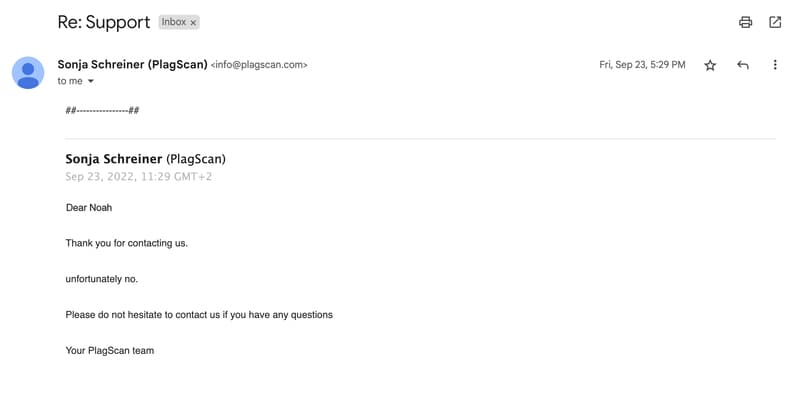
Meanwhile, the FAQs page is easy to navigate. I got the answers I needed in a matter of minutes. It answers plenty of questions regarding plagiarism features and data privacy, the latter of which I was particularly interested. The video tutorials were also decently produced. They mostly cover basic instructions like configuring your settings for plagiarism checking and setting up an account.
Phone Support
+49 221 75988994
Email support is provided through a contact form on the website.
Ease of Use
Although PlagScan’s interface can be a bit daunting at first due to the detailed plagiarism features on display, even a novice user can pick up things easily. It is clean and easy to navigate, and the information provided is easy to digest.
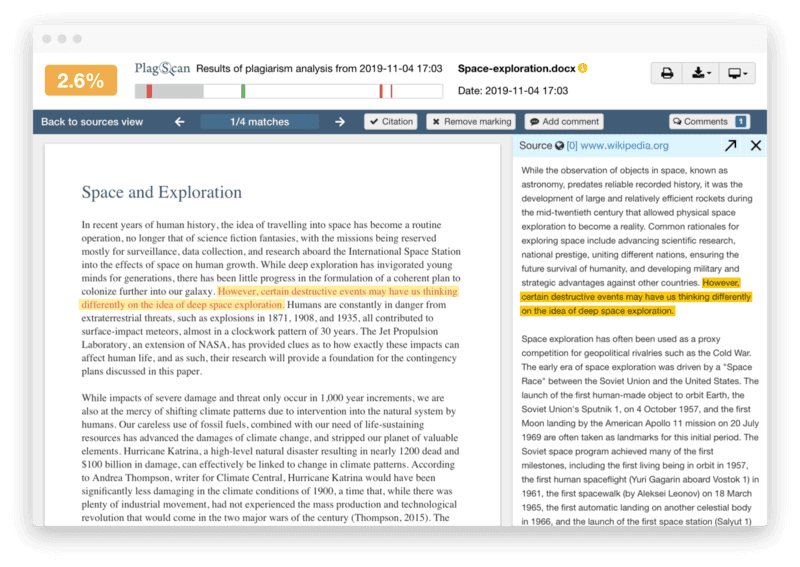
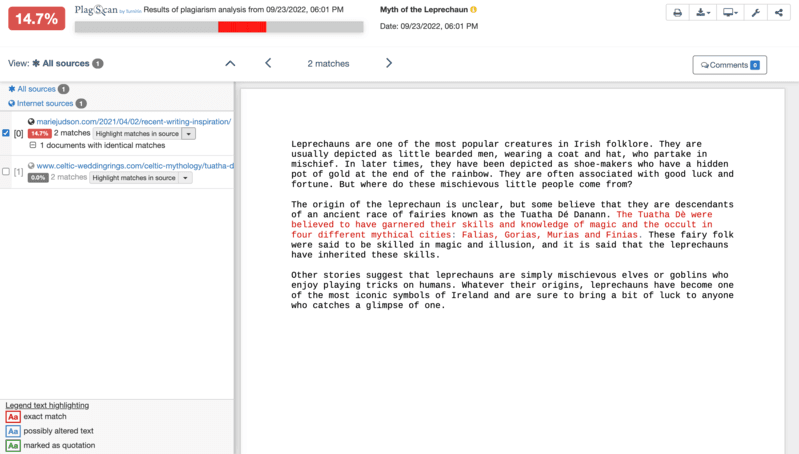
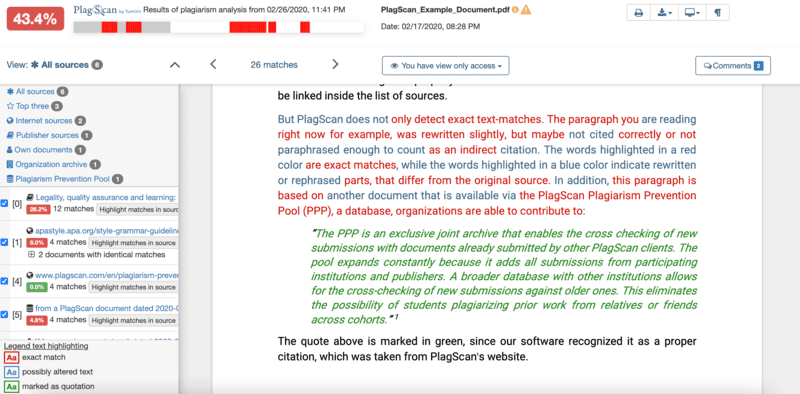
The standard view puts the document in the middle and the plagiarism level info at the top, while the side-by-side view allows you to compare your document to the text from detected sources. The tool features different color codes for easy review. Red highlights mean the texts are exact matches, while blue highlights indicate rewritten phrases. What’s even more useful is the color bar feature that gives you an overview of the report. You can click on parts of the bar to immediately jump to the corresponding section with plagiarized text. Most of PlagScan’s integrations are for LMS like Moodle and Canvas. But it does provide its API for businesses that want to build their own.
Performance
PlagScan performs at a decent speed. For 192 words, a report was generated after 26.55 seconds. For 500 words, the tool analyzed it in under 1 minute and 12 seconds. This was all achieved with my internet speed of 83.11 Mbps.
However, PlagScan is not as accurate as it claims. I tested 10 documents, all of which had blatantly copied texts from popular websites, or websites that ranked high in both Bing and Google. I even included texts from a 2021 Sonary blog article.
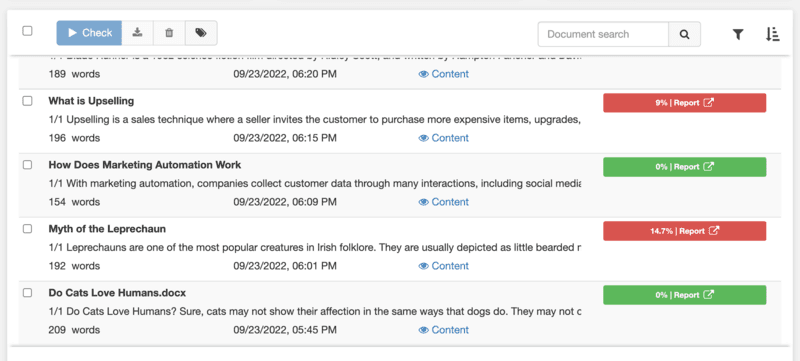
From these 10, only 4 articles were detected to have exact matches. PlagScan gave the rest a 0% plagiarism score, which was concerning. On the bright side, the matches that PlagScan detected were all accurate.
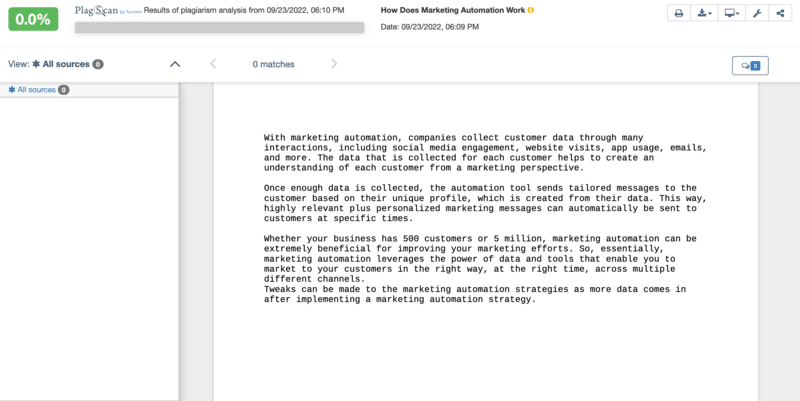
For the documents with the 0% score, I mixed plagiarized paragraphs from different sources. Although they were from mixed sources, they were still exact matches, and a good plagiarism checker would catch all of those.
Features & Functionality
PlagScan is a straightforward plagiarism checker designed for anyone who requires a plagiarism checker. It has handy text and source matching features that helps improve academic integrity and encourage users to produce original writing. Aside from its plagiarism checks, it offers no other capabilities (like grammar and spelling checks).
Source List
PlagScan checks for plagiarism against various sources, including the Internet, publishers, and even user-submitted documents. The Source List feature displays all these matches and categorizes them according to the source type.
Plagiarism Level
This feature indicates the percentage of matched text in a document. Yellow tells users their document contains a large amount of plagiarized text, while red warns them of suspiciously similar phrases that should be reviewed.
Citation Detection
Citation detection lets the tool recognize direct quotes and if they were properly referenced. It is customizable too, and you can configure how it will treat quotes in a document so that your plagiarism level won’t be affected.
Whitelist
This feature allows users to exclude content from the plagiarism analysis. It can be specific URLs, websites with similar content, or text phrases. This is useful if you want don’t want common phrases or expressions to affect your plagiarism percentage.
Plagiarism Prevention Pool
PlagScan’s database continues to expand thanks to the Plagiarism Prevention Pool (PPP). It is an exclusive joint archive consisting of documents submitted by other users. You can have your document cross-checked against the archive to help avoid plagiarism from other users’ works. Organizations partnered with PlagScan contribute to this archive, but users also have the option to keep their submissions private.
Choose from standalone tools or integrated software options.
Supports various database formats for enhanced functionality.
Features
- Plagiarism Check
- Citation Finder
- Content Scan
- Text Similarity Detection
- Multiple File Format Support
- Browser Application
- Custom Database
- Internet Content
- Academic Databases
Verdict
PlagScan is a software program purely for plagiarism detection, but it is not entirely accurate. While the matches it detects are often correct, there are more times when the tool fails to detect any form of plagiarism. It also does not offer any other features that could elevate it from the rest. Furthermore, customer support is rather limited.
However, PlagScan is easy to use and has useful capabilities to improve your text originality. It may be more convenient for students than it is for professionals since it can integrate with popular LMS.
Overall, PlagScan’s downsides outweigh its highlights. Other school-based plagiarism checkers, such as Unicheck, are simply stronger and more accurate.
Users Reviews
Be the first to write a review
Share your experience with PlagScan and help others choose the right software.