

Proggio Review
Overall Rating
4.2
Last updated: November 2025
Proggio is a user-centric project management solution. It focuses on building confidence at each step- from management and team alignment to connecting delivery dates with realistic project plans and executions.
Plans & Pricing
Free
$0
seat/
month
Basic
$9
seat/
month
Plus
$19
seat/
month
Enterprise
Custom
seat/
month
30-day FREE trial
* Featured prices can be updated and free offers may include additional terms.
The tool’s pricing is straightforward and transparent. There are four different plans to choose from – Free, Basic, Plus, and Enterprise. All plans support an unlimited number of users and are billed monthly.
Proggio is more expensive than many other tools on the market; however, it does offer sophisticated features that you may struggle to find elsewhere. There is also a nice 30-day free trial available to familiarize yourself with the software.
Expert Score
Pros
- Seamless UI and UX
- Teamwork-oriented
- Sophisticated, productivity-focused features
- Enterprise-friendly solution
Cons
- Bleak reporting and integration features
- No annual subscription
- Only recommended to Enterprise-level organizations
Customer Support
When it comes to help and support, Proggio is really on top of its game. While 24/7 support is available only to Business plan users and above, it shouldn’t be a problem for enterprise-level organizations. Professional users and above can opt for premium support at an additional price.
24/7 Help & Support
24/7 support is available only to Business plan users and above
FAQ
Detailed FAQ section featuring answers to numerous questions
Video Tutorials
Help center which includes dozens of articles and videos
Ease of Use
Despite its sophistication, Proggio is incredibly user-friendly and easy to use. The UI is nothing short of spectacular. All the buttons, tabs, customization options, and overviews are located exactly where you’d expect them to be. Moreover, the tool supplies a great deal of essential information and yet it doesn’t create a visual mess. In addition, there is absolutely no learning curve involved – even an intern would be able to use the tool effectively from day one. The software is accessible via all browsers and is mobile-friendly, allowing you to access your projects anytime, anywhere.
Features & Functionality
Proggio is a highly sophisticated PPM tool that offers all kinds of functionality that can satisfy the needs of any project manager and/or team. It performs general tasks like task management, project overviews, collaboration, etc. – with great effectiveness and efficiency while boosting productivity and helping teams succeed through organized teamwork.
Right off the bat when you create your account, you get to create a workspace, which helps the software set everything up (with hints, examples, and templates) conveniently, so you can start working right away. Each section of the software features either a pop-up with useful information, aimed to explain any specifics or a short video that demonstrates how to take advantage of a given aspect of the tool.
The dashboard is fully customizable and gives a bird’ eye view over all essential aspects of your projects, depending on what you need to track at a given time. There are over 25 different widgets that you can add to the dashboard including project health, portfolio milestones, burndown chart, timeline chart, overdue tasks, recent activities, etc.
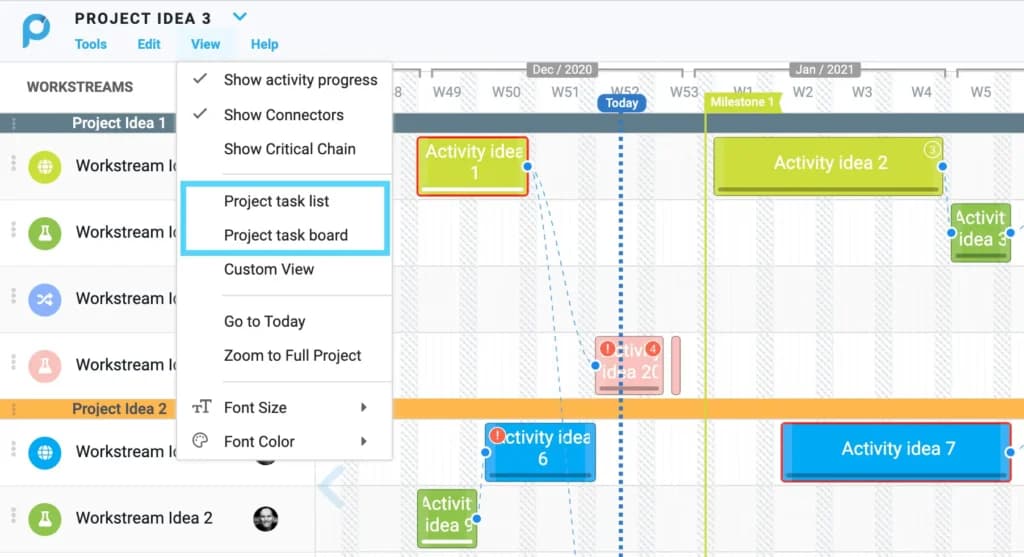
Seamless Task Management
The task management tool allows access to all tasks across all projects for all team members. The backlog is conveniently located on the left side of the app while the ongoing and completed tasks fill the rest of the board.
You can easily switch between list and board views, and filter tasks based on your projects, all tasks, or specific tasks. Typical task information (priority, deadlines, assignees, etc.) is listed in separate columns. And the best thing – when creating a new task, there are no pop-ups. Simply fill in three fields (task name, related project, assignee) and you’re done!
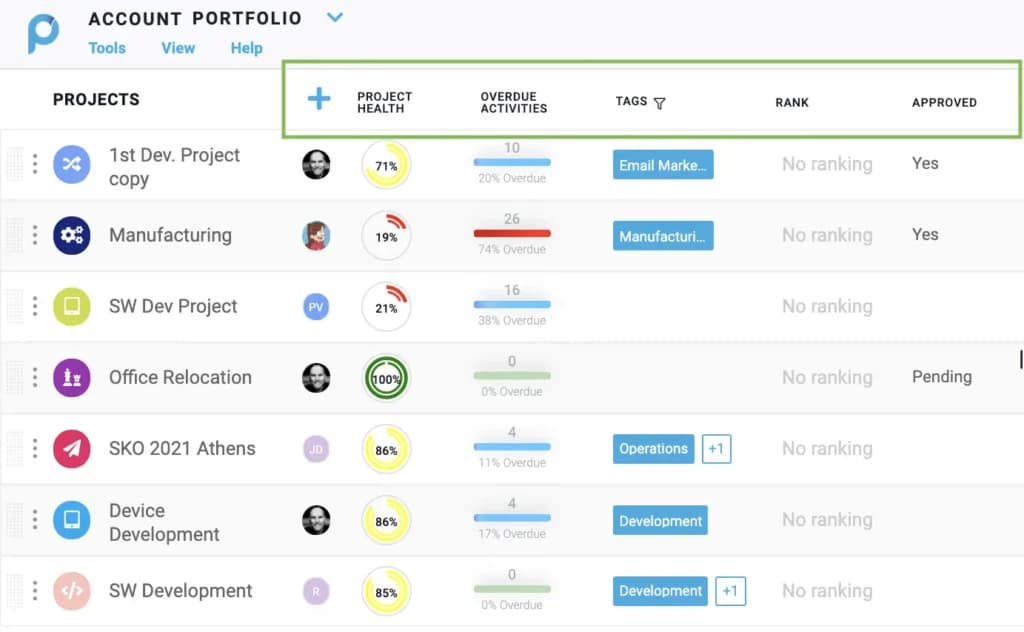
Portfolio View
The portfolio view shows the progress of all projects under the same tab, giving you an idea of how well you’re progressing on the macro level. Depending on project specifics, the tool automatically creates a roadmap for each project, serving as a quick evaluation mechanism. You can also delve straight into the details of a given project by double-clicking on it.
Also, the project release is clearly separated from all other activities, making sure that you’ll notice any possible time constraints well before the big day. Finally, the drag and drop functionality allows editing dependencies and due dates for milestones on the fly.
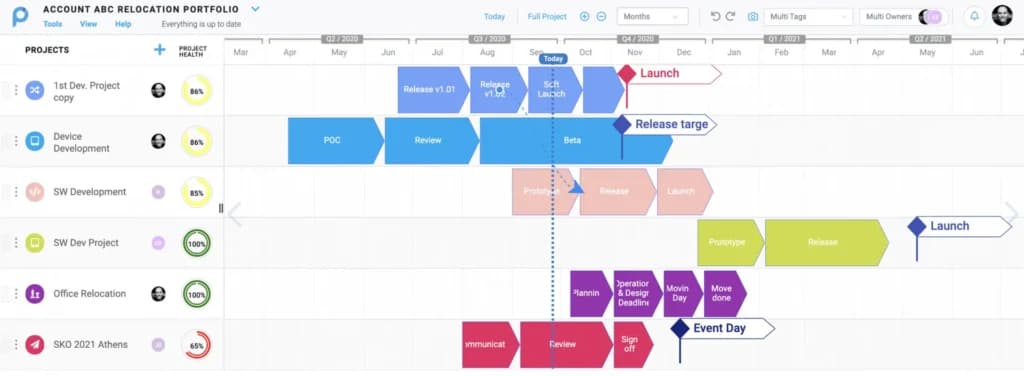
Project Lifecycle Management
Proggio is well-equipped to handle the end-to-end project management cycle including creation, ideation, prioritization, planning, execution, and release. You will never feel the need to use multiple tools for the same project for any reason, be it high-level view, detailed view, strategic planning, road mapping, or presenting.
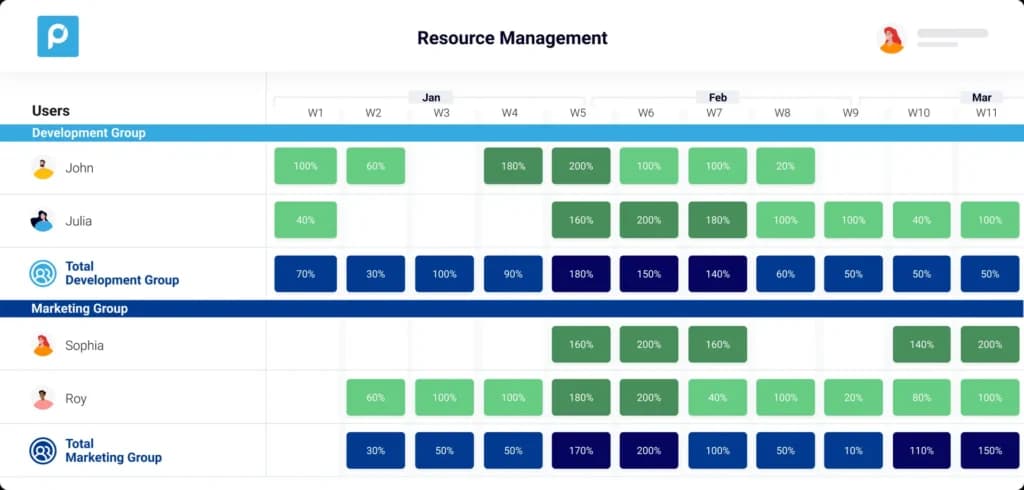
Resources Management
The resources management dashboard is a visual representation of the workload of all team members. It is split by weeks and provides incredibly useful information on each individual team member’s workload, allowing you to correctly evaluate every case.
Dashboard
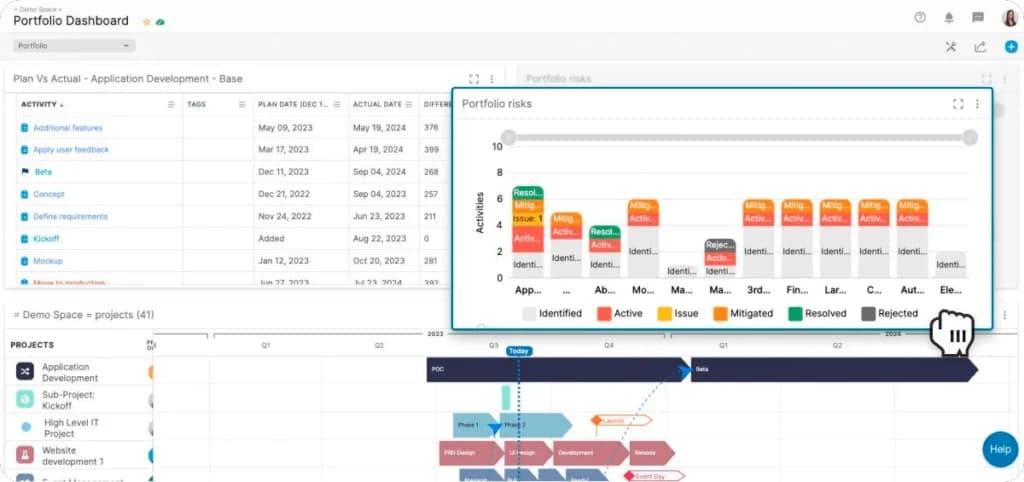
Enhance team collaboration with integrated communication features.
Gantt Charts
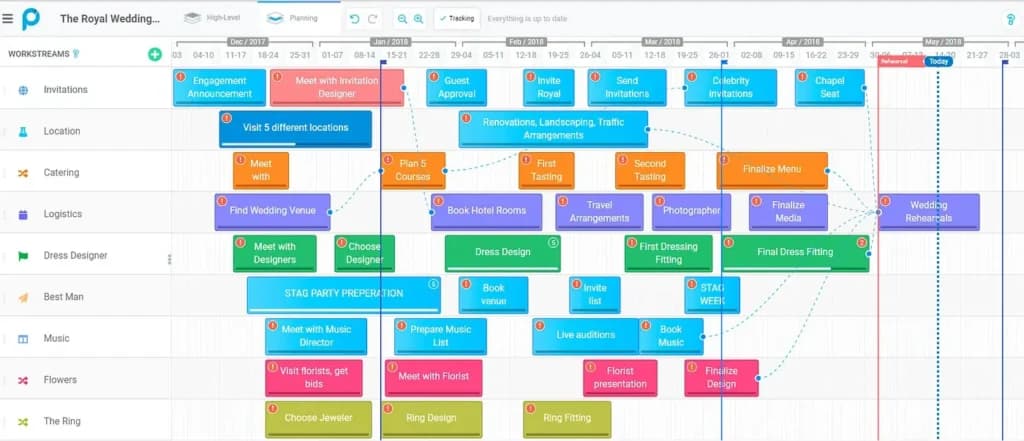
Proggio supplies dynamic, visual-first timelines that turn project plans into clear, actionable roadmaps, enhancing team collaboration and delivering full project visibility.
Reporting and Integrations
Currently, the app doesn’t offer in-depth analytics and the team behind Proggio is actively working on delivering those soon. However, thanks to the architecture of the tool, basic analytics and reports can be acquired with minimal effort from corresponding dashboards.
For instance, to evaluate the strengths and weaknesses of your project’s performance, you can take a look at planning vs. actual results in terms of milestones, tasks, and interdependencies. You can also evaluate each team member’s performance with the help of the resources management dashboard.
The budget report can be generated from the budgeting tool using the monthly average labor cost in the settings menu. From here, you need to apply an individual expense and actual expense to each activity. To generate the report, you need to find your project settings and click on the budget button. The report will appear as a pop-up on your screen and can be exported to a CSV file.
As for the integrations, Proggio integrates with JIRA, G-suite, Outlook, Slack, Asana, and Zapier, which are some of the most common apps used by project managers. That being said, many other popular integrations including Quickbooks, Basecamp, DropBox, Trello, etc. are currently unavailable.
Features
- File Sharing
- Document collaboration
- User Access and Permissions
- Mobile App
- Search
- Multi-language support
- Risk Analysis
- Reporting and Dashboards
- Customization
- Integrated Chat
Verdict
Overall, Proggio is an extremely convenient project portfolio management tool designed for enterprise-level organizations that highly value collaboration and teamwork. The seamless UI and UX make Proggio a real pleasure to use, while the handy and sophisticated features allow you to keep everything under tight control. Although slightly lacking in reporting and integrations, Proggio is an excellent choice for teams with defined workflows that are experienced with PM tools and don’t require too many improvements to their day-to-day activities.
Users Reviews
Be the first to write a review
Share your experience with Proggio and help others choose the right software.