
Last updated: August 2026
Based out of the UK, Sage Group is a multinational company that develops enterprise application software. The company offers various types of accounting, payroll, and payment processing software. Not only do they have desktop-based accounting software, but they also have cloud-based software that’s designed with small and mid-sized business owners in mind.
Plans & Pricing
* Featured prices can be updated and free offers may include additional terms.
When it comes to value, Sage stands out compared to its competitors. Offering a range of pricing options to suit different business needs, Sage provides both monthly and yearly subscription plans, ensuring flexibility and cost-effectiveness for its users.
Pro Accounting
Priced at $61.92/month for 1 user, this plan offers cloud-connected desktop accounting software. It's designed for essential accounting needs such as invoice and bill tracking, expense management, automated bank reconciliation, and more, making it ideal for individual users.
As you add users, the price goes up accordingly with special bundle prices. The yearly option for this plan is $625/user.
Premium Accounting
Starting at $103.92/month for 1 user, the Premium plan builds on the Pro offering with advanced features like purchase orders and change orders, advanced budgeting, and serialized inventory tracking. It's suitable for managing multiple companies and offers advanced reporting and audit trails.
The price also goes up per user, also with special bundle prices. For a yearly plan, it will cost $1043/user.
Quantum Accounting
At $177.17/month per user, Quantum Accounting is the most comprehensive plan, designed for larger teams requiring seamless collaboration. It includes all features in Premium, plus role-based permissions, faster processing, and advanced workflow management.
A yearly plan for this premium option comes at $1,780 per user.
Each plan is crafted to provide specific functionalities tailored to different business sizes and needs, from individual users to larger teams, ensuring that your accounting is efficient, secure, and accessible.
Expert Score
Pros
- Create separate profiles for your employees and accountant
- Send clients invoices directly from the dashboard
- Automatically backup and secure your data
Cons
- Limited customization
- No payroll processing features
Customer Support
If you run into problems with your accounting dashboard, the team at Sage is available via chat, email, and phone. Since Sage is a company that spans the globe, support is available in a variety of languages. While phone support can be reached 24/7, chat and email support are not as responsive. The top right-hand side of the dashboard has a chat icon, however, there are no agents on standby during the evening hours. In addition to the chat icon, there’s also a help link that will redirect you to Sage’s Customer Community. Here you’ll find heaps of resources to guide you through the features of their products. This section of their website functions similar to a FAQ page. If you can’t find the answer to your question, there’s also a very active forum called Sage City where you can seek help. Additionally, the Sage One website has numerous guides for both Accounting Start and Accounting.
Phone Support
Phone support is available 24/7.
24/7 Help & Support
A knowledge base and community forum around the clock
Ease of Use
After subscribing or registering, you can simultaneously log in to your dashboard and start setting up your platform. The dashboard has the main menu located at the top, letting you easily navigate to the different tools offered. When it comes to getting started, the most time-consuming part is registering and setting up your business. With that said, there are plenty of support options at your finger-tips and guides to get you started, such as Sage’s Customer Community. Whether you’re new to sage or just want to develop your skills, you can enroll in a class at Sage University to learn to the ins and outs of how their products work. If you’re new to accounting, there are plenty of resources to help you succeed.
Performance
Sage 50 offers a suite of powerful accounting solutions designed to meet the diverse needs of small to medium businesses. With desktop software that connects to the cloud, Sage 50 enables you to manage your finances, inventory, and much more with greater flexibility. Whether you're working from the office or remotely, these features ensure that you always have access to your critical business data.
Cloud-Connected Desktop Software
Cloud-connected desktop software allows for secure data sharing and collaboration with your accountant, ensuring that your financial management is flexible and accessible no matter where you are.
Invoice and Bill Tracking
This feature keeps your finances organized with comprehensive invoice and bill tracking. It simplifies the management of incoming and outgoing payments, helping you maintain a clear view of your business's cash flow.
Purchase Order and Approval
This helps to streamline your procurement process with efficient purchase order creation and approval workflows. It also ensures that you can manage your purchasing efficiently, keeping your inventory and expenses in check.
Expense Management
By tracking and categorizing your expenditures, you can better understand your spending patterns identify opportunities for savings, and take more control of your expenses.
Automated Bank Reconciliation
Automation saves you time and reduces errors with automated bank reconciliation. This feature compares your records with your bank statements, ensuring accuracy in your financial reporting.
Reporting
Reporting helps you gain insights into your business's financial health with comprehensive reporting tools. From income statements to balance sheets, you'll have access to the data you need to make informed decisions.
Inventory Management
Track your inventory in real-time, preventing stockouts and overstock situations.
Job Management
Oversee your projects with ease. Track project progress, costs, and profitability to ensure that your jobs are completed on time and within budget.
Payroll Subscription Available
This optional feature simplifies payroll management, ensuring that your employees are paid accurately and on time.
Fraud Protection with Sage Security Shield
Protect your business from fraud with advanced security measures to safeguard your financial data and transactions.
Support Plan
Access expert support when you need it. Whether you have technical questions or need guidance on using the software, Sage is there when you need them.
Sage 50's comprehensive features are designed to simplify complex accounting tasks, allowing you to focus on growing your business. With plans tailored to fit a range of business sizes and needs, Sage 50 ensures that you have the tools you need to manage your finances effectively.
Features & Functionality
Accounting Software
Accounting software provides comprehensive tools for organizing, tracking, reconciling, reporting, and streamlining financial processes.
Monitor and categorize expenses for accurate financial tracking.
Streamline tax compliance with automated preparation tools.
Automate repetitive accounting tasks to boost efficiency.
Expand software functionality with customizable add-ons.
Access accounting tools seamlessly across various devices.
Payroll Services
You will have access to many great payroll features through Sage. One of the highlights is the massive range of customization capabilities you have. This allows you to set up the payroll system in a manner that is completely congruent with your needs. This will help save you and your team time and energy over the long run.
There are also extensive reporting capabilities in place, particularly when it comes to various types of employee info. All calculations and paying of taxes can be automated with Sage, taking this hassle off your hands.
The automation of time cards is also possible and all of your employees’ relevant tax certificates can be stored in a safe manner via the cloud, with backups taking place on a daily basis. Lastly, there is great flexibility in terms of the ways in which you can make payments, including pay cards, checks, and direct deposits.
Integrations & Add-ons
Sage offers a number of different add-ons for account holders. These cover enhanced security protocols and functionality for businesses of different sizes. You can also get integrations with many different forms of accounting software and CRM systems. Naturally, there is plenty of integration with other Sage products, as well as being able to link in with relevant tax
Employees can choose between direct deposit, a convenient Pay Card or they can pick up their paychecks from your workplace. Paychecks delivered to your workplace would be ready for distribution-signed and inserted into individual envelopes— according to your specified schedule. Sage also handles your company’s year-end requirements, including direct reporting to the proper tax authorities and statements of deposits and filings made on your behalf.
Mobile Use
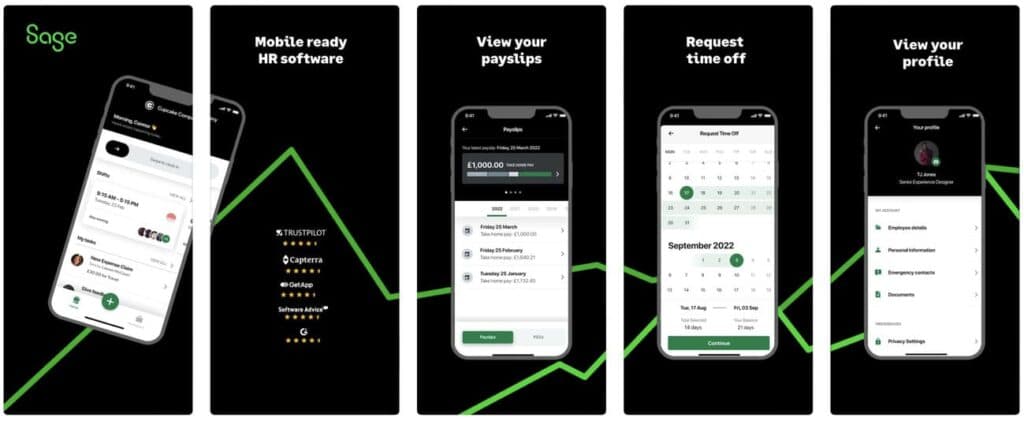
Sage has a new mobile app that is currently only available on iPhone.
General Ledger
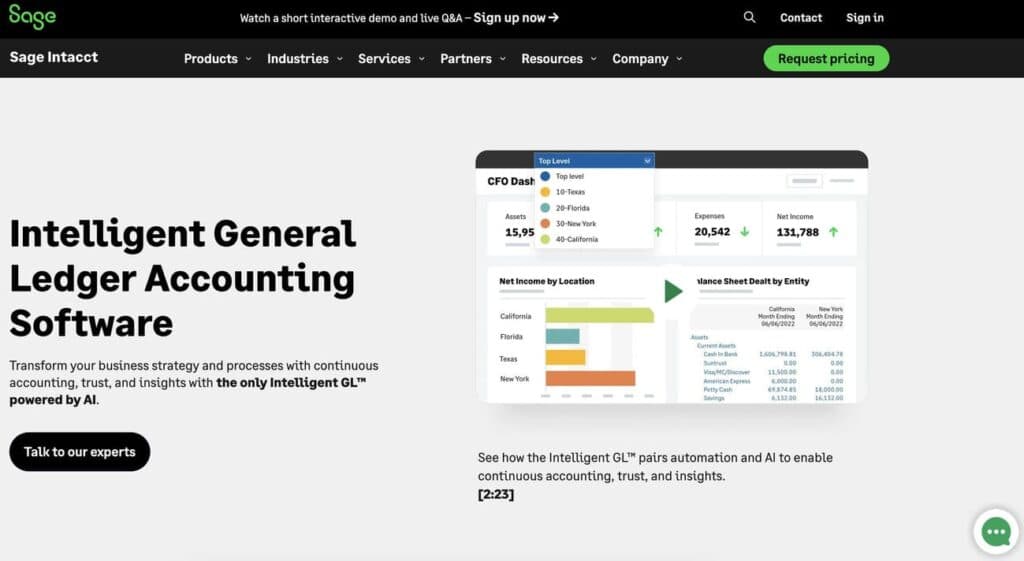
The general ledger interface to creates an import-ready file that brings all your payroll journal entries into your software package. Avoid manual journal entries and the expense of developing custom interfaces to connect your payroll and general ledger. Easily transmit the file to your Sage Intacct Accounting & ERP Software.
Automate repetitive payroll tasks to save time.
Integrated HR tools for comprehensive employee management.
Tax Administration & Filing
Sage People Payroll prepares, files, and deposits federal, state, and local taxes, while also issuing the required monthly reporting to relevant tax authorities. The software also responds to associated inquiries from any tax agency.
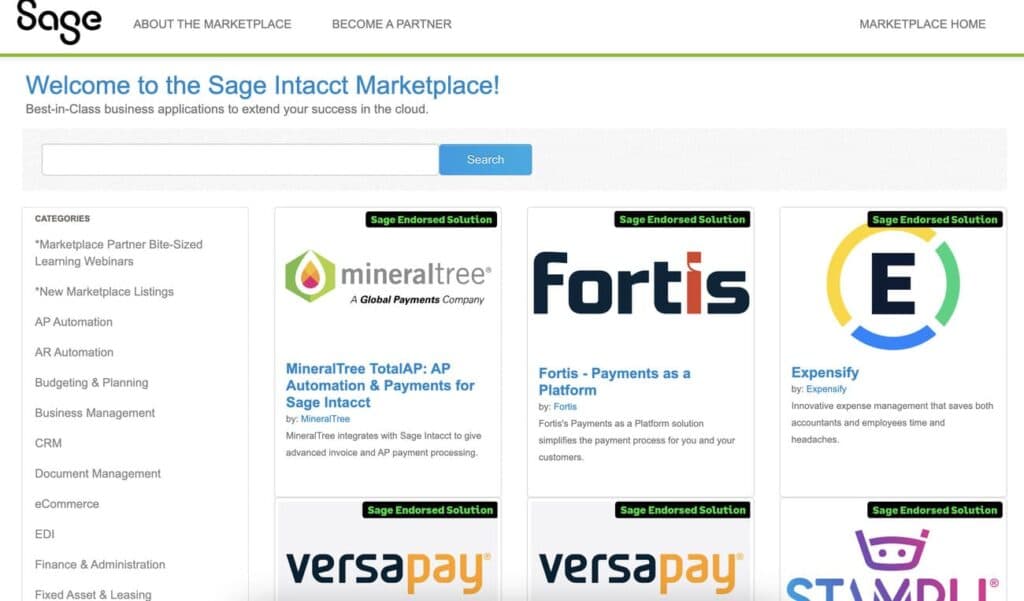
Through the Sage Intacct Marketplace, users can find and activate their favorite Sage and 3rd party platforms.
HR
Sage HRMS software covers a wide range of different functions and showcases a good selection of features. The end goal is to provide you with the HR support that you need in order to succeed as a business. Here are a few of the standouts features and functions:
Covers All Bases
If you are looking for software that can look after all of your HR needs from start to finish, then Sage could be the ideal option for you. Everything from finding and hiring the best talent, growing your best workers, managing employee benefits, and everything in between is possible thanks to Sage HRMS.
Customized Plan
As Sage does not have set pricing plans and packages for its clients, you will be getting a bespoke offering. You won’t have to pay for aspects of an offering that you are not using. This allows you to get the best bang for your buck.
Advanced Analytics
One of the best aspects of using Sage HRMS software is the advanced range of analytics that is available. You are able to get in-depth insights into your workforce. This allows you to make fully informed decisions and improvements to your processes.
Integrations & Add-Ons
Naturally, the other types of Sage offerings can be easily integrated with the HRMS software, such as payroll and bookkeeping. There is also the ability to integrate third-party systems, but this can be a bit clunky when compared to other platforms of this kind. There are a few different potential add-ons as part of Sage’s HR offering. These include the ability to pay for access to employee benefits management services, My Workforce Analyzer for making sure that everything is compliant, and accessing the Talent Management add-on for engaging and retaining workers.
Monitor and manage employee attendance accurately.
Track and manage applicants efficiently during hiring.
Simplify payroll and tax management for employees.
Provide engaging and effective training solutions.
Flexible pricing options to suit diverse HR needs.
Implement HR tools across various environments with ease.
ERP
Sage Intacct is renowned for its extensive and powerful features that enhance financial management and operational efficiency, making it a top choice for businesses aiming to streamline their processes and improve their financial oversight.
Financial Management
General Ledger
Sage Intacct's robust general ledger is equipped with multi-dimensional capabilities, allowing for detailed tracking and analysis. This feature enables businesses to categorize and analyze financial data from various perspectives, such as departments, locations, and projects, providing a comprehensive view of their financial health.Accounts Payable/Receivable
The accounts payable and receivable modules streamline the management of payables and receivables through automation. This functionality reduces manual data entry, speeds up the processing of invoices and payments, and ensures accurate tracking of outstanding receivables and payables.Cash Management
Sage Intacct offers real-time tracking of cash flow and cash positions, giving businesses a clear and up-to-date picture of their liquidity. This feature helps companies manage their cash more effectively, optimize their working capital, and make informed financial decisions.
Automation
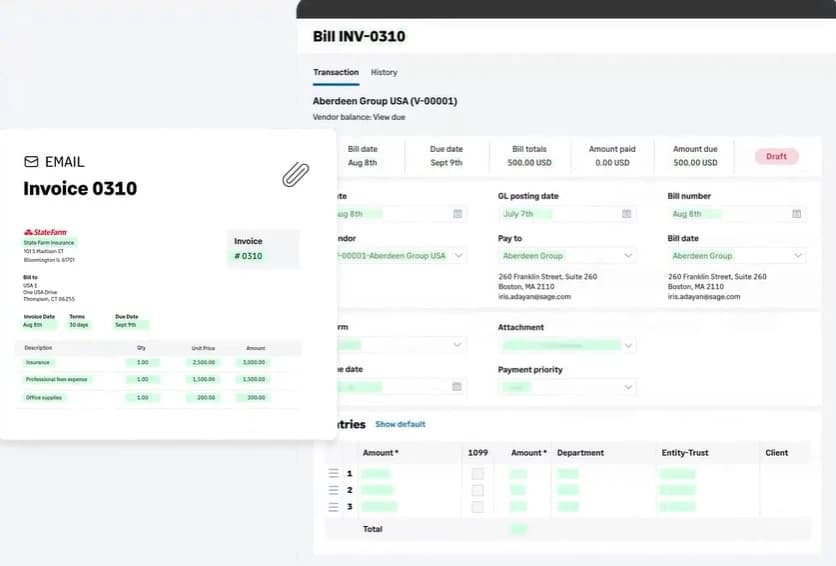
Accounts Payable Automation
The accounts payable automation feature significantly reduces manual data entry and accelerates payment processes. By automating invoice capture, approval workflows, and payment disbursements, businesses can enhance efficiency, reduce errors, and improve vendor relationships.Order Management Automation
Order management automation streamlines the entire order processing and fulfillment cycle. This feature ensures accurate order capture, efficient inventory management, and timely fulfillment, ultimately improving customer satisfaction and operational efficiency.Expense Management Automation
Sage Intacct's expense management automation automates the creation and approval of expense reports. This functionality simplifies the expense reporting process, ensures compliance with company policies, and provides better visibility into spending patterns.
Reporting and Analytics
Custom Reporting
Sage Intacct provides advanced reporting tools that allow users to create tailored financial and operational reports. These custom reports can be designed to meet specific business needs, providing critical insights that drive informed decision-making.Dashboards
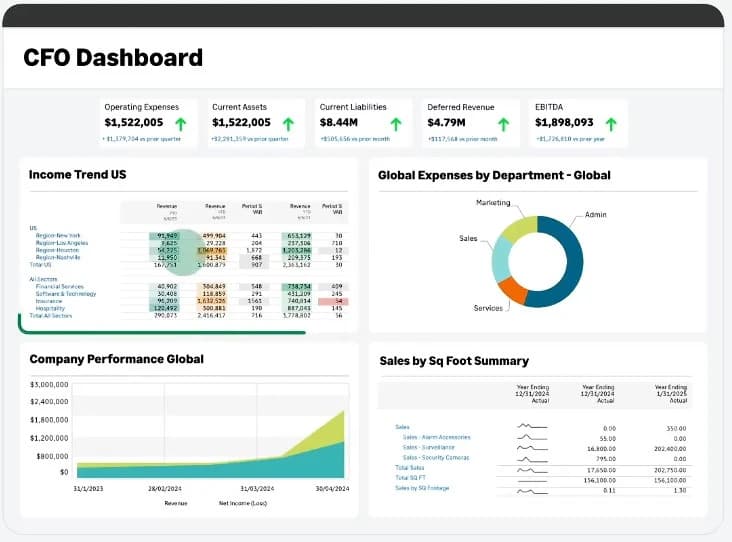
The platform offers real-time, customizable dashboards that provide quick insights into key business metrics. These dashboards can be tailored to display relevant information for different users, facilitating immediate access to vital data and enhancing operational visibility.Financial Forecasting
Financial forecasting tools in Sage Intacct support budgeting and strategic planning. These tools enable businesses to create accurate financial forecasts, assess future financial performance, and plan for various scenarios, helping to align financial strategies with business goals.
Multi-Entity and Global Consolidations
Multi-Entity Management
Sage Intacct supports the management of multiple entities, locations, and currencies within a single platform. This feature simplifies complex organizational structures, providing centralized control and consistency across all entities.Global Consolidations
The global consolidations feature simplifies financial consolidations across international operations. It ensures compliance with various accounting standards, automates inter-company eliminations, and provides consolidated financial statements, making it easier for businesses to manage global finances.
Project Accounting
Project Management
Sage Intacct offers detailed tracking of project costs, budgets, and profitability. This project management feature enables businesses to monitor project financials in real-time, ensuring projects stay on budget and profitable.Time and Expense Tracking
The time and expense tracking feature streamlines the tracking and billing of time and expenses related to projects. This functionality helps ensure accurate billing, improves project cost management, and enhances overall project profitability.Revenue Recognition
Sage Intacct ensures compliance with revenue recognition standards through its robust revenue recognition feature. This capability allows businesses to automate and accurately recognize revenue based on various criteria, ensuring compliance with accounting standards and providing clear visibility into revenue streams.
Monitor and manage business expenses effortlessly.
Simplify tax compliance and reporting.
Automate key processes for improved efficiency.
Enhance ERP capabilities with additional modules.
Access ERP tools across a range of devices.
Features
- General Ledger
- Bookkeeping
- Manages Accounts Payable/Receivable
- Income & Expenses Tracking/Management
- Financial Reporting
- Receipt Scanning
- Invoicing
- Record Expenses
- Record Mileage
- Generate Invoices
Verdict
There’s no doubt that the Sage Business Cloud Accounting is a strong tool for startups and small-sized business alike. With it’s automated invoicing tools, cash flow reports, a marketplace of add-ons, and training classes, you can accurately maintain your finances and develop your accounting skills in the process. Sage is no newcomer when it comes to financial reporting and enterprise management software, so you can certainly rely on the expertise of a well-rounded company to suit your business needs. Whether you’re an eager entrepreneur or veteran business owner, this cloud-based accounting platform lets you do your bookkeeping anywhere in the world and streamline your financial processes.
To fully customize your accounting module, you can head over to the Sage Business Cloud Marketplace where you’ll find CRMs, project management, and time tracking software. While there’s inarguably a stellar selection of add-ons and integrations, most of them charge a monthly fee. Here’s a quick glance at what you’ll find in the marketplace:
Maccoa
Cost-benefit analysis, time tracking, and project management.
Cashpundit
Cash flow management software developed by CPAs.
Business Importer
Import data from Excel into Sage.
Donation Manager RedCloud Suite
Manage your business donations.
In addition to the marketplace, you can integrate your account with PayPal to accept payments online. If you don’t use PayPal, you can use Sage Payment Solutions for a $0.15 per transaction plus 1.9% fee. Lastly, you can connect your Google Drive to Sage to store invoices.
Users Reviews
Be the first to write a review
Share your experience with Sage and help others choose the right software.