

Last updated: September 2025
SmartDraw is a versatile diagramming tool that makes it easy to create over 70 types of diagrams, including flowcharts, organizational charts, UML diagrams, ERDs, network diagrams, and floor plans. It's compatible with both Windows and Mac, and you can even use it online through your web browser. With a vast library of templates and symbols, you can craft professional diagrams in minutes. SmartDraw integrates seamlessly with Microsoft Office, Google Workspace, and other popular platforms, enhancing collaboration and productivity. In this SmartDraw review, I'll cover its features, performance, customer service, and how it compares to other diagramming tools.
Plans & Pricing
Billed Annually
Billed Annually
* Featured prices can be updated and free offers may include additional terms.
SmartDraw offers three plans; Individual, Team and Enterprise. The plans differ based on the number of users allowed. Also, they are billed annually. SmartDraw is cheap compared to its competitors, plus there's a seven-day free trial where you can access the full functionalities of this software before deciding to make a purchase.
Expert Score
Pros
- Easy to use software
- Cheap and affordable compared to its competitors
- Accessible on the go, on any device
Cons
- Some in-built functions are not customizable
- Unsophisticated collaboration features
- Unable to export to Visio for file sharing
Customer Support
For answers, while within the SmartDraw user interface, you can click on the help file in the downloadable program. Additionally, you can reach out to the SmartDraw support team via phone call during working hours or via email. According to the SmartDraw homepage, experts are on standby to help for free.
Phone Support
Contact SmartDraw via phone call on 858-225-3300
Reach SmartDraw via email by going to the contact us page.
24/7 Help & Support
SmartDraw experts are on standby to help for free.
FAQ
Detailed FAQ page where answers are given to common questions.
Video Tutorials
Many video tutorials on Youtube and the SmartDraw video library.
Ease of Use
With smart CAD tools for smart drawing, SmartDraw is an easy-to-use CAD software. Users can create drawings and dimensions by typing in data into the dimensions label. Also, with a large library of templates, SmartDraw makes it easy for inexperienced designers to hone their skills. Its design is that of standard design software with an easy-to-navigate user interface.
Features & Functionality
SmartDraw stands out because it offers so much for much less than its competitors. Although its main focus is making CAD projects quicker and easier, it provides powerful enterprise-grade solutions for its users.
- Floor Plans
- Flowcharts
- Org Charts
- Infographics
- Smart tools
- Design
- CAD Drawings
- Mind Maps
- Network Diagrams
- Gantt Charts
- Data Flow Diagrams
- UML Diagrams
- Whiteboarding
- Template library
- Easy collaboration
Let’s discuss some of the main features in more detail:
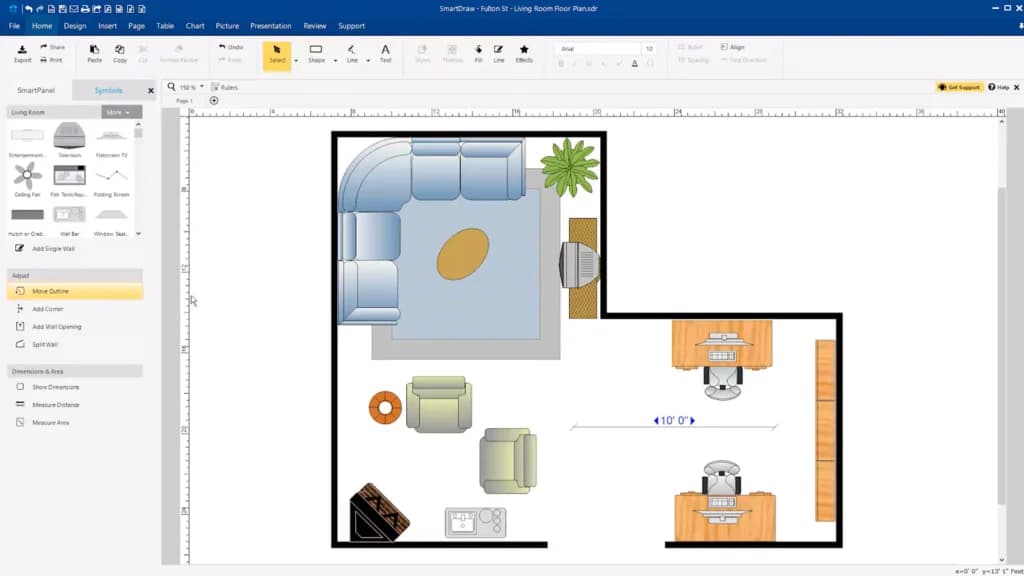
Floor Plans
The CAD tool's floor plan design feature allows users to create detailed and accurate layouts for physical spaces. It utilizes an extensive symbol library for furniture and structural elements. The tool offers pre-designed templates, precise measurement tools, and customization options for enhanced visual appeal.
Users can integrate and share their plans in various formats and access their work from any device due to its cloud-based nature. This functionality supports efficient space utilization and layout planning, making it ideal for architects, interior designers, and facility planners
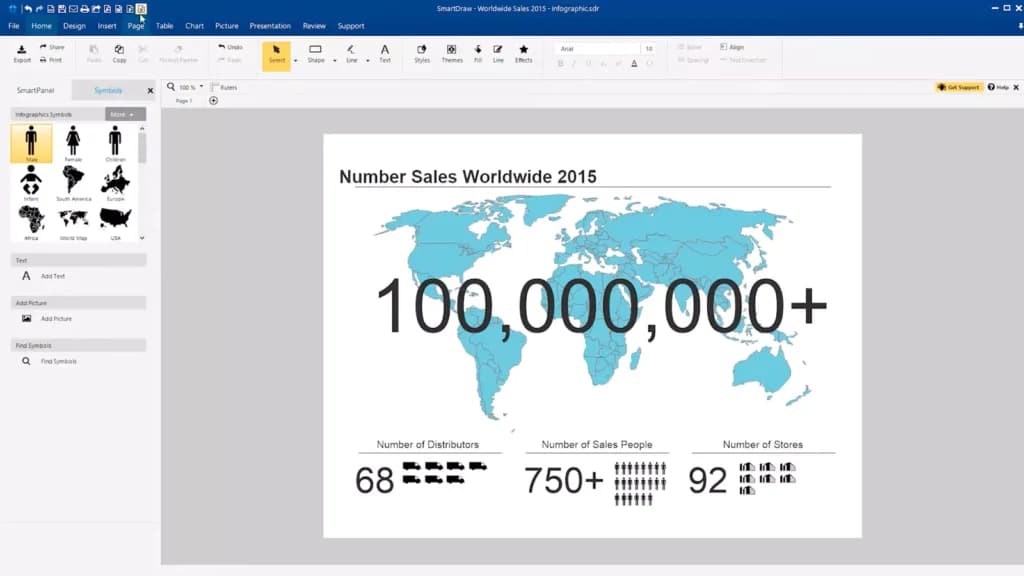
Infographics
SmartDraw's infographics feature enables users to create engaging visual content that conveys complex information clearly and effectively. This tool offers a variety of templates and design elements to help users present data and ideas in an appealing and easily understandable format. Infographics can include charts, graphs, icons, and images, allowing for rich visual storytelling.
Smart Tools
SmartDraw offers numerous smart tools, one of which is the ability to create drawings by simply entering data, for example, setting the size of an object by typing into the dimensions label. Another is the ability to select, print, and change common engineering and architectural scales at any time, even during your drawing process.
Design
SmartDraw's design feature includes a user-friendly drag-and-drop functionality, which simplifies the process of creating diagrams and drawings. This feature allows users to easily add, move, and organize shapes and symbols within their diagrams by simply dragging and dropping them into place from a library of pre-designed elements.
CAD Drawings
SmartDraw's drawing capabilities allow users to create detailed 2D drawings. These drawings can encompass a variety of applications, including architectural plans, engineering schematics, and detailed technical diagrams. The platform provides a comprehensive set of tools for precision drawing, ensuring that users can create accurate and professional-quality designs.
Mind Maps
The mind map feature enables users to create brainstorming diagrams that capture and organize ideas effectively. This tool enhances team creativity and planning by allowing users to visually map out thoughts and concepts in a structured manner.
UML Diagrams
SmartDraw's UML diagram feature allows users to model software architecture and design, supporting both software development and documentation. This tool includes various UML templates and symbols, enabling users to create class diagrams, sequence diagrams, use case diagrams, and more. It helps visualize and organize complex software structures and processes, facilitating clear communication among development teams.
Template Library
To make starting your CAD project quicker and easier, SmartDraw offers a large template library where you can select a template that most closely meet your needs and customize it to your full requirements. Also, this software boasts a vast collection of symbols that covers any type of CAD drafting project, from architectural to mechanical.
Easy Collaboration
Collaboration is made easier with SmartDraw as you only have to save your documents on a shared file or use an external file sharing app, such as Dropbox, Google Drive, Box, or OneDrive. Also, a non-SmartDraw user can add input to your project; all he/she needs is an email link.You can also collaborate in real-time with a virtual whiteboard, enhancing team brainstorming and planning sessions.
File Import/Export
SmartDraw allows users to import and edit Visio diagrams and also export into other file formats (e.g. pdf) so your team can update and collaborate as needed.
Work seamlessly with teams using shared design tools.
Features
- Visualizing
- Drawing
- Editing
- Modeling
- Dynamic Updating
- Multi-User
- File Import/Export
- Annotate
- Documentation
Verdict
Built for the purpose of making CAD drawing/design quicker and easier, SmartDraw is a relatively easy software to use compared to other CAD software. Its simple features allow for easy manipulation yet can undertake sophisticated projects. With an extensive template library, you only need to select what’s closest to your project’s need and customize it to your taste. Also, its vast collection of symbols, that is, mechanical and architectural symbols, makes it the go-to option for any type of CAD drafting software. However, its collaboration features are not the strongest. While you can import drawings from Visio, you can only import to other file formats (e.g., pdf) to edit and collaborate with your team.
Users Reviews
Be the first to write a review
Share your experience with SmartDraw and help others choose the right software.