

Last updated: September 2026
TotalAV delivers powerful antivirus protection and online security tailored for small to medium-sized businesses. With cutting-edge features like real-time scanning, malware removal, and ransomware defense, TotalAV keeps your business safe from digital threats while ensuring seamless, hassle-free operation. Read more about the features, benefits, and pricing plans in my TotalAV review.
Plans & Pricing
- Real-time protection
- Eliminates viruses, trojans & malware
- Zero day cloud scanning
- Everything in the Essential Plan plus:
- Safe browsing VPN
- Everything in the Pro Plan plus:
- Device protection
* Featured prices can be updated and free offers may include additional terms.
TotalAV pricing provides a range of antivirus plans tailored to fit the needs of many different users. With competitive pricing and robust features, you can find the perfect plan to safeguard your business against online threats.
Each plan offers a variety of security features, ensuring you get comprehensive protection at every level.
- Essential Plan: Real-time protection, virus/malware elimination, Zero Day cloud scanning, $19/year (renews at $99), 5 devices, free version available, 30-day money-back guarantee.
- Pro Plan: Includes Essential features plus Safe browsing VPN, $39/year (renews at $129), 6 devices, 30-day money-back guarantee.
- Ultimate Plan: Includes Pro features plus device protection, $49/year (renews at $149), 8 devices, 30-day money-back guarantee.
Expert Score
Pros
- High malware detection rate (99%)
- Minimal impact on system performance
- User-friendly interface and easy navigation
- Includes advanced phishing protection
Cons
- Limited customization for advanced users
- Occasional false positives
- No dedicated mobile app management
Customer Support
TotalAV provides robust customer support options, making it a reliable choice for businesses seeking comprehensive antivirus software and internet security solutions. Their support team is available around the clock, ensuring users can receive assistance whenever they need it.
24/7 Customer Support
TotalAV offers 24/7 customer support through multiple channels, including live chat and phone support. The live chat option provides instant access to a support agent, ideal for immediate assistance with antivirus protection, malware removal, or cybersecurity concerns. This ensures businesses can quickly address any security issues that arise, minimizing downtime and maintaining productivity.
For those who prefer more personalized help, TotalAV also offers phone support. You can reach their dedicated support team by calling their customer service number.
It’s recommended to call during off-peak hours for the fastest service, with typical wait times being minimal. This option is particularly beneficial for complex issues that require detailed guidance from a knowledgeable representative.
Additional Support Options
In addition to live chat and phone support, TotalAV provides several self-help resources directly on their website. These resources include:
- Video Tutorials: Step-by-step guides to help users navigate the software’s features, set up antivirus protection, and optimize security settings. These tutorials are designed to be user-friendly, making it easy for anyone to follow along, regardless of technical expertise.
- FAQ Section: A comprehensive Frequently Asked Questions section is available for quick answers to common queries. Whether it’s about subscription plans, software installation, or troubleshooting issues, the FAQ section covers a wide range of topics to assist users efficiently.
- Knowledge Base Articles: TotalAV offers a detailed knowledge base with articles that provide in-depth information about their features and services. This resource is particularly useful for business owners who want to understand more about the software’s capabilities and how to best utilize them for their specific needs.
- Community Forum: An active community forum allows users, including small business owners, to ask questions, share experiences, and exchange insights about digital security. This collaborative environment helps users learn from one another and stay informed about the latest security trends and threats.
- Blog: TotalAV’s blog offers regular updates, news, and expert advice on internet security and cybersecurity trends. It’s a valuable resource for businesses looking to stay current on the latest threats and best practices for digital security.
Support Overview
- 24/7 Phone Support: Available anytime, with minimal wait times for a quick response.
- 24/7 Live Chat: Instant access to a support agent for immediate assistance.
- Email Support: Currently not offered, but other channels provide ample support options.
- Self-Help Resources: Extensive tutorials, FAQs, and articles are available online.
- Community Forum & Blog: Engage with other users and stay updated on security news.
Phone Support
Available any time, with minimal wait times for a quick response.
You can send them an email via their ticket service on their site
24/7 Help & Support
Yes, both phone & live chat have 24/7 support.
FAQ
Comprehensive FAQ section available.
Blog
TotalAV's blog offers regular updates, news & expert advice.
Live Online Chat
Instant access to a support agent for immediate assistance.
Ease of Use
User Interface: The interface is clean and intuitive, with a well-organized layout that makes it easy to find and use various tools. The dashboard provides a clear overview of the system's security status, allowing users to access essential functions like real-time scanning and malware removal quickly.
Onboarding and Tutorials: TotalAV provides an excellent onboarding experience with comprehensive tutorials and guides. These resources, available both online and within the software, help new users get started quickly, even if they have limited technical knowledge.
Tool Accessibility: Basic and advanced tools are easily accessible, with user-friendly menus that require minimal clicks to perform tasks such as scheduling scans or enabling firewall protection. The software's automated features further simplify use, handling many tasks in the background.
Customization Options: Users can customize settings to fit their workflow, including adjusting scan preferences and configuring alerts. This flexibility ensures a tailored experience, enhancing efficiency and user satisfaction.
Performance
Protection Capabilities:
- Malware Detection Rates: TotalAV effectively detects both known and emerging threats using a combination of signature-based detection and machine learning. It consistently scores around 99% in malware detection tests, comparable to top competitors like Norton and McAfee.
- Real-Time Protection: The software provides real-time scanning and defense against a variety of threats, including viruses, spyware, ransomware, and phishing attacks. This ensures threats are intercepted immediately, providing proactive online security.
- Phishing Protection and Zero-Day Prevention: TotalAV includes strong online security tools to block malicious websites and prevent phishing attacks. Its methodical analysis and behavior-based detection are effective against zero-day threats, protecting against unknown vulnerabilities that other antivirus software might miss.
Performance Impact:
- System Impact: The TotalAV tool is designed to have a minimal impact on system performance, even during scans. Unlike some antivirus programs that can significantly slow down computers, the TotalAV tool runs smoothly without causing noticeable lag, making it suitable for businesses using various types of hardware.
- Scan Speed: The software offers fast scanning capabilities, completing quick scans in under five minutes and full scans in about 20-30 minutes. This is competitive with other antivirus software, ensuring efficient security checks without extended downtime.
- Resource Usage: TotalAV is resource-efficient, using minimal CPU and memory, even during scans. This low resource consumption ensures that business operations can continue without interruption.
Usability and Additional Features:
- Ease of Use and False Positives: TotalAV tool features an intuitive interface that is easy to navigate, even for non-technical users. It has a low rate of false positives, reducing unnecessary alerts and interruptions.
- Configuration Options: The software offers customizable settings, such as scan scheduling and firewall configurations, allowing businesses to tailor the software to their needs.
- Additional Features: TotalAV includes a built-in firewall, password manager, and parental controls, providing a comprehensive suite of security tools beyond basic antivirus protection.
Updates:
- Update Frequency: The software updates virus definitions and patches regularly, often multiple times daily, ensuring continuous protection against the latest threats.
Features & Functionality
The TotalAV feature set is comprehensive and impressive, ensuring your business’s online security on a daily basis.
- Real-time Malware Protection
- Ransomware Protection
- Phishing Protection
- Firewall
- Safe Browsing
- System Performance Optimization
- Password Manager
- VPN (Virtual Private Network)
- Secure File Deletion
- Identity Theft Protection
- Webcam and Microphone Protection
- Behavioral Analysis
I’ll go into more detail about each of these features:
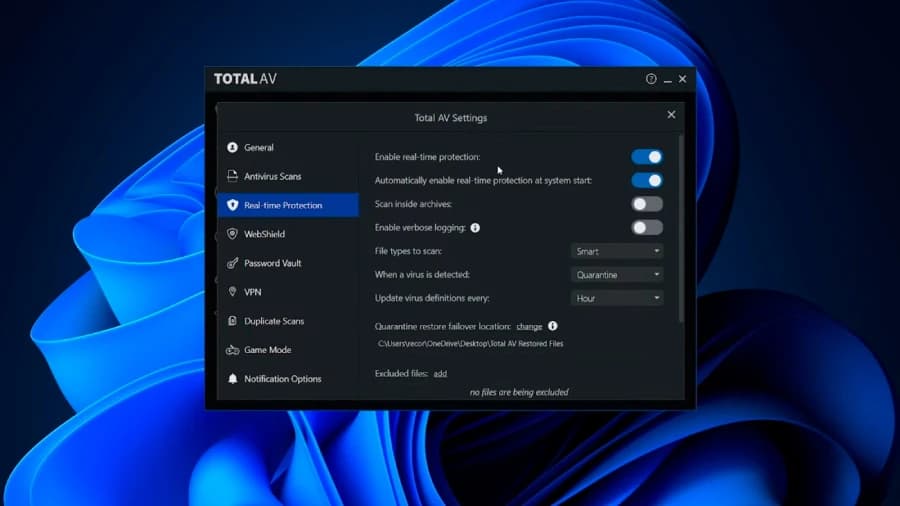
Real-time Antivirus Protection
TotalAV offers robust real-time online security that continuously monitors your system for malicious activity, including viruses, worms, Trojans, and other malware. The software uses a combination of signature-based detection and advanced machine learning algorithms to identify both known and emerging threats. This real-time monitoring helps prevent infections before they can cause damage, making it a vital feature for businesses that rely on continuous system uptime and data integrity.
Ransomware Protection
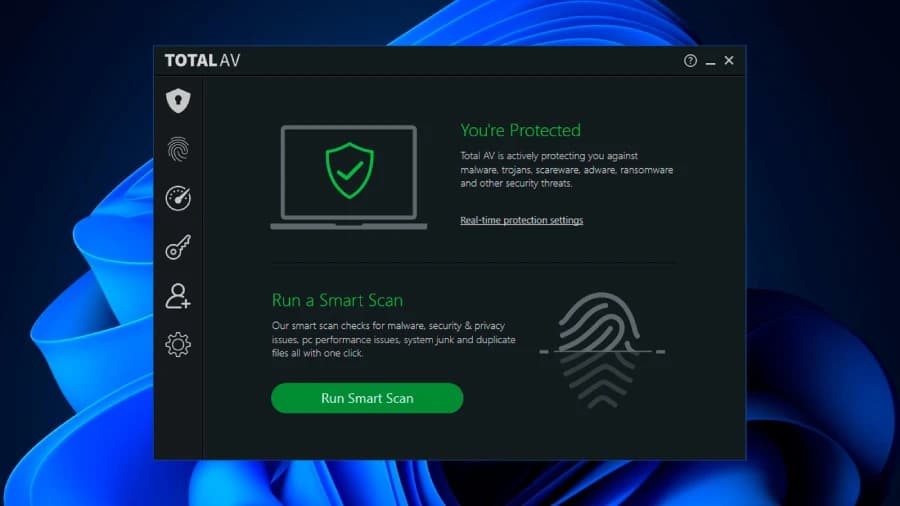
TotalAV’s ransomware protection is designed to prevent unauthorized access to sensitive files and attempts to reverse any damage caused by ransomware attacks. It uses behavior-based detection techniques to identify ransomware patterns and stop the attack before files can be encrypted. This feature is crucial for businesses to safeguard critical data and avoid costly downtime due to insufficient security software.
Phishing Protection
TotalAV includes phishing protection that actively blocks malicious websites and phishing attempts designed to steal personal information. The software’s browser extensions help identify suspicious URLs and warn users before they can fall victim to phishing scams. This feature is particularly beneficial for businesses whose employees regularly access email and web-based applications.

Firewall
The integrated firewall in TotalAV monitors and controls incoming and outgoing network traffic to
prevent unauthorized access. This feature adds an extra layer of security by filtering traffic and blocking suspicious activities that could compromise the network. The firewall can be configured
to suit specific business needs, allowing for custom rules and alerts.
Safe Browsing
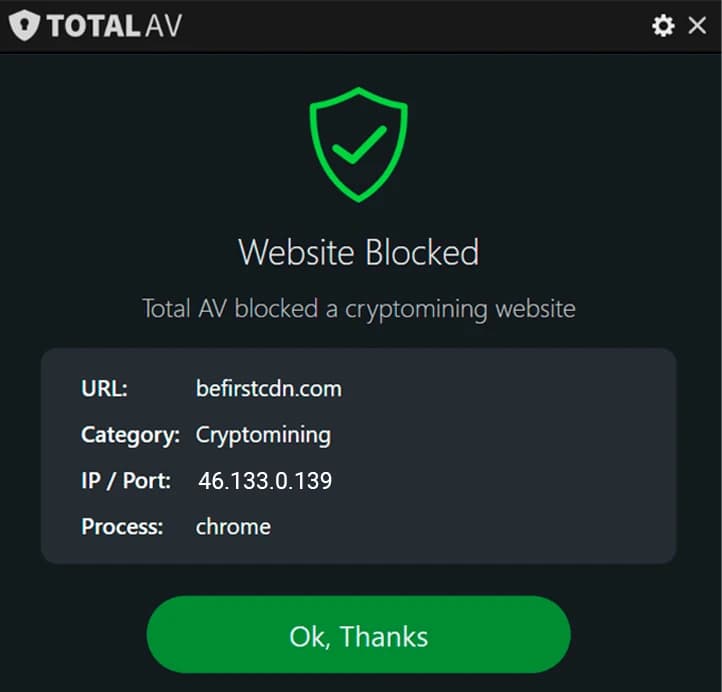
TotalAV’s safe browsing feature utilizes browser extensions to protect users from malicious websites and links. This feature helps ensure a safe online experience by blocking access to potentially harmful sites and alerting users to unsafe content. Safe browsing is essential for businesses to maintain secure internet practices across their networks.
System Performance Optimization
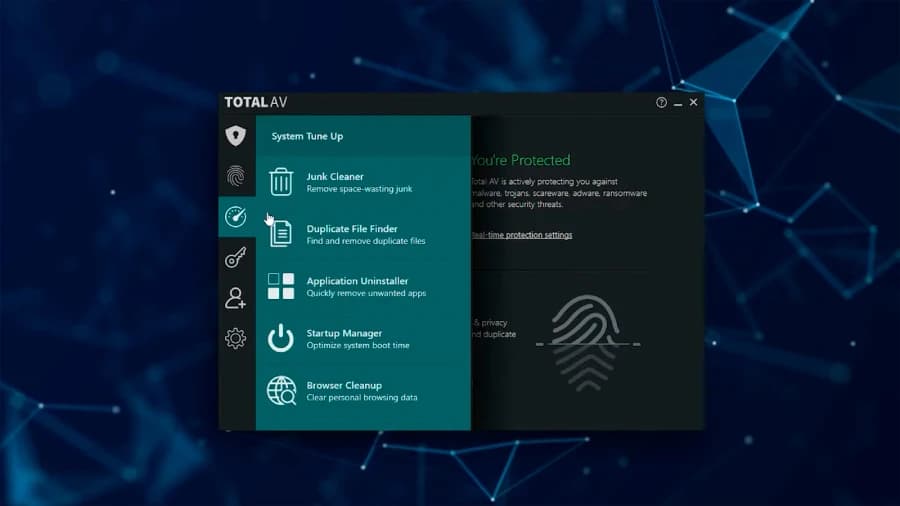
In addition to security features, TotalAV provides tools to optimize system performance. These tools include disk cleanup, junk file removal, and registry cleaner to improve the overall performance of computers. By keeping systems clean and optimized, TotalAV helps ensure that business operations run smoothly without unnecessary slowdowns.
Password Manager
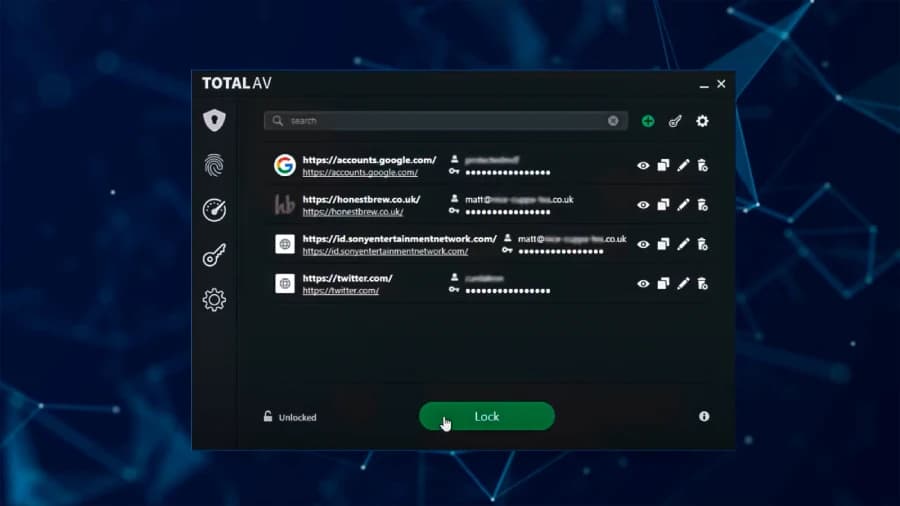
TotalAV includes a password manager that securely stores and manages passwords, allowing users to auto-fill login details and generate strong, unique passwords. This feature enhances security by reducing the risk of weak or reused passwords, a common vulnerability in many businesses.
VPN (Virtual Private Network)
The built-in VPN in TotalAV encrypts internet traffic to protect users’ privacy and secure their online activities. This feature is especially useful for businesses with remote workers or those who frequently use public Wi-Fi, as it helps prevent data interception and unauthorized access.

Secure File Deletion
TotalAV offers secure file deletion to ensure that sensitive files are permanently erased and cannot be recovered. This feature is critical for businesses that handle sensitive information and need to ensure that files are disposed of securely.
Identity Theft Protection
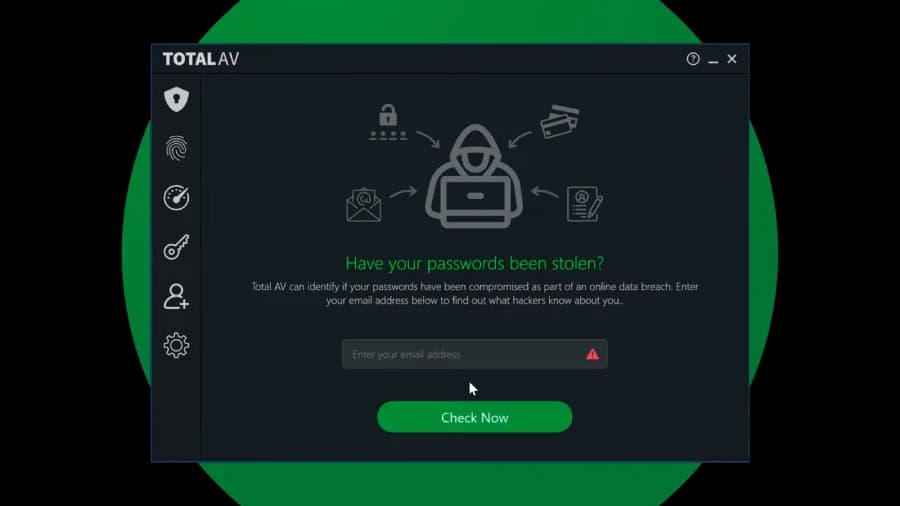
TotalAV provides identity theft protection by monitoring personal information and alerting users if their data is compromised. This proactive feature helps prevent identity theft by notifying users of potential breaches and providing steps to mitigate risks.
Webcam and Microphone Protection
To protect user privacy, TotalAV includes features that prevent unauthorized access to webcams and microphones. This feature is vital for businesses concerned about privacy breaches and spying through unauthorized access to hardware.
Behavioral Analysis
TotalAV employs behavioral analysis to monitor and analyze the behavior of applications in real-time. This advanced feature helps detect and block suspicious activities that might indicate malware, even if the specific threat is not yet known.
Features
- Dynamic scanning
- Automatic updates
- Exploit Protection
- Blocks phishing
- Apps protection
- Firewall
- Auto-clean
- Identity protection
- Realtime protection
Verdict
TotalAV is a great antivirus software, ideal for small to medium-sized businesses seeking reliable, user-friendly cybersecurity software. It offers comprehensive protection features, including real-time malware detection, ransomware defense, and phishing protection, all while having minimal impact on system performance.
The software is feature-rich, with additional tools like a built-in firewall, VPN, password manager, and system optimization utilities that enhance its value.
In terms of affordability, TotalAV pricing plans are competitive and offer great value for the level of protection and features included, making it accessible for businesses of varying sizes and budgets.
The intuitive interface and excellent support options make it easy to use, even for those with limited technical expertise.
Overall, in my TotalAV review, I found it delivers a balanced combination of robust security, usability, and performance, making it a worthwhile investment for businesses that need comprehensive digital protection. Consumer-grade protection covers a single machine well, but company devices need the central control the best business antivirus software comparison focuses on.
Users Reviews
Be the first to write a review
Share your experience with TotalAV and help others choose the right software.