

Monday Review 2026: Is It Worth It for a Small Business?
Overall Rating
4.7
Last updated: September 2026
Is monday.com worth it in 2026? Yes, for teams of three or more who want one visual platform for projects, sales and scheduling. Paid plans start at $9 per seat per month, billed annually, but a three-seat minimum makes $27 a month the real floor. It's strongest for cross-functional teams; poor value for solo users and pairs.
Visualize your projects' progress and make informed decisions with monday.com's project management software. Trusted by over 200,000 customers worldwide, monday.com offers a flexible platform adaptable to various workflows, including project management, CRM, software development, and human resources. Its intuitive interface and customizable features streamline collaboration, enhance efficiency, and provide real-time insights into project stages. In this monday.com project management review, I'll discuss features, performance, customer service, and monday.com pricing.
Plans & Pricing
- Price when billed annually
- Unlimited free viewers
- Unlimited items
- 5GB file storage
- 500 AI credits per month per account
- Prioritised customer support
- Create a dashboard based on 1 board
- Price when billed annually
- Includes basic, plus:
- Timeline & Gantt views
- Calendar View
- Guest access
- 500 AI credits per month per account
- Automations (250 actions per month)
- Integrations (250 actions per month)
- Create a dashboard that combines 5 boards
- Price when billed annually
- Includes standard, plus:
- Private boards
- Chart View
- Time tracking
- Formula Column
- 500 AI credits per month per account
- Automations (25K actions per month)
- Integrations (25K actions per month)
- Create a dashboard that combines 20 boards
- Includes pro, plus:
- Enterprise-scale automations & integrations
- Multi-level permissions
- Enterprise-grade security & governance
- Advanced reporting & analytics
- 500 AI credits per month per account
- Enterprise support
- Create a dashboard that combines 50 boards
* Featured prices can be updated and free offers may include additional terms.
monday.com offers a range of pricing plans to accommodate various team sizes and project management needs. Below is an overview of their current plans:
Free Plan: Ideal for individuals or small teams, this plan supports up to 2 users and includes features such as unlimited boards, over 200 templates, and mobile app access. It's a great way to explore the platform's basic functionalities at no cost.
Basic Plan: Priced at $9 per user per month when billed annually, the Basic Plan is designed for small teams starting to manage multiple projects. It offers unlimited items, 5 GB of file storage, and prioritized customer support, ensuring teams can collaborate effectively.
Standard Plan: At $12 per user per month billed annually, the Standard Plan is the most popular choice among growing teams. It includes all Basic features plus timeline and Gantt views, calendar view, guest access, and 250 automations and integrations per month, enhancing project tracking and collaboration.
Pro Plan: For larger teams with complex workflows, the Pro Plan is available at $19 per user per month when billed annually. It encompasses all Standard features, along with private boards, chart views, time tracking, and increased limits of 25,000 automations and integrations per month, providing advanced tools for comprehensive project management.
Enterprise Plan: Tailored for organizations requiring enterprise-grade features, the Enterprise Plan offers advanced security, compliance, and customization options. Pricing is customized based on specific requirements, and interested parties are encouraged to contact monday.com's sales team for a personalized quote.
Expert Score
Pros
- This project management software is easy to navigate
- The site uses reliable and user-friendly tools
- The organization of the platform is effective
Cons
- The help and support area needs to offer more options
- The help and support area should have more extensive testimonials and videos
- There is no multilingual support
Customer Support
When I tested monday.com, I found their customer support to be comprehensive and accessible, catering to various user preferences. Help Center The Help Center is a valuable resource for businesses, offering tutorials on basic account setup to ensure teams start off successfully. I appreciated the availability of training sessions and the option for one-on-one meetings with experts to enhance the user experience. Contact Options monday.com provides multiple channels for support: Email Support: Users can reach out via email for assistance. Live Chat: A live chat feature is available, offering real-time support directly through the platform. Phone Support: Currently, phone support is limited to billing inquiries, with callbacks available upon request.

Additional Resources Beyond direct support, monday.com maintains an active blog and a comprehensive FAQ section, providing insights and answers to common questions. These resources are beneficial for users seeking self-help options. Overall, the diverse support avenues and educational materials make monday.com a user-friendly project management platform, suitable for businesses aiming to optimize their workflows.
FAQ
Offers helpful suggestions as you explore the software.
Blog
The blogs and articles offer detailed experiences.
Video Tutorials
Suggestions and guidance tips for new and experienced users.
Ease of Use
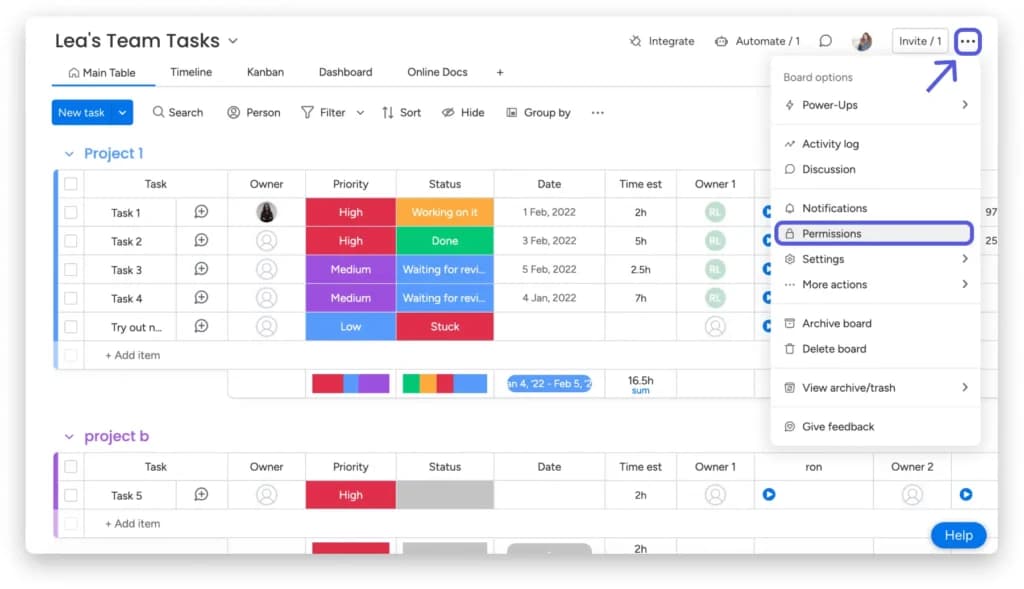
After exploring monday.com, it is clear that it is easy to use and navigate. You can quickly view your team's workload in an easy-to-see timeline that helps you estimate when each task should be completed. There is no drastic learning curve and if you are experiencing difficulty you can quickly check out the tutorials and demonstrations on the help and support area of the platform. I found it to be an intuitive project management software that simplifies task tracking and team collaboration. The platform's visual timelines make it easy to monitor workloads and set clear deadlines, which is essential for effective project tracking software. I could navigate the system effortlessly. For any uncertainties, the help center offers tutorials and demonstrations that are readily accessible. Updating project statuses in real-time was straightforward, providing an accurate overview of ongoing tasks. This user-friendly approach makes monday.com a strong contender among the best project management software for small businesses. This software offers easy-to-use project status updates that give you the most accurate depiction of the state of your projects in real-time.
Performance
When I tested monday.com, I found it to be a robust project management software that delivers reliable performance across various metrics. Its speed, dependability, and extensive feature set make it a strong contender among the best project management tools available.
Speed
Navigating through monday.com is generally swift, with responsive interfaces that facilitate efficient task management. The platform's developers have implemented performance enhancements, such as improved board performance, to boost frame rates and ensure smooth scrolling. These updates contribute to a seamless user experience, which is essential for teams relying on project tracking software.
Reliability
In terms of reliability, monday.com maintains a stable environment with minimal downtime. Users have reported consistent performance over extended periods, indicating the platform's robustness. While occasional bugs or lags may occur, they are typically addressed promptly by the support team, ensuring uninterrupted project workflows.
Feature Set
Exploring the feature set, I found monday.com offers a comprehensive suite of tools designed to enhance productivity. Key features include customizable dashboards, seamless integration with over 200 third-party apps, and AI-driven capabilities that automate tasks and provide data-driven insights. These functionalities position monday.com as a versatile project management platform suitable for diverse business needs.
Conclusion
Overall, monday.com delivers a high-performance solution for businesses seeking reliable and efficient project management apps. Its combination of speed, stability, and a rich feature set makes it a top choice among the best project management solutions available today.
Features & Functionality
monday Project Management Review
monday.com is a really easy platform with tons of features that are both easy on the eye, and intuitive to use. I'll break down some of the features here:
- Customizable Dashboards
- Integrations
- Automations
- AI Capabilities
- Gantt Charts
- Forms
- Kanban Boards
- Time Tracking
- Document Collaboration
- Mobile App
- AI Enterprise Service Management Platform
- AI Vision
- Role Assignment
- Budgeting Tools
- File Sharing and Document Management
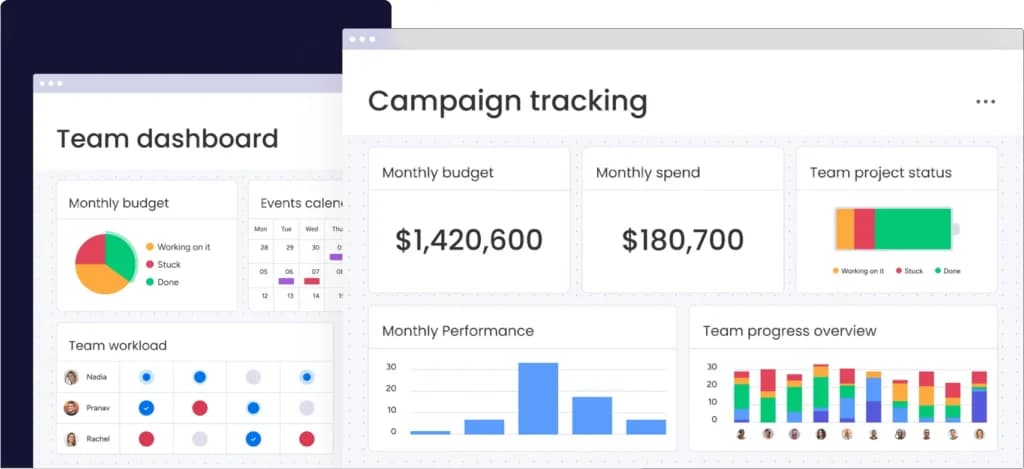
Customizable Dashboards
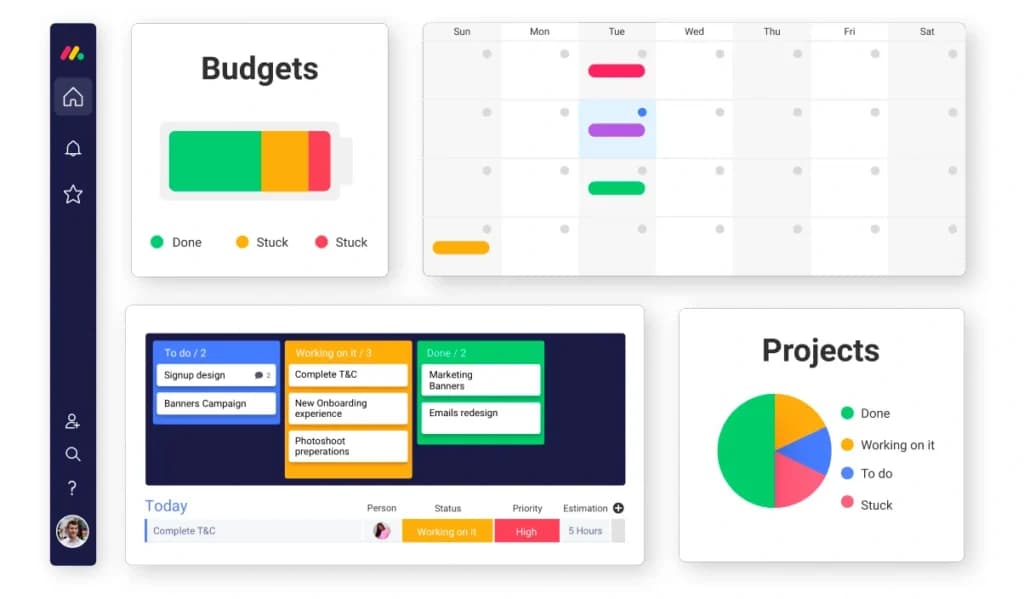
When I tried out monday.com, I was impressed by its customizable dashboards. They allow you to visualize project data in a way that suits your team's workflow, enhancing clarity and decision-making. This flexibility makes it a standout among project management tools.
Integrations
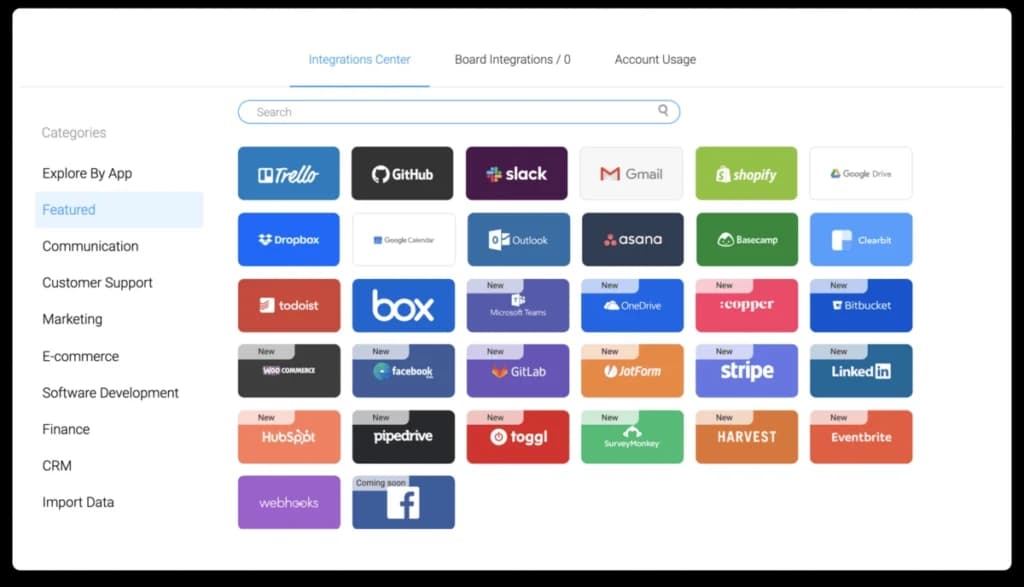
I played with monday.com's integration capabilities and found it integrates seamlessly with over 200 third-party apps, including Slack, Trello, Dropbox, and Google Drive. This interoperability streamlines workflows by centralizing tasks and communications, positioning it as one of the best project management solutions.
Team Management
The team management tool for monday.com makes it easy for teams to get on-board and adopt the software. To build a team, users send an email to invite new members. This provides a quick and easy start to any project.
You can also customize your software for different types of teams. You can decide how to manage your workflow or process. This can change due to the simplicity or complexity of your project.
The visual planning platform that is monday.com, provides many options to track and plan your progress. You can use calendars, charts, files, maps, and timelines. This is important for visible planning and tracking.
Automations
When I tested the automation features, I could automate repetitive tasks like status updates and deadline reminders. This reduces manual workload and minimizes errors, boosting overall efficiency—a key aspect of top project management platforms.
AI Capabilities
Exploring the AI features, I found that monday.com offers AI-driven tools that enhance productivity. These include AI Vision, which helps scale operations without additional resources, giving businesses a competitive edge.
Kanban Boards
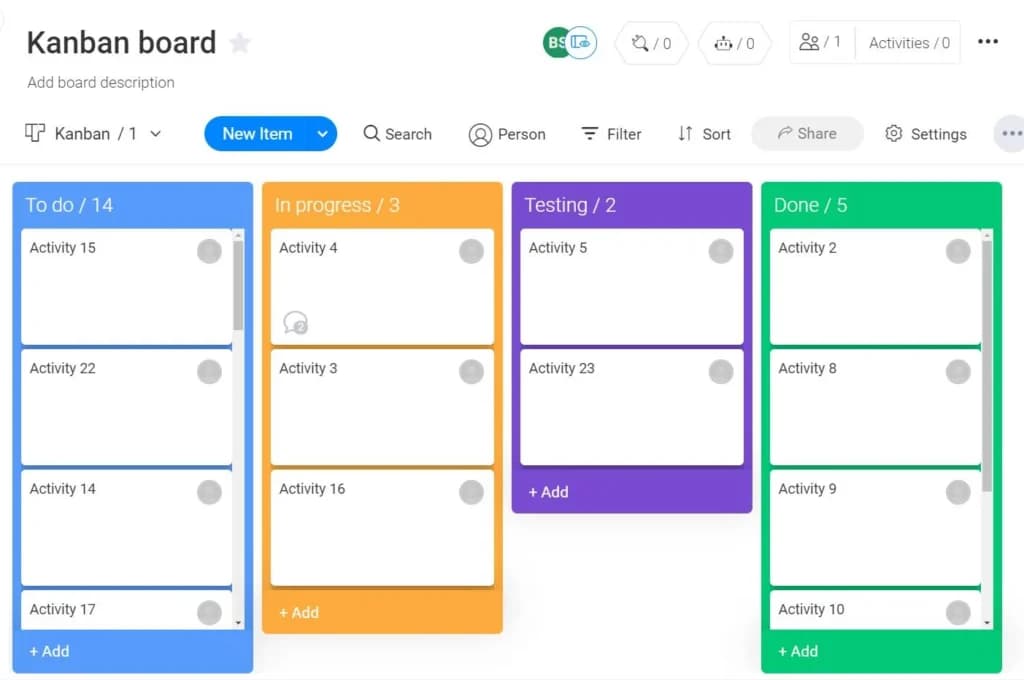
I explored the Kanban boards, which offer a visual method to manage tasks through customizable cards and columns. This approach enhances flexibility and clarity in task progression, solidifying monday.com's place among top project management tools.
Time Tracking
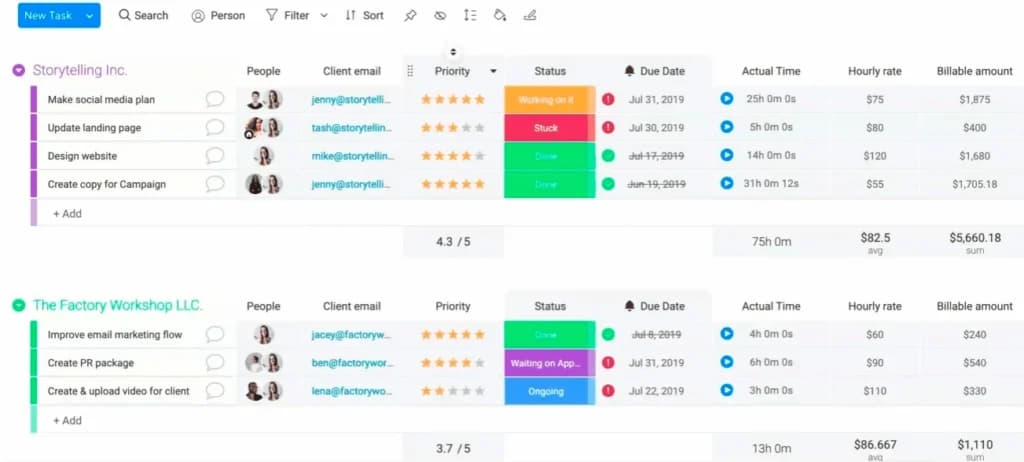
I utilized the time tracking feature to monitor the time spent on tasks directly within the platform. This aids in resource management and project budgeting, essential for businesses seeking the best project management software for small business.
Document Collaboration
I tested the document collaboration tools, which allow team members to work together on documents in real-time. This fosters seamless collaboration and ensures everyone is aligned, enhancing the platform's value as a project management app.
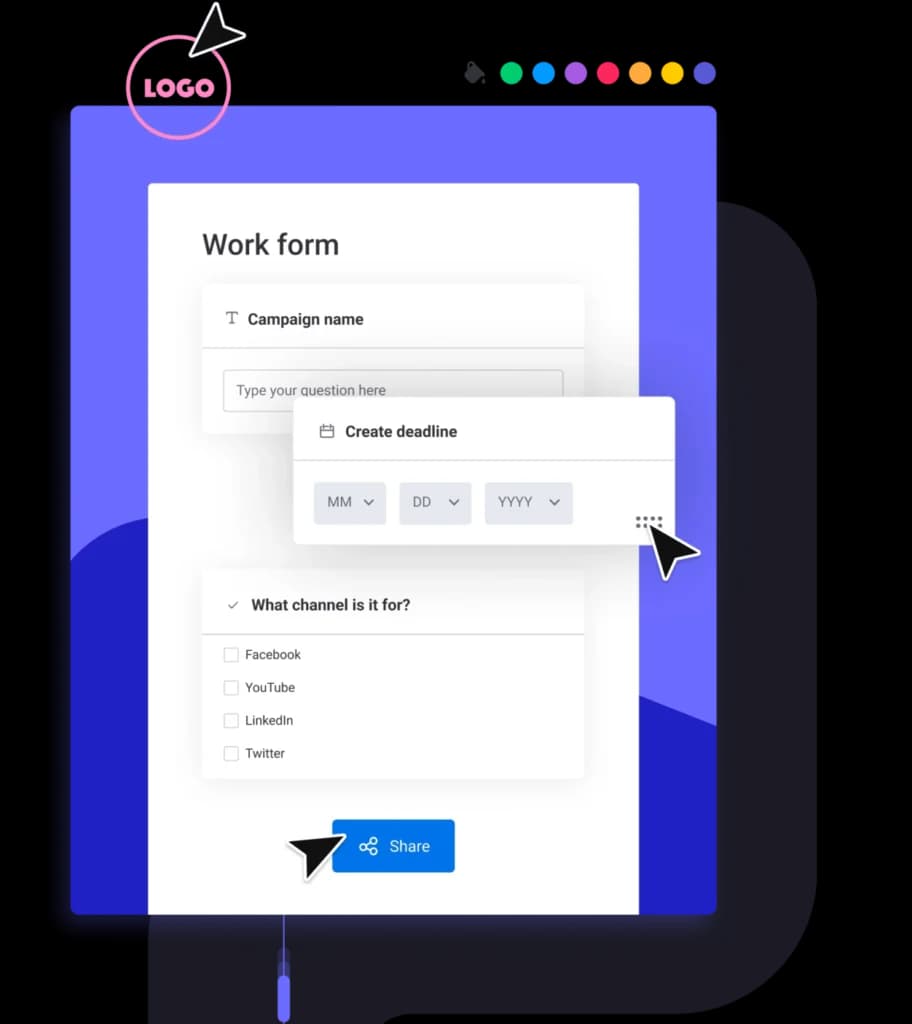
Forms
When I used the forms feature, I could create custom forms to collect data efficiently. Submissions are automatically populated into boards, simplifying data management—a useful tool in task management software.
AI Enterprise Service Management Platform
I explored monday.com's AI Enterprise Service Management Platform, which leverages artificial intelligence to automate incident resolution and streamline operations. This feature enhances efficiency and scalability, making it a valuable asset for businesses seeking advanced project management solutions.
AI Vision
When I tested monday.com's AI Vision, I found it offers AI-driven tools that help businesses scale operations without increasing resources. This feature provides a competitive advantage by accelerating processes often slowed by scale, positioning monday.com as a leader among top project management tools.
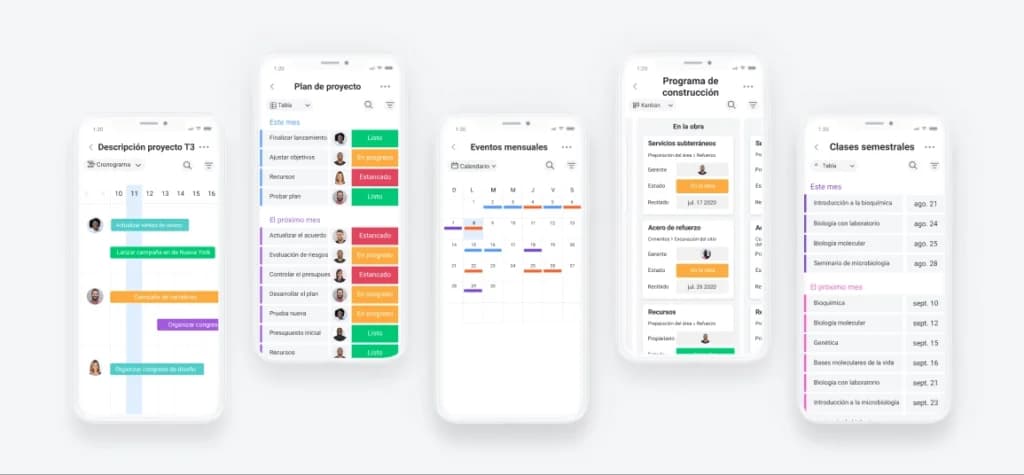
Mobile App
I tried out the monday.com mobile app, which provides access to all features on the go. This ensures continuous project tracking and task management, making it a versatile PM software for teams needing flexibility.
Role Assignment
I tried out the role assignment feature, which allows assigning specific roles to team members, ensuring each individual has access to the features they need to accomplish their tasks. This promotes accountability and clarity within the team, enhancing overall productivity.
File Sharing and Document Management
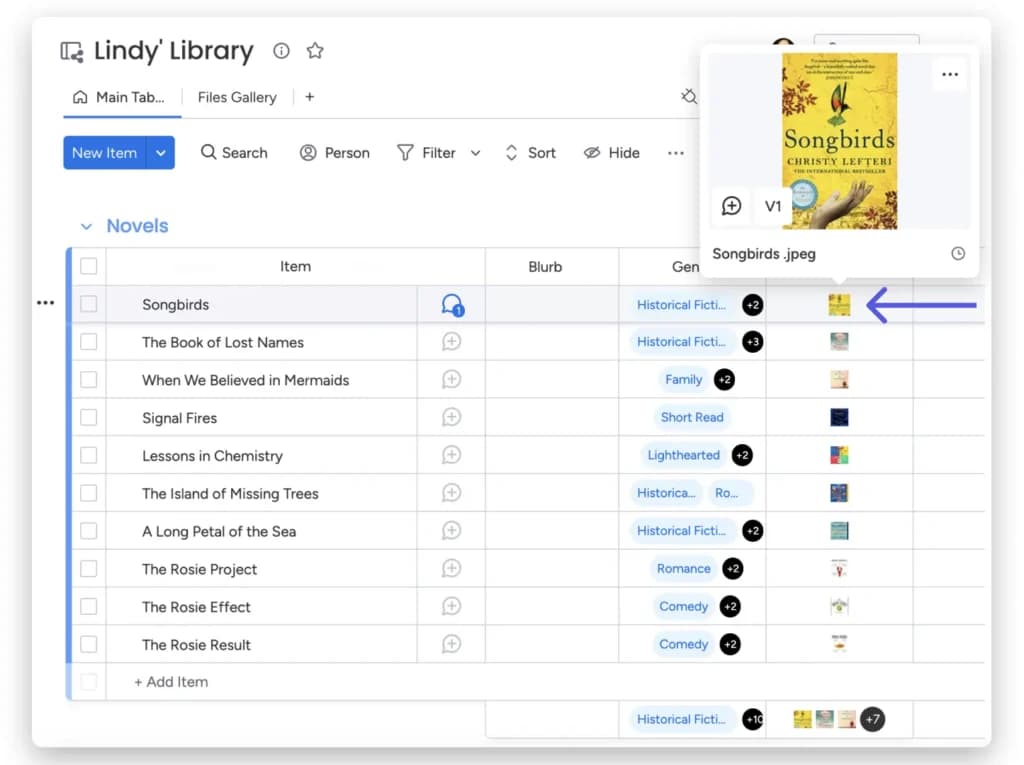
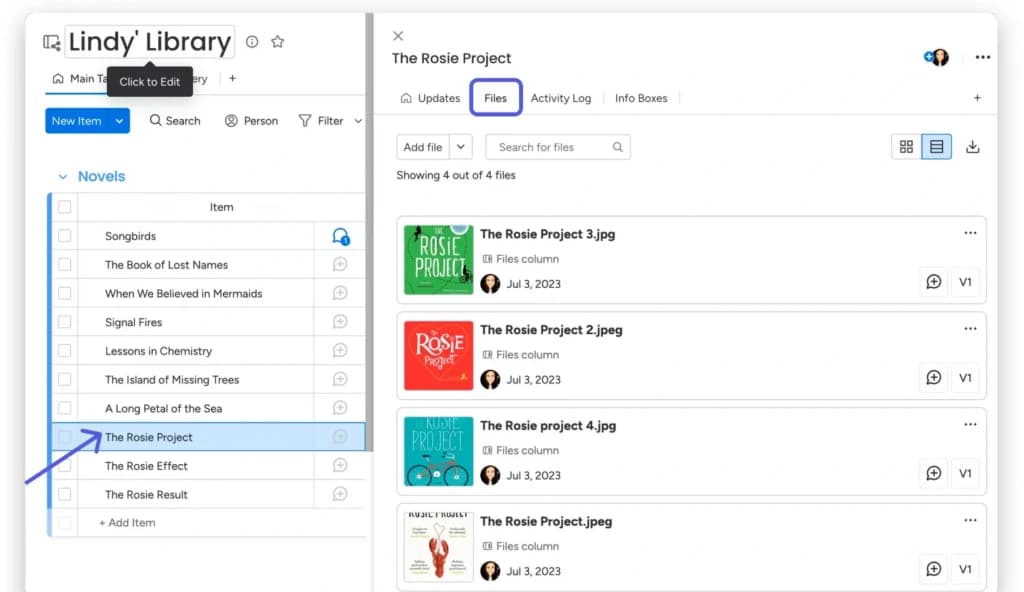
I utilized the file sharing and document management features, which integrate with platforms like Google Drive, allowing for seamless storage, access, and collaboration on files directly within monday.com. This integration streamlines workflows and centralizes project documentation.
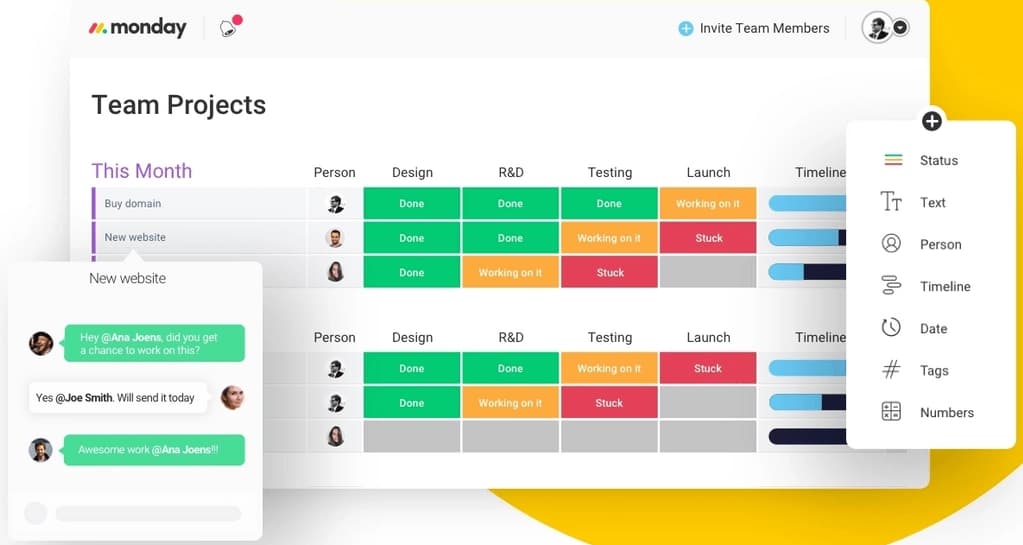
Enhance team collaboration with integrated communication features.
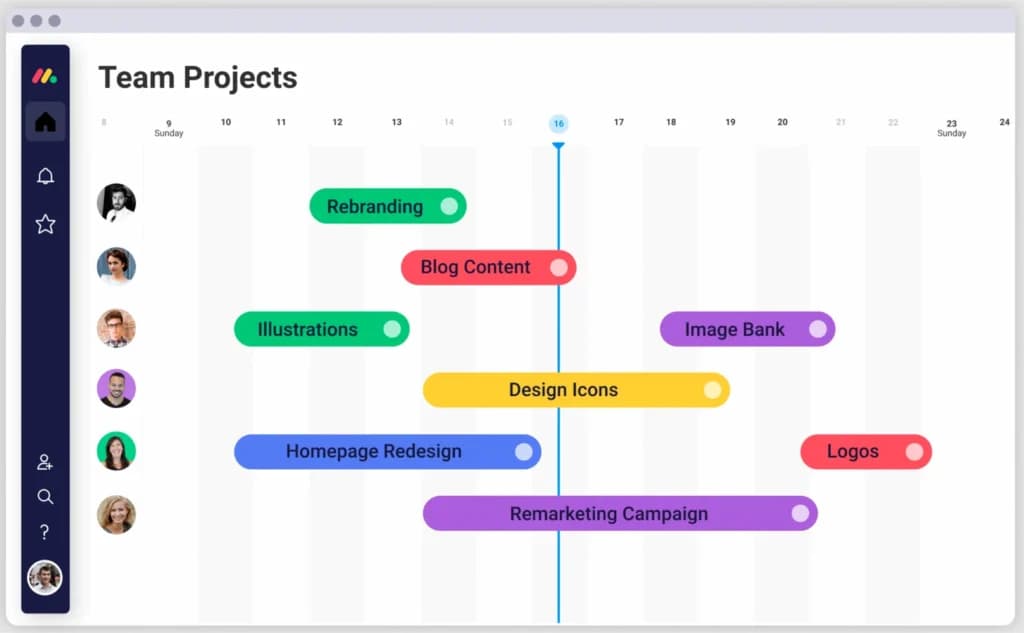
Gantt Charts
I tried out the Gantt chart view, which provides a visual timeline of project tasks and dependencies. This feature is invaluable for tracking progress and adjusting schedules, making monday.com a strong contender among the best project management software options.
Budgeting Tools
I played with the budgeting tools, which enable tracking project expenses, monitoring resource usage, and setting budget limits. These tools help in maintaining financial control over projects, making monday.com a comprehensive project management platform.
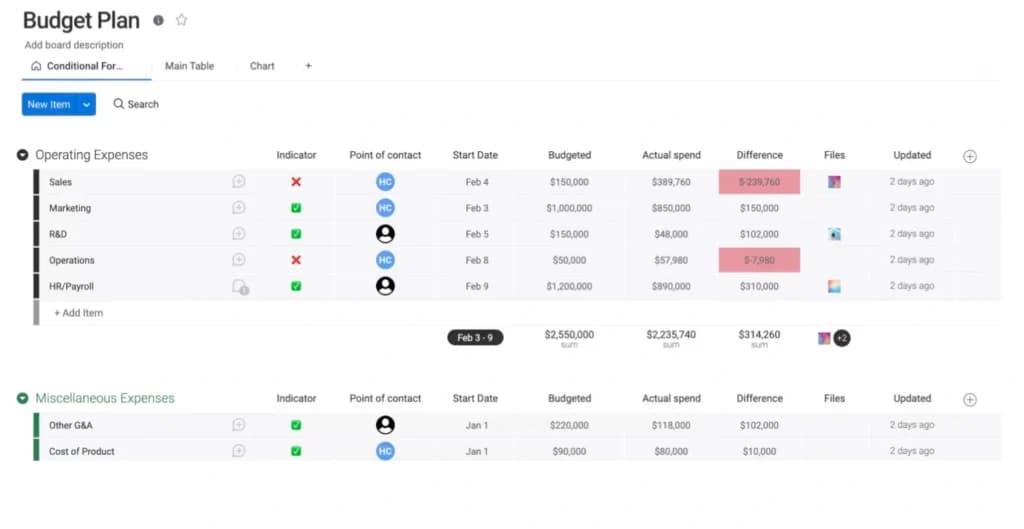
By using monday.com it allows your reports to automate successfully and reliably through the use of calendars, charts, files, Kanban boards, maps, and timelines. All of these tools promote a healthy and thriving business that can meet specific demands and deadlines.
The reporting process of your business improves tremendously due to the advanced automation, views, and dashboard tools within monday.com. This allows your business to accurately predict capacities, promote greater customer satisfaction, and update the progress on specific projects.
It can be adapted for use to track your sales to reach your monthly targets. It is clear that monday.com integrates with 40+ popular applications and services such as Zoom, Dropbox, Excel, Google Drive, Google Calendar, Integromat, Slack, Trell, and Zapier.
monday CRM review
monday CRM software offers a comprehensive set of tools to manage your customer relationships and boost engagement and conversions. We'll go into more detail below. Here's the list:
- Customizable dashboards
- Reporting and analytics
- AI-powered insights
- Custom forms for lead capture
- Collaborative work docs
- Account management
- Integrations
- Mobile app
- Kanban management interface
- Email tracking and sequences
- Mass emails
- Sales pipeline management
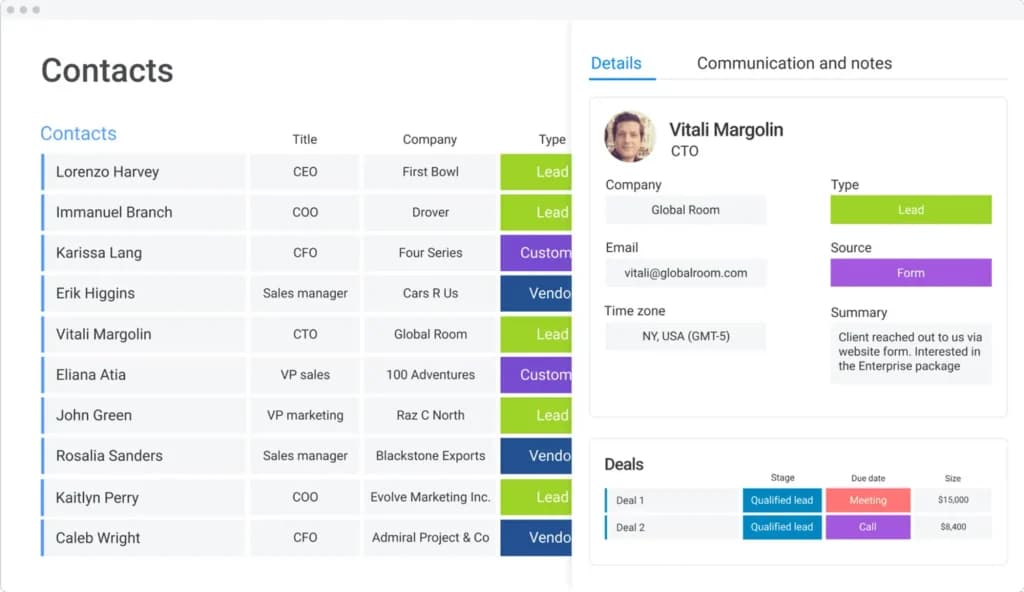
- Contact management
- Revenue forecasting
- Automated reports
- Sales pipeline automation
- Sales forecasting automation
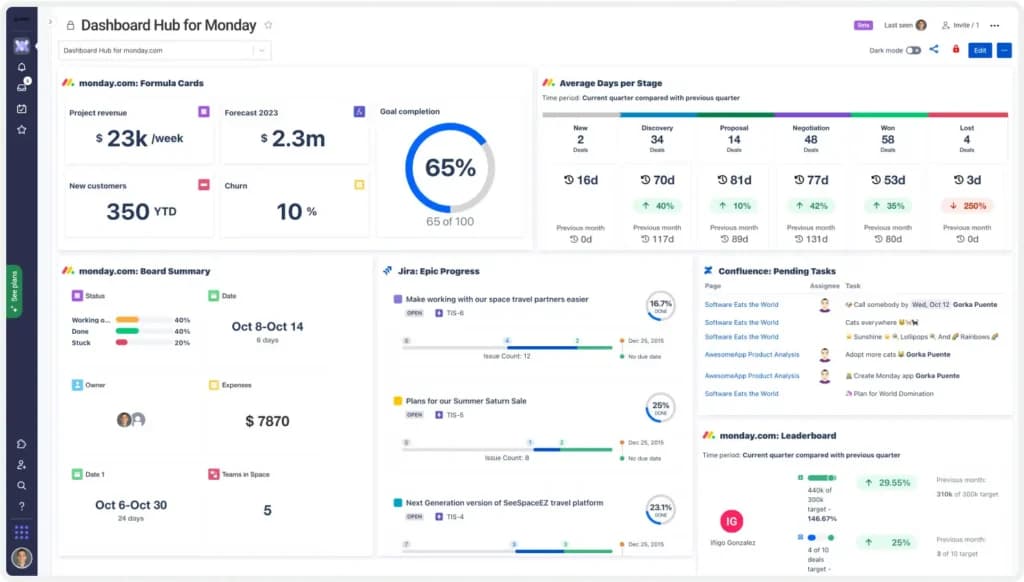
Customizable Dashboards
This CRM software has customizable dashboards that allow every team member to keep track of project progress without distorting the information. With these dashboards, monday allows you to save time with a highly visual design that’s easy for anyone to interpret. It helps you filter the information you want to view active deals, overviews, and the size of your deals.
Creating a new dashboard on this platform is quite straightforward. After clicking on the “Add” feature, name the dashboard and decide whether you’ll connect the board to the previous ones. You can customize your dashboard based on your preferences to improve your experience.
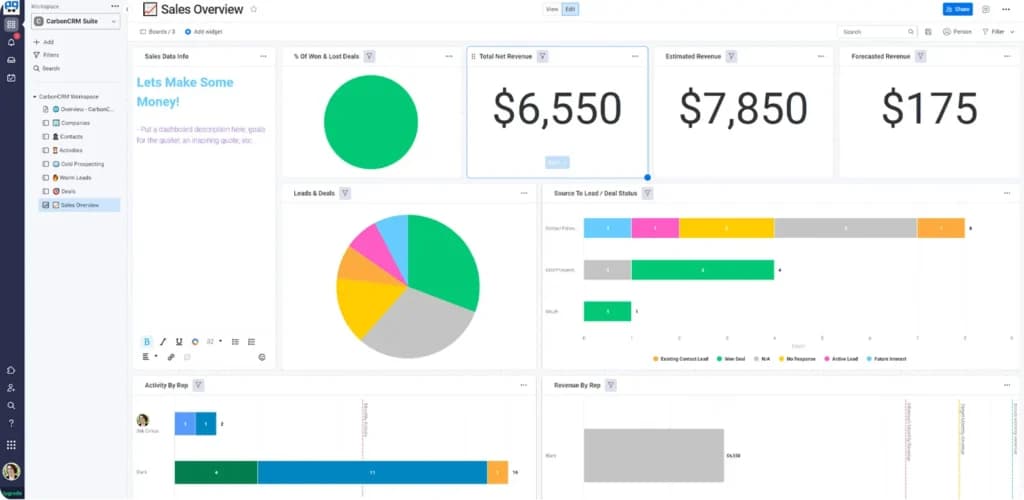
Reporting and Analytics
The sales dashboard offers comprehensive reporting and analytics concerning every activity concerning you and your clients. It shows active deals, average value of won deals, actual revenue, funnel chart, monthly goal, and progress rate. This uses different pictorial representations to allow easy interpretation of data.
AI-Powered Insights
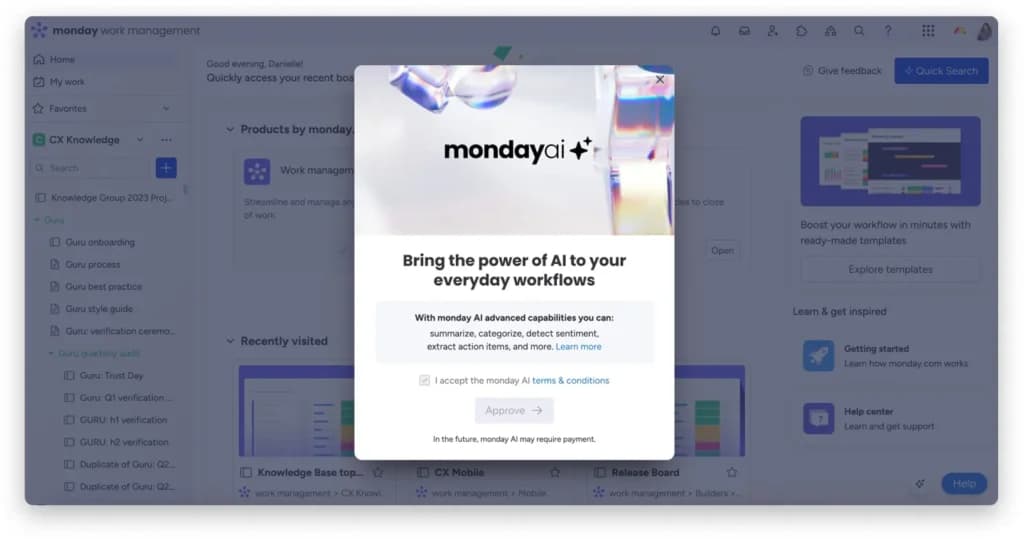
monday CRM uses AI to generate tasks, compose emails, and prioritize deals based on real-time data, helping you make smarter, faster decisions. These insights streamline sales processes and ensure your team focuses on high-impact activities that drive results.
Custom Forms for Lead Capture
Custom forms in monday CRM allow you to collect and qualify leads with ease, seamlessly integrating them into your workflows. This feature simplifies lead management and ensures that prospects are nurtured effectively, enhancing your sales pipeline efficiency.
Collaborative Workdocs
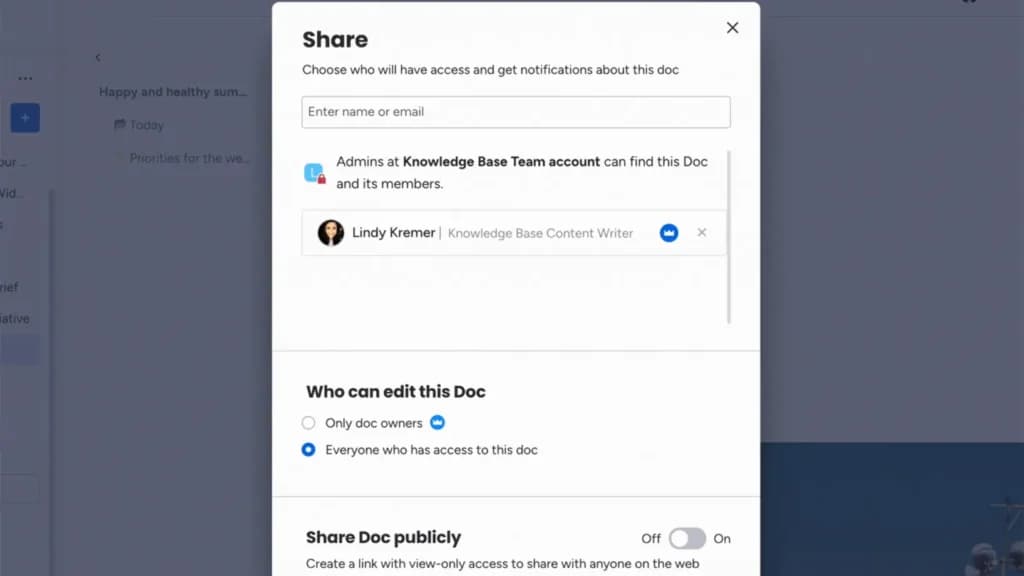
Collaborative workdocs let teams brainstorm, share ideas, and collaborate in real-time within monday CRM. This feature complements the Kanban Management Interface, fostering teamwork and ensuring that all team members stay aligned and informed on key projects.
Account Management
monday CRM’s account management tools allow you to track client activities, manage relationships, and maintain a complete history of interactions. This strengthens customer relationships and ensures long-term client satisfaction through better organization and insights.
Integrations
monday CRM connects seamlessly with the tools your business already uses. With over 50 built-in integrations, you can sync your workflow across popular platforms like:
- Slack – Stay updated on project progress through real-time notifications.
- Gmail – Track and manage email conversations directly within your CRM.
- HubSpot – Connect marketing efforts to your sales pipeline.
- Mailchimp – Power up your email campaigns with contact syncing and automation.
Whether you're managing communications, marketing, or operations, Monday CRM acts as a central hub, helping small and mid-sized businesses consolidate tools and reduce app switching. For businesses needing highly specialized integrations, platforms like Salesforce offer more extensive app marketplaces.
Mobile App
The monday CRM mobile app allows you to manage tasks, track deals, and log activities from anywhere, ensuring you stay connected and productive on the go. This flexibility is invaluable for sales teams that require real-time updates and accessibility, keeping everyone aligned no matter where they work.
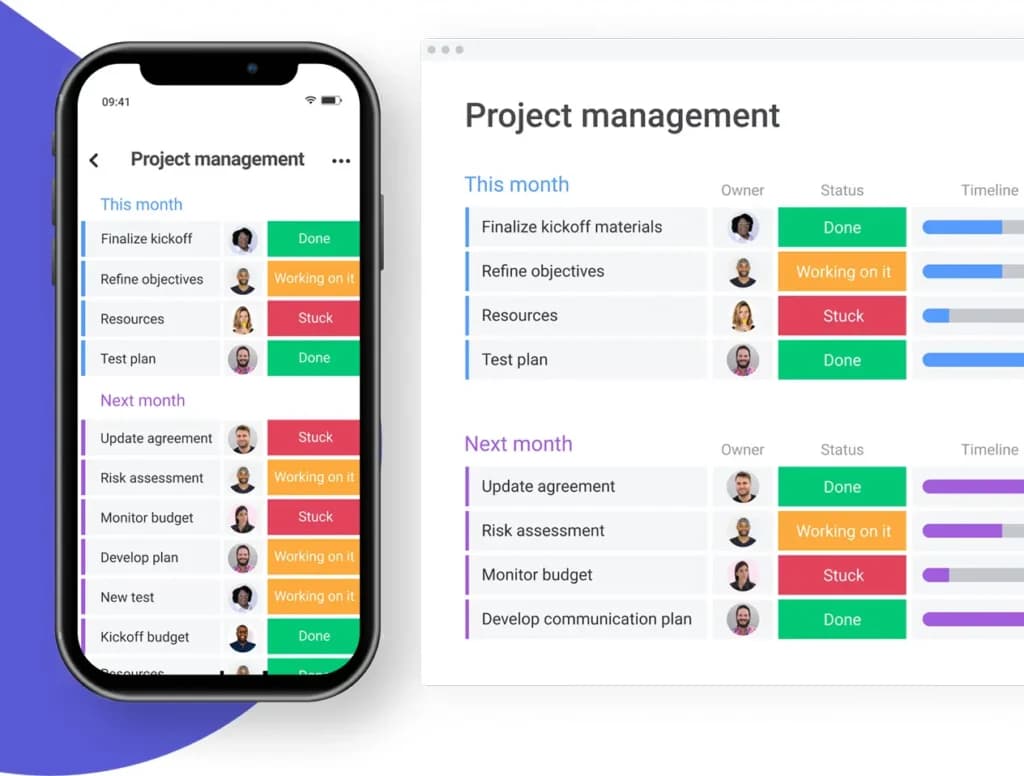
Kanban Management Interface
This CRM tool works with Kanban software, which helps you automate the redundant tasks in your team with a display feature that’s easy for everyone to understand. It also makes it easy for you to collaborate with teams and make required changes easily. Kanban is customizable, scalable, and easy to use.
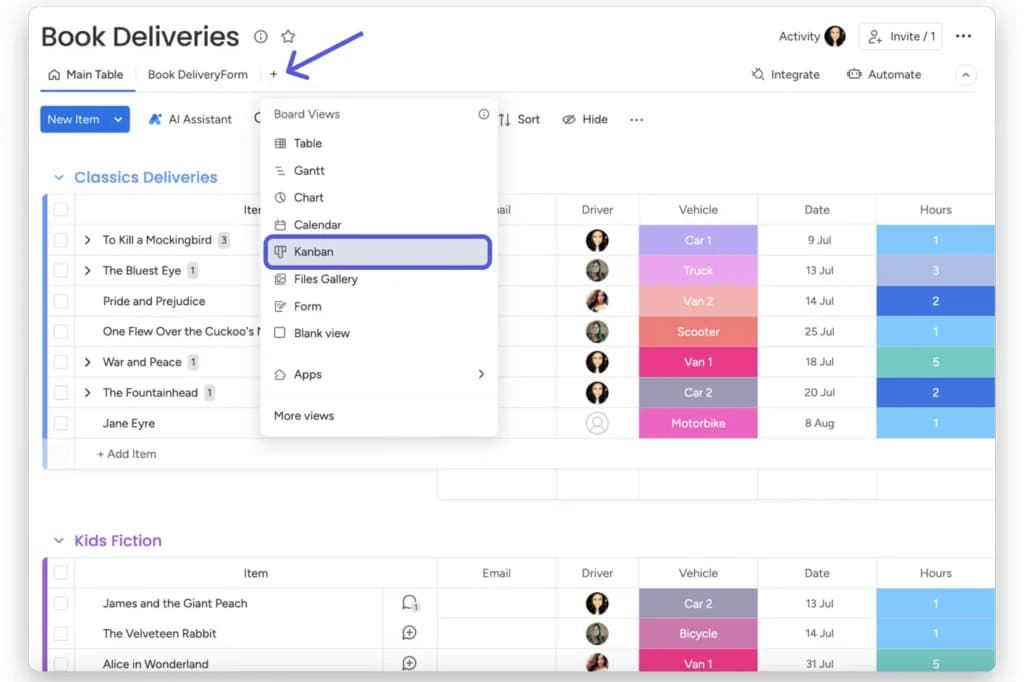
Analytics
The analytics feature allows you to views the sales funnel from multiple angles and make appropriate adjustments to your operations. For instance, you can view how many leads joined the funnel in a month, what percentage moved on to the next stage, how many got stuck, etc.
Reporting and Integrations
When it comes to integrations, monday.com definitely has you covered. The tool seamlessly integrates with over 30 popular software including G-suite, Slack, Jira, Zendesk, Microsoft Teams, Salesforce, Outlook, DropBox, Asana, MailChimp, Shopify, etc. The CRM reporting feature can be set to generate reports based on budgets and projects. You’ll be able to understand the effectiveness of your team members, how many leads have moved to the next stage during a specified time period, etc.
Email Tracking and Sequences
With email tracking and sequences, monday CRM allows you to monitor email opens, clicks, and engagement while automating follow-up messages with personalized sequences. This feature ensures timely communication, nurtures leads effectively, and enhances engagement by delivering the right message at the right time.
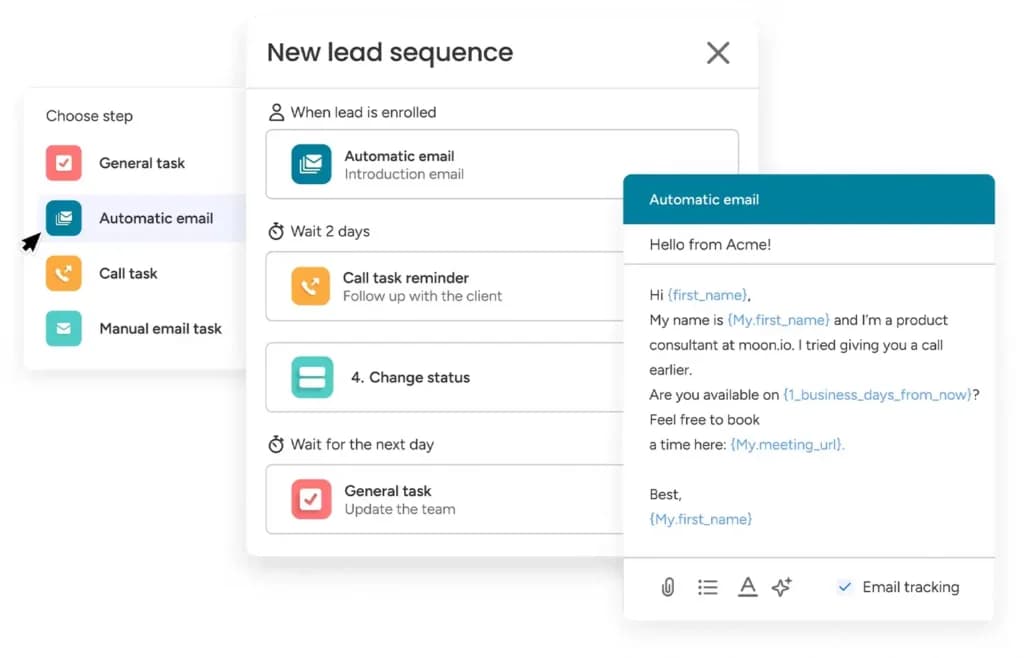
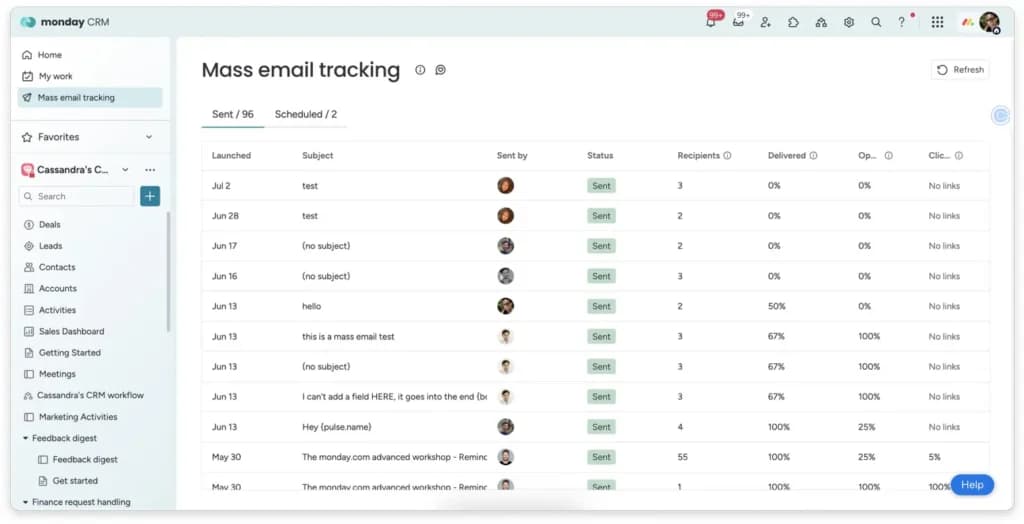
Mass Emails
The mass emails feature enables you to send personalized emails in bulk directly from the CRM, maintaining a professional yet personal touch. This simplifies your outreach efforts, helping you scale communications without losing the individualized experience that resonates with your audience.
Sales Pipeline Management
The sales pipeline feature on monday CRM helps you keep close tabs on the deals your sales team is handling. It covers every stage of the sales process, this way; you’ll easily spot the location of every lead within the pipeline. With this sales pipeline, you can assume what you’ll get in revenue and help you identify effective sales strategies to continue implementing.
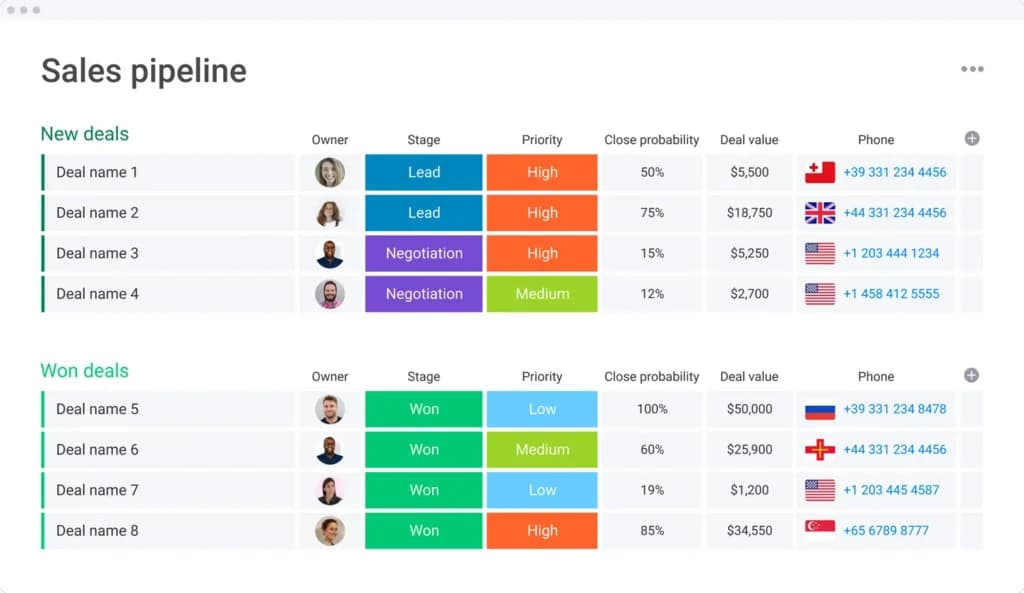
Contact Management
Managing your contacts with monday CRM is simple. Once you’ve chosen a preferred template, you can create new contacts and manage existing ones on this platform. I was confused about how to segment my different contacts, but with the options monday offered, I was able to walk through it like a breeze.
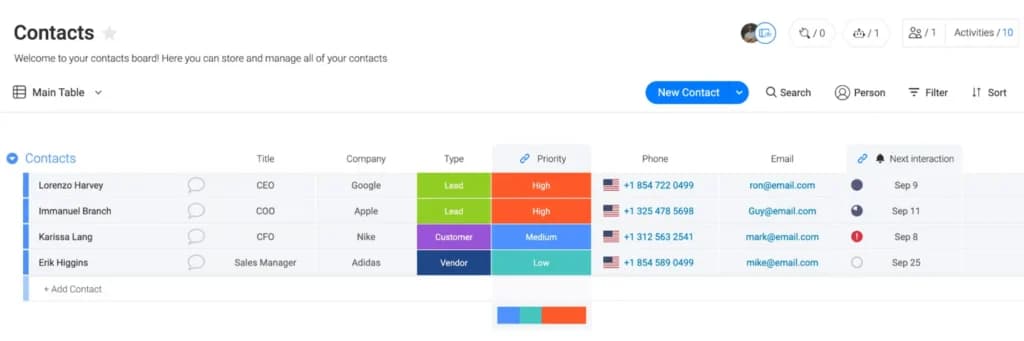
Revenue Forecasting
monday CRM’s revenue forecasting uses real-time data from your sales pipelines to project future revenue. This provides clear insights into potential earnings, helping you plan strategically, set realistic goals, and allocate resources effectively to drive growth.
Automated Reports
monday CRM’s automated reporting feature generates insightful, up-to-date reports on key sales metrics such as deal progress, revenue trends, and team performance. This saves time and ensures accuracy, allowing you to focus on strategic decisions rather than manual data collection, ultimately driving smarter business growth.
Sales Pipeline Automation
Sales pipeline automation streamlines your sales processes by automatically updating deal stages, assigning tasks, and sending reminders based on pre-defined triggers. This reduces manual effort, keeps pipelines accurate, and ensures that every lead moves efficiently through the sales cycle, maximizing productivity.
Sales Forecasting Automation
Sales forecasting automation leverages real-time pipeline data to predict future revenue and sales outcomes. This feature helps you identify gaps, set realistic goals, and allocate resources effectively, ensuring your team stays on track to meet and exceed targets.
monday ITSM
Automations
Monday.com lets you avoid repetitive work by automating several processes and tasks.
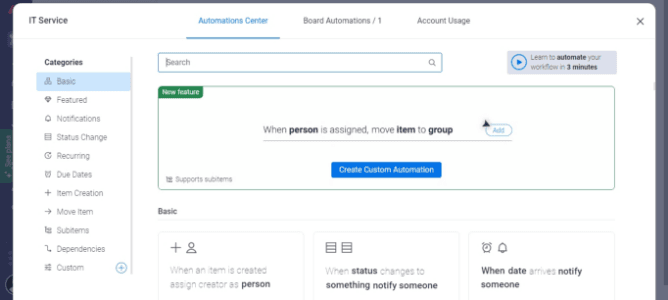
These include status updates, email notifications, dependencies, due date alerts, assigning tasks, time tracking, progress updates, and automated workflows. This means that you will stay up to date with all important tasks and processes, save time, and enhance efficiency.
Customizable Templates
Monday.com is pretty much made up of templates. The platform provides loads of fully customizable templates that make establishing processes and setting up boards super easy and fast. Some templates you can take advantage of include help desk tickets, team tasks, project portfolio tracking, contact management, campaign planning, customer onboarding, event planning, PMO project planning, and product roadmaps.
Integrations
You can seamlessly integrate all your favorite business tools into Monday.com to consolidate all your team's work in one place. Some of the most popular integrations are:
- Microsoft Teams
- Zoom
- Slack
- Zapier
- Salesforce
- Zendesk
Efficiently handle and resolve IT incidents.
Identify and solve recurring issues with advanced solutions.
Simplify service request processes for IT teams.
Monday.com does a great job at providing analytics and reports by giving you pretty much everything you need to visualize projects.
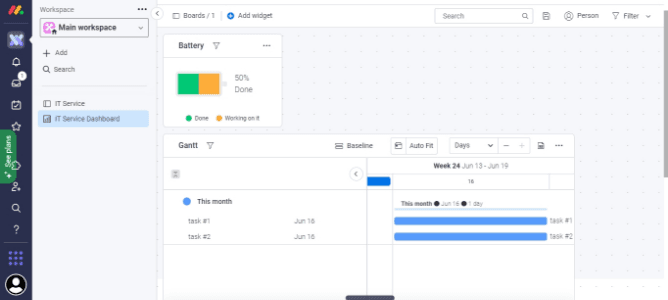
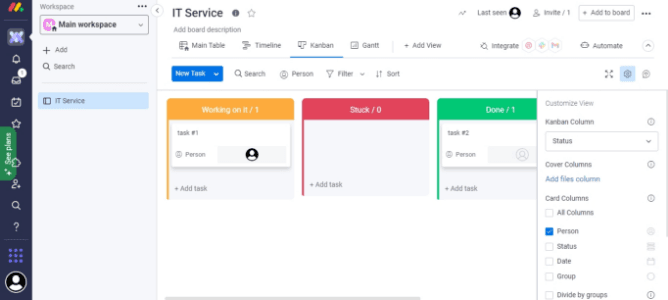
Some of the tools you can use are Kanban, Gantt charts, timeline, map, and calendar views. These give you a bird's view at a glance, information that can be used to track projects, minimize time wastage, and make decisions. On top of these, the platform allows you to create a custom dashboard comprising several boards, which can help track progress, timelines, and budgets.
monday Scheduling
monday.com offers a range of project scheduling and tracking features to help businesses streamline their workflows. Let’s explore some of its key offerings:
- Task scheduling
- Project views
- Automation
- Integration
- Project management
- Task management
- Resource management
- Portfolio management
- Roadmap planning
- Sprint management
- Gantt charts
- Kanban boards
- Automations for scheduling
- Time tracking
- Custom workflows
- Team scheduling and collaboration
- Calendar view
- Recurring tasks
- Deadlines and reminders
Task Scheduling
monday.com scheduling tool lets you create tasks, assign team members, set deadlines, and adjust priorities. Scheduling tasks on monday.com starts with creating a task (or “item”) on a board.
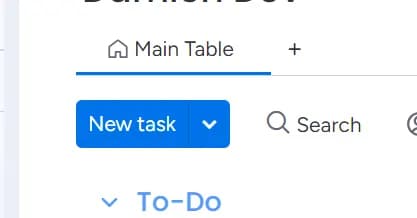
You can assign tasks to team members, set start and due dates, and allocate priorities in a matter of clicks. This simplicity allows for rapid setup, even for large projects.
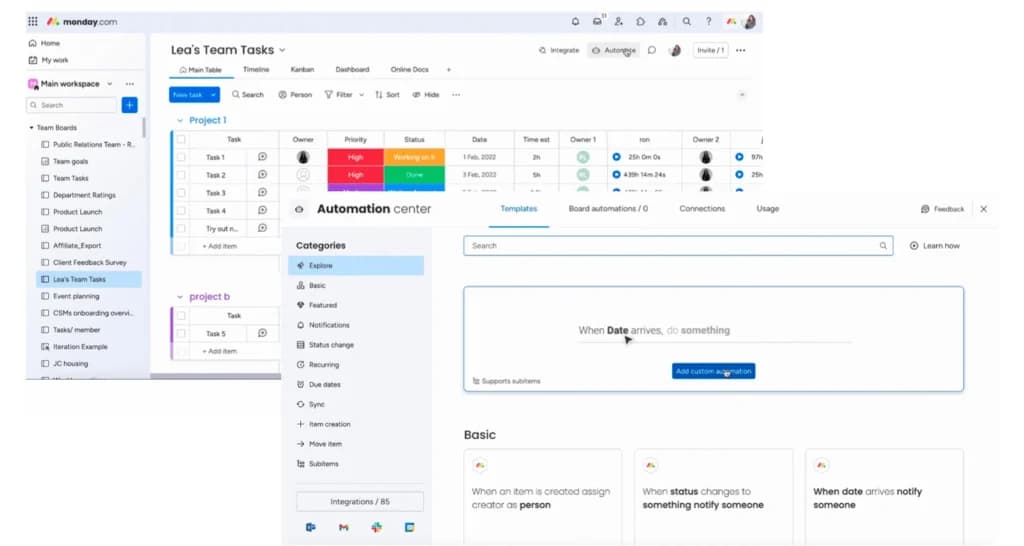
Once created, the scheduled tasks look like this:
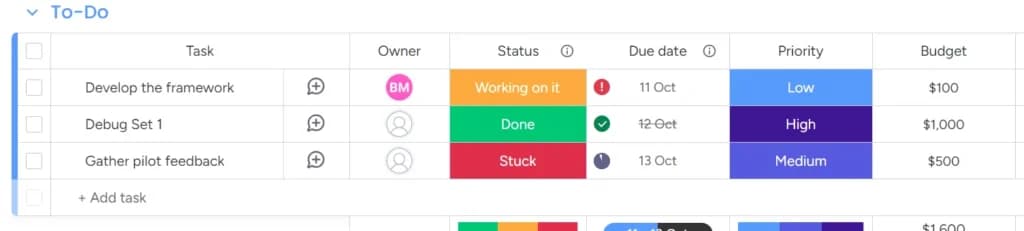
You can have many tracking metrics in the column like owner, status, due date, priority, etc. You’re prompted to set this up while you’re setting up the dashboard at the start:
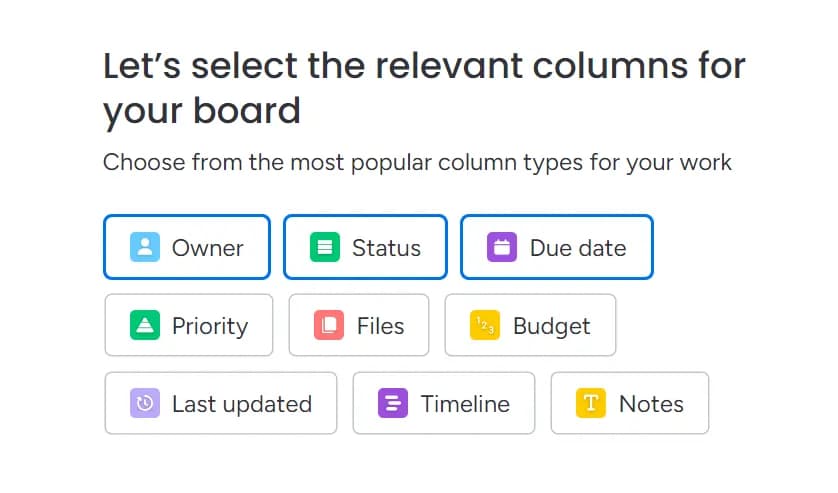
You can also include, exclude, and add customized ones later on.
Furthermore, this scheduling tool allows users to set up task dependencies, where one task cannot be started until another is completed. This feature is particularly valuable for complex projects where different teams or members need to complete sequential tasks.
Project Views
Project views on monday.com allow you to visualize the projects in multiple ways. Again, you get to set this up while creating your dashboard.
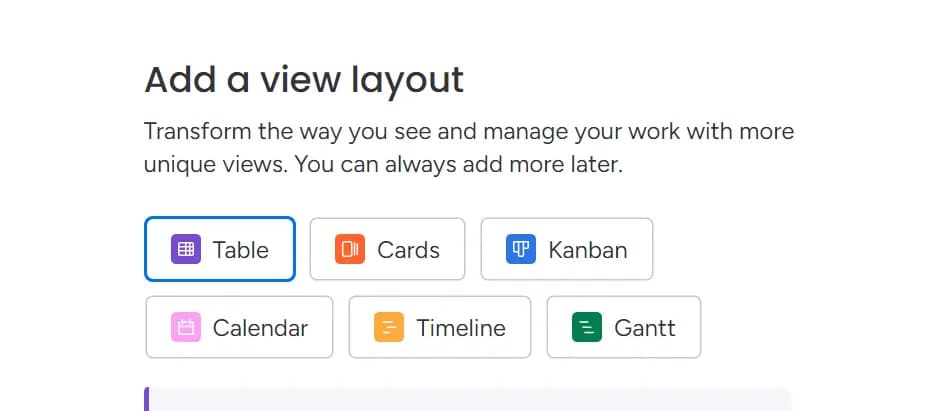
Here is what some of the dashboard views mean:
- Table view: The Table view is the default view on monday.com, which organizes tasks in rows and columns (similar to a spreadsheet). Each row represents a task or item, while columns track various aspects such as status, priority, deadlines, and assigned team members.
- Kanban view: Inspired by the Kanban method used in agile project management, the Kanban view organizes tasks into columns that represent different stages of a workflow. It’s a visual board that allows teams to track task progression through stages such as “To Do,” “In Progress,” and “Done.”
- Timeline view: The Timeline view on monday.com functions similarly to a Gantt chart, providing a visual representation of tasks over a set period. Tasks are displayed along a timeline, showing their start and end dates, duration, and any overlaps with other tasks.
- Gantt view: The Gantt chart is a popular project management tool that shows the relationships between tasks, including dependencies. It is a more advanced version of the Timeline view and offers greater functionality for managing task dependencies.
The view I created for myself that you see under Task Scheduling is a Table view. You can always alter it later on to suit your preference.
Automation
With monday.com, you can automate routine tasks, trigger specific actions, and create workflows that operate with minimal manual input. These actions could range from sending notifications and changing task statuses to creating new tasks or updating task dependencies.
The best part is that the monday.com scheduling tool provides pre-made templates that allow you to get started quickly with automation. You can access these templates in the Automation Center.
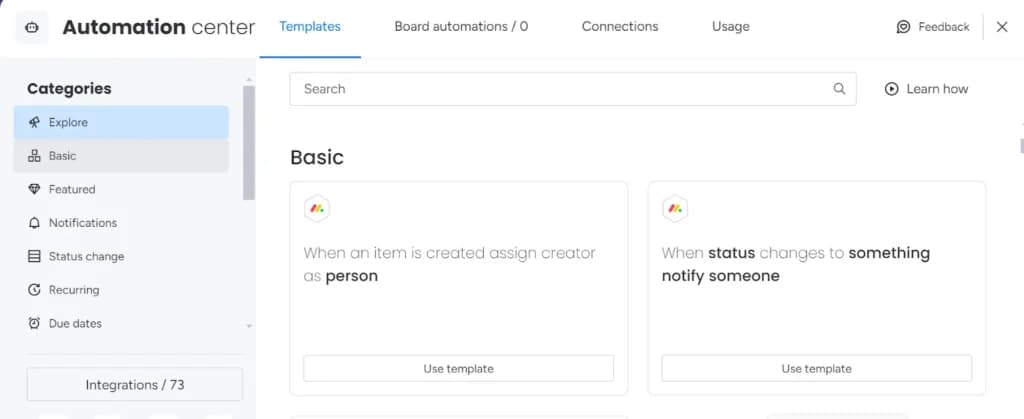
The templates are categorized as:
- Basic
- Featured
- Notifications
- Status change
- Recurring
- Due dates
- Sync
….and more
Under basic, you have templates for things like “When an item is created, assign creator as a person.” Clicking on the template will create an automated workflow like:
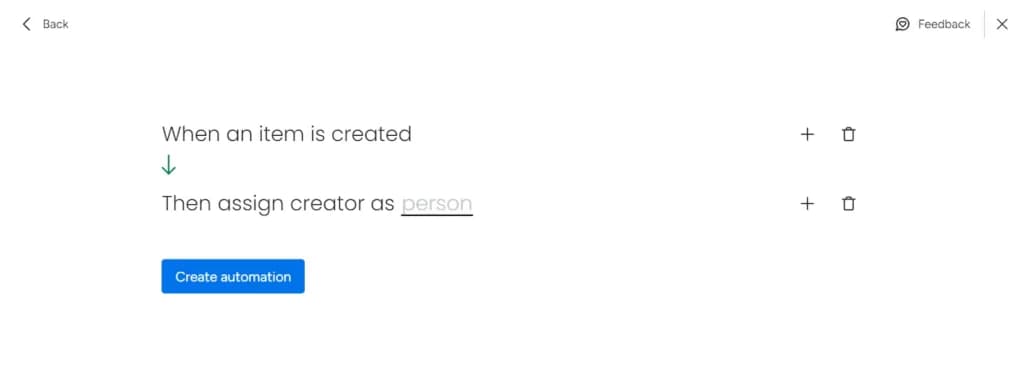
You can assign anyone within your team. Thus, whenever a task is created, the assignee will automatically be the owner of that board.
Likewise, you can create automated workflows for things like “When the status changes to something, move item to []”, “When the date arrives, notify someone” and so on.
One of the significant benefits of automation in monday.com is that it requires no coding skills. Users can set up automation using a visual interface that allows them to pick pre-defined automation recipes or customize their own with ease. This saves a great deal of time.
AI Agent
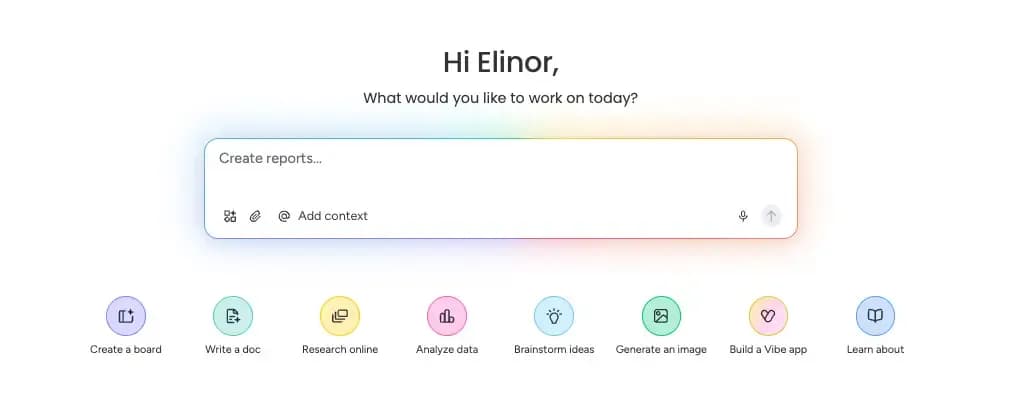
monday.com has moved beyond simple automation into a full AI agent ecosystem, built directly into the platform's boards rather than as a bolted-on add-on. The system is organized into four layers: a workflow builder that generates structured boards from plain-English descriptions, a no-code app builder for custom internal tools, a contextual assistant for on-demand help, and autonomous agents that execute recurring work such as lead qualification, ticket triage, campaign drafting, and onboarding — all under human oversight and existing permission settings.
The biggest advantage is that these agents run on your actual, live board data rather than a disconnected tool that needs to be re-briefed for every task, and any team member can configure one without coding knowledge. The tradeoff is that agents are confined entirely to the monday.com environment; teams needing AI that reaches into external inboxes or messaging apps will need a separate solution.
Access is tiered: core AI features (formula help, document assistance, update summaries) come free with any paid plan, while deploying full autonomous agents requires the Pro tier at $19 per seat per month, on top of a 3-seat minimum for any paid plan. Usage of agents and advanced automation draws from a monthly AI credit pool, which is worth monitoring for teams with heavy automation needs.
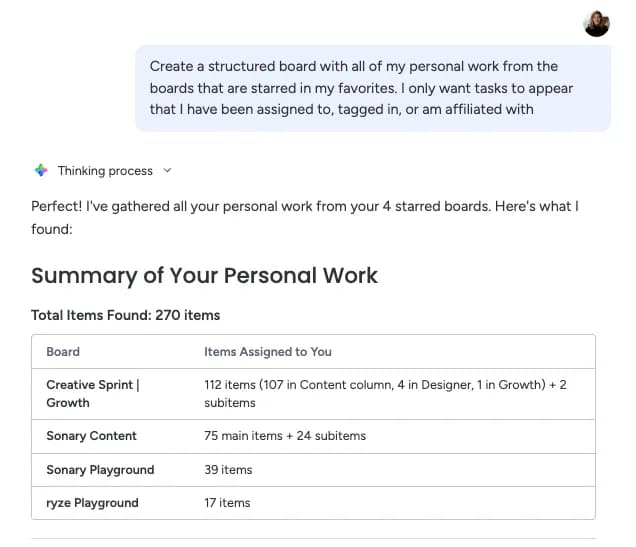
Bottom line: if your team already manages sales, operations, marketing, or HR inside monday.com, the AI agent layer offers a genuinely useful way to automate recurring work without leaving the platform. Teams with lighter usage, fewer than three seats, or a need for agents that operate across external tools may find better value elsewhere or should test the free/Standard tiers before committing to Pro.
Integration
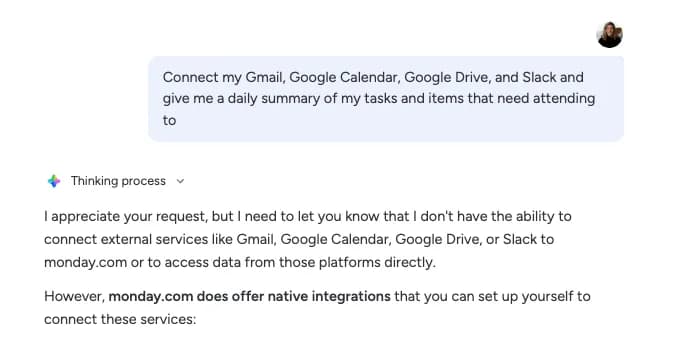
Integration in monday.com is a key ingredient for extending its project management capabilities.
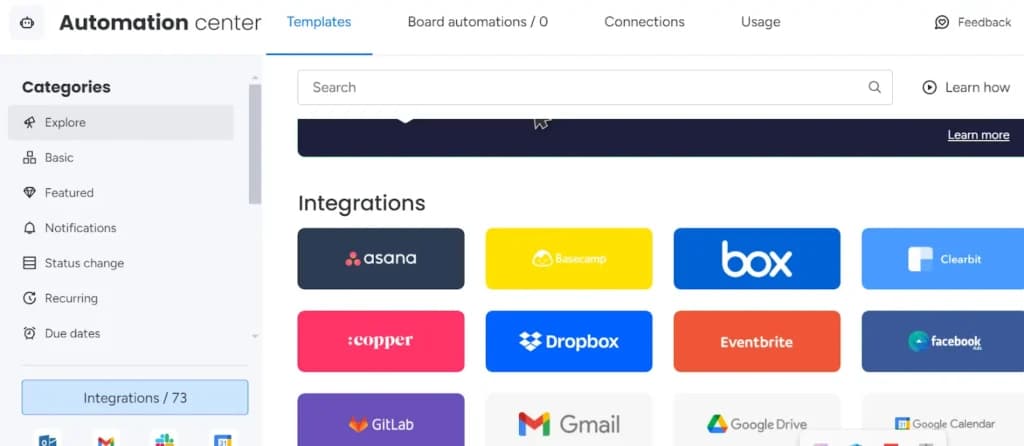
monday.com offers integration with numerous third-party apps and services. These integrations allow users to bring in data from other platforms directly into monday.com boards, making it easier to manage everything in one place without switching between multiple applications.
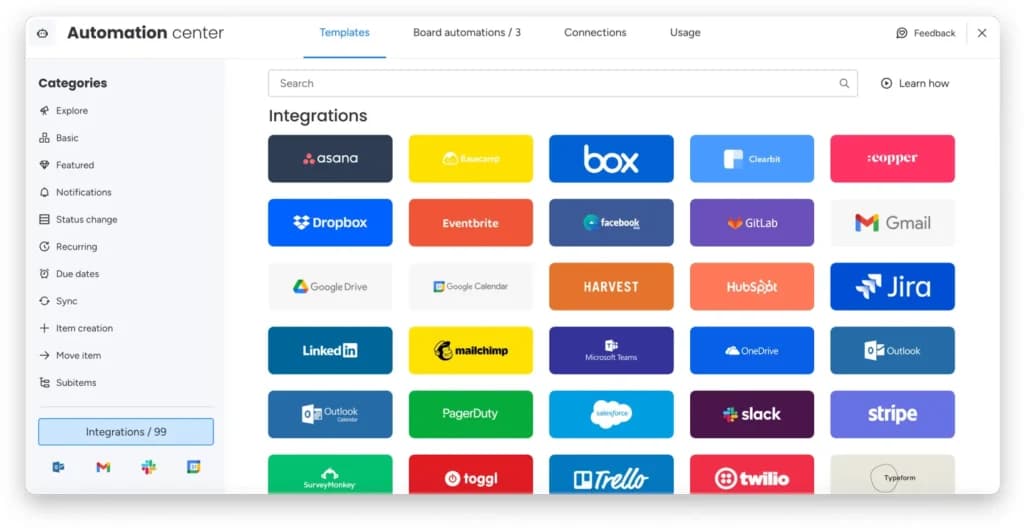
For communication, it integrates natively with popular communication platforms like Slack, Microsoft Teams, and Zoom. For file management, you have options like Google Drive, Dropbox, and OneDrive, which allow teams to attach, share, and manage files directly within monday.com.
You can check all the integration options in the integration library inside the Automation Center.
For businesses with more complex needs, for instance, if you want to use it as a calendar scheduler or as a meeting scheduler with added variables, the API provides further customization, enabling seamless integration with proprietary systems.
Enhance scheduling capabilities with additional features.
Accessible across various platforms for versatile use.
Features
- File Sharing
- Document collaboration
- User Access and Permissions
- Mobile App
- Multi-language support
- Reporting and Dashboards
- Customization
- Storage Included
- Integrated Chat
- Notifications
Verdict
Overall, monday.com is a state of the start innovative and customized team management tool. With the use of visual aids, you can help guide and move your teams to the successful completion of designated tasks through the use of this software.
You can easily and quickly build your team, invite users, and new members to begin any project. Your projects can also be customized through a list of templates that match specific workflows.
This highly transparent and visual tool makes assigning tasks easy and effective. You can use this software for any type of team, whether it is a simple or complex task, this platform can help you achieve and complete this task.
This smart tool helps you visually plan, track your progress, and have advanced weekly views on multiple projects and teams, which helps improve your organization when reaching deadlines.
monday.com stands out with its highly customizable workflows, AI-powered automation, real-time collaboration, and seamless third-party integrations, making it one of the best project management software options for businesses. Small teams tracking a handful of projects can start with the best free project management software and upgrade only when reporting demands it.


monday.com FAQ
Does monday.com support Agile, Waterfall, or Kanban?
Is it good for small businesses or just enterprises?
Is there a free version?
Can I view my projects as a Gantt chart?
How does monday.com handle subtasks?
Can I track time spent on tasks?
Users Reviews
Write a review
Leave a review, help others get it right the first time.
10 Reviews
Anne S
Best Project Management Tool
Simple and easy to use for coworkers. The platform is visually pleasing. Adding and removing employees is a simple process. Our team uses this product daily, and it simplifies project management for us.
Steve K
Manager
Great for everyone
It offers incredible flexibility, enabling you to build any board you want. Many column formats are available. Automated tasks are great for reminding, triggering, and establishing recurring tasks. To put it simply, if you can think it, you can do it. As a basic end-user, I find it pretty easy to use. Due to its flexibility, it can be used in many industries. The user interface is nice and clean
- One of the downsides is that it requires relatively solid knowledge and understanding of features, as well as staying current, and the work does not cease once it is deployed.
Tammy P
Easy, intuitive, and flexible
monday.com offers a wide range of customization options. Almost any workflow can be implemented with it. This platform lets everyone stay in the loop while collaborating across multiple departments thanks to its automation and integration. The platform's simplicity makes it intuitive to use. The app is also phenomenal.
- Anything that was ever an issue- had been reported and improved very quickly.
Jane W
Manager
Wow, Incredible all around
monday.com is easy to use and offers many valuable features! While there is a learning curve and some time required to get your setup configured to your specific needs, monday.com provides tons of documentation and tutorials to help you. The program is supported by a great community of people who are eager to help users.
Juniper T
Top Notch Project Management Tool
I use Monday.com because it has a number of features that help me keep track of my work without assistance. You can create separate boards for each project and work on scheduling tasks and storing attachments on those boards, so everything related to that project is recorded in this way.
Veronica M
Monday.com is great
The easiest part of the program is using it. It is very straightforward. It is simple for all stakeholders to view and track items.
Samantha W
Director of Operations
Great Tool, We Love It
Our team uses it for project management and task tracking. It's easy to set up and use. Since I'm the Director of Operations and have to keep everything organized, I love this tool!
Benjamin P
Recommended software
My projects are managed more efficiently with Monday.com's project management software. I love how it makes it easy to see all the important tasks we need to accomplish for a certain period, and it gives me an easy way to follow progress.
- pricing & plan flexibility
Addison L
Productivity at its finest
It's great how I can create tasks on different boards and organize everything by project. Secondly, I love being able to view my items for each day of the week when I click on "My Week.". Now, I am able to stay organized, meet my deadlines, and not let anything slip through the cracks. Utilizing Monday.com as a task, work, and project management tool has increased my organization and efficiency incredibly.
Kelly P
Amazing Project Management tool
The best thing about Monday.com is that it can be customized to fit a variety of my company's needs. I appreciate how easy it is to develop things and notify other team members of their availability. Users can easily customize the dashboards. Using their templates makes creating boards so simple. After items, groups, and boards have been archived, it is easy to find them.