

Last updated: September 2026
OnPay is a user-friendly payroll and HR platform designed to help businesses of all sizes manage their payroll, taxes, benefits, and other HR tasks in one place. The platform is cloud-based and offers real-time payroll processing, automatic tax filing, and direct deposit, saving businesses time and reducing the risk of errors. It also offers deep integrations with 3rd party software.
Plans & Pricing
- Unlimited monthly pay runs
- All tax filings and payments
- W-2 and 1099 workers
- Pay by direct deposit, debit card, or check
- Multiple pay rates and schedules
- Garnishments
- Unemployment insurance withholding
- Report designer with custom reporting
- Accounting and time tracking integrations (see below)
- Optimized for mobile
* Featured prices can be updated and free offers may include additional terms.
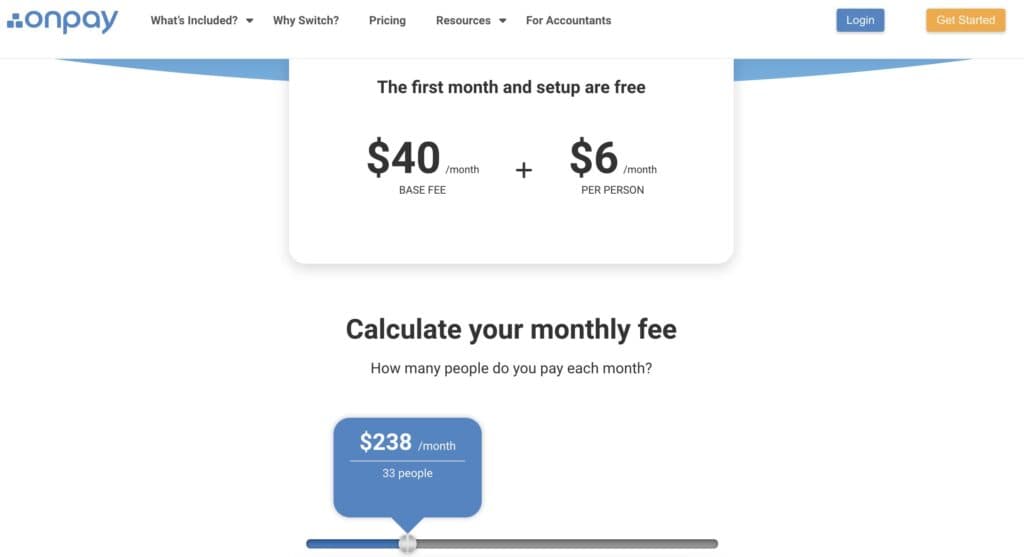
OnPay’s pricing plans are as straightforward as they come with $40/mo and $6 per person across the board. They even have a convenient fee calculator on their website:
Expert Score
Pros
- Free Migration & Setup
- Straightforward Pricing
- Exceptional customer support
- Deep integrations with multiple software
Cons
- Limited international support
Customer Support
OnPay offers customer support via phone and email from: 9 AM – 8 PM ET, Monday – Friday.
Email Support
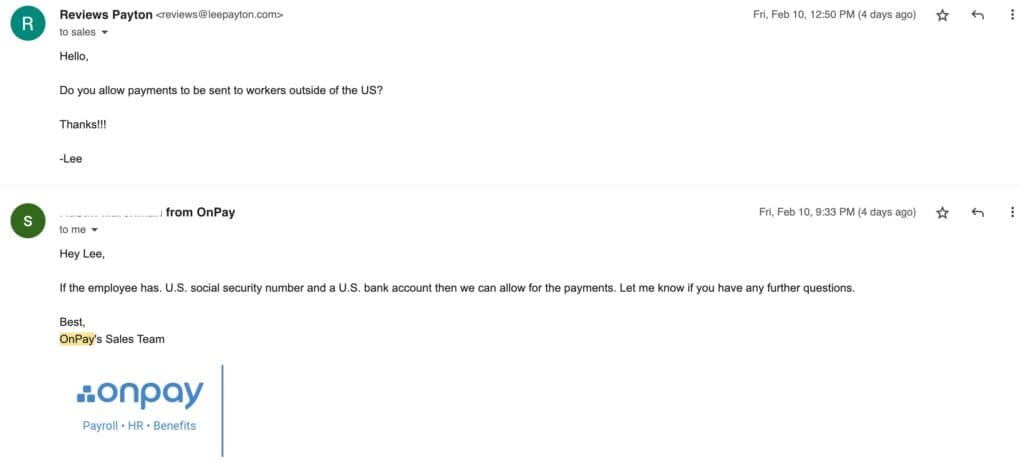
I sent a question to their support staff via email and received a reply within 8 hours. The representative answered my question directly with helpful information.
Live Phone Conversation
OnPay is known for its excellent customer service, and my brief phone conversation was pleasant, with no upsell attempts.
Online Resources
The website has a searchable Help Center that’s divided into categories and features an interactive map of the US for quick access to tax information. OnPay also has a dedicated YouTube Channel.
Overall Experience
My overall experience with their support options was very positive. The staff was helpful, answered all questions directly, and offered to guide me through the setup process.
Phone Support
During business hours
Replies within 3 hours
FAQ
Very comprehensive
Blog
On the website under Help Center
Video Tutorials
Dedicated YouTube Channel & Online Demo
Ease of Use
The OnPay initial sign-up was quick and easy. The user dashboard is clear and customizable, and the functions are easy to locate and use.
Setup of the Payroll Software
Click the video to see the full sign-up process and the information you’ll need to create an account:
Run Payroll
In this video, we take a look at the employer dashboard and run payroll:
Features & Functionality
Payroll Services
Automatic Payments
One of the best features as part of OnPay is the automatic remittance of payments. This goes for both 1099 contractors and W-2 employees. It covers local, state, and federal tax authorities without facing any extra charges. For the workers who are getting paid, they have the option to receive the funds through a paper check, direct debit, or through a direct deposit.
You will not have to pay extra for additional payroll runs during a given period or for payrolls that cover multiple states. Therefore, there is a seamless experience when it comes to running a payroll system no matter the size of your business.
HR
There are many great HR tools offered by OnPay through its package. This means that all of the important info for given workers will be available, such as the tracking of time worked and any time off.
You will have access to different types of HR templates, as well as reporting for new hires, and offer letters. You can customize this dashboard to your preferences. You can showcase tasks that are pending, requestion for vacation time, and the likes of day-offs for workers.
Accessibility
The OnPay platforms are very easy to access no matter where in the US you might be. This is because of the cloud-based system that has been used for the mobile and desktop offerings. All current versions of the popular web browsers are supported, with only some of the older Explorer versions perhaps having some minor issues to deal with.
COVID-19 support
As a result of the COVID-19 pandemic, a lot of businesses have been forced to deal with many payroll-related issues. There are pandemic tax codes and rules that have come into place relating to certain benefits.
OnPay has updated its entire offering to make sure that you can easily access any form of emergency regulations that you need. This covers the likes of paid leave through COVID-19 restrictions and tax deferrals.
OnPay offers single sign-on, an accountant dashboard, and 6 levels of permissions to keep data secure. You can also design custom payroll reports.
Some of OnPay’s automations include automated onboarding flows, E-signing, Online I-9 & W-4 forms, state new hire reporting, and custom personnel checklists.
For HR, OnPay offers document storage + personnel files, direct messaging, compliance audits, and an HR resource library.
Stay compliant with built-in tax management features.
OnPay connects more functionally than most platforms with popular 3rd party apps, including QuickBooks Online, QuickBooks Desktop, Xero, QuickBooks Time (formerly TSheets), Deputy, When I Work, Mineral (formerly Think HR), and PosterElite.
HR
There are a number of very good features associated with the OnPay HR software offering. As well as the simple all-in-one offering, there are numerous functionalities that will make your life a whole lot easier as a business owner or HR professional. Here are a few of the standout aspects:
All-In-One
A lot of companies require you to use separate plans in order to get access to both payroll and HR. This often leads to the costs each month adding up significantly. With OnPay, everything is covered under the same plan. This means that you are getting the most efficient package possible.
Everything integrates nicely with each other and you will be limiting the risk that errors will occur when transferring data. The cloud-based system also allows you to keep everything in one place without having to take up a lot of storage space.
Self-Service Capabilities
One of the key aspects of this offering sees you people able to empower your employees to do more when it comes to HR processes. Both full-time employees and contractors are able to easily access their own individual OnPay accounts.
This allows them to update their personal information, put in a request for some time off, as well as getting access to important documents and their pay stubs. This eliminates the time your HR team would usually spend having to manually respond to a lot of these requests.
Seamless Compliance
One of the most important aspects of HR and payroll is making sure that you are fully compliant. With changing rules and regulations, particularly if you are dealing with workers in different states, it is important that you have the capabilities to stay on top of everything.
With OnPay, there are regular compliance audits to make sure that your employees complete all key requests, such as signing recent HR documents or that they have fully completed their onboarding. There is also a free HR resources library that contains guides on all aspects of HR processes, including compliance checks.
Integrations & Add-Ons
OnPay has an all-in-one product plan, which means that there are not really any major add-ons available. In terms of integrations. OnPay will support a lot of the major third-party software offerings. This including accounting software like Xero, FreshBooks, and QuickBooks. You also can integrate popular software for time tracking, retirement, HR, compliance, and an array of business tools.
Monitor and manage employee attendance accurately.
Track and manage applicants efficiently during hiring.
Simplify payroll and tax management for employees.
Provide engaging and effective training solutions.
Flexible pricing options to suit diverse HR needs.
Implement HR tools across various environments with ease.
Features
- 401k Tracking
- FMLA Tracking
- Generation of pay stubs and reports
- Multi-Country
- Multi-State
- Calculate and pay employee salaries
- Compliance with state and federal tax laws
- Direct Deposit for Employee Paychecks
- Tracking of employee hours and overtime
- Update real-time employee information
Verdict
OnPay is ideal for businesses that want to streamline their payroll and HR processes but don't have the resources to manage these tasks in-house. Its pricing is straightforward at $40 per month & $6 per employee, and offers free setup and data migration to help you get running quickly. It also has award-winning customer service and is great for both simple and complex payroll needs with its deep integrations.
Click the video to see my closing thoughts:
https://www.youtube.com/watch?v=q5xqbIFVC58
OnPay’s deep integrations offer more comprehensive connections to 3rd part apps than most other payroll platforms.
Users Reviews
Write a review
Leave a review, help others get it right the first time.
8 Reviews
Derrick W
CFO
OnPay saves time and money
It is easy to enter weekly employee times and OnPay takes care of the rest which is exactly what we need to get things done!
- Customer support could be improved
Georgia E
Great Payroll Company
Super easy and fast to set up my company, the website is extremely user friendly and the service is impeccable
- -Super fast and easy to run payroll
- -Attentive staff to request and questions.
Gary P
Okay solution
simplicity of onboarding a client (or simply adding a business to Onpay). It takes a minimal amount of information and effort compared to other payroll software I've used
- -some browser issues when onboarding client employees
Ada J
Payroll Controller
Affordable Payroll & All-in-one
Onpay has good customer service. Their rates are very attractive, probably the best rates I have seen so far. All in all we are very pleased with the service
- Nothing to dislike so far
Daniel J
Great price easy to use
I have been using OnPay since December and have had no issues thus far. Great price compared to bigger payroll companies.Easiest interface
Barry W
Financial Manager
#1 Payroll System available!
From the beginning the whole team has been extremely helpful. We are happy we started to use Onpay. Best experience thus far
- -Ease of use
- -Price point
- -Assistance from customer support
Diane K
OnPay is Awesome
OnPay and their platform is outstanding. The Quickbooks integration is super beneficial for us. Tax filing, benefits administration, all in one place and accessible at all times
- - Customer service is impressive.
Julia T
Onpay is the way!
Onpay has been our got to for payroll for the past 2 years and we are so happy with their services. From their friendly customer support to the actual interface- we are very happy we made the switch
- -Great user interface
- -Customer Support