
QuickBooks vs FreshBooks: Which Is Best for Your Business in 2026?

Choosing the right accounting software is one of the most important financial decisions a small or mid-sized business (SMB) can make. Your accounting tool doesn’t just track income and expenses — it shapes how you manage cash flow, handle invoices, and understand your business performance.
Two names dominate this space: FreshBooks and QuickBooks Online.
Both are cloud-based accounting platforms built for SMBs, but they represent different philosophies:
- FreshBooks focuses on simplicity and client-facing billing.
- QuickBooks Online focuses on depth, scalability, and full accounting control.
This guide breaks down their pricing, features, and usability so you can choose the one that fits your business best.
TL;DR: quick decision guide
- Choose FreshBooks if you’re a freelancer, consultant, or service-based business that wants simple invoicing, expense tracking, and automation without the complexity.
- Choose QuickBooks Online if you’re a growing SMB that needs payroll, inventory tracking, and advanced financial reporting.
- Key takeaway: FreshBooks is easier to use and cheaper upfront; QuickBooks is more powerful and scalable long-term.
Key points
Core difference:
FreshBooks is designed for ease of use and client billing, while QuickBooks is built for complete, professional accounting.
Ideal user:
FreshBooks suits freelancers and service-based SMBs; QuickBooks suits product-based or fast-growing companies that need advanced tools.
Pricing model:
Both use tiered subscriptions. FreshBooks is cheaper at lower tiers, while QuickBooks offers more functionality for larger teams.
Ease of use:
FreshBooks wins for simplicity. QuickBooks takes longer to master but delivers more power.
The bottom line for SMBs:
Choose FreshBooks for simplicity and automation. Choose QuickBooks for detailed control and scalability.
FreshBooks vs QuickBooks: a quick comparison
Criteria | FreshBooks | QuickBooks Online |
|---|---|---|
Best for | Freelancers and service-based SMBs | Product-based and growing SMBs |
Starting price | $19/month (Lite plan) | $30/month (Simple Start) |
Free trial | 30 days | 30 days |
Accounting type | Single-entry | Double-entry |
Invoicing | Beautiful and client-friendly | Functional but basic design |
Expense tracking | Excellent automation | Advanced reconciliation |
Payroll | Through integrations | Built-in (add-on) |
Mobile app | Intuitive and lightweight | Robust but denser UI |
Scalability | Ideal for solos or small teams | Built for multi-user growth |
What is FreshBooks?
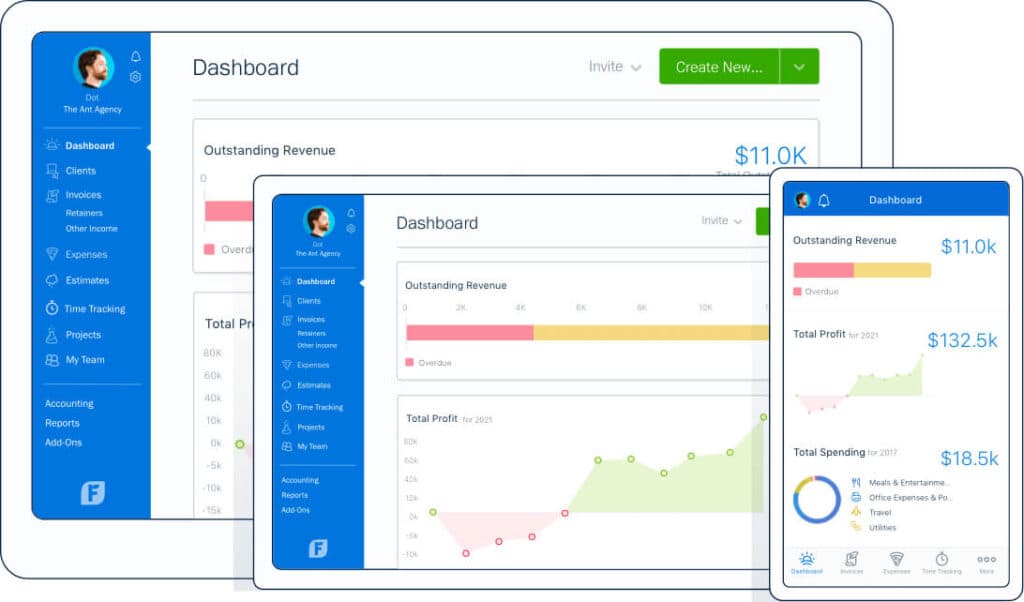
FreshBooks is a cloud-based accounting solution designed for non-accountants — especially freelancers, consultants, and agencies. It simplifies every step of the process, from creating invoices to tracking expenses and managing projects.
Its clean interface and automation tools make it ideal for business owners who want professional bookkeeping without a steep learning curve.
Pros
- Simple setup and intuitive dashboard
- Beautiful, customizable invoices
- Built-in time and project tracking
- Recurring billing and automated reminders
- Outstanding customer support (real humans, 24/7)
Cons
- Limited inventory and reporting tools
- No built-in payroll
- Fewer integrations than QuickBooks
- Scales less efficiently for larger teams
What is QuickBooks Online?
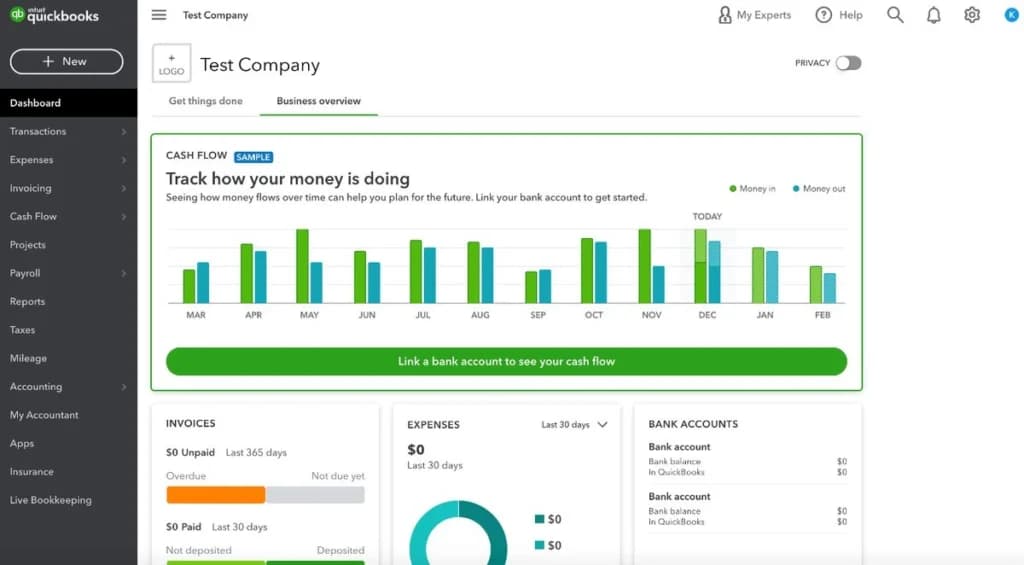
QuickBooks Online (QBO)is the leading small business accounting platform in the U.S. It offers full double-entry accounting, payroll, inventory tracking, and deep reporting.
It’s the go-to choice for businesses that want complete financial visibility and accountant collaboration.
Pros
- Comprehensive accounting with double-entry structure
- Detailed financial and tax reporting
- Built-in payroll and sales tax automation
- 750+ integrations across e-commerce, CRM, and HR tools
- Accountant-friendly and easily scalable
Cons
- Steeper learning curve
- Higher monthly cost at advanced tiers
- Occasional lag on large accounts
- Customer support can be inconsistent
Comparing core features: simplicity vs sophistication
FreshBooks is all about simplicity — automating tasks like invoicing, expense tracking, and time logging with minimal input. It’s built for service-oriented businesses.
QuickBooks, meanwhile, is more sophisticated — capable of handling payroll, purchase orders, inventory, and advanced reporting. It’s designed for businesses with more complex financial needs.
Feature | FreshBooks | QuickBooks Online |
|---|---|---|
Invoicing | Polished, branded templates | Functional but basic |
Expense tracking | Automated, easy categorization | Advanced reconciliation |
Time tracking | Built-in | Add-on required |
Project management | Yes | Limited |
Reporting | Basic P&L and tax reports | Advanced custom reporting |
Inventory | No | Yes |
Via integration | Native add-on | |
Multi-currency | Available on higher plans | Included |
Related Articles


Pricing and overall costs
Both offer subscription tiers, but FreshBooks is more affordable for small service-based businesses, while QuickBooks is the better investment for growing or product-based businesses.
Plan | FreshBooks | QuickBooks Online |
|---|---|---|
Entry | Lite: $19/month | Simple Start: $30/month |
Mid-tier | Plus: $33/month | Essentials: $60/month |
Advanced | Premium: $60/month | Plus: $90/month |
Enterprise | Select (custom pricing) | Advanced: $200/month |
💡Both offer 50% off for the first 3 months.
Example:
A solo consultant billing 20 clients a month will save money and time with FreshBooks Plus.
A retail business tracking inventory and employee hours will find QuickBooks Essentials or Plus indispensable.
Ease of use and onboarding
FreshBooks stands out for its simplicity. You can sign up, create your first invoice, and link your bank account in under an hour — no accounting background needed.
QuickBooks, while powerful, requires more setup. However, once configured, it provides unmatched control and collaboration, especially if you work with an accountant or bookkeeper.
Integrations and ecosystem
- FreshBooks:~100 integrations with apps like Asana, Gusto, Trello, and Shopify.
- QuickBooks: 750+ integrations covering payroll, CRM, e-commerce, and tax tools.
FreshBooks native integrations & built-in capabilities
- FreshBooks offers its own “Apps and Integrations” directory where you can connect multiple types of tools.
- It supports integrations for payroll, payments, CRM, time tracking, and more — directly or via third-party bridges.
- FreshBooks includes built-in time tracking, expense tracking, invoicing, estimates, project management, and reporting — features that give many small businesses a complete financial workflow without add-ons.
Notable third-party tools and integrations for FreshBooks
Because FreshBooks aims at flexible small-business workflows, many integrations are available. Examples include:
- CRM and client-management tools (for example, CRM platforms, client portals) to enrich FreshBooks’ basic client data.
- Productivity and project tools — useful if you deliver project-based or service-based work, linking time/expenses to invoiceable items.
- Payment and payroll / contractor-management integrations (for businesses that also manage staff or subcontractors).
- Automation and workflow tools (e.g. via platforms like Zapier) to connect FreshBooks with many other apps (email, spreadsheets, CRM, forms, etc.).
QuickBooks integrations
- QuickBooks Online integrates with over 800 apps across accounting, sales, e-commerce, payments, payroll, CRM, POS, inventory, and more.
- Thanks to this large ecosystem, businesses using QuickBooks can extend its capabilities greatly — essentially turning QuickBooks into a central hub for financial, sales, inventory, and operational data.
Examples of powerful integrations with QuickBooks
A few commonly used integrations (depending on business type):
- CRM and customer-management tools (e.g. CRM platforms that sync customer, invoicing, sales data into QuickBooks).
- E-commerce and sales-channel integrations (for example, tools that connect marketplaces or online stores so orders, proceeds, fees, and refunds automatically flow into QuickBooks) — helpful if you run physical product sales.
- Time tracking, payroll, and staff-management integrations — useful for service businesses or companies with employees.
- Inventory, order management, and supply-chain / purchase-order integrations — useful for retail or product-based operations.
- Automation engines — many integrations available via platforms like Zapier, to connect QuickBooks with internal tools, CRMs, forms, payment gateways, scheduling systems, and more.
Why QuickBooks’ ecosystem matters
- For growing small businesses, QuickBooks’ breadth allows you to scale operations without replacing your core accounting software.
- Centralizing financial data, sales, inventory, payroll, and operations in one system makes reporting, forecasting, and decision-making easier.
- Integration reduces manual data entry errors, saves time, and keeps books more up to date — which is especially valuable if you have multiple revenue streams (services, products, payroll, etc.).
If your business relies on multiple software platforms, QuickBooks offers more flexibility and automation.
Customer support
FreshBooks wins on customer support — known for quick, human responses 24/7.
QuickBooks offers multiple support options but relies more heavily on community forums and ticket-based help.
Use Case Analysis: Who Should Choose FreshBooks vs. QuickBooks?
✅ Choose FreshBooks if:
- You are a freelancer, independent contractor, or consultant whose business is built around selling your time and expertise.
- Your primary need is best-in-class invoicing; you want to create beautiful, professional invoices, proposals, and estimates to impress clients.
- You value a simple, user-friendly interface and want to manage your finances without a steep learning curve or accounting knowledge.
- You need seamless time tracking that integrates directly with your projects and invoices, allowing you to easily bill clients for your exact hours.
- Your business is service-based(e.g., marketing, legal, design, IT) and you don't need to manage physical inventory.
- You want simple expense tracking and rely heavily on a mobile app to snap photos of receipts and track expenses on the go.
- You need to manage client retainers or set up recurring invoices and automatic payment reminders to improve your cash flow.
✅ Choose QuickBooks if:
- You run a product-based business(like e-commerce, retail, or wholesale) and need robust inventory management to track stock levels, cost of goods sold (COGS), and purchase orders.
- Your accountant or bookkeeper uses QuickBooks, and you need an industry-standard chart of accounts for easy collaboration and tax filing.
- You are a growing small business that needs to run payroll internally, manage employee benefits, and pay 1099 contractors.
- You need comprehensive financial reporting, including detailed balance sheets, profit and loss statements, and cash flow management tools.
- You need to manage multiple users with different access permissions (e.g., giving an employee access to invoicing but not banking).
- Your business has to collect and remit complex sales tax from multiple states or jurisdictions.
- You need a highly scalable solution with deep integrations for e-commerce platforms (like Shopify or Amazon), CRM, and other advanced business apps.
Final verdict and recommendation table
Factor | Best choice | Reason |
|---|---|---|
Ease of use | FreshBooks | Clean, intuitive design built for non-accountants |
Customization | QuickBooks | Robust accounting tools and integrations |
Pricing | FreshBooks | Lower cost for small teams |
Reporting | QuickBooks | Comprehensive financial insights |
Invoicing | FreshBooks | Professional, branded templates |
Payroll | QuickBooks | Built-in and fully managed |
Customer support | FreshBooks | Accessible, human-first support |
Scalability | QuickBooks | Grows easily with your business |
Final thoughts
At its core, FreshBooks vs QuickBooks isn’t about which is better — it’s about which aligns with your business’s complexity and growth goals.
👉Choose FreshBooks if you want to simplify invoicing, automate payments, and keep your books clean without becoming a full-time accountant.
👉Choose QuickBooks Online if you’re ready to build a scalable, accountant-approved system that handles payroll, taxes, and detailed financial tracking.
FAQ: FreshBooks vs QuickBooks for small businesses
1. What is the main difference between FreshBooks and QuickBooks?
The main difference is their target user. FreshBooks is an easy-to-use invoicing and accounting software built for freelancers and service-based businesses. QuickBooks Online is a more comprehensive, all-in-one accounting platform designed for small to medium-sized businesses that need features like inventory management and complex tax support.
2. Which is easier to use: FreshBooks or QuickBooks?
FreshBooks is generally considered easier to use and is designed for users with no accounting background. QuickBooks is more powerful, but its wide range of features results in a steeper learning curve.
3. Is FreshBooks better for freelancers?
Yes. FreshBooks for freelancers is often the top choice because its core features are built around invoicing, client proposals, and time tracking, which are essential for service-based solopreneurs.
4. Which is better for small businesses: FreshBooks or QuickBooks?
It depends on your business type. FreshBooks is better for service-based small businesses. QuickBooks is better for product-based businesses (e-commerce, retail) or any small business that needs robust, full-featured accounting.
5. Which software is better for inventory management?
QuickBooks Online is the clear winner for inventory management. It offers built-in features to track stock, cost of goods sold, and purchase orders. FreshBooks does not have strong inventory features.
6. Which is cheaper: FreshBooks or QuickBooks?
FreshBooks often has a lower-cost entry point, making it cheaper for freelancers who just need simple invoicing. QuickBooks plans can be more cost-effective as your business scales, offering more features and users for the price.
7. Does FreshBooks or QuickBooks have better invoicing?
FreshBooks is renowned for its invoicing features. It offers highly professional, customizable templates, payment reminders, and is exceptionally user-friendly for billing clients.
8. Which has better time tracking for billing?
FreshBooks has excellent, seamlessly integrated time tracking. You can easily track hours per project and add them directly to a client's invoice, making it ideal for billing by the hour.
9. Which software has more app integrations?
QuickBooks has a much larger and more extensive app ecosystem. It integrates with hundreds of third-party apps for payroll, e-commerce (like Shopify), CRM, and payment processing.
10. Can I switch from QuickBooks to FreshBooks?
Yes, you can migrate from QuickBooks to FreshBooks (or vice versa), but it is a complex technical process. It is highly recommended to hire an accountant to ensure your financial data is transferred accurately.