

FreshBooks Review 2026: Accounting Software, Online Invoicing, Bookkeeping, Accounts Payable, Accounts Receivable
Overall Rating
4.4
Last updated: October 2026
For this review, I tested FreshBooks across its full platform: invoicing, expense tracking, time tracking, bookkeeping, accounts payable and receivable, and project management. It's the most intuitive cloud accounting solution I've reviewed for freelancers and service-based small businesses. Is FreshBooks worth it? If you bill clients by project or time and need clean, professional invoicing without an accountant, yes, it handles the financial side of a services business better than any comparable tool I've tested. Plans start at $19/mo (Lite). If you're a freelancer, consultant, or small agency, FreshBooks is purpose-built for you.
Freshbooks has accounting software that saves time without sacrificing professionalism. Their easy financial record keeping, unique invoice templates, and flexible business model make it easier for businesses of any size to grow efficiently. Over 30 million people have used Freshbooks.
Plans & Pricing
30-day FREE trial
- Send unlimited invoices to up to 5 clients
- Track unlimited expenses
- Send unlimited estimates
- Get paid with credit cards and bank transfers
- Track sales tax & see reports
- Access anywhere on iOS and Android
30-day FREE trial
- Send unlimited invoices to up to 50 clients
- Automatically track expenses
- Send unlimited estimates and proposals
- Get paid with credit cards and bank transfers
- Set up recurring billing and client retainers
- Run business health reports
- Double-entry accounting reports
- Invite your accountant
- Access anywhere on iOS and Android
- Mobile mileage tracking
30-day FREE trial
- Send unlimited invoices to an unlimited amount of clients
- Track Bills, Bill Payments & Vendors with Accounts Payable
- Track project profitability
- Customize email templates & signatures
- Automatically track expenses, send late payment reminders & bill late fees
- Send unlimited estimates & proposals
- Credit cards & bank transfers, checkout links
- Set up recurring billing & client retainers
- Run business health, financial & accounting reports
- Invite your accountant
* Featured prices can be updated and free offers may include additional terms.
FreshBooks offers four tailored plans designed to cater to freelancers, small businesses, and larger teams, all at competitive and flexible pricing:
Lite
- Best for freelancers and solo entrepreneurs.
- Key features include professional invoicing, expense tracking, time tracking, and basic reporting.
Plus
- Ideal for growing businesses that need more tools for managing clients and finances.
- Includes advanced features like automated recurring invoices, double-entry accounting, and project management.
Premium
- Designed for businesses with larger needs.
- Offers advanced reporting, unlimited billable clients, and robust time-saving automations.
Select
- Tailored for high-volume businesses or enterprises.
- Provides a dedicated account manager, customized workflows, and premium customer support.
FreshBooks regularly offers promotional discounts and a 30-day free trial to help businesses get started risk-free.
Is FreshBooks Worth It for Freelancers and Small Businesses in 2026?
Yes — for service-based businesses and freelancers, FreshBooks is the most purpose-built accounting platform I've tested. Here's how each area performs:
- Accounting & Financial Management: Clean double-entry accounting with an interface that doesn't require accounting knowledge to use. Bank reconciliation, profit & loss reports, balance sheets, and tax preparation included. I found it significantly more accessible than QuickBooks for non-accountants.
- Online Invoicing: Best-in-class invoicing in its category: customizable templates, automatic payment reminders, recurring billing, late fees, and real-time open/viewed tracking. Clients can pay via credit card, ACH, or Stripe directly from the invoice.
- Expense Tracking: Connect bank and credit card accounts for automatic expense import. Snap receipts via the mobile app. Expenses auto-categorize for tax purposes, which is useful at year-end and for quarterly estimates.
- Time Tracking: Built-in time tracker that converts tracked hours directly into invoice line items — a key differentiator for hourly and project-based billers. I tested it across desktop and mobile; both sync reliably. Teammates can also log time against shared projects.
- Accounts Payable & Receivable: Manage vendor bills (AP) and client payments (AR) in one place. Cash flow reporting keeps overdue balances visible. Not as deep as a full AP automation tool, but covers the basics cleanly for small teams.
- Project Management: Basic project collaboration: task management, team messaging, file sharing, and project profitability tracking. Not a replacement for a full PM tool like ClickUp, but well-suited for tracking deliverables and time per client project.
Expert Score
Pros
- Easy recurring invoices
- Excellent custom invoicing
- Competitive plan pricing
- Award-winning customer support
Cons
- High cost per user
- Manual balance sheet generation
Customer Support
FreshBooks is known for its award-winning customer support team. Their phone support is available Monday-Friday from 8 am - 8 pm EST. You can also contact them via email at any time. FreshBooks also offers a blog and an FAQ section on their site. Plus, YouTube has plenty of Freshbooks tutorials and walk-through videos. Overall, FreshBooks’ customer support is excellent. Additional customer support: Blog FreshBooks blog covers general accounting and small business subjects, as well as FreshBooks-specific topics.
Phone Support
Phone support is available 8 am - 8 pm EST during the week
Email FreshBooks a question to open a ticket
FAQ
FreshBooks has an extensive library of FAQs
Video Tutorials
You can find more FreshBooks help videos on YouTube
Ease of Use
FreshBooks was designed to help beginners handle their bookkeeping with ease. It manages to pack a lot of features into a sleek and simple interface. You can see a simple yet comprehensive overview of your business’s finances in the dashboard for fast decision-making, thanks to an array of charts. Getting started is quite easy, as you only need your email and a password to make an account. Once you confirm your email, you can dive right in.
Features & Functionality
Accounting Software
Recurring Invoices
Recurring invoices make it easy to collect payments from routine clients. For example, if you’re a freelancer, recurring invoices help get you paid on your retainer contracts.
Automatic Late Payment Reminders and Fees
FreshBooks offers a few late payment features to ensure you get paid on time for your work or the products you sell. Automatic late payment reminders make it so you don’t have to track your invoice deadline manually. However, if your client or customer doesn’t pay by the deadline, you can toggle automatic late payment fees.
Custom (and Easy) Invoicing
FreshBooks allows for a large degree of invoice customization to reflect your brand. You can even change the currency and language if you’re working with customers or clients in different countries.
Plus, if you often send similar invoices, you can just duplicate old invoices and tweak the numbers slightly.
Deposits
FreshBooks lets you accept deposits from clients so you can get paid upfront for your hard work.
Estimate Management
Quoting your clients a price takes time, but FreshBooks makes this much faster. You can add vendors, services, discounts, and more with a few simple clicks.
Accessibility
FreshBooks is available in the cloud. You can access it via the web on your computer or via your phone by using the Freshbooks iOS or Android apps.
- Automatic expense categorization.
- Upload and manage receipts through the mobile app.
- Real-time expense tracking to monitor cash flow.
- Tax-friendly reports for easy filing.
- Track tax-deductible expenses to maximize savings.
- Supports double-entry accounting for accuracy.
- Recurring invoicing and automatic payment reminders.
- Auto-billing for retainer-based clients.
- Automatic expense tracking
FreshBooks Plus and Premium allow you to add Advanced Payments — a feature that lets you proactively charge your client’s credit card if they provided it to you — for $20/mo. Select subscriptions may add Advanced Payments automatically.
- Integrates with over 100 third-party apps, including Stripe, PayPal, G Suite, and Trello.
- Offers robust project management tools for tracking tasks and team collaboration.
Additionally, FreshBooks integrates with numerous other applications, such as Stripe, Zoom, Expensify, Hubspot, Bench, Acuity, Calendly, Shopify, G Suite, and more. Paypal is only available for importing transactions — not for payment processing.
FreshBooks is compatible with:
- Windows
- Mac
- Android
- iPhone/iPad
- Web-Based
Online Invoicing
Custom, Easy Invoicing
FreshBooks might offer plenty of accounting and finance functions, but where it really shines (aside from pricing) is its invoicing.
FreshBooks allows for a large degree of invoice customization to reflect your brand. You can even change the currency and language if you’re working with customers or clients in different countries.
Plus, if you often send similar invoices, you can just duplicate old invoices and slightly tweak the numbers.
Recurring Invoices
Many types of businesses have arrangements with clients or customers that involve recurring revenue. Usually, these companies would have to create a new invoice every week/month/quarter to get paid, but not with FreshBooks’ recurring invoices.
Recurring invoices make it easy to collect payments from these routine clients and customers. For example, freelancers with retainer agreements with their clients can automate their monthly income by setting up recurring invoices in Freshbooks.
Automatic Late Payment Reminders and Fees
Sometimes, your customers and clients need a bit of a nudge to pay on time. That might be a payment reminder or, depending on your contract, a late fee.
Fortunately, FreshBooks offers some late payment features to ensure you get paid on time. Automated late payment reminders make it so you don’t have to track every invoice.
But what if your client or customer doesn’t pay by the deadline?
With other software, you’d have to charge the customer or client manually. But with FreshBooks, you can toggle automatic late payment fees.
Deposits
Plenty of service businesses collect deposits to get a client to “commit” to working with them, to hold said clients’ spot, and to protect themselves in case of non-payment. Some people collect half up-front, while others collect the full payment as a deposit before starting.
Regardless of how you collect deposits, FreshBooks lets you accept these from clients so you can stay protected and continue to thrive.
Time Tracking
FreshBooks has an excellent time tracking tool that is easy to use and can be turned on anywhere you have an Internet connection.
What’s even better, though, is that you can add your tracked time (and expenses) to your invoices with a few button clicks. That way, you’ll get paid accurately for the hard work you performed.
Process payments seamlessly with integrated systems.
Track time spent on projects for accurate billing.
Available on multiple devices for accessibility.
Affordable pricing to fit varied business needs.
Bookkeeping
Automated Bank Reconciliations
Reconciling your books with the bank regularly eats up time — yet all you’re doing is making sure numbers match up. You could spend that time better on mission-critical projects if you could somehow automate your bank recs.
FreshBooks lets you do that. Once you import transactions from your bank, FreshBooks suggests transaction matches that you can approve with one click or edit in case there are errors.
You can create a summary report for these and export it to Excel as well.
Billing and Invoicing Features
FreshBooks is best known for its wealth of invoicing features, especially its invoice customization. You can change the currency and language if you’re working with customers or clients in different countries.
Additionally, you can create recurring invoices to collect payments from routine clients or customers. For example, freelancers can use this feature to automate payment collection on retainer contracts.
Lastly, FreshBooks lets you set automated payment reminders and toggle automatic late fees if your clients/customers don’t pay on time.
Accounts Payable
Freshbooks isn’t just great for getting paid — it also helps you track what you owe to others. You can view bills you owe for a much easier bookkeeping experience on the accounts payable side of things.
Accountant Access
Do you have an accountant that needs to access your software for tax purposes? Or perhaps you have a bookkeeper keep your accounting records straight for you?
Fortunately, FreshBooks offers accountant access for all plans above Lite. You can add or revoke accountant access as needed.
Reporting/Analytics
Freshbooks offers you the ability to generate several types of reports, such as Profit and Loss statements, accounts agin reports, tax summaries, expense reports, invoice details, and more. You can sort and filter by various factors to get the exact data you need.
You can save these reports, export them to Excel, and even print them out to keep a hard copy.
Simplify and optimize tax filing with expert features and tools.
Automate repetitive tasks to improve efficiency and productivity.
Plus and Premium let you add Advanced Payments — a feature that lets you charge your client’s stored credit card ahead of time — for $20 per month. Customers on Select get it for free. FreshBooks also offers Gusto Payroll on its pricing page as an add-on, although you’ll have to see Gusto pricing to determine how much you’ll pay. FreshBooks integrates with numerous other products, such as Acuity, Bench, Calendly, Stripe, Zoom, Hubspot, Shopify, G Suite, and more. Paypal is only available for importing transactions — not for payment processing. Lastly, you can hire a bookkeeper through Freshbooks. Pricing is customized to your business, but it’ll likely be a more significant investment than doing things yourself. Still, the time saved and expertise gained might be worth it for some businesses.
Access and use on a variety of compatible devices.
Flexible pricing structures tailored to different needs and budgets.
Plus and Premium let you add Advanced Payments — a feature that lets you charge your client’s stored credit card ahead of time — for $20 per month. Customers on Select get it for free.
FreshBooks also offers Gusto Payroll on its pricing page as an add-on, although you’ll have to see Gusto pricing to determine how much you’ll pay.
FreshBooks integrates with numerous other products, such as Acuity, Bench, Calendly, Stripe, Zoom, Hubspot, Shopify, G Suite, and more. Paypal is only available for importing transactions — not for payment processing.
Lastly, you can hire a bookkeeper through Freshbooks. Pricing is customized to your business, but it’ll likely be a more significant investment than doing things yourself. Still, the time saved and expertise gained might be worth it for some businesses.
Accounts Payable
They have automatic payment recording and automatic expense recording which is great to have all the data collected in one place without the user having to manually add it on their own. FreshBooks has fast bank depositing as well which helps keep you cash flow positive. Another great feature they have is automatically sending late payment reminders and fees to your clients.
Account Dashboard
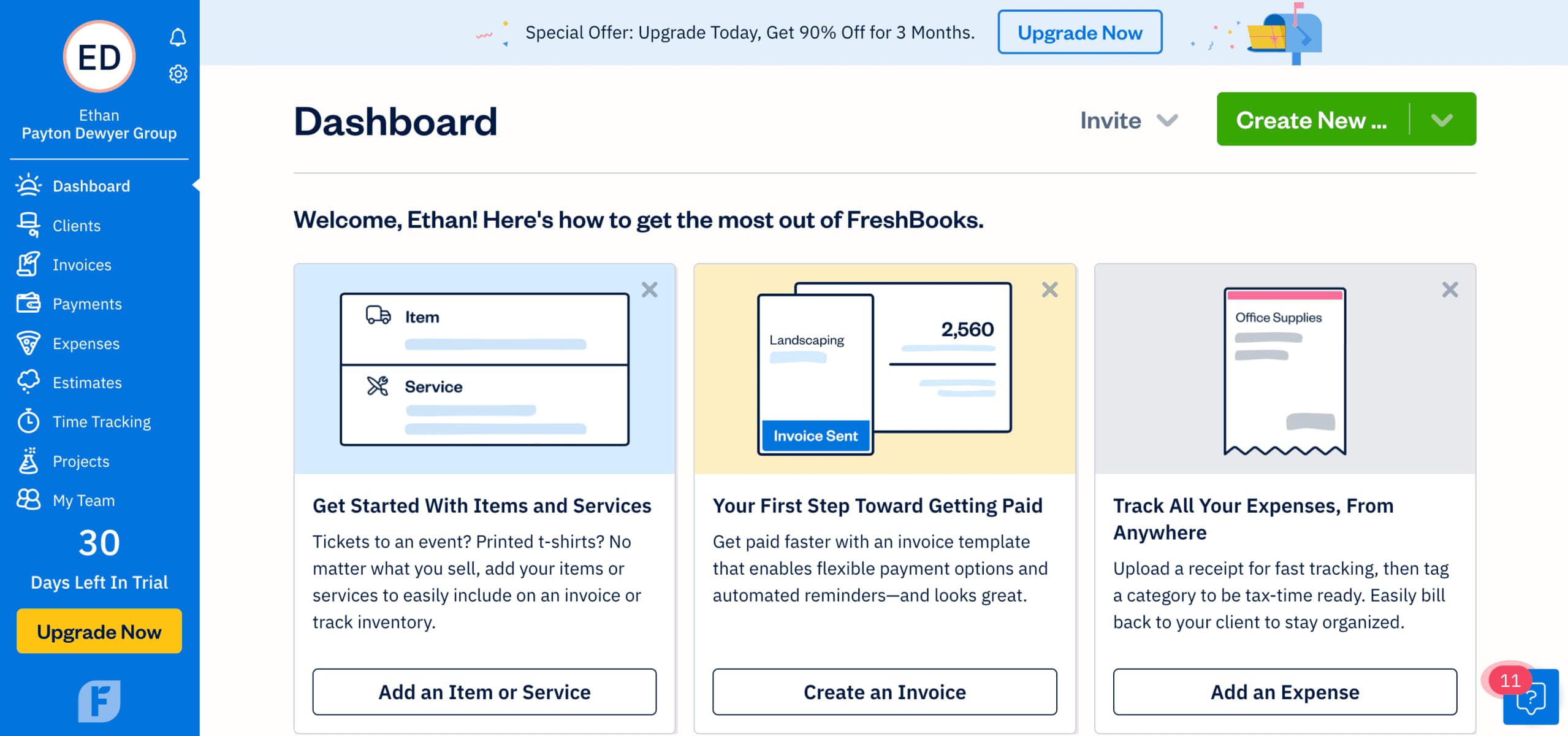
FreshBooks Account Dashboard is very user-friendly and easy to navigate. On the dashboard's home page, you have links to create invoices, add an expense, add an item or service, clients, payments, estimates, and much more.
Integrations
FreshBooks has over 100 mobile applications integrated into their accounts payable software. The dashboard is very user-friendly and their features are easy to locate and use. They also have a well-developed software to create invoices.
FreshBooks has all the basic features for payments including credit cards, invoices, billing payments, and expense payments. FreshBooks automatically tracks all cash flow through your business and they'll send automatic payment reminders to clients.
You can set up payroll for your employees. Invoicing is also very simple with their integrated software. You can accept or make payments in multiple currencies. FreshBooks will also allow you to issue full or partial refunds straight from your account.
Invoice Importing
You can import receipts, digital invoice documents, and printed receipts. The software will pull data from uploaded documents. The process is easy and can be accessed right from the dashboard's main screen.
Video for uploading receipts on a mobile app for data pull:
https://www.youtube.com/watch?v=hdl16ktRIc4
Gain insights with detailed reports and real-time analytics.
Accounts Receivable
Comprehensive tools for capturing, editing, recording, sharing, and collaborating to efficiently manage financial workflows.
FreshBooks offers various automation features such as creating invoices and receiving payments through multiple methods including credit and debit cards, ACH transfers, Stripe, and PayPal. The industry-standard credit card processing fee is 2.9% plus 30 cents per transaction.
FreshBooks provides double-entry accounting reports, the option to invite an accountant, and the ability to establish recurring billing and client retainers.
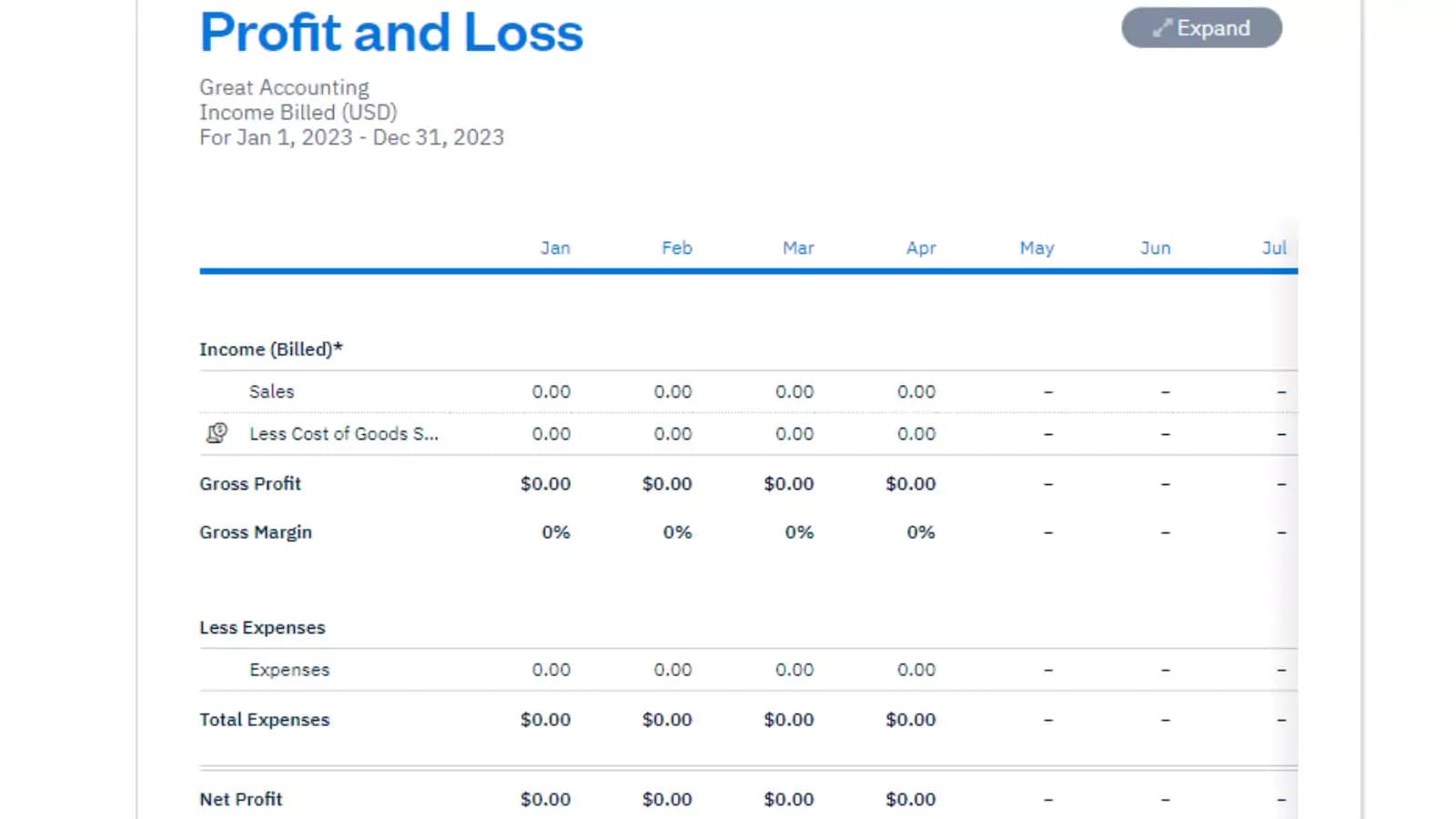
FreshBooks helps users monitor their business operations by providing detailed reports, timely, cloud-based invoicing services, while accepting multiple forms of payment. The software utilizes automation and online payments which can also increase profitability as a long-term strategy.
FreshBooks has various add-on capabilities, such as FreshBook Payments (allowing users to get paid faster through credit card payments), FreshBook Select, which is designed for growing businesses that can benefit from specialized services, and FreshBook Teams which allows for more functionality when managing people and projects. It also has integrations such Gusto for a fully integrated payroll and Bench for bookkeeping.
Features
- General Ledger
- Bookkeeping
- Manages Accounts Payable/Receivable
- Income & Expenses Tracking/Management
- Account Reconciliations
- Financial Reporting
- Receipt Scanning
- Invoicing
- Record Expenses
- Generate Invoices
FreshBooks Alternatives
Starting from: $2.30/month
Lite
$2.30
seat/month
Pros
- Easy recurring invoices
- Excellent custom invoicing
- Competitive plan pricing
- Award-winning customer support
Cons
- High cost per user
- Manual balance sheet generation

Starting from: $128.67/month
Pro Accounting
$128.67
seat/month
Pros
- Create separate profiles for your employees and accountant
- Send clients invoices directly from the dashboard
- Automatically backup and secure your data
Cons
- Limited customization
- No payroll processing features

Starting from: $0/month
Free
$0
seat/month
Pros
- Robust and secure cloud-based software
- Customizable and intuitive dashboard and reports
- Numerous integrations
- Full desktop and mobile access
Cons
- Lack of 24/7 customer phone support (except for Advanced)
- Payroll costs extra
- Learning curve
Verdict
After testing FreshBooks across its plan range, I found that it delivers on its core promise: clean, professional financial management for businesses that bill for time and services. The invoicing experience is best-in-class, the time-to-invoice workflow saves meaningful hours for project-based teams, and the interface is genuinely approachable for non-accountants. Theonly tradeoff is that it's optimized for service businesses, so product-based businesses with inventory needs should look at QuickBooks or Zoho Books instead.
What works well
✓ Best-in-class invoicing: Customizable, automated reminders, and real-time open tracking
✓ Time tracking converts directly to invoice line items, which eliminates manual billing calculations
✓ Accessible interface that non-accountants can navigate without training
✓ Solid mobile app with expense receipt capture and time logging on the go
✓ Project profitability reporting ties financial data to individual client work
What to watch out for
✗ Not built for product-based businesses — no inventory management
✗ Payroll requires a third-party add-on (e.g., Gusto integration)
✗ Limited reporting depth compared to QuickBooks at higher plan tiers
✗ Lite plan restricts to 5 billable clients — active businesses will need Plus or Premium
Use FreshBooks if you are...
→ A freelancer, consultant, or agency billing clients by time or project
→ Running a service-based business that needs professional invoicing and expense tracking
→ Looking for accounting software that doesn't require accounting knowledge to use
→ Managing multiple client projects that need time tracking tied to billing
Skip FreshBooks if you are...
✗ A product-based business needing inventory management — consider QuickBooks or Zoho Books
✗ A larger team needing payroll included at base price — consider Gusto or QuickBooks
✗ An enterprise needing complex multi-entity accounting — consider NetSuite
Bottom line: FreshBooks is the right accounting platform for freelancers and service businesses — intuitive invoicing, reliable time tracking, and clean financials without needing an accountant. If you bill by time or project, it's the most purpose-built tool available.
Users Reviews
Write a review
Leave a review, help others get it right the first time.
11 Reviews

Mervis P
activism over quality
I had used freshbooks for years but cancelled due to a significant decline in service. I am not politically active myself, so to me, virtue-signaling activism is nowhere close to being as important as customer service.
Patty L
My accounts like it a lot
The functionality capabilities of the software suit the type of creative business I'm in and my accountants absolutely love it.
Robert J
7 years of FreshBooks
Not a bad software and can’t see us using something else, but the new look isn’t my fav.
- The software and its features show they understand the needs of small business needs.
- They forced me to move from my classic version to the latest one. I did not like that one bit.
Nina B
Account Manager
Freshbooks- Bookkeeping software every business needs
FreshBooks allows you to easily manage your bookkeeping and makes work more efficient and the software is financially affordable with a wide range of great features.
Brett M
Administration Manager
Every need-FreshBooks satisfies
This software has been the most complete solution for accounting, bookkeeping and invoicing of my company's bookkeeping processes, which gives me total control of all administrative processes quickly, easily and securely.
- -multiple and very useful functions
- -intuitive
- -affordable
Henry J
Account Manager
#1 for Bookkeeping!
We couldn't be happier with the software provided by FreshBooks.Super intuitive and its functions and features are exactly what we need in order to manage all of our bookkeeping processes. Hands down the best software we have used.
Gabrielle L
Integration capabilities
It integrates with all the other apps I use. Customers can save their credit cards for future payments.
Francis G
Sped up how fast I received payments
FreshBooks makes it easy for me to invoice and follow up with clients every month. Prior to signing up, I used Excel for invoicing and expense tracking. Overall, I’m happy with the software and service.
Jarred N
Administrator Accountant
Best online bookkeeping software!
FreshBooks provides me with all the tools for accounting and bookkeeping management of my company. I consider their software to be the best cloud-based bookkeeping software on the market to date.
- Cloud-based and has a wide range of amazing features essential to efficiency and productivity
Hannah B
Account Manger
Best in the business
Freshbooks is what I call the industry standard bookkeeping method that our accountants use and benefit from this greatly
- -Intuitive UI
- -Double-entry accounting
- -Delightful user experience
James D
Highly recommended for accounting and invoicing
I’ve been using Freshbooks for many years to handle my estimates, invoicing, and accounting. I have recommended Freshbooks to other business owners.