

QuickBooks Review 2026: Which Plan Does a Small Business Need?
Overall Rating
4.5
Last updated: September 2026
I've tested QuickBooks across its full suite: bookkeeping, invoicing, expense tracking, accounts payable and receivable, payroll, and tax prep, and it's up there with the most complete cloud accounting platforms I've reviewed for small and mid-sized businesses. Is QuickBooks worth it? If you need reliable financial management without a full-time accountant, yes, it automates the tedious stuff well. Plans start at $17.50/month; payroll is an add-on. If you've been running your business on spreadsheets, QuickBooks is the natural upgrade.
Quickbooks leads the way in cloud-based accounting software for small businesses by keeping it simple and effective. Everything your business needs is housed under its site and app. It is packed with features and integrations for automating aspects deemed too time-consuming.
Plans & Pricing
No credit card required
- Track income and expenses
- Send 2 invoices per month
- Run profit & loss report
- Chat support
- Track income & expenses
- Send unlimited custom invoices & quotes
- Connect your bank
- Track GST and VAT
- Insights & reports
- Progress invoicing
- For one user, plus your accountant
- 3 users
- Run enhanced reports
- Integrate third-party data into KPIs and dashboards
- Everything in Essentials plan, plus:
- Recurring transactions and bills
- Track inventory
- Track project profitability
- Manage budgets
- For five users, plus your accountant
- Everything in Plus plan, plus:
- Manage users (up to 25)
- Automate workflows
- Custom reporting fields
- Customise dashboards
- Customise role permissions
- Backup online & restore data
- Manage revenue recognition
* Featured prices can be updated and free offers may include additional terms.
* QuickBooks Plus went from $115 to $140/month on 1 Aug 2026.
QuickBooks offers four flexible plans designed to meet the needs of businesses of all sizes. Each plan comes with a range of features at affordable prices:
Simple Start
- Ideal for solo entrepreneurs and small businesses.
- Features include income and expense tracking, custom invoicing, bank connectivity, and GST/VAT tracking.
Essentials
- Best for growing businesses needing more advanced tools.
- Includes everything in Simple Start, plus bill management, time tracking, and multi-currency support.
Plus
- Designed for businesses that require inventory management and budgeting tools.
- Adds recurring transactions, inventory tracking, project profitability, and budgeting capabilities.
Advanced
- Tailored for larger businesses with higher operational needs.
- Includes all Plus features, with support for up to 25 users and advanced automation tools.
Each plan is priced competitively and provides essential features to streamline accounting, improve financial visibility, and grow your business.
Does QuickBooks Have a Free Accounting Plan?
If you are hoping to use QuickBooks without spending a dime, the quick answer is yes, but with some major fine print.
QuickBooks does offer a permanent QuickBooks Free plan, but it is stripped down to the bare essentials. It works fine if you are a solo freelancer who only sends a couple of invoices a month and tracks basic expenses from a single bank account. However, the limits hit quickly; you can't add team members, add your accountant, or manage bills and inventory.
If your small business is doing regular transactions, you will likely outgrow the free plan right away. In that case, your best bet is to take advantage of QuickBooks’ 30-day free trial for paid plans like Simple Start or Plus. That way, you can test out the full toolset without committing any money upfront.
Is QuickBooks Worth It for Small Businesses in 2026?
For small to mid-sized businesses that need cloud accounting, the answer is yes — with the caveat that payroll and advanced features require extra spend. Here's how each area performed in my testing:
- Bookkeeping & Accounts Payable/Receivable: QuickBooks handles core bookkeeping reliably — general ledger, bank reconciliation, AP/AR tracking, and automated expense categorization. I found the bank connectivity seamless across major institutions, and Intuit Assist's AI categorization significantly reduces manual entry.
- Online Invoicing: Customizable templates, recurring billing, automated payment reminders, and real-time payment tracking all included. Simple Start covers the basics well; Essentials adds multi-currency for international billing.
- Inventory Management: Available on Plus and above. Handles stock levels, purchase orders, and basic inventory tracking well, but businesses with complex multi-location or lot-tracked stock may hit its limits. Solid for most small retailers.
- Payroll: Not included in base plans — add-on pricing starts at $22.50/mo + $4/employee (Core). In my testing it covers full-service payroll, automated tax filing, and direct deposit well. Best when you keep payroll inside the QuickBooks ecosystem.
- Merchant Services / Payment Processing: Accepts cards, ACH, Apple Pay, PayPal, and Square. Payment data flows directly into the books, meaning no double-entry. Processing fees apply separately per transaction.
- Advanced Plan (Enterprise-Level Features): Up to 25 users, batch processing, workflow approvals, and 24/7 support. Reporting and analytics are notably stronger here. Best for teams that have outgrown the basic plans but aren't ready for a full ERP like NetSuite.
Expert Score
Pros
- Robust and secure cloud-based software
- Customizable and intuitive dashboard and reports
- Numerous integrations
- Full desktop and mobile access
Cons
- Lack of 24/7 customer phone support (except for Advanced)
- Payroll costs extra
- Learning curve
Customer Support
QuickBooks offers online chat and phone customer support 6am - 6pm PST during the week, and 6am - 3pm on Saturdays. Advanced plan users can access 24/7 support. Customer support is fairly responsive, although a few online have complained about reaching them. In addition to customer support, you can access all of QuickBooks’ educational resources, including FAQs, video tutorials, the QuickBooks blog, and the forums. Additional customer support: Blog QuickBooks’ blog is full of helpful information. Community Forum If QuickBooks’ resources can’t answer your question, you can ask it in the community forums.
Phone Support
Available 6am - 6pm PST during the week
Email QuickBooks a question, and they’ll get back to you shortly
24/7 Help & Support
Live chat support available 24/7
FAQ
A large FAQ library is available
Live Online Chat
Available 24/7
Video Tutorials
Tutorial videos available on QuickBooks site and YouTube
Ease of Use
QuickBooks’ interface can take a little getting used to, especially if you’re a beginner. Fortunately, Intuit offers an extensive library of video tutorials to guide you in setting up your account and using Quickbooks. Plus, you can find additional online help through third-party tutorials (like YouTube walkthroughs) because QuickBooks is so popular. Still, you can pay QuickBooks $50, and they’ll set up your account for you. With that said, QuickBooks has quite an intuitive interface. Once you familiarize yourself with the program, you should find it easy to navigate around it.
Performance
QuickBooks integrates seamlessly with bank accounts and offers real-time tracking of financial data. It automates repetitive tasks like categorizing expenses and scheduling payments. Advanced plans provide performance enhancements through powerful reporting and analytics.
Features & Functionality
Accounting Software
Business Insights and Reporting
You can generate succinct balance sheets, P&L statements, and other reports with the click of a button. You can also export reports as needed with ease.
Customer Quoting, Invoicing, and Payment Tracking
QuickBooks has a suite of quoting and invoicing features that make it easy to provide customers quotes, send custom invoices, and keep track of payments. You can set up recurring invoices, send payment reminders, track the status of specific client/customer payments.
QuickBooks lets you account for discounts, shipping, and taxes, making organization and recordkeeping easy.
Project Tracking
QuickBooks Plus lets you evaluate the potential profitability of individual projects for better decision-making. Since you can add up to five employees, multiple people can analyze the project.
Mileage Tracking
QuickBooks’ Self-Employed offers a mileage tracker so you can track and write off business miles.
This feature uses your phone’s GPS to track the distance traveled automatically. You can then categorize miles as personal or business as needed.
Mileage Tracking Tax Management, powered by TurboTax
Quickbooks Online has recently introduced a new feature that offers a streamlined and expert-assisted tax filing experience. It allows users to manage their books and prepare their taxes effortlessly, saving time and effort. It also provides access to expert help for tax returns and helps ensure accuracy.
The payment is low-risk and it only requires payment upon filing, and the cost starts at $169, making it a valuable, affordable, and effective tool for tax management.
- Automated expense categorization using AI.
- Link to bank and credit card accounts for real-time data.
- Detailed expense reporting and receipt capture via the mobile app.
- Customizable spending alerts.
- Automatic tracking of tax-deductible expenses.
- Integration with TurboTax for seamless tax filing.
- Sales tax tracking and reporting based on location and rates.
- Year-end tax reports and expert-assisted tax help.
- Recurring invoice scheduling and payment reminders.
- Auto-categorization of transactions.
- Batch processing of invoices and expenses in the Advanced plan.
- Workflow automation for approvals and custom processes.
QuickBooks offers payroll add-ons for an extra monthly fee. There are three plans:
- Core: Provides full-service payroll with automated payroll tax calculations, automatic payroll, health benefits services, garnishment and deduction management, next-day direct deposit, and reporting. $22.50/mo, then $45/mo, plus $4/employee/mo.
- Premium: Contains all Core features plus same-day direct deposit, worker’s compensation administration, an HR support center, expert setup review, and on-the-go time tracking. $37.50/mo, then $75/mo, plus $8/employee/mo.
- Advanced: Includes all Core and Premium features plus white glove custom setup, 24/7 support, on-the-go project tracking, Tax Penalty Protection, and a personal HR advisor. $62.50/mo, then $125/mo, plus $10/employee/mo.
QuickBooks supports integrations with numerous third-party products as well:
- Transaction importing from PayPal, Square, or your financial institution
- Sales and sales tax tracking for Shopify and other major e-commerce platforms
- Payment processing for POS or mobile card readers
- Accounts payable automation through Bill.com
- Payroll: Simplifies employee payments, tax filings, and benefits management.
- Payment Processing: Accepts cards, ACH, Apple Pay, and more.
- Time Tracking: Efficient employee time tracking with integrations.
- Third-Party Integrations: Includes Mailchimp, Salesforce, and more.
Lastly, QuickBooks can connect you to a QuickBooks-certified bookkeeper if you need someone to handle your books.
QuickBooks supports a wide range of devices and platforms:
- Windows
- Mac
- Android
- iPhone/iPad
- Web-Based
QuickBooks Online Invoicing
Invoice Customization
Everything in your business can be branded — even your invoices. Putting your logo, brand colors, and other stuff on your invoice makes you stick out that much more in the customer’s mind. Not to mention that it’s satisfying to make your invoice really represent your company.
QuickBooks makes it easy to do that. You can personalize an invoice template with your logo and colors, then send it to your customers or clients in minutes.
Recurring Invoices
Many types of businesses sell ongoing services. For example, a freelance writer might work on a monthly retainer for a client.
These businesses have to send out a similar invoice every month for the same amount, most of the time. It’s easy to forget, though, which is where QuickBooks’ recurring invoices come in handy. You handle the specifics, then QuickBooks makes sure the invoice goes out at your preferred date, every time.
Customer Quoting, Invoicing, and Payment Tracking
QuickBooks has a suite of quoting and invoicing features that make it easy to provide customers quotes, send custom invoices, and keep track of payments. You can set up recurring invoices, send payment reminders, track the status of specific client/customer payments.
QuickBooks lets you account for discounts, shipping, and taxes, making organization and recordkeeping easy.
Billable Hours Tracking
Work on an hourly basis? QuickBooks has built-in time tracking you can use to automatically track your hours worked and bill clients at the appropriate rate.
Notifications
QuickBooks invoicing comes with plenty of types of notifications to keep you and your customers/clients on top of things.
On your side, QuickBooks will notify you when your customer or client views your invoice. Using this information, you can plan your invoice follow-ups if they’re taking longer to pay. You’ll also receive an alert in real-time when they pay.
On the client or customer’s side, you can automate late payment reminders to ensure they pay on time and keep your cash flows strong.
Process payments seamlessly with integrated systems.
Track time spent on projects for accurate billing.
Available on multiple devices for accessibility.
Affordable pricing to fit varied business needs.
QuickBooks Bookkeeping Capabilities
Income and Expense Tracking
A foundational aspect of bookkeeping is, well, tracking your income and expenses. Fortunately, QuickBooks makes this super easy. You can categorize transactions with the click of a button, add transactions manually, sort and filter through your transactions, and more. It keeps all of this in one intuitive dashboard, making for easy bookkeeping.
Receipt Storage and Organization
When you’re out and about shopping for your business, you need a way to save the receipts for documentation purposes.
QuickBooks makes it easy to snap a photo of a receipt for any transaction and attach it to said transaction for future reference.
Customer Quoting, Invoicing, and Payment Tracking
QuickBooks offers plenty of quoting and invoicing features that make it easy to provide customers with quotes, send custom invoices, and track payments. You can also arrange recurring invoices and send reminders.
QuickBooks lets you account for discounts, shipping, and taxes, too making your bookkeeping simple. Of course, much of this invoicing data flows directly into your books, too.
Business Insights and Reporting
A key aspect of bookkeeping is evaluating your numbers via reports.
QuickBooks lets you generate succinct balance sheets, P&L statements, and other types of statements and reports with a button click or two. You can also export reports with ease if needed.
Simplify and optimize tax filing with expert features and tools.
Automate repetitive tasks to improve efficiency and productivity.
Don’t want to do your books yourself? QuickBooks offers live virtual bookkeeping for a one-time “cleanup” fee plus an extra $200/month.
During the first month, QuickBooks’ bookkeepers will clean and organize your financial records, bringing your financials up to date. You’ll also receive setup help, and QuickBooks will provide you your updated financial statements.
After that, QuickBooks does everything for you each month. They’ll also close out each month, provide you with financial reports, and offer convenient virtual support.
- QuickBooks also offers payroll add-ons for an extra monthly fee. There are three payroll plans:
Core: Offers full-service payroll with automated payroll runs and tax calculations, health benefits services, garnishment/deduction management, next-day direct deposit, and reporting. $22.50 per month, then $45 per month, plus $4 per employee per month. - Premium: Has all Core features plus same-day direct deposit, worker’s comp. administration, an HR support center, expert setup and review, and on-the-go time tracking. $37.50 per month, then $75 per month, plus $8/employee/month.
- Advanced: Contains all Core and Premium features plus white glove custom setup, 24/7 support, on-the-go project tracking, Tax Penalty Protection, and a personal HR advisor. $62.50 per month, then $125 per month, plus $10/employee/month.
QuickBooks supports integrations with numerous third-party products as well:
- Import transactions from PayPal, Square, or your financial institution
- Track sales and sales tax for Shopify and many other e-commerce platforms
- Process PoS or mobile card reader payments
- Automate accounts payable with Bill.com
- Access and use on a variety of compatible devices.
Flexible pricing structures tailored to different needs and budgets.
Don’t want to do your books yourself? QuickBooks offers live virtual bookkeeping for a one-time “cleanup” fee plus an extra $200/month.
During the first month, QuickBooks’ bookkeepers will clean and organize your financial records, bringing your financials up to date. You’ll also receive setup help, and Quickbooks will provide you your updated financial statements.
After that, QuickBooks does everything for you each month. They’ll also close out each month, provide you with financial reports, and offer convenient virtual support.
QuickBooks also offers payroll add-ons for an extra monthly fee. There are three payroll plans:
- Core: Offers full-service payroll with automated payroll runs and tax calculations, health benefits services, garnishment/deduction management, next-day direct deposit, and reporting. $22.50 per month, then $45 per month, plus $4 per employee per month.
- Premium: Has all Core features plus same-day direct deposit, workers’ comp. administration, an HR support center, expert setup and review, and on-the-go time tracking. $37.50 per month, then $75 per month, plus $8/employee/month.
- Advanced: Contains all Core and Premium features plus white-glove custom setup, 24/7 support, on-the-go project tracking, Tax Penalty Protection, and a personal HR advisor. $62.50 per month, then $125 per month, plus $10/employee/month.
QuickBooks supports integrations with numerous third-party products as well:
- Import transactions from PayPal, Square, or your financial institution
- Track sales and sales tax for Shopify and many other e-commerce platforms
- Process PoS or mobile card reader payments
- Automate accounts payable with Bill.com
QuickBooks Payroll Services
Automatic Taxes
Taxes can be a pain for most business owners. However, QuickBooks takes care of this for you in a seamless manner. This is done through an automatic process that includes calculating, filing and paying all of the state and federal taxes that are due.
Benefits and HR
As HR and payroll go hand in hand, there are plenty of useful features that cover both of these areas. You can keep a track of any dental or health insurance quotes, as well as having the ability to apply for a given plan directly through the platform. Your employees can then use their dedicated portal to sign up in an easy manner.
Reporting tools
There are a lot of great payroll reports that QuickBooks offers its users. This allows you to deep dive into any particular area of your payroll that you are interested in learning more about. You are able to favorite your preferred types of reports for easy access and you also can build your own custom reports as needed.
Automatic payroll
As payroll can be a time-intensive process, automating the majority of the work can save you a lot of time. QuickBooks allows you to do just that, with the automatic system taking a lot of work off your hands. You still have the ability to review and make alterations to the payroll if needed.
QuickBooks’ payroll is an add-on but is packed with features to include same-day direct deposit, employee self-service, tax compliance, time and attendance tracking, and benefits deductions.
Multiple Interface Options
The QuickBooks mobile app is intuitive and allows complete control across all devices which connect to a user’s Online Account. There is also a QuickBooks Desktop version available for those wanting to keep their payroll on a local server.
Learn Payroll
No matter what stage of business a user is at, QuickBooks has a collection of articles, videos, and tools to help you hire employees and learn payroll fast.
Features & Live Chat
Click the video to see a quick tour of payroll features and a live agent chat:
Automate repetitive payroll tasks to save time.
QuickBooks Workforce goes beyond payroll processing by offering a range of human resources (HR) features designed to help small and medium-sized businesses manage their employees more effectively. These HR tools simplify tasks such as employee management, benefits administration, compliance, and more. Here’s a detailed look at the HR features available with QuickBooks Workforce:
1. Employee Benefits Management
QuickBooks Workforce integrates with benefits providers to help businesses offer and manage employee benefits:
- Health Insurance: QuickBooks Workforce allows businesses to offer health insurance through partner providers. The system simplifies the enrollment process and automatically deducts premiums from employee paychecks.
- Retirement Plans (401(k)): The platform integrates with retirement plan providers to manage 401(k) contributions. Employees can easily set up their contributions, and QuickBooks handles the payroll deductions.
- Other Benefits: You can also manage additional benefits such as dental, vision, life insurance, and flexible spending accounts (FSAs).
2. HR Support Center
QuickBooks Workforce offers access to HR resources through its HR support center (available with higher-tier plans):
- Employee Handbook Builder: The HR support center includes tools to help you create and customize an employee handbook, ensuring it aligns with labor laws and your business’s policies.
- HR Document Templates: Provides a library of essential HR forms, such as job descriptions, offer letters, and disciplinary action forms.
- HR Compliance Alerts: Receive notifications and updates regarding labor law changes that may affect your business, helping you stay compliant.
3. Employee Onboarding
QuickBooks Workforce streamlines the employee onboarding process:
- Self-Onboarding: New employees can enter their own information directly into the system, such as tax withholding (W-4), personal details, and bank information for direct deposit. This reduces administrative work for HR and payroll staff.
- New Hire Reporting: QuickBooks automatically files required new hire reporting forms with the appropriate state agencies, ensuring compliance with legal requirements.
4. Employee Self-Service Portal
The employee self-service portal empowers employees by giving them access to their personal payroll and HR information:
- Pay Stubs and Tax Forms: Employees can view and download pay stubs, W-2s, and 1099s directly from the portal.
- Update Personal Information: Employees can update their personal details, such as address, contact information, and direct deposit details, reducing the burden on HR staff.
- Benefits Enrollment: Employees can review and manage their benefit options, such as health insurance and retirement contributions, through the portal.
5. HR Compliance and Legal Guidance
QuickBooks Workforce helps businesses stay compliant with federal, state, and local labor laws:
- Compliance Alerts: The platform notifies you of upcoming compliance deadlines and changes in labor regulations, such as minimum wage updates or new workplace safety laws.
- HR Expert Support (Premium and Elite Plans): Access to HR professionals for guidance on employee relations, legal issues, and best practices in human resources. This can help businesses navigate complex HR situations, such as handling disputes or terminations.
6. Time and Attendance Tracking
QuickBooks Workforce integrates with QuickBooks Time (formerly TSheets) to track employee hours:
- Time Tracking: Employees can clock in and out using the mobile app, desktop, or time clocks. The system automatically syncs with payroll, ensuring accurate wage calculations.
- Overtime Management: The system tracks overtime hours, ensuring employees are compensated correctly based on applicable overtime laws.
- PTO and Sick Leave Tracking: QuickBooks Workforce tracks paid time off (PTO), vacation days, and sick leave balances, automatically updating these records as employees take time off.
7. Performance Management
Although QuickBooks Workforce focuses primarily on payroll and compliance, it offers basic tools for tracking employee performance:
- Employee Information Storage: Maintain detailed records of employee performance reviews, job descriptions, and disciplinary actions within the system.
- Employee Notes: Managers can add notes related to employee performance, helping with future reviews and decision-making.
8. Employee Management Tools
QuickBooks Workforce helps businesses manage their employees through a centralized platform:
- Organizational Charts: Provides a visual representation of your company’s structure, helping managers track reporting relationships and team composition.
- Employee Records: Stores comprehensive employee information, including job titles, wages, hire dates, and work history, all in one place.
9. HR Reports and Analytics
QuickBooks Workforce provides various reports to help businesses monitor their HR activities:
- Employee Turnover Reports: Track employee turnover rates and reasons for separation, helping you identify potential retention issues.
- Labor Cost Reports: Analyze the total cost of wages, taxes, and benefits to understand how labor expenses impact your bottom line.
- Compliance Reports: Generate reports that detail employee eligibility for benefits, tax withholding summaries, and more, helping with regulatory compliance.
10. Paid Family Leave (PFL) and Paid Time Off (PTO) Management
QuickBooks Workforce allows businesses to track and manage paid leave:
- Leave Accrual Tracking: Automatically calculates and tracks leave accrual for employees, including vacation, sick days, and paid family leave (PFL).
- PTO Requests: Employees can submit PTO requests through the self-service portal, and managers can approve or deny them with just a few clicks.
QuickBooks Workforce is designed to automatically stay up-to-date with the latest tax laws and regulations at the federal, state, and local levels. Here’s how QuickBooks Workforce manages tax updates to ensure compliance and accuracy:
1. Automatic Tax Rate Updates
QuickBooks Workforce automatically updates the tax rates for federal, state, and local taxes. These updates include:
- Federal Tax Rates: Social Security, Medicare, federal income tax withholding, and unemployment taxes (FUTA) are automatically updated.
- State Tax Rates: State income taxes, unemployment taxes, and any state-specific payroll taxes are also automatically updated within the system.
- Local Taxes: If your business is in a location that requires local payroll taxes (e.g., city taxes), QuickBooks Workforce will automatically apply the correct local tax rates.
The system continuously monitors tax law changes and applies them to your payroll calculations as soon as they take effect.
2. Compliance with Tax Law Changes
QuickBooks Workforce is regularly updated to comply with new tax laws, such as changes to withholding formulas, thresholds, or deductions. This ensures that:
- New Tax Laws: Any changes to tax laws (such as updates from the IRS or state governments) are applied automatically, without requiring you to manually adjust settings.
- Year-End Updates: At the end of the tax year, QuickBooks Workforce ensures compliance with new tax regulations, including updates to W-2s, 1099s, and other required forms.
3. Real-Time Updates During Payroll Runs
When you run payroll, QuickBooks Workforce automatically checks for any tax updates that need to be applied:
- Instant Calculations: The system automatically recalculates payroll based on the latest tax rates and withholding requirements, ensuring that payroll is accurate and up to date.
- Error Prevention: If there are any discrepancies or updates needed before you submit payroll, QuickBooks will notify you and guide you through the necessary changes.
4. Filing Updates and Notifications
- Automatic Filing Adjustments: QuickBooks Workforce will automatically adjust your payroll filings to reflect updated tax laws. This includes submitting the correct amounts for federal, state, and local taxes.
- Tax Filing Reminders: If a tax law changes or requires your action (such as new forms or additional filings), QuickBooks Workforce sends notifications and reminders to ensure compliance.
5. Self-Adjusting Based on Employee Location
If your business has employees in multiple states or localities, QuickBooks Workforce will:
- Adjust for Multi-State Taxes: The system tracks employee work locations and applies the correct state and local tax rates accordingly.
- Automatically Handle Relocation: If an employee moves to a new location with different tax requirements, QuickBooks will automatically apply the updated tax rates and withholding requirements based on the new address.
6. Payroll Tax Support
QuickBooks Workforce provides support and guidance on tax issues:
- Support for Tax Questions: If you have questions about tax updates, QuickBooks Workforce's customer support team is available to assist with specific payroll tax issues.
- HR and Tax Guidance (Higher Tiers): Some plans offer access to HR and tax experts who can provide insights into compliance and assist with more complex tax scenarios.
Expand payroll functionality with third-party integrations.
QuickBooks Merchant Services
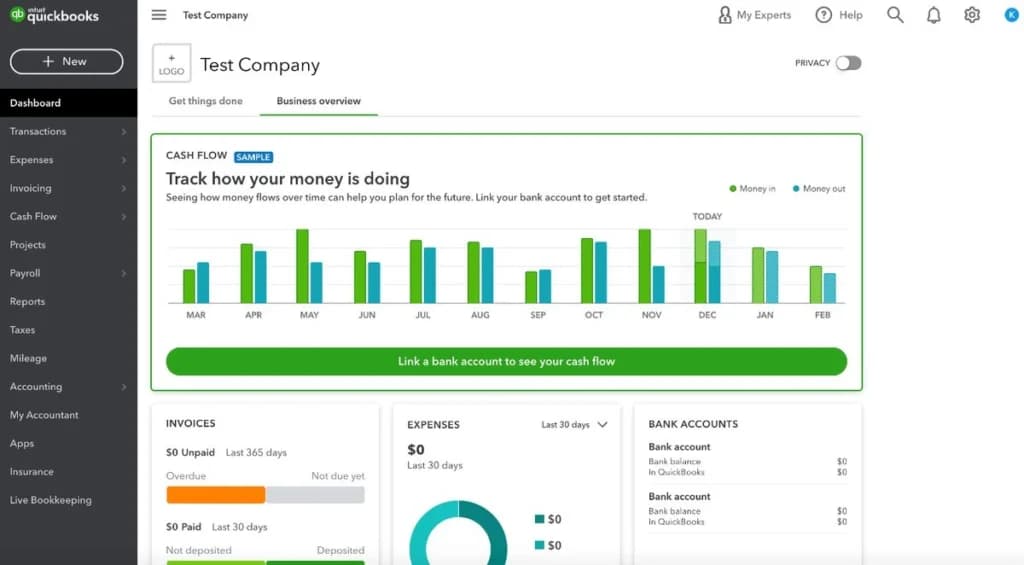
Dashboard
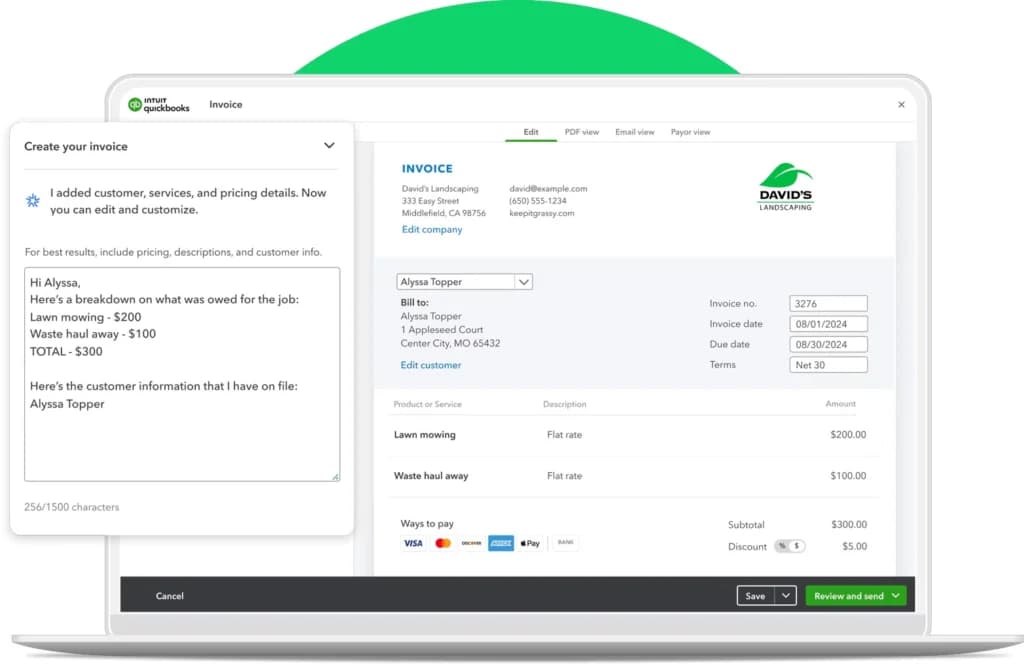
Customer Quoting, Invoicing, and Payment Tracking
Quickbooks comes with plenty of quoting and invoicing features that streamline much of the billing and invoicing process. You can send payment reminders, set up recurring charges, and track client/customer payment statuses, among other things. Customers can pay straight off the invoice with a couple of button clicks. As for the invoices themselves, they’re fairly customizable. You can easily duplicate invoices if needed or go off of invoice templates.
Quickbooks also let you factor discounts, shipping, and taxes into invoices.
eCommerce
Thanks to Quickbooks’ numerous integrations (covered in the next section), it can integrate with numerous eCommerce platforms and accept payments made for purchases from your eCommerce store. Then, Quickbooks tracks these payments, deposits them to your bank account, and handles much of the bookkeeping — leading to plenty of time savings on your part.
QuickBooks Cash Business Banking
QuickBooks Payments users who want to further aggregate their operations into one place might consider opening a QuickBooks Cash account. QuickBooks Cash is a high-yield business savings account provided by QuickBooks. It offers an impressive 1% APY, no monthly fees, and access to 19,000 AllPoint ATMs. Of course, QuickBooks Payments users who open a QuickBooks Cash account can access their money paid from invoices within 30 minutes, regardless of date or time, since everything is happening in QuickBooks. QuickBooks Cash also offers cash flow projections and insights (one of the main ones being Cash Flow), free ACH transfers, and a savings helper tool called QuickBooks Envelopes.
QuickBooks Point of Sale
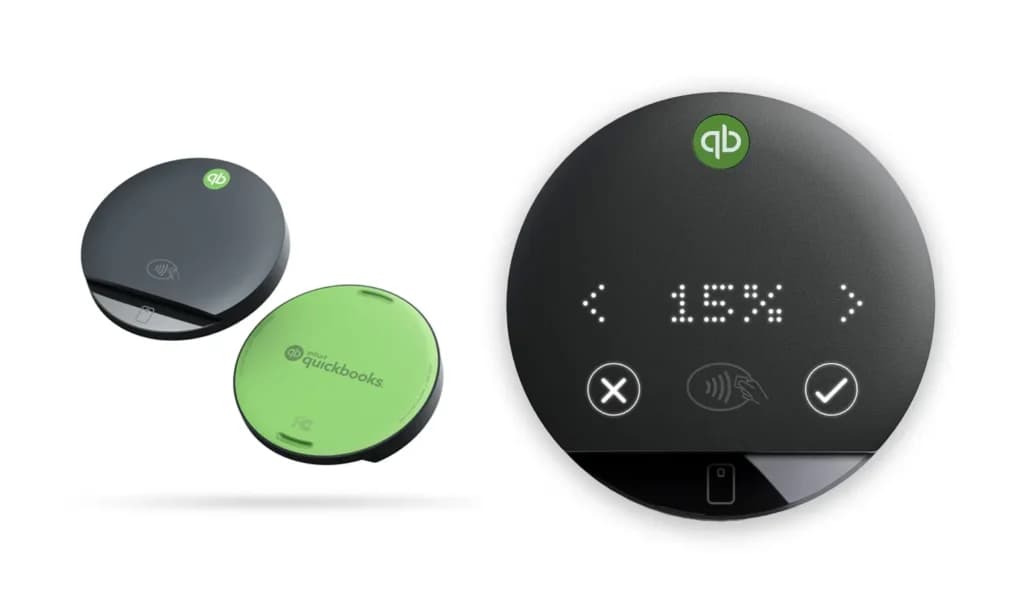
For QuickBooks Desktop users, there’s QuickBooks Point of Sale. This is an excellent choice if you use QuickBooks to run your brick-and-mortar business. Everything syncs flawlessly with your QuickBooks account, and you can obtain a variety of hardware through QuickBooks for your POS needs.
Add-Ons & Integrations
- QuickBooks supports integrations with numerous third-party products, many of them payment processors:
- PayPal, Square, or your financial institution (for transaction importing)
- Sales and sales tax tracking for Shopify/other major e-commerce platforms
- Payment processing for PoS or mobile card readers
- Bill.com accounts payable automation
Many of these work well in conjunction with QuickBooks Payments, while others are simply nice extras. QuickBooks can also connect you to a QuickBooks-certified bookkeeper if you need one.
Hardware needs vary depending on what features you’re using. For example, brick-and-mortar companies will need POS hardware to run QuickBooks Point of Sale. Card readers may also be helpful.
Simplify billing with automated pricing features.
Expand business reach with diverse sales channels.
Accounts Receivable
QuickBooks features a user-friendly layout that allows for easy navigation. On its main page, you'll find convenient links to various sections, including an overview, bookkeeping, payroll, adding clients, tasks, sales, banking, reports, workflows, and time.
Additionally, this platform offers excellent accounting reports, making it a straightforward and practical tool to use.
QuickBooks offers the option to link your bank and credit card accounts during the setup process. This allows the software to automatically monitor and manage your expenses and bills.
Manual tracking is also an option. Whether you're paying in cash or by check, it's simple to input the transaction directly into the system.
In addition, QuickBooks provides a range of reports for analyzing your financial activity. By keeping track of your bills, you can easily stay on top of upcoming payments and avoid any late fees.
With QuickBooks, it's easy to generate and review various reports, such as the number of outstanding invoices, the total amount due from clients, and the details of each invoice (whether paid or due). QuickBooks provides numerous reports to analyze your expenses and bills. By keeping a record of your bills, you can effortlessly track upcoming payments and ensure timely payments.
When using the QuickBooks Accounting application on your mobile phone, you have the ability to import receipts, digital invoices, and printed receipts onto any of the expense or bill payment options.
The software will automatically extract data from these uploaded documents when you use the mobile app. However, if you access the login page of the QuickBooks website for online accounting software, you will need to manually enter all of the expense and bill information, including the vendor, date, amount, category, type of payment used, memo or description, and attachment such as a copy of the physical receipt, since the website will not pull data from uploaded receipts or invoices.
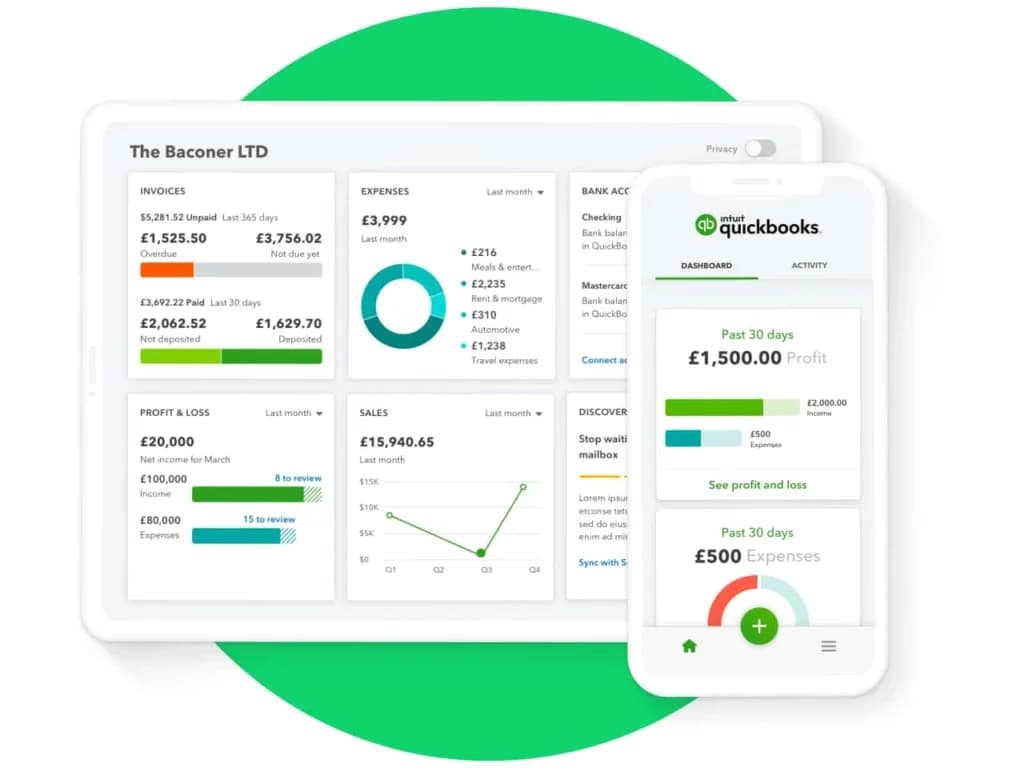
The QuickBooks platform has seamless integration, allowing for effective management of your business finances. The Performance Center, located on the account dashboard, generates charts depicting your business's profits and expenses. The platform also offers advanced capabilities for tracking reports, payments, and payroll management. However, the software lacks the ability to extract data or vendor invoice information from uploaded invoices.
Account Dashboard
QuickBooks Account Dashboard offers an easy-to-navigate layout. On the main page of the dashboard, you have quick links which allow you to access your account overview, bookkeeping, payroll, client list, tasks, sales, banking, reports, workflows, time, etc. It's also to use with good accounting reports.
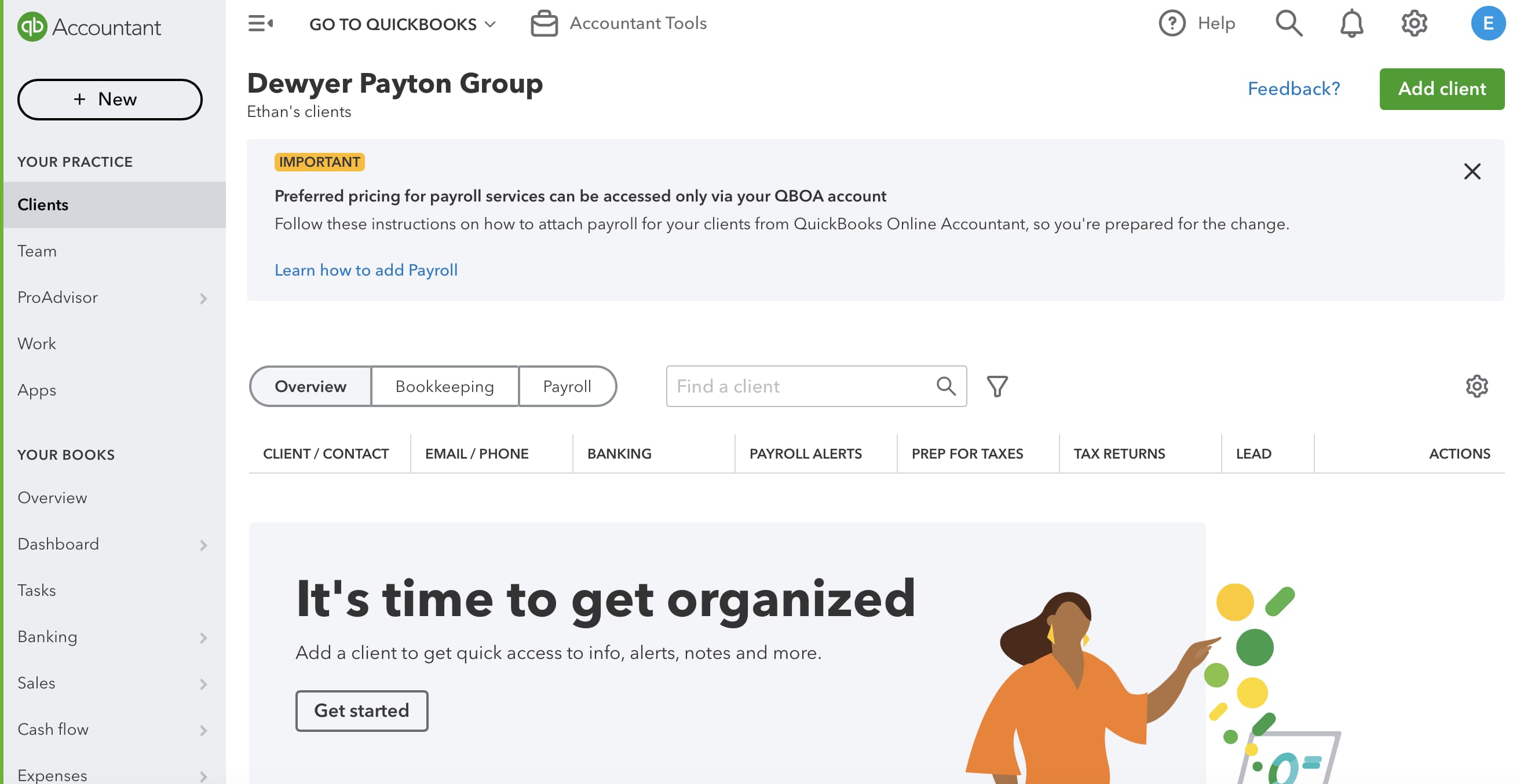
QuickBooks has great features to setup automatic recurring transactions and automated bank feeds. It's also easy to set up your clients and payments. You can also quickly set up and manage payroll for your employees. Invoicing is also very simple with their integrated software. You can accept or make payments in multiple currencies with the multicurrency option, after enabling it in your account settings. Adding invoices and payments to vendors or expenses automatically creates a total- to-date that assists in creating monthly expense reports.
Invoice Importing
You can import receipts, digital invoice documents, and printed receipts on any of the expense or bill payment options when using the QuickBooks Accounting application for mobile phones. The software will pull data from uploaded documents when you use the mobile app. The login page on the QuickBooks website for online accounting software will not pull data from uploaded receipts or invoices, and you will have to manually enter all expense and bill information. That includes vendor, date, amount, category, type of payment used, memo or description, and attachment (copy of physical receipt).
Here's a quick video that shows you how to upload a receipt on your mobile app:
QuickBooks reports are very detailed and cover multiple parameters, including: Business Overview, Who owes you, Sales and Customers, What you owe, Expenses and Vendors, Employees, For my Accountant, and Payroll.
You can also choose and favorite which metrics you prefer to track.
Inventory Management
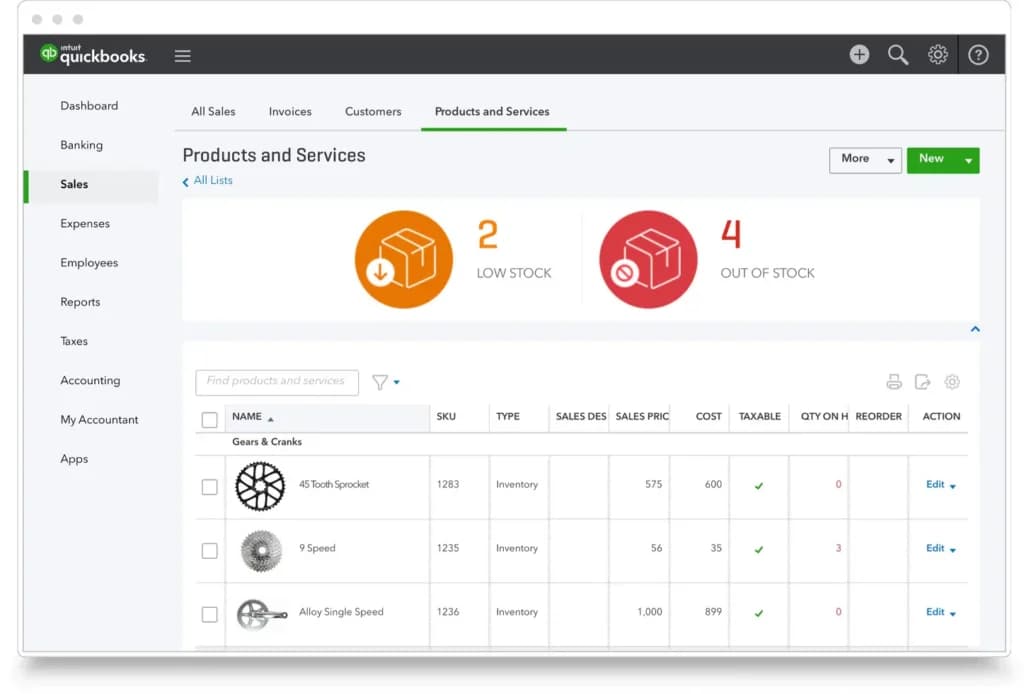
QuickBooks Online inventory management software offers a range of features to help businesses optimize their operations and streamline their supply chains. From inventory management to logistics, these supply chain management tools empower you to make informed decisions, reduce costs, and improve overall efficiency. Here are some of the top features you can leverage:
- Inventory management
- Order management
- Demand forecasting
- Supplier management
- Logistics and transportation management
- Warehouse management
- Mobile barcode scanning
- Analytics and Reporting
- Integration with ERP/CRM systems
- Security and access control
- Bookkeeping automation
- Cash flow management
- Invoicing and payments
- Bill management
- Project profitability
- Multi-currency support
- Sales and sales tax tracking
- Data syncing
- Custom access controls
- Workflow automation
QuickBooks Online inventory management offers real-time tracking of inventory levels, stock level alerts to prevent shortages, and categorization for better organization. This helps businesses maintain accurate records, avoid overstocking and understocking, and efficiently keep track of their inventory.
Order Management
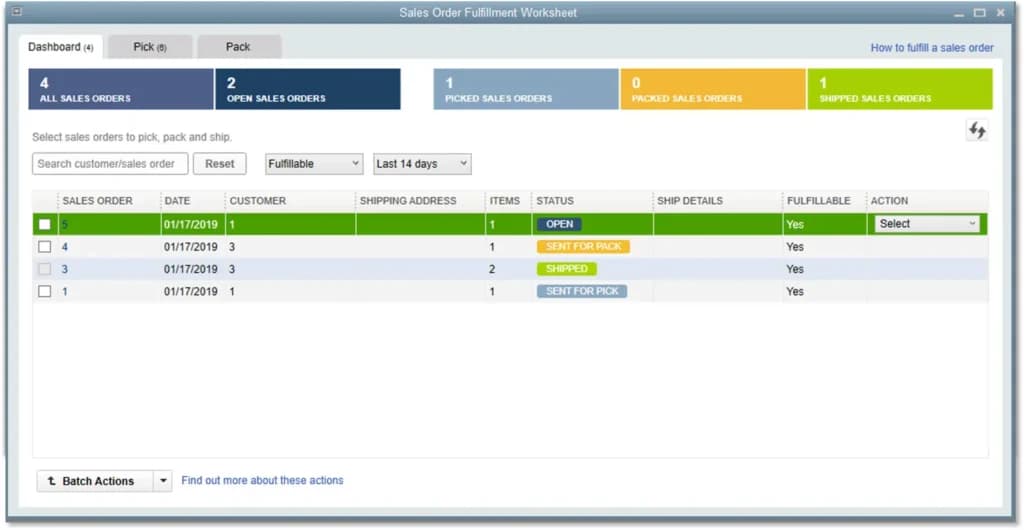
QuickBooks Online automates order management processes so you can manage the entire sales order fulfillment cycle from a single dashboard. You can prioritize orders based on customer value, manage delivery timelines, and reduce errors and delays, resulting in improved customer satisfaction and operational efficiency.
Demand Forecasting
QuickBooks Online helps you avoid understocking and overstocking by automatically calculating reorder points and generating purchase orders. You can also track inventory expiration dates and set up alerts to prevent losses. By optimizing your inventory levels, you can save on shipping costs and ensure that your customers' orders are filled on time.
Supplier Management
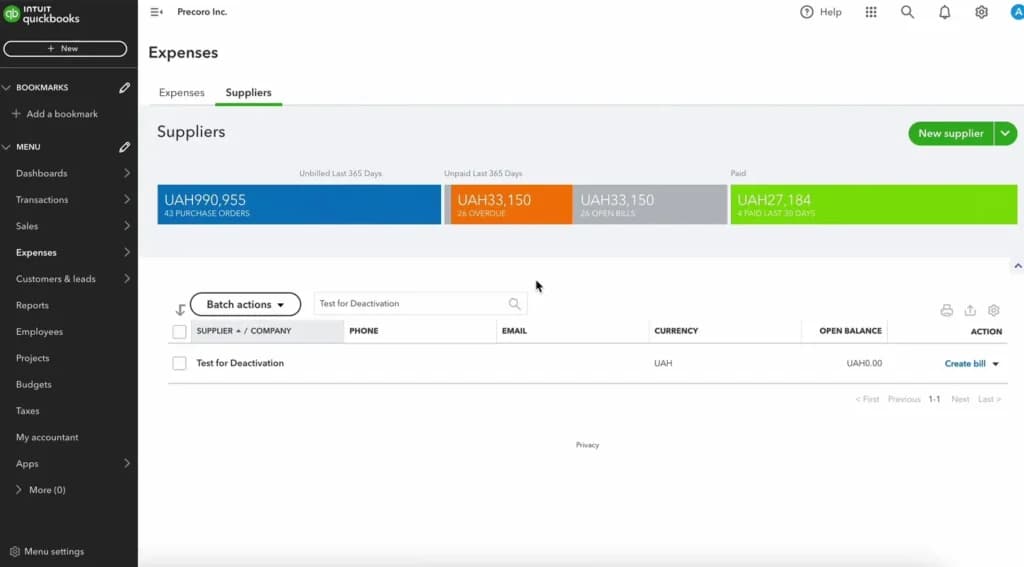
QuickBooks Online' Supplier Management Center helps you streamline vendor management by providing a centralized platform to store contact information, pricing data, and performance metrics. This allows you to identify reliable supply chain management vendors easily, manage delivery timelines, and find alternative suppliers when needed. By improving your supplier relationships, you can improve procurement efficiency and reduce costs.
Logistics and Transportation Management
QuickBooks Online integrates with various third-party Transportation Management Systems (TMS) to provide comprehensive supply chain inventory software. This integration empowers businesses to track shipments in real time, optimize routes, manage carrier relationships, and automate proof of delivery processes. By leveraging the power of TMS integrations, QuickBooks Online customers can streamline their inventory management, reduce transportation costs, and enhance overall operational efficiency.
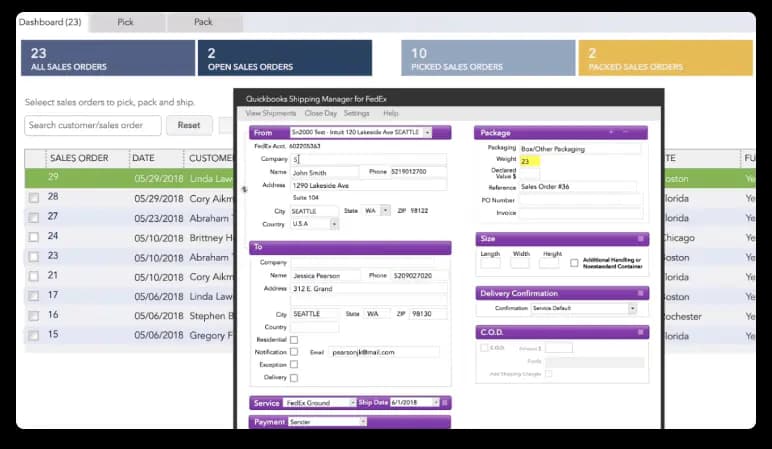
Warehouse Management
Allows you to track inventory across multiple locations, transfer inventory between locations, automate processes with barcode scanning, and set accurate delivery dates for better customer satisfaction.
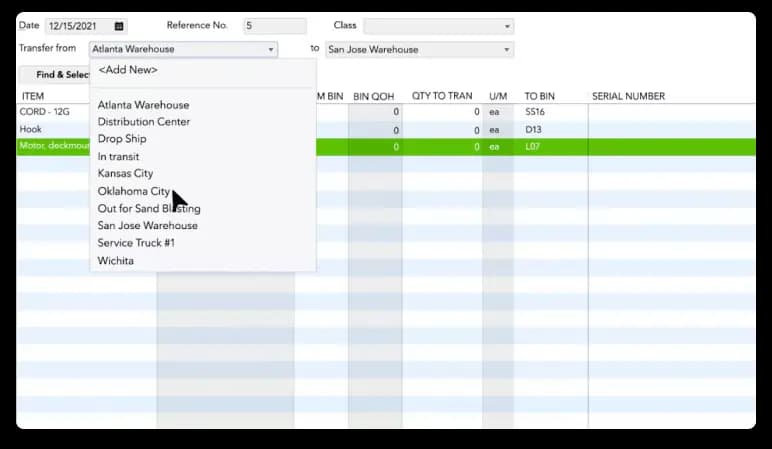
Mobile Barcode Scanning
Using the QuickBooks Online app, you can easily turn your Android phone into a mobile barcode scanner. This helps with warehouse operations by automating receiving, picking, and data entry processes. It also enables workers to scan inventory items, transfer data wirelessly, and print barcode labels with pricing information, leading to increased efficiency, reduced errors, and improved overall productivity.
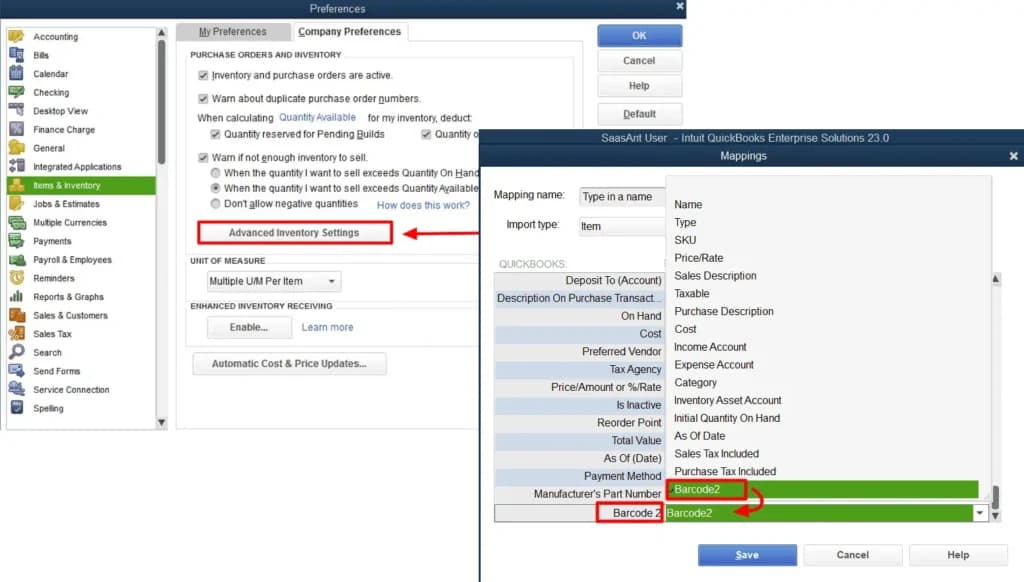
Analytics and Reporting
QuickBooks Online Offers a wide range of customizable reports, including financial statements, aged receivables, and general ledger reports. The SCM software allows you to set your favorite reports for quick access and schedule automated report delivery. Additionally, QuickBooks Online's forecasting and budgeting tools, along with data visualization capabilities, empower businesses to make data-driven decisions and improve financial management.
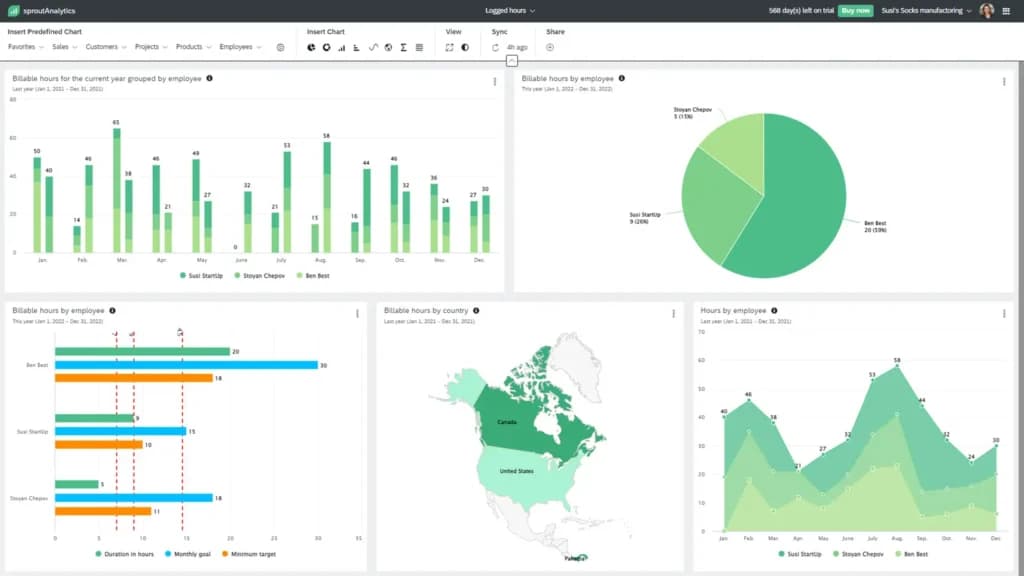
Integration with ERP/CRM Systems
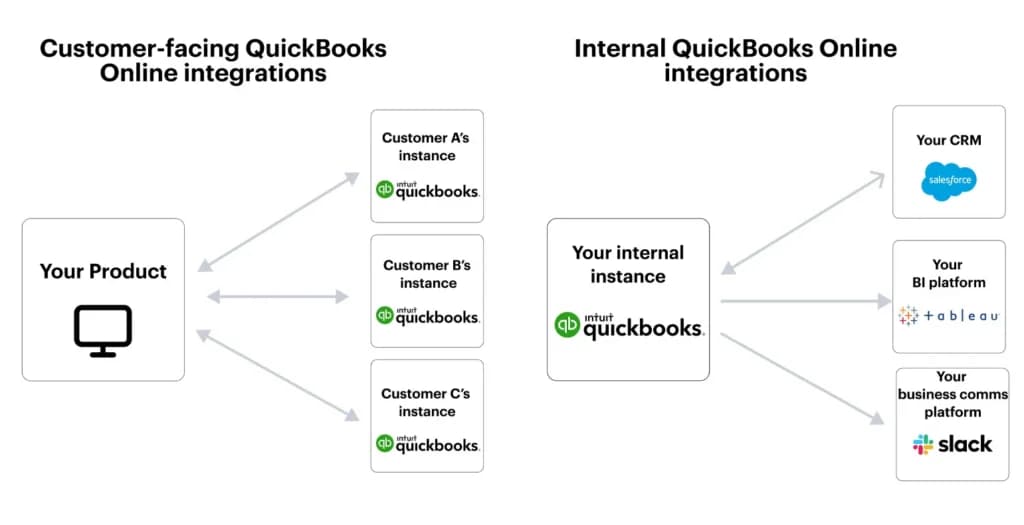
The inventory management software integrates with a wide range of third-party business applications, including popular POS systems, online stores, CRM software, and project management solutions. The integration eliminates the need for manual data entry and ensures accurate and up-to-date information across all systems. Quickbook has over 750 integrations available to meet the specific needs of your inventory management.
Security and Access Control
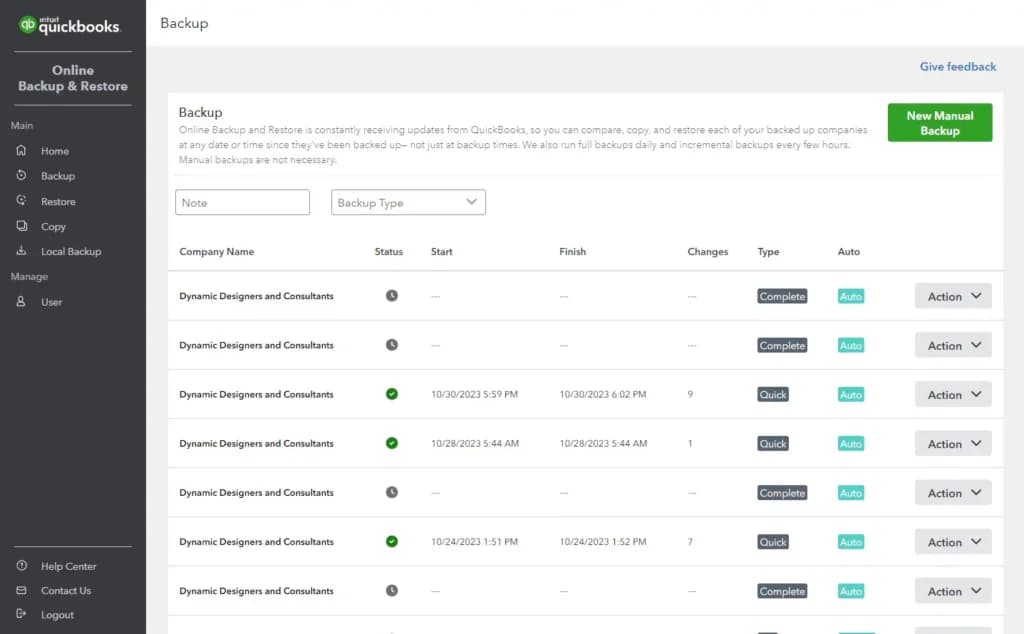
QuickBooks Online Online prioritizes data security with bank-grade encryption and two-factor authentication. You can also set granular user permissions to control employee access. The audit log tracks all user activity, helping to deter and detect potential fraud. These security measures ensure the protection of your sensitive financial information.
Bookkeeping Automation
QuickBooks Online offers automation features to streamline your bookkeeping process. With automated bank feeds, you can easily import bank transactions directly into your QuickBooks Online account, eliminating the need for manual data entry. Additionally, QuickBooks Online can automatically categorize transactions, match invoices to payments, and generate financial reports. By automating routine tasks, you can save time and reduce the risk of errors, allowing you to focus on more strategic aspects of your business.
Cash flow management
Manage your cash flow from anywhere at any time and spot trends so your business can keep growing. You can also see cash flow projections for the next 90 days and get personalized, predictive insights and recommendations.
Invoicing and payments
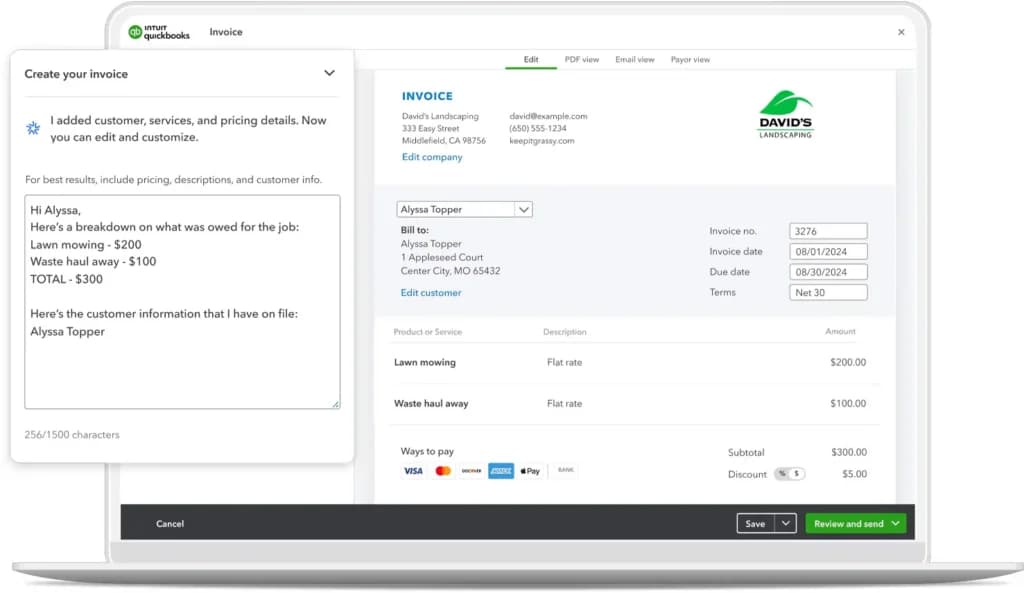
QuickBooks Online simplifies invoicing and payment processes for small businesses. You can easily create professional invoices, offer multiple payment options, and track payments in real-time. Automatic reminders and instant deposits help accelerate cash flow. By integrating with QuickBooks Online accounting, you can maintain accurate records and gain valuable insights into your financial performance.
Bill management
QuickBooks Online simplifies bill management by automating payments, tracking bill statuses, and organizing vendor information. By eliminating manual tasks and providing clear visibility into your expenses, QuickBooks Online helps you improve cash flow, reduce errors, and maintain accurate financial records.
Project profitability
QuickBooks Online provides project profitability tools to help you track and analyze the financial performance of your projects. By monitoring costs, generating detailed reports, and identifying profitable projects, you can make informed decisions to optimize resource allocation, improve pricing strategies, and enhance overall business performance.
Multi-currency support
You can enter transactions in different currencies, and QuickBooks Online will automatically convert them to your home currency. This feature is especially useful for businesses that operate internationally or frequently deal with foreign currencies.
Sales and sales tax tracking
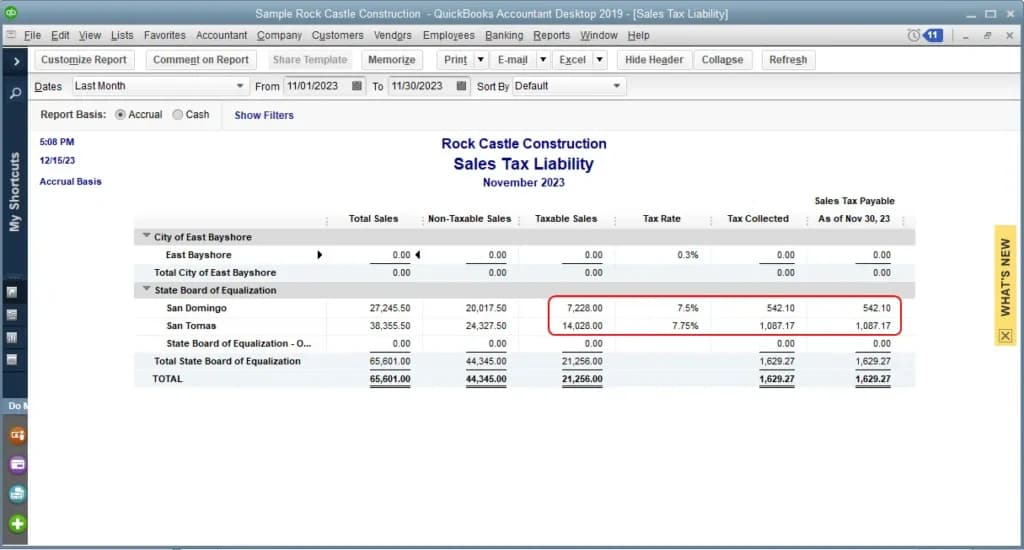
QuickBooks Online simplifies sales tax management by automating calculations, tracking sales tax liability, and ensuring compliance with tax regulations. With automatic tax rate updates and seamless integration with tax authorities, you can save time, reduce errors, and avoid potential penalties.
Custom access controls
With custom access controls, QuickBooks Online allows you to tailor user permissions to specific roles and responsibilities. By creating custom roles, you can limit access to sensitive financial information, improve security, streamline workflows, and ensure compliance with industry regulations. This granular control helps protect your business's financial data and maintains a secure and efficient working environment.
Workflow automation
You can create custom workflows to automate tasks like sending payment reminders, approving invoices, and generating reports. By automating repetitive tasks, you can focus on more strategic activities and improve overall efficiency.
QuickBooks also offers advanced inventory management features to streamline the supply chain processes and boost productivity. These are below:
The inventory management software also offers a host of reporting and analytics features to empower businesses with actionable insights, optimize inventory levels, identify trends, and reduce carrying costs. QuickBooks supports data-driven decision-making for improved operational efficiency and profitability with these features:
The QuickBooks inventory management software also supports integrations and add-ons to seamlessly connect with existing tools, streamline workflows, and enhance functionality. This provides you with a customizable solution tailored to your unique operational needs. Books can be kept without a paid subscription, and the roundup of best free accounting software sets out where those tools stop being enough.
Features
- General Ledger
- Bookkeeping
- Manages Accounts Payable/Receivable
- Income & Expenses Tracking/Management
- Account Reconciliations
- Financial Reporting
- Invoicing
- Record Expenses
- Record Mileage
- Generate Invoices
Quickbooks Alternatives
Starting from: $0/month
Free
$0
seat/month
Pros
- Robust and secure cloud-based software
- Customizable and intuitive dashboard and reports
- Numerous integrations
- Full desktop and mobile access
Cons
- Lack of 24/7 customer phone support (except for Advanced)
- Payroll costs extra
- Learning curve
Starting from: $25/month
Early
$25
seat/month
Pros
- Outstanding context-aware assistance
- Efficient utilization of artificial intelligence
- Delivers vital business insights
- Enhanced client data management
Cons
- Interface layout could be improved
- Lacks inventory assembly features
- Time logs need to be linked to specific projects.

Starting from: $0/month
Free
$0
seat/month
Pros
- Account packages are reasonably priced
- Ability to add on a range of different services
- Very easy to use on desktop and mobile
- Allows for plenty of time-saving due to automation
Cons
- Probably not suitable for very large businesses
- Separate accounts needed for different businesses
- No payroll services as an add-on option
Verdict
After testing QuickBooks across its full plan range, I can confidently say that it earns its position as the small business accounting standard. Core bookkeeping is tight, integrations are genuinely extensive (750+ apps), and Intuit Assist's AI reduces the manual overhead that kills small teams. The main friction: the platform's real power requires stacking add-ons — payroll, payments, and advanced reporting all cost extra.
What works well
✓ Clean, automated bookkeeping with bank categorization and reconciliation
✓ 750+ integrations: PayPal, Shopify, Salesforce, Bill.com, Mailchimp
✓ Intuit Assist AI reduces manual invoice categorization and data entry
✓ Scales from solo operators (Simple Start) to teams of 25 (Advanced)
✓ TurboTax integration makes tax prep seamless at year-end
What to watch out for
✗ Payroll is a separate add-on — costs jump significantly with employees
✗ Inventory management lacks depth for multi-location or lot-tracked stock
✗ No 24/7 phone support below the Advanced plan
✗ Pricing increases sharply after the promotional period ends
Use QuickBooks if you are...
→ A small to mid-sized business needing reliable cloud accounting in one place
→ Running AP, AR, invoicing, and bookkeeping and want them all connected
→ Looking to automate bookkeeping and cut tax prep time
→ Using Shopify, PayPal, or Salesforce that need clean financial data synced
Skip QuickBooks if you are...
✗ A larger enterprise needing full ERP capabilities — consider NetSuite or Acumatica
✗ Looking for payroll included at base price — consider Gusto or Patriot
✗ Running complex multi-location inventory that needs dedicated WMS tools
Users Reviews
Write a review
Leave a review, help others get it right the first time.
25 Reviews

yasmin G
Mid level management
Quick on book keeping
Quickbooks expanded their suites to be all encompassing for the business use case. I have them doing our payroll, payment processing and our A/R. It's all folded into one and integrated with the bank account which is seamless and simple. I can't think of another use for it, in essence it tracks every dollar everywhere, and it has seamless invoicing processes. Come tax time it's a breeze for our accountants to handle the Books and shape them into a tax return. Furthermore being that its an intuit product it integrates into other intuit stuff like pro series tax software, which our accountant uses. Simply easy. these people know what they are doing in this realm.
- Fully integrated.

PAUL G
Chief OO
Streamlines things for me..
Integrating QuickBooks into our medium-sized business has been a paramount decision that significantly streamlined our accounting processes. With its intuitive interface and robust capabilities, QuickBooks has revolutionized the way we manage financial data. Tracking expenses, generating invoices, and reconciling accounts are now executed with exceptional ease and accuracy. The automated reporting features have granted us invaluable insights into our financial performance, empowering us to make well-informed decisions. Furthermore, QuickBooks' seamless integration with other business tools has further enhanced our operational efficiency. Our accounting team can now focus on more strategic tasks, confident in the knowledge that our financials are meticulously organized and compliant. Without a doubt, QuickBooks has proven to be an indispensable asset, optimizing our financial management and fostering growth.
- Must get.

Ronald S
e-commuter
My favorite
As a small business owner, QuickBooks has been an invaluable tool for enhancing efficiency and profitability. The software's user-friendly interface and extensive features have simplified our financial management processes. With QuickBooks, we can easily keep track of our expenses, generate accurate financial reports, and manage cash flow effectively. The ability to automate recurring tasks, such as payroll and tax calculations, has saved us significant time and effort. QuickBooks' integration with other business tools has also streamlined our workflow, eliminating the need for manual data entry. Thanks to QuickBooks, we have optimized our operations, reduced errors, and ultimately increased our bottom line
- My favorite

Me S
Middle manager
QB is the QB
Quickbooks is the quarterback of all money in and out, and payroll cross sections. It's a complicated taco folded into one. It has payroll, it has the ability to do all the reports and tax filings with it, accounts payable invoices, all the above, the tracking is second to none, integration into bank accounts of all the majors. Easy come tax time, and easy come payroll time, its all rolled into one. It cuts down on the time of having these things seperated by 20-30% in some cases more, ive fired an employee due to quickbooks saving us enough time that we could only have one accounts payable person. This saved us 50k usd per year. Brilliant
- Saves business money.

Sander M
CEO
Simply sublime
As a CEO, one of the key responsibilities is managing the company's finances effectively. By utilizing QuickBooks, a powerful accounting software, I was able to streamline our financial processes and make significant cost savings. With QuickBooks' user-friendly interface and automation features, we reduced the need for additional hires in our accounting department. The software efficiently handled tasks like bookkeeping, payroll, and financial reporting, minimizing errors and saving valuable time. By relying on QuickBooks for accurate financial data and streamlined workflows, we optimized our resources, eliminated unnecessary expenses, and maximized productivity, ultimately contributing to substantial cost savings for the company.
- Saved Money

Stephen H
Worker
Fastest there is...
Fastest software i have ever seen in the accounting industry. It is a fly by wire system basically with AI steroid injected engines attached to it. My brain feels good when i use it because the application and software just makes common sense. Anything they can automate they can do, it is borderline 100% optimization with this app. The industry leader for a reason, i have tried others like Proseries, and many many more. This one destroys them all. Get it, or just get left in the dust, its that simple.
- Best ever. Constant optimization

Sandy R
Worker
Not cheap but what it costs makes up for it in production
QuickBooks has excellent customer service that is easy to understand and helpful. Whenever I had a question or needed assistance, their support team was always available and willing to assist me. They patiently guided me through any issues or concerns I had, providing clear explanations and solutions. Their prompt response and friendly approach made me feel valued as a customer. QuickBooks' dedication to providing A1 customer service has greatly enhanced my experience with their software, ensuring that I feel supported and confident in using their platform for my business needs.
- Customer service 10000% best

Nara S
Worker
Saving time is saving money to me
QuickBooks is an absolute lifesaver when it comes to saving time. Its efficient features and automation capabilities have transformed my financial management tasks. From automatically syncing bank transactions to generating detailed reports in a few clicks, QuickBooks streamlines the entire process. Invoicing becomes a breeze with customizable templates and automated reminders. The ability to connect with other business tools further enhances productivity. The time-saving benefits of QuickBooks are immense, allowing me to focus on growing my business instead of getting bogged down in tedious financial tasks. With QuickBooks, I've reclaimed precious hours that I can now devote to what truly matters.
- Time saved

Ursula E
Money Manager
It simply makes sense
Prepare to be shocked and amazed by the sheer brilliance of this accounting software! I am absolutely blown away by its capabilities. From automating mundane tasks to generating mind-blowing reports, this software does it all with jaw-dropping precision. Its lightning-fast speed and accuracy leave me in awe, making even the most complex financial calculations seem like child's play. The level of detail and insights it provides is simply mind-boggling, giving me a newfound understanding of my business's financial health. I stand in awe of this accounting software's extraordinary abilities, and I cannot imagine running my business without it. Truly a game-changer!
- User friendly
- good for senior citizens

Raina T
Lead Comptroller
One of One
As a seasoned accounting professional, I am thrilled to share my exhilarating experience with the groundbreaking accounting software(quickbooks et al) that has revolutionized my workflow. This state-of-the-art software is a game-changer, streamlining processes and catapulting efficiency to new heights. The robust feature set of this accounting software is simply awe-inspiring. From advanced reporting capabilities to real-time data integration, every aspect has been meticulously crafted to meet the complex needs of modern accounting practices. Its intuitive interface allows for seamless navigation, enabling even the most intricate financial tasks to be performed effortlessly. One of the standout features is the sophisticated automation functionality. By eliminating manual data entry and automating repetitive tasks, this software frees up valuable time for strategic analysis and decision-making. It seamlessly integrates with other business systems, enabling real-time synchronization of financial data across platforms. The level of customization offered is unparalleled. The software adapts to the unique requirements of my business, allowing for tailored workflows and user permissions. Its advanced security features ensure data integrity and confidentiality, giving me peace of mind. Furthermore, the software's robust reporting capabilities provide comprehensive insights into financial performance, cash flow, and budgeting. With customizable dashboards and dynamic visualizations, I can analyze data from various angles, empowering me to make informed decisions and drive growth. The dedicated customer support team deserves special mention. Their responsiveness and deep product knowledge have been invaluable in addressing any queries or concerns promptly. They provide comprehensive training resources, ensuring a smooth onboarding process and maximizing the software's potential. In conclusion, this accounting software is a game-changer in the industry. Its advanced features, automation capabilities, customization options, and top-notch support have transformed my accounting processes. It has elevated efficiency, accuracy, and strategic decision-making to unprecedented levels. I highly recommend this software to financial professionals seeking to optimize their workflows and unlock the true potential of their accounting operations. Prepare to embark on a transformative journey in the realm of financial management.
- Best in class
- Ease of use
- Interface

Craig Z
Worker
The best there is ...
Over the years QB has kept up with the times. I've used this product since 2010. Never have i seen a competitor ever get close to the level of efficiency, use case and helpfulness of this product. Frankly, they just keep seperating more and more from the competition... Others come in and try to get close, but there isnt a comparison. They have all the integrations. I anticipate them eventually using an AI integration which will even further seperate them from the competition. Get used to this software, as it is the best by a factor of 10. A must use for Taxation and AR people.
- Constantly evolving
- No upcharge for better software each year.

Danny Y
Tax pro
Don't leave home without it....
After using this software for 5 years and watching it evolve with the times, there simply isnt anything more efficient or better. There is a reason it's the most used software. In the end, choose what makes you the most money in time savings. Choose this one.
- Evolves constantly to be more efficient.
- None.

derka B
tax pro
Best there is for accounting software...
QB just makes sense, never have i seen such logic. The system is the best in the world. It's also the most used in all banking... don't bother with other softwares for accounting... youll just be let down and end up with quickbooks later on lol.
- Top integration
- No wasted functionality
- cost

Shelly B
Accountant
Industry leader in this space....
QB integrates with literally everything under the sun. Talk about efficient, it saves 100s of hours for myself and my staff every week with the integrations. From bank accounts to other complex integrations with other intuit products... skys the limit for this suite. It's saved me 33% in the past 3 years on human labor, as every task is faster and more efficient. Reccomend.
- Integrated
- Fast
- Made by accountants for accountants
Plaxico P
Managing Accountant
Strong integration - Good experience
I love the automation on this product, ultimately i am satisfied with my experience, i think i would of given it 5 star if it was slightly more optimized, but honestly its def the best on the market for the bookkeeping side. I've used the constantly evolving product over the past 10 years+
- Integration
- User Interface
- Super AI integration not quite there
- Nothing more
Sergey J
Built with user experience in mind
I love that it integrates with many related solutions and it’s super simple to use the software.
- I find that QuickBooks has better features than most other software.
- Price is a bit higher than the competition, but you also get what you pay for and QuickBooks is a quality product.
Sean M
Accountant
Most reliable Bookkeeping Platform
QuickBooks Online helps me to maintain all my bookkeeping processes based on real-time information. Now it is very easy for me to manage and stay on top of everything and also it is extremely easy to use
Sarah F
Perfect for my small business
QuickBooks has been a great accounting software for my small business. It’s fast, easy to use, and the invoicing is terrific.
Daniel S
Perfect for Small to Medium Businesses
Quickbooks is what I consider a 5 star Accounting, Invoicing, & Payment Solution for Small to Medium Business.
David R
Love the ease of this product
Great selection of features, and optimization for small businesses
- A few errors occurred during installation