
Zendesk pricing guide: Which plans do small and micro businesses actually need?

Zendesk is customer service software that gathers customer questions from emails, chats, messaging apps, and phone calls into one workspace, where your team can answer them as tickets.
Each ticket gets an owner and a status, so no customer is missed and two people from your team never reply to the same customer. Zendesk sells this in two product lines. Support plans cover email ticketing only. Suite plans add live chat, WhatsApp and social messaging, phone support, a help center, and AI agents that answer routine questions on their own.
Most small and micro businesses need only two Zendesk plans: Support Team at $19 per agent per month for email-only support, or Suite Team at $55 per agent per month once customers expect chat, WhatsApp, a phone line, or a help center. Both prices are for annual billing (November 2026). For most small businesses the Suite Professional, Suite Enterprise, and the $50 Copilot add-on aren’t required.
The seat price is also only part of the bill. Zendesk charges separately for AI resolutions and phone minutes, and Meta charges per message once a business phone number passes 1,000 service replies a month. This guide shows where each plan stops, what the usage charges add, and when Freshdesk is the cheaper fit.
How much does Zendesk cost in 2026?
Zendesk costs between $19 and $115 per agent per month on its published plans when you pay annually, and Suite Enterprise is sold by quote only. Support Team is $19 annually or $25 month-to-month, Suite Team is $55, and Suite Professional is $115 (November 2026).
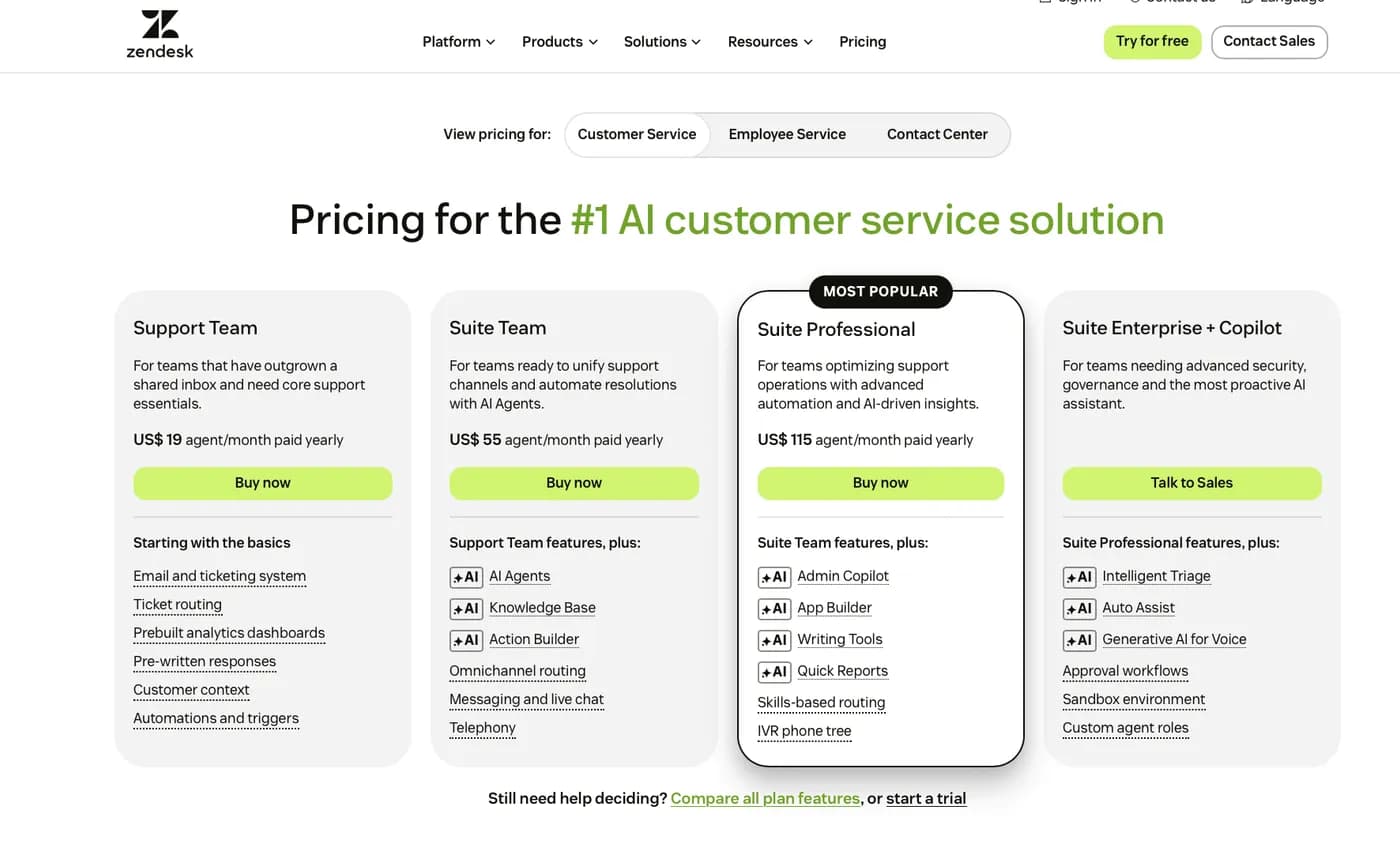
Zendesk prices every plan per agent, so the bill grows with each person who answers tickets. A 3-person team pays $57 a month on Support Team or $165 a month on Suite Team, billed annually, before any usage charges.
Plan | Annual billing (per agent per month) | Monthly billing (per agent per month) | Channels | Small business verdict |
Support Team | $19 | $25 | Email, web forms | Buy |
Suite Team | $55 | $69 | Email, chat, messaging, voice, help center | Buy |
Suite Professional | $115 | $149 | Everything in Suite Team, plus skills-based routing, custom and live analytics, SLA tracking, and up to 100 light agents | Skip |
Suite Enterprise | Custom quote | Custom quote | Everything in Suite Professional, plus enterprise governance, with Copilot as an add-on | Skip |
Read the verdict column as: Buy = fits most teams of 1 to 15 agents, Skip = pays for features a small team rarely uses.
Prices are per agent per month in USD, confirmed from Zendesk's pricing page, November 2026.
Is Zendesk worth it for small businesses?
Yes, Zendesk is worth it for most small businesses, as long as you buy the plan that matches how your customers reach you. If customers only email you, Support Team at $19 per agent per month is good value for a team of one to three people.
It suits the business where a few people share one support email address and take turns answering it. Nobody can tell which emails someone else is already handling, so two people reply to the same customer while another email sits unanswered. Support Team turns each email into a ticket with an owner and a status. Everyone can see who is working on which query and which customer questions are still open, so replies stop doubling up and nothing gets missed.
The next step comes when you want customers to reach you from multiple channels. Suite Team at $55 per agent per month puts chat, WhatsApp, and phone calls in one queue, with calls from $0.012 per minute and no second subscription for voice. It also gives you AI agents that only cost money when they fully solve a customer's problem. My research found the jump is worth it once chat, WhatsApp, or phone calls bring in a real share of your customers.
If you want email support and nothing else, Zendesk works well. Support Team gives you ticketing, routing, macros, and 5 free AI resolutions per agent each month for $19 per agent. If you also want a help center where customers can find answers themselves, Freshdesk Growth includes one at the same $19, and Zendesk needs Suite Team at $55 for it.
For multichannel support, take a three-person online store that answers email and WhatsApp all day and takes a few phone calls a week. On Freshdesk Omni Growth with the $15 Voice add-on, its seats cost $132 a month. On Zendesk Suite Team, they cost $165, before call minutes on either. If the same team later wants AI help drafting replies, the gap grows: Freshdesk Pro with Freddy AI Copilot comes to $84 per agent, and Zendesk Suite Professional with Copilot comes to $165 per agent.
Zendesk makes more sense for that store if it wants calling built into every seat without an add-on, or plans to lean on AI agents. Zendesk only charges for conversations its AI fully solves, and the store gets 15 free resolutions every month on Suite Team (5 per agent), after which each costs $1.50 to $2.00. Freshdesk charges $0.49 for every AI session started once its one-time pool of 500 runs out, whether the session solves the problem or not.
What is the difference between Support Team and Suite Team plans?
Suite Team ($55 per agent per month) includes everything in Support Team ($19 per agent per month), plus live channels and a self-service help center. Both prices are for annual billing.
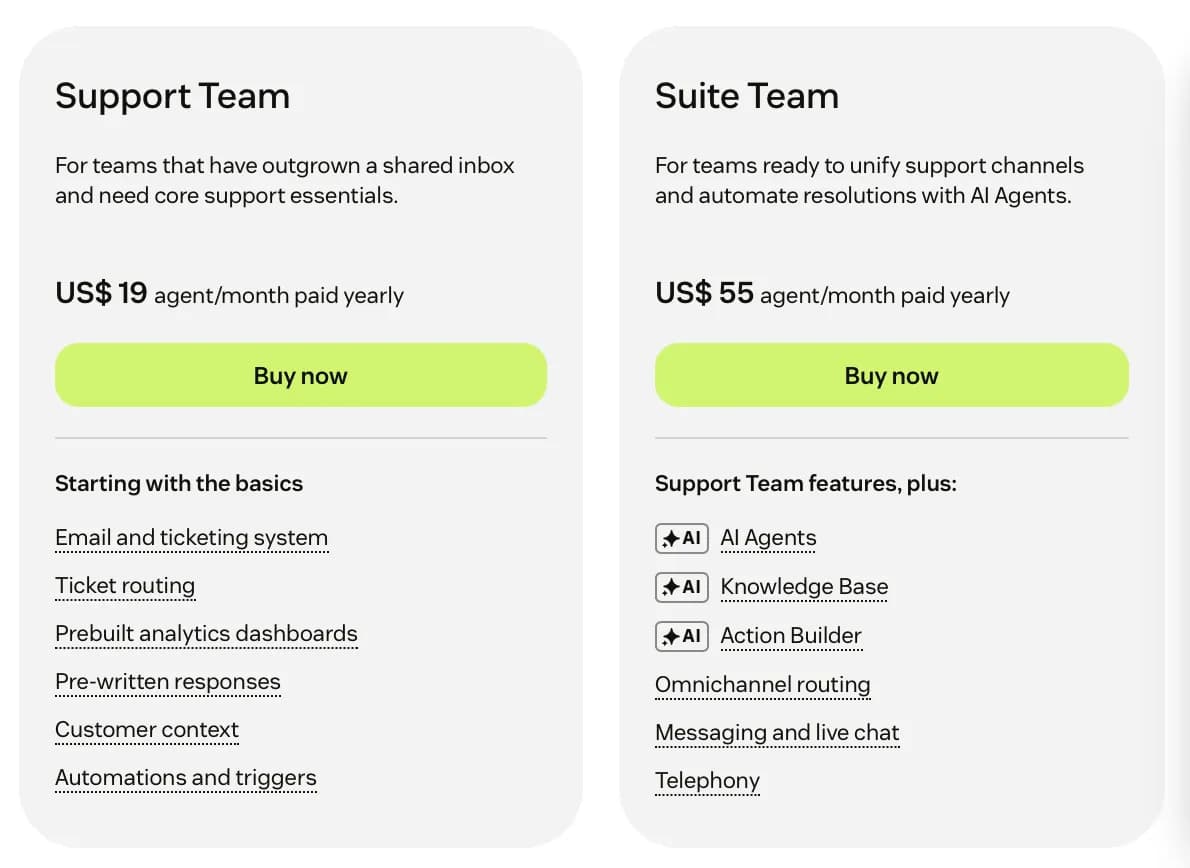
Support Team is the foundation. It gives you email ticketing, customer profiles that show each customer's past tickets, and macros, or saved reply templates, to answer common questions fast. It also includes AI agents, with 5 free automated resolutions per agent each month.
Suite Team is that same foundation plus live channels. You get everything in the Support Team, plus live chat on your website, phone calls inside Zendesk, social messaging on WhatsApp, Facebook, and Instagram, and a public help center for your FAQs.
If your business handles support only over email, buy the Support Team plan. If you want the same email tools plus live chat, phone, social messaging, or an FAQ page in one place, buy Suite Team plan.
Zendesk's 14-day free trial opens on Suite Professional ($115), so it shows you more than either plan above includes. As you test, note the features you use most, then check whether each one is in the $19 or the $55 plan before you buy.
Is Support Team ($19 per agent per month) enough for a micro-business?
Yes - Zendesk Support Team is enough for a business of 1 to 3 people who answer customers only by email and do not need a public FAQ page. It costs $19 per agent per month billed annually, or $25 month-to-month.
Support Team is built for the step after a shared Gmail or Outlook inbox. It turns each customer email into a ticket with an owner and a status, so two people stop replying to the same customer and nobody gets missed.
Who should buy the Support Team plan?
Buy Support Team if your customers write to you and wait for a reply. That fits the online store owner who handles order questions from a shared inbox, the consultant who gets a few dozen client emails a week, and the local service business that takes bookings by web form. If you answer support once a day in a batch, this plan covers you.
What you get on Support Team
The plan covers the basics of organized email support:
- Email ticketing and web contact forms
- Ticket routing and automated triggers
- Macros, or pre-written replies you insert with one click
- Customer context, meaning each customer's past tickets beside the current one
- Prebuilt analytics dashboards that refresh once every 24 hours
- Data storage of 10GB plus 50MB per agent, file storage of 10GB plus 2GB per agent, and attachments up to 50MB per file
What you do not get on Support Team
The Support Team leaves out every channel beyond email. There is no live chat or website widget, no WhatsApp, Facebook, Instagram, or SMS, no phone line, and no help center for self-service articles. Standard custom ticket fields (drop-downs, text, checkboxes, and dates) are included, but it has no conditional fields or multiple ticket forms, no SLA tracking (targets for how fast tickets get answered), and no light agent seats for colleagues who only need to read tickets. AI agents are the one exception: Support Team includes them, with 5 free automated resolutions per agent each month.
In our experience, the clearest sign you have outgrown this plan is customers asking for chat or a phone number more than once a week.
When should a small business upgrade to Suite Team ($55 per agent per month)?
Upgrade to the Zendesk Suite Team when customers reach you through anything other than email, such as website chat, WhatsApp, Instagram, or a phone call, or when you want a help center to cut repeat questions. It costs $55 per agent per month billed annually, nearly three times the Support Team seat.
The extra $36 per agent buys new channels. The table below shows exactly what changes between the two plans.
Feature | Support Team ($19) | Suite Team ($55) |
Email ticketing | Yes | Yes |
Help center (self-service knowledge base) | No | Yes |
Live chat and website widget | No | Yes |
Messaging (WhatsApp, Facebook, Instagram, SMS) | No | Yes |
Voice (calls in the browser) | No | Yes, minutes billed separately |
AI agents (5 automated resolutions per agent each month) | Yes | Yes |
Omnichannel routing (tickets from every channel in one queue) | No | Yes |
Read the table as: Yes = included in the plan price, No = not available on the plan.
Features from Zendesk's pricing page, November 2026.
Who should buy Suite Team?
Buy Suite Team if any customer conversation happens in real time. That fits the store owner who takes orders and delivery questions over WhatsApp, the clinic or salon that needs a phone line agents answer from the browser, and the software business that wants a help center so the same 20 setup questions stop arriving by email.
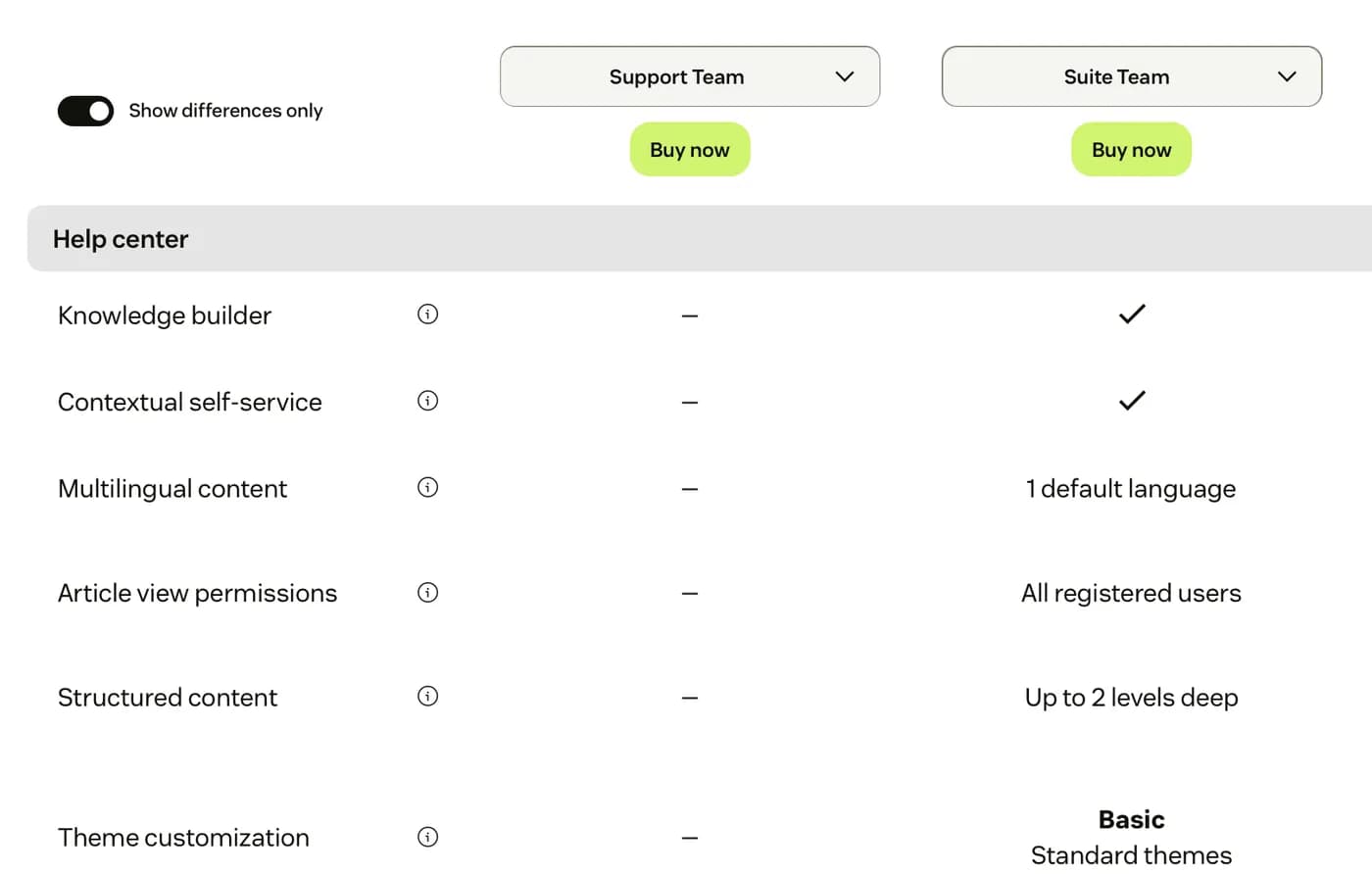
On Suite Team, Zendesk's AI agents can also answer routine questions on chat and messaging without a person stepping in.
What Suite Team still does not cover
Suite Team does not include usage. Phone minutes, AI resolutions past the free allowance, and WhatsApp message fees from Meta are all billed on top of the $55 seat. The Copilot add-on for agent assistance is not sold on Suite Team. It costs $50 per agent per month and requires Suite Professional ($115) or Suite Professional. Light agent seats, for colleagues who only read tickets and leave internal notes, are not included on Suite Team. You can buy them as an add-on on any Suite plan, including Suite Team, or move up to Suite Professional ($115), which includes up to 100.
Which Zendesk plans can a small business skip?
Skip Zendesk Suite Professional, Suite Enterprise, and the Copilot add-on if you run 15 agents or fewer and nobody on the team manages support full time. Suite Professional alone costs $115 per agent per month, $60 more per seat than Suite Team.
These tiers are priced for contact centers with layered approval rules, compliance needs, and managers who live inside reporting. A 5-agent team moving from Suite Team to Suite Professional pays an extra $3,600 a year in seats alone.
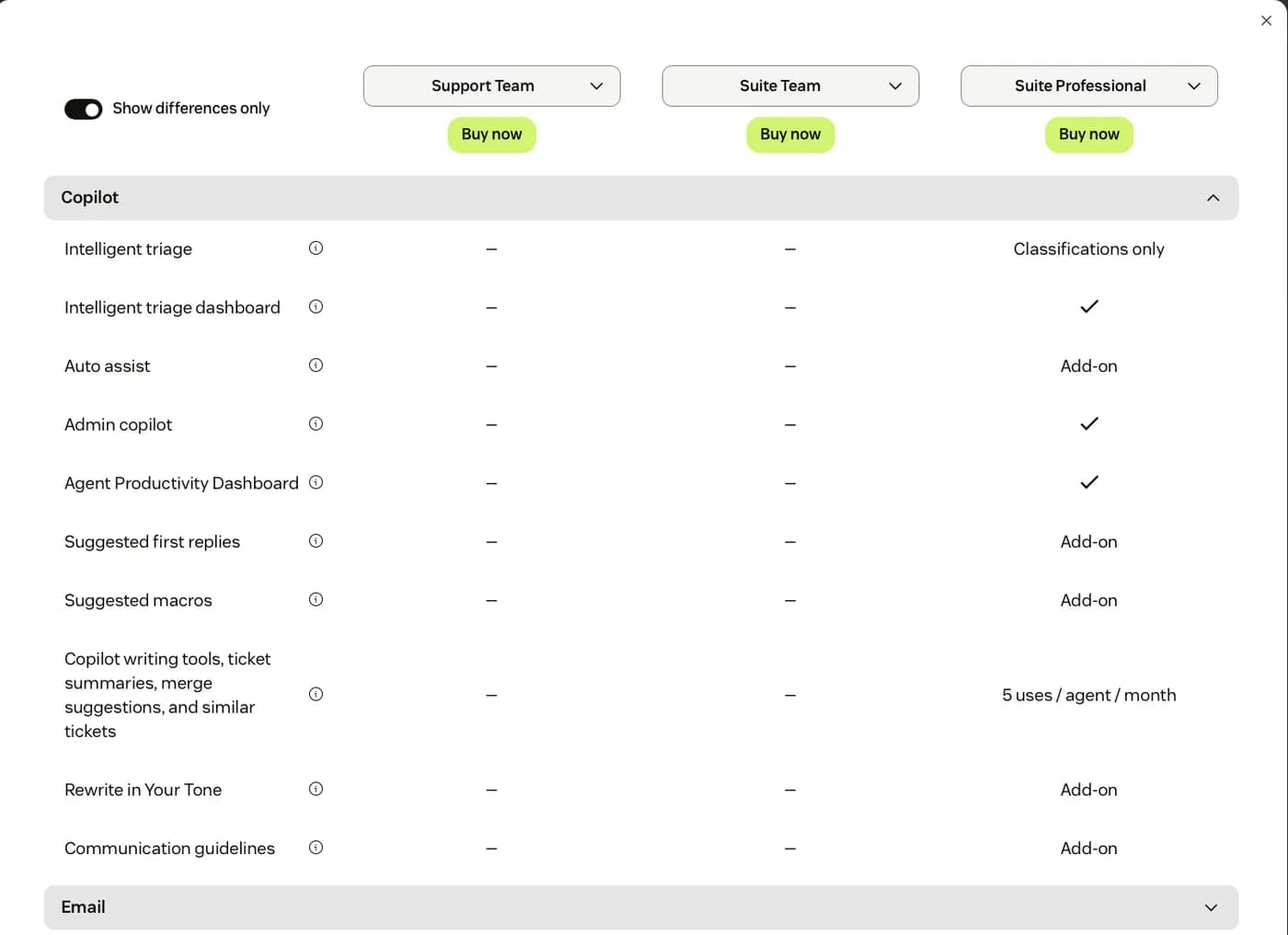
Copilot is the steepest add-on for small teams at $50 per agent per month, and Suite Professional ($115) is the cheapest plan that offers it. A Suite Team account pays $60 more per seat to upgrade before the add-on even applies. Suite Professional already includes Copilot's writing tools, ticket summaries, merge suggestions, and similar tickets at 5 uses per agent per month. Those uses are pooled across the team, so 10 agents share 50 uses, and the pool is capped at 500 uses a month per account. It also includes intelligent triage for classifications, the triage dashboard, admin copilot, and the agent productivity dashboard. Paying the extra $50 per agent adds auto assist, suggested first replies and macros, rewriting in your tone, and communication guidelines, which a small team rarely needs.
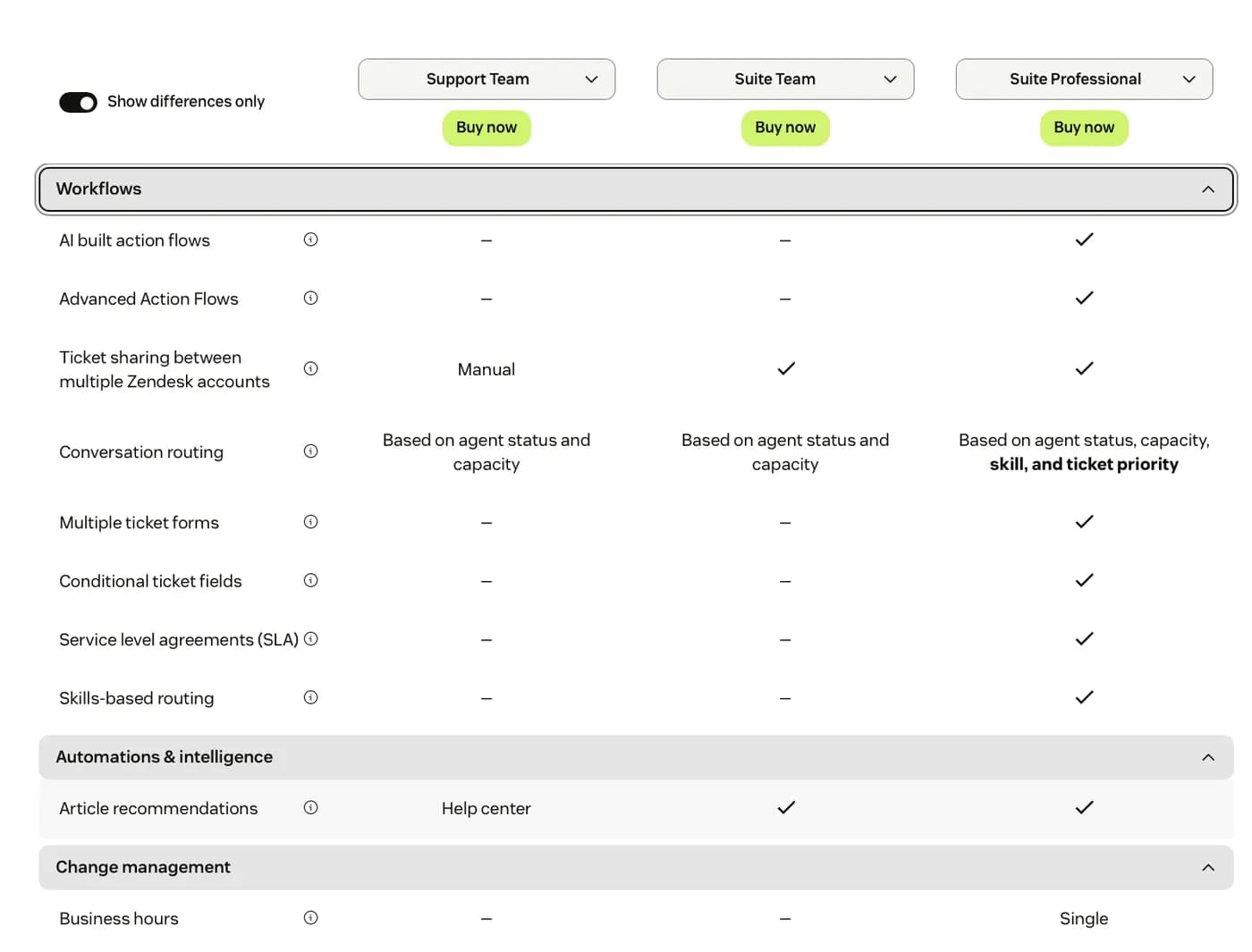
The one reason to look above Suite Team is a hard requirement your plan cannot meet, such as SLA tracking (set response and resolution times) for a client contract. Zendesk includes SLAs only from Suite Professional, at $115 per agent per month. If you cannot name that requirement, you do not need the upgrade.
How does Zendesk charge for AI, and what will it cost you?
Zendesk charges for AI per automated resolution, meaning a customer request its AI agent closes with no human involved and that passes Zendesk's own check, and not per chat or per message. Every Support and Suite plan includes a free resolution allowance, shown on Zendesk's pricing table as 5 free resolutions a month per agent seat on Support Team and Suite Team (10 on Suite Professional, 15 on Suite Enterprise), after which each verified resolution costs $1.50 pre-purchased or $2.00 pay-as-you-go.
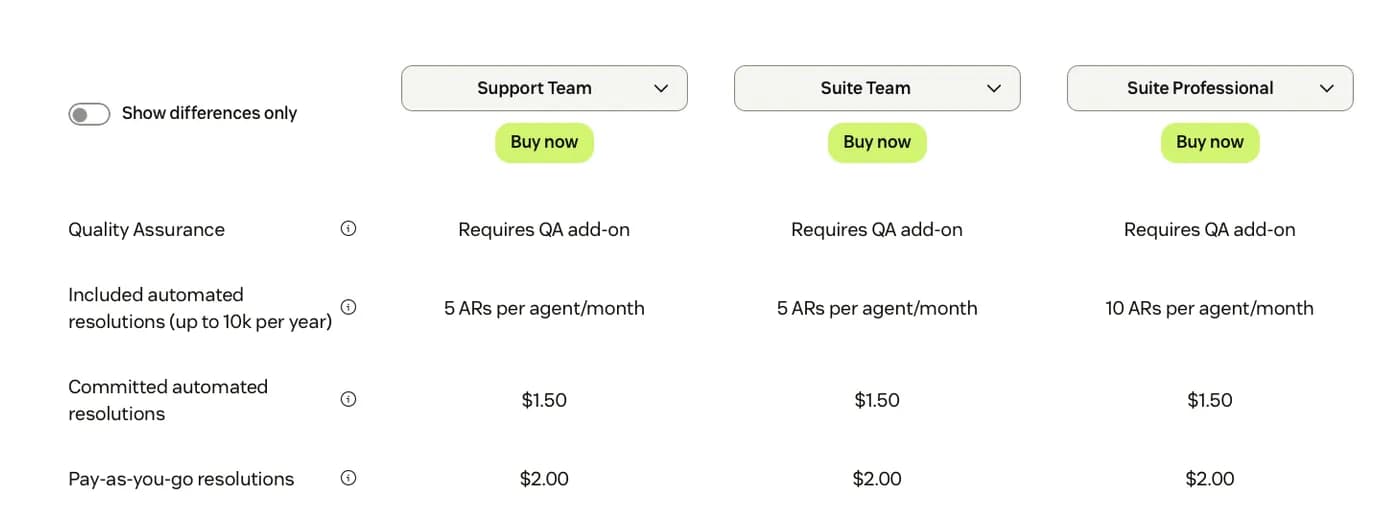
Zendesk sorts every AI conversation into three tiers, and only one is billed. An assisted escalation (the AI does part of the work, then hands over to a person) and a contained resolution (the AI finishes, but the outcome fails Zendesk's check) cost nothing. A verified resolution, where the AI solves the issue with no human help and passes the check, draws on your allowance. A messaging conversation counts as ended after 2 hours of quiet by default, and an email after 72 hours.
Allowance | Cost per automated resolution | How it bills |
Included with plan | Free | 5 per agent per month on Support Team and Suite Team, 10 on Suite Professional, 15 on Suite Enterprise, up to 10,000 a year per account |
Pre-purchased commitment | $1.50 | Discounted rate when you commit to annual volume |
Pay-as-you-go | $2.00 | Billed on usage above the free allowance |
Read Cost as: the price of each resolution in USD after the free allowance runs out.
AI pricing from Zendesk's pricing page, its AI agents page, and its outcome-based pricing guide, November 2026.
The free allowance runs out fast. A 3-agent Suite Team account gets 15 free resolutions a month. If the AI agent closes 200 requests, the other 185 cost $370 pay-as-you-go or $277.50 pre-purchased. That is more than the team's $165 seat bill.
That cost can still pay off if each resolution saves an agent several minutes. But stay on pay-as-you-go and check the resolution count in your first two billing cycles before you commit to annual volume.
What do Zendesk Voice phone calls cost on top of the plan?
Zendesk Voice (formerly Zendesk Talk) phone calls are billed by the minute on top of your Suite plan, starting with $1 a month for a US local number and $0.012 per minute for calls answered in the browser. Outbound calls to the US and Canada cost $0.022 per minute.
For a small team, the phone line is the cheap part. A team that rents one local number ($1), answers one thousand inbound minutes ($12), and makes 300 outbound minutes ($6) a month, with every call recorded ($3.9), pays $23.50 in total. Its Suite Team seats cost far more.
Item | Rate | What it covers |
US local phone number | $1.00 per month | Monthly number rental |
Inbound call (browser) | $0.012 per minute | Calls agents answer inside Zendesk |
Inbound voicemail | $0.012 per minute | Voicemail left on an inbound call |
Outbound call (US and Canada) | $0.022 per minute | Calls to US and Canadian numbers (Alaska: $0.116 per minute) |
Call recording | $0.003 per minute | Optional recording for quality checks |
Post-call transcription | $0.010 per minute | Text transcript after the call ends |
Live call transcription | $0.027 per minute | Transcript that appears during the call |
Voice AI agent connection | $0.005 per minute | Fee when an AI agent handles the call |
Read Rate as: the USD charge per minute of call time, or per month for the number.
Rates from Zendesk's help center rate card for Voice numbers (still titled under the Talk name), November 2026. Rates outside the US and Canada differ by country.
Zendesk also sells prepaid telephony credit packages with bonus credit, from 3% extra on a $1,000 purchase to 20% extra on $50,000. These need invoice billing and are sized for contact centers, so most small teams can ignore them.
Is the WhatsApp channel free on Zendesk?
Yes, for most micro-businesses - WhatsApp comes with Zendesk Suite Team and above, and Meta gives every business phone number 1,000 free service replies a month. After that, Meta charges per reply, from $0.0034 per message in the US and Canada to $0.055 in Germany, and utility templates are charged from the first message unless the chat started from a click-to-WhatsApp ad.
The cost depends on who sends the message and why. The table below shows what each type of WhatsApp message costs today.
WhatsApp message | Who you pay | Cost |
Messages customers send to you | - | Free |
Messages inside the 72-hour window after a customer taps a click-to-WhatsApp ad | - | Free |
First 1,000 service replies each month (agent or third-party AI replies inside the 24-hour window), per business phone number, with no rollover | - | Free |
Service replies after the first 1,000 | Meta | Per message: $0.0014 India, $0.0034 US and Canada, $0.0068 Brazil, $0.022 UK, $0.055 Germany |
Utility templates, such as order or delivery updates | Meta | Same per-message rate, charged from the first message outside the ad window |
Replies from Meta Business Agent, Meta's own AI | Meta | $2.00 per 1 million tokens, about 4 to 5 cents per interaction |
Read Cost as: what Meta charges for each message type in USD, Free = no Meta charge.
Rates from Zendesk's help center article on WhatsApp Business messaging pricing and Meta's developer documentation, November 2026.
Meta also requires a payment method in Meta Billing Hub. Without one, your service replies on WhatsApp are blocked, even if your Zendesk account is paid up.
If WhatsApp is your main channel, check one month of Meta invoices against your reply volume before you budget for the year. Sending routine questions to your help center instead of WhatsApp is the simplest way to keep that bill down.
How does Zendesk compare with Freshdesk for small teams?
Zendesk and Freshdesk both start at $19 per agent per month, but Freshdesk includes a knowledge base on its $19 plan, and Zendesk does not. Freshdesk's cheapest multichannel plan, Omni Growth, also costs $29, compared to Zendesk's $55 Suite Team. Every Freshdesk plan, including the $19 Growth and $29 Omni Growth, also includes its first 500 free AI sessions, and its AI help for agents costs $29 per agent, compared to Zendesk's $50.
The entry prices match, so the differences sit in what each plan includes, what multichannel support costs, and how AI is billed.
| Zendesk | Freshdesk |
Free plan | No (14-day trial) | Free Program for up to 2 agents for 6 months |
Entry plan (per agent per month) | $19, Support Team | $19, Growth (email, social, customer portal, and web forms) |
Cheapest multichannel plan (per agent per month) | $55, Suite Team | $29, Omni Growth (email, chat, WhatsApp, Instagram, Facebook, and messaging apps, with phone as a Voice add-on at $15 per agent per month) |
Knowledge base on entry plan | No | Yes |
AI resolution pricing | 5 free per agent per month on Support Team and Suite Team (10 on Suite Professional), then $1.50 to $2.00 each | First 500 sessions free on every plan, then $49 per 100 sessions started |
AI help for agents | Copilot, $50 per agent per month (Suite Professional and above) | Freddy AI Copilot, $29 per agent per month (on Pro, $55, and above) |
Read the table as: prices in USD with annual billing, Yes = included in the plan, No = not available.
Prices from each vendor's pricing page, November 2026. [Sonary Freshdesk review link]
When Freshdesk is the better fit
Pick Freshdesk if you want a self-service help center but do not need live chat yet. On Zendesk that combination forces you onto the $55 Suite Team plan. Freshdesk also runs a Free Program for up to 2 agents for 6 months. Every Freshdesk plan includes its first 500 AI sessions free, as a one-time pool. Once that pool runs out, Freshdesk charges $49 per 100 sessions, or $0.49 for every session started, whether resolved or not. Zendesk's free resolutions renew every month: 5 per agent on Support Team and Suite Team, and 10 on Suite Professional.
When Zendesk is still the right call
Stay with Zendesk if you want phone support without a second subscription. Zendesk Voice comes with every Suite plan at no extra seat cost, with minutes from $0.012. On Freshdesk Omni, phone is a paid Voice add-on: $15 per agent per month on Omni Growth and $39 on Omni Pro.
See also
Which Zendesk plan should you choose?
Choose Zendesk Support Team at $19 per agent if every customer reaches you by email, and Suite Team at $55 per agent the moment chat, WhatsApp, or phone calls enter the picture. Most teams of 1 to 15 agents never need a third option.
The right pick depends on how your customers contact you today:
- If you answer email in batches with 1 to 3 people, buy Support Team, billed annually.
- If customers message you on WhatsApp or Instagram, or call, buy Suite Team, and budget for Meta message fees and phone minutes on top.
- If you want a help center but not live chat, compare Freshdesk Growth first, since it includes a knowledge base at $19.
- If you are an early-stage startup, apply to Zendesk for Startups before paying anything. Qualifying startups get 6 months of Zendesk Suite Professional free for up to 50 agents.
Start the 14-day free trial with no card, but remember it opens on Suite Professional. As you test, write down each feature you actually use. If nothing on that list sits above Suite Team, buy Suite Team or Support Team and ignore the upgrade prompt when the trial ends.
FAQs
Is Zendesk cheaper if I pay annually?
Is Zendesk cheaper if I pay annually?
Yes. Support Team costs $19 per agent per month billed annually and $25 billed month-to-month, a saving of $72 per agent per year.
Does Zendesk Support Team include live chat?
Does Zendesk Support Team include live chat?
No. Support Team covers email and web forms only. Live chat, the website widget, and messaging apps start on Suite Team at $55 per agent per month.
Does Zendesk have a free plan?
Does Zendesk have a free plan?
No. Zendesk has no permanent free plan. It offers a 14-day free trial with no credit card, which opens on Suite Professional by default.
Can two people share one Zendesk agent login?
Can two people share one Zendesk agent login?
No. Sharing one agent login among several people breaks Zendesk's terms of service. Colleagues who only need to read tickets and add internal notes can use light agent seats. Suite Professional includes up to 100, and every Suite plan, including Suite Team, can buy them as an add-on.
What counts as an automated resolution in Zendesk?
What counts as an automated resolution in Zendesk?
Zendesk bills only verified resolutions: requests its AI agent solves with no human help that also pass Zendesk's own check. Conversations the AI hands to a person, or finishes without passing the check, are not billed.
What happens when I use up my free AI resolutions?
What happens when I use up my free AI resolutions?
Each extra resolution costs $2.00 on pay-as-you-go, or $1.50 if you pre-purchase annual volume. Every agent seat includes 5 free resolutions a month on Support Team and Suite Team, 10 on Suite Professional, and 15 on Suite Enterprise, up to 10,000 a year per account.
How much does a Zendesk phone number cost?
How much does a Zendesk phone number cost?
A US local number costs $1 a month. Calls answered in the browser cost $0.012 per minute, and outbound calls to the US and Canada cost $0.022 per minute.
Is Zendesk free for startups?
Is Zendesk free for startups?
Qualifying early-stage startups can get 6 months of Zendesk Suite Professional free for up to 50 agents, including AI agents and Copilot, through the Zendesk for Startups program. Startups referred by a partner VC or accelerator can get up to 2 years free. You qualify if you are a new Zendesk customer, a tech or tech-enabled business under 10 years old, funded up to Series B (bootstrapped counts), and under 250 employees. Teams of 50 to 249 people need a partner referral.
How much storage does Zendesk include?
How much storage does Zendesk include?
Support Team includes 10GB of data storage plus 50MB per agent, and 10GB of file storage plus 2GB per agent. Single attachments are capped at 50MB.
Is Freshdesk cheaper than Zendesk?
Is Freshdesk cheaper than Zendesk?
Often, yes. Both start at $19 per agent per month, but Freshdesk Omni Growth covers chat, WhatsApp, and social for $29 against Zendesk Suite Team at $55. Freshdesk also works out cheaper if you need a knowledge base without chat, or AI help for agents, which costs $29 per agent on Pro and above against Zendesk's $50 on Suite Professional and above.