
Last updated: September 2026
Zendesk offers applications that enable clients to manage incoming support requests from end customers from any computer connected to the Internet. Zendesk is designed to help support, sales, and customer success teams better engage with their customers. What this implies is that you can pay for fewer tools and keep all your customer data in one place.
Plans & Pricing
* Featured prices can be updated and free offers may include additional terms.
Zendesk offers a 14-day free trial that lets you explore all of the software's features. You can then upgrade to any of Zendesks' plans starting from $19/mo, or $49/Mo per user billed annually depending on the package you wish to subscribe to. Now the pricing section may seem a bit confusing, but this article makes it easier to understand. Zendesk offers different packages; Zendesk Support Team, and Suite Team. Overall, Zendesk is a great deal, and a good value for money given the number of features it packs into its software, however, most people suggest that more features should be added, or the price lowered a bit.
Expert Score
Pros
- The ability to create complex message templates with auto-filled information is a significant time-saver.
- User-friendly and easy to manage tasks.
- Zendesk offers a variety of Customer Support solutions, and integrates well with different platforms including WordPress & Jira.
Cons
- Sometimes external users have access to internal comments
- The dashboard is not very user-friendly
Customer Support
Zendesk offers one of the widest range of support systems amongst other competitors, among the support gateways are the support ticketing system, guide/help center, live chat and messaging, voice/phone support, reporting and analysis, plus community forum to mention but a few (these are only available when you're logged in to your account of course). In addition to customer support, you're able to access all of Zendesks' free online courses (training), FAQs library, video tutorials, Zendesk blog, and community forum. Additional Customer support: Blog Zendesks' blog contains tons of useful articles that'll come in handy when you need help. Community forum In any case, where you're not able to find your desired answer in the blog, you can upload your question to the community forum, and you're sure to get a response from experts. Training This is something I find particularly interesting, Zendesk offers a FREE training course on how to use their products, got issues setting up? Don't hesitate to check out these courses. Personal experience of customer support: One of the first issues you'll experience with Zendesk is if you're using a trial account. As soon as your account is created, you'll be immediately locked out of your trial account with a message asking you to contact Zendesk customer support. Down to the support page, you'll be asked to use the chat widget to get you on with a chatbot, which would request some level of information from you, and link you to a virtual agent, which is likely to respond in less than 15 minutes. Response time is not that slow via live chat, however, I found their support rather disappointing for a software that offers ticketing support. For a company in this industry, it's disappointing to have such poor interaction when it comes to using it. Contacting support via messaging was possible through a link provided by a virtual assistant, for phone support or a zoom session, the VA confirmed that either of them can be scheduled. Zendesk products are wonderful (as you should notice in the later parts of this article), their resources have a high capability to solve most of your problems likewise, but if you even need support from Zendesk, it might be a horrible experience for you.
Phone Support
YES, for paid accounts, and must be scheduled.
FAQ
A large FAQ library with helpful answers.
Blog
Zendesk blog, with tons of useful articles for support.
Live Online Chat
You'll get connected to a virtual agent in a short time.
Video Tutorials
Available Tutorials to help show you around.
Ease of Use
Zendesk as a help desk/service tool is complete, fully customizable, highly available, and easy to use, manage and configure. Providing customer service has never been simpler. The company provides fast and reliable technical support. Whether you have small or large sized company, it will perfectly suit your business.
Features & Functionality
ITSM
Help desk: a help desk software performs a wide range of essential functions such as answering questions whether through self-service or through a help desk agent, measuring customer satisfaction, and helping your agents be more productive with their workflows.
Ticketing system: Zendesk’s ticketing system or support ticket system offers: multilingual, multichannel, workflow, multi-brand, audit trail, and centralized hub.
Self-service portal: The Zendesk Guide, one of Zendesk’s help desk products, uses a smart knowledge base for empowering your agents and customers through a self-service solution featuring a knowledge base, help center, customer portal, and community forums.
Analytics: One of the top features of Zendesk help desk software is its easy-to-use interface that allows you to access reports and analytics to learn more about your customer support and help desk system.
Integrations: A CRM serves as the center of many businesses so, naturally, it should be plugged into the rest of your tech stack. A few notable integrations include: Salesforce, teamviewer, and MailChimp.
Efficiently handle and resolve IT incidents.
Identify and solve recurring issues with advanced solutions.
Effectively manage IT infrastructure changes.
Simplify service request processes for IT teams.
Generate detailed reports for insights and decision-making.
CRM
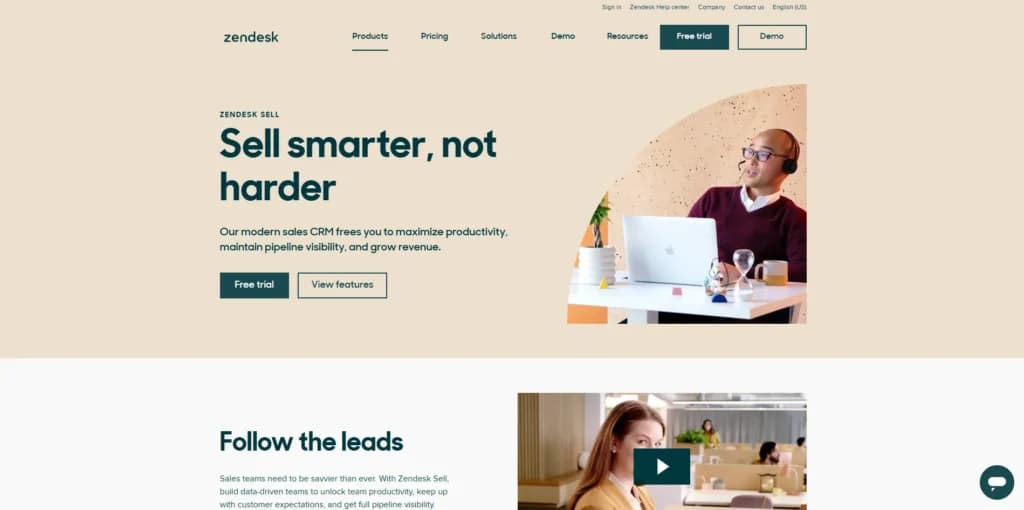
Homepage
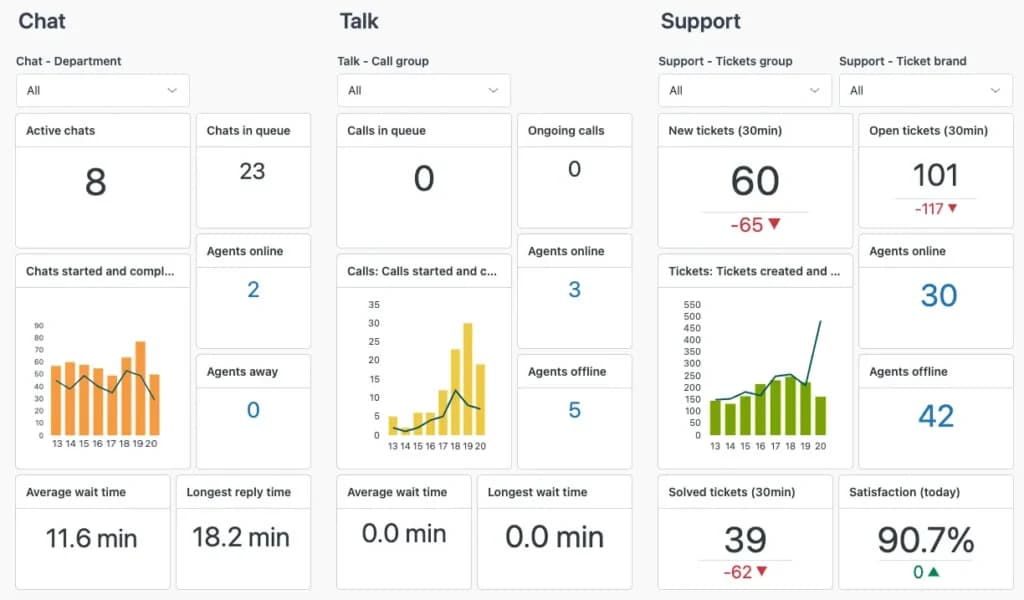
Customizable Dashboards
Zendesk Sell allows you to customize your dashboard to suit your needs. You can customize the fields, lead status, lead sources, tags, and smart links on the leads and contacts page. However, the deals page also has options for including deal sources, whether referrals, word of mouth, newspaper ads, or referrals.
Where a deal is lost, Zendesk offers features that help to customize it so you can choose from several options, including poor follow-up, loss to competition, price, service gap, timing gap, and other reasons.
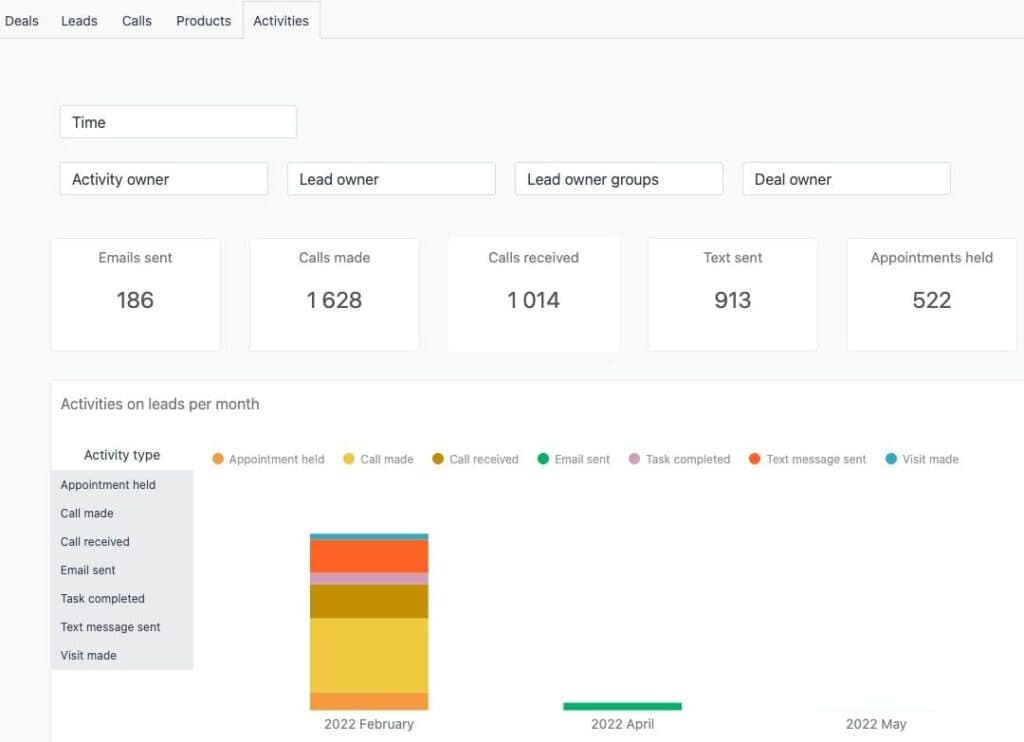
Reporting and Analytics
The reporting and analytics tools of the Zendesk CRM measure numerous metrics that cover pipeline analysis, sales performance, activity reports, sales goals, advanced sales insights, success insights, marketing effectiveness, and voice. These metrics have sub-divisions that accurately measure all your efforts to determine the most successful techniques so you can adjust appropriately. There are also forecasts for future results using multiple values to determine the right results.
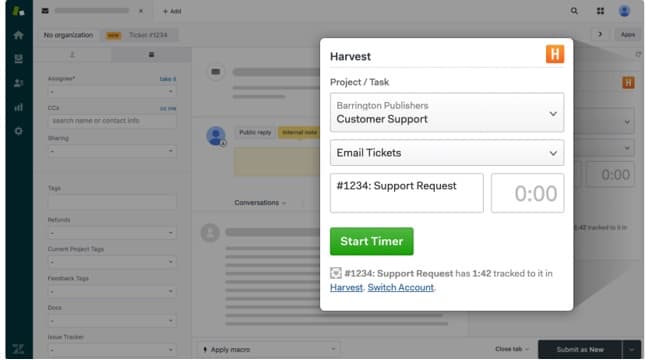
Zendesk has lots of apps that help with various things. These integrations stem from marketing to editing and even agent training. A good example is Harvest. This makes it easier to track your team's activity periodically from your laptop, phone, or other devices.
Harvest provides intuitive, visual reports which make it easy to analyze your team’s time and ensure all projects are on track. Also, in relation to clients, Harvest helps you create invoices, email them to your client, and ensure you get paid online.
Another integration is the Digiteam Mobile Workforce Management. This provides access to a mobile workforce platform without even leaving Zendesk support. It also helps in maintenance services, repairs, and inspections. With this app, teams have a sort of tool which guides access to technical documents and materials.
Zendesk has an easy-to-use interface that allows users to access reports and analytics and learn more about their customers. Furthermore, it helps you act on available data, which improves your company's relationship with its customers. Data is turned into insight that you can act upon. This is done without any written code.
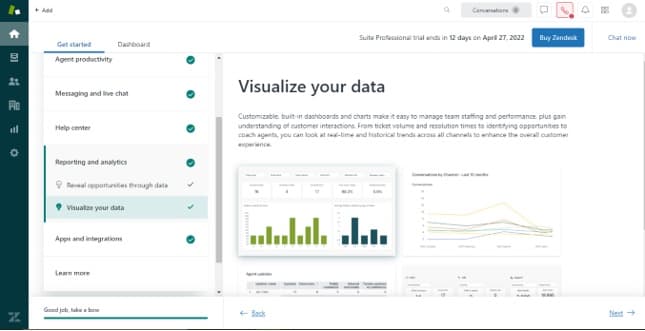
Streamline communication with integrated email tools.
Sales Engagement Tools (Reach)
The sales engagement tools fall into two categories, prospecting credits and enrichment credits. Depending on the data you have of the lead beforehand, you’ll choose the section that suits you best. While using the free trial, you get access to 4 credits each. Clicking on “add,” then you’ll find new prospects as a subheading. This section offers different companies you can filter to make your search more effective. There are various fields, including job title or industry, as criteria for choosing.
If you find a company that interests you, you can click on “find people” and select from what the list produces. Then, you can review prospects afterward. This tool helps you gain high-quality leads you can import and work with. The enrichment feature gives you comprehensive details about your contacts so you can build fuller profiles.
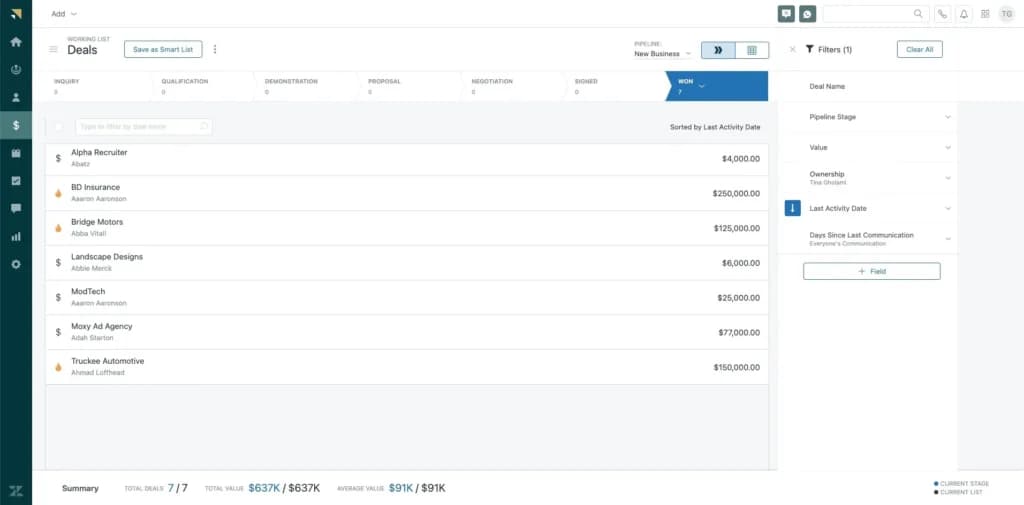
Contact Management
Zendesk allows you to manage your contacts easily across different pages. You can export files or add details manually. With the customizable features of the Zendesk CRM software, you include new fields, including contact properties and communication levels. This way, you can analyze your contacts and track communication to help you increase revenue.
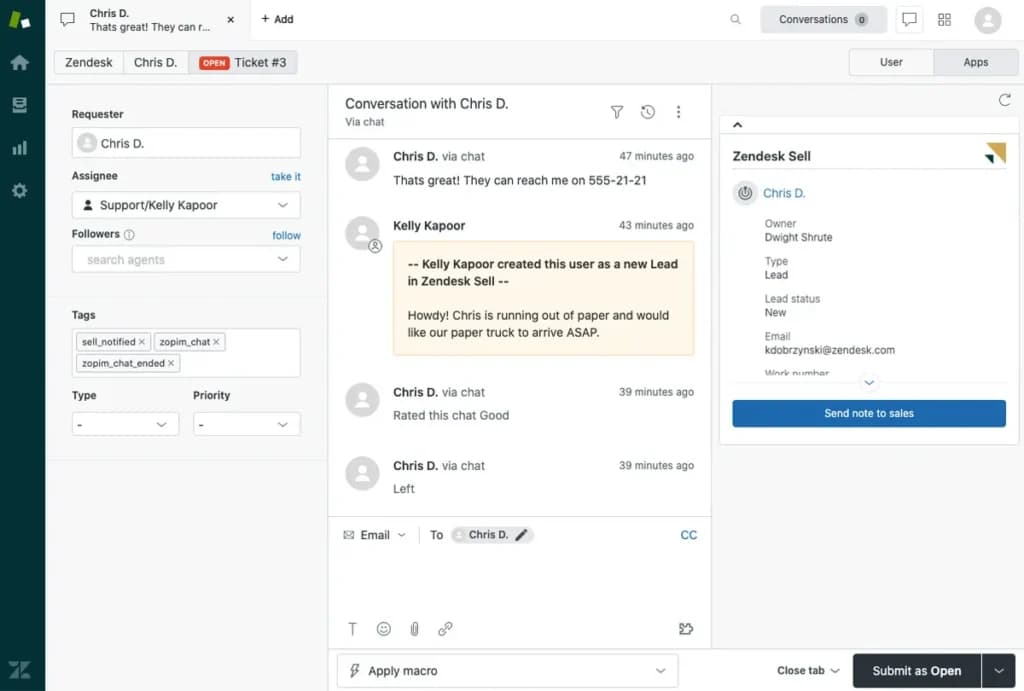
Pipeline Management
This feature helps you track your sales process to choose more deals so your business can grow quickly. It uses easy-to-understand statistics and visuals to determine the right moves to help you close more deals. You can customize the features on the sales pipeline so you can guide your customers from beginning to end.
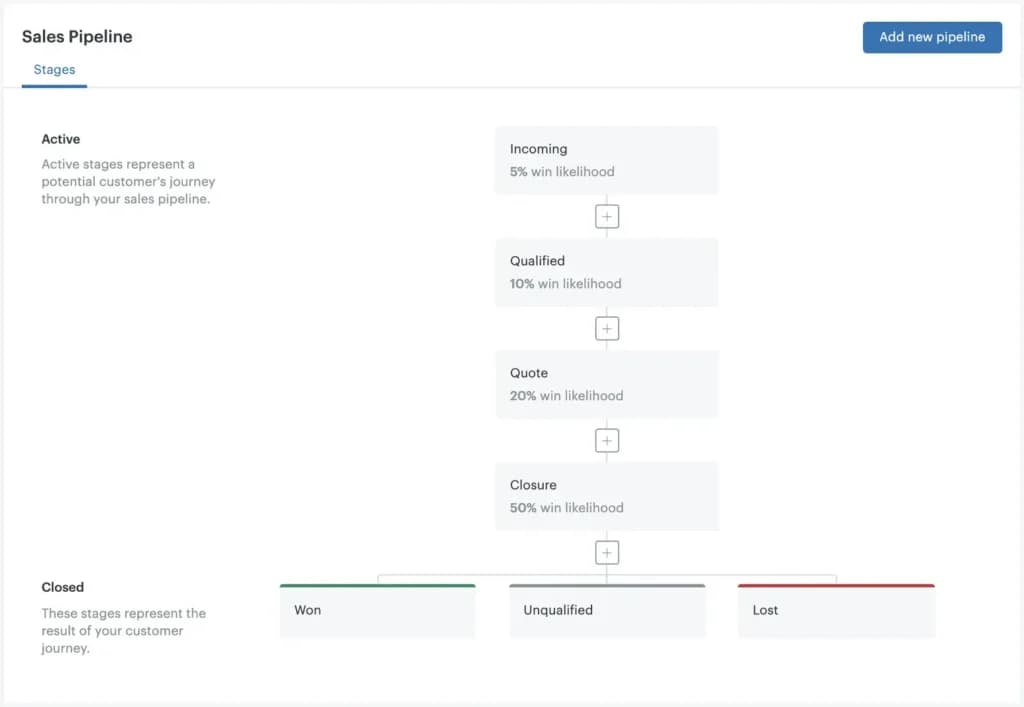
Features
- Asset Discovery and Management
- Configuration Management
- Incident and Problem Management
- Self-Service Support Desk
- Knowledge Management
- Request Management
- Metrics & Analytics
- BI & Reporting
- Multi-Cloud Support
- Major Incident Management
Zendesk Alternatives

Starting from: $49//mo /agent
Suite Team
$49
seat//mo /agent
Pros
- The ability to create complex message templates with auto-filled information is a significant time-saver.
- User-friendly and easy to manage tasks.
- Zendesk offers a variety of Customer Support solutions, and integrates well with different platforms including WordPress & Jira.
Cons
- Sometimes external users have access to internal comments
- The dashboard is not very user-friendly

Starting from: $45/month
Starter
$45
seat/month
Pros
- It includes free CRM software, ideal for sales teams, marketing automation software, and so on.
- It can be used for marketing or to build your website.
- Hubspot CRM is easy to integrate with internet browsers, email providers and your company workflow.
Cons
- HubSpot offers very limited features in its free version, so you’ll only be able to use it for the most basic things.
- HubSpots contracts aren't flexible, once you agree to a contract, you're locked in.
- Some of the templates aren't so easy to modify.
Starting from: $0/month
Free Trial
$0
seat/month
Pros
- Good value for money, scalability and integrations.
- Great automation, workflows & rules.
- Highly efficient customisation options.
- One of the best in the industry.
Cons
- Sometimes the interface is a little slow.
- Most popular and useful features are not included on the free plan.
- Zoho desk does not integrate well with WordPress.
- The user interface can be a bit confusing if you are an entry level user.
Verdict
Overall I’m extremely satisfied with Zendesk. It has a lot of great features that help us provide a great customer support service which is important for a successful business. The UI is intuitive, the software is futuristic, and packs plenty of perks and features. Customer support would score a 3 out of 5, and you'll get a good value for your money, as this is one of the best ITSM software available in the market.
Users Reviews
Be the first to write a review
Share your experience with Zendesk and help others choose the right software.