
Best Ecommerce Platforms for Small Business in 2026
Shopify is the best ecommerce platform for most small businesses that are primarily focused on selling. Wix is the top choice for small teams that need design flexibility alongside selling. For budget-first setups on WordPress, WooCommerce wins. Read on for the full breakdown.
Last updated: September 2026

- Dropshipping-friendly
- 100+ designer-made templates
- You can integrate directly with social platforms
- Built-in email marketing and cart abandonment workflows
- Dozens of payment processors options
- In-depth product listing options
- Templates aren’t interchangeable
- Some elements can’t be fully customized
- Dropshipping-friendly
- 100+ designer-made templates
- You can integrate directly with social platforms
- Built-in email marketing and cart abandonment workflows
- Dozens of payment processors options
- In-depth product listing options
- Templates aren’t interchangeable
- Some elements can’t be fully customized

3-Days Free Trial
- Trusted by millions of businesses globally
- Drag-and-drop store creator
- Create your online store in minutes
- Large suite of marketing tools to grow your website
- You’re able to sell online, offline, and through multiple marketplaces
- It has a built-in payment processor
- Supports unlimited products on every plan
- It charges you for third party payment processors
- The basic plan doesn’t have access to pro reports
3-Days Free Trial
- Trusted by millions of businesses globally
- Drag-and-drop store creator
- Create your online store in minutes
- Large suite of marketing tools to grow your website
- You’re able to sell online, offline, and through multiple marketplaces
- It has a built-in payment processor
- Supports unlimited products on every plan
- It charges you for third party payment processors
- The basic plan doesn’t have access to pro reports

Free plan available
- Start free with unlimited product listings
- Built-in SEO tools and Google integrations
- Advanced features: Abandoned cart recovery
- It’s 100% free to get started
- Excellent for small businesses
- Strong security features
- Inventory syncs seamlessly online and offline
- Very limited options for payment gateways
- Doesn’t have many templates to choose from
Free plan available
- Start free with unlimited product listings
- Built-in SEO tools and Google integrations
- Advanced features: Abandoned cart recovery
- It’s 100% free to get started
- Excellent for small businesses
- Strong security features
- Inventory syncs seamlessly online and offline
- Very limited options for payment gateways
- Doesn’t have many templates to choose from

15-Days Free Trial
- 240+ design templates
- Drag & drop product merchandising
- Built-in SEO tools to boost visibility
- Can use HTML and CSS for deep design flexibility
- Large ecosystem of third-party integration
- 24/7 support for all customers
- Even on the entry-level plan, you get many advanced features
- Pricing plans are tied to your yearly sales volume
- Difficult to edit orders after they’ve been placed
15-Days Free Trial
- 240+ design templates
- Drag & drop product merchandising
- Built-in SEO tools to boost visibility
- Can use HTML and CSS for deep design flexibility
- Large ecosystem of third-party integration
- 24/7 support for all customers
- Even on the entry-level plan, you get many advanced features
- Pricing plans are tied to your yearly sales volume
- Difficult to edit orders after they’ve been placed

14-Days Free Trial
- Seamless checkout with secure payments
- Easy-to-customize e-commerce templates
- Feature-rich online store builder
- Provides email marketing tools to customers
- Help and support is 24/7
- Wide range of features to boost conversions
- Solid professional-looking, mobile friendly templates
- There’s no auto save feature when editing pages
- You don’t get a refund on monthly plans
14-Days Free Trial
- Seamless checkout with secure payments
- Easy-to-customize e-commerce templates
- Feature-rich online store builder
- Provides email marketing tools to customers
- Help and support is 24/7
- Wide range of features to boost conversions
- Solid professional-looking, mobile friendly templates
- There’s no auto save feature when editing pages
- You don’t get a refund on monthly plans

Free plan available
- Vast ecosystem of extensions
- Enables limitless customization
- Integrates with any WordPress site
- Excellent customization and extensions library
- Integrations with all essential payment options
- Fully scalable from startup phase onward
- Extensive online community
- Greater functionality leads to more complexity
- Over-reliance on extensions
- Large stores are resource-intensive
Free plan available
- Vast ecosystem of extensions
- Enables limitless customization
- Integrates with any WordPress site
- Excellent customization and extensions library
- Integrations with all essential payment options
- Fully scalable from startup phase onward
- Extensive online community
- Greater functionality leads to more complexity
- Over-reliance on extensions
- Large stores are resource-intensive
* Featured prices and terms can be updated. Free offers may include additional terms.
So, What's the Best Ecommerce Platform for Small Businesses?
Honestly? It depends on what kind of business you're running. But if I had to pick one platform for a small team that needs to do everything - design, sell, market, manage - without hiring anyone extra, I'd go with Wix. And if your business is purely about selling products and you want the most powerful commerce engine out there, Shopify is the move.
But that's the short version. The real answer takes a bit more context, because every business is different. So let me walk you through each platform the way I'd explain it to a friend over coffee.
Key Takeaways
- Wix is the top choice for total design freedom and rapid AI-assisted site launches.
- Shopify remains the gold standard for businesses planning to scale quickly and utilize deep dropshipping integrations.
- AI-powered tools for writing product descriptions, generating images, and automating marketing are now built into every major ecommerce platform
- Squarespace leads for aesthetic-heavy brands and service-based micro-businesses.
- ROI Focus: Small businesses that consistently use built-in SEO and blogging tools tend to build compounding organic traffic over time, a long-term advantage over relying solely on paid ads.
How We Test Ecommerce Platforms
We test these platforms hands-on - not as journalists writing from press releases, but as people who have actually built stores on each one. Our team includes a solo founder who ran a WooCommerce store for 3 years before migrating to Shopify, a small-business consultant who helps micro-teams get online, and a product tester who has completed the full signup-to-first-sale flow across more than a dozen platforms. Our affiliate rates - disclosed at the top of this page - are the same across every platform listed, so we have no financial incentive to rank one above another.
How long we tested: Each platform on this list was actively used for at least 4 weeks. That is long enough to complete onboarding, build a store with at least 20 products, process test transactions, configure shipping zones, connect a payment gateway, and run into at least one real problem - and see how the support team handles it. Platforms we have used for over a year (Wix, Shopify, WooCommerce) carry more weight in our real-world assessments.
What we score and why: Each platform is rated across five weighted criteria. Features (1–5)cover product management, payment options, inventory, shipping, multichannel selling, and returns. Price (1–5)evaluates value relative to what you actually get - a plan that replaces $150 in apps scores higher than one that forces you to add them. Ease of Use (1–5)measures how long it takes a non-technical person to get a store live with a product that can be purchased. Support (1–5)reflects the quality of the live chat, the depth of the documentation, and response times during our testing window. Performance (1–5)covers store loading speed, uptime reliability, and mobile checkout experience. User Reviews (1–5)aggregates verified buyer ratings on our platform.
Our small-business filter: Every platform had to pass one core test - could a single person, on a Tuesday night with no developer and no outside budget, get a functional store live within a weekend? If the answer was no, or if basic tasks required coding or paid plugins, the platform was either excluded or heavily penalized in the Ease of Use category. Read our full rating methodology for a complete breakdown of how scores are calculated.
Top Small Business Ecommerce Platforms at a Glance
Feature | Wix eCommerce | Shopify | Squarespace | BigCommerce | WooCommerce |
|---|---|---|---|---|---|
Best For | Total Design Control | Scalability & Sales | High-End Aesthetics | Large Catalogs & B2B | WordPress / Content-First |
Starting Price | $17/mo | $29/mo | $16/mo | $29/mo | Free (hosting extra) |
AI Builder | Yes (Wix Harmony / Aria) | Yes (Shopify Magic) | Yes (Blueprint AI) | Limited | No |
Transaction Fees | 0% (paid plans) | 0% (Shopify Payments) | 3% (Business plan) | 0% (all plans) | 0% (processor fees only) |
App Market | 100+ Integrations | 8,000+ Apps | Select 3rd Party Apps | 1,000+ Integrations | 50,000+ Plugins (WP) |
Built-in SEO Tools | Yes (SEO Wiz) | Yes (auto-sitemaps) | Yes | Yes (advanced) | Yes (Yoast etc.) |
Free Trial | No (free plan) | 3-Day Free Trial | 14-Day Free Trial | 15-Day Free Trial | Free plugin |
Team Size | 1–3 Employees | 1–10+ Employees | 1–5 Employees | 1–20+ Employees | Any (tech comfort needed) |
Best ecommerce for a small business just starting out: Wix
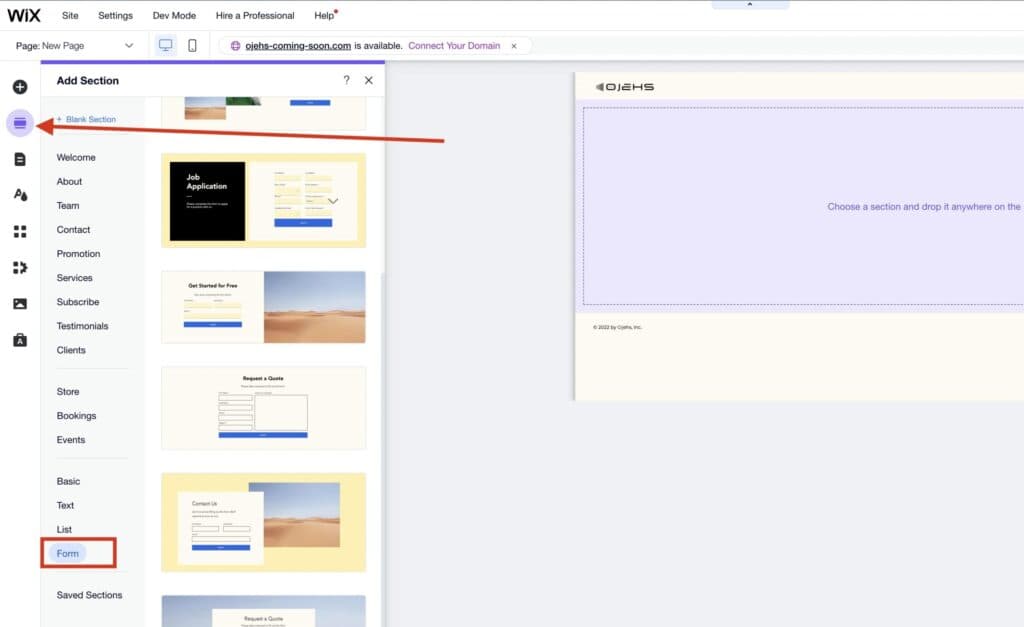
Here's the thing about running a small business: you're not just the owner. You're the designer, the developer, the copywriter, the customer support rep, and sometimes the person packing boxes at midnight. You need a platform that respects that reality.
That's why I keep coming back to Wix for small and micro businesses.
Wix lets you build your entire Ecommerce site with a drag-and-drop editor. No code. No weird workarounds. You literally move things around the page, and what you see is what your customers see. You can optimize the desktop and mobile versions separately, which is huge because most platforms just give you one layout and hope it looks okay on a phone. With Wix, you actually control how your site looks everywhere.
But here's where it really gets interesting for small teams - the AI website builder. You can build an entire site with one prompt. Seriously. Wix asks you a few questions about your business (what you sell, what your goals are, what style you like), and then it generates a full website with demo products, pages, navigation, the whole thing. From there, you just swap in your real products, tweak the design, and you're live.
They recently launched something called Wix Harmony with an AI agent called Aria. You can literally tell Aria "change my color palette to something warmer" or "add a testimonials section" or "redesign my homepage" - and it just does it. It understands your whole site, so changes in one area don't break something in another. That's the kind of thing that used to require hiring a developer.
On top of all that, Wix has AI tools for writing product descriptions, generating images, creating blog posts, and even an SEO assistant that tells you what to fix. The integrations are massive too - over 100 third-party platforms, from Mailchimp to payment providers to social media channels.
Wix eCommerce helps stores not just sell their products and services but expand their capabilities online. Featuring over 500 professional templates, a user-friendly drag-and-drop editor, and… Read more
Wix eCommerce helps stores not just sell their products and services but expand their capabilities online. Featuring over 500 professional templates, a user-friendly drag-and-drop editor, and seamless payment integration, Wix simplifies the creation of customized online stores. Its centralized platform allows for efficient management across multiple sales channels, including social media and marketplaces, ensuring streamlined operations. With built-in marketing and SEO tools, businesses can effectively attract and retain customers. In this Wix eCommerce review we'll look at the features, pricing, ease of use and business value offered by this e-commerce web builder.
Learn more in our full Wix E-commerce review.
Pros & Cons
- You can integrate directly with social platforms
- Built-in email marketing and cart abandonment workflows
- Dozens of payment processors options
- In-depth product listing options
- Templates aren’t interchangeable
- Some elements can’t be fully customized
Features
- Number of templates
- Drag & Drop Editor
- Free Stock Photos
- SEO Tools
- Social Media Integration
- Visitor statistics
- Third-party apps
- Data Security
- Multi-lingual website
- Inventory Management
- Payment options
- Returns & Refunds
- Shipping Management
- Mobile - friendly
- Mobile compatible templates
- Add HTML code
- Blog
- Design flexibility
- Fully customized
- Video Plug-Ins
- Widgets + Apps
- Abandoned cart tools
- Newsletter tool
- Monetization
- Product reviews
- Promotions & Discounts
- Advertising credits
- Number of sites
- Free custom domain
Pricing
$29
mo/
month
$36
mo/
month
$159
mo/
month
Who Should Pick Wix
If you're a small team - maybe 1 to 5 people - and the person running the website is also the person running the business, Wix is built for you. It's especially great if design matters to you but you're not a designer, if you want to blog for SEO but you're not a writer, and if you want to get to market fast without cutting corners on quality.
Real Talk: When Wix Might Not Be the One
If you're building a massive product catalog with thousands of SKUs and need advanced inventory management across multiple warehouses, Wix might start to feel tight. But for the vast majority of small businesses? It does more than enough.
A Real-World Example
Picture a small skincare brand. Three people: the founder who does everything digital, a part-time content person, and someone handling fulfillment. The founder uses Wix's AI builder, gets a full site up in under an hour, swaps in real product photos, uses the AI text tools to write product descriptions, and sets up a blog for SEO content. The content person writes weekly skincare articles using Wix's blogging tools. The fulfillment person manages orders from the dashboard.
No developer. No designer. No agency. Three people, one platform, fully running.
Best multi-channel ecommerce platform: Shopify
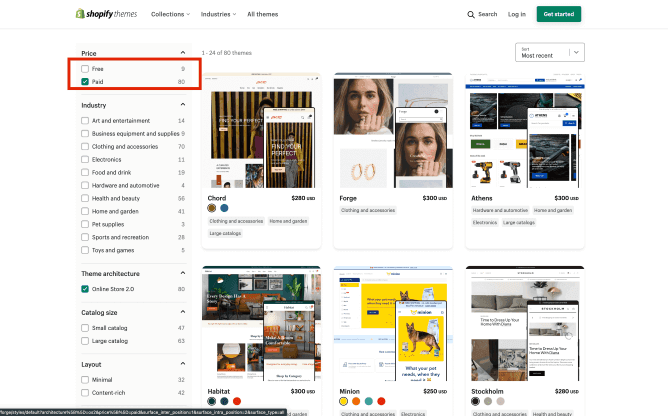
If Wix is the best all-rounder for small teams, Shopify is the best pure Ecommerce platform. Period. And here's the difference: Wix is a website builder that does Ecommerce really well. Shopify is an Ecommerce platform that also builds websites. If your entire business revolves around selling products - physical, digital, subscriptions, whatever - Shopify is designed for exactly that.
From the moment you log into Shopify, everything is about commerce. Your products, your orders, your customers, your sales channels. It's not trying to be a portfolio site or a blog platform. It's a selling machine.
Shopify also has its own AI store builder now. You type in a description of your business, and it generates three fully designed store layouts with products, images, descriptions, and SEO content already in place. Then there's Shopify Magic- their built-in AI that writes product descriptions, email subject lines, chat replies, and blog posts. It even has AI image editing so you can clean up product photos without Photoshop.
But the real power of Shopify for small businesses is the app store. There are thousands of apps that extend your store - email marketing, reviews, upsells, subscriptions, print-on-demand, dropshipping, loyalty programs. You can build a seriously sophisticated store without touching code. Just pick the apps you need and plug them in.
The flip side? Those apps cost money. A store with 5-10 paid apps can easily add $100-300/month on top of your subscription. That's something to budget for.
Shopify stands as a leading e-commerce platform, empowering over 1.75 million merchants across 175 countries to sell online seamlessly. Its user-friendly interface, customizable templates, and… Read more
Shopify stands as a leading e-commerce platform, empowering over 1.75 million merchants across 175 countries to sell online seamlessly. Its user-friendly interface, customizable templates, and comprehensive app ecosystem enable businesses to create and manage online stores with ease. Features like integrated inventory management, secure payment gateways, and mobile-responsive design ensure a smooth shopping experience for customers. Trusted by brands like Netflix and Mattel, Shopify offers scalable solutions suitable for businesses of all sizes. In this Shopify e-commerce review, I'll discuss features, performance, customer service, and Shopify pricing.
Learn more in our full Shopify review.
Pros & Cons
- Large suite of marketing tools to grow your website
- You’re able to sell online, offline, and through multiple marketplaces
- It has a built-in payment processor
- Supports unlimited products on every plan
- It charges you for third party payment processors
- The basic plan doesn’t have access to pro reports
Features
- Number of templates
- Drag & Drop Editor
- Free Stock Photos
- SEO Tools
- Social Media Integration
- Visitor statistics
- Third-party apps
- Data Security
- Multi-lingual website
- Inventory Management
- Payment options
- Returns & Refunds
- Shipping Management
- Mobile - friendly
- Mobile compatible templates
- Add HTML code
- Portfolio
- Design flexibility
- Fully customized
- Video Plug-Ins
- Audio Plug-Ins
- Widgets + Apps
- Abandoned cart tools
- Newsletter tool
- Monetization
- Product reviews
- Promotions & Discounts
- Advertising credits
- Free custom domain
- Space
- Bandwith
Pricing
$29
mo/
month
$79
mo/
month
$299
mo/
month
Who Should Pick Shopify
If selling products is your core business and you want to grow - selling on your website, Instagram, Facebook, TikTok, Amazon, and maybe even in-person with a POS system - Shopify gives you all of that in one place. It's also the go-to for dropshipping and print-on-demand businesses.
Real Talk: When Shopify Might Not Be the One
If your business is more content-driven (a blog, a portfolio, a service business) with a small shop on the side, Shopify can feel like overkill. The blogging tools are pretty basic compared to Wix or WordPress. And the design editor, while improved, isn't as free-form as a true drag-and-drop builder. You're working within the theme's structure more than creating from scratch.
A Real-World Example
Think about a husband-and-wife team making handmade jewelry. He makes the pieces, she runs the business side. She sets up Shopify Basic, uses the AI builder to get a storefront running in 20 minutes, and lets Shopify Magic write the product descriptions. She installs a free reviews app, connects Instagram Shopping, and turns on abandoned cart emails - which saves 3 sales in the first month alone.
As business picks up around the holidays, they upgrade to the Grow plan for gift card support and better reporting. Their total monthly cost: about $79 for the plan plus $30 in apps. Two people, growing steadily, no outside help needed.
Best ecommerce for small business with a design-led brand: Squarespace
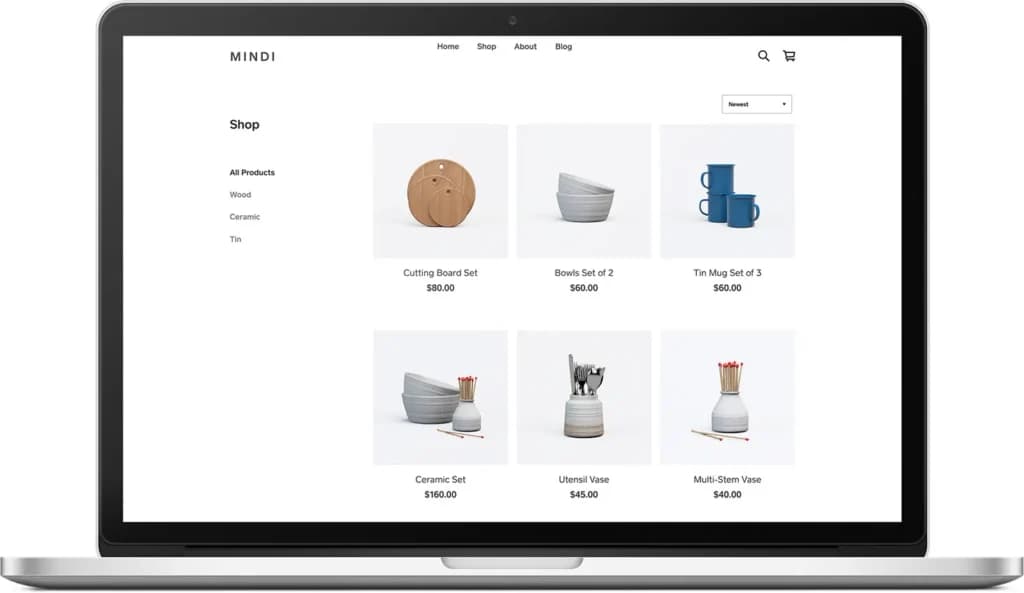
You know those websites where you land on the homepage and immediately think "wow, this brand is legit"? Half the time, that's Squarespace. And the beautiful thing is, it probably cost the owner $23 a month.
Squarespace has always been the design-first platform. The templates are gorgeous, and the editing experience keeps everything visually consistent - which means it's actually hard to make an ugly site, even if you're not a designer. For small businesses where brand aesthetics matter - independent fashion brands, artisan food producers, wellness companies, photographers, creative studios - Squarespace makes you look way more established than you might actually be. And honestly, that's a superpower.
They recently updated their pricing. The big deal for small businesses? You can now sell unlimited products even on the cheapest plan ($16/month). But the sweet spot is the Core plan at $23/month- zero store transaction fees, unlimited contributors, advanced analytics, and custom code support. That's actually cheaper than Shopify or Wix for basic Ecommerce
Squarespace also has a Blueprint AI tool that helps you set up your site by asking about your preferences, layout needs, and content. It's not as advanced as Wix's Harmony or Shopify's Magic, but it gets you a solid starting point.

Square is one of the most complete free business platforms for small businesses, covering POS, merchant services, accounting, online invoicing, payroll, bookkeeping, and ecommerce from a single… Read more
Square is one of the most complete free business platforms for small businesses, covering POS, merchant services, accounting, online invoicing, payroll, bookkeeping, and ecommerce from a single dashboard. It works especially well for micro businesses and SMBs that want to replace multiple subscriptions with one connected system — where sales, finances, inventory, and payroll all update automatically in the same place. For most small businesses, Square is worth it.
Learn more in our full Square review.
Pros & Cons
- No monthly payment
- Next-business-day transfers
- Inexpensive long-term option
- Comprehensive inventory management
- Not great for all industries
- Some performance issues
Features
- Inventory Management
- Loyalty Program
- Mobile Compatibility
- Online Ordering
- Reporting
- Split Checks
- Manage Tips
- Staff Scheduling
- Offline Payments
- Customer Profiles
- Multidevice Payments
- Gift Card Support
- Accounting Integration
- Tableside Ordering
- Floor Plan Management
- Customer-Facing Display
- Self-Service Kiosk
- Retail Store
- Coffee Shop
- Nightclub
- Quick Service
- Bars
- Restaurants
- Food Truck
- iOS
- Android
- Cloud-Based
- Free Trial
- Freemium
- Monthly subscription
- One-Time License
Pricing
$0
mo/
month
$29
mo/
month
Who Should Pick Squarespace
If you're a visual brand and the way your site looks is just as important as what it sells, Squarespace is your platform. Creatives, artists, makers, and lifestyle brands thrive here. It's also great for service businesses that want a beautiful online presence with a small shop attached.
Real Talk: When Squarespace Might Not Be the One
The app ecosystem is limited compared to Shopify. If you need advanced inventory, multi-channel selling across Amazon and TikTok, or heavy customization beyond what the templates offer, Squarespace will feel restrictive. It's intentionally simple - which is a strength for most small businesses, but a limitation if your needs are complex.
A Real-World Example
Two friends start an artisan candle business. One handles production, the other handles the brand. The brand person picks Squarespace because the site needs to feel premium - they're selling a high-end product at a high-end price. She picks a template, customizes it over a weekend, adds brand photography, and writes product descriptions. The site looks like it was designed by a professional studio.
They connect Mailchimp for email, Instagram for social, and use Squarespace's SEO tools to rank for "hand-poured soy candles." Within six months, organic Google traffic becomes their number-one sales source. Total cost: $23/month for the platform, $13/month for Mailchimp. That's $36/month for a business that looks like it has a real marketing department.
Use our Free Website Worth Calculator
Best ecommerce platform for wholesale and B2B: BigCommerce
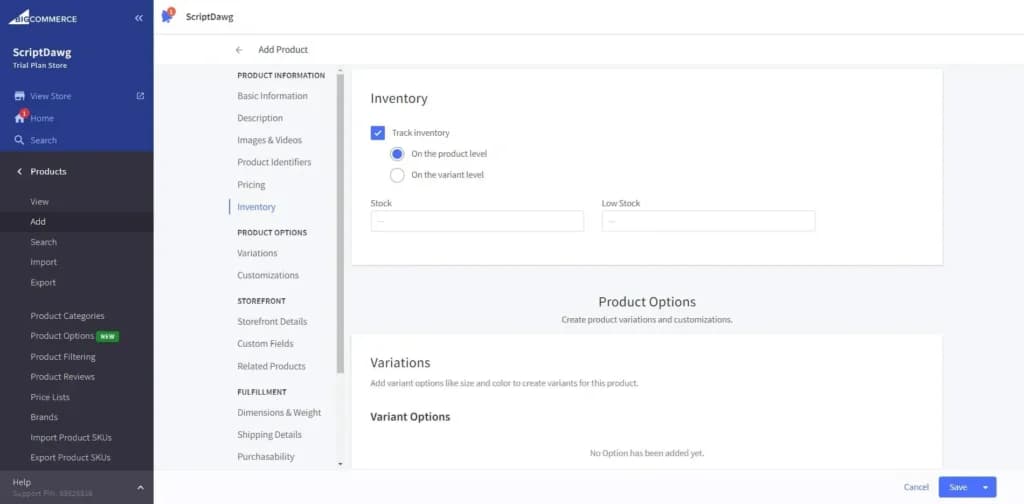
BigCommerce is the platform I recommend when someone tells me "I have a lot of products and I'm tired of paying for apps." Because here's the thing - a lot of features that Shopify charges extra for through apps, BigCommerce includes out of the box. Product variants, advanced search filtering, multi-currency support, customer groups for wholesale pricing, no transaction fees on any plan. All built in.
For small businesses with bigger catalogs - a specialty food store with 500 products, a parts supplier with complex options, a B2B business that needs different pricing for different customers - BigCommerce can save real money every month by not needing a stack of paid apps.
BigCommerce is a leading e-commerce platform designed for both B2B and B2C businesses, offering extensive customization and scalability. With a robust CMS, it provides seamless app integrations,… Read more
BigCommerce is a leading e-commerce platform designed for both B2B and B2C businesses, offering extensive customization and scalability. With a robust CMS, it provides seamless app integrations, expert services, and diverse commerce solutions, all within a single platform. This comprehensive approach empowers businesses to tailor their online stores to unique requirements, facilitating growth and adaptability in a dynamic market. In this BigCommerce review I'll discuss the features, pricing, ease of use and business value offered by this e-commerce website builder.
Learn more in our full Bigcommerce review.
Pros & Cons
- Can use HTML and CSS for deep design flexibility
- Large ecosystem of third-party integration
- 24/7 support for all customers
- Even on the entry-level plan, you get many advanced features
- Pricing plans are tied to your yearly sales volume
- Difficult to edit orders after they’ve been placed
Features
- Number of templates
- Drag & Drop Editor
- SEO Tools
- Social Media Integration
- Visitor statistics
- Third-party apps
- Data Security
- Multi-lingual website
- Inventory Management
- Payment options
- Returns & Refunds
- Shipping Management
- Mobile - friendly
- Mobile compatible templates
- Add HTML code
- Blog
- Design flexibility
- Fully customized
- Video Plug-Ins
- Audio Plug-Ins
- Widgets + Apps
- Abandoned cart tools
- Newsletter tool
- Monetization
- Product reviews
- Promotions & Discounts
- Number of sites
- Space
- Bandwith
Pricing
$29
mo/
month
$79
mo/
month
$299
mo/
month
Who Should Pick BigCommerce
Product-heavy businesses. B2B sellers. Anyone who looks at Shopify's app costs and thinks "there has to be a better way." If you need robust commerce features without the app dependency, BigCommerce is worth a serious look.
Real Talk: When BigCommerce Might Not Be the One
It has a steeper learning curve. The design templates are more functional than beautiful. If you're a solo founder who wants to get a gorgeous site up in an afternoon, BigCommerce will feel heavy compared to Wix or Squarespace.
A Real-World Example
A family-run spice company with 400+ products. Four people: the owner, his wife on customer service, and two part-time fulfillment workers. They chose BigCommerce because it natively supports product variants (different sizes of the same spice), faceted search (filter by type, region, heat level), and wholesale customer groups - all without paid apps.
They connected it to their Amazon and eBay stores for automatic inventory sync. Total platform cost: $29/month. Running the same setup on Shopify with apps would easily cost $150-200/month more.
Cheapest ecommerce for small business already on WordPress: WooCommerce
If your business already runs on WordPress - maybe you have a blog with real traffic, or a content-driven site - adding WooCommerce is a no-brainer. It's a free plugin that turns your existing WordPress site into an Ecommerce store.
The catch? You're responsible for everything. Hosting, security, updates, backups, troubleshooting. There's no support team to call at 2 AM. You need someone on your team who's at least comfortable with WordPress.
WooCommerce, launched in 2011, has evolved from a simple plugin into a powerful open-source e-commerce solution for WordPress websites. Its seamless integration with WordPress allows businesses to… Read more
WooCommerce, launched in 2011, has evolved from a simple plugin into a powerful open-source e-commerce solution for WordPress websites. Its seamless integration with WordPress allows businesses to transform their sites into fully customizable online stores, offering features like flexible product management, secure payment processing, and a vast library of extensions to enhance functionality. This adaptability makes WooCommerce an ideal choice for businesses aiming to establish a robust online presence without incurring substantial costs. In this WooCommerce review we'll look at the features, pricing, ease of use and business value offered by this e-commerce web builder.
Learn more in our full WooCommerce review.
Pros & Cons
- Excellent customization and extensions library
- Integrations with all essential payment options
- Fully scalable from startup phase onward
- Extensive online community
- Greater functionality leads to more complexity
- Over-reliance on extensions
- Large stores are resource-intensive
Features
- Number of templates
- Drag & Drop Editor
- Free Stock Photos
- SEO Tools
- Social Media Integration
- Visitor statistics
- Third-party apps
- Data Security
- Multi-lingual website
- Inventory Management
- Payment options
- Returns & Refunds
- Shipping Management
- Mobile - friendly
- Mobile compatible templates
- Add HTML code
- Blog
- Portfolio
- Design flexibility
- Fully customized
- Video Plug-Ins
- Audio Plug-Ins
- Widgets + Apps
- Abandoned cart tools
- Newsletter tool
- Monetization
- Product reviews
- Promotions & Discounts
- Advertising credits
Pricing
$0
mo/
month
$6.95
mo/
month
$8.95
mo/
month
$12.95
mo/
month
Who Should Pick WooCommerce
WordPress users. Content-first businesses. Anyone who wants complete control and full ownership of their data. Budget-conscious teams that are willing to invest time instead of money.
Real Talk: When WooCommerce Might Not Be the One
If nobody on your team knows WordPress, don't start here. The "free" price tag can end up costing you more in time (and frustration) than a managed platform would cost in money.
A Real-World Example
A small independent publisher with a WordPress blog that already gets thousands of visitors from search. They add WooCommerce in a weekend, install a free theme, set up PayPal and Stripe, and start selling books directly to the audience they already have. Total cost: $25/month for hosting. That's it.
Which ecommerce platform fits your business size
Your monthly sales figure decides this, and there are four real thresholds. Three of them are published by the vendors and nobody puts them in a comparison table.
Under $2,500 a month in sales
Pick on anything except cost, because cost is identical. Shopify Basic, Wix Core, Squarespace Core and BigCommerce Core all come to about $99 a month all-in at this volume.
Two exceptions worth knowing. WooCommerce is genuinely cheaper at roughly $74, because the plugin is free and you are only paying for hosting. And Squarespace Basic at $19 is a trap - its 2% commerce fee costs more than the $10 you save the moment you pass $500 in monthly sales.
$2,500 a month: BigCommerce Core runs out
BigCommerce Core is capped at $30,000 trailing-twelve-month GMV, which is $2,500 a month averaged across the year. Pass it and you move to Growth at $79 a month. This is a hard published limit, not a soft nudge.
If you are picking BigCommerce and you expect to grow, price the plan you will be on in twelve months, not the one you start on.
$8,333 a month: BigCommerce Growth runs out
Growth is capped at $100,000 TTM GMV. Above it you are on Scale at $299 a month, a 278% jump from Growth. There is nothing in between.
This is the single clearest reason to think twice about BigCommerce for a small store that intends to stop being small. Shopify and Squarespace have no revenue cap at all. Wix has no revenue cap. WooCommerce has no revenue cap.
$10,000 a month: Squarespace Plus starts paying for itself
Plus costs $20 more than Core and drops card processing from 2.9% to 2.7%. Two tenths of a percent covers $20 at exactly $10,000 a month in sales. Below that, stay on Core. Above it, upgrade.
$25,000 a month: Shopify Grow starts paying for itself
Same arithmetic. Grow costs $50 more than Basic and saves 0.2% on card processing, which breaks even at $25,000 a month. Most comparison articles push you to Grow far earlier than that. Do not upgrade until you are there, because until you are, the extra features are costing you money.
For the record, the next one up: Advanced costs $220 more than Grow and saves another 0.2%, so it breaks even at $110,000 a month. That is not a small-business decision.
Already running WordPress
WooCommerce, at any volume in this range. The plugin is free, your hosting is already paid for, and WooPayments charges the same 2.9% + $0.30 as everyone else with no platform cut on top if you use a different gateway.
See also
- Wholesale needs customer-specific pricing, net terms and quote requests. See B2B ecommerce platforms.
- If your developers want to own the front end, you need a headless ecommerce platform - a different shortlist entirely.
- Above a certain order volume the platform fee stops mattering and integrations take over. See enterprise ecommerce platforms.
- Free ecommerce plans take a higher transaction cut. The free ecommerce platforms list does the math on when a paid plan is cheaper.
Conclusion
An online store is a powerful way to grow your brand or launch it from scratch. Many tools will help you succeed such as Ecommerce website builders, advertising platforms, and social media platforms. They’re only as effective as you make them. The first step is understanding how to use them properly to reach your goals. If you’re looking for the right Ecommerce website builder then be sure to check out our helpful reviews so you can quickly shortlist the best candidates based on your situation.
Here's how I think about it when someone asks me "which platform should I use?":
Pick Wix if you're a small team that does everything and you want one platform that handles design, content, marketing, and selling - with AI tools that actually save you hours of work.
Pick Shopify if selling is your whole business and you want the most powerful commerce ecosystem with room to grow into multiple sales channels.
Pick Squarespace if your brand's visual identity is everything and you want a site that looks like you spent thousands on design - for $23/month.
Pick BigCommerce if you have a big catalog, complex products, or B2B needs, and you don't want to pay for apps to get features that should already be there.
Pick WooCommerce if you already live in WordPress, you're comfortable managing your own tech, and you want total control.
No platform is perfect. But the right one for your small business is the one that lets your tiny team get big things done without losing your mind - or your budget.