

Shopify E-commerce Review 2026: What the Plans and Transaction Fees Cost
Overall Rating
4.5
Last updated: September 2026
Shopify stands as a leading e-commerce platform, empowering over 1.75 million merchants across 175 countries to sell online seamlessly. Its user-friendly interface, customizable templates, and comprehensive app ecosystem enable businesses to create and manage online stores with ease. Features like integrated inventory management, secure payment gateways, and mobile-responsive design ensure a smooth shopping experience for customers. Trusted by brands like Netflix and Mattel, Shopify offers scalable solutions suitable for businesses of all sizes. In this Shopify e-commerce review, I'll discuss features, performance, customer service, and Shopify pricing.
Plans & Pricing
- Up to 77% shipping discount
- 10 inventory locations
- 24/7 chat support
- Localized global selling (3 markets)
- POS Lite
- Up to 88% shipping discount and insurance
- 10 inventory locations
- 24/7 chat support
- Localized global selling (3 markets)
- 5 additional staff accounts
- POS Lite
- Up to 88% shipping discount, insurance, 3rd-party calculated rates
- Custom reports and analytics
- 10 inventory locations
- Enhanced 24/7 chat support
- Localized global selling (3 markets) + add markets for $59 USD/mo each
- 15 additional staff accounts
- 10x checkout capacity
- POS Lite
* Featured prices can be updated and free offers may include additional terms.
Shopify’s entry-level plan ($29/mo billed annually) matches the starting price of main competitors like Wix Core ($29/mo) and BigCommerce Core ($29/mo). While all three give micro-businesses an affordable foot in the door, Shopify is purpose-built strictly for e-commerce, meaning every feature is engineered to convert visitors into sales.
Where the Growth Pricing Gap Expands When moving beyond starter tiers, Shopify’s pricing gap widens—costing more than general site builders like Wix ($79/mo for Shopify Grow vs. $39/mo for Wix Business). This higher price tag is driven by a few critical factors:
- Conversion-First Checkout: Shopify’s checkout (including Shop Pay) converts significantly higher than Wix, turning a higher percentage of your traffic into paying customers.
- No Forced Revenue Caps: BigCommerce automatically forces you onto higher plans ($79/mo or $299/mo) once you cross strict annual sales caps ($30,000/yr). Shopify lets you stay on cheaper tiers no matter how much revenue you bring in.
- Built-in Cash Back: Features like 1% cash back on sales (up to $5,000 on Basic, $7,500 on Grow) actively lower your effective subscription cost as your sales grow.
- Ecosystem Depth: You get out-of-the-box support for 10 inventory locations, multi-channel selling (social platforms, AI chats), and thousands of specialized apps that general site builders cannot match.
Is Shopify Worth It for Small and Micro Businesses?
Yes, absolutely. For small and micro businesses where online selling is the core engine, Shopify is built from the ground up for ecommerce. Every single tab in the dashboard, from inventory management to checkout recovery, is built to help you succeed and scale. While Wix is cheaper as you grow, Shopify’s superior checkout efficiency and dedicated sales tools generate a far higher overall return on investment.
Independent studies show Shopify's checkout converts 15% better on average than competitors—and up to 36% better using Shop Pay. For a business making $10,000 a month, a 15% conversion boost brings in $1,500 in extra sales, making the $40 price gap between Shopify ($79/mo) and cheaper alternatives like Wix ($39/mo) completely irrelevant.
You also avoid hidden growth penalties. BigCommerce forces automatic plan upgrades to $79/mo or $299/mo as soon as you cross $30,000 in annual sales. Shopify imposes no sales limits on its $29/mo entry plan, letting you scale indefinitely without forced price increases. Additionally, Shopify’s built-in 1% cashback reward directly offsets your monthly bill (yielding up to $75/mo in credits on Grow), bringing your actual software cost down to just $4/mo at full volume.
Lower starting prices on general website builders like Wix are misleading. Wix requires $30 to $100 per month in extra third-party apps to match Shopify's built-in inventory tracking, multi-channel selling, and B2B tools. Because Shopify focuses 100% of its engineering on selling products rather than general website design, small businesses make significantly higher net profit on Shopify despite the higher sticker price.
Expert Score
Pros
- Large suite of marketing tools to grow your website
- You’re able to sell online, offline, and through multiple marketplaces
- It has a built-in payment processor
- Supports unlimited products on every plan
Cons
- It charges you for third party payment processors
- The basic plan doesn’t have access to pro reports
Customer Support
Overall, Shopify's multi-faceted support system ensures that assistance is readily available through various channels, catering to the diverse needs of businesses operating online stores. When I tested Shopify's e-commerce platform, I found that it offers a comprehensive support system to assist businesses in selling online effectively. Live Chat Support I tried out Shopify's 24/7 live chat feature, accessible through the Help Center. The support agents were knowledgeable and responsive, providing immediate assistance for various inquiries. Phone Support Shopify offers phone support in select regions, including the United States, United Kingdom, Australia, and others. I found that speaking directly with a support representative can expedite the resolution of complex issues. Email Support For less urgent matters, Shopify provides email support. I found that this channel is suitable for detailed inquiries, with responses typically received within 24 to 48 hours. Community Forum I explored Shopify's Community Forum, a platform where users can ask questions, share experiences, and provide solutions. This peer-to-peer support system enhances the overall support ecosystem.
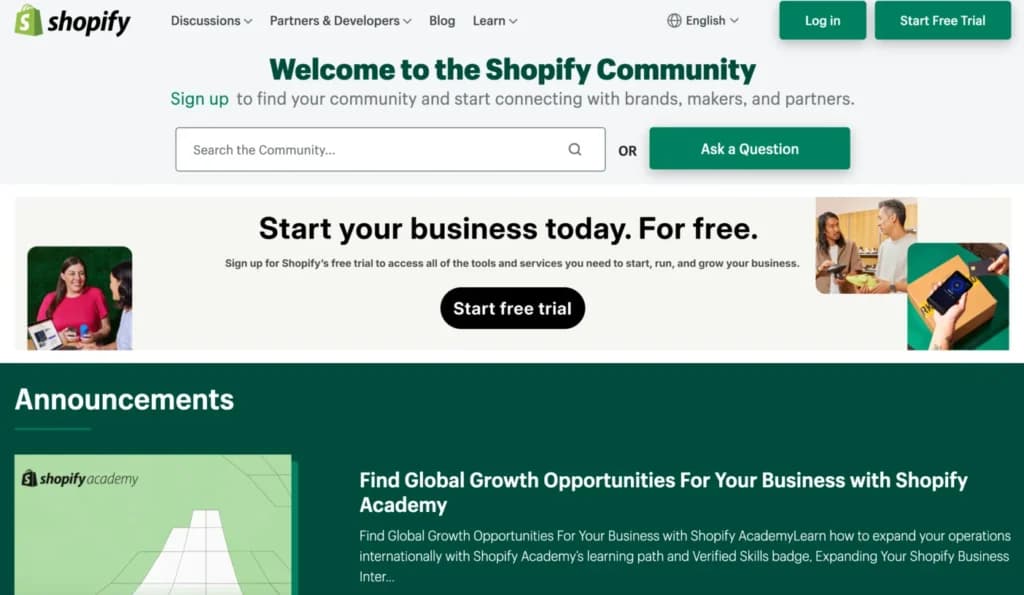
Blog and Help Center Shopify maintains a regularly updated blog covering topics like e-commerce trends, business tips, and platform updates. Additionally, the Help Center offers a wealth of articles and guides to assist users in navigating the platform.
Email support is available to all customers 24/7
24/7 Help & Support
24/7 support is available across multiple channels
FAQ
Ask a question and a list of possible solutions appear
Blog
Shopify maintains an active blog that is updated with 2-5 posts p
Live Online Chat
Live chat is also available 24/7 to all customers
Video Tutorials
Variety of video tutorials on the website and YouTube
Ease of Use
Simple Setup and User-Friendly Design When I tested Shopify’s e-commerce platform, I found the setup process smooth and intuitive. The online store builder walks users through key steps, making it one of the best e-commerce platforms for small businesses. Even without technical knowledge, I was able to customize the layout, add products, and configure settings with ease. Store Management and Customization I played with Shopify’s dashboard and found inventory management straightforward. The platform’s CMS makes managing orders, tracking stock, and updating product listings simple. However, advanced customization requires coding or third-party apps, making it less flexible than an open-source or headless CMS solution. For those looking to sell online without technical complexity, Shopify offers an affordable e-commerce solution with mobile-responsive design and SEO features. While larger enterprises may need more customization, Shopify remains an excellent choice for selling online efficiently. Here's an in-depth tutorial on how to build a store from scratch:
Performance
Scalability and Reliability
When I tested Shopify's e-commerce platform, I found it capable of handling high traffic volumes without compromising performance. The platform's infrastructure supports businesses of all sizes, ensuring consistent uptime and swift page loads, which are crucial for online stores aiming to provide a seamless shopping experience.
Speed Optimization
I played with Shopify's built-in tools designed to enhance site speed, such as efficient content delivery networks (CDNs) and image optimization features. These tools contribute to faster loading times, benefiting both user experience and search engine rankings.
Integrated Analytics
Shopify offers comprehensive analytics that provide insights into sales performance, customer behavior, and traffic sources. These metrics are invaluable for businesses looking to optimize their operations and marketing strategies.
Overall, Shopify delivers a robust performance framework, making it a top choice among e-commerce platforms for businesses seeking reliability and scalability in their online store builder.
Features & Functionality
eCommerce
Shopify has a solid collection of features for building e-commerce websites, extending their functionality, and marketing to customers across multiple channels. You can map a custom domain, use unlimited bandwidth, access financing through Shopify Capital, and use robust analytics tools.
It is a robust, user-friendly CMS platform suitable for small startups and large enterprises looking to grow and manage their online sales effectively.
Here are some of the top features for e-commerce sites:
- Customizable online storefronts
- Product listing and inventory management
- Extensive app store
- Unified sales channels
- Advanced marketing tools
- Comprehensive dashboard and analytics
- Shopify POS (Point of sale)
- Mobile optimization
- Dropshipping capabilities
- Multilingual and multi-currency support
- Abandoned cart recovery
- Optimized checkout
- Shopify Ping
- Free stock photos
- Multichannel sales
- Payment options
- Safety
I’ll explore these features in more detail below:
Products Listing and Inventory Management
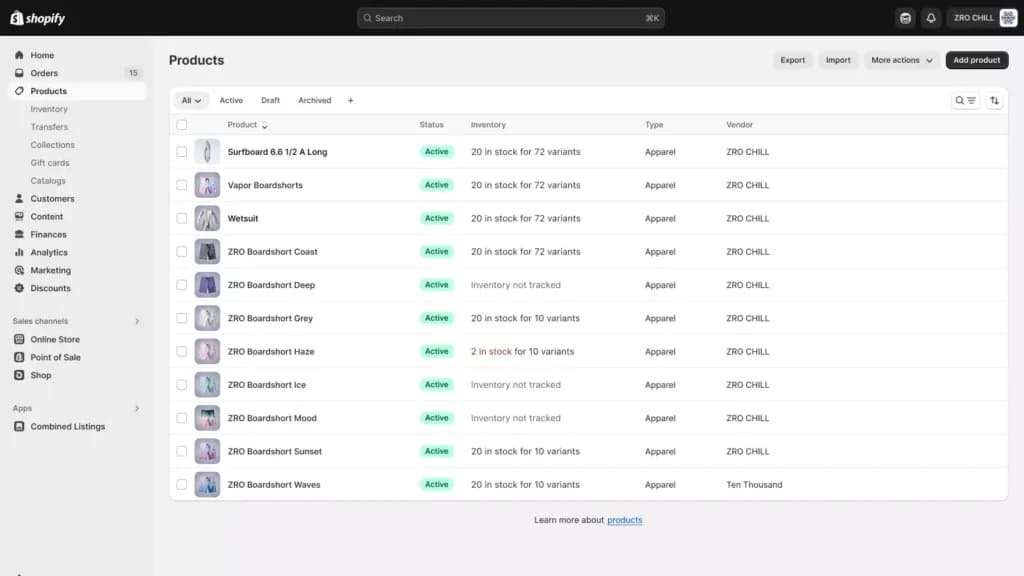
Shopify tools have some of the best inventory tracking and listing features available. I found it easy to list unlimited products across all plans and create multiple variations of each product. The options are limited to three, so you can’t get too deep into the weeds, but it should be adequate for most users.
Like with the drag-and-drop builder, some plugins allow you to add more than three options to your product variants. Finally, the central dashboard gives you a clear overview of your inventory, sales, and web traffic.
Customizable Online Storefronts
The Shopify website builder provides a range of customizable themes that make it easy for businesses to design and deploy their online store. Users can select and modify themes without needing coding skills, ensuring their store aligns with their brand image.
Extensive App Store
I explored the Shopify App Store, which offers thousands of apps to expand store functionality. From SEO features and social media integration to customer service tools, businesses can enhance their online store with specialized plugins that meet their needs.
Unified Sales Channels
Shopify makes selling online easier by integrating multiple sales channels. I played with the platform’s ability to sync inventory and orders across a website, social media, and marketplaces. This feature streamlines inventory management and provides a centralized dashboard for tracking performance.
Advanced Marketing Tools
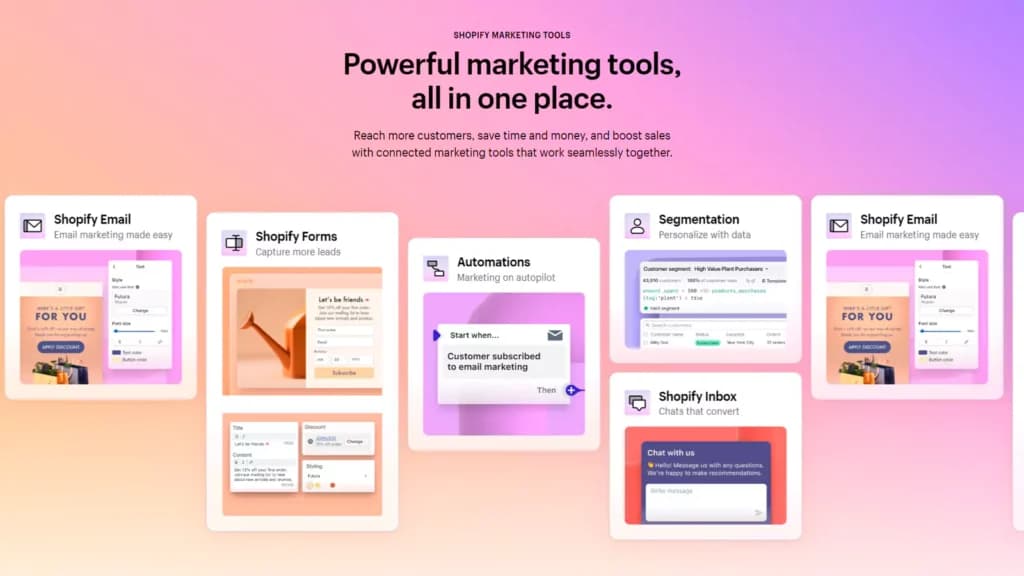
Shopify doesn’t hold anything back when it comes to helping you market your website in the most effective way possible. The CMS tool has tons of integrations with marketing tools through its app store.
There are also SEO tools that’ll let you easily optimize your website, support a blog, have built-in email marketing, have deep Facebook ads integration, and a native tool named Kit. Kit serves as your marketing assistant and can help convert customers and make marketing recommendations. Those same storefront features show up in different combinations across the best ecommerce tools, so compare which ones ship natively rather than as paid apps.
Comprehensive Dashboard and Analytics
The platform provides a central dashboard where users can monitor everything from sales to customer interactions. The dashboard is equipped with analytics to gauge performance and make informed decisions.
Shopify POS
This POS tool integrates online and physical sales, allowing businesses to sell in-store while managing their inventory and sales data through Shopify’s ecosystem, making it ideal for businesses with both online and offline sales channels.
Mobile Optimization
Shopify CMS ensures that all online stores are fully responsive, meaning they work seamlessly on mobile devices, thus improving the customer shopping experience and potentially increasing mobile sales.
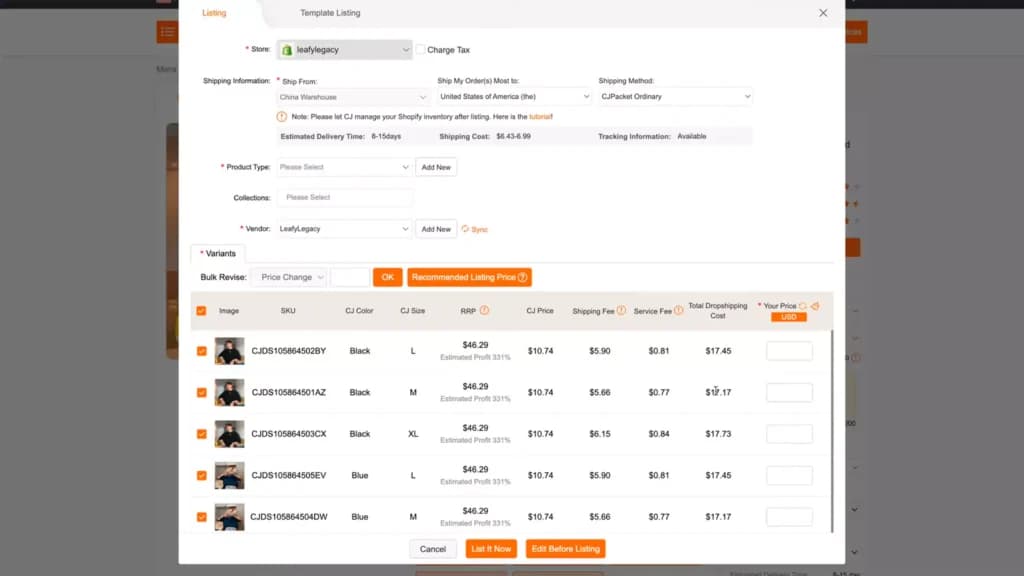
Dropshipping Capabilities
Shopify tools support dropshipping directly through its platform with tools and partnerships that make it easy to set up and manage without needing to stock inventory.
Multilingual and Multi-currency Support
The CMS platform accommodates global businesses by supporting multiple languages and currencies, which simplifies selling to international customers.
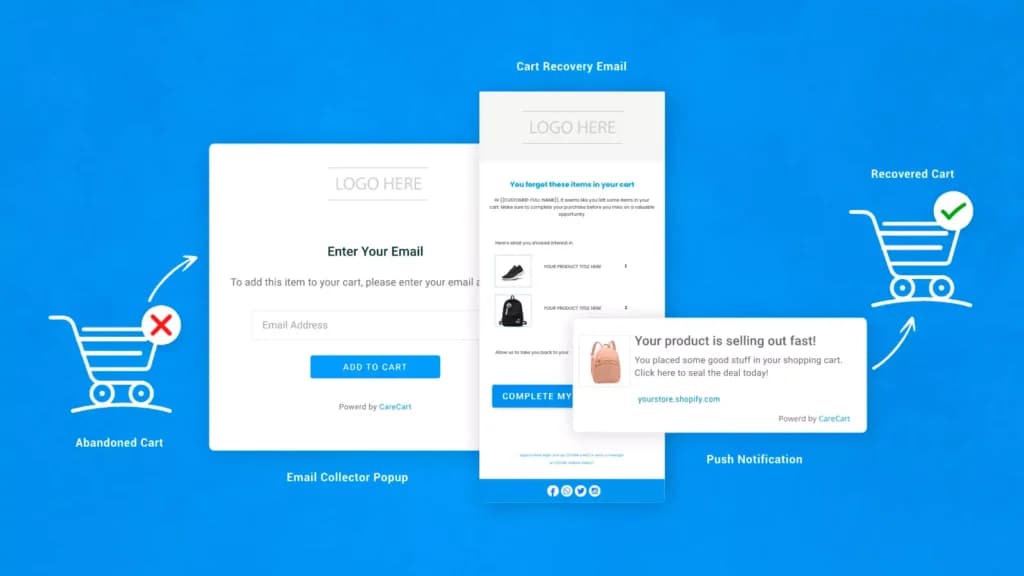
Abandoned Cart Recovery
Shopify helps recover lost sales by automatically sending emails to customers who have left items in their cart, encouraging them to complete their purchases. This can significantly recover potentially lost revenue.
Optimized checkout
The Shopify checkout experience has been optimized through over 2.5 billion transactions. It combines speed and conversion-boosting layouts on desktop and mobile to ensure you get more sales.
Shopify Ping
Shopify Ping is a live chat solution that allows you to answer customer questions in real-time. You can also add products directly into the chat and create a seamless checkout experience. It connects with other messaging apps so you can manage all of them from a central location.
Free stock photos
Shopify has a platform called Burst where you can access thousands of royalty-free images to use on your store, blog, or anywhere else you choose. It has a useful search function and is organized into multiple categories so you can find what you need quickly.
Multichannel sales
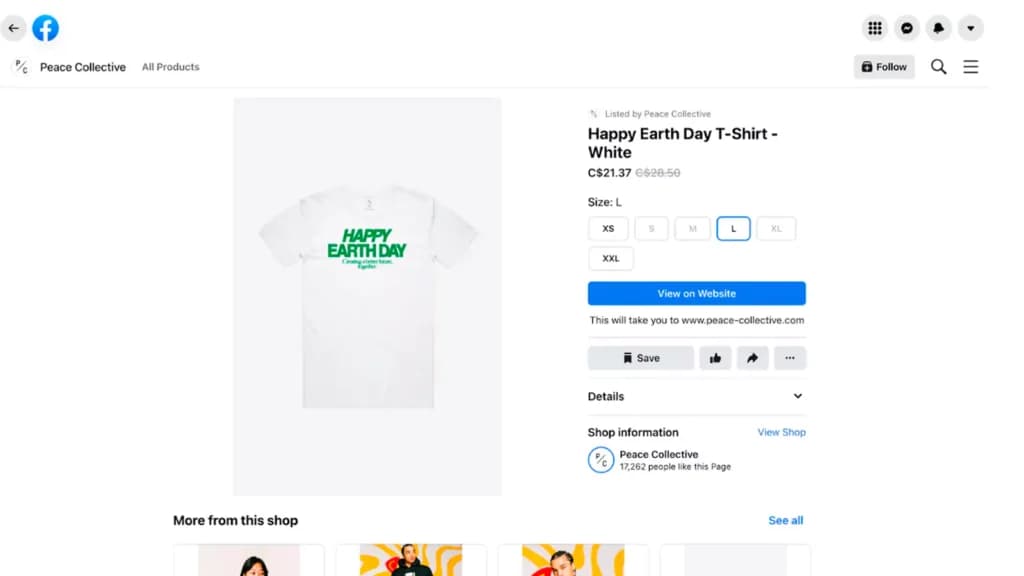
The platform supports selling in multiple places including Facebook, Instagram, Walmart Marketplace, eBay, and Amazon. Even though you’re selling in multiple places, inventory management is centralized.
Payment options
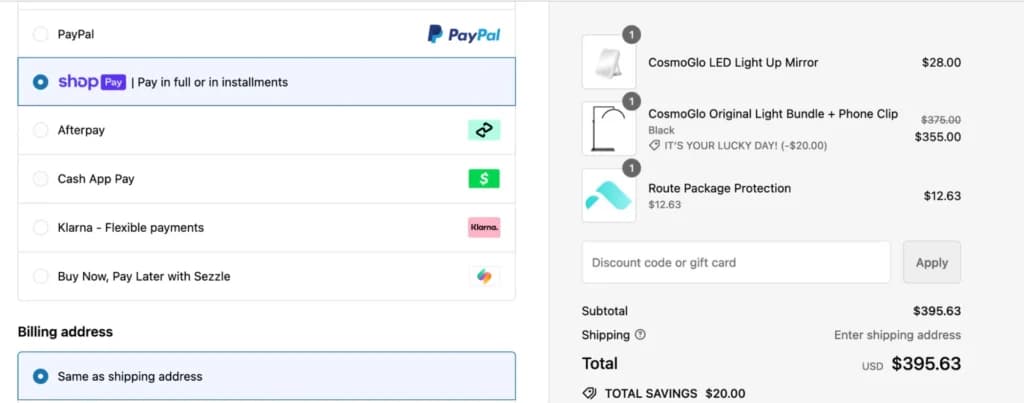
The platform has a payment processing feature that you can take advantage of but needs to pay transaction fees. Additionally, it has integrations with many third-party payment solutions like PayPal and Stripe. Still, you have to pay an additional fee on top of the base transaction fee on top of the standard rate.
Safety
As I expected, Shopify has comprehensive security for its merchants and end-users. It’s level 1 PCI DSS compliant. Additionally, all stores have a 128-bit SSL certificate – the industry standard – to encrypt information sent between browsers and your store. You don’t have direct access to credit card information and don’t save it in your store backend so even if something goes wrong, no one can access customer credit card data.
Shopify has over 70 professional-looking templates designed by teams like Pixel Union and Clearleft. They serve as a starting point for your eCommerce website. Each one has multiple page layouts and post formats to help you get the look you’re happy with.
The templates can be fully customized to match your vision. You’re not limited to just the colors and the layout. You can go deeper and edit the HTML or CSS to get a pixel-perfect design. Unfortunately, Shopify isn’t a drag-and-drop editor but you can use one of the thousands of apps in the marketplace to get that functionality. The only drawback is that many of Shopify’s themes come with a fee so keep that in mind.
Free Stock Photos
I found that Shopify’s e-commerce platform offers free stock photos through its built-in Burst image library. This feature helps businesses create professional-looking e-commerce website designs without needing external resources, making it an excellent tool for startups and small businesses.
Video Plug-Ins
Shopify supports video plug-ins that allow businesses to showcase products more effectively. I played with apps like Promo.com and Vimeo Create, which make it easy to add promotional videos to product pages, enhancing customer engagement and selling online.
Audio Plug-Ins
For businesses incorporating audio content, Shopify provides plug-ins that support background music, podcasts, and voiceovers. I found these useful for brands looking to create a more immersive online store experience, particularly for media and entertainment businesses.
- SEO Tools – Shopify’s built-in SEO features optimize product listings, meta tags, and URLs for better search visibility.
- Social Media Integration – Connects with Facebook, Instagram, and TikTok, enabling seamless selling online across platforms.
- Widgets & Apps – The e-commerce platform supports thousands of apps to customize store functionality.
- Abandoned Cart Tools – Automated recovery emails help recapture lost sales.
- Newsletter Tool – Email marketing integrations allow businesses to engage customers effectively.
- Monetization – Various payment options, subscriptions, and digital downloads support revenue growth.
- Product Reviews – Apps enable customer feedback and ratings to improve credibility.
- Visitor Statistics – Real-time analytics track store performance and user behavior.
- Promotions & Discounts – Built-in tools offer coupon codes and limited-time deals.
- Advertising Credits – Shopify partners with platforms like Google and Facebook to provide ad credits for new users.
- Free Custom Domain – Shopify provides a free myshopify.com subdomain, while custom domains can be purchased directly within the platform.
- Space – The e-commerce platform offers unlimited storage, ensuring businesses can upload as many products and media files as needed.
- Bandwidth – Shopify includes unlimited bandwidth, allowing stores to handle high traffic volumes without additional costs or slowdowns.
Affiliate Marketing
From a merchant’s point of view, Shopify Collabs offers a couple of features that make it one of the best affiliate software solutions on the market.
Users have two ways of accessing the Shopify Collabs app - through a mobile device, or through the Shopify admin panel on the web. As expected, the web version is easier to navigate, and has a much simpler interface.
Industry Categories
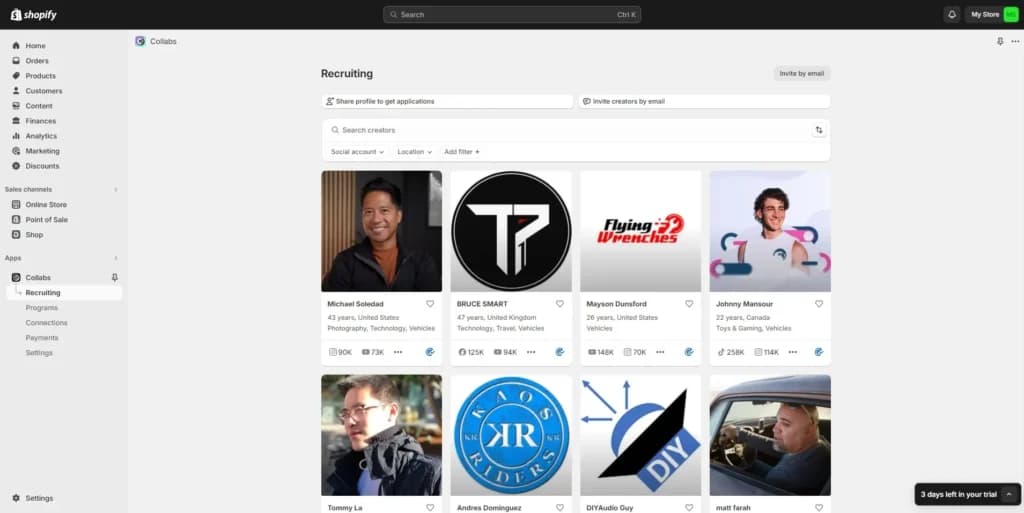
The Shopify Collabs affiliate marketing platform operates across a diverse range of categories, such as fashion, beauty, pet care, lifestyle, technology, personal finance, and more. This allows the user to find partners based on their specific category, location and audience size.
Access to Creator Marketplace
Access to the creator marketplace is the most important feature of the Shopify Collabs app. This list allows businesses to browse among thousands of content creators in specific niches. By collaborating with influencers, businesses can turn attention into sales.
Easily Make Affiliate Links and Discount Codes
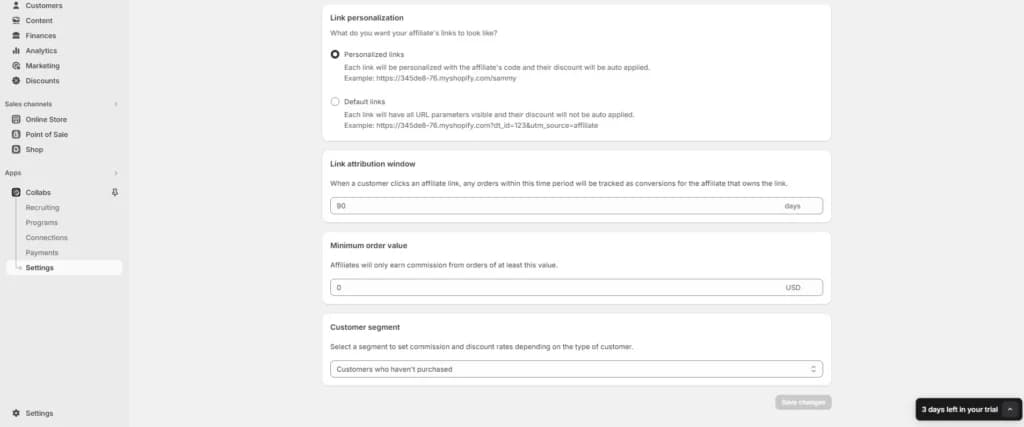
Establishing an affiliate network requires the possibility of creating affiliate links and discount codes quickly and effortlessly. This is one of the main features of the Shopify Collabs platform that allows businesses to easily track the performance of each content creator the brand is working with.
Affiliate links and discount codes are used to promote a product or service through blogs, websites, and various different content such as short-form and long-form videos. Once a viewer visits a certain website through the provided affiliate link and makes a purchase, the content creator is entitled to a commission.
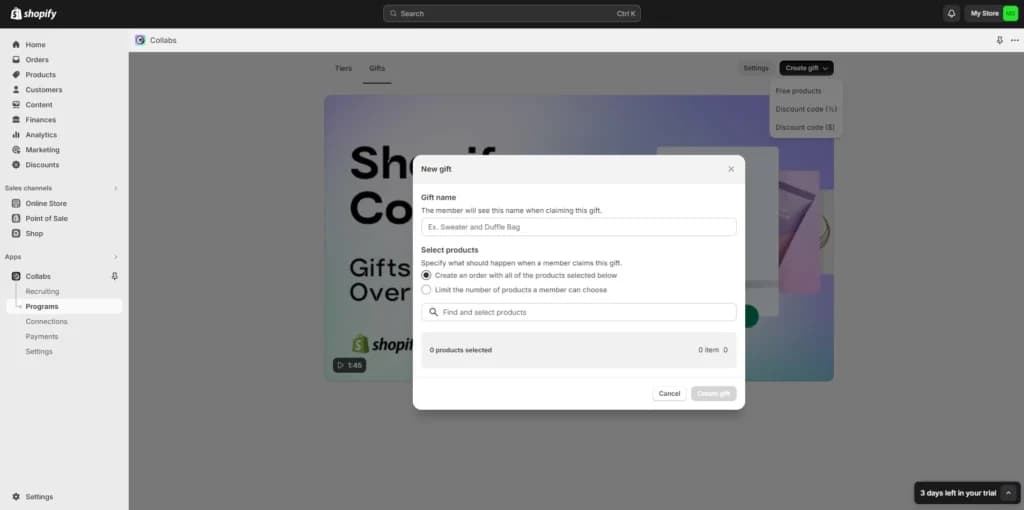
Gift Management
Sending gifts to influencers is a big part of some of the best affiliate marketing companies, so the gift management feature comes in very helpful, especially for brands that collaborate with a larger number of influencers.
Analytics
Although this feature doesn’t have a direct effect on sales, it’s one of the most important features to have. By following the numbers, businesses can make decisions on which influencers bring in more sales. With detailed analytics, users can optimize their affiliate marketing campaigns and get the most out of every collaboration.
Add-Ons & Integrations
The Shopify Collabs is a pretty simple tool, and it doesn’t have any specific add-ons at the time of writing this review. However, the Collabs tool does include a few integrations that can speed up the workflow.
By integrating the Collabs app with Shopify Flow, users can automate a few processes by including certain rules. One of the first things users do when integrating Collabs with Flow is create rules for accepting applicants. This can be anything from selecting a specific niche to the minimum number of followers.
Accepting applicants is one thing, but keeping in touch with them can build a strong bond, which is why the automatic follow-up email integration is so useful. With this feature, users can set up automatic emails to creators as soon as they claim their gift.
Setting up the integration with Flow is very simple. Users need to log into their admin panel and simply install the Shopify Flow app from the Shopify store. The integration is straightforward and even beginners can quickly and easily start using tools.
Website Builders
Shopify Website Builder boasts myriad features and functionalities, some of which can be found in competitor products. Some unique features that bring small and medium businesses, especially to Shopify are the following.
Free no-code customizable themes
Shopify provides up to 70 free themes for new users to work with. These themes are easily customizable with the available drag-and-drop feature, making it possible for users with zero coding and design skills to build a custom website.
Powerful customizable POS software
The POS software allows merchants and shop owners to set up their inventory and collect payment in-store through their mobile devices. With this powerful POS feature, you can have your customers view your products online and order in-store, and vice versa.
Mobile friendly
Shopify is built with mobile users as the center focus. So, every website built on the platform is responsive and allows mobile users to easily navigate your online store.
Detailed analytics
The detailed analytics dashboard brings all your audience's activities into one place. Here, you can track your digital marketing efforts, product sales, returns, returning customers, carts, and many more. The Analytics gives you a comprehensive overview of how your business is growing and reveals where to make adjustments.
Integrations
The Shopify Website Builder allows the integration of over 6,000 apps with which users can customize and automate their business. The available applications are designed to perform various functions, including marketing, dropshipping, payment processing, etc.
However, a few app integrations stand out from what’s obtainable among Website Builders.
Buy Button
The Buy Button is a free integratable app that allows your social media followers to directly order a product without having to visit the product page or pursue several links.
Product sourcing
Small-size retail businesses sometimes don’t have a product in stock. That doesn’t mean they can’t offer it to their customers. Product sourcing app integrations on the Shopify Website Builder make it possible for merchants to source for ordered products from other merchants on the platform which may be fulfilled by themselves or the original seller.
One of the top-rated apps for sourcing products globally is Zendrop with over 250,000 users helping each other sell products.
Reliable hosting solutions to support your site.
Incorporate videos, images, and more for dynamic websites.
Ideal for small businesses, individuals, and enterprises.
POS
Shopify offers tailored solutions for retail stores, coffee shops, nightclubs, quick service, bars, restaurants, and food trucks.
Shopify POS is designed with retail businesses in mind, offering tools and features tailored to streamline operations. From the moment I set it up, I had access to split tenders, offline payments, and discount codes, all essential for smooth transactions.
Upgrading to the Shopify plan unlocks additional features, including professional reports, refunds, cash float tracking, and staff pin management. These upgrades make it easier to manage and scale operations effectively.
Here are some of the many, many features that Shopify POS offers:
- Customer profile management
- Omnichannel selling
- Mobile POS terminals
- Customizable smart grid interface
- Integrated payment processing
- Staff management
- Marketing integrations
- Gift cards
- Custom payment types
- Staff management and timeline
- Unified reporting
- Custom receipts
- Inventory management
- Discount management
- Tax management
- Order management
- Analytics and reporting
The Dashboard
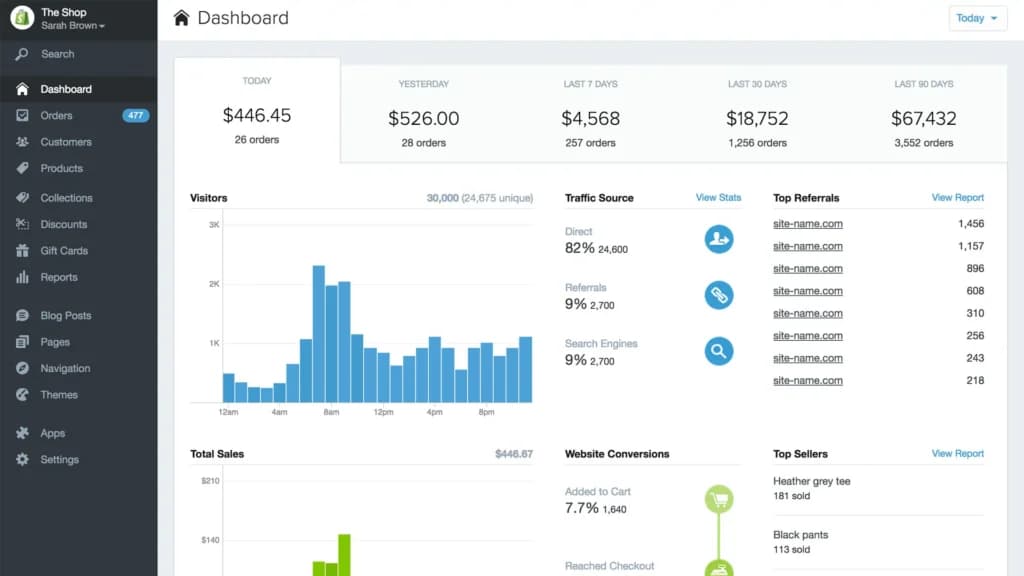
If you've used a content management system (CMS) before, navigating Shopify POS will feel familiar. However, it’s worth noting that access to advanced reporting features depends on the plan you choose, which can be limiting for some users.
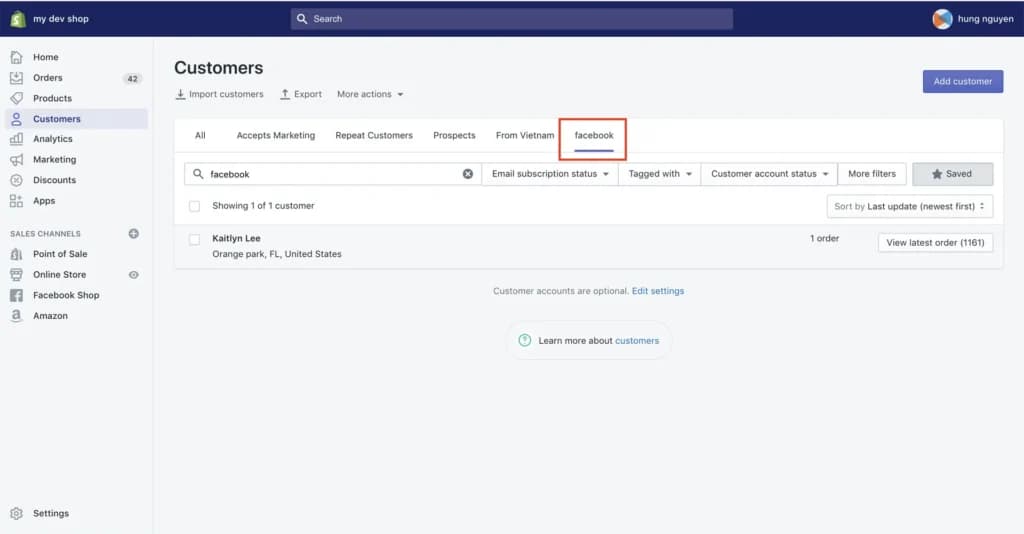
Customer profile management
Shopify POS’s customer profile management is a powerful tool for enhancing customer relationships and driving engagement. Every new transaction prompts the creation of a customer profile, storing valuable details like order history, buying patterns, contact information, and preferences. Over time, this data builds a comprehensive view of each customer, allowing businesses to tailor their marketing strategies and sales approaches effectively.
During my testing, I used these profiles to segment customers and send personalized offers through Shopify’s integrated email marketing tools. For example, frequent in-store buyers could receive exclusive promotions to encourage repeat visits, while online shoppers could be targeted with offers to boost e-commerce sales. The seamless integration of this feature with Shopify’s Point of Sale software ensures customer data is synchronized across all channels, creating a unified and consistent shopping experience.
This functionality also aids in tracking customer loyalty, identifying high-value clients, and developing targeted programs to reward repeat business. By leveraging the insights from customer profiles, businesses can strengthen their Customer Relationship Management (CRM), foster deeper connections with their audience, and increase both in-store foot traffic and online sales. It’s an indispensable tool for businesses seeking to improve customer engagement and long-term retention.
Omnichannel Selling
Shopify POS excels in omnichannel selling by seamlessly integrating online and offline sales channels. I tried the system’s ability to unify inventory tracking, customer data, and order management across all touchpoints, ensuring consistency. Whether customers shop in-store or online, their experience remains seamless. This integration simplifies operations, enhances retail management, and boosts efficiency for businesses aiming to optimize e-commerce integration and in-person sales.
Mobile POS Terminals
Shopify’s mobile POS functionality offers exceptional flexibility, allowing sales to be processed anywhere, whether in-store or at events. Using a smartphone or tablet, I could handle transactions, manage inventory, and engage customers on a personal level. This mobility reduces checkout wait times and enhances the customer experience by creating smoother, more personalized interactions, making it a valuable tool for multi-location management and pop-up stores.
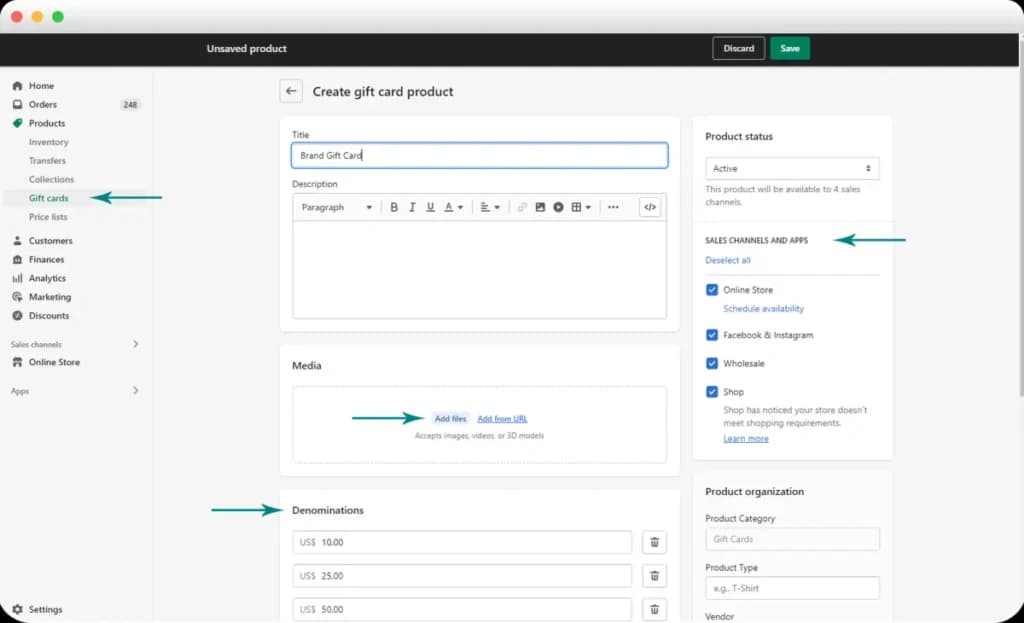
Gift Cards
Gift cards are a standout feature of Shopify POS, included in its Standard plan or higher without requiring additional fees. I created both physical and electronic gift cards, redeemable online or in-store. This integration strengthens Customer Relationship Management (CRM) by offering customers flexible purchasing options, encouraging repeat business, and improving customer loyalty. The simplicity of managing gift cards directly within the Point of Sale software adds to its overall value.
Customizable Smart Grid Interface
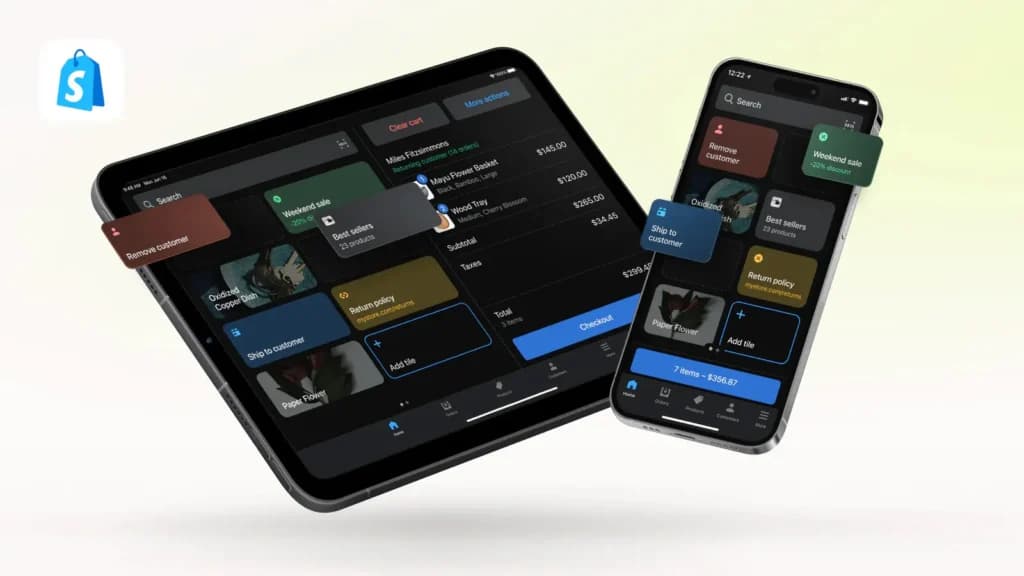
Shopify POS features a customizable smart grid interface, which I found invaluable for streamlining operations. I tailored the POS app's home screen to highlight frequently used functions, specific products, or discounts, enabling faster and more efficient checkouts. This customization aligns the Point of Sale software with individual business needs, improving productivity and making the checkout process intuitive for staff.
Integrated Payment Processing
Shopify POS provides integrated payment processing, allowing businesses to accept credit cards, debit cards, and contactless payment options like Apple Pay and Google Wallet. During my testing, transactions were seamless and offered competitive rates. This built-in functionality eliminates the need for third-party payment processors, simplifying financial management and creating a smoother checkout experience for customers. It’s a reliable solution for businesses prioritizing efficiency and flexibility.
Custom payment types
The ability to accept custom payment types sets Shopify POS apart. I played with this feature by adding unique options, such as IOUs, through the POS app interface. This flexibility ensures that businesses can accommodate diverse payment preferences, from traditional methods to unconventional options like gold bullion. By enabling tailored payment solutions, Shopify POS supports inclusivity and adaptability, enhancing the overall customer experience.
Staff Management
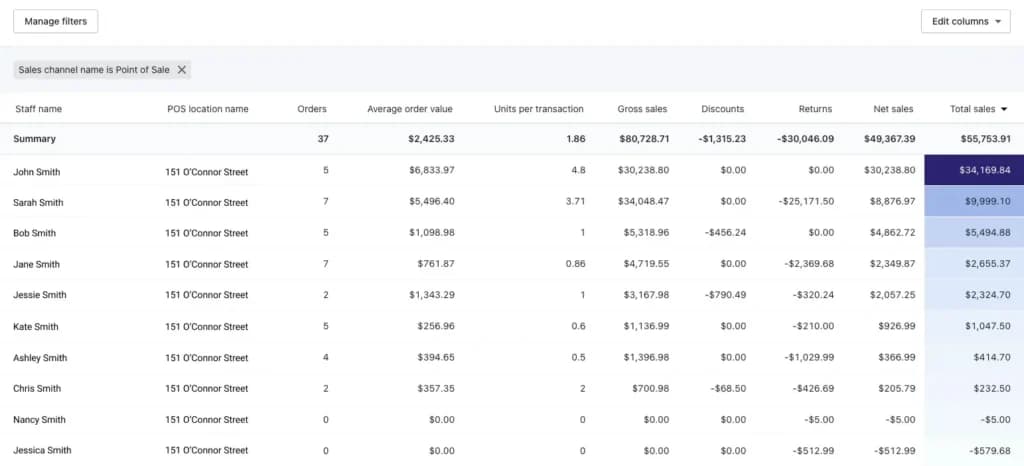
Shopify POS’s staff management tools are essential for maintaining control and efficiency within a team. I assigned roles and permissions to team members during testing, ensuring they only accessed the features relevant to their responsibilities. This functionality enhances security and accountability. Additionally, I tracked individual performance metrics, which proved helpful for managing commissions and identifying areas where training was needed. These tools streamline team oversight, making them a valuable addition to any Point of Sale system.
Marketing Integrations
Shopify POS integrates seamlessly with various marketing tools, enabling businesses to create targeted campaigns using detailed customer data. I crafted personalized promotions based on purchasing habits and preferences. This integration enhances Customer Relationship Management (CRM) by driving repeat business and building customer loyalty through tailored communications. By connecting Point of Sale software with marketing efforts, businesses can maximize the impact of their promotional strategies.
Unified Reporting
The unified reporting tools in Shopify POS consolidate data from both online and in-store sales, offering a comprehensive view of overall business performance. You can use these reports to track sales trends, analyze customer behavior, and assess inventory across channels. This functionality supports data-driven decisions, enabling businesses to identify growth opportunities and optimize retail management with a clear, holistic view of their operations.
Custom Receipts
Shopify POS allows businesses to customize receipts by adding branding, personalized messages, and promotional content. During my testing, I used this feature to reinforce brand identity and share targeted offers directly on receipts. This added a professional touch to the customer experience while creating additional opportunities for marketing. It’s an effective tool for boosting engagement and encouraging repeat visits.
POS Software:
- Turn any mobile device into a powerful point of sale. You can download the Shopify Retail POS app on to any Android or iOS smartphone or tablet.
Hardware:
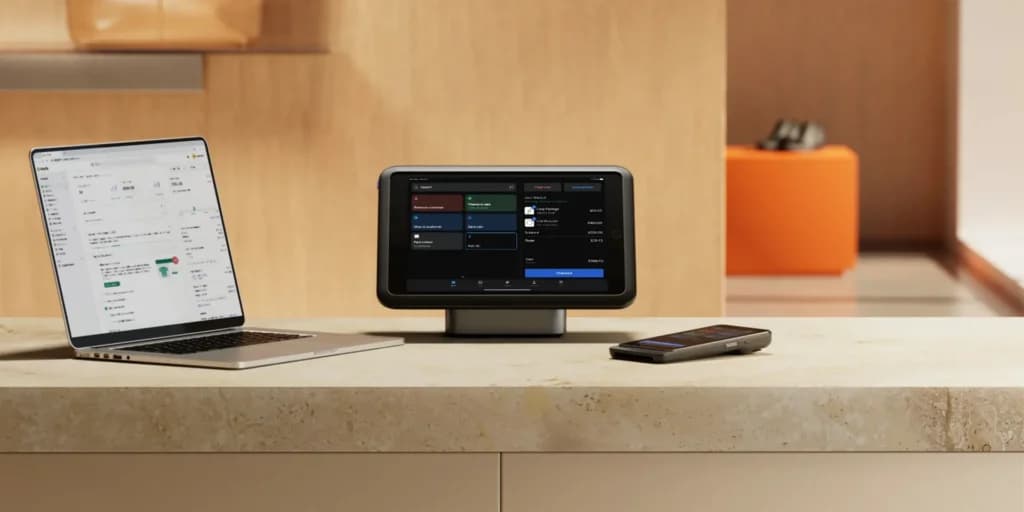
- Accept fully integrated payments with wireless hardware.
- When using Shopify hardware, you get the benefits of Shopify payments:
- Pay one low rate for all cards, starting from 1.5% + 0¢ AUD
- Get paid quickly
- Keep payment information safe
- Accept popular payment methods
Flexible pricing plans to meet different business needs.
Features
- Number of templates
- Drag & Drop Editor
- Free Stock Photos
- SEO Tools
- Social Media Integration
- Visitor statistics
- Third-party apps
- Data Security
- Multi-lingual website
- Inventory Management
Shopify Alternatives
Starting from: $29/month
Basic
$29
seat/month
Pros
- Large suite of marketing tools to grow your website
- You’re able to sell online, offline, and through multiple marketplaces
- It has a built-in payment processor
- Supports unlimited products on every plan
Cons
- It charges you for third party payment processors
- The basic plan doesn’t have access to pro reports

Starting from: $29/month
Core
$29
seat/month
Pros
- You can integrate directly with social platforms
- Built-in email marketing and cart abandonment workflows
- Dozens of payment processors options
- In-depth product listing options
Cons
- Templates aren’t interchangeable
- Some elements can’t be fully customized

Starting from: $0/month
Free
$0
seat/month
Pros
- Excellent customization and extensions library
- Integrations with all essential payment options
- Fully scalable from startup phase onward
- Extensive online community
Cons
- Greater functionality leads to more complexity
- Over-reliance on extensions
- Large stores are resource-intensive
Verdict
Shopify is one of the most robust eCommerce website builders. It brings together all of the important features you’ll need without breaking the bank or charging you a tax for success. You get access to strong marketing tools, robust inventory management, multiple professional-looking templates, and optimized checkout pages.
It has a lot going for it but there is an additional charge for using third-party payment processors and you need to pay more for advanced reports. If you can get past that then the 24/7 support, strong community, and proven platform will help you grow your eCommerce business much faster.
Shopify stands out as a leading e-commerce platform due to its scalability, extensive app ecosystem, and built-in payment solutions. Unlike many online store builders, it offers a balance between ease of use and advanced customization, making it suitable for both beginners and growing businesses looking to sell online with SEO features and a mobile-responsive design. Anyone still undecided can put Shopify side by side with the best ecommerce platforms for small business and judge the fit on catalog size.
Frequently asked questions
Is Shopify actually a good website builder for beginners?
Should I use Shopify if I only have a few products?
What are the "hidden fees" everyone on Reddit talks about?
Is Shopify a good ecommerce platform for SEO?
Why do some people say Shopify "steals" their profit?
Is it a good place to sell internationally?
Can I customize my checkout page?
Is Shopify better than WooCommerce in 2026?
Do I need a developer to launch a professional store?
Users Reviews
Write a review
Leave a review, help others get it right the first time.
6 Reviews
Haley I
Ideal for many businesses
Well known and for good reason. Its interface is intuitive and makes navigation refreshing. Payment processing is also done simply and confidently.
- Wow, so many features and integration possibilites. Almost too much! I'm impressed and comforted knowing that as I grow my business, the platform also evolves with me. Eveything I need now and in the future.
- I feel that the template options are limited.
Joe A
Stress free eCommerce
Shopify has a great selection of apps to choose from, pretty much everything an online store might need.
- Quickest setup imaginable. Had my site up and running within hours. My site feels safe and reliable now. No long load time or hacking happening here.
- Not so fond of the transaction fees
Martina D
I am so so happy with Shopify!
I'll be sticking with Shopify for as long as possible. My online store is booming, thanks to everything that this software has done. It really had improved my checkout process, product displays, and payment processes.
- Recommend 100%!
Edmond V
Easiest ecommerce platform
Once can easily start and run a business through shopify. One can even effectively grow their shop with the help of this platform. Many incredible features that boost traffic and engagement.
- Great looking storefront design and managing features
- Keyword editor is slightly too simple compared to others. Categorizing products isn't as fluid or user friendly as I'd like either.
Eric H
Shopify has you covered!
From marketing to payments to checkout and even security - Shopify handles it all. I don't have to spend countless hours managing my e-commerce site anymore.
- No live customer support is available in my region.
Elise T
Perfection when it comes to starting an online store
Shopify has made starting up an eCommerce business an enjoyable and simplified process. The service is remarkable.
- Every app integration you could possibly need is possible, most are even free!
- Nothing bad to report. I'm very pleased.