

KORONA POS Review For 2026
Overall Rating
4.4
Last updated: October 2026
KORONA is a cloud-based POS system for retail stores. It’s perfect for ordering, receiving, and counting inventory as well as taking payments from customers. Plus, customers can access free 24/7 support via phone, email, and chat.
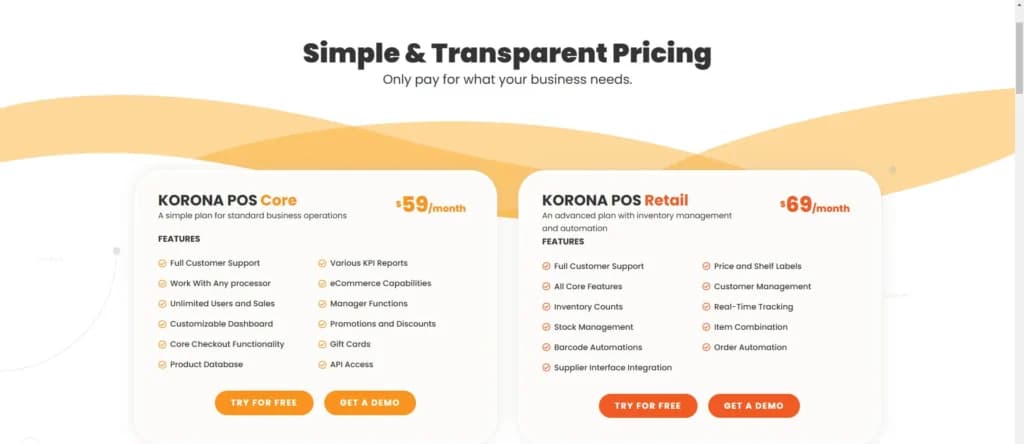
Plans & Pricing
KORONA POS Core
$59
seat/
month
- Full Customer Support
- Work With Any processor
- Unlimited Users and Sales
- Customizable Dashboard
- Core Checkout Functionality
- Product Database
- Various KPI Reports
- eCommerce Capabilities
- Manager Functions
- Promotions and Discounts
KORONA POS Retail
$69
seat/
month
- Full Customer Support
- All Core Features
- Inventory Counts
- Stock Management
- Barcode Automations
- Supplier Interface Integration
- Price and Shelf Labels
- Customer Management
- Real-Time Tracking
- Item Combination
KORONA Food
+ $10
seat/
month
Per terminal
- Server management
- Table management
- Courses
- Multiple order printers
- Modifiers
- KORONA Menu
- Graphical table layouts
- Item transfers & check-splitting
- Time tracking
- Cash journals
KORONA Plus
+ $20
seat/
month
Per terminal
- Advanced store stock management
- Individual store prices and product listing
- Store ranking
- Assortment cleanup
- Key performance report
- Slow and top sellers
- Organization indicators and comparison
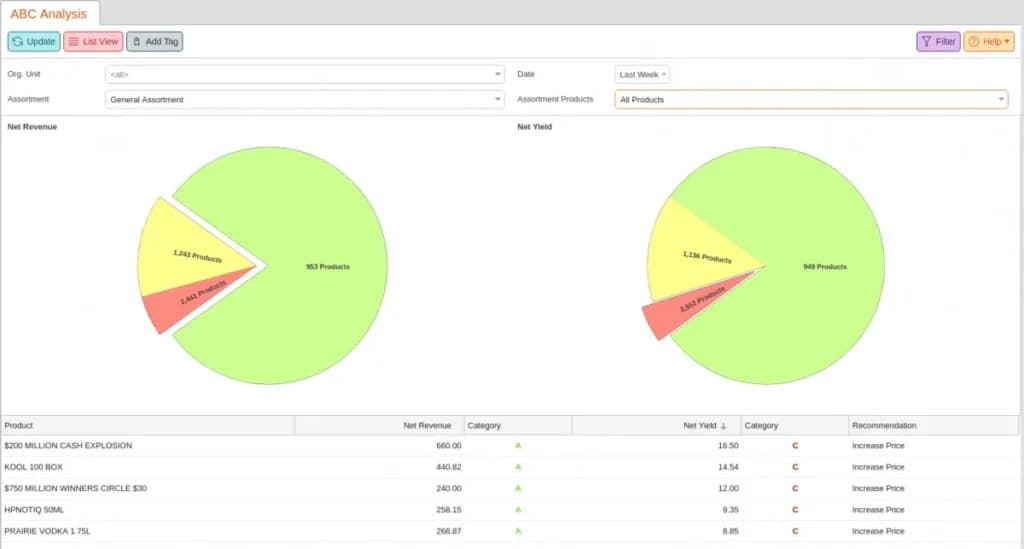
- Custom ABC analysis
- Movement report
- Financial accounting data export
KORONA Invoicing
+ $10
seat/
month
Per terminal
- Quotes
- Rentals
- Delivery notes
- Invoices
- Collective invoices
KORONA Ticketing
+ $50
seat/
month
Per terminal
- Ticket printing
- Entry gates
- Ticket definitions
- Customer management
- Time-tracking
- Cash journals
- KORONA Event integration for online ticketing
KORONA Franchise
+ $30
seat/
month
Per terminal
- Franchisor features
- Scalability for franchisees
- Customizable royalty systems
- Product syncing
- International options
- Custom taxes and currencies
- Centralized inventory management
KORONA Integration
+ $45
seat/
month
Per terminal
- Integration jobs
- Integration job-workflows
- Integrations services
- Integration dashboard
* Featured prices can be updated and free offers may include additional terms.
With flat rates and no contracts, KORONA is a very appealing option for retailers who may be growing in the near future. It’s perfect for scaling up and it’s highly customizable. Even better, every terminal purchase comes with free training and they’ll ship pre-loaded hardware directly to businesses.
Unlimited Free Trial
Start with a free trial. Import some company data and do a live demo so KORONA staff can demonstrate how the POS system works. Ask any questions about integrations and add-ons during your free trial.
This POS stands out because KORONA allows businesses to choose whichever credit card processor they prefer. They also offer plenty of hardware, such as barcode scanners and receipt printers. Ask about integrating your existing hardware, too.
Expert Score
Pros
- Quickest average checkout time in the industry
- Customer service support is available 24/7
- Complete inventory management
- Integrations for loyalty and eCommerce
Cons
- Software updates can temporarily interfere with system
- Queries could be more robust
- Time-intensive data transfer in initial set-up
Customer Support
KORONA’s customer support team is available 24/7 for emergency assistance. It’s free to call, email, or chat with someone who can help resolve any problems. Set-up assistance is included in the package and KORONA has a comprehensive database with helpful tutorials about troubleshooting. Additional Customer Support: Blog The KORONA team regularly publishes blogs on topics relevant to SMBs, such as marketing, seasonal tips, and analytics.
Phone Support
Users can call to get support from customer service
Available for troubleshooting, hardware integrations & other
24/7 Help & Support
Available day & night for KORONA service members
FAQ
There is an extensive, free, online KORONA manual
Live Online Chat
Their chat helps resolve problems with live, virtual assistance
Video Tutorials
Korona offers video tutorials that set-up processes and industry
Ease of Use
KORONA is very easy to use. Set-up can take a while, but once the system is up and running, your team should be able to start using it intuitively and immediately. Overall, users report that the interface is easy to learn. Depending on how many integrations and how much inventory you have, your set-up time will vary.
Features & Functionality
No Contract
Unique among other retail POS systems, KORONA doesn’t require users to sign a contract for yearly usage. It’s a month-to-month subscription that can be canceled at any time.
Time Clock Integrated Into POS
Employees can easily log in and out via the KORONA POS, which makes payroll super easy. Keeping everything organized in one place can improve customer service and staff satisfaction.
Customized Access and Shift Reporting
It’s easy to set access controls for every employee so that only the right people have access. Plus, KORONA allows you to pull shift reports that reveal transactional data.
One-Tap Product Analysis
This POS allows users to generate a “report card” on a product in the inventory. With a single click, you can see a well-organized report about how it’s performing.
Multi-Location Management
With KORONA, owners can set up promotions or discounts between several locations (or just a single store). It’s also easy to manage royalties so that franchisees can pay the franchisor.
This POS offers many different reports and analysis options, including product performance, profits, sell-through rate, return rates, and time-based comparisons.
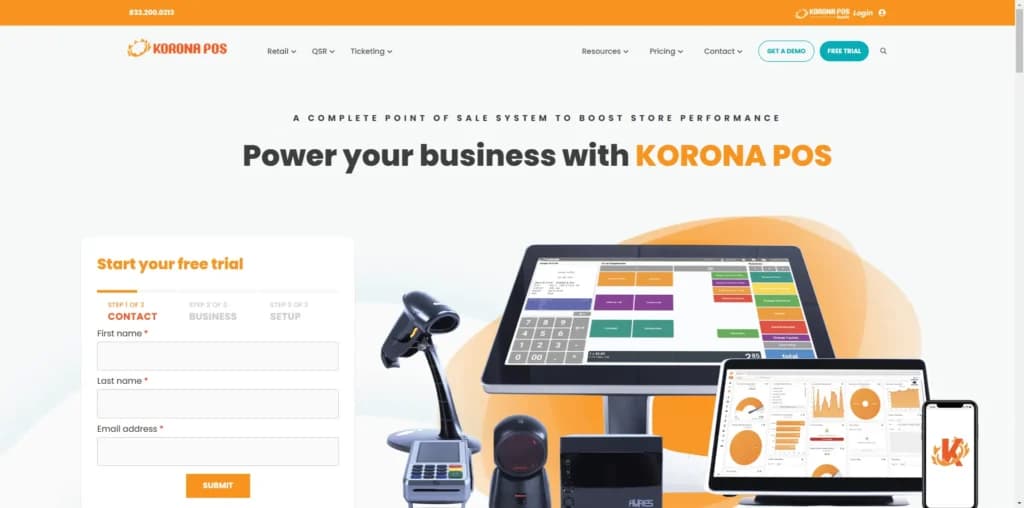
Tailored solutions for retail stores, coffee shops, nightclubs, quick service, bars, restaurants, and food trucks.
Hardware Requirements
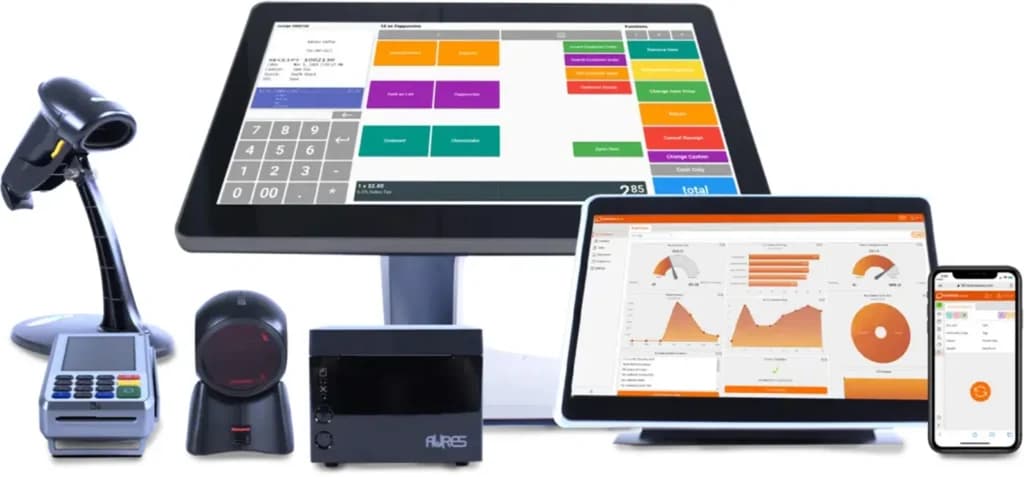
KORONA is compatible with both Mac and PC devices. This includes desktop computers, mobile devices and tablets, and customer-facing displays. To get started, users will need at least one terminal, a POS device, a cash register with a drawer, and a scanner and receipt printer. Customers can lease hardware, or ask for payment plans if they don’t wish to purchase it outright. The KORONA team is willing to try to integrate your existing hardware with their software first.
Integrations & Add-Ons
KORONA can easily integrate with QuickBooks for streamlined accounting. For existing loyalty programs, users can integrate KORONA with bLoyal and Bottlecapps. It’s also a great POS for integrating with eCommerce and web store offerings through an open API, to help owners get a handle on the overall sales data for their business. The company is constantly working to incorporate integration requests from customers, so it’s likely you’ll be able to get the integration you need.
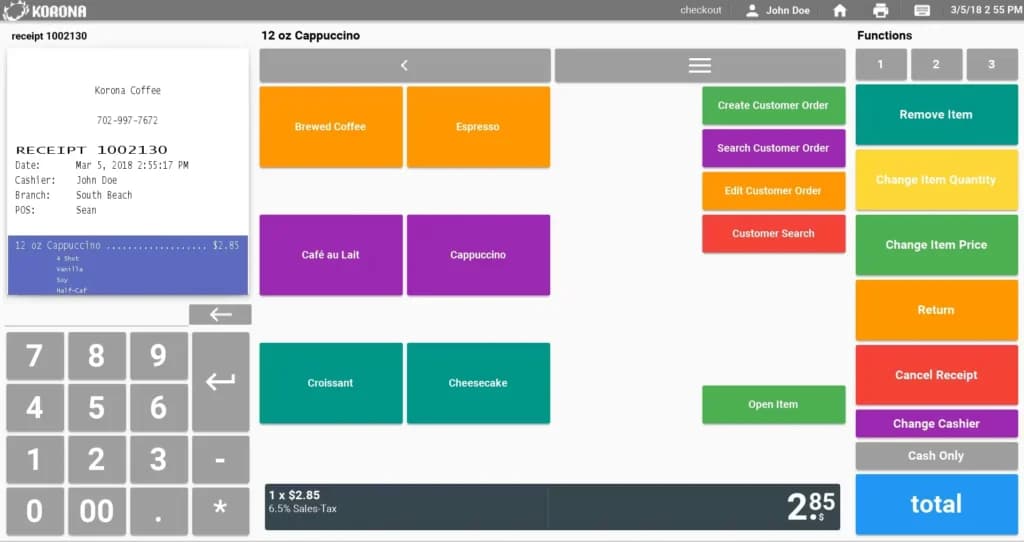
Flexible pricing plans to meet different business needs.
Features
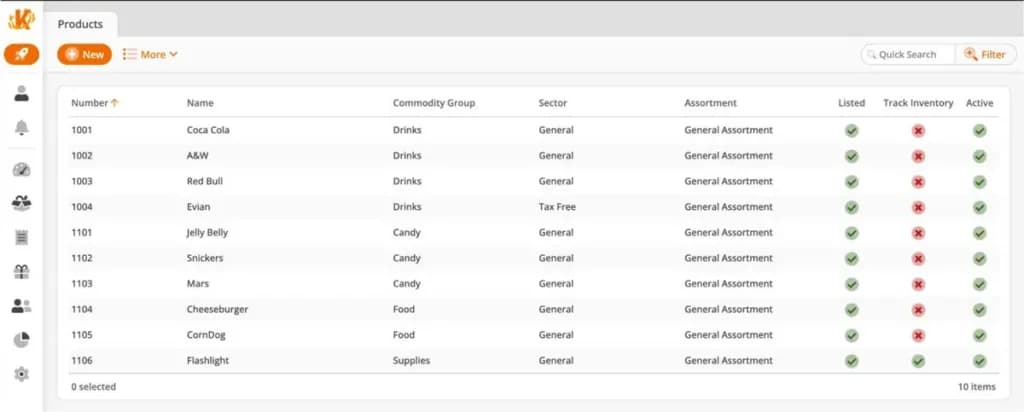
- Inventory Management
- Loyalty Program
- Mobile Compatibility
- Online Ordering
- Reporting
- Split Checks
- Offline Payments
- Customer Profiles
- Multidevice Payments
- Gift Card Support
Verdict
KORONA is a powerful POS system for handling all aspects of retail. It offers straightforward packages and transparent pricing, so owners never have to worry about paying for things they don’t need. Users will never be locked into a contract, either. Brick-and-mortar stores will appreciate the robust inventory analysis and sales reporting tools. Museums and theme parks can access turnstile and ticketing add-ons to streamline their retail operations.
FAQ
Q: What is Korona POS?
A: Korona POS is a cloud-based point-of-sale system primarily designed for retail businesses, including liquor stores, convenience stores, vape shops, and boutiques. It also serves some quick-service restaurants and ticketing venues. It offers features like inventory management (with detailed tracking), sales reporting, customer loyalty programs, and employee management.
Q: How much does Korona POS cost per month?
A: Korona POS has transparent, fixed monthly pricing listed on their website. Plans usually start around $49-$59 per month per terminal for the core software. Unlike many competitors, they often emphasize no long-term contracts and no hidden fees. Additional features or terminals cost extra, but the pricing structure is generally straightforward.
Q: Does Korona POS offer a free trial or a free plan?
A: Korona POS offers an unlimited free trial with no time limit, allowing businesses to test the software thoroughly before committing. They do not offer a completely free plan for ongoing use like Square does.
Q: What are the most common complaints about Korona POS?
A: Korona POS generally receives positive reviews, especially regarding its fair pricing and customer support. However, some criticisms include a user interface that can feel slightly dated compared to sleeker competitors, occasional minor software bugs, and the lack of deeply integrated e-commerce features (though integrations exist). Some users also note a learning curve for mastering its extensive inventory features.
Q: Can I use my own payment processor with Korona POS, or am I locked in?
A: This is a major advantage of Korona POS: Yes, you can use almost any payment processor you want. They are "payment agnostic," meaning they don't lock you into their own processing service. This allows businesses to shop around for the best credit card processing rates.
Q: Does Korona POS require long-term contracts? Are there cancellation fees?
A: No, Korona POS typically operates on a month-to-month basis with no long-term contracts required for their software subscription. You can usually cancel with reasonable notice (e.g., 30 days) without facing hefty early termination fees, which is a significant difference from many competitors like Toast, Lightspeed, or Epos Now.
Q: How does Korona POS compare to Square or Lightspeed Retail?
A:
- vs. Square: Korona POS offers significantly more advanced inventory management features (matrix inventory, loss prevention tools, detailed reporting) than Square's free plan, making it better for complex retail. Korona is payment processor agnostic, while Square requires Square Payments. Square is cheaper to start (free plan), while Korona has monthly fees but potentially lower processing costs long-term.
- vs. Lightspeed Retail: Both offer robust inventory and retail features. Korona is often praised for its transparent, contract-free pricing and payment processor flexibility. Lightspeed might have a sleeker interface and more built-in e-commerce options (
Lightspeed eCom) but usually involves contracts and pushesLightspeed Payments.
Q: Does Korona POS work offline if the internet goes down?
A: Yes, Korona POS has a robust offline mode. If you lose internet connection, you can continue processing sales, including credit card transactions (which are securely stored and processed upon reconnection). Inventory counts also continue to function locally and sync later.
Q: What kind of hardware does Korona POS run on?
A: Korona POS software is platform-independent. It can run on devices using Windows, iOS (iPads), Android, and even web browsers. They also sell compatible hardware bundles (touchscreens, printers, scanners, etc.), but you have more flexibility in choosing devices compared to systems locked to proprietary hardware.
Q: How is Korona POS's customer support?
A: Customer support is frequently cited as a strong point for Korona POS. Users often praise their responsive, knowledgeable, and helpful 24/7 support team, which is based in the US. This contrasts with common complaints about support from larger competitors.
KORONA POS stands out with its exceptional inventory management, providing real-time tracking and advanced analytics for seamless business operations.
Users Reviews
Write a review
Leave a review, help others get it right the first time.
10 Reviews
Tina P
Great Program!
I wanted an all in one system and Korona did just that for me!
- Being able to import my products thru a template
- Difficulties withthe tag option but now it is something we use through out all our locations
Rachel A
Korona was an easy transition
A straightforward point of sale (POS) system that is expanding and I look forward to all it has to offer
- Amazing customer phone suppprt. Our account rep(s) are always attending to our needs at any hour and are reassuring consistently.
- Updates often times remove functionality and it can be a problem for us
Claire D
Great system- so easy to use
Excellent, the staff is friendly and knowledgeable
- Easy to use, detailed software, laid out very nicely for great appearance
- Needs to be adjusted slightly and more info added
Hayley S
great system for a small business
We throughly enjoy using their system especially as a small business it allows us to do so much more
- Korona's benefits are their ease of use with their system which makes it easy to train staff faster. It also helps when dealing with large amounts of people too
Andrew P
Flexible and Integrated POS system
flexible enough to conform to any business workflow. Most of the popular cloud based point of sale solutions that I have tried are very rigid in their ability to adapt to your needs.
- So far, so good!
Gordon C
High-end solution with a great support team
Korona has made it possible for me and my staff to properly manage our 4 different shop locations. It's reasonable and easy to use. Their customer service exceeded all of our expectations and truly been upstanding.
- More transparent reporting on sales and highly customizable.
- Struggled with a few integrations, but those have since been resolved.
Gareth B
Nice POS system
Software was good and features designed
- Quite expensive in my opinion
Deidre C
great value for the money
I have been using this system for 4 years. and overall it has assisted with day to day management and business intelligence
- Support is outstanding. They keep adding features. It is easy to use. lots of tools and is super efficient for our business
Lucy E
Quite efficient
All the information is on hand to use once it's set up and customer support was helpful
- All the information I need regarding the running of my store is right here where i need it
- Set up was long and tedious
Henry R
Highly recommend to all!
The reporting function is simple to navigate and configure. I believe that many types of businesses across multiple industries could utilize this service and reap many benefits. I've already recommended it to multiple partners of mine.
- Some features can be confusing at first such as the tagging option.