

Square Review 2026: POS, Accounting Software, Online Invoicing, Payroll Services, Merchant Services, and more
Overall Rating
4.4
Last updated: November 2026
Square is a trailblazer in merchant services, powering over 4 million businesses globally with its comprehensive suite of payment and business management solutions. From seamless point-of-sale systems to advanced software for payroll, marketing, and customer loyalty, Square enables businesses to operate efficiently and scale effortlessly. With user-friendly hardware, secure payment options, and integrated financial tools like Square Banking, it transforms how businesses manage their operations. Square's innovative approach, supported by powerful technology and unwavering reliability, provides unparalleled value to entrepreneurs and enterprises across diverse industries, making it an indispensable partner in business success. In this review, I'll dive into Square pricing, performance, features, and customer service.
Square is one of the most popular and effective POS systems on the market. The company’s success can be credited to the overall excellent performance they offer. They provide you with a powerful tool excellent for many different business types.
Plans & Pricing
- Transfers as soon as the next business day
- Account takeover protection
- Fast online signup
- End-to-end encrypted payments
- Live phone support
- Free Square Point of Sale app
- Active fraud prevention
- Dispute management
- Transfers as soon as the next business day
- Account takeover protection
- Fast online signup
- End-to-end encrypted payments
- Live phone support
- Free Square Point of Sale app
- Active fraud prevention
- Dispute management
- Transfers as soon as the next business day
- Account takeover protection
- Fast online signup
- End-to-end encrypted payments
- Live phone support
- Free Square Point of Sale app
- Active fraud prevention
- Dispute management
* Featured prices can be updated and free offers may include additional terms.
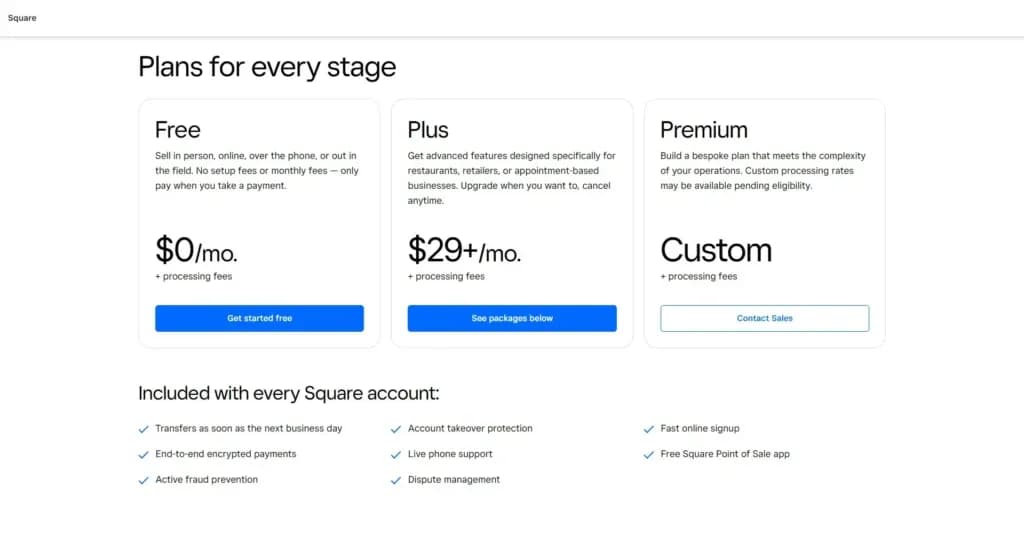
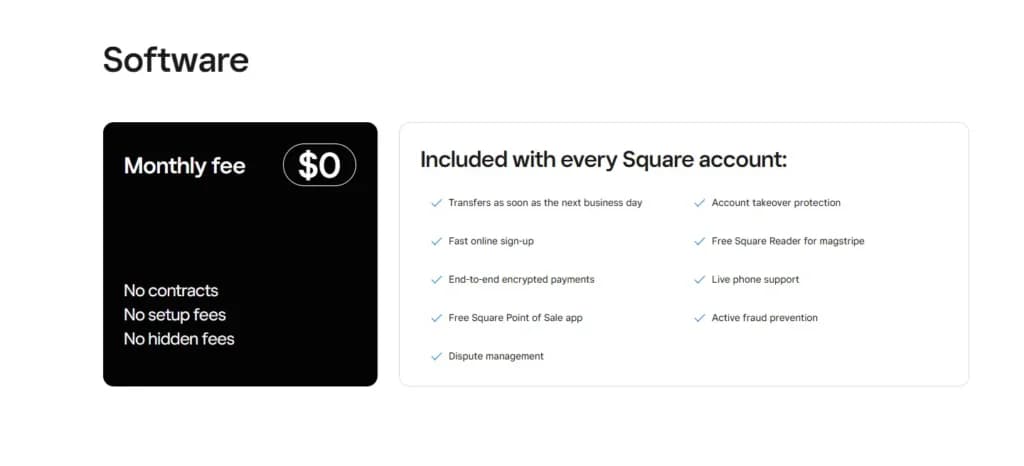
Square doesn’t charge one-time or monthly fees, you merely pay per transaction. Thus, you don’t have to be as cautious about signing up for Square. If you don’t like it, you can cancel their services without paying anything. Square has a few different fee structures depending on the way you take payments. Each one is pretty inexpensive, making Square suitable for smaller, low-volume businesses.
Here’s a breakdown of the current pricing for Square POS. All pricing should be verified for your local currency / region (Israel may have different rates).
Square Software & Transaction Fees
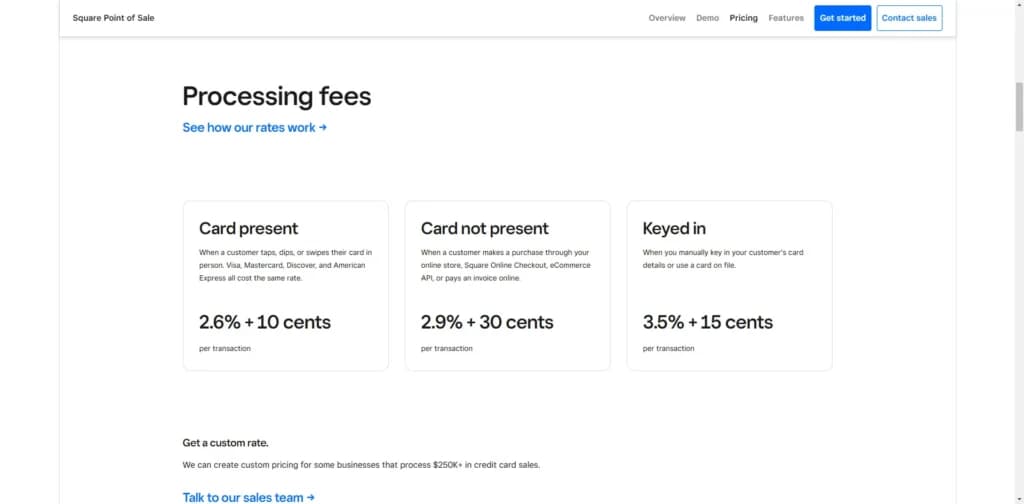
- Free plan (“Square Point of Sale software”) — $0/month. Processing rate: 2.6% + 15¢ (or ~10¢) for in-person transactions.
- Online payments: around 2.9% + 30¢per transaction.
- Manually-entered (card-not-present) transactions: ~3.5% + 15¢.
Vertical-specific Plans
- Square for Retail: Free plan per location; Plus plan costs ~$89/month/location adding features like advanced inventory management, vendor management, staff management.
- Square for Restaurants: Free plan supports basic setup; Plus plan ~$69/month/location for features like menu management, floor plan, kitchen display system (KDS), 24/7 support.
- Square Appointments(for service-based businesses): Free for individual, Plus around $29/month, Premium higher.
Hardware Costs & Other Add-Ons
- Card readers: e.g., contactless/chip reader approximate $49-59 USD.
- Terminal/Full Register hardware: e.g., Square Terminal around $299 USD.
- Add-ons: Loyalty program ~$45/month/location; email/text marketing add-ons from ~$10-$15/month plus per-usage.
Hidden/Important Notes for SMBs
- While software monthly fee may be $0 for the basic plan, you still pay processing fees and buy hardware.
- If you scale to many locations or require advanced features, monthly fees will add up.
- Always check local currency, taxes, hardware import/shipping (for Israel) and compatibility with your bank/card-processor environment.
- No long-term contract means you have flexibility, but also means you should review processing fees as volume grows.
The plans include a free plan, plus plan, and a premium plan. Each plan comes with the following:
- Transfers as soon as the next business day
- Account takeover protection
- Fast online signup
- End-to-end encrypted payments
- Live phone support
- Free Square Point of Sale app
- Active fraud prevention
- Dispute management
The pricing plans are designed to meet the needs of businesses of different sizes and can be customized based on the specific requirements of each business.
Is Square Worth It for Small Businesses in 2026?
For most micro businesses and SMBs, yes. Square offers more built-in functionality per dollar than almost any other platform in its class — and the free plan is a genuine starting point, not a stripped demo. Here's what the platform covers:
• POS & Merchant Services — Free POS software with flat-rate payment processing (2.6% + 10¢ in-person). Supports in-person, online, and mobile payments. Hardware starts at $0.
• Accounting & Bookkeeping — Automatic income and expense tracking, bank reconciliation, profit & loss reporting, and sales tax automation. Integrates with QuickBooks and Xero.
• Online Invoicing & Accounts Receivable — Recurring invoices, automated payment reminders, deposit scheduling, and overdue account tracking — all connected to the same payment dashboard.
• Payroll Services — Automated federal, state, and local tax filings, direct deposit, employee self-service, and benefits management. Flat per-employee pricing.
• eCommerce & Website Builder — Free online store with real-time inventory sync to your register. Sell on Instagram, Facebook, and Pinterest. Mobile-first templates, no coding needed.
The free plan covers POS, basic ecommerce, invoicing, and reporting — you pay transaction fees only. Paid plans start at $29/month for advanced retail, restaurant, and appointment features.
Expert Score
Pros
- No monthly payment
- Next-business-day transfers
- Inexpensive long-term option
- Comprehensive inventory management
Cons
- Not great for all industries
- Some performance issues
Customer Support
Square offers multiple support channels: live chat, self-help documentation, and phone support (depending on plan). According to reports, 24/7 chat support is available on higher-tier plans. That said, some users and reviews note variation in support responsiveness and the need to upgrade to get the best support. For small businesses starting out with the free plan, support may not be as comprehensive as for enterprise-tier systems. It’s wise to check what level of support you’ll require (single-location vs multi-location, 24/7 vs business hours) and choose accordingly.
Phone Support
Available from 6AM to 6PM PCT on weekdays
Available from 6AM to 6PM PCT on weekdays
FAQ
Square's website offers an FAQ section
Live Online Chat
You can find live chat support on the Square website
Video Tutorials
Square's website and Youtube Channel offer video tutorials
Ease of Use
Ease of use is another area where Square excels. If your business is in retail, restaurant, or appointment-based services, you will have no trouble figuring out how to efficiently use Square. You just need to choose the right package and get started. While you can simply use your own iPad, if you have comprehensive inventory management needs or something beyond the ordinary, you will have an easier time using the Square Register.
Performance
In the real world, Square POS delivers solid performance for the vast majority of SMBs. Transaction speeds, hardware responsiveness, and cloud reporting are generally strong. For example, the system’s offline mode for card-present payments is available, so you won’t be halted entirely if connectivity drops.
Some reports indicate that very high-volume/complex workflows may face limitations (e.g., slower bulk imports, less depth in custom reporting). But for day-to-day operations, uptime & reliability are good, and the hardware ecosystem is mature.
Features & Functionality
Square POS
General / Core Features
Square POS allows in-person and online payments: it accepts major credit cards, contactless payments, mobile wallets (e.g., Apple Pay, Google Pay), keyed-in/manual transactions, and even offline mode so you can process while internet is temporarily down and sync later.
For SMBs, this means you can serve customers through multiple channels with one system, minimizing friction and hardware complexity.
Sales & Checkout Workflow
The system supports a streamlined checkout process, with options for discounts, refunds/exchanges, tipping (in restaurant/hospitality versions), and payment splits. Because the hardware ecosystem is mature (tablet stands, terminals, mobile reader) you can implement setups for counter checkout, mobile/table-side checkout, pop-ups or market stalls.
This helps SMBs by giving flexibility across different selling formats without needing entirely different systems.
Inventory & Product Management
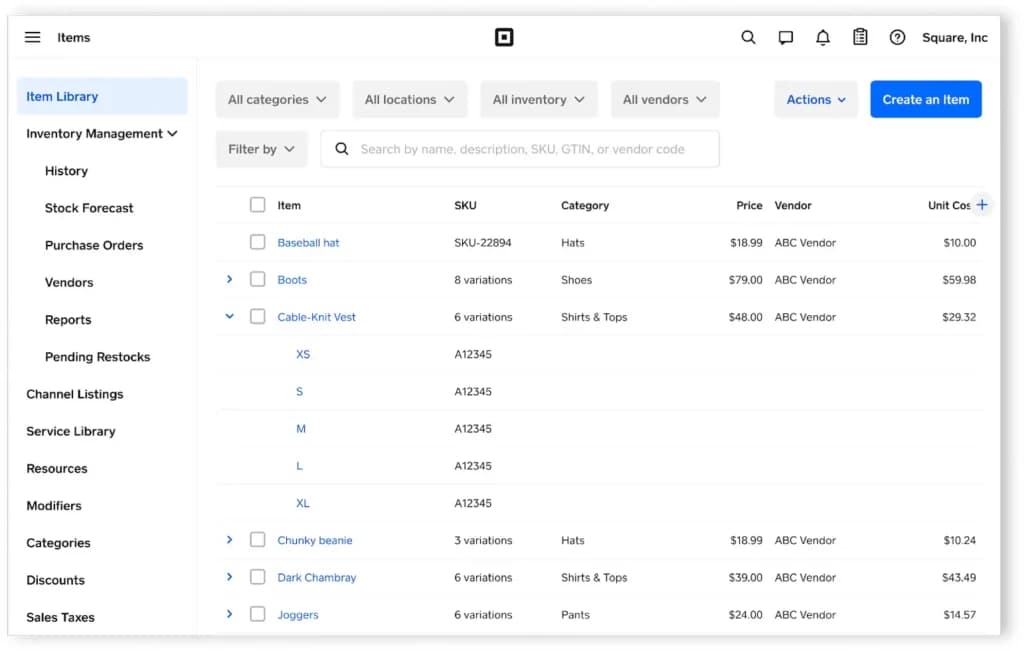
Square for Retail and other plans include inventory management: you can add/edit items, track stock levels, set low-stock alerts, print barcode labels, auto-generate SKUs, manage vendors and purchase orders (on higher tiers).
For SMBs, this means you can keep track of your product flow, avoid stock-outs, and scale from single to multi-product operations.
One limitation: bulk-import workflows and complex inventory structures may feel less refined than niche systems.
Multi-location & Staff Management
Square POS supports multiple business locations (in many plans), enables location-based reporting, transfers between locations, staff user accounts and permissions (in upgraded plans).
For SMBs wanting to expand or with multiple sites, having one system to manage all locations is efficient; still, very large multi-site enterprises may need more advanced features.
Customer Engagement & Loyalty
Square offers a customer directory (tracking purchase history, contact details), digital gift cards (customisable) and add-on loyalty programs.
This helps SMBs build repeat business, collect customer data and run targeted marketing, often without needing separate third-party systems.
Online Store / Omnichannel Selling
Square’s POS integrates with its own online store offering, and supports linking e-commerce channels (web, social). Inventory and sales sync across channels.
For SMBs that sell both in-store and online, this unified approach simplifies operations and ensures consistency.
Hardware Ecosystem
Square provides a suite of hardware from basic readers to full registers. The hardware integrates tightly with the software. For SMBs, this means you can choose a minimal setup and expand as needed.
For example: free magstripe reader on signup in some regions.
Reporting & Analytics
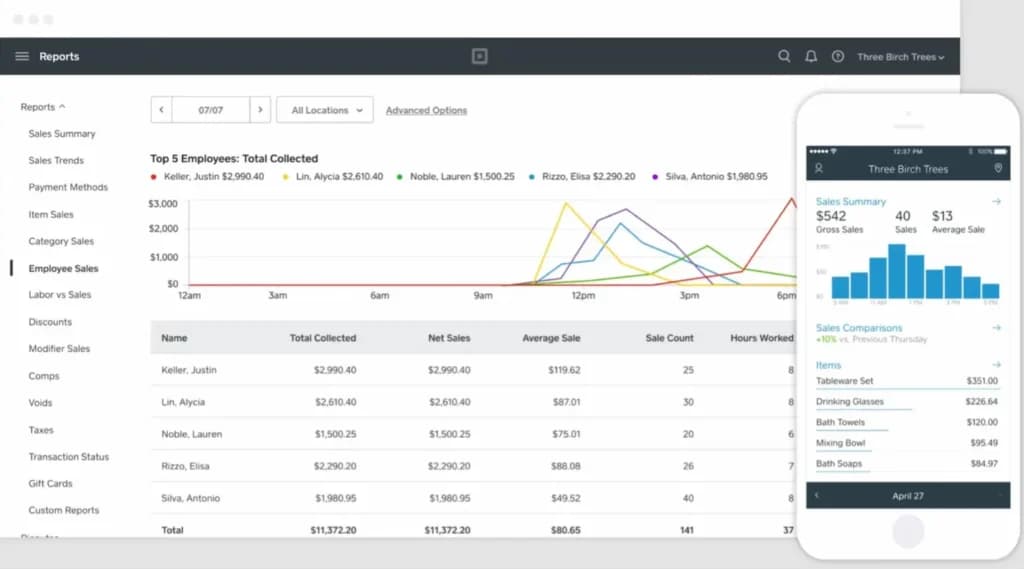
Square includes dashboards of sales, inventory, top items, staff performance. On higher plans you gain more advanced analytics. Reviewers note the interface is clean and usable.
This helps SMBs make data-driven decisions (which products sell, when to restock) without needing separate business-intelligence tools.
Add-Ons & Extensions
Beyond core POS you can add payroll, email/text marketing, loyalty, appointments, online bookings etc. For example, loyalty starts at ~$45/month; email marketing ~$15/month for up to 500 contacts.
For SMBs, this modular approach means you can add features as you grow, rather than paying for a large bundle up front.
Free Mobile Processing
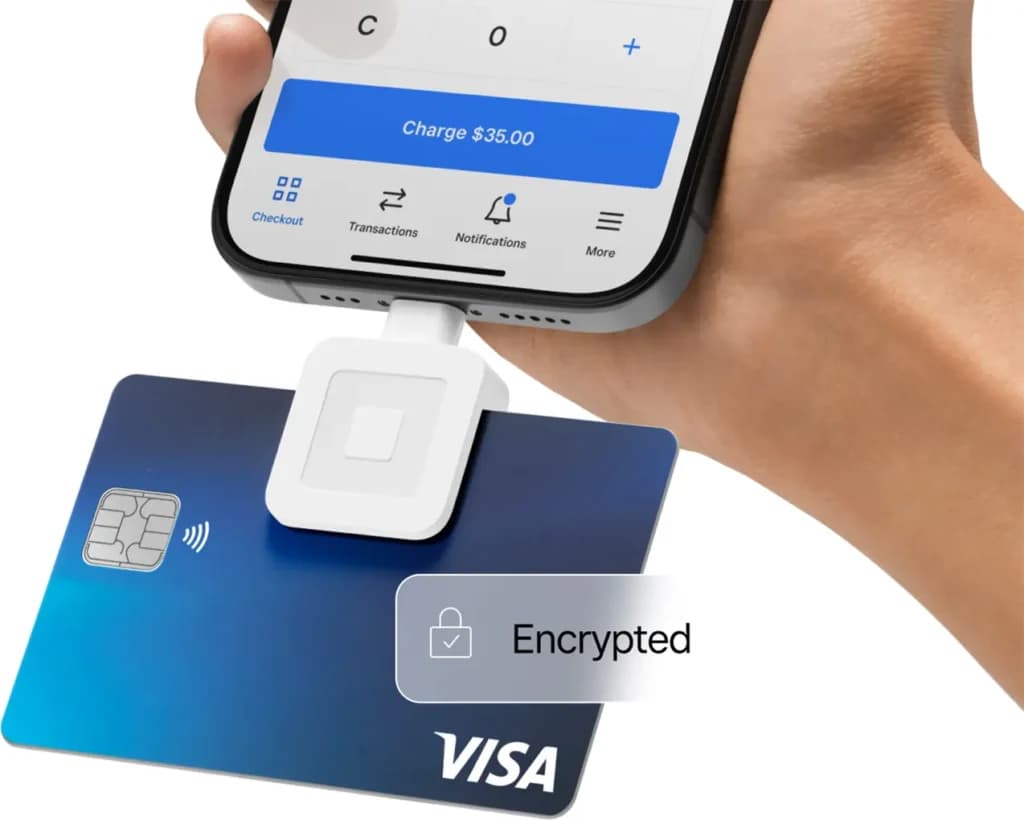
Square is one of the only POS companies that offers a free mobile payment processing feature. It’s not the best in the industry, but given that it’s free, it’s hard to beat their offer. They also process payments quickly and withdrawals will land in your bank account within 2 business days.
Payment Terminal
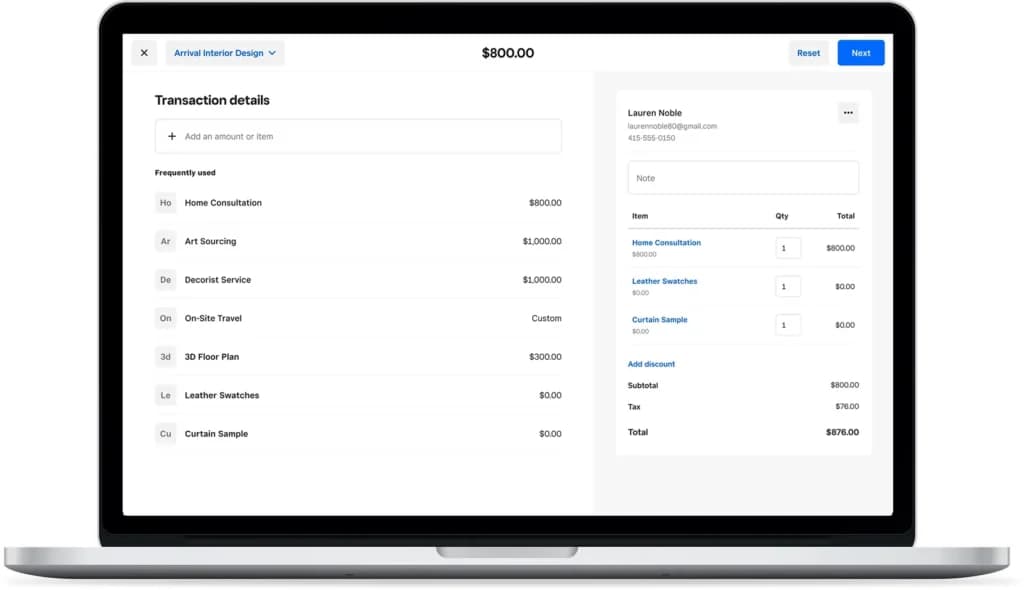
Square makes all payment types easy. Using the Square Virtual Terminal, you can take card payments from any device with an internet connection. You can even take payments from a desktop through your browser.
What makes Square even better is that you can set up recurring payments or invoices just as easily. You can even use Square Capital to offer financing to your customers. You still get paid upfront and Square assumes the risk of non-payments meant to be made through Square Capital.
Different Packages
Square has separate packages for different industries. It’s not the best for every industry, but each product offers a different set of features for:
- Retail
- Restaurants
- Appointment-based businesses
- Generic stores
Dashboard
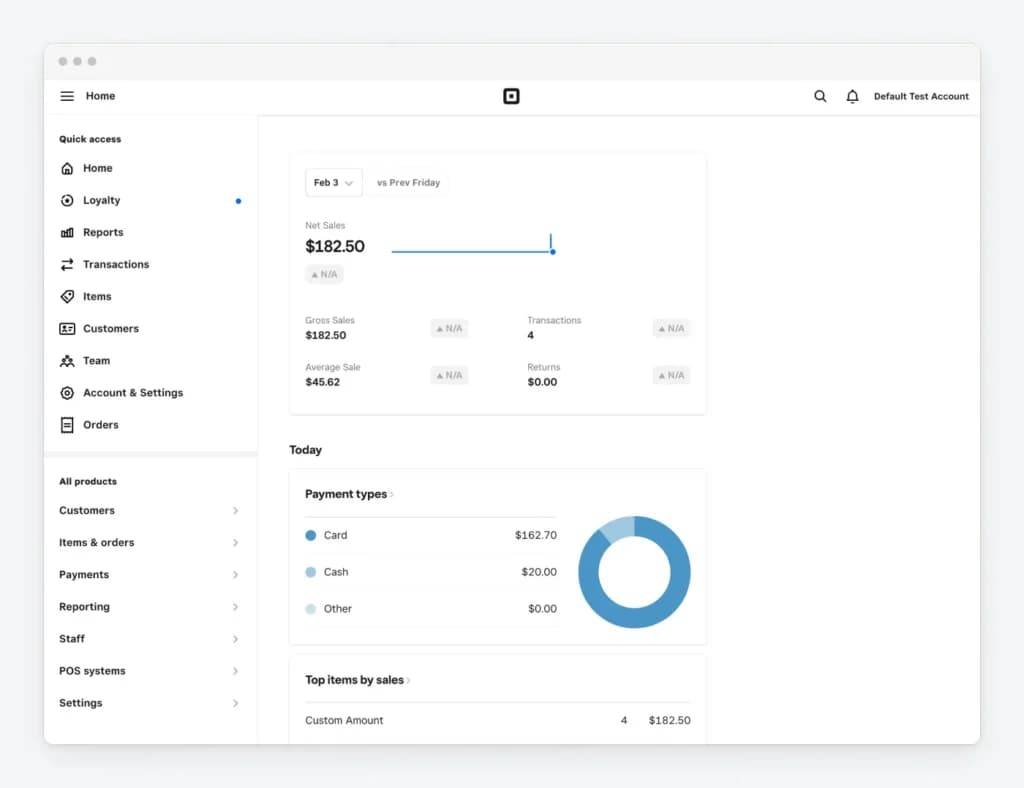
Tailored solutions for retail stores, coffee shops, nightclubs, quick service, bars, restaurants, and food trucks.
Hardware requirements
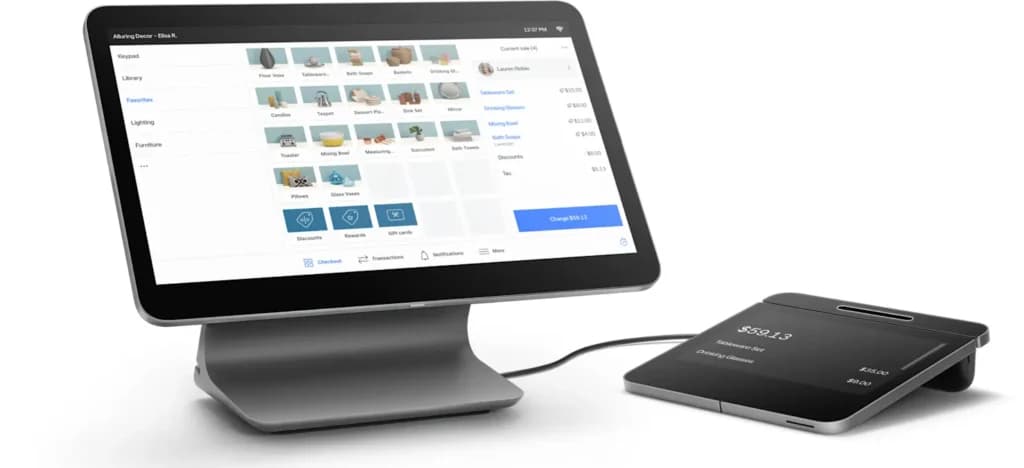
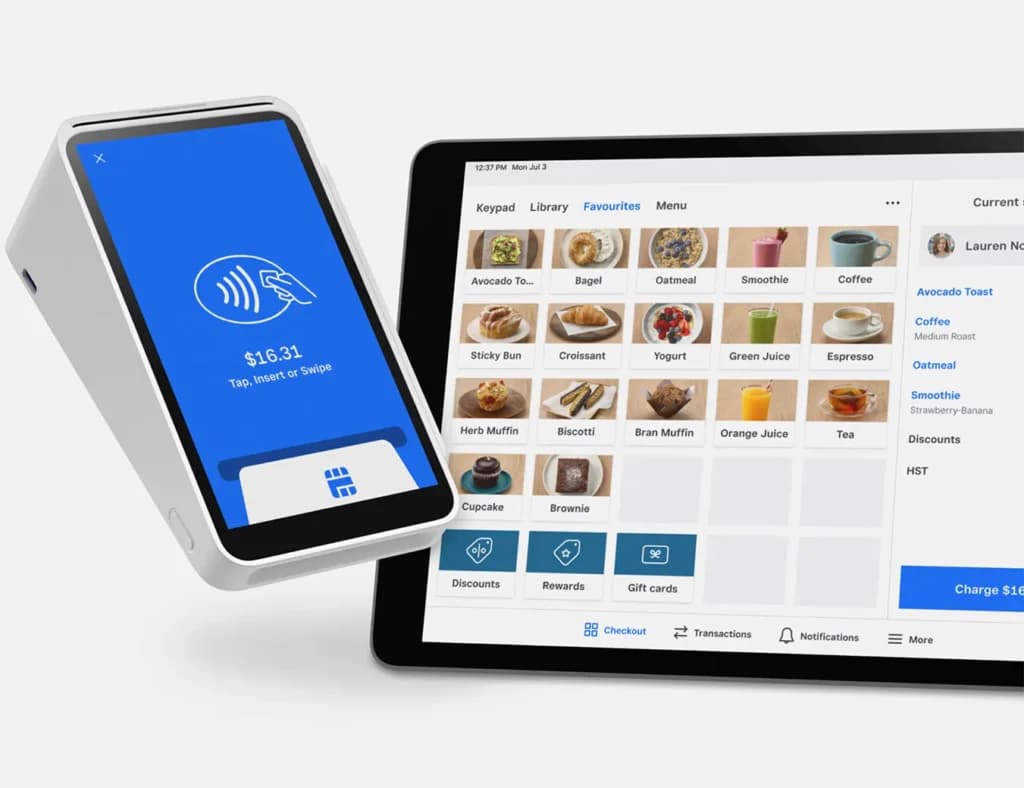
The simplest hardware option for Square is to have your own iPad and order their free card reader. But Square also offers:
- A Square stand with a chip reader for $169
- A Square Register for $799
The latter option offers the most comprehensive POS service. But you can use most of Square’s features with an iPad and mobile devices with internet connections.
Software
Integrations & Add-Ons
Square offers integrations with many apps including:
- Acuity Scheduling
- BigCommerce
- Cuboh
- Ecwid
- GoDaddy
- JotForm
- Setmore
- Shippo
- Wix
- WooCommerce
- Wufoo
- Zoho Books
Flexible pricing plans to meet different business needs.
Square Accounting Software
Recurring Invoices
Service businesses are often on retained for some of their clients. Sending your retainer clients invoices every month can be a headache, which is only made worse when they seem to dodge around paying you.
However, thanks to Square, you can store client credit or debit cards and set up recurring billing quite easily. Their card will be charged automatically, so they won’t have to remember to pay, and you won’t have to stress about non-payment.
Payment Reminders
Another automation feature Square offers is payment reminders. When creating your invoice, you can schedule payment reminders ahead of time to increase your clients’ chances of paying on time.
Deposits
If you run a service business, you likely require your clients to put down a deposit upfront to reserve a spot in your calendar or protect yourself if they’re a bad client.
Square lets you set up deposits and other milestones, so you can get paid when you complete essential portions of each client project.
Estimate Management
Square provides excellent estimate creation and management features. You can create and send custom, multi-package estimates so that clients can pick the best one based on their needs and budget. Once they choose their package, you can convert the estimate into an invoice with a few clicks.
To streamline documents even further, Square offers numerous contract templates you can fill in and send with the invoice.
Monitor and categorize expenses for accurate financial tracking.
Square’s accounting software offers a variety of tools tailored to streamline financial management:
- Income and Expense Tracking: Easily categorize transactions and monitor cash flow in real time.
- Invoicing: Create, send, and automate recurring invoices with professional templates that make client billing seamless.
- Bank Reconciliation: Automatically match transactions with bank statements to ensure financial records are accurate.
- Financial Reporting: Access detailed reports, including profit and loss statements, cash flow summaries, and balance sheets, to keep a pulse on your business's financial health.
- Integration with Payments: All sales and payment data from the POS system syncs with the accounting software, ensuring accuracy without manual data entry.
Square makes tax preparation easier by automating key processes:
- Sales Tax Automation: Automatically calculates sales tax on transactions and provides detailed reports for filing.
- Tax-Friendly Reports: Access profit and loss statements, expense summaries, and transaction reports to simplify year-end tax filing.
- Integration with Tax Software: Square integrates with tools like QuickBooks and Xero, ensuring that your tax data is ready for filing without manual intervention.
Square’s automation tools are tailored to accounting management, reducing repetitive tasks and improving efficiency:
- Automated Invoices: Set up recurring invoices for regular clients, complete with payment reminders.
- Expense Categorization: Automatically sort expenses into predefined categories, simplifying bookkeeping.
- Bank Reconciliation: Match transactions with bank records automatically to avoid discrepancies and errors.
- Real-Time Syncing: All payment and sales data instantly syncs with accounting tools, providing an up-to-date financial view at all times.
Square offers numerous other small business management beyond their invoicing. Some are free, while others cost money.
Additionally, Square integrates with several administrative and marketing tools to streamline your operations, such as Acuity scheduling software, ActiveCampaign, JotForm, Mailchimp, and TSheets.
Access accounting tools seamlessly across various devices.
Square Online Invoicing
Recurring Invoices
Many service businesses have retainer agreements with clients, meaning they get paid a fixed fee every month for an agreed-upon workload. Creating and sending retainer invoices every month is tedious, though.
Square lets you can store client credit or debit cards and set up recurring billing with ease. Square bills the card automatically, reducing work for both parties and increasing your chance of being paid on time.
Payment Reminders
Square also lets you set automated payment reminders to keep your clients in the loop about invoices or purchases coming up soon. You can schedule these ahead of time.
Deposits
Plenty of service businesses require clients to pay a deposit up front. This holds their spot in line and protects the company’s revenue in case of a dodgy client.
Square built in features that let you accept deposits and milestones, ensuring you get paid at the appropriate times for your hard work.
Estimates
Square has a host of estimate creation and management features. You can create and send multi-package estimates to give clients options depending on their budget and needs. You can then convert their chosen estimate into an invoice for easy money.
Square also provides numerous contract templates you can fill in and send with the invoice.
Process payments seamlessly with integrated systems.
Track time spent on projects for accurate billing.
Available on multiple devices for accessibility.
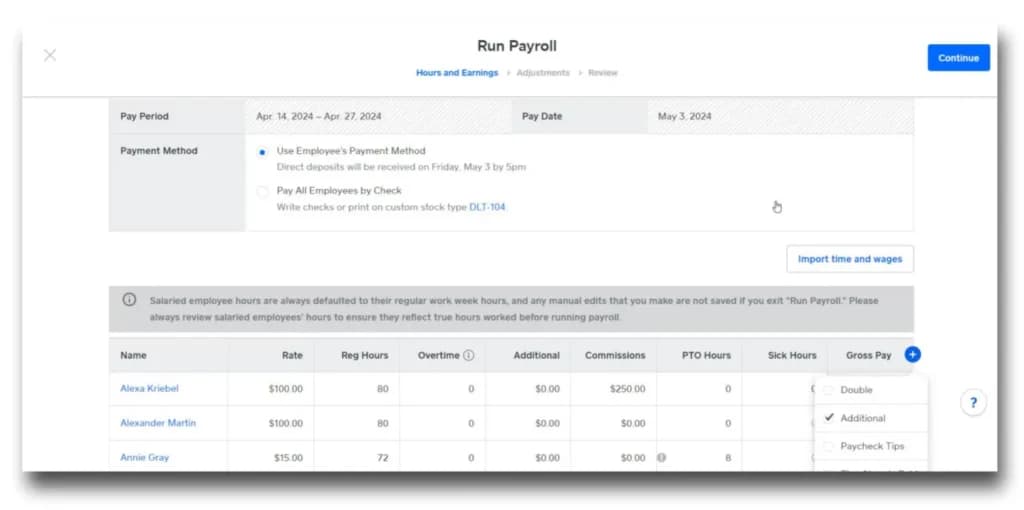
Square Payroll Services
Automating key processes
One of the best features offered by Square’s payroll offering is the automatic calculating and filing of tax payments. This covers local, state, and federal taxes. You will also have your payroll processes automated in a similar fashion. This means that timesheets, salary info, overtime, etc. will be automatically taken into consideration.
There is the option for the payments to be sent via paper check or direct deposit. The administration of health and retirement benefits couldn’t be easier and there are now even capabilities to provide on-demand payment to workers.
Simply interface for workers
Contractors and employees can create their own accounts as part of Square payroll. This allows them to always be able to access their payroll info. This includes tax info, pay stubs, benefits, and so on. They can update different info, such as their tax withholdings and direct deposit accounts.
Management of benefits
Small businesses are able to choose and manage different types of benefits packages for their workers. This includes the likes of retirement benefits and health insurance. The employer is able to set the number of deductions for the paychecks to cover the various benefits for a given worker. Employees will use their personal payroll accounts to sign up for the benefits, meaning that there will be no paperwork on the business owner’s end.
Regular releases of new features
Square is known for being very innovative and it is regularly releasing new types of payroll features to make the user experience even better. Recent improvements include on-demand pay and instant payments. Over time, it is likely that more and more great features will be issued by Square.
Square Payroll includes automatic quarterly and annual tax filings, timecard, tips, and commissions integration, and flat pricing for payroll services and live support.
Mobile App
The Square Payroll app lets employers manage and process payroll away from their computers. The Square Payroll app is currently available on iPhones and Android devices. Employees and contractors can download the Square Team app to manage their personal payroll accounts.
Square Integrations
With Square Payroll, you can add other tools from the Square family for seamless integration with Square POS, Team Management, and more. It also integrates with 3rd party tools.
Automate repetitive payroll tasks to save time.
Square offers benefits for teams of any size, including healthcare and retirement benefits that automatically sync with your payroll. There is also a pay-as-you-go workers’ compensation insurance that automatically syncs with your payroll.
Click the video for a tour of Square Payroll’s main features:
https://www.youtube.com/watch?v=eHvJ8qf0vZk
Stay compliant with built-in tax management features.
Expand payroll functionality with third-party integrations.
Square Merchant Services
Square merchant service provider offers a huge array of features and business optimizing solutions to improve your payment processing functions and business workflows. Here are some of the tools on offer:
Multiple Ways to Get Paid
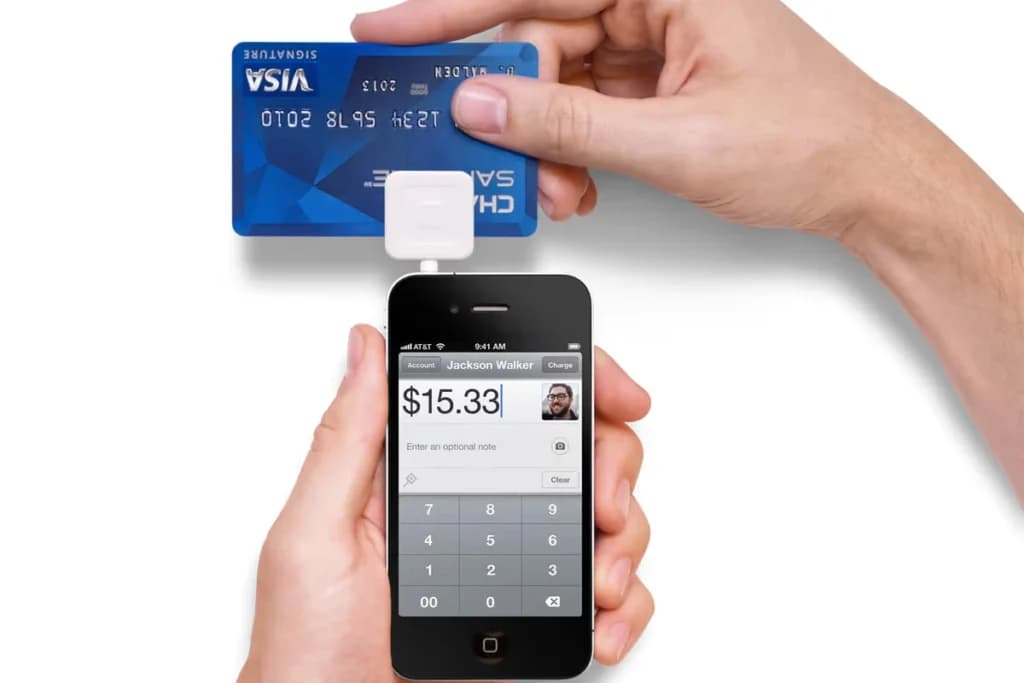
Square offers a ton of ways to get paid. You can get some hardware from Square for in-person swipe, chip, tap, or manual payments. You can accept payments in-app, via digital invoice creation, online payments through your website, and even through shareable checkout links.
Recurring Invoices
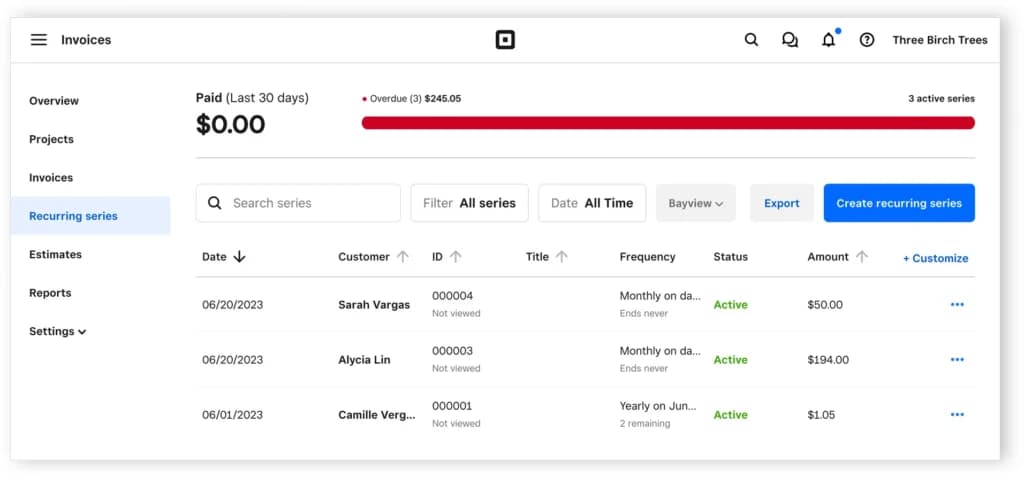
Do you have any regular clients? Perhaps you’re on retainer with a few, providing regular services in exchange for a fixed monthly fee? With Square, you can store your clients’ credit or debit cards and set up automated recurring invoicing. Square automatically charges your client’s card, making it so that neither party needs to remember to pay or get paid.
Payment Reminders
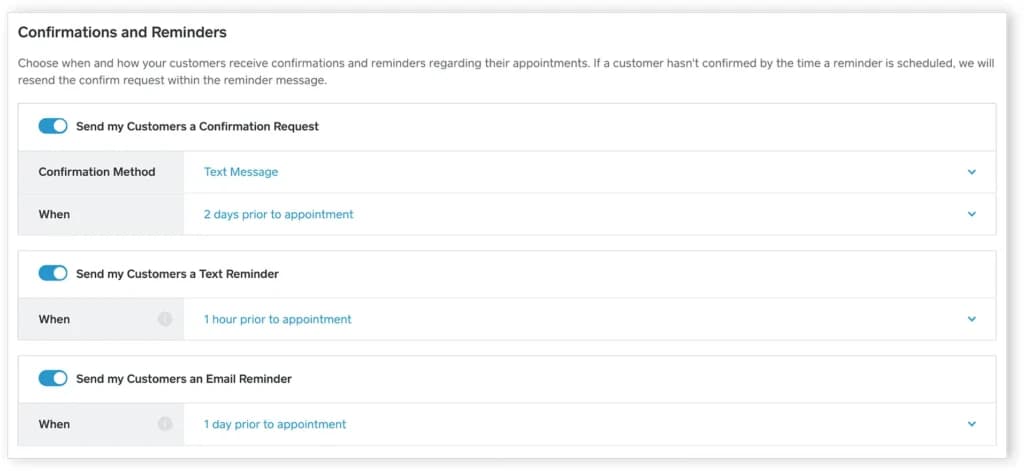
Square offers payment reminders as another automation to help you collect on customer accounts and maximize cash flows. When you create an invoice in Square, you can schedule these reminders ahead of time so you can get back to working on more important matters.
Online Payment Solutions for E-Commerce
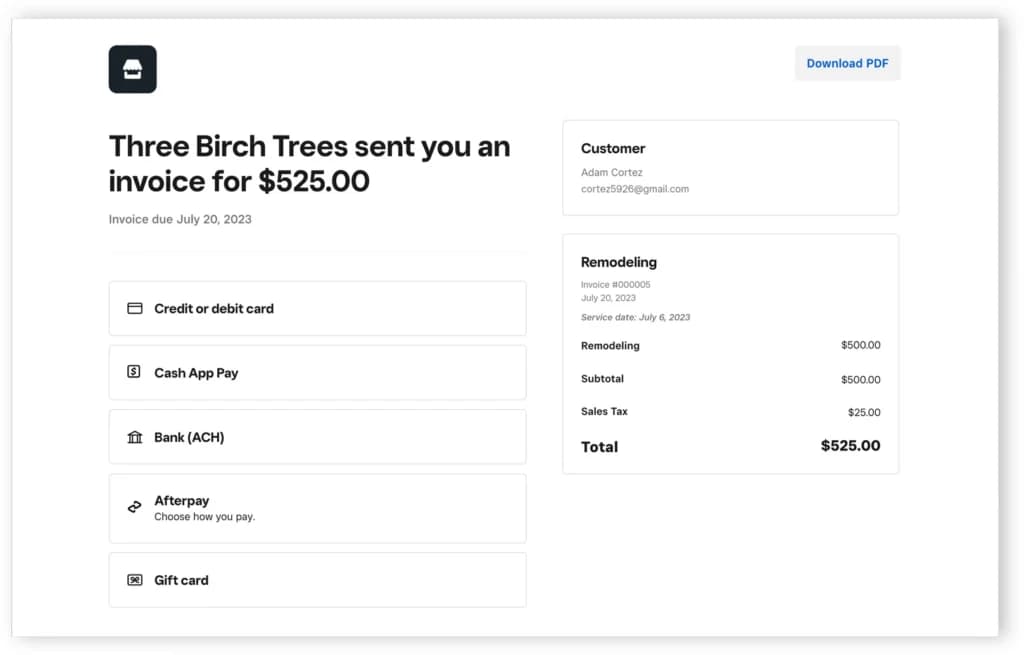
Square empowers businesses with robust e-commerce payment capabilities through its Online Payment Platforms. Their payment gateway supports secure online payment processing services, enabling merchants to accept payments directly through customizable websites. Virtual card support and electronic check processing make Square's offerings versatile, while integration with popular e-commerce tools ensures flexibility for modern businesses.
Marketing and Customer Loyalty Programs
Square's marketing tools help businesses drive customer engagement through personalized email campaigns and promotions. Its loyalty programs allow businesses to reward repeat customers, integrate with payment transactions, and track redemption analytics. These features, built into Square’s Merchant Services software, help businesses create meaningful connections with their customers while enhancing retention rates.
Payroll Services for Businesses
Square simplifies payroll management by offering end-to-end solutions for businesses. With features like automated tax filing, direct deposit, and integration with Square’s POS system, payroll becomes seamless. This solution accommodates all business sizes, offering transparent pricing and efficient employee payment methods.
Employee Management and Scheduling Tools
Square includes advanced employee management tools within its software suite, enabling businesses to schedule shifts, track attendance, and manage labor costs. These tools are particularly beneficial for hospitality and retail industries, ensuring optimized staff performance and seamless payroll integration.
Square Banking with Savings and Checking Options
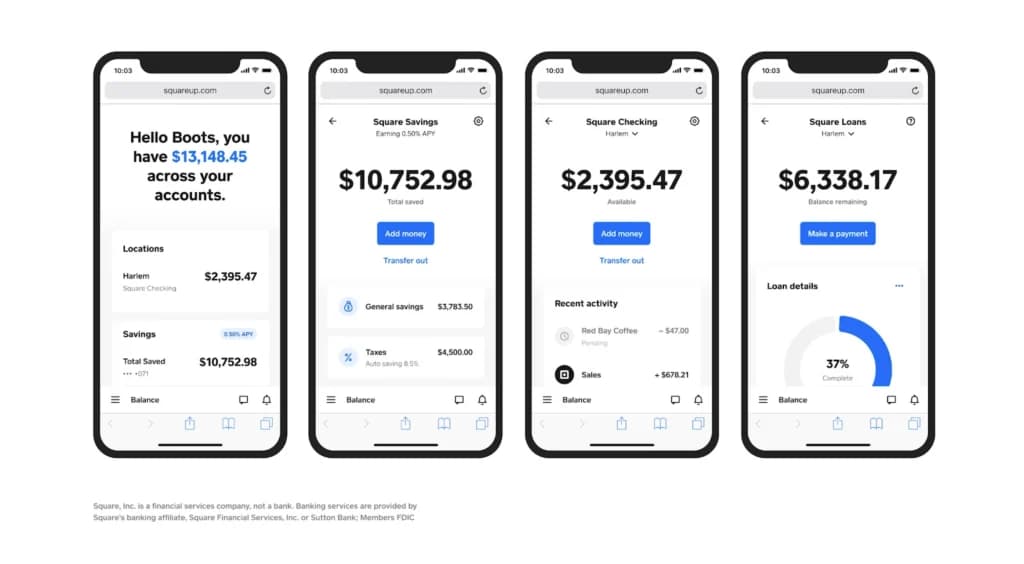
Square Banking allows businesses to manage their funds efficiently with built-in savings and checking accounts. Transactions are automatically synced with sales data, and the free Square Debit Card ensures immediate access to earnings. This integration of financial services within their Online Merchant Services ecosystem boosts cash flow flexibility for small and medium businesses.
Buy Now, Pay Later Integration for Customers
Square’s Buy Now, Pay Later feature provides customers with flexible financing options, increasing purchase potential and enhancing the overall shopping experience. Integrated with Square’s payment platforms, this solution helps businesses improve conversion rates and customer satisfaction.
Gift Card Solutions for Businesses
Square simplifies gift card management with a comprehensive solution that includes digital and physical options. Gift cards are fully integrated into the payment system, enabling seamless transactions, tracking, and reporting. These tools help businesses drive additional revenue and customer acquisition.
Advanced Analytics and Reporting Tools
Square’s analytics tools provide businesses with actionable insights through intuitive dashboards. Key metrics like sales trends, customer behavior, and inventory performance are easily accessible, enabling data-driven decisions. These tools are part of Square's Merchant Services software, ensuring businesses can maximize operational efficiency and profitability. Stock counts that sync between the shop floor and the online store are the dividing line among best retail POS systems, so check that first.
Industry-Specific Tools
Square tailors its solutions to specific industries, offering features like table management for restaurants, inventory tracking for retail, and appointment scheduling for beauty salons. These industry-specific tools are integrated with their online payment processing services, ensuring that businesses can meet their unique operational needs effectively. Register, inventory and payments arriving in one account is the draw, and the same bundling shows up across the best POS for small businesses.
Financing
Need some cash for your business to invest in new projects? Square offers merchant cash advances (although they call them loans) through their Square Capital division, so you can exchange a slice of future credit sales for some quick cash.
Square Bookkeeping
Recurring Invoices
Service businesses are often on retained for some of their clients. Sending your retainer clients invoices every month can be a headache, which is only made worse when they seem to dodge around paying you.
However, thanks to Square, you can store client credit or debit cards and set up recurring billing quite easily. Their card will be charged automatically, so they won’t have to remember to pay, and you won’t have to stress about non-payment.
Payment Reminders
Another automation feature Square offers is payment reminders. When creating your invoice, you can schedule payment reminders ahead of time to increase your clients’ chances of paying on time.
Deposits
If you run a service business, you likely require your clients to put down a deposit upfront to reserve a spot in your calendar or protect yourself if they’re a bad client.
Square lets you set up deposits and other milestones, so you can get paid when you complete essential portions of each client project.
Estimate Management
Square provides excellent estimate creation and management features. You can create and send custom, multi-package estimates so that clients can pick the best one based on their needs and budget. Once they choose their package, you can convert the estimate into an invoice with a few clicks.
To streamline documents even further, Square offers numerous contract templates you can fill in and send with the invoice.
Simplify and optimize tax filing with expert features and tools.
Automate repetitive tasks to improve efficiency and productivity.
Square offers numerous other small business management beyond their invoicing. Some are free, while others cost money.
Additionally, Square integrates with several administrative and marketing tools to streamline your operations, such as Acuity scheduling software, ActiveCampaign, JotForm, Mailchimp, and TSheets.
Access and use on a variety of compatible devices.
Inventory Management
Fast Setup
Unlike much other inventory management software that has to be deployed by specialists, it is possible to set up Square Up easily. You can import thousands and hundreds of products seamlessly using CSV spreadsheets. Whenever your item count requires adjusting, you can easily add inventory. Staff training time drops when the tablet interface matches what people already use at home, a pattern across the best iPad POS systems.
Quick Inventory Counting
With Square Up, business owners can easily keep track of their inventory. With the use of scanned barcodes, it is possible to derive stock quantities for different products.
Smart-Stock Alerts
This special feature comes with machine learning, which helps it to make accurate predictions on the durability and lifespan of stock. This way, sellers can be alerted to dwindling inventory and automatically reorder stock.
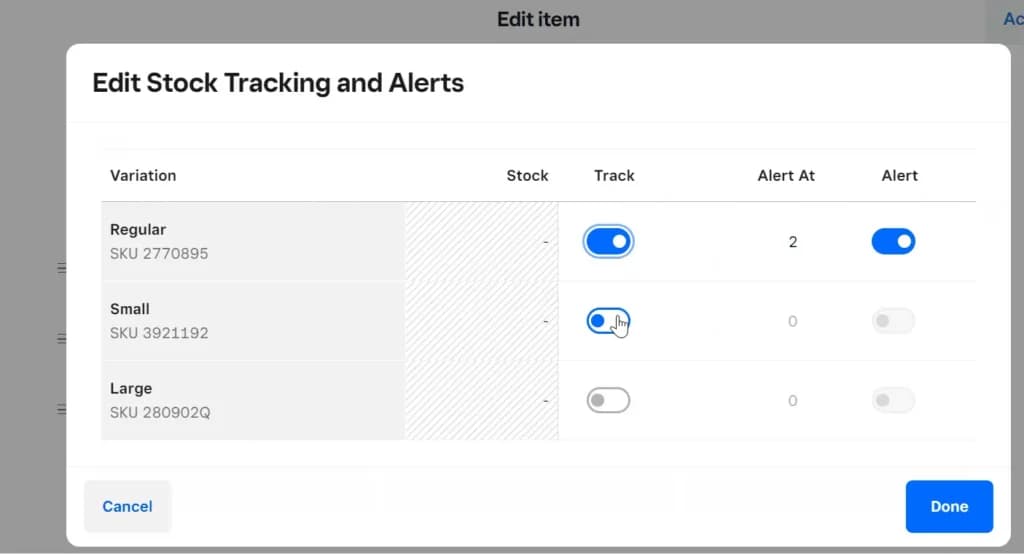
Advanced editing
With Square Up, business owners can seamlessly manage key details suck as the quantity and prices of stock. It is also possible to quicken the line with easy and quick modifiers. Several advanced inventory tools are also available. In addition, there is access to cost of goods sold, multi-location inventory management, projected profit reporting, and POs (purchase orders).
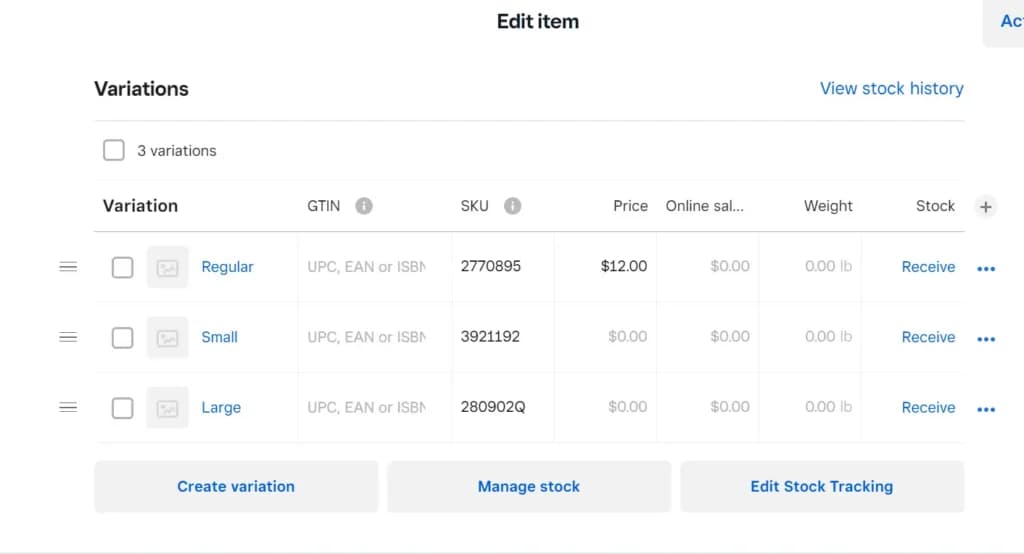
SquareUp also offers advanced inventory management features to streamline the supply chain processes and boost productivity. These are below:
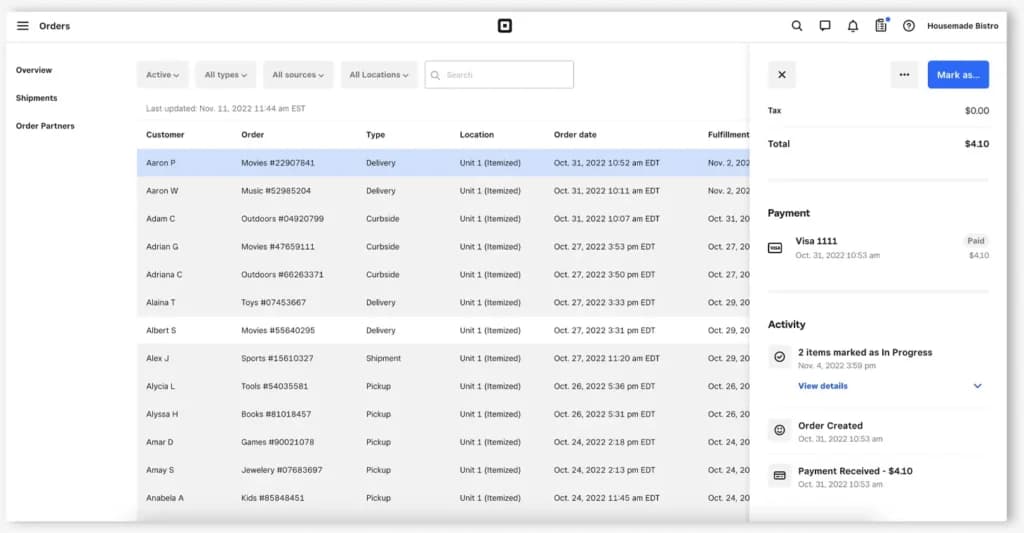
The inventory management software also offers a host of reporting and analytics features to empower businesses with actionable insights, optimize inventory levels, identify trends, and reduce carrying costs. SquareUp supports data-driven decision-making for improved operational efficiency and profitability with these features:
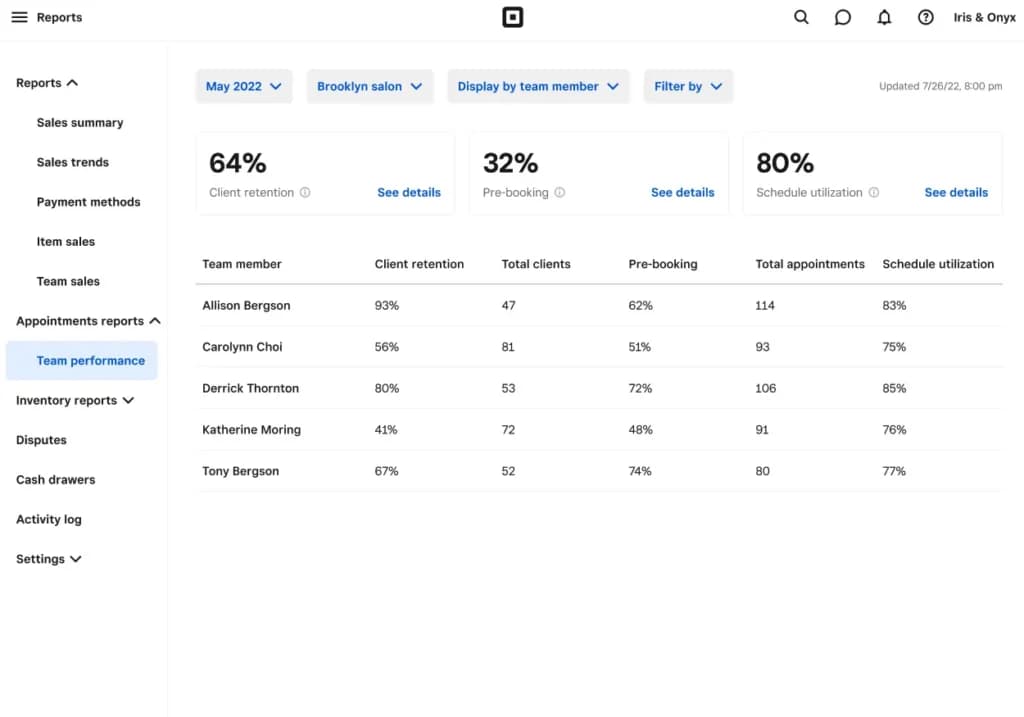
Not a lot of inventory software has as many integrations as Square Up. Almost every prominent business service is listed on the platform, allowing you to interact seamlessly. Some of Square Up’s integrations and their related industries are listed below.
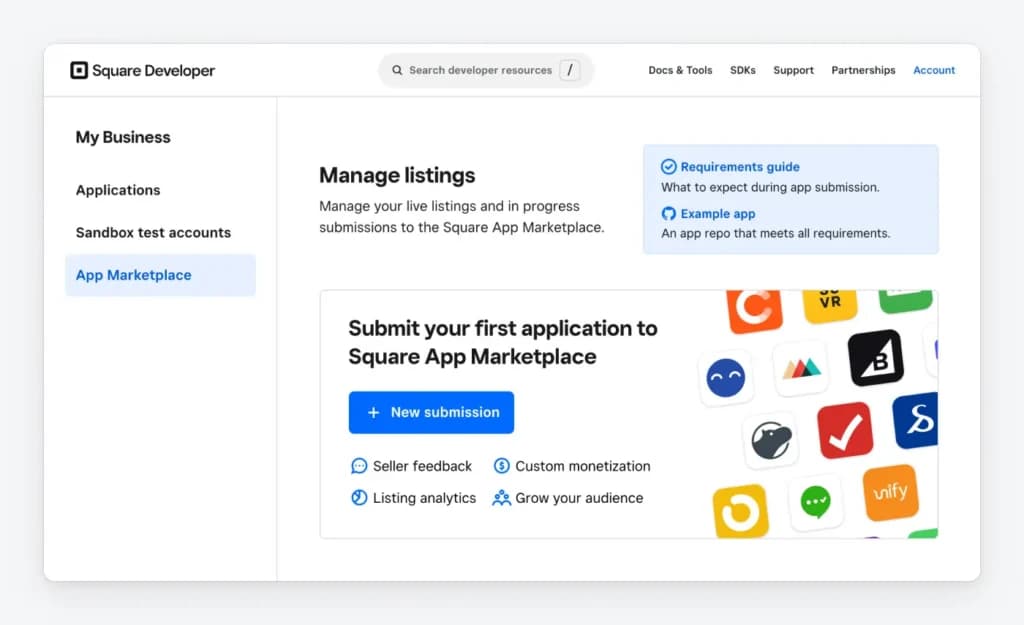
Tax and Accounting: TurboTax Self-Employed, Commerce Sync, Intuit QuickBooks, Zoho BooksOnline, and Xero.
Scheduling and Booking: Wix Bookings, Acuity Scheduling, GoDaddy Appointments, and Schedulicity.
Order and Delivery: GoParrot, Craver, Chowly, Kyoo, and The Ordering.app.
E-commerce: Magento, WooCommerce, Wix, BigCommerce
Other integrations include Breezeworks, simPRO, mHelpDesk, JotForm, Wufoo, Gravity Forms, Cognito Forms, 123FormBuilder, DrChrono EHR & RCM, IntakeQ, Embroker, MassageBook, 17hats, Táve, PandaDoc, vcita, ZipBooks, MarketMan, DEAR Systems, Shopventory, Sku IQ, TapMango, Gift Up!, TheGiftCardCafe.com, Digital Loyalty by Loyalzoo, Mailchimp, IFTTT, SumAll, Dor, Customer Screen, TouchBistro, Vend, KioskBuddy, SalesVu POS & Self-Order Kiosk, Fresh KDS, and SuitePOS.
Features
- Inventory Management
- Loyalty Program
- Mobile Compatibility
- Online Ordering
- Reporting
- Split Checks
- Manage Tips
- Staff Scheduling
- Offline Payments
- Customer Profiles
Square Alternatives
Starting from: $0/month
Free
+ processing fees
- No monthly payment
- Next-business-day transfers
- Inexpensive long-term option
- Comprehensive inventory management
- Not great for all industries
- Some performance issues
Starting from: $69/month
Starter
- Payments, POS and e-commerce all in one place
- Wide hardware compatibility makes customization easy
- Interface is intuitive and simple to use
- Lots of support options and helpful tutorials
- Some desirable features only included in the top tier plans
- Add-ons can ramp up the cost
- You are tied in to an annual contract

Starting from: $0/month
Starter Kit
Starting at $0/month
- Streamlined back office operations
- Excellent integration between kitchen and service staff
- Multi-location menu management
- Fairly priced
- Only available on Android
- 2–3-year processing agreement on most plans
- Early termination fee
Verdict
Square is the platform I'd recommend to any small business owner who wants to run payments, invoicing, payroll, and ecommerce without paying for five separate tools.
The free plan is genuinely free — 2.6% + 10¢ per in-person transaction, no monthly fee, no tricks. Hard to beat as a starting point.
What works well
✓ Everything connects: Payroll pulls timesheet data from your POS. Sales update your online inventory in real time. Invoices feed into your bookkeeping automatically. No manual syncing, no exports.
✓ Free plan is a real product: Not a 14-day trial. You get POS, invoicing, basic ecommerce, and reporting from day one — just pay per transaction.
✓ No long-term contract: Start, pause, or switch plans anytime. For a small business, that flexibility matters.
✓ Fast to set up: You can go from signup to taking your first payment in under an hour. No specialist needed.
✓ Great for in-person + online: If you're moving from a physical store to also selling online, the inventory sync between your register and your Square Online store is seamless.
What to watch out for
✗ Account holds: Square can freeze your funds if your transaction patterns look unusual — a large one-off sale or a sudden volume spike can trigger it. When it happens, resolution is slow and free-plan support is limited.
✗ Fees add up at volume: Flat-rate 2.6% + 10¢ is fair when you're small. Once you're processing $10,000–$15,000+/month, a dedicated merchant account with negotiated rates will likely cost you less.
✗ Closed ecosystem: You process through Square or not at all. No plugging in your own bank or third-party processor.
✗ Reporting has a ceiling: The dashboard is clean and useful for most SMBs, but multi-location reporting and advanced analytics are limited compared to enterprise tools.
Use Square if you are...
→ A retailer, café, or food truck operator: looking for a free POS with solid inventory management.
→ A freelancer or service business: that needs recurring invoices, automated reminders, and simple bookkeeping.
→ A small business adding an online store: to an existing physical operation — the inventory sync makes this easy.
→ A growing team: that wants payroll, benefits, and POS timesheets all in one place.
Skip Square if you are...
✗ Processing high volumes: and need to negotiate processing rates below 2.6%.
✗ In a high-risk industry: (crypto, adult, firearms, etc.) — account freezes are more likely.
✗ Running a complex multi-location operation: that needs deep reporting and custom integrations.
Bottom line: For most small businesses, Square is the most complete free platform on the market. Start on the free plan, add what you need as you grow, and revisit the economics once your monthly volume crosses $10K.
FAQs
Where can I buy square card readers for contactless payments?
Is Square POS really free
What is the downside of using Square?
Why does Square sometimes hold funds or freeze accounts?
How long you need to wait for a payment from Square
Can I cancel Square account anytime?
What happens if a customer disputes a charge on Square?
Users Reviews
Write a review
Leave a review, help others get it right the first time.
4 Reviews
Vicki G
Impressive payment platform!
Best parts are the fraud protection, which eases my worries when generating invoices. I also feel like I am in constant control and communication with my business because of portability of this software. I recommend Square to anyone who is looking for a s
- No monthly fees! Also didn't cost anything to get started.
- Can be a bit confusing setting up payments plans, but after some diligence it becomes super easy.
Gabriel R
Excellent POS software!
Overall, I couldn't be more pleased by Square. So happy I implemented this software into my business. Streamlined my entire payment process.
- Selling online and delivery has been a breeze, completely transformed how I conduct sales.
- Doesn't integrate with Wix which was one difficulty I had to work around.
Lisa D
The gift cards are a gamechanger
Being able to sell e-gift cards without paying any fees has boosted my beauty company. Once we started using Square, we saw a huge increase in the amount of gift cards purchased.
- No monthly fee to administer gift cards, and super easy to set up site.
- Somethings could be more streamlined such as the integration with bookkeeping and actual reports.
Kathy F
100% Recommend
Been using Square for 10 months now, and I have nothing but great things to say. First off, there are no contracts, low to no start-up costs, and many amazing add-on features.
- The dashboard is easy to learn and navigate.


