

Last updated: October 2026
SpotOn is an all-in-one point-of-sale and business management platform built primarily for restaurants and small retailers, combining POS hardware, integrated payment processing, online ordering, reservations, loyalty marketing, and reporting in a single system. Pricing is quote-based starting around $0 software + 2.6%+10¢ per card transaction for restaurants, with hardware bundles from roughly $700. The catch: SpotOn is best for full-service and quick-service restaurants under 20 locations; multi-state retail and enterprise hospitality groups usually outgrow it within a year and move to Toast or Square for Restaurants.
Plans & Pricing
- 15″ station hardware bundle
- Cloud-based restaurant POS software
- Powerful dashboard with marketing, reporting & review management
- Access to SpotOn Capital
- 10″ counter hardware bundle (guest-facing display)
- Cloud-based restaurant POS software
- Powerful dashboard with marketing, reporting & review management
- Access to SpotOn Capital
- Employee Management
- Commission-free online ordering
- 15″ station hardware bundle
- Kitchen display system (KDS)
- Cloud-based restaurant POS softeare
- Powerful dashboard with marketing, reporting & review management
- Employee management
- Online ordering & digital dine-in ordering
* Featured prices can be updated and free offers may include additional terms.
I found that the SpotOn pricing plans were transparent. They also offer flat rates, which means no long-term contracts and no hidden fees. SpotOn’s subscription fees are month-to-month and cancelable at any time.
SpotOn POS Pricing Breakdown
- Quick Start Plan:
- $0/month(hardware and software costs included in processing fees).
- Processing Fees: 2.89% + $0.25 per transaction.
- Includes 15” station hardware bundle, cloud-based POS software, and basic reporting tools.
- Counter-Service Package:
- $99/month+ $3 per employee.
- Processing Fees: 1.99% + $0.25 per transaction.
- Features a 10” hardware bundle, employee management tools, and commission-free online ordering.
- Full-Service Package:
- $135/month+ $3 per employee.
- Processing Fees: 1.99% + $0.25 per transaction.
- Includes a 15” station, kitchen display system (KDS), QR code ordering, and advanced management tools.
- Customizable Options:
- Tailored pricing for businesses with complex needs, including payroll, loyalty programs, and reservations.
- Setup Fee: $1,000 for personalized installation and training.
Which SpotOn situation describes you?
Pick the row that matches your business type and stage.
- You run a single-location independent restaurant, SpotOn is a strong fit. Quote-based pricing usually lands $0 software + 2.6%+10¢, which is competitive with Toast and beats Clover for most independent restaurants.
- You run a 2–10 location restaurant group. Get quotes from both SpotOn and Toast. SpotOn often wins on hardware cost; Toast often wins on enterprise reporting.
- You run a small retail boutique or coffee shop. Look at Square for Retail first; Square's pricing is transparent, and the hardware is cheaper for low-volume retail.
- You run a quick-service restaurant or food truck. Compare SpotOn against Square for Restaurants; both work, but Square's online ordering is more polished for quick-service.
What can each restaurant's POS actually do?
Rows are real outcomes for an independent restaurant.
Outcome you need | SpotOn | ||
|---|---|---|---|
In-person card payments | Best | Best | Best |
Online ordering + branded site | Best | Best | Best |
Reservations (built-in) | Best | Limited | Limited |
Loyalty program built-in | Best | Limited | Limited |
Handheld order/pay devices | Best | Best | Best |
Inventory tracking | Best | Best | Best |
Payroll built-in | No (partner) | Best (Toast Payroll) | Best (Square Payroll) |
Hardware starter cost | ~$700 | $0 starter / $1,200+ standard | ~$300 |
Why do restaurants pick SpotOn over Toast in ?2026
Restaurants pick SpotOn over Toast in primarily because SpotOn bundles reservations and loyalty without extra subscription fees, and because the sales team negotiates more aggressively on transaction rates for single-location restaurants.2026
Why is this the right fit?
Toast's $0 starter plan looks cheaper on paper but adds Toast TakeOut ($75/month), Toast Marketing ($75/month), and a reservations partner. SpotOn rolls these into the base contract. For a 60-seat independent restaurant, SpotOn typically lands $200–$400/month in savings on all-in costs.
How much does this cost?
Quote-based. Typical single-location restaurant: $0–$135/month software + 2.6%+10¢ card processing + ~$700 hardware. Multi-location adds per-location fees.
What does this look like in practice?
The 80-seat Italian restaurant in Sacramento that switched from Toast to SpotOn in early . They were paying Toast $312/month all-in plus 2.49%+15¢ processing. They moved to SpotOn at $98/month all-in plus 2.6%+10¢ processing. The all-in monthly savings ran $214/month after factoring the slightly higher card rate against their average ticket size.2026
When should you pick something else?
Skip SpotOn if you specifically want Toast's deeper enterprise reporting or if your restaurant group already has Toast at multiple locations. Mixing POS systems across locations creates reporting headaches.
Is SpotOn the right POS for a small retail business?
SpotOn is the right POS for a small retail business that wants integrated loyalty and email marketing, but Square for Retail or Lightspeed Retail usually wins on transparent pricing and hardware cost for boutique retail.
Why is this the right fit?
SpotOn's retail product (SpotOn Retail) is genuinely capable but less mature than the restaurant product. The integrated loyalty + marketing combo is the differentiator. For boutique retail with a high-touch returning-customer base, this matters; for high-volume low-touch retail, it doesn't.
How much does this cost?
Quote-based, typically $0–$95/month software + 2.6%+10¢ processing. Hardware starts around $400 for a card reader + iPad stand.
What does this look like in practice?
The independent bookstore in Asheville that moved from Square for Retail to SpotOn after two years. They wanted the integrated loyalty program to handle their 'Book Club Member' tier. SpotOn's loyalty added $42/month in software cost but tracked a 19% lift in repeat purchases over the first 6 months because the loyalty tier was seamlessly tied to checkout.
When should you pick something else?
Skip SpotOn for retail if your annual revenue is under $ 200 K. Square's free POS + cheap hardware is the right starting point until you have the volume to justify SpotOn's contract.
How does SpotOn's processing rate compare to flat-rate competitors?
SpotOn's standard 2.6%+10¢ processing rate is similar to Square (2.6%+10¢) and slightly higher than Toast (2.49%+15¢), with the trade-off being that SpotOn's lower software fees offset most of the difference.
Why is this the right fit?
Effective per-transaction cost depends on your average ticket size. SpotOn's higher percent rate hurts on smaller tickets; the lower fixed fee helps on smaller tickets. For an average $35 ticket, SpotOn and Square cost roughly the same; Toast is about $0.02 cheaper.
How much does this cost?
SpotOn 2.6%+10¢, Toast 2.49%+15¢, Square 2.6%+10¢, Clover starting 2.3%+10¢ for higher-volume tiers. Custom rates negotiable for annual processing volume above ~$500K.
What does this look like in practice?
The owner of two coffee shops in Portland that ran a 90-day side-by-side test: one shop on SpotOn, one on Toast. Average ticket $9.50. The SpotOn shop's effective per-transaction cost was $0.35; the Toast shop's was $0.39, because the higher fixed fee hit smaller tickets harder. He standardized both locations on SpotOn.
When should you pick something else?
Skip SpotOn if your average ticket is over $80 and your monthly processing is over $ 50K. At that volume, negotiate Toast or Clover for a custom rate that beats SpotOn.
How do you actually evaluate SpotOn for your restaurant?
You can evaluate SpotOn against competitors in roughly two weeks by running a structured demo + quote process, not by reading marketing pages.
- Step 1: Request a demo from spoton.com, they will call within 1 business day. Have your average ticket size, monthly card volume, and number of POS terminals ready.
- Step 2: During the demo, push for specifics: ask the exact rate they would offer for your volume, not the 'starting at' rate on the website.
- Step 3: Request the same quote from Toast and Square for Restaurants for direct comparison. All three will offer a starter package.
- Step 4: Calculate your effective cost per transaction at your real average ticket size. The headline rate is misleading until you do the math.
- Step 5: Negotiate the hardware. SpotOn's starter hardware bundle is usually overpriced; ask for a 20–30% discount on the hardware in exchange for a 2-year software contract.
Pro tip: Never sign a SpotOn contract on the first call. Reps have the authority to discount 15–20% if you walk through the door once. Always book a second call to 'discuss the contract with my business partner' even if you don't have one, the second-call discount is real.
Do you actually need to switch your POS?
Most restaurant owners switching POS systems are solving a 30%-saving problem by spending 70% of their working hours on the migration, the math usually does not pay back in year one.
Before signing with SpotOn (or any new POS), calculate the real switching cost: 2 weeks of dual-system parallel running, staff retraining (8–12 hours per FTE), menu rebuild (4–6 hours), accountant re-integration, and the inevitable two-week sales dip. For a $400K-revenue restaurant, those costs add up to roughly $8,000 of operating disruption. SpotOn might save you $200/month, which is $2,400/year, meaning a 3.5-year payback before you break even. Switch only if your current POS is actively failing on hardware, support, or essential features, not just because a competitor is cheaper per month.
Expert Score
Pros
- 24/7 customer support
- Restaurant-focused platform
- Low commission rates
- No annual contract
Cons
- Add-on costs
- No free trial or money-back guarantee
- Must use SpotOn hardware only
Customer Support
Customer Support
SpotOn’s customer support is designed to keep businesses operating without disruptions. Their 24/7 support via phone and email is a standout, providing quick resolutions for issues related to payments, billing, menu management, and sales analytics. I tried out their support system and found their department-specific contact list incredibly useful, ensuring I was connected with the right team without unnecessary delays. This efficiency makes the support experience seamless and dependable for busy business owners.
Knowledge Base
The SpotOn Knowledge Base is an extensive resource hub that offers answers to FAQs, troubleshooting tips, and detailed guides for resolving common issues. I found the step-by-step articles helpful for navigating more advanced features, like inventory tracking and loyalty program setup. Additionally, SpotOn’s active YouTube channel provides tutorials and how-to videos, making it easy to learn the system and implement features effectively without needing additional support.
Online Demo
I tested SpotOn’s demo request process and was impressed by the personalized experience. After submitting my details, a representative contacted me within a few days to schedule a one-on-one session. The demo was tailored to my business needs, showcasing relevant POS software features, such as integrated payment solutions and cloud-based POS system functionalities. This hands-on approach helps businesses determine if SpotOn is the right fit.
Phone Support
SpotOn’s phone support, while only available during business hours, is highly responsive. Calls were answered quickly, and representatives were knowledgeable about resolving specific issues, such as multi-location management or mobile POS troubleshooting. The extended availability compared to standard support hours is a major advantage for businesses that operate late.
Overall Experience
SpotOn’s customer support system delivers reliable and effective assistance through a combination of personalized help and self-service resources. Their direct phone and email support provide fast resolutions, while the Knowledge Base and YouTube channel offer valuable tools for navigating the platform’s features, like e-commerce integration or tip management. Although some resources are restricted to platform users, the overall support experience is highly efficient and ensures businesses can quickly resolve challenges with their Point of Sale system.
Here's one of the tutorial videos they offer:
Phone Support
There is phone support available both with business hours and 24/
There is email support available both with business hours and 24/
24/7 Help & Support
Their support is divided into departments, and a selection of the
FAQ
There is a knowledge base on the SpotOn Website.
Blog
The blog can be found on the SpotOn website.
Video Tutorials
You can find video tutorials on their website and YouTube channel
Ease of Use
Initially, I found SpotOn POS's user interface somewhat overwhelming. However, after spending some time exploring its features, I quickly became comfortable with the platform. Its intuitive design made it easy for me to navigate, take orders, and customize settings on the go. Once I understood the system, I realized it would be easy for a business owner to train employees. It's important to note that the installation process requires up to two weeks of lead time and a custom quote. Despite this, the exceptional customer support and high degree of customizability make SpotOn POS a top choice for businesses seeking a reliable and adaptable Point of Sale system. The 24/7 support via phone or email ensures that assistance is always available when needed. Overall, my experience with SpotOn POS has been positive, and I appreciate the balance between its comprehensive features and user-friendly interface.
Performance
I tried out SumUp POS software and found its performance to be highly efficient and reliable, making it an excellent choice for streamlining business operations. The system processes payments quickly and effortlessly, supporting a variety of methods such as Visa, Mastercard, Apple Pay, Google Pay, and QR codes. This flexibility ensures that businesses can cater to diverse customer preferences while maintaining smooth operations.
During my testing, transactions were processed without delays, even during high-demand periods. The offline transaction feature stood out, allowing payments to be completed even when the internet was unavailable. This level of reliability ensures that businesses can continue serving customers seamlessly, no matter the circumstances.
The cloud-based infrastructure was another impressive aspect, enabling real-time access to sales data and analytics from any device. This feature made monitoring and managing operations remotely straightforward and efficient, whether tracking sales performance or managing inventory levels.
SumUp’s hardware integrates seamlessly with its software, offering a user-friendly interface that simplifies daily operations. From setup to execution, the system is intuitive, allowing staff to learn and use it quickly.
Overall, SumUp POS delivers on its promise of speed, reliability, and flexibility, making it a valuable tool for businesses in both retail and hospitality sectors looking to optimize payment processing and enhance customer service.
Features & Functionality
SpotOn POS is ideal for businesses seeking a versatile and efficient solution to streamline operations, enhance customer experiences, and drive growth.
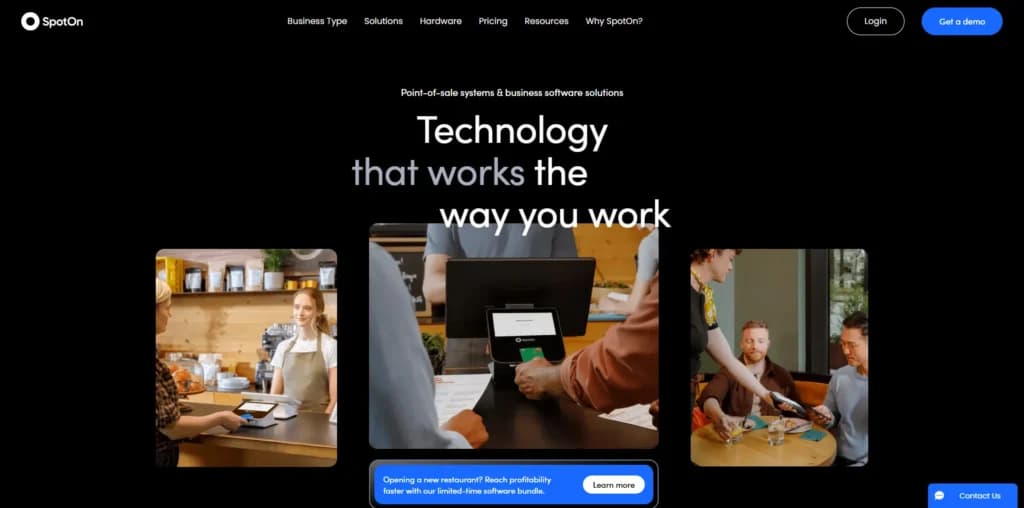
In my experience, SpotOn Restaurant delivers everything operators need to streamline operations and increase profits. Its intuitive cloud-based Point of Sale system is designed for speed and efficiency, making it easy for staff to navigate and use. Here are some of the features I'll tested out and will discuss:
Platform Features
- Email marketing
- Review management
- Loyalty programs
- Business analytics
- Access to financial capital for loans
Comprehensive Reporting
- Visual dashboards
- Detailed reporting on sales, labor costs, product mix, and more
SpotOn Teamwork
- Scheduling
- Tip distribution
- Payroll preparation
- Labor cost analysis
- Employee engagement
- Automated clock-in rules for compliance
SpotOn Order
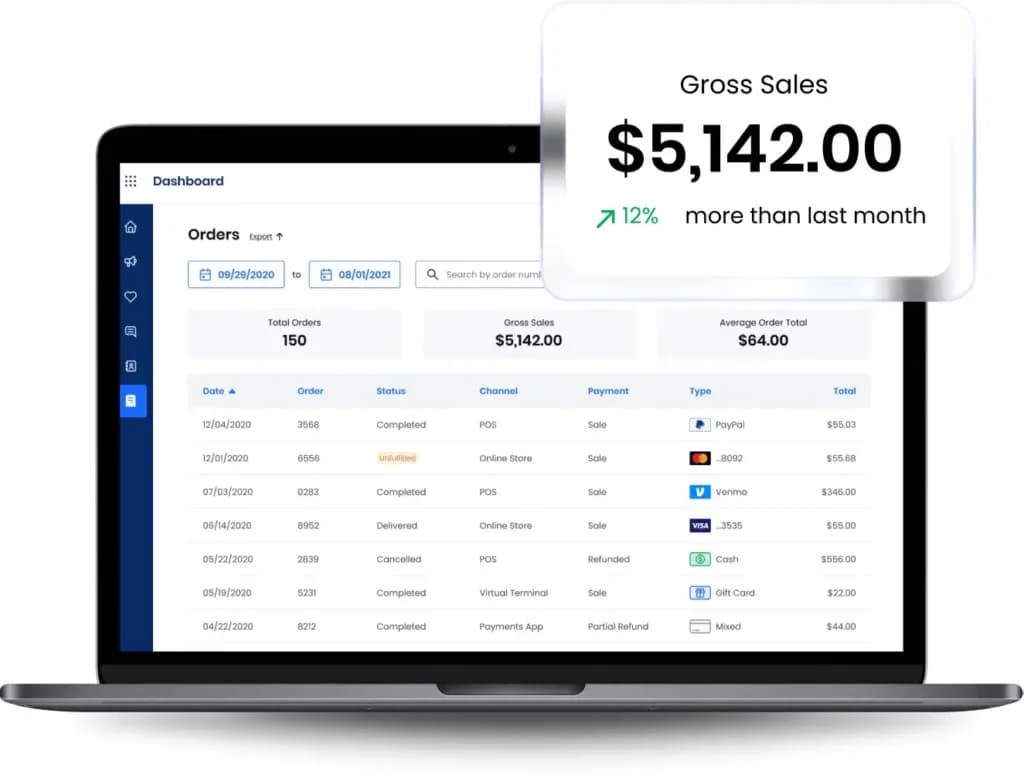
- Commission-free online ordering integrated with POS and loyalty programs
SpotOn Reserve
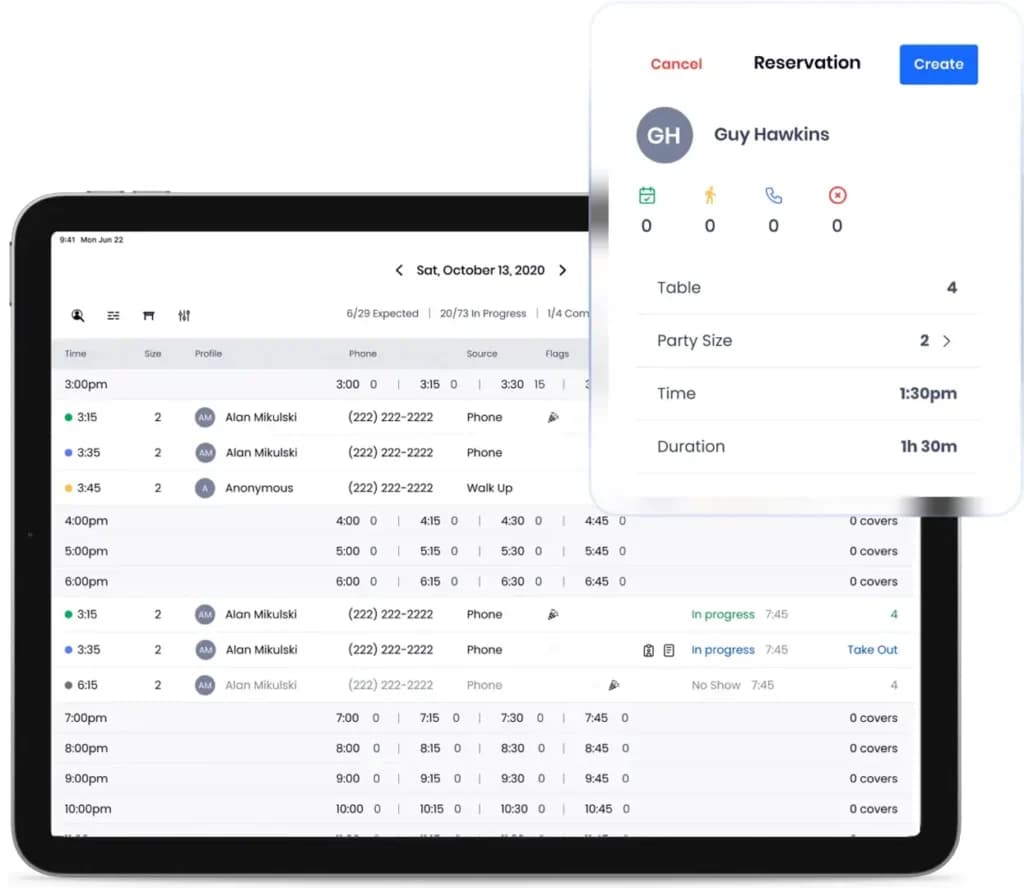
- Smart table management solution
- Turn-time recommendations based on workload
- Online waitlist management
- Two-way text communication with guests
- Pre-fixe dining options
- Guest data integration for marketing
Seat & Send
- Pre-order food or drinks fired immediately upon guest seating
- Pre-order food or drinks fired immediately upon guest seating
Customizable and Easy to Use
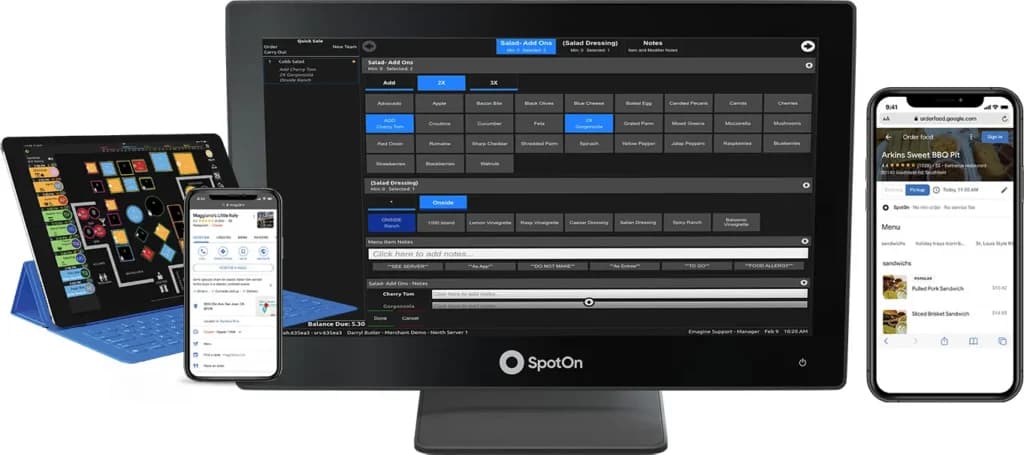
After testing SpotOn POS, I found its combination of flexibility and ease of use impressive. The system’s Point of Sale software offers highly customizable features, allowing businesses to tailor it to their specific needs. Despite its robust functionality, onboarding staff is simple, thanks to its intuitive design. SpotOn integrates proprietary hardware, including the 15.6” Station, 10” Counter, and 6.5” Handheld, which were developed with input from experienced restaurateurs. This hardware-software synergy ensures a seamless experience for both staff and guests.
Hardware: Includes the 15.6” Station, the 10” Counter, and the 6.5” Handheld, designed with input from highly-respected restaurant owners and operators in SpotOn’s Restaurant Advisory Council.
Platform Features
Marketing and CRM Tools
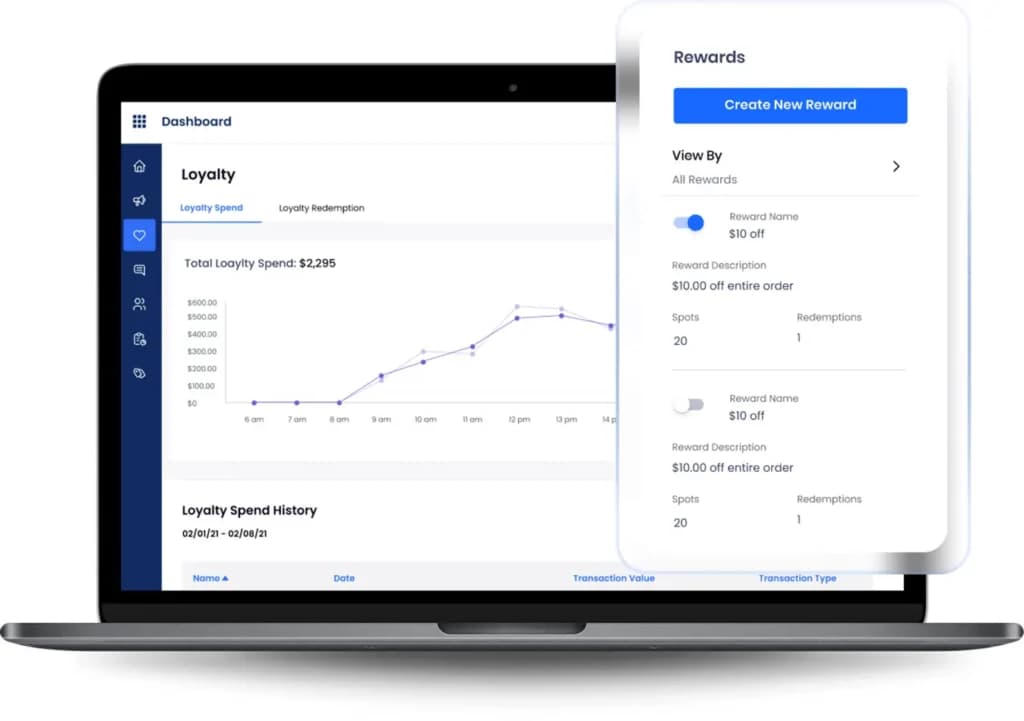
SpotOn POS offers a comprehensive suite of Customer Relationship Management (CRM) features that go far beyond basic Point of Sale software. With tools like email marketing, review management, and customizable loyalty programs, businesses can easily engage with their guests and build long-term relationships.
Email Marketing
The email marketing feature allows targeted campaigns to be sent directly to customers, keeping them informed about promotions, events, or personalized offers. The integrated review management tool helps businesses monitor and respond to feedback, fostering trust and improving their online reputation.
Loyalty Programs
Loyalty programs are fully customizable, making it easy to reward repeat customers and incentivize new ones. These programs can integrate seamlessly with the POS, automatically tracking customer spending and issuing rewards, which streamlines operations and improves retention.
SpotOn’s CRM tools are invaluable for businesses focused on improving customer engagement, increasing repeat visits, and driving higher sales. Proprietary terminals lock you to one vendor, while the best iPad POS systems run on tablets you can replace at any electronics store.
Access to Financial Capital
SpotOn includes a unique feature that allows businesses to apply for and manage loans directly through the platform. This can be a significant benefit for growing restaurants in need of financial capital to expand operations. Table management and coursing matter less if you sell products off a shelf, where the best retail POS systems put stock control first.
Comprehensive Reporting
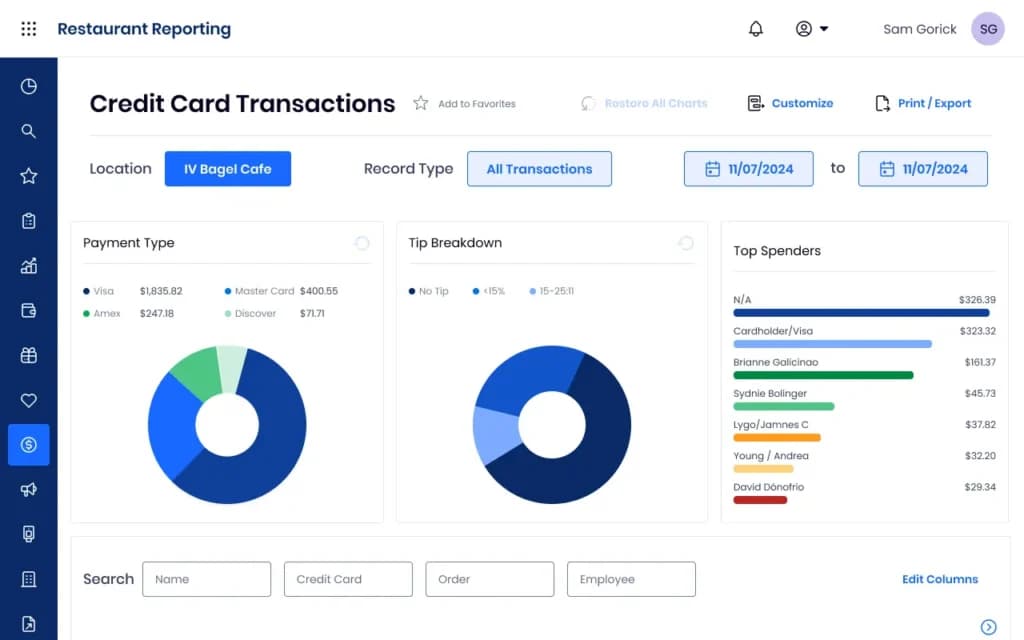
SpotOn POS excels in sales analytics and reporting. The visual dashboards deliver clear, actionable insights, while detailed reports cover key metrics like sales, labor costs, and product performance. These tools are invaluable for data-driven decision-making, helping restaurants optimize profitability and efficiency.
SpotOn Teamwork
Tip Management
The platform simplifies complex tip distribution with customizable solutions, saving hours of work while ensuring fairness for staff.
Compliance
SpotOn automates clock-in rules to help businesses stay compliant with labor laws, providing peace of mind in daily operations.
With scheduling, payroll preparation, and labor cost analysis, SpotOn Teamwork addresses labor market challenges effectively.

SpotOn Order
Integrated Online Ordering
SpotOn’s commission-free online ordering integrates seamlessly with its POS system and loyalty programs. Businesses can track and manage online orders directly from the POS while incentivizing guests to reorder through rewards. This feature is a powerful tool for businesses focused on selling online.
SpotOn Reserve
Smart Table Management
SpotOn Reserve is a comprehensive table management solution that helps businesses streamline operations and deliver exceptional guest experiences. The system uses turn-time recommendations to optimize table turnover while balancing server workloads, ensuring efficiency during peak hours. Its online waitlist management allows guests to join the queue remotely, reducing frustration and enhancing convenience.
One standout feature is the two-way text communication, which keeps guests informed about table readiness and lets them update preferences or arrival times. This fosters smoother communication and improves customer satisfaction.
SpotOn Reserve also integrates seamlessly with other platform features, such as loyalty programs and Customer Relationship Management (CRM) tools, enabling businesses to collect and utilize guest data for personalized marketing. For unique dining setups, like pre-fixe or special event meals, the system’s flexibility and efficiency shine, making it an essential tool for restaurants that prioritize tailored experiences and operational excellence.
Seat & Send
The Seat & Send feature revolutionizes restaurant efficiency by allowing guests to pre-order food or drinks, which are sent to the kitchen upon seating. By combining the capabilities of SpotOn Order and SpotOn Reserve, this tool accelerates service, improves guest satisfaction, and optimizes operations—ideal for high-volume restaurants aiming to elevate the dining experience.
SpotOn requires customers to use their easy-to-use touchscreen hardware.
SpotOn’s proprietary hardware is built for efficiency, reliability, and ease of use with multiple configurations. The three devices include the station, the counter, and the handheld device. There is an additional one-time cost for these devices, options vary and start at $799/Restaurant Station.
Hardware bundles, promotional rates and $0 upfront financing options are available. SpotOn also lets you augment your chosen package with software add-ons like web development, web hosting, online ordering, and appointment management all at an additional monthly cost.
SpotOn hardware includes a range of devices designed with insights from the SpotOn Restaurant Advisory Council, which features respected restaurant operators.
- 15.6” Station: Ideal for front-of-house operations, offering speed and reliability.
- 10” Counter: Compact and efficient for smaller spaces.
- 6.5” Handheld: Perfect for tableside ordering, enhancing speed and customer interaction.
These devices make SpotOn POS a Mobile POS solution that adapts to any restaurant’s needs, combining durability with cutting-edge design.
SpotOn allows you to use your own payment processing company, however, it will jack up the service cost. Meanwhile, SpotOn has one of the lowest commission rates, and if you choose to use the built-in payment processor, the POS charges two different rates depending on the payment type. On top of the monthly fees, businesses can expect to pay 1.99% + 25¢ for standard credit and debit card transactions and 2.99% + 25¢ for keyed-in, international and corporate transactions.
Features
- Retail Store
- Coffee Shop
- Quick Service
- Bars
- Restaurants
- Inventory Management
- Loyalty Program
- Mobile Compatibility
- Online Ordering
- Reporting
Verdict
In my experience, SpotOn POS is a fantastic option for both high-volume restaurants and small to mid-sized establishments. What truly sets it apart as a Point of Sale system is the extensive range of features it offers. From cloud-based POS software that supports seamless operations to tools like inventory tracking, sales analytics, and Customer Relationship Management (CRM), SpotOn is packed with capabilities designed to enhance retail management and efficiency.
I particularly appreciate its scalability, as it supports everything from selling online with integrated e-commerce solutions to multi-location management for expanding businesses. However, I’ve noticed that while SpotOn’s comprehensive feature set is impressive, many advanced tools come at an additional monthly cost. Despite this, the system’s versatility, reliability, and integrated payment solutions make it a strong investment for restaurants aiming to streamline operations and elevate guest experiences.
https://youtu.be/Fgd-w6P7Wmw
FAQ
Q: What is SpotOn POS?
A: SpotOn POS is a cloud-based point-of-sale system primarily focused on the restaurant and hospitality industry, though they also offer solutions for retail and field services. It bundles hardware (such as terminals and handheld devices - SpotOn Serve), software (including order taking, table management, online ordering, inventory management, and reporting), and integrated payment processing (SpotOn Payments) into a comprehensive platform.
Q: How much does SpotOn POS cost per month?
A: SpotOn uses quote-based pricing tailored to the business, often promoting bundled packages. While specific prices aren't always listed publicly, expect monthly software fees(potentially starting around $25-$150+ per station, depending on the software package), hardware costs(purchased upfront or leased), and mandatory payment processing fees through SpotOn Payments. Total costs vary widely based on needs and negotiated terms.
Q: What are the most common complaints about SpotOn POS?
A: Common complaints found online often relate to aggressive or misleading sales practices, long-term contracts(often 3 years) that are difficult and expensive to cancel, issues with customer support(responsiveness, effectiveness in resolving technical problems), software bugs or glitches, and feeling locked into SpotOn Payments with potentially uncompetitive rates over time.
Q: Do I have to use SpotOn Payments with SpotOn POS?
A: Yes, almost certainly. SpotOn operates on a fully integrated model, bundling its POS software and hardware with its mandatory in-house payment processing, SpotOn Payments. Using a separate, third-party merchant account provider is generally not an option with their system.
Q: Does SpotOn require long-term contracts? Can I cancel easily?
A: Yes, SpotOn typically requires customers to sign long-term contracts, often for 3 years, covering software, hardware (if leased), and payment processing. These contracts usually include significant Early Termination Fees (ETFs), frequently requiring payment of the full remaining contract value, making cancellation very costly.
Q: Does SpotOn POS work offline if the internet connection goes down?
A: Yes, SpotOn POS systems generally include an offline mode. This allows the terminals to continue ringing up sales and securely queueing credit card transactions if the internet connection fails. Orders are stored locally and synced back to the cloud, with payments processed, once connectivity is restored.
Q: What kind of hardware does SpotOn use? Is it proprietary?
A: SpotOn offers a range of proprietary and third-party hardware options. They have their own branded terminals (like the SpotOn Register) and handhelds (SpotOn Serve), often running on Android. They also support certain compatible third-party devices and peripherals (printers, scanners, etc.). However, the hardware is typically provided as part of a bundle tied to their software and payment processing agreement.
Q: How is SpotOn's customer support?
A: Reviews on customer support are mixed. SpotOn promotes 24/7 support. Some users report positive experiences with responsive help, especially during initial setup. However, many complaints involve long wait times, difficulty reaching support staff capable of resolving complex technical issues, unresolved tickets, poor communication regarding software updates or bugs, and challenges with billing or contract support.
Q: How does SpotOn POS compare to Toast for restaurants?
A: Both SpotOn and Toast are major players targeting the restaurant industry with comprehensive, integrated POS solutions (hardware, software, payments) and often require long-term contracts. Toast uses proprietary Android hardware and is known for deep restaurant features but faces heavy criticism for its contracts and support. SpotOn offers a similar feature set, potentially with more hardware flexibility in some cases (though often bundled), but also receives frequent complaints regarding contracts, sales tactics, and support consistency. Feature-wise, they compete closely, making the sales experience, specific module needs, and contract terms key differentiators.
Q: Are there hidden fees with SpotOn POS?
A: While SpotOn aims for bundled solutions, users should be vigilant about potential extra costs. Besides the core software and processing rates, look out for fees related to hardware leases vs. purchase, charges for add-on software modules(advanced reporting, marketing, loyalty), PCI compliance fees, potential premium support charges, and especially the substantial Early Termination Fees. Always get a detailed, itemized quote and meticulously review the contract and merchant agreement.
SpotOn POS distinguishes itself through its comprehensive suite of features tailored to diverse business needs. Its cloud-based infrastructure ensures real-time data access and seamless multi-location management, enabling businesses to oversee operations across various sites efficiently. The system's e-commerce integration facilitates effortless selling online, unifying in-store and digital sales channels.
Additionally, SpotOn's mobile POS capabilities provide flexibility in payment processing, enhancing customer service. The inclusion of integrated payment solutions supports various payment methods, including contactless options, ensuring a smooth checkout experience.
Furthermore, SpotOn offers robust customer relationship management (CRM) tools, empowering businesses to build and maintain strong customer relationships through targeted marketing and loyalty programs. This combination of versatility, scalability, and user-friendly design makes SpotOn POS a unique and valuable asset for businesses seeking a comprehensive point of sale system. Restaurant-first design shapes everything here, so retail and service operators should compare the best POS for small businesses before signing a hardware agreement.
Users Reviews
Be the first to write a review
Share your experience with SpotOn and help others choose the right software.