
Best AI App Builders 2026
Last updated: September 2026

Free plan available
 No Code
 AI Powered
 Prompt to Site
- Automatically sets up the backend for you
- Build with words. No coding needed
- Launch your apps directly to App Store

- Transform your ideas into functional apps & sites
- Design & deploy intelligent agents
- Build powerful scalable integrations

Free plan available
- Describe what you want in plain language
- Refine your design and deploy
- Lovable handles your end-to-end infrastructure

- AI-powered functionality for commerce
- Pick from 100s of feature-packed templates
- Build effortlessly with drag and drop

30-Days Free Trial
- Easy drag & drop WordPress builder
- Get started with over 300 templates
- 24/7 builder support

Free plan available
Prompt to Site Drag & Drop
- Choose from 800+ designer made templates
- 1000+ innovative small business features
- Enterprise level security

Free plan available
Free plan available
- Generate, deploy & scale with ease
- Automate actions in just a few clicks
- Make your own database with smart suggestions
* Featured prices and terms can be updated. Free offers may include additional terms.
Our Top Choice
Free plan available
No CodeAI PoweredPrompt to Site- Automatically sets up the backend for you
- Build with words. No coding needed
- Launch your apps directly to App Store
Ship Faster, Scale Smarter

3-Days Free Trial
- Used by millions of businesses across the globe
- Fully customizable, user-friendly interface
- Seamless integrations to boost your business
Build smarter with the best AI app builders
App development no longer requires a dev team, weeks of coding, or a massive budget. Today’s best no code app builder platforms flip the script. These tools use AI app builder technology to help you launch powerful business apps—fast, and without writing a line of code.
Tools like Base44 let you create full apps just by describing what you need. From CRMs to dashboards and internal tools, it’s all possible with a simple prompt. You can even get started for free and scale as you grow.
- Automatically sets up the backend for you
- Build with words. No coding needed
What is an AI app builder?
An AI app builder is a tool that turns your ideas into working software—without the code. Just describe what you want to build, and the platform generates a fully functional app using artificial intelligence.
Most AI app builders run on no-code platforms, so you can skip the tech jargon and jump straight to results. Want a custom CRM? A dashboard? A client portal? These tools handle the layout, data logic, and user interface behind the scenes, so you can focus on what matters—your business.
Some platforms also support vibe coding. It's a more innovative, more intuitive way to build apps by typing what you want in plain English. The system interprets your request and structures the app for you.
Why use an AI app builder or no code app builder?
The rise of the AI app builder has made it easier than ever to launch powerful digital products—without writing a single line of code. Whether you're looking for the best no code app builder to create internal tools, or exploring an AI app creator that understands plain English prompts, these platforms give you full control without technical complexity.
Modern no code app builder platforms pair AI with intuitive interfaces. Some even support vibe coding, a new way to build apps by simply describing what you want in natural language. Instead of wrestling with code, you can launch CRMs, dashboards, booking systems, or MVPs in hours-not weeks.
If you want to build smarter and move faster, choosing the right AI app builder is the key to scaling your ideas efficiently.
Top use cases for small businesses
AI app creators aren’t just for tech startups. They’re built to solve real problems for small businesses—fast. Whether you're managing customer data or building internal tools, these platforms make it easier to get things done.
Here’s what you can build:
- A custom CRM to track leads and automate client follow-ups
- A dashboard to monitor KPIs, team activity, or sales performance
- Booking and scheduling tools for service-based businesses
- Expense trackers to keep tabs on spending and subscriptions
- Internal apps for managing HR, inventory, or logistics
- Gamified experiences using a built-in game generator
- An MVP to validate your product idea without hiring developers
- Quick prototypes to share and test with your team or investors
Platforms like Base44 let you build all of the above—and more—without writing a single line of code.
- Automatically sets up the backend for you
- Build with words. No coding needed
How AI app development works
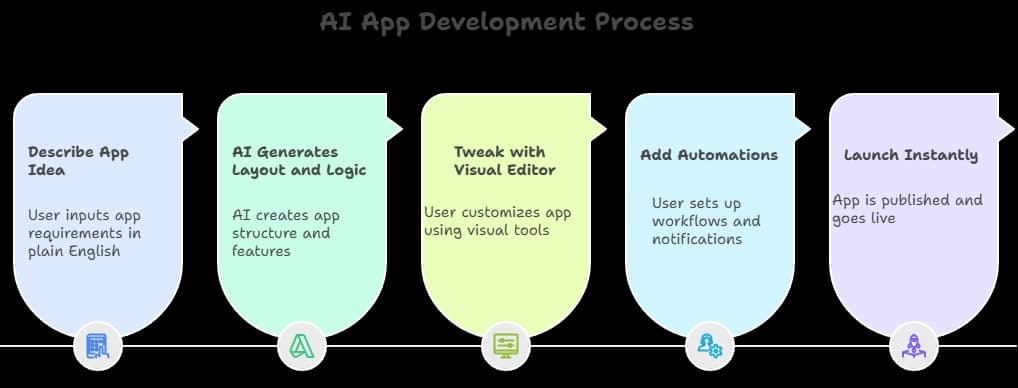
Building an app used to take months. Now it takes minutes. AI app builders flip the script with tools that do the heavy lifting—no dev team required.
Here’s what the process looks like:
- Describe your app idea
Type what you want in plain English. Think: “I need a CRM to track clients and send automated reminders.” - AI generates the layout and logic
The builder takes your input and sets up the pages, features, and user flows. - Tweak it with a visual editor
Drag, drop, and customize. Change layouts, update content, or add more functionality—no coding needed. - Add automations
Set up workflows, user roles, notifications, and more using built-in automation tools. - Launch instantly
Most platforms include hosting, so when it’s ready, hit publish and go live.
How to choose the right AI app builder for your needs
Not every AI builder works the same way. Some are better for internal tools. Others shine when you’re launching customer-facing apps. Here’s what to keep in mind:
- Ease of use -If you're not technical, stick with a no-code platform. A clean, drag-and-drop editor is a must.
- AI capabilities -Some builders offer natural language input, others support vibe coding—where you type what you need and the builder does the rest.
- Templates and built-in features -Need a CRM? A dashboard? A game generator? Look for pre-built templates and tools aligned with your use case.
- Pricing flexibility -Want to build an app for free? Many platforms offer free credits or usage-based tiers to start small.
- Fit for your goal -Whether you're prototyping, launching an MVP, or scaling a live product, make sure the platform is built for your stage.
Final thoughts: Launch today with an AI app builder
If you're ready to build an app but not ready to hire a dev team, AI app builders are your shortcut. These tools make it easy to launch custom apps—from CRMs to booking tools—without code or complexity.
Platforms like Base44 are leading the way, letting you create apps using just a prompt. Whether you’re testing an idea, automating internal workflows, or building something brand new, the best no-code platforms help you launch fast and grow with confidence.
Frequently asked questions
Q. What is the difference between no-code and low-code?
A. No code means zero programming—think drag‑and‑drop and natural language. Low code still uses visual tools but lets you add light code when you need more flexibility. It’s great for teams with some tech skills who want more control.
Q. Are no-code platforms secure for business use?
A. Yes. Most modern builders include authentication, role access, encrypted data, and regular security updates. They manage the technical side so you don’t have to.
Q. Do no-code tools really save time and money?
A. Absolutely. They can cut development time by up to 90 percent and save your business a ton in dev costs. You can get live faster and without the expense of hiring developers.
Q. When should I choose traditional development over no-code or low-code?
A. Go custom only if your app needs deep integrations, unique logic, or compliance that off‑the‑shelf platforms can’t handle. It’s costlier and slower, but gives you total control.
Q. How scalable are no-code tools as my business grows?
A. They’re surprisingly scalable. Platforms often support thousands of users, role management, APIs, and advanced automation—enough for most growing small businesses.
Q. Is it possible to build an app for free using no code?
A. Definitely. Many tools offer free tiers or credits to get you started—so you can build your first app without spending a dime.
- Automatically sets up the backend for you
- Build with words. No coding needed