
Last updated: October 2026
Wix is a versatile website builder that empowers users to create stunning, professional websites without requiring advanced technical skills. Known for its intuitive drag-and-drop editor, Wix offers hundreds of customizable templates, robust e-commerce capabilities, and built-in SEO tools to optimize site performance. Whether you're a small business owner, blogger, or creative professional, Wix provides an all-in-one solution to design, manage, and grow your online presence. With features like mobile optimization, app integrations, and reliable hosting, Wix ensures your website is both functional and visually impressive, making it a top choice for users of all experience levels.
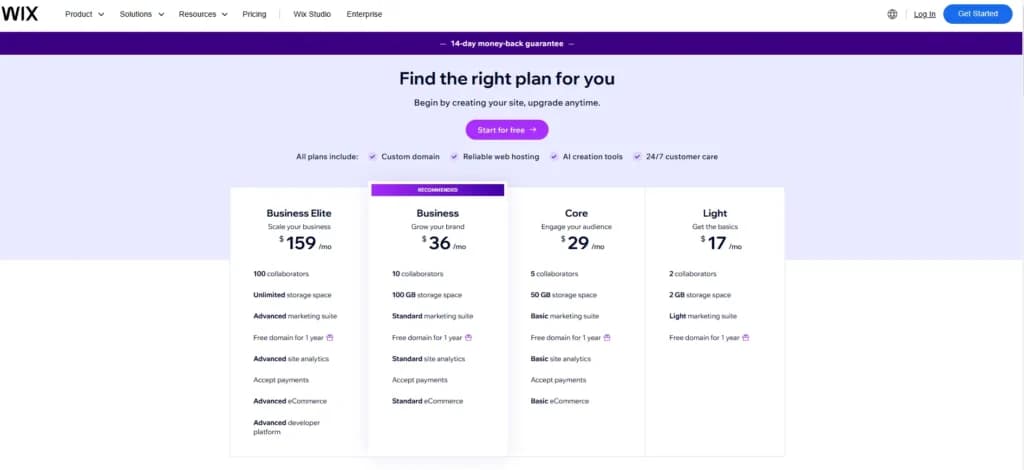
Wix E-commerce Plans & Pricing
- Reliable web hosting
- Intuitive drag and drop editor
- No-code design features
- +1000 of templates
- 2 GB storage space
- Free domain for 1 year
- 5 collaborators
- 50 GB storage space
- Basic marketing suite
- Free domain for 1 year
- Accept payments
- Basic eCommerce
- 10 collaborators
- 100 GB storage space
- Standard marketing suite
- Free domain for 1 year
- Standard site analytics
- Accept payments
- Standard eCommerce
- 15 collaborators
- Unlimited storage space
- Advanced marketing suite
- Free domain for 1 year
- Advanced site analytics
- Accept payments
- Advanced developer platform
* Featured prices can be updated and free offers may include additional terms.
Wix pricing currently ranges from a free tier to $159 per month for standard business use, with the most popular entry-point for entrepreneurs being the Core plan at $29 per month
- Best Value for SMBs: The Core Plan ($29/mo)is the recommended starting point for most small businesses because it unlocks essential payment and booking features.
- Hidden Costs: Budget an extra $15–$25/year for domain renewals after the first year and $6/mo per user for professional Google Workspace email.
- Billing Strategy: Annual billing saves businesses between 18% and 41%compared to monthly payments.
- Scalability: High-volume retailers should look toward the Business Elite ($159/mo) or Wix Studio for advanced developer tools and unlimited storage.
Is Wix free to use?
Yes, Wix is 100% free to use, and you can build, publish, and host a fully functioning website without ever entering credit card information.
Wix is free to use and not free to launch. The free plan carries Wix branding and will not take a custom domain, so the first real cost arrives the moment you want your own address. If budget is the binding constraint rather than features, the cheapest website builders comparison prices the entry tiers against each other, including what each one takes away at the bottom.
What is Included in the Free Plan?
- Wix Editor & Templates: Access to the full drag-and-drop editor and over 800+ designer-made templates.
- Wix Hosting: Free web hosting on Wix's servers.
- SEO Basics: Ability to customize page titles, meta descriptions, and alt text to help your site appear in search results.
- Wix App Market: Access to hundreds of free apps to add functionality like contact forms or social media feeds.
Best For: Testing and Students
It is ideal for individuals or micro businesses who want to test the platform's interface or business ideas without financial commitment. It is also suitable for students or hobbyists building personal projects where professional branding is not critical.
The Limitations (The "Catch")
If you choose to stay on the free plan, you must accept the following trade-offs:
- Wix Branding: A visible Wix advertisement banner will appear at the top of every page.
- No Custom Domain: Your URL will be a subdomain (e.g., username.wixsite.com/sitename) rather than a professional address like yourbusiness.com.
- Limited Resources: You are capped at 500MB of storage and 500MB of bandwidth, which can lead to slow load times if your site has many images or high traffic.
- No Online Payments: You cannot accept credit cards or run an e-commerce store on the free tier.
- No Google Analytics: You cannot connect professional tracking tools to see detailed visitor data.
The Light Plan (Personal & Branding)
Best For: Portfolios, Resumes, and Blogs
This plan is best for professionals and digital creators who need to showcase work or establish an online identity but do not need to sell products. It provides the necessary credibility of a custom domain without the cost of sales tools.
The Core Plan (Entry-Level Ecommerce)
Ecommerce Enabled: Accept online payments and sell products
Best For: Small Online Stores and Service Providers
It strikes the best balance of value for new merchants. It is ideal for small businesses that need to accept payments (e.g., consultants, small shops) but do not yet have the high traffic to justify the higher tiers.
The Business Plan (Scaling Growth)
Advanced Ecommerce: Supports multiple currencies and automated sales tax calculation (up to 100 transactions/month)
Best For: Mid-Sized Brands Scaling Up
This plan is designed for established businesses that need to automate operations, such as tax calculations and shipping, to handle growing sales volume. It allows for international expansion through multi-currency support.
The Business Elite Plan (High-Volume)
Advanced data analytics, loyalty programs, and automated sales tax for up to 500 transactions/month
Best For: High-Traffic Retailers and Large Teams
This tier is for businesses generating significant revenue where "unlimited" resources and immediate support are critical to operations. It is best for global consumer brands that cannot afford downtime or storage caps
Wix Studio Plans (For Agencies & Developers)
For users who need advanced design control, Wix offers "Studio" plans which differ slightly from the "Classic" plans listed above.
Best For: Web designers and agencies managing multiple client sites who need a more robust CMS and developer tools
Important: Hidden Costs & Extra Fees
When budgeting for Wix, you must consider costs beyond the monthly subscription:
- Domain Renewal: While free for the first year, a custom domain (e.g., .com) costs approximately $14.95/year or more upon renewal.
- Transaction Fees: Wix Payments typically charges 2.9% + $0.30 per transaction for US-based sales.
- Premium Apps: Many features (like advanced dropshipping or accounting integrations) require third-party apps, which can cost from $2.50 to nearly $500 per month.
- Email: Professional email (e.g., Google Workspace) is not included and costs roughly $6/month per user.
- POS Hardware: If selling in person, Wix POS hardware packages cost around $1,495.
Final Recommendation
For most small businesses starting out, the Core Plan ($29/month) is the recommended entry point. It provides all essential selling features without the high cost of the upper tiers. You can always upgrade to the Business plan later as your storage needs or transaction volumes increase.
Wix Expert Review Score
Pros
- Wix-powered websites are fast
- Has intuitive drag-and-drop design features
- Digital marketing integrations are super easy
- Massive reservoir of support materials
Cons
- One paid plan (except Enterprise) for only one site.
- Wix branding on Free plan
- Cannot use a custom domain on Free plan
Wix E-commerce Customer Support
Without a doubt, Wix excels in its customer service, making it clear that they prioritize user satisfaction. From the very beginning, I found the platform easy to navigate, thanks to the abundance of helpful support materials readily available at every step. Personally, I’ve been impressed by how above-average their customer service is across all available channels. Here’s a closer look at my experience with Wix’s support options and how they’ve consistently ensured my journey with the platform has been smooth and hassle-free.
FAQs
Wix webpages are populated with relevant FAQs. I find this section of the webpage very essential for new users to understand what the company is offering through its Website Builders. It provided vital information that helped me build my expectations of the product. The answer to each question was straight to the point and easy to follow.
Wix Learn
Wix also provides online courses and classes for all categories of users. Wix Learn is built to help users learn all they can about running a successful online business. It’s really impressive, if I may add, because it reveals the company’s intention to help online businesses succeed.
Wix Partner Community
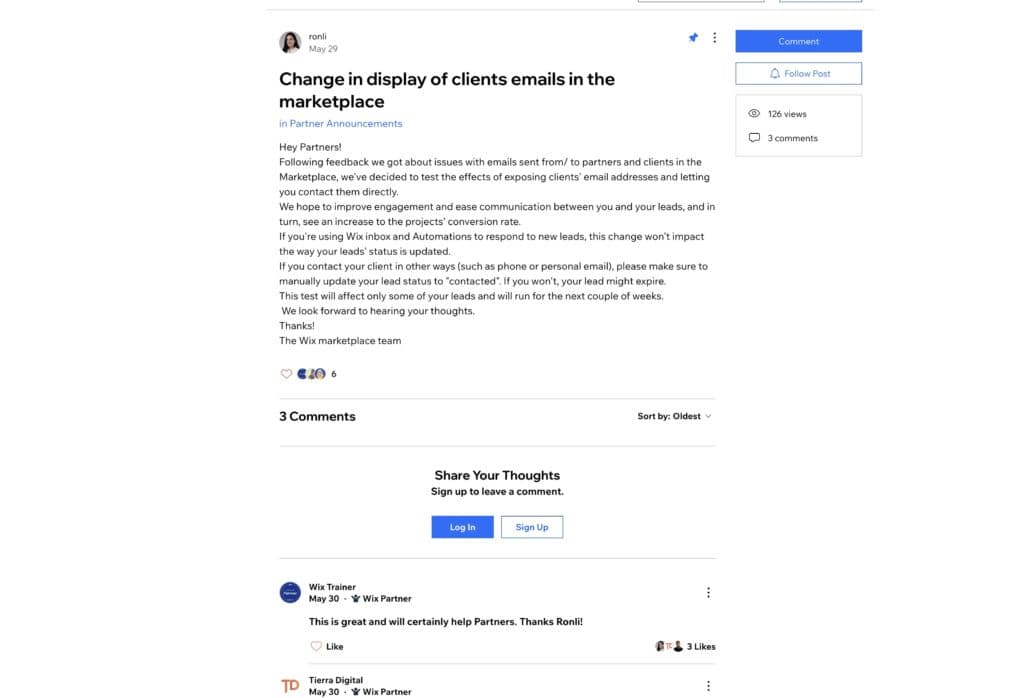
Although the platform was built to help business owners with little technical background, Wix’s over 200 million users include developers, marketers, designers, and certified experts. The company has a partners’ community forum where users can share their challenges and receive insightful suggestions and workarounds from fellow users and experts. Browsing through the questions asked on the community forum, I realized that any issue raised by a user is resolved within 24 hours. The screenshot below is an example of a user-generated challenge that was resolved within 24 hours.
Phone Support
Phone support is also available for Enterprise users and prospects. However, you have to request a call back from the experts. That doesn’t take long. Whenever I request a call-back, a Wix expert gets gives me a phone call in less than 5 minutes.
Setup Guides
One thing that makes Wix Website Builder a standout product is the massive library of interactive guides that anyone can follow to build a spectacular website. It doesn’t really matter whether you are new to web design, the guides explain every step in the simplest way possible.
Blog
Wix has a culture of information sharing. So, several certified experts contribute to its blog. Each expert shares new, innovative ways to use the products and position your online business for success. The information in the Wix Blog is always updated. With the various expert contributors sharing their knowledge, the Blog receives 10-15 posts every month. Yes, that’s a lot of helpful information and the search bar is right there to help you find whatever you are looking for.
Phone Support
Allows phone call booking at any time.
Shoot an email using Wix contact form and get a response ASAP.
24/7 Help & Support
Offers 24/7 support via email and chat.
FAQ
Easily accessible FAQ library.
Blog
Wix has an up-to-date blog
Video Tutorials
Video tutorials available on Wix Support.
How easy to u
Setup
One of the standout quality of the Wix website builder is its intuitive and easy-to-use interface. From setup to launch, every aspect of building a website is as simple as it can be. From personal experience, the setup is a 4-step process. All you have to do is answer 4 questions to help set up the right dashboard for you and preinstall the apps that your website will need to perform at its best.
Designing
Once you are all set up, you can jump straight to designing your website. You can pick any one of the 800 free customizable templates provided by Wix or simply build from scratch. For ease, it’s often best to pick a template and make it your own by designing the elements the way you want them.
Text styling
Text styling is important to every brand. Apple uses the SF Pro font style for its products (Mac, iPhone, iPad, etc) while Google uses the Sans Serif font. Wix understands how important this is to your website, so its Wix website builder was designed to keep various text styling functions within reach. Styling a text on Wix is similar to using a word processor (like MS Word and Google Docs). They use the same shortcut keys for bolding and italicizing texts.
Form customization
Forms are an important part of web pages. Businesses need them to collect leads and vital customer data. The Wix website builder has ready-to-use forms that you can customize to fit your website style and business needs. Using the Website Editor, you can simply click the “Add Section” icon on the left corner of your screen. The “Form” category is right beneath. It features a variety of customizable forms.
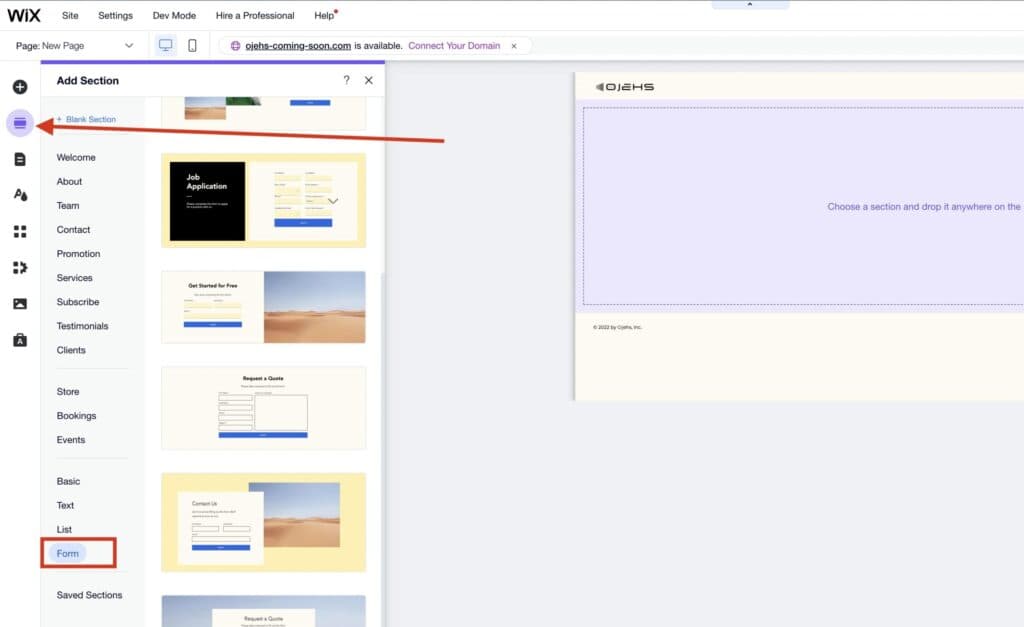
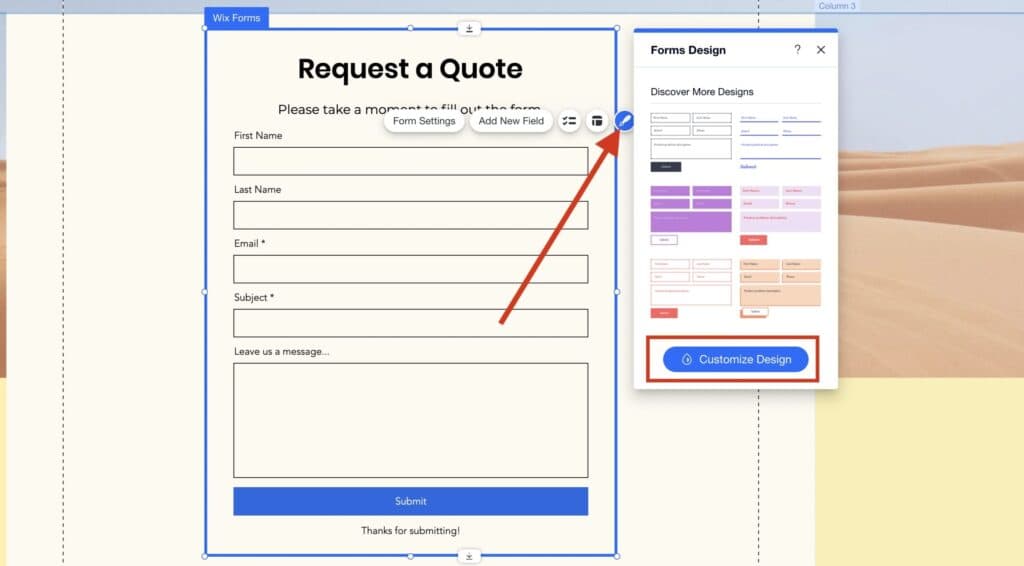
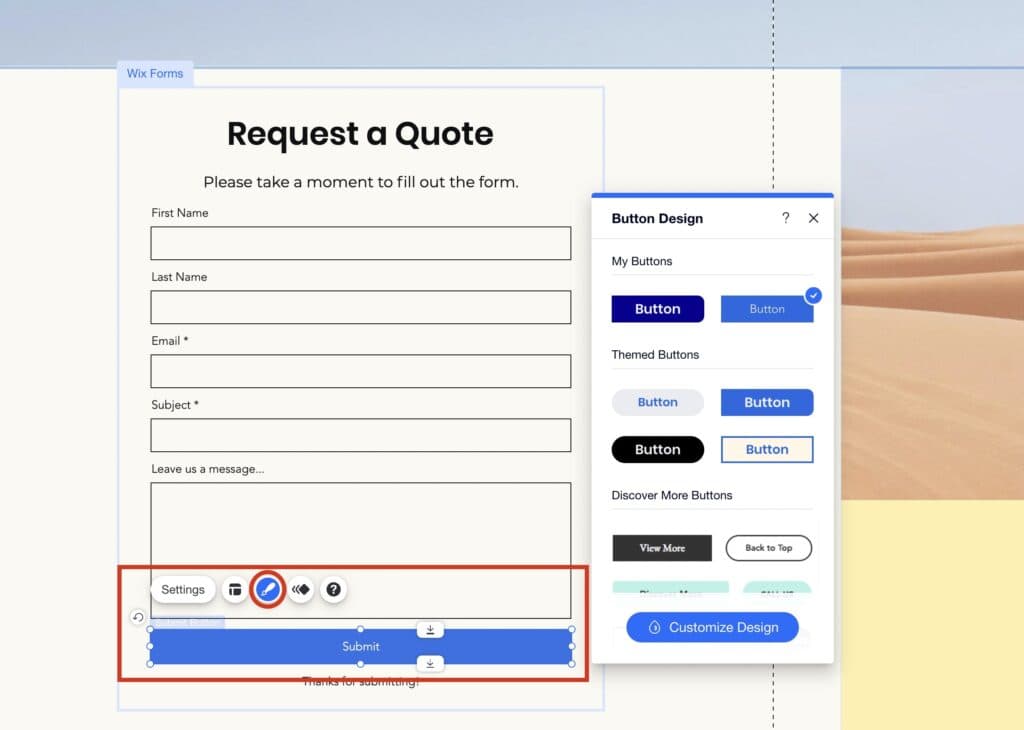
From the list, you can drag and drop one of the forms into your website. Then, click the “brush” icon and customize your design just how you want it. The process is pretty much straightforward and intuitive. You can also change the settings of your form right on the Editor. That way, you’ll configure how the form interacts with your users and conveys information to you, the website administrator.
Button design
Buttons are part of forms. They also appear on almost every part of a web page. They are the actions that customers take, one of the few ways that they actually interact with your website. Therefore, they have to be designed to match your brand identity and inspire actions at the same time. Customizing buttons normally will require you to know the fundamentals of HTML and CSS. However, with the Wix Website Editor, you just need to pick from various button formats, combine a few elements (text style, color, border and corner styles), and make your own unique button style.
Performance
Site & Page Speed
Fast-loading websites have higher conversion and lower bounce rates. According to a 2019 study, the first 5 seconds of your website’s load time has the highest impact on conversion rate. However, the faster the better. The same study showed that a website with a 1-second page load speed will gain 3x more conversion than one with a 5-second load speed.
Interestingly, a majority of Wix websites have a decent page load time below 5 seconds. This is because the Wix website builder has built-in tools to optimize the elements of websites, making them lightweight. Also, Wix has a global content distribution network (CDN) that facilitates quick delivery of website content to users regardless of the user’s location of access.
Here’s the speed test result of my Wix-powered website that scored 3.09 seconds on the page speed index, with the largest content on the website taking 4.3 seconds to load completely.
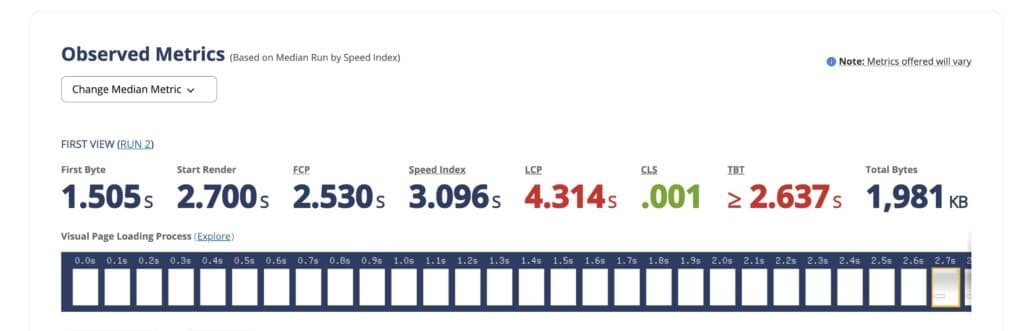
A good page load speed is crucial to your website’s performance. According to the Search Engine Journal, page speed plays a vital role in a website’s search engine ranking. Experts equally believe that faster load speed is key for an outstanding user experience. However, a website performance index is an important metric to track since a high-performance score puts you within the good grace of search engines.
Websites built with the Wix website builder have a decent performance score on a large scale. The performance score of my Wix-powered website hovers around 56, which is about average.
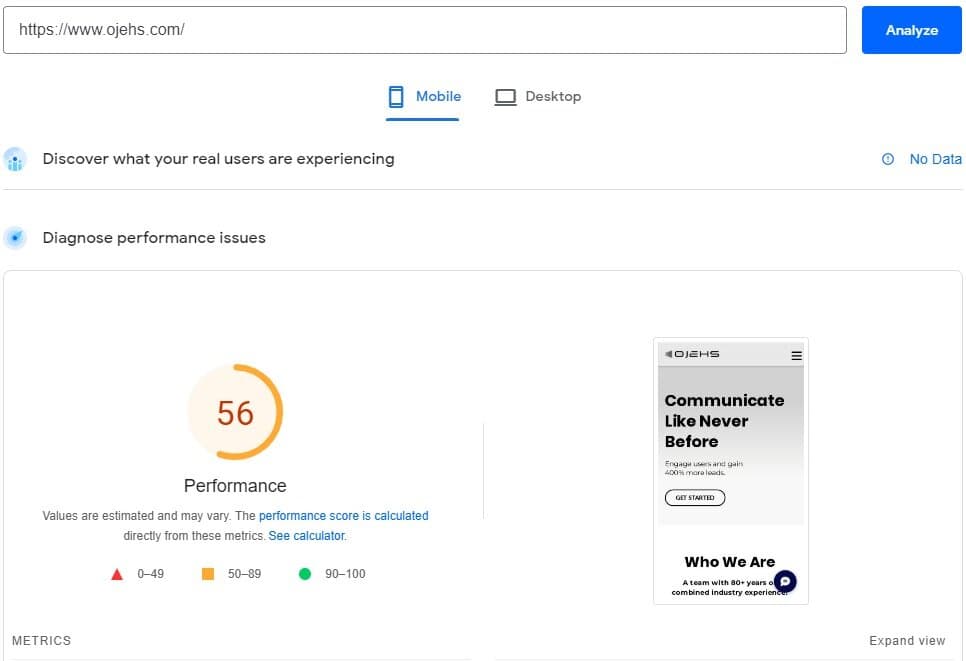
While Wix has built-in tools to optimize websites, as the website administrator, I’m tasked to take measures to improve my performance score. As a part of their support efforts, Wix has provided a checklist to help me figure out where (and how) to make these improvements.
Uptime
Using the Wix website builder guarantees users up to 99.98% uptime. This means that Wix servers are up and running almost all the time and your websites will be accessible to visitors 99.98% of the time. With a 0.02% downtime, I’ve never had a first-hand experience of my website being down and inaccessible to visitors.
Features & Functionality
Using the Wix Website Builder brings everything you need to run a successful online business in one place. Unlike several other website builders, Wix allows you to store customer contact details, run your email campaigns, sync social media campaigns, SEO, and manage your Google Business profile in real-time. This eliminates the need to hop between apps to track data.
Among these interesting features, Wix stands out because of its Site Speed tracker and Automation features.
Offline Designing
When working with some other website builders, fluctuating internet connections can pose frustrating challenges to your productivity. You are probably familiar with an error that reads somewhat in the line of“You’re offline. Connect to the internet to continue working.”For designers, this is a nightmare. With Wix, it doesn’t have to be.
You can continue working on your website even when your internet connection is cut off momentarily. However, you won’t be able to publish or save your changes until you are back online.
You might worry about what would happen to your changes if your computer shut down unexpectedly. The truth is that nothing bad will happen. When working offline, the Wix website builder saves your changes locally as caches. So, as long as you continue working with the same device, your changes are safe. The best thing to do, nevertheless, is to connect to the internet and save your changes as soon as possible.
Mobile Responsiveness
Users can install the Wix Owner app locally on their Android and iOS phones. Although a desktop is required for building or designing your website, the mobile app allows users to monitor everything about their online business on the go. The app’s push notification informs you as things happen on your site including new page visits, orders, messages, and several other interactions between your website and visitors.
Here’s what the mobile notification looks like when I get a website visit.

Process Automation
Wix website builder lets you save more than 30% of your time by automating mundane and repetitive tasks like sending “thank you” emails after order, and timely invoice and payment reminders to customers. There are dozens of prebuilt automation on Wix that would fit into your business processes like lock and key, but you can build your own automation from scratch if you prefer to do that.
Workflow and task management
Business operation is Herculean without an effective workflow process. Some business owners use workflow management software, like Trello and Asana, to stay on top of business activities. This requires them to manually create tasks as cards (on Trello, for instance) and move these cards between columns as the tasks move through a predefined workflow process. Wix provides an in-built workflow and task management tool. When properly configured, you don’t need to create tasks manually. Tasks can be automatically created when a customer moves through the sales funnel either by ordering a product or booking your service. An efficient workflow system on Wix will let you keep track of all the stages for completing an order without missing a beat. With the Wix website builder, you can choose from several categories of customizable workflow templates or build one from scratch. Customizing a workflow template is intuitive. Wix’s signature drag-and-drop functionality makes it easier than unwrapping a lollipop.
Using the Wix Website Builder brings everything you need to run a successful online business in one place. Unlike several other website builders, Wix allows you to store customer contact details, run your email campaigns, sync social media campaigns, SEO, and manage your Google Business profile in real-time. This eliminates the need to hop between apps to track data.
Among these interesting features, Wix stands out because of its Site Speed tracker and Automation features.
Wix SEO Performance
Many websites are powered a CRMs which require users to install third-party SEO applications, like Yoast SEO. This attracts extra expense since Yoast encourages users to opt for its premium package. The Wix website builder comes with a free SEO tool characterized by an actionable checklist of SEO best practices to help position your websites within the good graces of search engines.
Wix Analytics and Reporting capabilities
As a vital part of its website builder, Wix offers a full suite of business and website analytics tools to track everything happening on your website. These tools actively collect activity data to track website traffic, sales, site uptime, security threats, individual page speed, and visitors’ behaviors.
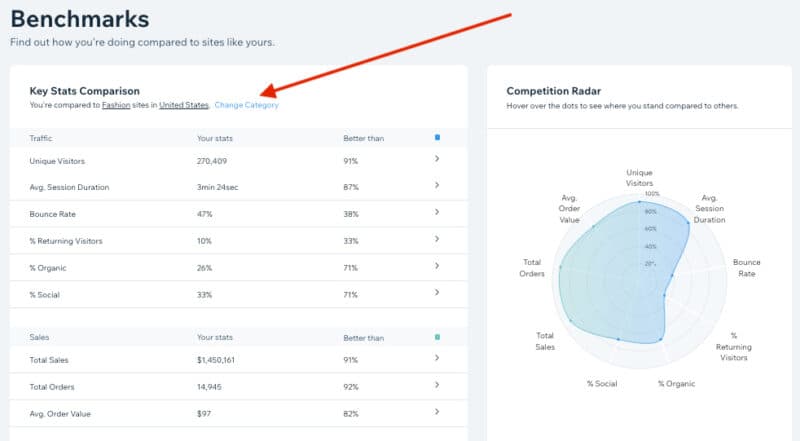
With all the data collected, you can also generate analytics reports in a few clicks, and gain insight into your customers and how your business is meeting their needs. The analytics tools also provide various industry benchmarks, generated from its more than 3.3 million websites. You can easily compare your website performance against these benchmarks to find improvement opportunities.
Here’s what a typical website benchmark report on Wix looks like.
Wix and Apps integration
Building a business on Wix isn't just about making a pretty website—it’s about hooking up the actual engine that runs your daily sales, marketing, and operations.
Getting Found on Google (Without Hiring a Tech Guy)
When you build a site, your main job is making sure local and online customers can actually find it. Wix connects directly to Google Search Console, Google Analytics, and Google Business Profile with a single click. You don't need to touch code or mess around with website headers.
You get listed on Google Maps, see who is visiting your site, and know which pages make you money. On top of that, Wix brings keyword data from Semrush straight into your page builder. That means while you write about your business, the editor shows you the exact phrases people are searching for so you can rank higher naturally.
Taking Payments and Automating Your Bookkeeping
To run a business, taking payments easily is mandatory. Wix hooks right into Wix Payments, Stripe, and PayPal so you can take credit cards online, invoice clients, or accept payments in person.
The real magic happens when you connect QuickBooks or Wave. Every time someone pays an invoice or buys a product on your site, that transaction data flows straight into your accounting software. You don't have to spend your Sunday night manually typing receipts into a spreadsheet or trying to figure out where your profit went.
Selling Physical Merch Without Holding Any Inventory
If you want to sell products like clothing, books, or custom goods, you don't need a warehouse or boxes cluttering your garage. By integrating Printful, Printify, or Syncee, you can run a full e-commerce shop on autopilot.
When a customer orders a custom t-shirt or product on your Wix store, the order is sent automatically to the supplier. They print it, pack it, and ship it directly to your customer with your branding on it. The customer gets an automatic tracking number, and you pocket the profit without ever touching the box.
Turning Website Visitors into Repeat Customers
Most people who visit your site won't buy on day one. To catch those lost sales, Wix links directly with marketing platforms like Mailchimp, HubSpot, and Zapier.
If someone starts filling out a form or leaves an item in their shopping cart, your system automatically triggers a polite follow-up email or a discount code a few hours later. If a high-value lead submits a inquiry, Zapier can instantly send a text to your phone or a notification to your team's Slack channel so you can call them back while they are still interested.
Answering Customer Questions and Building Instant Trust
People buy from businesses they trust and can talk to quickly. Adding Wix Chat or a WhatsApp button puts a direct line to your phone right on your site. If a potential client has a quick question before booking your service, they can message you on the spot.
Once the sale is done, tools like Trustpilot or Fera take over. They automatically email your buyer asking for a quick review. When the customer leaves a rating, it updates dynamically on your homepage. New visitors see real social proof, which makes them feel safe buying from you too.
Unlike several other website builders where app integration requires you to copy a bunch of codes from third-party software and paste them on your website, the Wix website builder lets you integrate apps in only a few clicks without touching any code. Most of the apps that you might need are already in the AppMarket, so you don’t have to run multiple APIs to complete an integration. You can simply find an app in the AppMarket and click the “Add to Site” button on the top right corner of the page. Voila! The app is integrated. This is especially easy for apps that are provided by Wix.
For third-party app integrations, you may be required to connect your website to your personal account on the third-party platform using public and private/secret keys. These keys can be easily generated and revoked in the “My Account” or “Settings” sections of most web applications (e.g. MailChimp). After you input these keys, click the “Connect” button and the integration is done. Easy-peasy!

AppMarket
The Wix AppMarket has over 300 apps to supercharge your website and customize your user experience. However, a majority of these apps are designed to help you do more with your website.
Some of the apps in the marketplace are cross-platform integrations. They allow you to send data from the website to third-party software, like MailChimp and HubSpot. The AppMarket allows you to integrate 45 third-party marketing tools into your website but you can do more.
Some of these apps are connectors, syncing data between your website and third-party applications. For instance, you can use the QuickBooks integration to relay financial data from your website to your QuickBooks account.
The AppMarket consists of several other categories of apps, designed to improve the interaction between your website and its users, track and automate marketing activities, process payments, and manage media and content. Whatever you’re trying to accomplish with your website, the Wix AppMarket has integration to make it possible.
Apps on the Wix AppMarket are sorted into categories for users to browse similar apps. It also has a search bar to help you comb through the available options and find exactly what you’re looking for.
Wix AI Website Builders Review
Wix AI Website Builder (Wix ADI) is a powerful website-building tool designed to simplify the web design process. Unlike traditional website builders that require manual input for layouts and content, Wix AI Website Builder uses artificial intelligence to generate fully customized websites based on user preferences and business needs. It is especially appealing to individuals and small businesses with minimal technical expertise or limited time for design tasks.
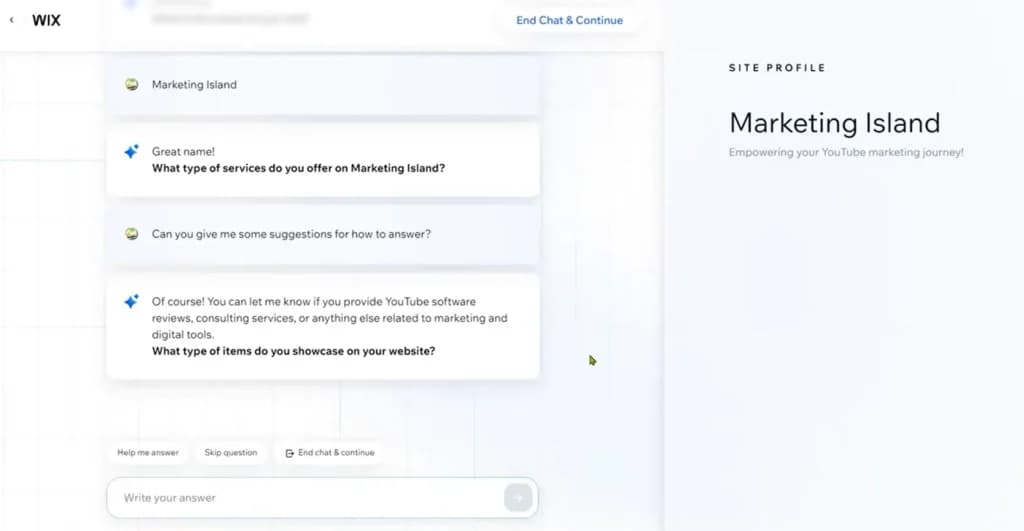
Wix AI Website Builder distinguishes itself by using AI to ask users a series of simple questions about their goals, industry, and style preferences. Based on the answers, it automatically generates a functional, visually appealing website that is ready to go live.
Key Features
1. Automated Website Creation
Wix ADI’s standout feature is its ability to create a complete website in minutes. Users answer questions about their business type, preferred design style, and required features (e.g., booking tools, contact forms). The AI then generates a site layout, colors, and fonts tailored to these preferences.
2. Industry-Specific Templates
The AI uses Wix’s extensive database of templates and industry data to craft websites that align with the needs of specific sectors, such as:
Restaurants
Fitness studios
Online stores
Portfolios
Professional services
3. Content Suggestions
Wix AI Website Builder pulls relevant content from the web, including business information, social media profiles, and images. For example, if your business has an active Facebook or Google My Business profile, the platform can integrate that content directly into your site.
4. Customization Options
While Wix AI Website Builder focuses on automation, it still allows manual adjustments. Users can edit text, replace images, or tweak layouts post-generation, combining the convenience of AI with the flexibility of a traditional website builder.
5. Mobile Optimization
Wix AI Website Builder automatically generates mobile-friendly designs, ensuring the site looks great on all devices without requiring additional input from the user.
6. Integrated Features
Depending on the user’s needs, Wix AI Website Builder can add:
Booking systems
Contact forms
eCommerce functionality
Blogs
Social media integrations
7. Continuous Learning and Improvements
Wix AI Website Builder evolves with user feedback, continuously improving its algorithms to offer better design suggestions and user experiences.
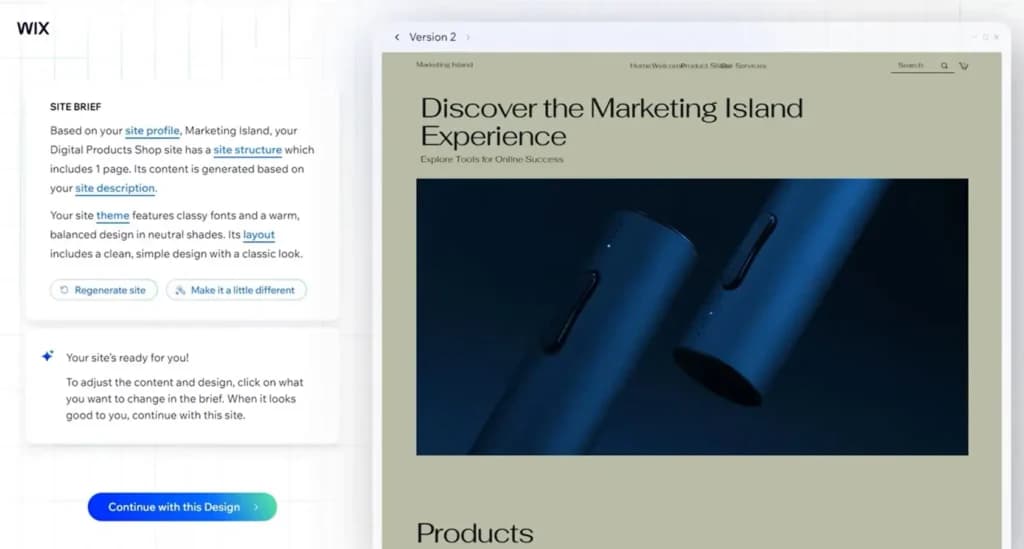
Wix AI Website Builder delivers exceptional performance in its primary goal: creating functional, visually appealing websites quickly. Its AI algorithm is adept at generating layouts and content based on user input, and the integration of mobile optimization ensures the end product is professional and user-friendly. However, users with complex requirements or a need for unique branding may find the tool less suitable than fully manual design processes. Visual editing is the whole appeal here, and the comparison of best drag and drop website builders shows which rivals handle it as well.
Full Review of Wix AI Website Builder (Artificial Design Intelligence)
Wix AI Website Builder (Artificial Design Intelligence) is a powerful website-building tool designed to simplify the web design process. Unlike traditional website builders that require manual input for layouts and content, Wix AI Website Builder uses artificial intelligence to generate fully customized websites based on user preferences and business needs. It is especially appealing to individuals and small businesses with minimal technical expertise or limited time for design tasks.
Overview
Developer: Wix.com
Launch Date: 2016
Primary Use: AI-driven website creation for businesses, individuals, and eCommerce.
Target Audience: Small businesses, entrepreneurs, freelancers, and anyone seeking a quick and easy way to build a website.
Wix AI Website Builder distinguishes itself by using AI to ask users a series of simple questions about their goals, industry, and style preferences. Based on the answers, it automatically generates a functional, visually appealing website that is ready to go live.
Wix AI Website Builder Performance
Wix AI Website Builder delivers exceptional performance in its primary goal: creating functional, visually appealing websites quickly. Its AI algorithm is adept at generating layouts and content based on user input, and the integration of mobile optimization ensures the end product is professional and user-friendly. However, users with complex requirements or a need for unique branding may find the tool less suitable compared to fully manual design processes.
Wix AI Website Builder Ideal For:
- Small Businesses: Ideal for businesses needing an online presence without a large budget or technical team.
- Freelancers and Entrepreneurs: Offers a quick way to create portfolios or personal branding sites.
- Startups: Enables a fast launch while focusing resources on other areas.
Wix Web Design Review
Designing on Wix is simple once you get into it. Here is my honest experience with how the design side works.
100+ Built-In Templates
- Easy Implementation: You can pick from over 100+ built-in templates designed for great UI and UX. You just click on a template, and it changes the entire site accordingly.
- Great for Beginners: The page templates only need minor visual edits. That means most of your effort goes into the content inside, which will happen no matter what platform you use.
The AI Website Builder
- A Real Game Changer: What I found wow is the Wix AI builder. Most of the results feel like a unique design made specifically for your purpose.
- Smart Matching: The AI picks a color palette and font style that match your website topic without you having to figure it out yourself.
Changing Layouts Later
- Updating Your Pages: When you want to change a template after you have already configured another one, you have to go through every page type to see whether you need to update your content to fit the new look.
- Not Easy, But Possible: It is not super easy, but it is completely doable for websites under 100 pages.
Overall, Wix makes web design simple and approachable. The AI and built-in templates handle the hard design work, so you get a site that looks made just for you. While reviewing your pages takes a little extra effort, the simple setup makes it completely worth it.
Wix Logo Design Review
Portfolio and Experience
The tool does not offer much functionality to create a genuinely outstanding logo. All the logos share a familiar 2-dimensional feel without a massive artistic touch. In terms of branding, the tool has a limited variety of layouts, thereby reducing creative output. The final version usually comes with both a text and a symbol. However, the merit is you don't need any special skills to create a logo.
Wix Logo Design Process
The process of designing your logo is quite simple. It takes about 3-5 minutes on average to finish creating your logo. These changes are reversible so that you can rest easy if you make a mistake or wish to go back to make changes.
The design steps for creating your logo with Wix are:
- Register with a Wix free account.
- Type in your business name and tagline
- Specify what kind of business you are designing the Logo for. If there is more than one answer, state all of them, separated by commas.
- Choose all the terms associated with your business. The options available are: Creative, Techy, Hipster, Formal, Dynamic, Fun, Modern, Playful, Timeless, and Fresh. These options help to coordinate the style and give color choices for the Logo.
- Take a look at a few logos and ''like" or "dislike" them.
- Explain your branding needs by ticking all the boxes where you intend to make use of your logos, such as social media accounts or business cards.
The tool will process the result and come up with some ideas for your logo. Select the one you like and then begin to customize.
You can also customize all aspects of the logo (position, icon, background, font, and so forth). Your pricing plan would determine how many versions of the logo you can receive. These include SVG vector files, which you can use for customization in the future, and commercial use such as business cards, print advertising, etc. You can also receive up to 40+ social media-compatible logo files.
Export high-quality logos ready for various applications.
Features
- Do it yourself
- Drag-and-drop tool
- Multiple templates
- Design service (DIFM)
- Multiple design concepts
- Multiple designers on your project
- Direct communication with design team
- Marketplace
- High-res file types
- Royalty-free usage
Alternatives to Wix Website Builder

Starting from: $0/month
Free
$0
seat/month
Pros
- Wix-powered websites are fast
- Has intuitive drag-and-drop design features
- Digital marketing integrations are super easy
- Massive reservoir of support materials
Cons
- One paid plan (except Enterprise) for only one site.
- Wix branding on Free plan
- Cannot use a custom domain on Free plan

Starting from: $0/month
Free
$0
seat/month
Pros
- Has easy drag-and-drop feature for intuitive design experience.
- Offers advanced store features for ecommerce businesses.
- Multiple language options and automatic translation.
- Outstanding 24/7 customer support via live chat and email support.
Cons
- Premium packages only cover for one website. You have to purchase multiple packages if you own more than one website.
- Site123 branded message on the free plan.
- Great for generic websites as customization features are highly limited.

Starting from: $2.99/month
Premium Website Builder
$2.99
seat/month
Pros
- Excellent uptime
- Unlimited storage and bandwidth on all plans
- Sophisticated AI-powered business tools
- Large photo repository
Cons
- Can’t publish a site on free plan
- Limited customization
If you want the head-to-head rather than the category, the Wix alternatives comparison covers the platforms people switch to and what they gain and lose doing it.
Among several website builder brands, Wix is an industry leader. Its intuitive and user-friendly interface makes it stand out from competitors. Also, its powerful app integrations, feature-rich platform, and professional logo design services are rivaled by none.
Verdict
From personal experience, building and managing my websites on Wix was a bang for my bucks. I could set up a simple website in one weekend, eliminating the delays from developers. And managing activities afterward from my mobile phone, on the go!
Wix is the right pick if you want one bill, a visual editor and somebody else handling maintenance. It is the wrong pick if you need to own your stack or move the site later, because a Wix site does not export. That trade is the whole decision and it does not get easier further in. If it is not the trade you want to make, the best website builders for small business comparison covers the platforms that make the opposite one.
As much as I have to buy a new premium plan for each website that I own, I still consider it a fair deal. At least, Wix offers me a free registered domain with every premium plan that I buy as well as free SSL certificates. All these, including the secure payment processing and several other features that Wix provides, it’s pretty difficult to find a better deal elsewhere.
Also, Wix ADI is an excellent tool for small businesses, freelancers, and individuals seeking a quick and hassle-free way to build a professional website. It balances automation and customization, allowing users to get online fast while still having room for personalization. However, those seeking advanced design capabilities or unique branding might find the traditional Wix Editor or alternative platforms more suitable. For its target audience, Wix ADI delivers on its promise of simplicity, speed, and accessibility, making it a standout choice among AI-driven website builders.
FAQs
What is Wix eCommerce and how does it work?
What is Wix eCommerce and how does it work?
Wix eCommerce, also called Wix Stores, is the online store builder inside the Wix platform. It lets you design a storefront, upload products, manage inventory, accept payments, set shipping and tax rules, and track orders — all from a single dashboard. You can also sell through social channels like Facebook and Instagram.
How much does Wix eCommerce cost?
How much does Wix eCommerce cost?
To sell online, you’ll need one of Wix’s Business or eCommerce plans. Pricing typically starts at $27/month for the Business Basic plan and goes up to $159/month for the Business Elite plan. Each tier unlocks more features like advanced shipping, subscriptions, and analytics.
Does Wix charge transaction fees?
Does Wix charge transaction fees?
Wix doesn’t charge transaction fees when you use Wix Payments, but standard payment processing fees apply (around 2.9% + $0.30 per transaction). If you use a third-party provider, their rates will apply instead.
Is Wix good for large online stores?
Is Wix good for large online stores?
Wix works best for small and mid-sized businesses with moderate product catalogs. While it can technically support thousands of SKUs, very large or complex stores may experience slower performance and limited backend flexibility compared to platforms like Shopify or BigCommerce.
How does Wix handle SEO for online stores?
How does Wix handle SEO for online stores?
Wix provides full SEO control. You can edit meta titles, descriptions, slugs, alt text, and canonical tags for each product. It also includes built-in structured data, automatic sitemap generation, and integration with Google Search Console through the Wix SEO setup wizard.
What are the main limitations of Wix eCommerce?
What are the main limitations of Wix eCommerce?
The main drawbacks are limited template switching, fewer advanced scaling tools, and higher reliance on third-party apps for some features. Some users also report slower load times on large stores with heavy visual content.
What payment gateways does Wix support?
What payment gateways does Wix support?
Wix supports major payment options, including credit/debit cards, PayPal, Apple Pay, and Google Pay via Wix Payments. You can also connect 80+ third-party gateways worldwide depending on your business setup.
Can I switch templates after launching my Wix store?
Can I switch templates after launching my Wix store?
Not directly. Once your site is live, you can’t switch templates automatically. You’ll need to manually rebuild your pages if you want a new design, which is a known Wix limitation.
How do I optimize my Wix store for SEO?
How do I optimize my Wix store for SEO?
Writing keyword-rich product titles and descriptions
Using high-quality images with alt text
Customizing meta tags for every product and category page
Enabling structured data markup
Improving site speed and mobile responsiveness
Adding internal links and blog content for topical authority
Can I do dropshipping on Wix?
Can I do dropshipping on Wix?
Yes. Wix integrates with dropshipping apps like Modalyst and Printful, allowing you to sell products without holding inventory. You can import items directly, set your own prices, and manage everything from the Wix dashboard.
How do I track analytics and performance?
How do I track analytics and performance?
Wix Analytics offers real-time dashboards for sales, traffic, abandoned carts, and customer behavior. You can also connect Google Analytics and Meta Pixel for advanced tracking.
Can I connect Wix to social media or marketplaces?
Can I connect Wix to social media or marketplaces?
Absolutely. Wix supports multichannel selling through Facebook, Instagram, TikTok, and Amazon. You can sync your product catalog and manage all orders in one place.
Users Reviews
Write a review
Leave a review, help others get it right the first time.
29 Reviews

Amelia G
Digital Marketing
Simple and Stylish, But With Some Trade-offs
Wix is one of the most popular website builders, known for its ease of use and vast customization options. Here’s a breakdown of its pros and cons to help others decide if it’s the right choice.
- Wix offers a drag-and-drop interface that is perfect for beginners. Even without coding knowledge, you can create a professional-looking website quickly.
- Once you choose a template and go live, switching to a different one isn’t possible. This can be frustrating if you decide to revamp your site.

Sunday O
Worker
Helped me help web design team!
Wix has been an invaluable tool in streamlining my work with the web design team. Its user-friendly interface allowed me to effortlessly create and edit web pages, reducing development time significantly. The drag-and-drop feature simplified the design process, eliminating the need for complex coding, and ensuring seamless collaboration with the team. With Wix's real-time editing and commenting, communication became smoother, enabling us to provide instant feedback and implement changes swiftly. The platform's templates and customizable elements empowered me to bring my creative ideas to life without technical constraints. Thanks to Wix, our web design workflow has become remarkably efficient, delivering impressive results.
- Integrates the team.

Tobias B
Admin
It works and it works well
Choosing Wix as our web design tool was the best decision for our business. The platform's simplicity and versatility allowed us to create a visually stunning and functional website. Wix's extensive collection of templates gave us a head start, and the customization options enabled us to make our site unique. The integrated SEO features helped us rank higher in search results, driving more organic traffic. Wix's seamless integration with payment gateways made selling products online effortless. Thanks to Wix, our online presence has expanded, resulting in increased sales and business growth
- Templates
- Pleb friendly

Isreal O
Computer Guru
Good even for a developers taste
Even as a seasoned web developer, I cannot emphasize enough how great Wix is for web development. The platform's intuitive interface and drag-and-drop functionality enable me to create stunning websites in record time. With Wix's extensive collection of templates and design options, I can quickly prototype and customize websites to meet client requirements. The seamless integration of third-party applications and plugins saves me hours of coding. Wix's responsive design ensures that websites look flawless on any device. Wix empowers web developers to work faster and more efficiently, delivering exceptional results to clients.
- Developer friendly.
- not as complex as id like

Justina O
Admin
Web design in a jiff
Wix, the web design software, has truly transformed my online presence and made my life easier in countless ways. With its intuitive drag-and-drop interface and extensive collection of templates, I was able to create a stunning website without any coding knowledge. Wix's user-friendly features, such as pre-designed elements, built-in SEO tools, and mobile optimization, streamlined the entire web design process. It empowered me to showcase my brand, products, and services effectively. Furthermore, Wix's reliable hosting and seamless integration with other platforms simplified managing my online business. Thanks to Wix, I could focus on my content and business growth while enjoying a professional and visually appealing website.
- Made life easier

Stephanie K
CMO
Good even for C Suite
As the CMO of our firm, I am thrilled to share how Wix has revolutionized our operations and saved us significant resources. With its user-friendly interface and extensive template library, we were able to create stunning websites in no time, eliminating the need for expensive web development services. Wix's seamless integration with marketing tools enabled us to automate processes, saving countless hours of manual work. The platform's affordability and scalability allowed us to allocate our budget more effectively, unlocking additional resources for other critical initiatives. Thanks to Wix, we've not only streamlined our operations but also achieved impressive cost savings, making it an invaluable asset for our firm.
- Scaleable

Rina K
manager
ez pz lemon squeezie
Wix completely revolutionized my website design experience, transforming my online presence in the best possible way. As a non-designer, I was often frustrated with complicated platforms and limited options. But with Wix, everything changed. Their user-friendly interface, drag-and-drop functionality, and vast selection of stunning templates empowered me to create a professional-looking website without any coding skills. The freedom to customize every element to match my brand vision was liberating. Wix's extensive collection of apps and integrations also allowed me to add advanced features effortlessly. Thanks to Wix, my website now stands out, attracting more visitors and boosting my online success. It's truly been a game-changer in my website design journey.

Priscilla G
Comptroller
Ez pz
Wix has been an absolute game-changer in scaling my small business! As a well-educated African American entrepreneur in my 20s, time is of the essence, and Wix has been a lifesaver. Their intuitive platform allowed me to create a stunning website in no time, showcasing my brand's unique identity. The user-friendly interface and pre-designed templates saved me countless hours of coding and design work. Wix's seamless integration with essential business tools streamlined my operations, enabling me to focus on growing my business and reaching new customers. Thanks to Wix, I've been able to efficiently navigate the digital landscape while making a powerful impact.
- Culturally friendly

Teni T
semi retired
As a boomer i still got to use it and it worked!
Working with Wix has been an absolute delight! As a 66-year-old, I was initially apprehensive about building my own website, but Wix made it incredibly fun and accessible. Their intuitive platform and user-friendly interface allowed me to unleash my creativity and design a beautiful website that perfectly showcased my passion. The drag-and-drop feature made it a breeze to customize every element, and the vast selection of templates ensured that my site looked professional and engaging. Wix's comprehensive support and helpful tutorials made the entire process enjoyable and stress-free. It's never too late to embark on a digital journey with Wix by your side!
- Senior friendly

Yesenia T
Admin
Fairy godmother of web design
Oh my goodness, let me tell you how much I adore Wix! It's like a digital fairy godmother that magically transforms my ideas into stunning websites. The user-friendly interface and drag-and-drop features make it a dream to use. I can customize every detail with a girly touch, from pretty fonts to fabulous color palettes. With Wix's stylish templates and versatile design options, my website becomes a true reflection of my feminine flair. It's the perfect tool for empowered women like me to create beautiful online spaces. Wix, you're my web design soulmate!
- Soulmate of web design :)
- Zero!

Precious N
CMO
One of the best around.
This self web design company is an absolute game-changer. Their intuitive platform empowers individuals to create stunning websites with ease. The user-friendly interface and drag-and-drop functionality make the design process enjoyable and stress-free. With a vast library of customizable templates and robust features, I was able to bring my vision to life effortlessly. The company's extensive tutorials and support resources ensured that even as a beginner, I could achieve professional results. I highly recommend this self web design company for anyone looking for a cost-effective and empowering solution to create their own website.
- professional results, not professional skill level
- learning curve

Yesenia M
Account manager
My first experience using the software i already built a website
As a woman with little technical know-how, I embarked on the daunting journey of building a website for my small business. Thankfully, I discovered Wix, and I couldn't be happier with the experience it provided me. Wix is a true gem in the world of website builders, offering an intuitive platform that allows even the most inexperienced individuals to create stunning websites. From the moment I signed up, the user-friendly interface and drag-and-drop functionality made the process a breeze. What impressed me the most about Wix was the sheer range of customizable templates available. Whether I wanted a sleek and modern design or a whimsical and artistic layout, Wix had an abundance of options to suit my needs. The templates provided a solid foundation, saving me time and effort in creating a visually appealing and professional-looking website. Wix's extensive library of features and apps further enhanced my website-building experience. From seamless integration of social media feeds to the inclusion of a user-friendly e-commerce platform, Wix had everything I needed to take my online presence to the next level. The ability to add forms, blogs, and image galleries with just a few clicks was a game-changer for me. The responsive design capabilities of Wix ensured that my website looked great on any device, be it a smartphone, tablet, or desktop. It gave me peace of mind knowing that my site would provide a seamless browsing experience for my visitors, regardless of their preferred device. Additionally, Wix's robust customer support was a lifesaver whenever I encountered any hiccups or had questions. Their helpful guides, tutorials, and responsive support team were always there to assist me promptly, making the entire process less daunting and more enjoyable. Overall, Wix exceeded my expectations as a website-building platform. It provided me with the tools, flexibility, and support needed to create a stunning website that effectively represents my business. If you're a woman like me, searching for a hassle-free and visually captivating way to build your online presence, Wix is the answer you've been looking for.
- Every THING
- Ease of use, even for beginner

Kona R
Citizen
So easy a caveman can do it...
Wix.com truly showcases its technological superiority. As a middle-aged man with an eye for innovation, I was amazed by the advanced features and capabilities offered by this platform. The intuitive drag-and-drop editor, coupled with an extensive range of templates and customization options, allowed me to create a visually stunning website with ease. The seamless integration of cutting-edge apps and add-ons enhanced the functionality of my site to meet my specific needs. The responsive design ensured my website looked flawless on any device. Wix.com's technological prowess and constant updates reaffirm its commitment to staying ahead of the curve, making it an exceptional choice for anyone seeking a technologically superior web development platform.
- Fast easy and good for an older less tech savvy man
- learning how to web design

Ada O
Web dev
Top of the top....
Top of the food chain when it comes to website design for the average person. Wix has single handedly helped to erase the complications of building a simple to mid level website. I've used it myself despite being a dev, and i find it fast forwards the process for myself and my clients. Time is money, and wix saved me a lot of it. Plus the sites look killer.
- Fast web site building
- Could easily build a site without much know how.
- could use more advanced functions for developers

Olga C
Account manager
Making website building so easy a kid can do it, or an old man can do it...
They simplify the heck out of website building. Back 20 years ago all this you had to hand code... now its a few pushes of buttons and some basic instruction. I walked my friend who is illiterate through a site build the other day using this product. He's a small carwash business. Really a helpful tool for small businesses.
- User friendly.
- Top shelf support
- Mountains of how to guides
- Interface needs a little sprucing.

Tanko B
lead designer
Easy design
Wix basically makes web design a breeze, gone are the days of manual coding... it's set it and forget it. My mom was even able to figure one out and she is 60 years old with minimal computer experience. She setup her own lemonade business online.
- Simplicity
- Ease of use
- Non advanced tools

James C
CEO
Easy site builder
Overall Wix made it simple to write and open my website. Their tools are very foolproof, and there isn't much guesswork. By far the best self website builder, and just takes it to a new level to not have to pay thousands for a developer when the site is simple
- simplicity
- too good.
Ben C
Other
Easy Platform
Wix is a simple platform for site builders and SEO because it offers a user-friendly interface, SEO-friendly features, mobile-responsive templates, app integrations, and affordable pricing.
Neil B
If you don’t need a lot of functionality, go for it
The platform is designed for those who don’t have much knowledge of web design and need something up and running quickly.
- -Has some of the best templates out of the most popular website builders
- - The website building algorithm (AI) is surprisingly good
- -Issues with little things like adding a search bar to an eCommerce website
- -Customer support replies with canned messages about issues and often doesn’t resolve glitches on time
Will S
A great tool for business websites
Thanks to Wix, we havebeen able to reach more customers by taking advantage of online booking and support for processing international transactions.
- Receive payments through Wix with pre-configured checkout forms