

Last updated: November 2026
Clover is a user-friendly point-of-sale (POS) system designed for small to medium businesses, offering a range of software and hardware tailored to different industries, from retail to restaurants. While not the most affordable, it has diverse payment partners that make it a reliable choice. Clover is owned by Fiserv (which acquired First Data in 2019). Clover POS delivers a comprehensive solution for payment processing, inventory management, and sales tracking.
Plans & Pricing
* Featured prices can be updated and free offers may include additional terms.
I liked that Clover offers pricing plans tailored for different business categories, providing flexibility with either monthly subscriptions or upfront purchases:
1. Full-Service Dining (FSD) Starter Plan: $165/month for 36 months or $1,699 upfront + $89.95/month for software. Hardware: Includes Station Solo, receipt printer, and cash drawer. Transaction Fees: 2.3% + $0.10 for card swipes; 3.5% + $0.10 for manual entries. Features: Table mapping, contactless dining, online ordering, tax reporting, and basic employee management. The platform also features an online menu that can be updated in real time and integrates with online ordering systems, ensuring customers and kitchen staff always have the latest information. Integration with Uber Eats is available, streamlining online ordering and delivery management for restaurants.
2. Quick-Service Dining (QSD) Starter Plan: $105/month for 36 months or $799 upfront + $59.95/month for software. Hardware: Includes Mini POS with built-in receipt printer. Transaction Fees: Same as FSD. Features: Fast order processing, contactless QR code ordering, online order management, and customer database. The online menu feature allows for real-time updates and seamless integration with online ordering platforms. Uber Eats integration is also supported for efficient delivery management.
3. Retail Starter Plan: Similar pricing as QSD but focuses on inventory tracking and stock management. Features: Real-time sales reporting, itemized cost tracking, and support for loyalty programs. You can track sales in real time by product, employee, and time period, helping you analyze performance and make informed business decisions.
4. Professional Services Pricing: Typically aligned with QSD and Retail Starter Plans. Focus: Invoicing, customer feedback management, and detailed reporting for service-based industries. The platform allows clients to book appointments directly through your website or catalog, with integrated scheduling features and automated reminders. Managing client payments is streamlined with automated invoicing and payment tracking, making it easy to monitor payment statuses efficiently.
5. Personal Services Pricing: Similar to Professional Services Starter Plan. Features: Customer scheduling and management tools, integrated payment processing, and employee tracking. Clients can book appointments online using the built-in scheduling system, and the platform helps manage client payments with automated invoicing and real-time payment tracking.
6. Home and Field Services Pricing: Matches other service plans with additional options for mobile payment acceptance. Focus: Mobile-friendly solutions with real-time reporting and seamless customer payment experiences.
Clover offers tailored system solutions for both restaurant and retail businesses, providing flexibility and scalability based on your operational needs. The plans are categorized to support different levels of functionality, helping businesses of various sizes optimize their processes.
Restaurant Systems
The restaurant systems are designed to streamline order management, payments, and overall operations. They are offered in three tiers:
1. Starter: Provides essential tools for running a front-of-house wait station, ideal for small-scale operations.
2. Standard: Offers advanced features for server stations or table-side ordering with portable POS systems, enhancing customer experience.
3. Advanced: Includes comprehensive tools to connect front-of-house and back-of-house operations, offering robust management capabilities for larger establishments.
Retail Systems
The retail POS systems focus on providing seamless payment processing and inventory management across different levels of business complexity. These plans include:
1. Starter: A compact countertop solution for accepting payments and managing basic operations.
2. Standard: Combines touchscreen functionality with customer-facing displays, suitable for mid-sized businesses.
3. Advanced: Includes handheld devices and additional displays to extend reach and streamline operations for larger, busier retail setups.
Each plan caters to specific business needs, offering flexibility in payment options for purchase or subscription. You can select the plan that aligns with your operational demands and scalability goals.
Expert Score
Pros
- Attractive pricing 30-day trial at no cost
- Affordable hardware beginning at $49
- Feature-packed Ideal for businesses with an online presence
- Round-the-clock phone and email assistance.
Cons
- You can't apply for the POS online; it requires interaction with a sales representative
- Pricing information isn't clear-cut
- No complimentary plan available
Customer Support
Clover POS provides phone support for customer questions. Additionally, they feature an FAQ segment and business resources where users can access valuable information and detailed articles. Personal Experience of Customer Support Overall, I had a positive experience with customer service at Clover.
The phone line was easy to find, the automated selections were clear, and my call was answered promptly. The representative I spoke with was friendly and professional. My email request for assistance was also answered the same day. The only feature I found challenging was the live online chat. Even without an account setup, the interface presents an online chat icon, however I was unable to determine how to begin a chat in either the main or ‘messages’ screen. I requested a demonstration of Clover’s POS interface and was granted an appointment for the next business day.
Phone Support
Available with an added “let us call you” callback feature
Access to a readily available support email address
24/7 Help & Support
Available to all Clover customers via a selection of routes
FAQ
Available via Clover “Help Center” section
Live Online Chat
Available 24/7
Video Tutorials
Available via Clover blog, resellers and other third-parties
Clover Performance
When I tested Clover’s merchant services, I found their performance to be exceptional across several key areas:
Speed and Reliability
Clover’s systems are designed for swift and dependable card payment processing. The Clover Station Solo, for instance, boasts robust processing power, ensuring quick transactions and minimizing customer wait times. Its multiple connectivity options—WiFi, Ethernet, and 4G/LTE—provide consistent uptime, crucial for uninterrupted business operations. Clover also offers rapid deposit functionality, allowing businesses to access immediate funding or cash advances for specific transactions. This feature supports business cash flow and adds an extra layer of security for particular sales.
Security Measures
Security is paramount in credit card processing for businesses, and Clover excels in this domain. Their end-to-end encryption and tokenization technologies safeguard sensitive data from the moment a credit card is swiped, dipped, or tapped. This comprehensive approach helps businesses maintain PCI compliance and reduces the risk of data breaches.
Feature-Rich Platform
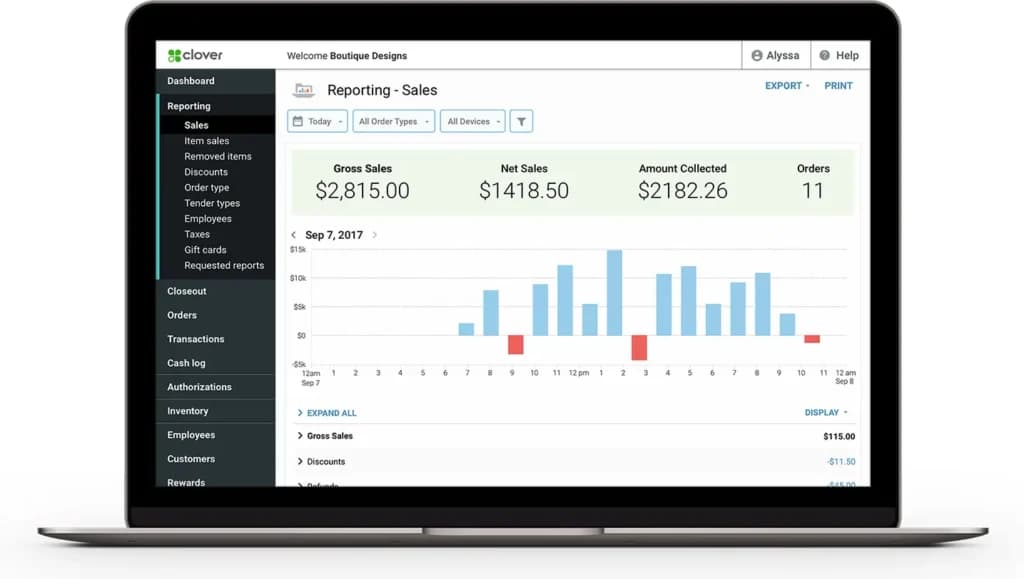
Clover offers a suite of features that enhance merchant card processing. Their systems support various payment methods, including EMV chip cards, magnetic stripe, and contactless payments like Apple Pay and Google Pay. Additionally, Clover provides tools for inventory management, employee tracking, and sales reporting, all accessible through an intuitive interface.
Scalability and Flexibility
Whether you’re a small business owner or managing a larger enterprise, Clover’s solutions are scalable to meet diverse needs. Their range of hardware—from the compact Clover Mini to the comprehensive Clover Station Duo—caters to various business environments, ensuring efficient credit card processing for small businesses and larger operations alike.
Clover’s merchant services deliver high-performance solutions characterized by speed, reliability, robust security, and a rich feature set, making it a top contender among credit card processing companies.
Uniqueness:
Clover stands out among credit card processing companies with its seamless integration of POS and merchant services. Its all-in-one system supports various payment methods, offers real-time reporting, and includes advanced security features. The customizable solutions cater to businesses of all sizes, ensuring efficient and secure card payment processing.
Ease of Use
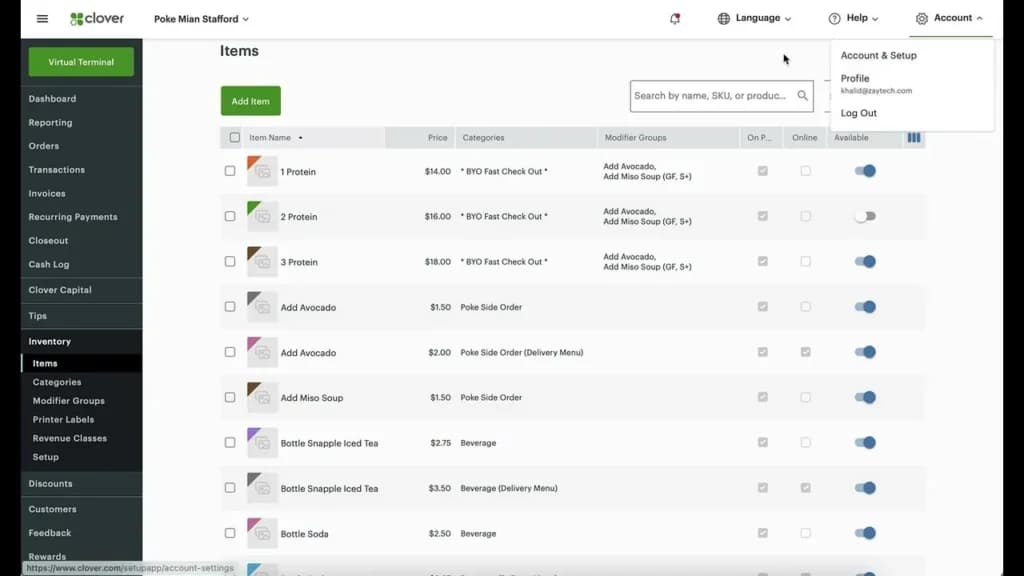
Clover’s POS is very intuitive to use and has a sleek, modern appearance. Even though it has several features, they are laid out in a straightforward manner to ensure the user is capable of navigating the system effectively. I especially appreciated the ease with which inventory can be added into the POS to allow for tracking, as well as the ability to offer print, electronic, or both types of receipts to customers.
The receipts themselves are professional in appearance and easily customizable. The software setup is straightforward, especially with the dedicated personalized concierge support. This can include training on hardware, importing inventory, setting up receipts with the user’s business logo, and assistance with various apps and integrations supported by Clover. The Clover website also offers quick start guides with detailed information that the user can refer to.
Clover POS Features & Functionality
Clover POS streamlines workforce operations with its employee management features, allowing for easy role-based permissions, team performance assessments, and employee rewards. Its Time Clock tool ensures precise tracking of employee hours. For business insights, Clover provides real-time sales data, employee-based sales tracking, and detailed reports, making it simple to pinpoint bestselling items and monthly sales patterns. Those needing assistance can enlist an SMB CompuCom professional for on-site setup and training.
Tailored POS solutions for coffee shops, retail stores, nightclubs, quick service, bars, restaurants, and food trucks.
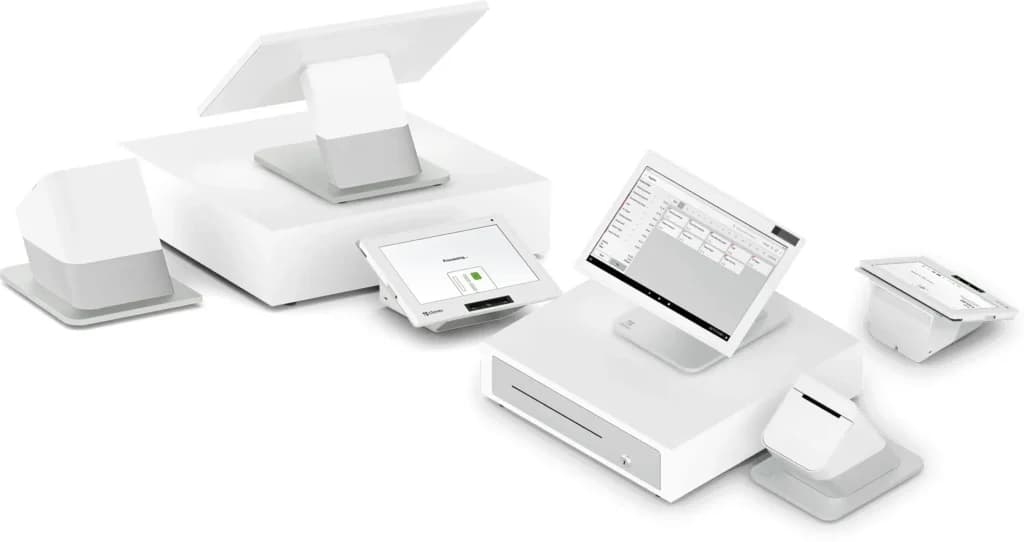
Clover's comprehensive solution seamlessly blends hardware and software elements to cater to diverse business needs. Users have the flexibility to choose from a variety of equipment, ranging from mobile readers to handheld and countertop devices.
These can be further complemented with additional accessories, including scanners and printers. On the software front, businesses can customize their Clover system, picking features and functionalities that align with their operational requirements.
Regardless of the chosen configuration, each system comes equipped with intrinsic capabilities for employee management, customer engagement, and detailed tracking and reporting. This integration ensures businesses can evolve and expand effortlessly, making Clover a strategic partner in growth.
Software
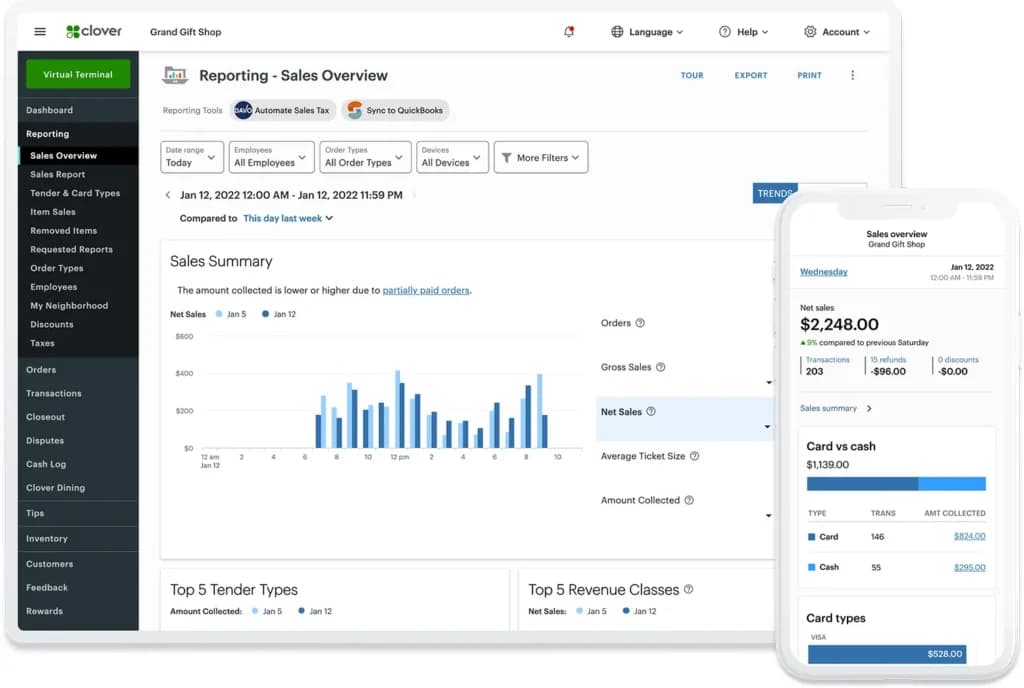
Clover POS offers a diverse range of pricing plans, meticulously crafted to cater to specific business types such as Full Service Dining, Quick Service Dining, Retail Shops, Professional Services, Personal Services, and Home & Field Services. Regardless of the chosen plan, businesses benefit from a plethora of features that enhance the overall customer experience.
These include the ability to send electronic receipts, streamline the invoicing process, and securely store customer card details, facilitating a swifter and more efficient checkout process. Additionally, costs are further determined by the transaction method; a distinct fee structure applies based on whether customers opt for card payments or alternative methods. This pricing strategy ensures flexibility and choice, allowing businesses to select a plan that mirrors their operational demands and budgetary constraints.
Merchant Services
Clover Merchant Services solutions provide all the capabilities required to initiate and process an electronic transaction.
All major credit and debit cards, as well as NFC payments, are accepted. The option to handle payments offline is also provided. Clover’s hardware is consistently praised for its durability and longevity. The POS interface is particularly user-friendly, and Clover provides a variety of reports to help businesses make better decisions. Clover's software lets you manage inventory, process payments, and access a user-friendly interface to support a wide range of business operations.
Clover is accessible via web browsers on both Mac and Windows and is also compatible with smartphones.
Here’s a list of some of the merchant services features:
- Inventory management
- Easy-to-use interface
- Customer management
- Restaurant-specific features
- Rapid deposit functionality
- Employee management tools
- Customer loyalty programs
- Digital and physical gift card sales
- Online ordering capabilities
- Online payments acceptance for digital transactions
- Reporting and analytics tools
- Flexible funding through Clover Capital
- À la carte app integrations
- Portable and countertop POS hardware options
- Multi-payment acceptance (credit, debit, contactless, etc.)
- Integration with online stores and inventory sync features
Inventory Management
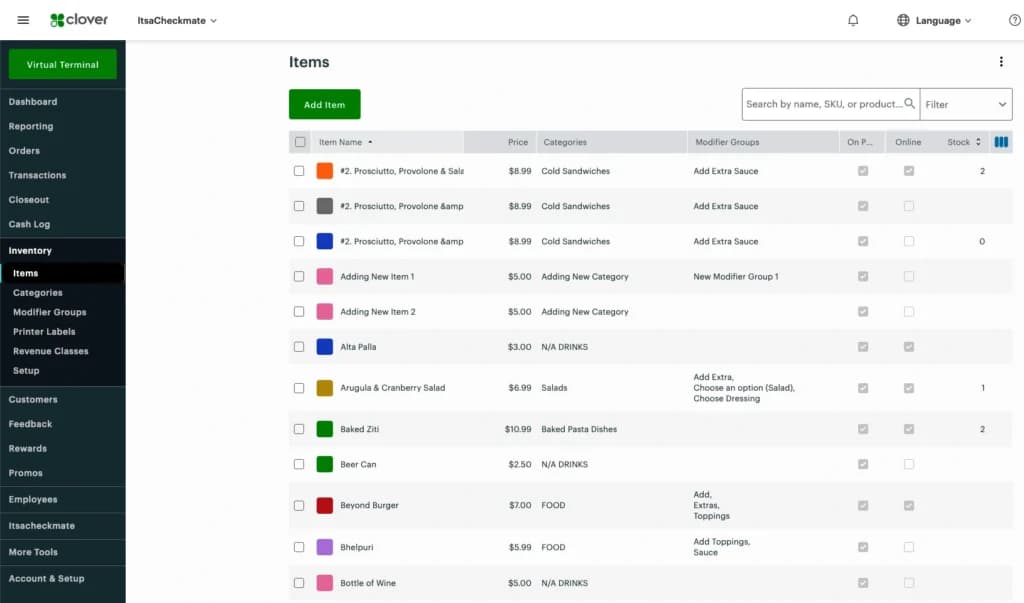
When I tested Clover’s inventory management feature, I found that it offers a competitive edge in the card processing industry. Although this tool is only available with Register Lite or enhanced subscriptions, it’s worth a shot for businesses focused on credit card processing for small business needs.
Clover’s inventory management helps retailers and restaurateurs monitor transactions and inventory levels, ensuring accurate tracking for merchant card processing. Whether you’re using a mobile credit card reader or handling online credit card processing, Clover’s inventory management makes it easier to accept credit card payments and optimize your operations.
Easy-to-Use Interface
Clover’s appeal lies in its easy-to-use interface. When I tried out the system, I was impressed by how simple it was to learn how to accept credit card payments, even for team members who aren’t tech-savvy.
Clover’s straightforward design makes it a popular choice among card processing companies, as it minimizes complex functions. Businesses searching for the best credit card processing companies will find Clover’s intuitive design ideal for streamlining card payment processing, whether through a credit card reader for phone or online credit card processing system.
Customer Management
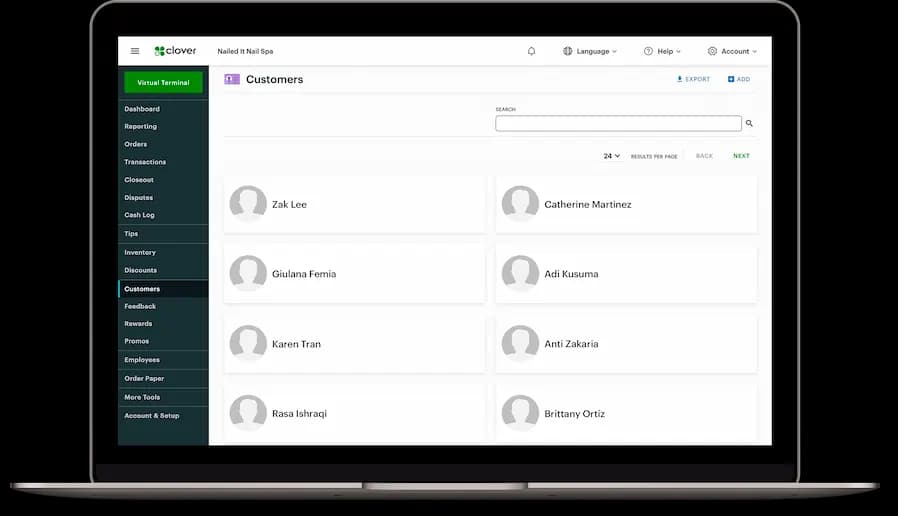
Clover’s customer management feature stood out to me when I tested their merchant services. I was able to create client profiles, send customized emails, add loyalty points, and request feedback, which helps build strong customer relationships.
This feature benefits both traditional brick-and-mortar businesses and online credit card processing systems. If you’re looking for how to take credit card payments and increase customer engagement, Clover’s customer management tools make it easy to accept credit card payments and boost customer loyalty.
Restaurant-Specific Features
While looking at Clover’s card payment processing system for restaurant operations, I discovered features designed specifically for the food industry.
These include the ability to organize floorplans, map tables, and offer tableside ordering. These features make Clover a compelling choice for businesses focused on how to accept credit card payments in the restaurant space, offering a seamless solution for accepting credit cards and enhancing overall operations.
Rapid Deposit Functionality
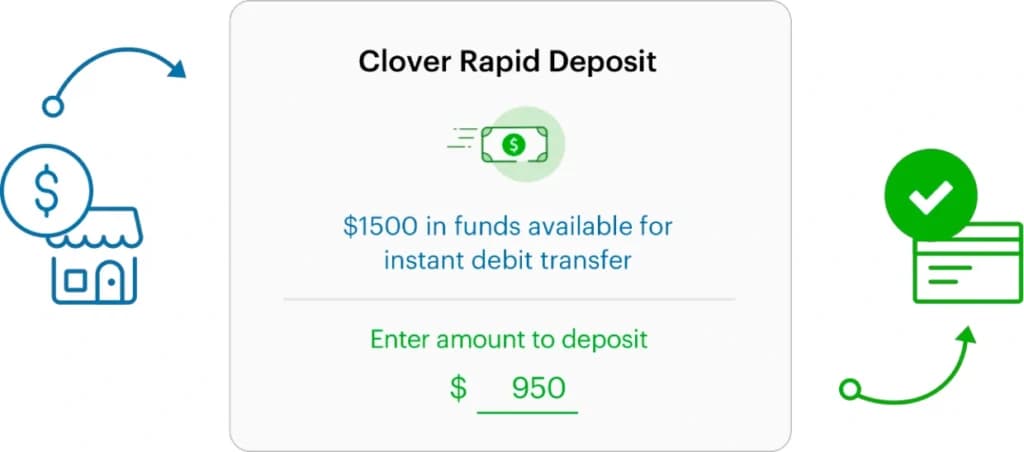
One feature that stood out to me was Clover’s rapid deposit functionality. Unlike some card processing merchants that take days to transfer funds, I saw payments moved in minutes.
This quick and secure service is crucial for businesses needing reliable credit card processing for business cash flow. Clover’s rapid deposit feature makes it a strong contender among the best credit card processing companies for fast, secure transactions.
.
Customer Loyalty Programs
When I tried out Clover’s customer loyalty programs, I was impressed with how customizable they were.
The programs integrated directly into the POS system, making it easy for businesses to incentivize repeat purchases with rewards.
I found it simple to track customer behavior and tailor promotions to increase engagement. For businesses focused on accepting credit cards and building lasting relationships, Clover’s loyalty programs are a great addition to their merchant card processing tools.
Digital and Physical Gift Card Sales
Clover makes it easy to sell and manage both digital and physical gift cards. I tested this feature and liked how seamlessly it integrated into the POS system.
It’s a great way to drive revenue, enhance customer retention, and create upsell opportunities.
For businesses looking to maximize their card payment processing options, Clover’s gift card functionality adds value to both in-person and online credit card processing operations.

Flexible Funding Through Clover Capital
Clover Capital stood out when I looked into credit card processing for business growth. This feature provides fast and flexible funding by converting future sales into working capital.
I saw that approvals typically happen within 1-2 business days, and repayment is adjusted to match sales performance. This option provides businesses with a financial safety net, making it a great partner among card processing companies.
À la Carte App Integrations
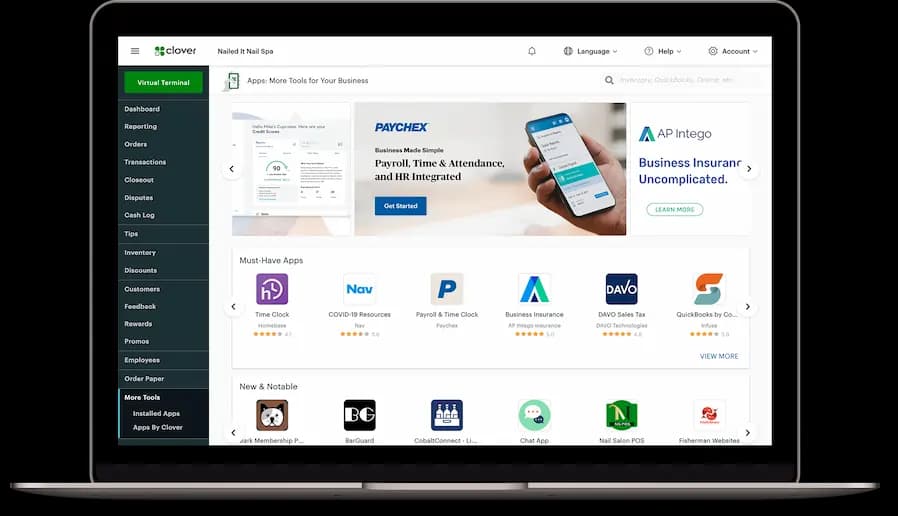
Clover’s app marketplace offers a wide range of à la carte integrations.
I explored different apps for accounting, inventory, and marketing, finding that these options allowed businesses to customize their POS system.
This flexibility ensures that businesses can evolve their credit card processing capabilities to meet changing needs. It’s a strong reason why Clover ranks among the best credit card processing companies.
Portable and Countertop POS Hardware Options
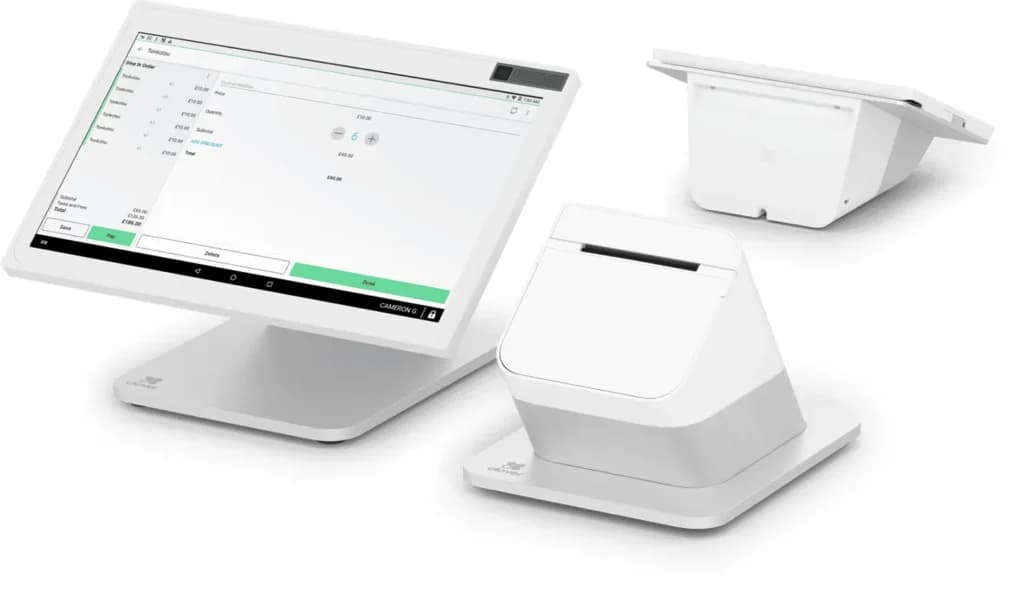
I tested different Clover hardware options, including portable devices like Clover Flex for on-the-go transactions and the Clover Station Duo for high-volume environments.
Each device was designed for durability and ease of use, supporting multiple payment methods like credit cards, debit cards, and contactless payments.
For businesses seeking how to take credit card payments efficiently, Clover’s versatile hardware options make it a solid choice.
Integration With Online Stores and Inventory Sync Features
Clover integrates seamlessly with popular e-commerce platforms, and I found the inventory sync feature incredibly useful. This tool allowed me to manage stock levels in real-time across both online and in-store channels.
Businesses focused on online credit card processing and inventory management will find this feature essential for reducing errors and improving operational efficiency. This makes Clover an excellent option for accepting credit cards and optimizing credit card processing for small businesses.
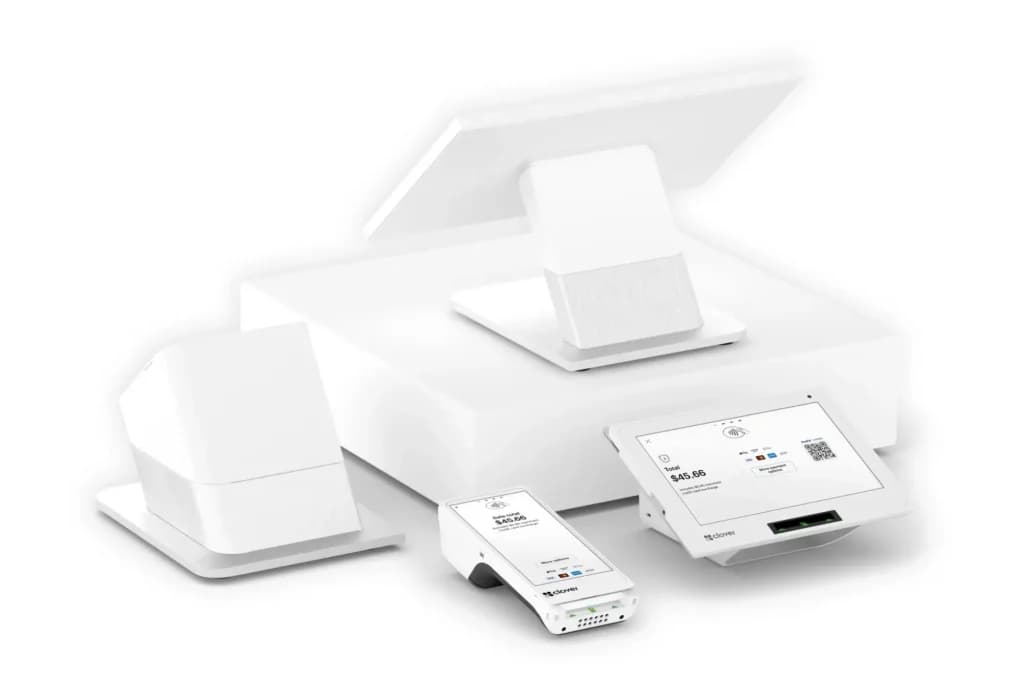
Clover’s credit card processing system is compatible with both Android and iOS devices, making it a versatile option for businesses looking to accept credit card payments. The following hardware options are available from Clover and work seamlessly with their merchant card processing software:
Mobile POS - Clover Go
I found Clover Go, a mobile POS system, to be an affordable, portable credit card reader priced at $69. Clover mobile POS works on both iOS and Android, making it compatible with all Clover products. This device is perfect for businesses needing to take credit card payments on the go.
Clover Flex
Clover Flex is a complete POS system that fits in the palm of your hand. Priced at $499, it provides a card reader and card payment processing solution for businesses of all sizes. It supports accepting credit cards, NFC payments, and mobile credit card reader functions.
Clover Mini
The Clover Mini is a compact, countertop POS system priced at $749. When I tested it, I found it to be ideal for businesses looking for credit card processing for small business operations. Its small footprint makes it a great fit for limited counter space while providing robust card processing capabilities.
Clover Station
Clover Station is a full countertop POS system designed to meet the needs of larger businesses. It costs $1,349 and offers high performance for card payment processing. It’s a great option for businesses that want reliable credit card processing for business with enhanced functionality.
Clover Station Pro
The Clover Station Pro is the latest and most advanced offering, priced at $1,649. This system features a customer-facing screen in addition to the standard functionality of the Clover Station. It’s an ideal choice for businesses looking for the best credit card processing companies that offer an enhanced customer experience and seamless merchant card processing.
Clover Security Features
When it comes to processing credit card payments, security is non-negotiable—and Clover delivers robust protection at every step. Clover’s POS system is built with end-to-end encryption and tokenization, ensuring that every transaction, whether in person or online, is shielded from potential threats. This means that sensitive customer data is never exposed, giving both businesses and their customers peace of mind with every sale.
Clover’s software lets businesses accept payments confidently, thanks to PCI-compliant payment processing and advanced security protocols. The virtual terminal is a standout feature, allowing businesses to accept payments over the phone or online while maintaining the same high level of security as in-person transactions. For businesses that rely on future credit card sales, Clover Capital’s funding solutions are also protected by real-time tracking and secure, automatic repayment processes.
The security focus extends to Clover’s hardware as well. Devices like the Clover Mini and Clover Station Duo are equipped with secure credit card readers and tamper-evident features, making them a safe choice for small businesses, full-service dining, and professional services alike. These POS hardware solutions are designed to prevent unauthorized access and ensure that every payment is processed securely.
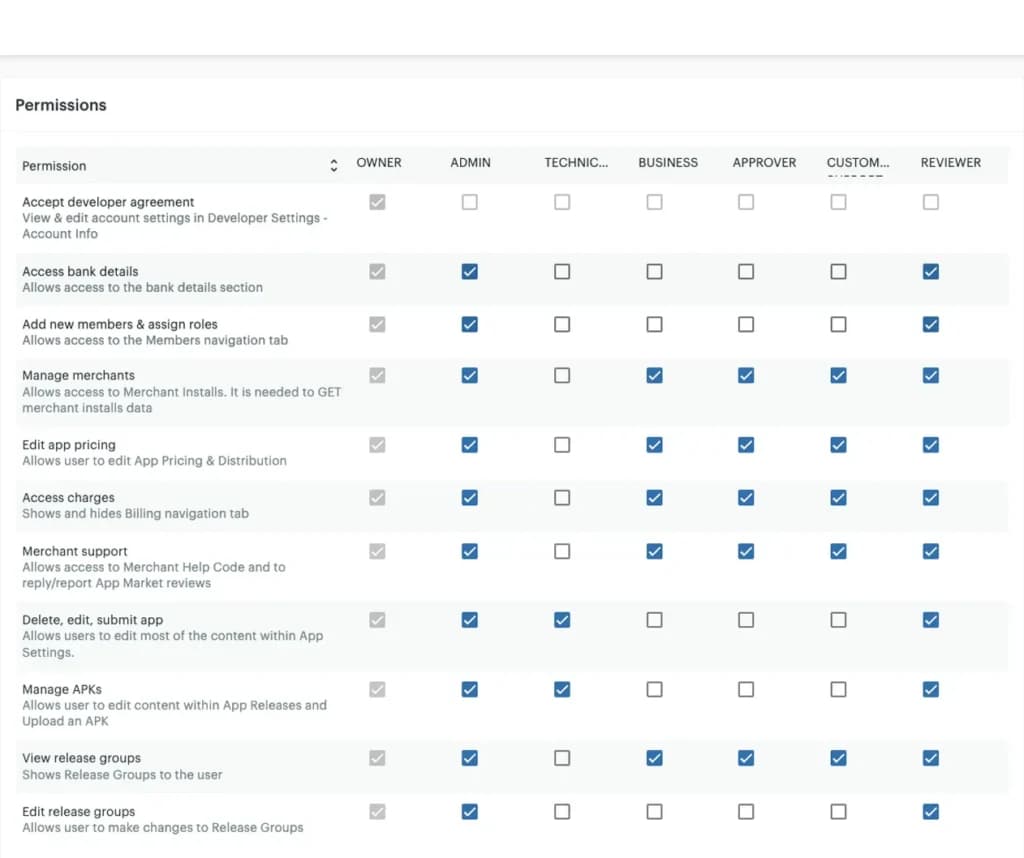
Employee management is another area where Clover’s security shines. Business owners can set permissions and access controls for staff members, ensuring that only authorized personnel can view or manage sensitive information. This is especially valuable for service-based businesses and those with multiple employees handling payments and inventory.
Inventory management is seamlessly integrated with security, allowing businesses to track inventory and stock levels without risking data breaches. Digital gift cards are also protected by encryption and tokenization, so customer information remains secure whether sales happen in-store or through online ordering.
Clover’s transparent pricing plans and clearly outlined termination fees mean there are no hidden surprises, and the company provides additional support to help businesses maintain secure transactions. With features like two-factor authentication and secure POS hardware, Clover helps businesses streamline operations, reduce the risk of fraud, and focus on building customer loyalty.
In short, Clover’s security features are designed to protect every aspect of your business—from accepting payments and managing inventory to safeguarding customer data and supporting business growth. By choosing Clover, businesses can trust that their operations are secure, their customers are protected, and their path to success is clear.
Simplify billing with automated pricing features.
Expand business reach with diverse sales channels.
Features
- Inventory Management
- Loyalty Program
- Mobile Compatibility
- Online Ordering
- Reporting
- Split Checks
- Manage Tips
- Staff Scheduling
- Offline Payments
- Customer Profiles
Verdict
Clover POS is tailor-made for various sectors: its restaurant POS facilitates options like click to pickup, curbside, and dine-in, making order assignments and special guest requests straightforward. Retailers benefit from features like inventory management and seamless payments, while professionals and service-oriented businesses receive plans replete with client databases, engagement tools, and invoicing. However, Clover POS might not appeal to those seeking clear-cut pricing due to perceived hidden fees and the need to consult a sales representative for specific costs. In an expert's perspective, Clover POS emerges as a versatile choice for businesses of all sizes, integrating essential POS functions with advanced analytics. Whether for startups or mature enterprises, it promises operational efficiency, enhanced customer experiences, and potential business growth.
FAQ
Q: What exactly is a Clover POS system?
A: Clover is a point-of-sale (POS) system that includes both hardware (like touchscreens, card readers) and software to help businesses take payments, manage sales, track inventory, and run operations. It's often sold bundled with payment processing services from Fiserv or its partners (ISOs/banks).
Q: How much does Clover POS cost per month?
A: Costs vary. You'll typically pay a monthly software fee(starting around $15 for basic plans, up to $75+ for more advanced ones)plus payment processing fees per transaction (e.g., 2.3% + 10¢). Hardware costs are often separate (either purchased upfront or leased), and additional fees for apps or PCI compliance can apply.
Q: Is Clover a good POS system? Should I choose it?
A: It depends. Clover offers sleek hardware, a versatile App Market, and features suitable for many business types (retail, restaurants). However, common complaints involve high costs (especially with hidden fees), difficult contracts/cancellation, and inconsistent customer support from resellers. It's good for some, but comparing it to alternatives like Square (often simpler, cheaper start) is crucial.
Q: Is Clover POS expensive compared to competitors like Square?
A: Yes, it often is, particularly the initial hardware cost and ongoing monthly software fees. Square offers a free basic software plan, making it generally cheaper to start. Clover might offer slightly better processing rates for high-volume businesses, but you need to factor in all the fees.
Q: Does Clover POS offer a free plan or a free trial?
A: No, Clover does not offer a free software plan like Square does. They also don't typically offer a free trial period for their software subscriptions. You usually start paying the monthly fee right away.
Q: What are the biggest complaints people have about Clover?
A: Common issues mentioned online include pushy or misleading sales tactics from third-party resellers (ISOs), unexpected fees, difficulty canceling long-term contracts, and frustrating customer support experiences (long waits, unhelpful answers).
Q: Can I use Clover hardware (like the Mini or Flex) with a different payment processor to get better rates?
A: Almost always, no. Clover hardware is typically locked to the specific processor (often Fiserv or a partner ISO) that you originally signed up with. You generally can't just reprogram it for another processor.
Q: What "hidden fees" should I look out for with Clover?
A: Be aware of potential extra costs beyond the main software and processing fees. These can include monthly fees for apps from the Clover App Market, PCI compliance fees, early termination fees (ETFs) if you break a contract, and sometimes higher costs if you lease the hardware instead of buying it.
Q: How hard is it to cancel a Clover contract? Are there big fees?
A: Many users report that it can be difficult and expensive to cancel, especially if you signed a multi-year agreement. Early Termination Fees (ETFs) can be substantial, sometimes hundreds or even thousands of dollars, depending on your contract terms. Read the cancellation clause very carefully before signing.
Q: Who actually provides customer support for Clover? Is it any good?
A: Support often comes from the Independent Sales Organization (ISO) or bank that sold you the Clover system, not directly from Clover/Fiserv. Quality varies wildly. Many users complain about long hold times, getting bounced between departments, and reps not being able to solve technical problems effectively.
Q: How easy is it to set up a Clover POS system?
A: The hardware setup is generally straightforward– you plug it in and follow on-screen instructions. Configuring the software (adding inventory, employees, customizing settings) takes more time and can have a bit of a learning curve, especially if you add apps from the Clover App Market. It's often considered slightly more complex to set up than Square initially.
Q: Does Clover POS work if my internet goes down?
A: Yes, Clover devices have an offline mode. If you lose internet connectivity, you can still accept card payments (swiped or chip cards, usually not tap/contactless in offline mode). The transactions are stored securely and processed automatically once the connection is restored. Be aware there's a risk these offline payments could be declined later.
Q: What types of payments can Clover accept?
A: Clover accepts a wide range of payments, including credit and debit cards(swipe, chip/EMV, tap/NFC/contactless), mobile wallets(like Apple Pay, Google Pay, Samsung Pay), and cash. Depending on your setup and apps, it can also handle gift cards and checks.
Q: Do I have to use Clover's payment processing if I use their POS system?
A: Yes. The Clover POS system and payment processing are bundled together through Fiserv or its partners. You can't use the Clover POS software and hardware while processing payments through an entirely separate third-party processor like Stripe or another merchant account.
Q: What is the Clover App Market and will I need to use it?
A: It's like an app store for your Clover device. It offers add-ons for specific functions like advanced inventory management, employee scheduling, loyalty programs, online ordering integrations, etc. While basic functions are built-in, you'll likely need apps for more specialized tasks, and many of these apps have their own monthly fees.
Q: Is Clover suitable for different types of businesses (retail, restaurant, services)?
A: Yes, Clover is designed to be versatile. They offer different software plans (Register Lite, Register for retail/services and Table Service, Counter Service for restaurants) and hardware combinations (Flex, Mini, Station Solo/Duo) tailored to various business types. You choose the plan and hardware that best fits your specific industry needs.
Q: Is Clover reliable? I've seen mentions of system outages.
A: While generally reliable for day-to-day use, there have been reports of occasional outages or glitches, sometimes causing issues like being unable to process payments or tips temporarily. Connectivity issues (like Wi-Fi dropping) are also sometimes mentioned by users.
Users Reviews
Write a review
Leave a review, help others get it right the first time.
6 Reviews

Q U
Resturant Owner
OK Product, Clover Mini after one year needed to be replaced. On line ordering is a mess. Can not get sales report, Support doesn't know how the system functions nor follows up on the open cases. Support is not in the USA.
- Easy to work with.
- On line ordering does not provide any kind of alert system and must have someone monitoring the POS for on line orders. No sales report...
Jodi F
Retail owner
easy
great product but 3 yrs seems to start glitching and having to reboot constantly also no alert when something doesn't scan... really have to pay attention on the screen or items wont ring up and you will not know...but very easy to use .. just wish it had better options for retail scanning
- easy to use big screen
- not good options for retail ,,, no alert when something doesnt scan
- could miss a sale
Patricia M
Clover POS s outstanding
Excellent experience overall! Clover is the best! Adding new items is easier with the handheld Flex, ringing up purchases is simpler, contactless payments are nice, and the option to text/email receipts is wonderful (it does not Auto-print receipts, saving paper)
Jackson S
Love this POS!
The interface is sleek, the pricing reasonable, and insanely easy to train employees on. Overall this payment solution has done wonders for how my business conducts sales.
- Easily can add features and compatible with other apps.
Jessica K
Clover was a great choice
Clover has been a nice addition to my payment process. It's completely user friendly, and the portable feature of this service is a life saver.
- Clover constantly releases updates which improve an already great payment solution. The customer support is reliable and helpful.
- Can be a bit expensive
Evan M
Perfect for my small business
Clover POS has been an excellent addition to my business. It helps us take payments in all my stores, and streamlines back and front of house processes.
- clover tablets slow down a little and we have to reboot them to refresh the speed.