
What’s the best POS for quick-service restaurants in 2026 (for QSR owners)?
For owners of fast food, fast casual, counter-service, and quick-service restaurants running 1–10 locations
Last updated: September 2026

- Start for free
- Customize your package
- Features to help your restaurant adapt
- Streamlined back office operations
- Excellent integration between kitchen and service staff
- Multi-location menu management
- Fairly priced
- Only available on Android
- 2–3-year processing agreement on most plans
- Early termination fee
- Start for free
- Customize your package
- Features to help your restaurant adapt
- Streamlined back office operations
- Excellent integration between kitchen and service staff
- Multi-location menu management
- Fairly priced
- Only available on Android
- 2–3-year processing agreement on most plans
- Early termination fee

- Free setup & no hidden fees
- Create customer profiles in seconds
- Simple to use inventory management
- No monthly payment
- Next-business-day transfers
- Inexpensive long-term option
- Comprehensive inventory management
- Not great for all industries
- Some performance issues
- Free setup & no hidden fees
- Create customer profiles in seconds
- Simple to use inventory management
- No monthly payment
- Next-business-day transfers
- Inexpensive long-term option
- Comprehensive inventory management
- Not great for all industries
- Some performance issues

- Cloud-hosted & accessible from anywhere
- Accept payments & track inventory
- Offer gift cards to boost customer retention
- Attractive pricing 30-day trial at no cost
- Affordable hardware beginning at $49
- Feature-packed Ideal for businesses with an online presence
- Round-the-clock phone and email assistance.
- You can't apply for the POS online; it requires interaction with a sales representative
- Pricing information isn't clear-cut
- No complimentary plan available
- Cloud-hosted & accessible from anywhere
- Accept payments & track inventory
- Offer gift cards to boost customer retention
- Attractive pricing 30-day trial at no cost
- Affordable hardware beginning at $49
- Feature-packed Ideal for businesses with an online presence
- Round-the-clock phone and email assistance.
- You can't apply for the POS online; it requires interaction with a sales representative
- Pricing information isn't clear-cut
- No complimentary plan available

- Advanced inventory management capabilities
- Smarter sales & reporting
- Cloud-based data management
- Payments, POS and e-commerce all in one place
- Wide hardware compatibility makes customization easy
- Interface is intuitive and simple to use
- Lots of support options and helpful tutorials
- Some desirable features only included in the top tier plans
- Add-ons can ramp up the cost
- You are tied in to an annual contract
- Advanced inventory management capabilities
- Smarter sales & reporting
- Cloud-based data management
- Payments, POS and e-commerce all in one place
- Wide hardware compatibility makes customization easy
- Interface is intuitive and simple to use
- Lots of support options and helpful tutorials
- Some desirable features only included in the top tier plans
- Add-ons can ramp up the cost
- You are tied in to an annual contract

- 100+ app integrations for your business
- Business reporting available in real-time
- Award-winning software
- A diverse range of useful features
- Great and inexpensive hardware selection
- Good fit for all sizes of businesses
- Strong selection of integrations
- You must pay if you want personal support
- Not especially tailored to any industry
- Slow customer support
- 100+ app integrations for your business
- Business reporting available in real-time
- Award-winning software
- A diverse range of useful features
- Great and inexpensive hardware selection
- Good fit for all sizes of businesses
- Strong selection of integrations
- You must pay if you want personal support
- Not especially tailored to any industry
- Slow customer support
* Featured prices and terms can be updated. Free offers may include additional terms.
The best POS for quick-service restaurants in is Toast2026, a quick-service restaurant POS built for speed, with one-tap combos, a kitchen display system, and commission-free online ordering. If you run a single-location QSR or you’re just starting, Square for Restaurants is free and simpler. If food cost and multi-location inventory are the problem, step up to Lightspeed or Epos Now. The catch: Toast’s best tools sit on the $69/month plan, often with a multi-year contract.
Which quick service restaurant POS system fits your QSR?
Each line is the real question a QSR owner in that spot is asking. Jump to the section that sounds like your restaurant.
- You’re opening your first single-location QSR→ Square for Restaurants, free, simple, and selling the same day.
- You run a high-volume fast food or fast-casual spot→ Toast, one-tap combos, KDS, and durable hardware built for the rush.
- Online ordering and delivery account for a large share of sales→ Toast: commission-free online ordering and third-party delivery sync.
- Food cost and ingredient waste are killing your margin→ Lightspeed or Epos Now, ingredient-level inventory and recipe costing.
- You’re scaling to multiple QSR locations→ Lightspeed or Toast, centralized menus, and cross-location reporting.
- You want simple, payment-focused hardware→ Clover, flexible terminals, and real-time stock, easy to run day-to-day.
Best quick service POS systems by situation: at a glance
A QSR point-of-sale system is not one-size-fits-all. Find the row that matches how your restaurant runs, then read that section below for the why and the cost.
If this is your QSR | Best POS | Why this one |
|---|---|---|
First single-location QSR or startup | Square for Restaurants | Free, simple, fast order entry, selling the same day |
High-volume fast food or fast casual | Toast | One-tap combos, native KDS, hardware built for rush |
Online ordering and delivery are heavy | Toast | Commission-free online ordering; delivery integrations |
Food cost and inventory are the problems | Lightspeed or Epos Now | Ingredient-level tracking and recipe/cost control |
Scaling to multiple locations | Lightspeed or Toast | Central menus, cross-location reporting, loyalty |
Simple, payment-focused setup | Clover | Flexible hardware, real-time stock, and easy day-to-day |
What can each QSR POS system actually do?
Every fast food POS system claims to be fast. This matrix reflects how each one actually performed in our hands-on testing on the jobs that decide a quick-service rush. Read across the row for what you need.
Real job in a QSR rush | Toast | Square | Clover | Lightspeed | Epos Now |
|---|---|---|---|---|---|
Ultra-fast order entry with one-tap combos | Best | Yes | OK | OK | OK |
Fire orders to a kitchen display (KDS) | Best | Yes | OK | OK | OK |
Commission-free online ordering | Best | Yes | OK | OK | OK |
Self-serve kiosks | Best | Yes | OK | OK | OK |
Contactless, tap, and mobile wallets | Best | Best | Yes | Yes | Yes |
Ingredient-level inventory + auto-deduction | OK | No | Yes | Best | Best |
Central control across multiple locations | Yes | OK | OK | Best | Yes |
Best-seller and labor reporting | Best | OK | Yes | Best | Yes |
Start with no monthly software fee | Yes | Yes | No | No | No |
Best = purpose-built and proven in our testing. Yes = does it well. OK = works, but it's not its strength. No = unavailable. Pricing and capabilities as of July 2026.
How much does a quick service restaurant POS system cost?
The cost of a POS system for a quick-service restaurant ranges from $0/month to $399/month for software, plus card-processing fees of roughly 2.3%–3.09% per order and any hardware or KDS screens. QSR POS system cost breakdown: Confirm the current number with the vendor before you sign.
POS | Monthly software | In-person rate | Watch out for |
|---|---|---|---|
Toast | $0 Starter / $69 Point of Sale | 3.09% + 15¢ Starter; 2.49% + 15¢ paid | Own Android hardware; KDS/online ordering add-ons; multi-year terms |
Square for Restaurants | $0 Free / $69 Plus per location | 2.6% + 15¢ | Flat rate gets pricey at high volume; KDS is a paid add-on on Free |
Clover | $14.95 payments / ~$85–$130 full-service | From 2.3% + 10¢ | Mini ~$849, Station Duo ~$1,899; 36-mo contracts common |
Lightspeed Restaurant | $69 Starter / $189 Essential / $399 Premium | 2.6% + 10¢ | Inventory and analytics depth sit in the higher tiers |
Epos Now | From $39/mo (or ~$449 upfront/12 mo) | 2.6% + 10¢ | A ~$79/mo support plan is sometimes required; custom quotes |
For a busy QSR, the real cost is the processing fee and any add-ons (KDS, online ordering, kiosks), not the base software. A QSR doing $50,000/month in card sales pays roughly $1,250–$1,550 a month in fees before software, which is why the rate and the add-on list matter more than the sticker price.
Sources: vendor pricing pages and 2026 pricing reviews for Toast, Square, Clover, Lightspeed, and Epos Now.
How did we test these quick service restaurant POS systems?
The Sonary team has tested more than 12 POS systems hands-on. For this guide, we set up each of the five below in demo and trial accounts using demo QSR profiles, then evaluated them against the jobs a quick-service restaurant performs during a rush.
- Set it up ourselves on a mobile device and the terminal, and timed how fast we reached the first order.
- Ran the counter workflows that matter, one-tap items, combos, modifiers, and firing orders to a kitchen display.
- Explored online ordering and kiosk options, since digital orders now drive a big share of QSR volume.
- Checked inventory and reporting for ingredient-level tracking, auto-deduction, best-seller data, and multi-location control.
- Compared pricing plan by plan, including processing fees and add-ons like KDS, online ordering, and kiosks.
One honest limit: our testing was in demo environments with demo restaurants, not inside a live lunch rush. We can speak to setup, workflows, and features with confidence; real-world throughput on your busiest hour depends on your staff, your menu, and your hardware. Where a system’s live behavior is well documented, we say so.
See Sonary’s full rating methodology for how scores are assigned.
What’s the best POS for a first or single-location QSR?
Square for Restaurants is the best quick service restaurant POS for a first or single-location spot on a budget.
Square is one of the most complete free business platforms for small businesses, covering POS, merchant services, accounting, online invoicing, payroll, bookkeeping, and ecommerce from a single… Read more
Square is one of the most complete free business platforms for small businesses, covering POS, merchant services, accounting, online invoicing, payroll, bookkeeping, and ecommerce from a single dashboard. It works especially well for micro businesses and SMBs that want to replace multiple subscriptions with one connected system — where sales, finances, inventory, and payroll all update automatically in the same place. For most small businesses, Square is worth it.
Learn more in our full Square review.
Pros & Cons
- No monthly payment
- Next-business-day transfers
- Inexpensive long-term option
- Comprehensive inventory management
- Not great for all industries
- Some performance issues
Features
- Inventory Management
- Loyalty Program
- Mobile Compatibility
- Online Ordering
- Reporting
- Split Checks
- Manage Tips
- Staff Scheduling
- Offline Payments
- Customer Profiles
- Multidevice Payments
- Gift Card Support
- Accounting Integration
- Tableside Ordering
- Floor Plan Management
- Customer-Facing Display
- Self-Service Kiosk
- Retail Store
- Coffee Shop
- Nightclub
- Quick Service
- Bars
- Restaurants
- Food Truck
- iOS
- Android
- Cloud-Based
- Free Trial
- Freemium
- Monthly subscription
- One-Time License
Pricing
$0
mo/
month
$49
mo/
month
$149
mo/
month
Screenshots
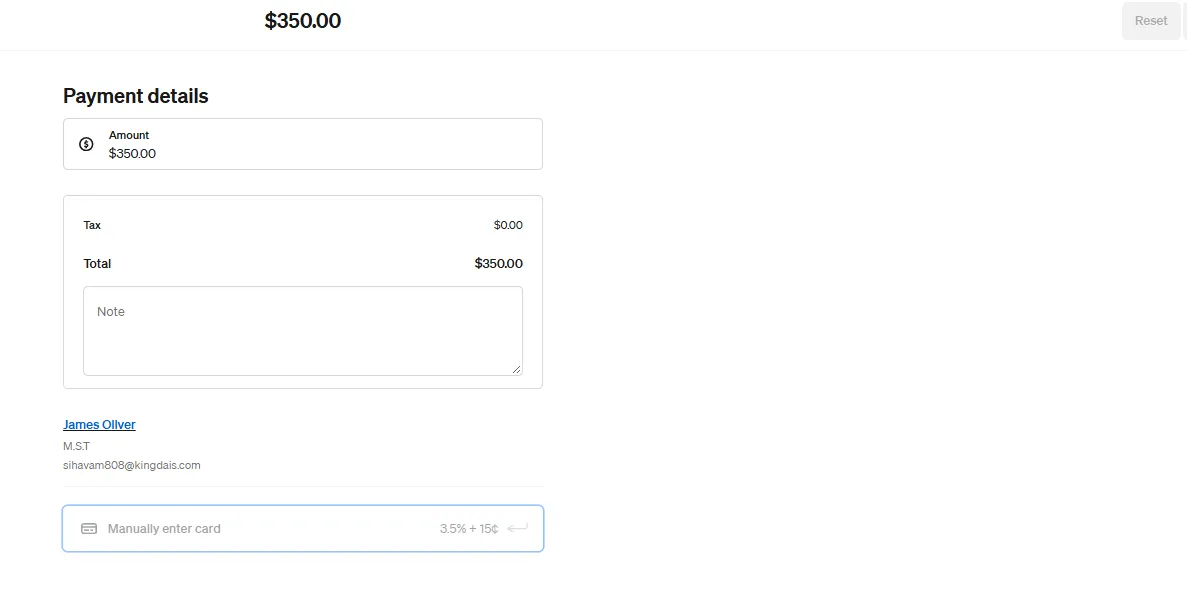
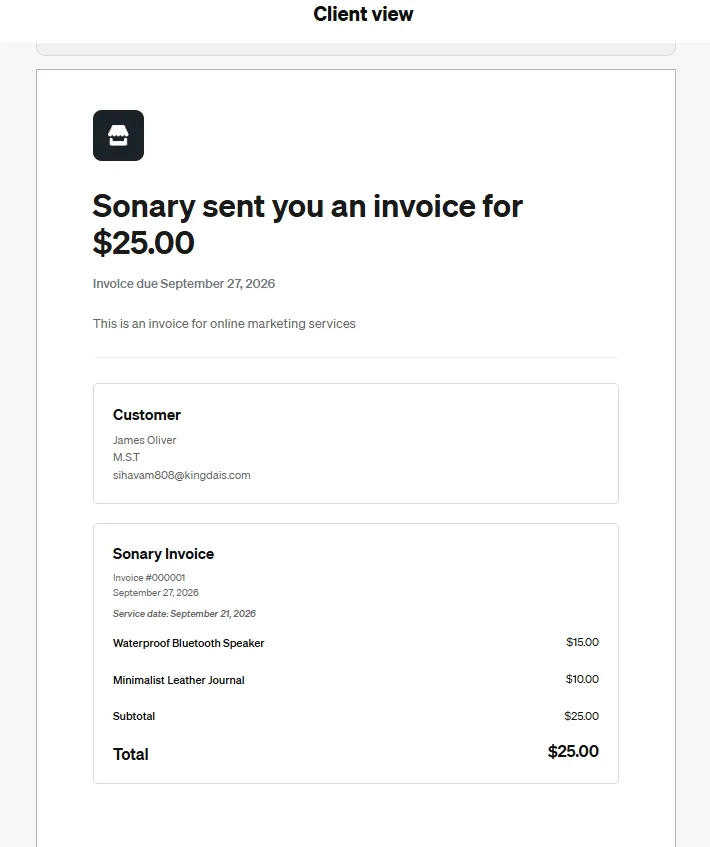
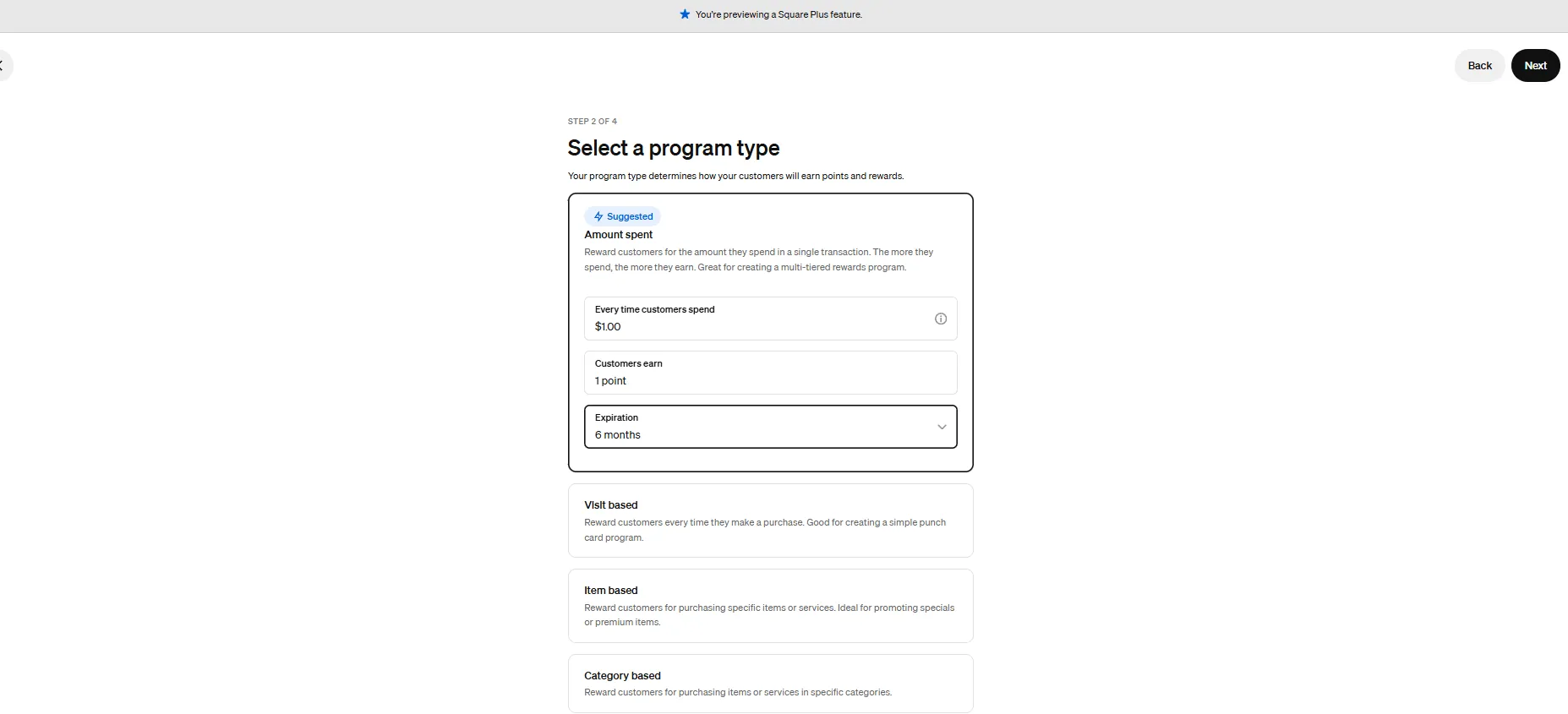
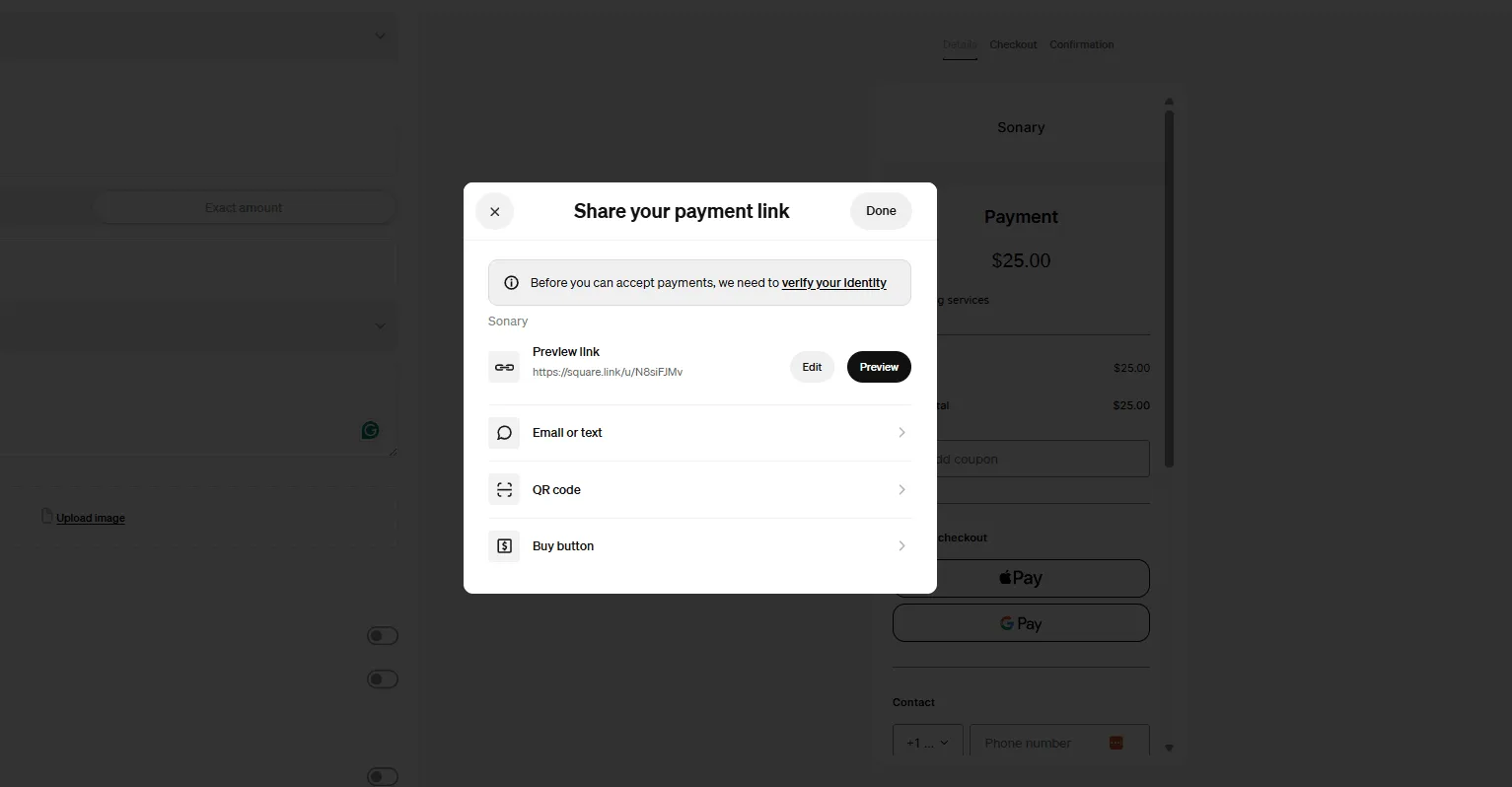
Why it fits
Square gives you a free plan with no contract, fast one-tap order entry, modifiers, tip prompts, and built-in online ordering. Tap to Pay and a $59 reader mean low hardware costs. With a single counter and a short menu, you can start taking orders the same day you sign up.
What we found testing it
In our testing, Square was the simplest system we set up, a few minutes on a phone, and the terminal is ready to ring orders, with almost nothing to learn first. For a new QSR that just needs to move a line fast, that low barrier is the whole appeal.
What does it cost?
- Free plan:$0/month, 2.6% + 15¢ per in-person order; KDS is a $20/month add-on on Free.
- Plus plan:$69/month per location adds free KDS, coursing, and deeper reporting.
- Hardware:$0 with Tap to Pay on iPhone; $59 reader; Square Stand from $149.
When to pick something else
Once you’re high-volume, multi-location, or fighting food cost, Square’s flat rate and lighter inventory tools start to cost you. That’s when Toast, Lightspeed, or Epos Now earns its monthly fee.
What’s the best POS for a high-volume fast food or fast-casual restaurant?
Toast is the best fast food POS system for a high-volume, online-ordering-heavy operation.
Toast POS is a cloud-based POS system tailored to restaurants. It offers special features for restaurant management and a diverse array of features for restaurant management and revenue maximization.
Learn more in our full Toast review.
Pros & Cons
- Streamlined back office operations
- Excellent integration between kitchen and service staff
- Multi-location menu management
- Fairly priced
- Only available on Android
- 2–3-year processing agreement on most plans
- Early termination fee
Features
- Inventory Management
- Loyalty Program
- Mobile Compatibility
- Online Ordering
- Reporting
- Split Checks
- Manage Tips
- Staff Scheduling
- Offline Payments
- Customer Profiles
- Multidevice Payments
- Gift Card Support
- Accounting Integration
- Tableside Ordering
- Floor Plan Management
- Customer-Facing Display
- Self-Service Kiosk
- Coffee Shop
- Quick Service
- Bars
- Restaurants
- Food Truck
- iOS
- Android
- Cloud-Based
- On-place Installation
- Windows
- Mac
- Free Trial
- Monthly subscription
- Annual subscription
- One-Time License
Pricing
$0
mo/
month
$69
mo/
month
$69
mo/
month
Why it fits
Toast is built from the ground up for restaurants, so QSR speed is native: one-tap combos, preset modifier flows, a kitchen display system that routes tickets to the right station, and commission-free online ordering instead of handing DoorDash 25%. Self-serve kiosks and durable, spill-resistant hardware round it out for a busy counter.
What we found testing it
In our testing, Toast set up in minutes, and the day-to-day is simple. Its analytics screen stood out; it clearly shows your best-selling items and drinks and doubles as a lightweight inventory manager, so you can see what’s moving and what’s running low without leaving the POS.
What does it cost?
- Starter Kit:$0/month software, 3.09% + 15¢ processing, the trade-off for no monthly fee.
- Point of Sale plan:$69/month, 2.49% + 15¢; KDS, online ordering, and kiosks are add-ons.
- Hardware: Toast’s own Android terminals, handhelds, and kiosks, financing available.
When to pick something else
Toast is Android-only on its own hardware, and paid plans often carry multi-year contracts. Read the agreement first. A tiny single-location QSR with a short menu may not need Toast’s depth; Square is leaner and free.
What’s the best QSR POS for food cost and ingredient inventory?
Epos Now is the best quick service restaurant management software when food cost and ingredient waste are your real problems; Lightspeed is the closest alternative.
Epos Now is a young and innovative point of sale system. Unlike its alternatives, it offers features and a level of usability appropriate for several niche businesses. The company has been focusing… Read more
Epos Now is a young and innovative point of sale system. Unlike its alternatives, it offers features and a level of usability appropriate for several niche businesses. The company has been focusing on its usability, and the result is a versatile system.
Learn more in our full Epos Now review.
Pros & Cons
- A diverse range of useful features
- Great and inexpensive hardware selection
- Good fit for all sizes of businesses
- Strong selection of integrations
- You must pay if you want personal support
- Not especially tailored to any industry
- Slow customer support
Features
- Inventory Management
- Loyalty Program
- Mobile Compatibility
- Online Ordering
- Reporting
- Split Checks
- Manage Tips
- Staff Scheduling
- Offline Payments
- Customer Profiles
- Multidevice Payments
- Gift Card Support
- Accounting Integration
- Tableside Ordering
- Floor Plan Management
- Customer-Facing Display
- Retail Store
- Coffee Shop
- Nightclub
- Quick Service
- Bars
- Restaurants
- Food Truck
- iOS
- Android
- Cloud-Based
- On-place Installation
- Windows
- Mac
- Monthly subscription
- Annual subscription
Pricing
$39
mo/
month
$99
mo/
month
$100
/month/
/month
Why it fits
Epos Now breaks inventory down to the individual ingredient, auto-deducts stock as orders ring in, sends low-stock alerts, and supports purchase orders and multi-location stock visibility. For a QSR watching every point of food-cost margin, that ingredient-level control is exactly the tool. Lightspeed matches it and adds recipe costing and deep analytics.
What we found testing it
In our testing, Epos Now had the most granular stock control of the group, down to the individual ingredient, with offline capabilities for outages. It’s the system we’d point a margin-focused operator to when restaurant inventory management, not the order screen, is the hard part of the business.
What does it cost?
- Epos Now: software from $39/month (or ~$449 upfront for 12 months); payments 2.6% + 10¢; 100+ integrations. A ~$79/month support plan is sometimes bundled in, so confirm your quote.
- Lightspeed (alternative):$69/month Starter up to $399/month Premium, with recipe costing and reporting in the higher tiers.
When to pick something else
A simple single-counter QSR doesn’t need ingredient-level stock control; it’s overhead you’ll never use, and Square or Toast is simpler. Epos Now’s order-screen speed is fine but less slick than Toast’s for a pure high-volume counter.
What’s the best QSR POS for analytics and scaling to multiple locations?
Lightspeed Restaurant is the best quick service POS system for deep analytics and multi-location control.
Lightspeed POS is a sophisticated, cloud-based point-of-sale system designed to adapt seamlessly to businesses of all sizes. Whether you're operating a cozy café or managing a multi-location retail… Read more
Lightspeed POS is a sophisticated, cloud-based point-of-sale system designed to adapt seamlessly to businesses of all sizes. Whether you're operating a cozy café or managing a multi-location retail chain, Lightspeed offers a versatile solution that scales with your needs. Its user-friendly interface simplifies complex tasks, from real-time inventory tracking to comprehensive sales analytics, empowering business owners to make informed decisions effortlessly. With integrated eCommerce capabilities, you can unify in-store and online operations, providing a consistent customer experience across all platforms. In this Lightspeed POS review, I'll discuss features, performance, customer service, and pricing.
Learn more in our full Lightspeed review.
Pros & Cons
- Payments, POS and e-commerce all in one place
- Wide hardware compatibility makes customization easy
- Interface is intuitive and simple to use
- Lots of support options and helpful tutorials
- Some desirable features only included in the top tier plans
- Add-ons can ramp up the cost
- You are tied in to an annual contract
Features
- Inventory Management
- Loyalty Program
- Mobile Compatibility
- Online Ordering
- Reporting
- Split Checks
- Manage Tips
- Offline Payments
- Customer Profiles
- Multidevice Payments
- Gift Card Support
- Accounting Integration
- Tableside Ordering
- Floor Plan Management
- Customer-Facing Display
- Retail Store
- Coffee Shop
- Quick Service
- Bars
- Restaurants
- iOS
- Cloud-Based
- Windows
- Mac
- Free Trial
- Monthly subscription
- Annual subscription
Pricing
$69
mo/
month
$89
mo/
month
$149
mo/
month
$289
mo/
month
Why it fits
Lightspeed is a cloud-based platform with the deepest reporting of the group , central menu updates, cross-location inventory, recipe costing, and analytics detailed enough to ask which item sold most at full price versus discount, by location. For a growing QSR brand standardizing menus and pricing across sites, that centralized control is the point.
What we found testing it
In our testing, it was very easy for staff to ring orders quickly, and the back office reported clearly across locations, which is why we point scaling operators here rather than to Square. The trade-off is setup time and cost: the real depth lives in the higher tiers.
What does it cost?
- Lightspeed Restaurant:$69/month Starter (2.6% + 10¢ in-person), $189/month Essential, $399/month Premium, multi-location and analytics depth sit in the higher tiers.
- Toast (alternative):$69/month standard, with strong central menu control if you also want native online ordering.
When to pick something else
A single-location QSR won’t use Lightspeed’s multi-site depth and may find the interface denser than Square’s. Watch for annual billing and possible multi-year terms on the upper plans.
What’s the best QSR POS for a simple, payment-focused setup?
Clover is the best QSR point-of-sale system for a simple, hardware-forward, payment-focused counter.
Clover is a user-friendly point-of-sale (POS) system designed for small to medium businesses, offering a range of software and hardware tailored to different industries, from retail to restaurants.… Read more
Clover is a user-friendly point-of-sale (POS) system designed for small to medium businesses, offering a range of software and hardware tailored to different industries, from retail to restaurants. While not the most affordable, its diverse payment partners make it a reliable choice. Clover is owned by Fiserv (which acquired First Data in 2019), Clover POS delivers a comprehensive solution for payment processing, inventory management, and sales tracking.
Learn more in our full Clover review.
Pros & Cons
- Attractive pricing 30-day trial at no cost
- Affordable hardware beginning at $49
- Feature-packed Ideal for businesses with an online presence
- Round-the-clock phone and email assistance.
- You can't apply for the POS online; it requires interaction with a sales representative
- Pricing information isn't clear-cut
- No complimentary plan available
Features
- Inventory Management
- Loyalty Program
- Mobile Compatibility
- Online Ordering
- Reporting
- Split Checks
- Manage Tips
- Staff Scheduling
- Offline Payments
- Customer Profiles
- Multidevice Payments
- Gift Card Support
- Accounting Integration
- Tableside Ordering
- Floor Plan Management
- Customer-Facing Display
- Self-Service Kiosk
- Retail Store
- Coffee Shop
- Nightclub
- Quick Service
- Bars
- Restaurants
- Food Truck
- Android
- Cloud-Based
- Free Trial
- Monthly subscription
Pricing
$16
mo/
month
$59.95
mo/
month
$170
mo/
month
$145
mo/
month
$230
mo/
month
$205
mo/
month
Why it fits
Clover offers flexible, polished hardware, wide availability through payment providers, and a QSR mode that handles fast checkout, real-time inventory, and a range of payment types. It’s the easiest of the reporting-heavy systems to roll out and run day-to-day, and you can negotiate your own processing rate with a third-party provider.
What we found testing it
In our testing, Clover was one of the strongest all-around systems; its real-time inventory tracked stock depletion well, and it was the easiest reporting-capable system to operate each day. Advanced QSR features can require add-on apps, which quietly stack up in cost.
What does it cost?
- Clover:$14.95/month payments-only; roughly $85–$130/month for a full-service plan; from 2.3% + 10¢, negotiable. Clover Mini ~$849, Station Duo ~$1,899; buying direct usually means a 36-month contract.
When to pick something else
For native, restaurant-grade speed and online ordering, Toast is stronger. For the deepest inventory and analytics, Lightspeed or Epos Now win. Choose Clover when hardware quality and payment flexibility matter most and your menu workflow is simple.
Related Articles


How do you set up a QSR checkout that keeps the line moving?
Speed is everything in a quick service restaurant; every extra second per order adds up to a longer line. Here’s the setup that shaved the most taps in our testing, on Toast, Square, or Clover.
- Build one-tap menu buttons and combos. Put your top 10 sellers and combo meals on the first screen so most orders are a single tap.
- Pre-set your modifier flows. Force the modifiers that matter (size, protein, no-onion) and hide the rest to cut taps per order.
- Route tickets to a kitchen display. Send orders straight to a KDS by station so nothing is handwritten and nothing gets lost.
- Turn on the tap and mobile wallets. Enable contactless, Apple Pay, and Google Pay, the fastest way to close each order.
- Add online ordering and a kiosk. Push digital orders to the same KDS so a kiosk and your website take pressure off the counter.
- Add upsell prompts. Set a ‘make it a combo?’ prompt so the POS raises the average check without slowing staff.
What’s the actual difference between Toast and Square for a QSR?
Both are fast to set up and fast at the counter. The difference is depth: Toast is a restaurant platform with native KDS, kiosks, and online ordering, while Square is simpler and free. For a small counter the gap is small; for a high-volume, online-heavy QSR it decides everything.
What matters | Toast | Square for Restaurants |
|---|---|---|
Monthly fee | $0 Starter or $69/mo | $0 Free or $69/mo Plus |
In-person rate | 3.09% Starter / 2.49% + 15¢ paid | 2.6% + 15¢ |
One-tap combos & modifiers | Best, restaurant-native | Strong |
Kitchen display (KDS) | Native | Add-on ($20/mo on Free) |
Commission-free online ordering | Native | Included, simpler |
Self-serve kiosks | Native | Available |
Hardware | Toast Android only | iPhone / iPad, Tap to Pay |
Contract | Often multi-year | None |
Which quick service POS system is right for you?
Toast
- Start for free
- Customize your package
In testing: built for restaurants, fast to set up, with a native KDS and best-seller analytics that doubles as light inventory.
Skip it if you run an all-iPad shop, dislike multi-year contracts, or you’re a tiny single-counter QSR with a short menu.
Choose it if you run a high-volume fast food or fast-casual spot and want one-tap combos, native KDS, kiosks, and commission-free online ordering.
Square for Restaurants
- Free setup & no hidden fees
- Create customer profiles in seconds
In testing, the simplest system we set up, minutes on a phone, and the terminal was ready to ring orders.
Skip it if you’re high-volume, multi-location, or need deep ingredient inventory and food-cost control.
Choose it if you’re opening your first single-location QSR, want zero monthly fee, and need to sell the same day.
Read the full Square for Restaurants review →
Lightspeed Restaurant
- Advanced inventory management capabilities
- Smarter sales & reporting
In testing, the deepest reporting and cleanest multi-location control of the group, staff rang orders quickly in tests.
Skip it if you have a single, simple counter, or you don’t want a higher-tier plan and a possible multi-year term.
Choose it if analytics and multi-location inventory are your hard problems, and you want recipe costing and cross-store reporting.
Read the full Lightspeed Restaurant review →
Epos Now
- 100+ app integrations for your business
- Business reporting available in real-time
In testing: the most granular ingredient-level stock control we tested, with auto-deduction and low-stock alerts.
Skip it if you run a simple single counter where order-screen speed matters more than inventory depth.
Choose it if food cost is your problem and you want a quick service restaurant management software with ingredient-level tracking.
Read the full Epos Now review →
Clover
- Cloud-hosted & accessible from anywhere
- Accept payments & track inventory
In testing, one of the strongest all-around systems, polished hardware, real-time stock, and the easiest reporting-heavy system to run day-to-day.
Skip it if you want native restaurant-grade online ordering and KDS (Toast) or the deepest inventory (Lightspeed/Epos Now).
Choose it if you want flexible, premium hardware, a simple payment-focused setup, and your own negotiated processing rate.
Do you actually need a QSR-specific POS, or will a general POS do?
If you serve food to order, yes, a restaurant POS pays for itself. A general retail POS does not.
Retail and general POS systems aren’t built for combos, forced modifiers, or kitchen routing, so every custom order becomes slow manual entry and the kitchen works off guesswork. A quick service restaurant POS handles those natively and fires tickets to a KDS, which is the difference between a 12-second order and a 30-second one at a lunch rush. The one honest exception: a grab-and-go counter selling a handful of fixed items with no kitchen ticket (think pre-packed drinks and snacks) can run fine on a simple system like Square’s free plan or even a basic card reader. Everyone cooking to order should buy a restaurant-grade POS.
How does your QSR POS affect your online visibility?
Your POS quietly decides how easily hungry people nearby can find and order from you, and most operators never connect the two.
Toast, Square, and Clover all publish an online-ordering page tied to your menu. Google indexes those pages, so a clean menu with real item names and prices helps you rank for “tacos near me” or “late-night burgers open now.” Keep the POS menu, hours, and address identical across your Google Business Profile, your ordering page, and third-party apps, because AI answer engines like ChatGPT Search and Perplexity cite sources that agree with each other. Commission-free online ordering through your POS also keeps the customer and the data yours, rather than a delivery app’s. The QSR whose menu, hours, and ordering link match across the board wins the free “order now” traffic.
What do QSR owners actually ask before picking a POS?
What’s the best POS for quick service restaurants in 2026?
Toast is the best POS for quick service restaurants overall, with one-tap combos, a native kitchen display system, kiosks, and commission-free online ordering. Square for Restaurants is best for small or single-location QSRs; Lightspeed and Epos Now for inventory and multi-location control; and Clover for a simple, payment-focused setup.
What’s the most important feature in a QSR POS?
Speed of order entry and checkout. Every extra second per order lengthens the line and costs revenue, so one-tap combos, pre-set modifiers, tap payments, and a kitchen display that fires orders instantly matter most.
What’s the best quick service POS system for a small QSR?
Square for Restaurants. It’s free to start, simple to set up, fast at the counter, and includes online ordering, ideal for a single-location fast-food or fast-casual spot just getting going.
Do QSRs need a restaurant-specific POS?
Yes, if you cook to order. Restaurant POS systems handle combos, forced modifiers, and kitchen routing that a general retail POS can’t do efficiently. Only a fixed-menu grab-and-go counter can get by on a general system.
Which QSR POS is best for inventory management and food cost?
Epos Now and Lightspeed. Epos Now tracks stock to the individual ingredient and auto-deducts as orders ring in; Lightspeed adds recipe costing and deep analytics. Both beat Square and Toast on restaurant inventory management.
How much does a fast food POS system cost?
A fast food POS system costs $0 to $399/month in software, plus 2.3%–3.09% + 10–15¢ per order and any hardware, KDS screens, or kiosks. A QSR doing $50K/month in cards pays roughly $1,250–$1,550 a month in processing before software.
Can a QSR POS do online ordering without paying delivery commissions?
Yes. Toast and Square both offer commission-free online ordering through your own branded page, so you keep the margin and the customer data instead of paying a third-party app 20–30%.
What POS supports self-serve kiosks for a QSR?
Toast, Square, Lightspeed, and Clover all support self-serve kiosks. Toast’s are the most restaurant-native; kiosks cut line pressure and tend to lift average check size through built-in upsell prompts.
Where can you go deeper?
- Best POS Systems for Small Business (hub), the full situation-by-situation POS guide.
- Best Restaurant POS Systems, menu setup, KDS configuration, and contract gotchas for food service.
- Kitchen Display Systems, compare KDS-capable POS systems for firing tickets to the line.
- Best Inventory POS Systems for QSRs that live on ingredient-level food cost control.
- POS for Coffee Shops & Cafés and POS for Food Trucks are sister guides for other quick-service formats.
- Best POS for Bars & Pubs, if your QSR also runs a bar or taproom.
- How We Rate, Sonary’s testing and scoring methodology.
What’s the bottom line on the best quick service restaurant POS?
There’s no single winner among quick service restaurant POS systems; there’s the one that fits how your QSR runs. For most fast-food and fast-casual operators, Toast is the best POS for quick-service restaurants: one-tap combos, a native KDS, kiosks, and commission-free online ordering. Opening your first single-location QSR? Square for Restaurants is free and the simplest. Fighting food cost or scaling locations? Lightspeed or Epos Now for ingredient-level inventory and reporting. Want simple, premium hardware? Clover. Match the point-of-sale system to your volume and menu, then set it up this week.
Who wrote and reviewed this article?
Written by Daniel Zvi
Daniel Zvi writes about POS and small-business software at Sonary, where he has hands-on tested more than 12 point-of-sale systems. He’s the author of Sonary’s POS comparison library, including Toast vs Lightspeed, Clover vs Toast, Square vs Toast, and “What Is a POS System?” His focus is on giving non-technical operators the practical details they need to choose the right tools.
Daniel’s author page · LinkedIn
See also
- Throughput at the counter is the measure that matters, and best POS systems by business type shows which categories are tuned for it.
- Order-ready screens and hold times keep the line moving, and the best KDS for a small kitchen page covers both.
- Drink-led counters with modifier heavy menus have their own shortlist in best coffee shop POS systems.
- Adding table service, covers and course firing moves you to the best restaurant POS system comparison.