
Last updated: September 2026
Google Gemini is Google's flagship multimodal AI assistant — it reasons and generates across text, images, video, audio, code and PDFs in one app. As of 2026 the consumer lineup runs on the Gemini 3.5 generation, framed by Google as "frontier intelligence with action": Gemini 3.5 Flash is Google's strongest agentic and coding model yet — leading coding and agentic benchmarks, with output roughly 4× faster than other frontier models and computer use built in, so you can build custom agents that see, reason and act across desktop, mobile and browser. Gemini 3.5 Pro is rolling out for the most advanced reasoning and long-context work (up to a 1M-token context window), with a Deep Think mode on the top tier. Image generation is handled by the Nano Banana 2 family (with Nano Banana 2 Lite as the fastest, most cost-efficient option) and video by Gemini Omni — a model that creates high-quality video from any input (image, audio, video, text), grounded in real-world knowledge and physics; the first model is Gemini Omni Flash. Gemini is free to start, with paid Google AI plans (Plus, Pro, Ultra) unlocking higher limits, Gemini Omni video, Deep Research and deep Google Workspace integration.
Plans & Pricing
Free
$0
seat/
month
- Image generation
- Unlimited exchanges per conversation
Google AI Plus
$4.99
seat/
month
60-day free trial
Google AI Pro
From $19.99
seat/
/mo or per user
14-day free trial
Google AI Ultra
From $99.99
seat/
/mo or per user
14-day free trial
* Featured prices can be updated and free offers may include additional terms.
Google's Gemini chatbot offers a free version with AI-powered assistance for various tasks.
Expert Score
Pros
- Many features available in the free plan, strong value at $0
- Deepest integration with Google Workspace
- Capable of writing in multiple languages for global reach
- Clear, laddered pricing from $4.99 → $99.99
Cons
- Occasionally misinterprets the context or the nuances of the task
- Top features can be region-limited and roll out unevenly
- Data-privacy considerations when feeding sensitive business content into a consumer AI
Customer Support
Given that Gemini AI's chatbot is a product of Google, it boasts a meticulously organized customer support system.
The depth of support available varies with the user's subscription level — basic for free users and comprehensive for enterprise clients, who also enjoy quicker service.
Despite limited options for some users, the majority can access ample resources such as blog posts, FAQs, and tutorials within Google’s help center, aiding in the initial setup, prompt writing, and integration with other applications.
24/7 Help & Support
Users can get 24/7 support via chatbot
FAQ
Here: https://gemini.google.com/faq?sjid=15812671598888125333-NA
Blog
Google’s Blog section includes articles about every product, incl
Ease of Use
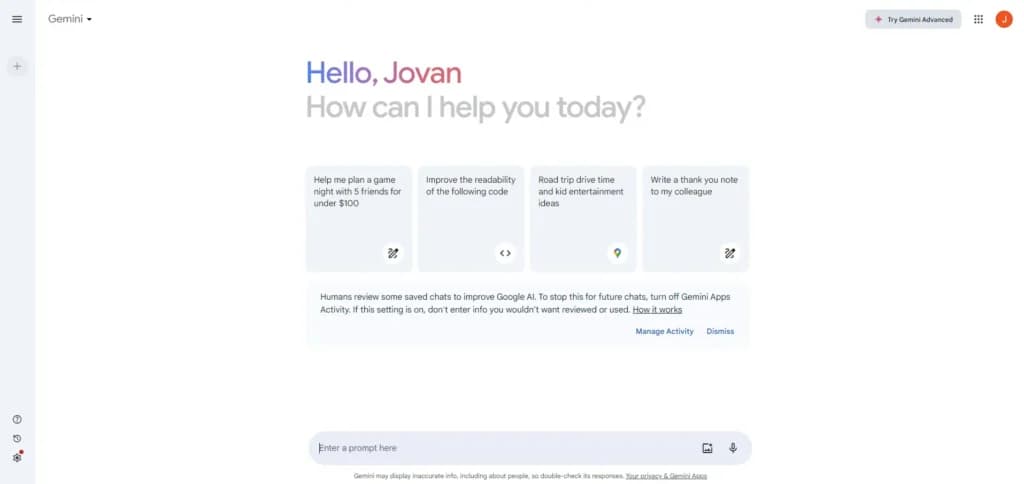
Getting started with the Gemini AI writing tool is straightforward, even for those unfamiliar with AI chatbots.
Users can create an account effortlessly by connecting their Google account and automatically enrolling in the free subscription plan with an option to upgrade swiftly.
To begin using the tool, a user simply needs to input a prompt into their browser. While the tool is user-friendly for basic content writing or coding tasks, exploring the detailed guides in the Google Gemini resources can greatly refine the effectiveness of the prompts and improve overall outcomes.
Performance
Gemini could easily rank among the top five AI tools thanks to its stellar performance across all features, from content writing to AI-driven code development.
The Gemini AI writing tool consistently delivers flawless content, no matter the complexity of the subject. The effectiveness of this tool hinges on the clarity and detail of the user’s prompt.
When interacting with the Gemini AI chatbot, the consistency in style and tone of voice is maintained unless instructed otherwise, which is crucial for generating extended content from multiple prompts.
Features & Functionality
A great thing about Google Gemini is the fact that it’s not a single-function AI tool. It includes a few different features and functionalities that provide value to its users. Even with a number of features available at the moment, Google plans to upgrade Gemini with additional features and functionalities over time.
Content Writing
Here are some of the content writing features you’ll find:
- AI-driven content generation
- Semantic understanding
- Tone and style adaptation
- SEO enhancement tools
- Language translation
- Real-time collaboration
- Content personalization
- Multimodal content capabilities
- Automated summarization
- Plagiarism detection
AI-driven content generation
The Gemini AI tool is often used for content writing, whether blog posts, articles, social media posts, or anything in between. However, better results can be achieved when users have conversations with Gemini.
Aside from writing content from scratch, the Gemini AI tool can also be used as a writing assistant. This means that users can generate ideas, and content structures, or even evaluate already written content. This is particularly important for writers who want to cover all aspects and go in-depth about a certain topic.
Once the user types in a prompt, Gemini will return the result within seconds!
Users have also asked Gemini a variety of questions and prompts to evaluate its response quality and capabilities, testing how well it handles different topics and tasks.
Real-time collaboration
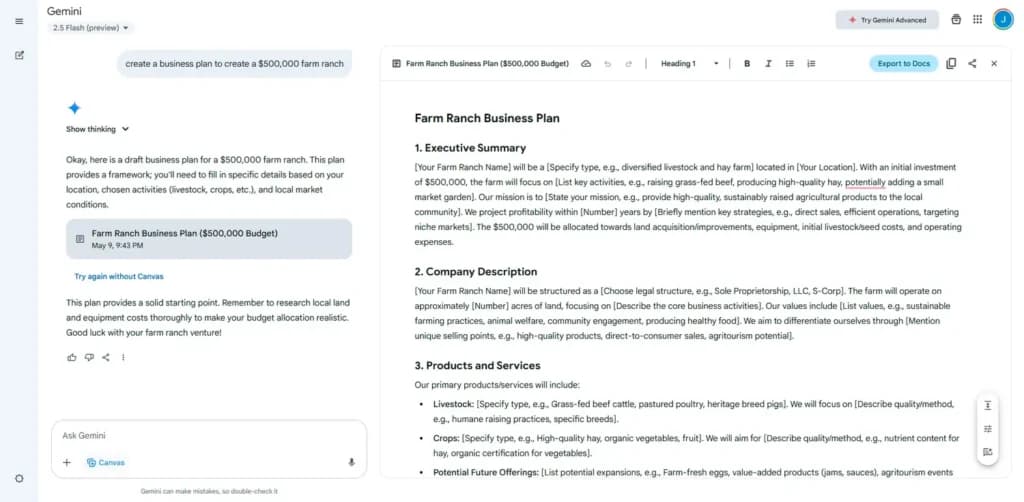
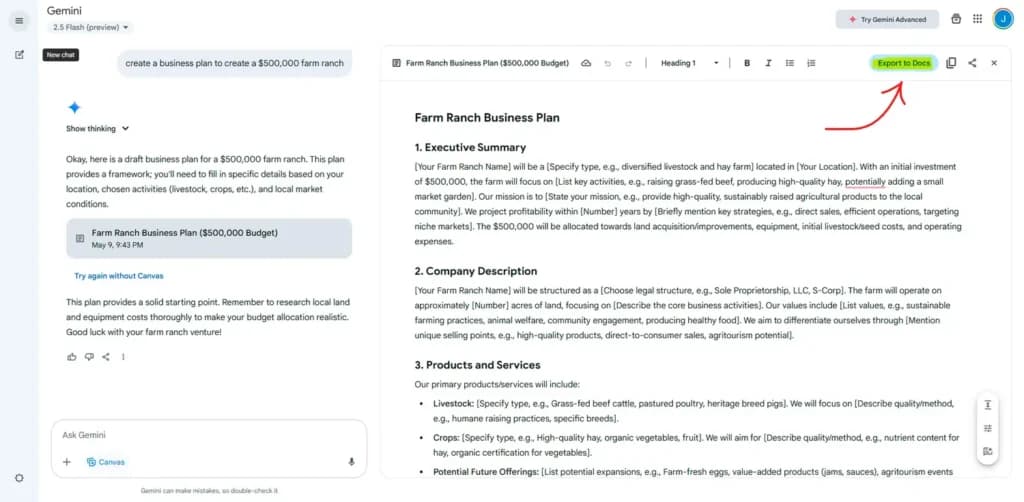
Although users can’t collaborate in real-time within the Gemini platform, they can collaborate within Google Docs, which Gemini can easily integrate into.
Tone and style adaptation
Giving specific instructions within prompts, the AI tool will return AI-generated content that follows these instructions. This feature provides huge value for brands with a built brand voice and who want to publish content that follows the same style and tone.
Language Translation
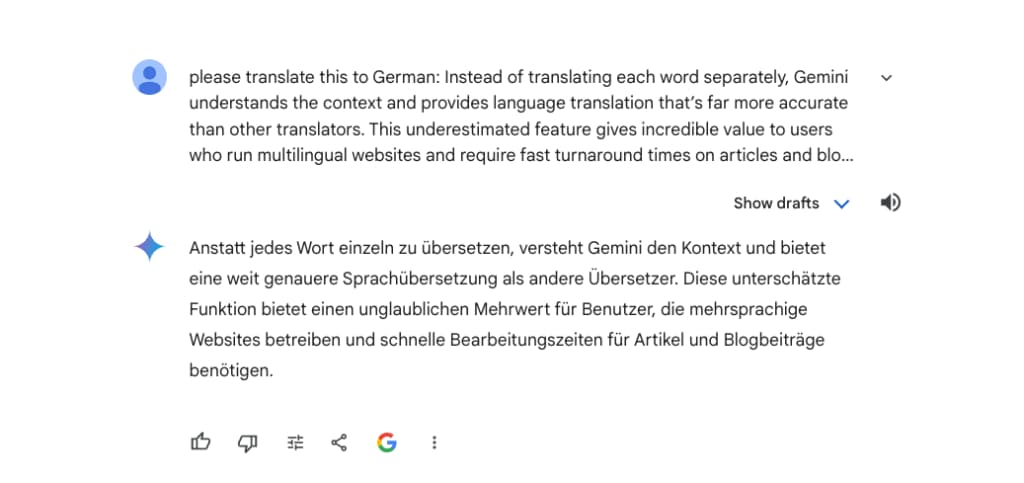
Instead of translating each word separately, Gemini understands the context and provides language translation that’s far more accurate than other translators. This underestimated feature gives incredible value to users who run multilingual websites and require fast turnaround times on articles and blog posts.
Automated summarization
Summarizing text gives users the possibility to understand complex and long blocks of text, and fast. This feature can also be used for generating new content, repurposing old content, and search engine optimization.
Multimodal Reasoning Within The Chatbot
Gemini AI supports a diverse array of formats including text, images, audio, video, and code.
Initially, AI chatbots could only process typed queries or tasks, but Gemini now accepts a wide range of inputs. This flexibility significantly broadens the ways users can interact with this AI-powered tool. Beyond just handling text, Gemini’s multimodal capabilities allow users to upload various media types for interaction, enhancing the tool’s utility. However, unlike some competitors that support uploading and analyzing multiple images in a single message, Gemini currently allows users to upload only one image per message, which can impact tasks requiring analysis of multiple images. It’s not just about improved content creation; Gemini can also analyze extensive media content, summarize detailed information, and perform numerous other functions.
Integration With Google Tools
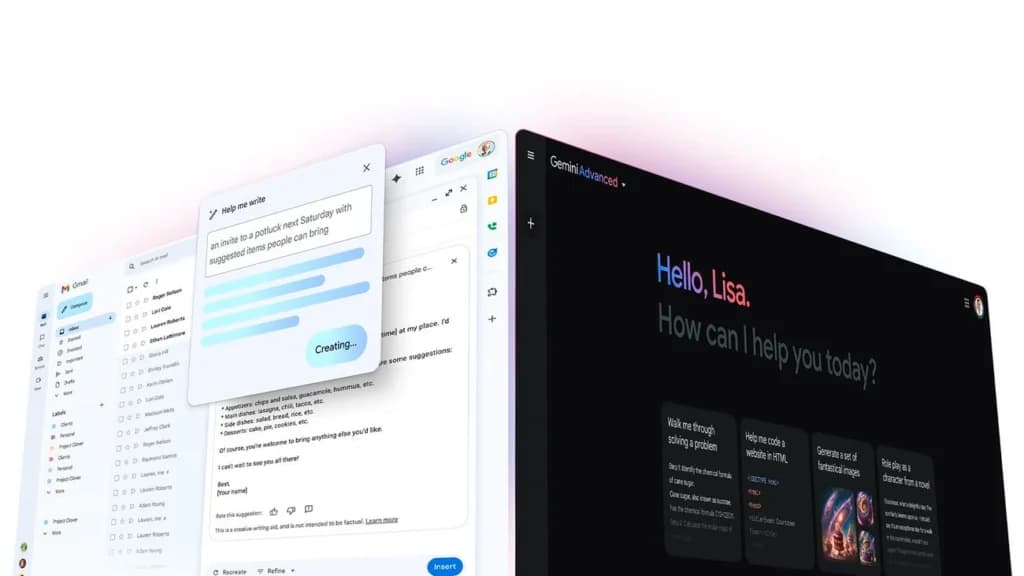
One of the key features of the Gemini AI tool is the fact that it can be easily integrated into a number of Google services, including Gmail, Docs, Sheets, Maps, and even YouTube. Gemini enhances a wide range of Google products, such as Gmail, Calendar, Docs, and Sheets, by adding AI-powered functionalities that streamline tasks and boost productivity.
Being able to use the Gemini tool within these services allows users to be significantly more productive and creative. Integration with different Google apps gives users the ability to retrieve very specific information and get recommendations based on specifics that the apps can’t do on their own. For example, users can get recommendations for restaurants within a specific distance that serve specific dishes and are rated with 4.5 stars or higher. Using the Google Maps app without Gemini wouldn’t give users such a specific result. Additionally, Gemini's Google Search integration allows users to access real-time information and up-to-date knowledge directly within the platform, ensuring factual accuracy and current data. If those features matter more than the model itself, a run through the best AI apps for small business shows which tools package them differently.
There are countless other examples of how Gemini can help streamline different processes within Google services. This is probably one of the most underrated Gemini features, but it’s safe to say that it’ll show its true potential in the near future. Video generation sits inside the wider stack here, so weigh it against the best free AI video generators before committing to a single ecosystem.
One of the most significant additions lately is Veo 3 / Veo 3.1— a video generation model integrated into the Gemini ecosystem and accessible through Gemini Apps /API. This opens video creation to people who may not have video-editing or animation skills.
Important details:
- With Veo 3.1 you can create short, high-quality videos (8 seconds) from a plain text prompt or from an image + prompt. Gemini transforms your input into motion + visuals + native audio (ambient sounds, speech, etc).
- Videos can be 720p or 1080p depending on settings.
- Veo 3 supports both text-to-video and image-to-video workflows, giving flexibility: you can describe a scene or start from a photo.
- There is support for extension of previously generated videos, specifying first/last frames (for smooth transitions), and generating content in cinematic style.
- For developers or creative agencies — Veo 3 + Gemini API allows integrating these video-creation capabilities programmatically into workflows or tools.
For SMB use — you could, for example, generate short promo videos, social media clips, product teasers, animated ads — without needing a video team or expensive software. Turning a prompt into a shipped internal tool takes a different kind of platform, and the best no-code app builders comparison covers those.
Other tasks: video understanding, audio, multimodal workflows
Gemini 3 isn't just about creating content. It can also understand and analyze media:
- If you feed it a video, it can process both visual and audio streams and generate descriptions of what is happening — useful for content summarization, accessibility (captions), indexing, metadata generation, etc.
- It can parse documents (PDFs), images, code, data charts — making it suitable for research, summarization, data extraction, and structured output.
All of this makes Gemini 3 a very powerful Swiss-army knife AI — one tool that can handle writing, media creation, coding, analysis, and content automation. Real-world examples include using Gemini's multimodal capabilities to summarize meeting recordings, extract key data from complex documents, or generate interactive visuals to clarify difficult concepts.
Visual content generation (images)
While Gemini 3 itself handles reasoning and multimodal inputs, for image generation/editing the suite typically uses a dedicated model built on Gemini foundations: Nano Banana Pro. This model has become part of the Gemini ecosystem, offering strong AI-driven image creation and editing.
Key image features:
- Text-to-image generation, image editing, object fusion, background changes, style adjustments.
- “Subject consistency”: the same person/item or style can be retained across revisions or different prompts — helpful when you need consistent branding, recurring characters, or brand visuals.
- Combines “world knowledge” (context-aware edits) — you can make context-aware changes to images (e.g. change season, change lighting, background environment) in a realistic way.
- For branding or commercial visuals — you can produce polished images without hiring a graphic designer, reduce costs, speed up content creation.
Because of this, Gemini 3 + Nano Banana Pro becomes a powerful tool for small businesses needing regular visuals — for social media, marketing, ads, product mockups, etc.
AI Image Generation
You can also enhance your written content with customized images, which is great for the user experience as well as SEO results.
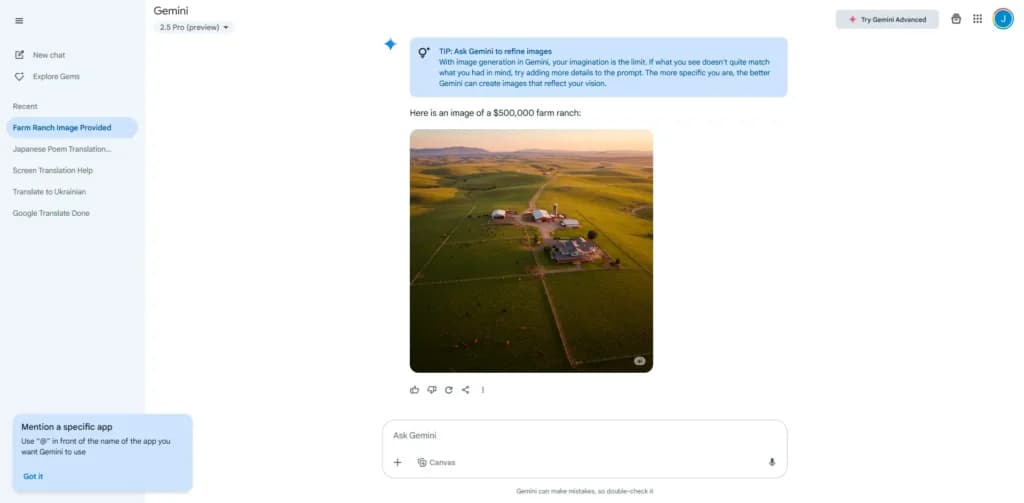
Here are some of the features and capabilities of Gemini's AI image-generation tool:
Core Features
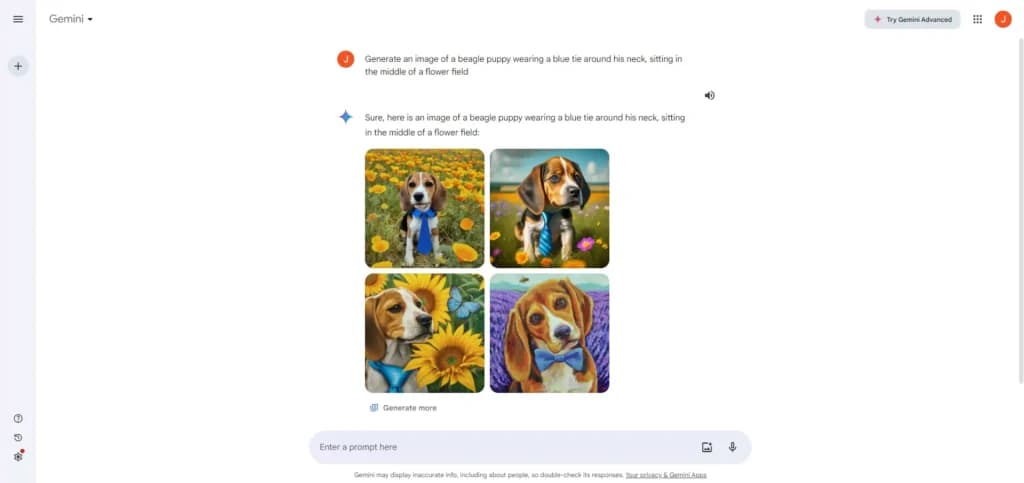
Gemini offers a variety of image generation features, including text-to-image conversion, customizable styles and themes, high-resolution outputs, and real-time modifications. Users can manipulate objects within images, create and edit scenes, emulate artistic styles, convert image formats, and process images in batches.

Seamless Integration
It integrates smoothly with various creative software suites, enhancing workflow efficiency.
Efficient and Realistic Image Creation
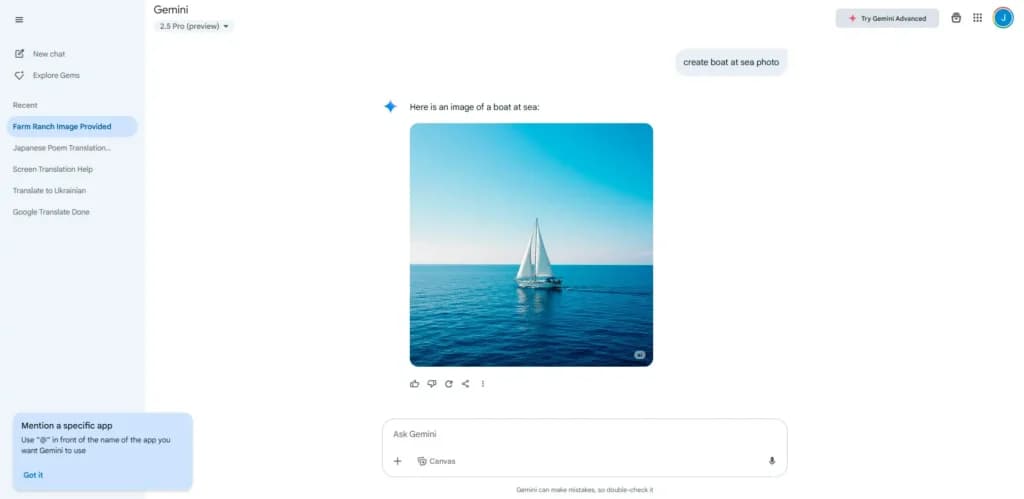
The AI image generation tool within Gemini allows users to input prompts and quickly generate accurate and realistic images, streamlining the content creation process.
User-Controlled Customization
Detailed prompts let users specify the image's format, style, and theme, with the tool providing results in seconds. After generation, images can be regenerated or downloaded based on user needs.
Accessible on multiple platforms for versatile use.
Website Builders
Google Sites builder has some features that make the design process easy. Functions like collapsible fields and carousel creation add some style and interactiveness to the otherwise rigid look of Google Sites builder.
But beyond the look and feel, other features can be helpful to small online businesses.
Auto SEO
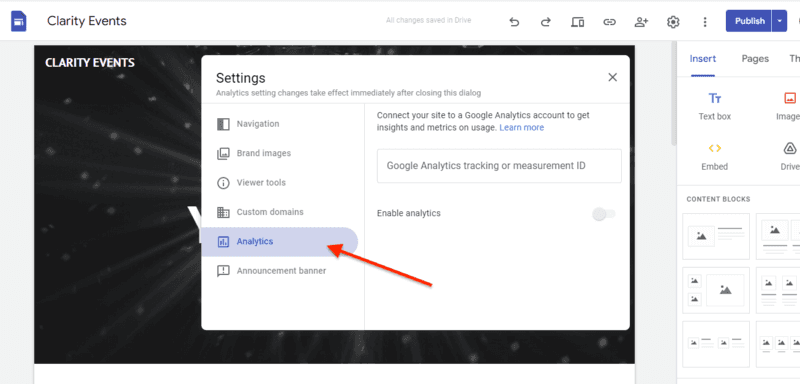
Google Sites have some auto SEO functionalities, like creating page descriptions. Using a custom domain, submitting your website to Google Search Console, and setting up Google Analytics increases your website SEO.
There are lots of tips available online through Google support and SEO experts that you can use to improve your website’s performance. Considering the fact that Google is the dictator of SEO rules, its website builder should be well-positioned to abide by those rules.
Google Marketplace
There are over 5,000 third-party apps available on the Google Workspace Marketplace. These apps include business tools, CRM tools, sales tools, document management tools, and workflow tools. Thankfully, there is a search button available so you can find what you are looking for easier. You can add any third-party app to your Workspace and use it to modify what Sites can do.
If you don't want add-ons from the marketplace, you can embed apps from other sources or create your own custom apps using the App Script tool (only available to Enterprise users).
Pre-formatted website layouts (templates and themes)
Creating your design from scratch can get intense and confusing if you are a true beginner in website building. Knowing where to set elements, keeping elements in harmony and other simple things can be difficult without guides and formats.
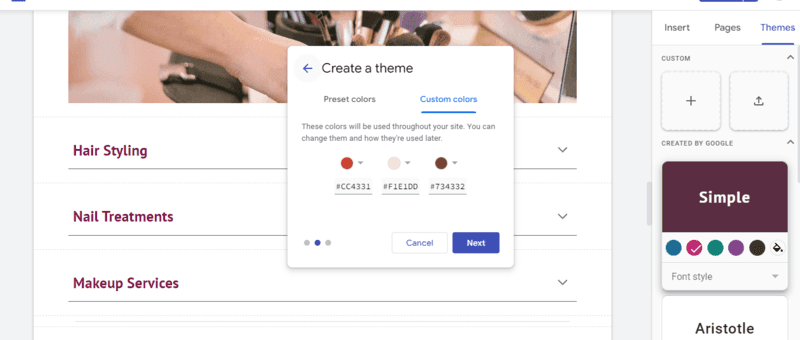
Google Sites has pre-designed templates, themes, and content blocks. These preformatted layouts make it easy to arrange elements on your website. There is a grid background and block divider that helps you keep elements in proper alignment and prevent overlaying by accident.
That there are preformatted website layouts doesn't mean you can not customize. You can customize templates by moving content blocks up and down a page or switching themes. You can create custom themes too. It’s almost complete creative freedom.
Analytics and Reports
Website analytics is an important tool that businesses use to monitor and improve their marketing strategy. It also reveals how users interact with your websites, which can help you identify and remove pain points on your user journey. Most website builders depend on third-party apps for analytics and reports but Google Sites do not.
Websites created with Google Sites are integrated with Google Analytics. This allows you to leverage the full capacity of analytics to track your website visitors and generate reports. You can visualize data and share reports via email.
Mobile responsiveness
A mobile responsive website is one with content that automatically aligns with various screen sizes (especially mobile phones, tablets, and desktops).
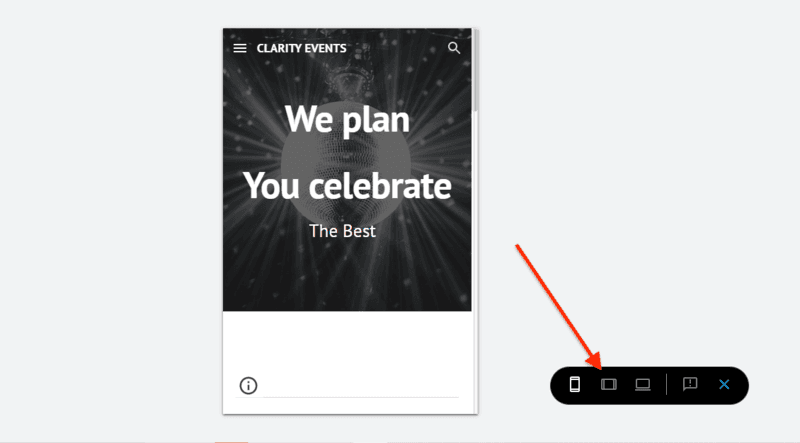
Although website designing with Google Sites can only be done on a desktop, you don't have to create a different design for a smartphone screen. You can toggle between different screen sizes on your desktop to see how it would look on mobile and tablets.
Most times, you don’t need to adjust the elements to fit. They just fit into smaller screens by default. That is because Google Sites websites are designed to be seamlessly mobile responsive.
Announcement banner
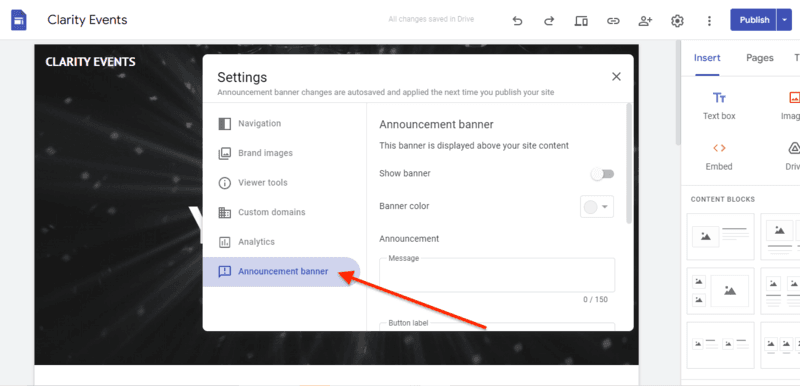
Changing your business name? Running a promotion? A website banner is the easiest way to get customers to see the information easily and quickly. An announcement banner is an eye-catching tool that website owners use to relay urgent and important information.
Most other drag-and-drop website builders often restrict banner displays to paid plans and the top tier plans at that. With Google Sites, you can display your banner on your website, even on a free plan. You can choose to display the banner sitewide or restrict it to specific pages.
Web Design Software
Google Web Designer allows users to easily create designs using a drag-and-drop interface, which can be helpful for users who are new to web design or who do not have much experience with HTML5. It is also extremely responsive and allows users to create designs that will automatically adjust to fit different screen sizes and devices, which is important for creating content that is accessible on a wide range of devices.
The best part of Google Web Designer is its tool for creating animations and interactive elements, such as hover effects and clickable buttons, which can help to make content more engaging and interactive. It also integrates with Google's ad-serving platform, making it easy for users to create and publish ads to Google's network.
Easily manage and update website content.
Customize websites with advanced coding options.
Features
- Grammar and Style Checks
- SEO Optimization
- Plagiarism Check
- Collaboration Features
- Content Personalization
- Multilingual Support
- API Access
- Text Editing and Formatting
- Compliance and Security Measures
- Background Noise Reduction
Verdict
Gemini AI is renowned for its versatility and exceptional value in practical applications. Suitable for everyone from solo entrepreneurs to large corporations, the tool is competitively priced, ensuring accessibility without compromising on the powerful features it provides.
As Gemini AI is still developing, users should be aware of its infancy, especially given past issues with Google’s AI tools. However, it's improving rapidly, constantly adding new features and refining existing ones. Getting acquainted with Gemini AI early on can greatly benefit users, making it easier to integrate future enhancements.
Users Reviews
Be the first to write a review
Share your experience with Gemini AI and help others choose the right software.