
Last updated: October 2026
Hostinger offers multiple services related to hosting and domain management. Whether you’re a small business or operate a huge website, Hostinger has a hosting plan for you and can adapt to your unique needs.
Hostinger Plans & Pricing
- Managed Hosting for WordPress
- 400 000 files and directories (inodes)
- 100 GB SSD storage
- Free pre-built templates
- Free automatic website migration
- WordPress vulnerabilities scanner
- Weekly backups
- Standard WordPress acceleration
- Unlimited bandwidth
- Free domain (US$ 9.99 value)
- Everything in the Website Plan Plus:
- Free CDN
- WordPress AI tools
- WordPress staging tool
- Everything in the Business Plan Plus:
- Dedicated IP address
- Priority support
* Featured prices can be updated and free offers may include additional terms.
Hostinger offers business owners the freedom to create stunning websites with its free plan, which puts very loose limits on the tools available for customers to use.
However, with all the freedom allowed on the free plan, you can’t actually publish your website until you upgrade to a paid plan.
This free plan allows you to try out a majority of the features offered by Hostinger. So, can take all the time you need to build your website and only pay when it’s about to go live.
Once your website is all set, you can easily upgrade to one of the paid plans below to publish the site and start reaching your customers with ease.
Hostinger has many pricing plans based on the type of hosting you’re looking for which includes shared hosting, cloud hosting, VPS hosting, WordPress hosting, and more. Each type of hosting has multiple pricing tiers but this review focuses on shared hosting.
The Hostinger shared hosting plans are quite competitive when compared to other companies that offer a similar service. The renewal price is also within an acceptable range which makes it a great choice for small and medium-sized websites.
Expert Score
Pros
- Excellent uptime
- Unlimited storage and bandwidth on all plans
- Sophisticated AI-powered business tools
- Large photo repository
Cons
- Can’t publish a site on free plan
- Limited customization
Customer Support
Hostinger has a robust support system with email and live chat supports available, as well as easily accessible materials for customer self-service. So, whether you prefer to get your hand busy with DIY support or want to solicit the help of an expert, you can feel confident that the Hostinger team is there for you.
Email Support
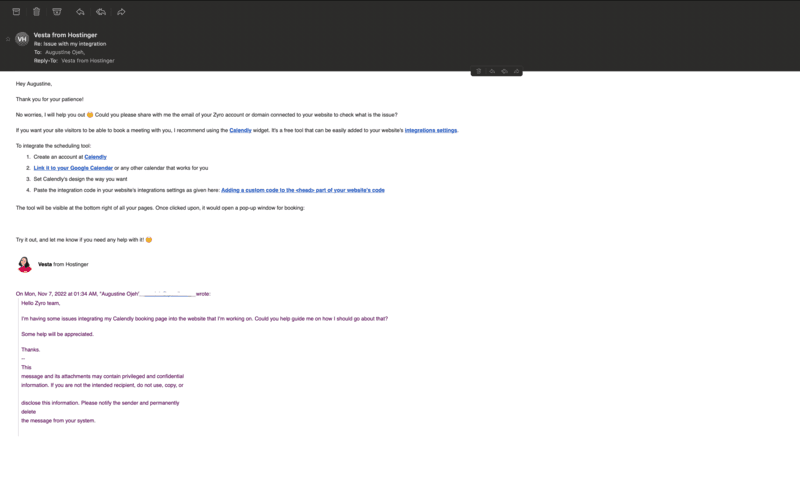
Finding the email support of Hostinger was pretty easy. Reaching out to them about integrating my Calendly booking page, I received a response in exactly 30 minutes. The support specialist that reached out to me was graceful. She offered to walk me through the integration process and was even willing to do it for me herself. All I had to do was share my website domain name or email address.
Live Chat
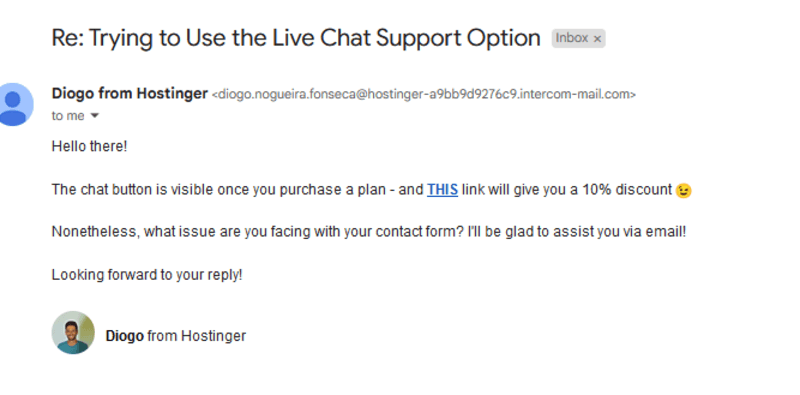
The live chat option is intertwined with the email support service. When you send a message to the support team via live chat, the email support feedback in your mailbox will be updated in real time. This way, you don’t have to be emailed a transcript when you finish your chat. And if your live chat does go off for some reason, you can always kick it back up by sending a response via email. Interestingly though, the live chat option is not available to everyone. Those using the free plan cannot access the live chat. You can only see the chat button after you’ve purchased a premium plan. I found this out after accessing the page incognito and reaching out to the team to figure out why a live chat button was missing.
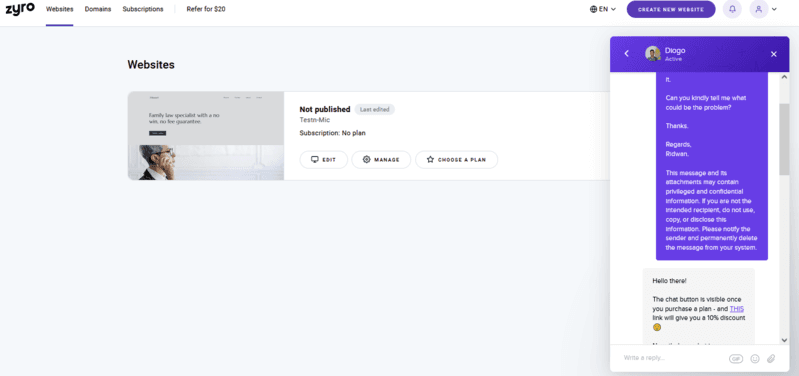
Once I signed back into my paid account, the live chat was there for me to use all through. And Diogo was quite responsive. Great support, man!
FAQs
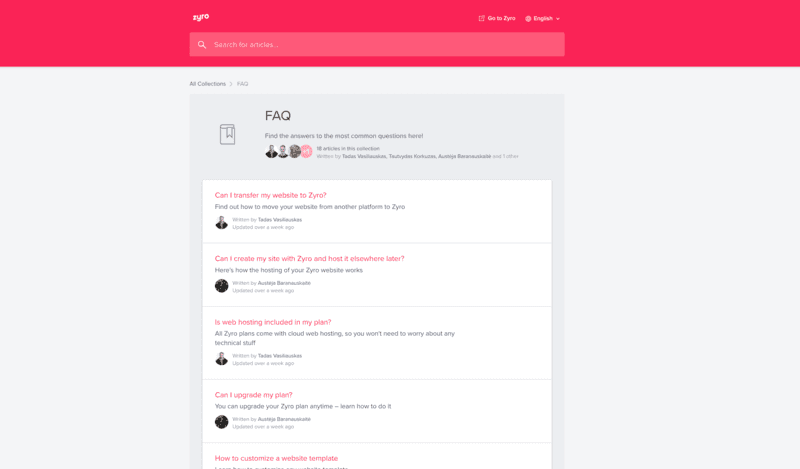
FAQs are important for every business page. It saves you and the support team a lot of time. Instead of waiting to get a response to generic questions, you can just scan through the FAQ section of the website to catch answers to the most commonly asked questions.
Hostinger Blog
Hostinger blog is designed to help small business owners grow as an enterprise. It features helpful branding and marketing tips to enhance business success. Personally, I’ve gained a wealth of experience-based knowledge by following the blog. Business Glossary Hostinger Business Glossary, also known as Hostinger Encyclopedia, is a page specifically built to help business owners understand the complex and relatively easy technical terms that they’d encounter as they run an online business from day to day. The Business Glossary page groups terms into two main categories, including website builder and e-commerce categories. Each of these categories contains terms that are explained to-the-detail with really interesting examples to help users understand them better. Personally, I consider this Hostinger Business Glossary as the ultimate online business dictionary.
Hostinger provides support for its customers in many ways. It provides a detailed knowledge base and multiple tutorials related to managing a website. It also has live chat and email support if the self-help resources aren’t enough. The support reps themselves are knowledgeable but it can sometimes take a while to get a response from the support team.
Available for all customers and will usually reply within a few h
24/7 Help & Support
Hostinger provides round-the-clock support for all customers.
FAQ
Multiple FAQs around the website and a detailed knowledgebase.
Live Online Chat
Live chat is available for all customers 24/7.
Ease of Use
Aside from the sophisticated AI branding tools available on the Hostinger website builder, the drag-and-drop editor makes it easy to use. And the intuitive interface brings adds fun to the website creation process. Some of the use cases are pretty straightforward.
Setup
Does Hostinger really have a setup process? Hard to tell since all you have to do is sign in with your email and you are set. Unlike most other website builders that puts a questionnaire in your face, Hostinger makes setting up a super easy process. Once you sign up, you’d be immediately presented with loads of website templates to pick from. Then, you can start building your website right away. Right on this templates page, you can choose to start building your website from scratch or customize a really cool template to fit your brand message and tone. As you can see in the video below, I jumped right into one of the cool, techies templates on the page. Up next? Design!
Designing
Once you finish Hostinger's almost non-existent setup process, you can dive right into designing your website. For most website builders, the design process could require a few mouse clicking and feature fondling. Working with Hostinger, the design process is right on track. Intuitive, visual, and highly responsive. From how the texts on your page look to the forms and buttons, everything can be customized just how you want it. Total creative freedom.
Text Styling
Even though you’re new to web design, you obviously know that there’s a need for uniformity across the whole website. This includes maintaining uniform text styles, including font type, and size. It can be irksome to web visitors if your website texts are inconsistent. Not very obvious but it’s one of those quirks that chase your customers away. Hostinger is well aware of this. So, they made the text styling functionality accessible right on the section of the page that you are editing. You don’t have to open another window to work on each text. The page and text styling functions are seamlessly integrated. More interestingly, you can use the regular shortcuts to style texts on the Hostinger editor (i.e. Ctrl+B or Ctrl+I to bolden or italicize selected text).
Form Customization
Forms are an important element of a website. You need them to collect user information, make sales, and drive engagement from website visitors. But forms don’t have to be the regular boring fields and button outlook. You can design forms to fit your brand and work the background, fields, and buttons into your brand elements. Hostinger website builder makes it insanely easy to do this, all without leaving the page that you’re working on.
Button Designing
Without clickable buttons, a website is no more than a digitized billboard advert. You need buttons on your website to boost engagement and enhance user experience. But dry, boring buttons don’t exactly meet these needs effectively. So, Hostinger has designed its website builder in a way that allows you to customize your buttons however you want. You can work the corners, change the fill colors, customize the hover functions, and even choose a more convenient orientation for the button if you want. Here, have a look.
App Integration
Having a website on Hostinger doesn’t offer you everything you need to run a successful business. Actually, no website builder offers all the solutions. But you can integrate with third-party apps easily with Hostinger. All you have to do is navigate to the Integration function right from the website settings option on the bottom-left corner of the website builder. Then, simply paste a developer’s embed code from the third-party app provider. Voila!
As mentioned in the previous section, Hostinger has a custom control panel. It doesn’t offer quite as much functionality as cPanel is it’s easier to use. The main options are displayed on the top menu and labeled clearly which makes it difficult to miss the key functions. Even if you’re a novice, as long as you understand the options, you should be able to manage your hosting without the aid of help documents or detailed tutorial videos.
Features & Functionality
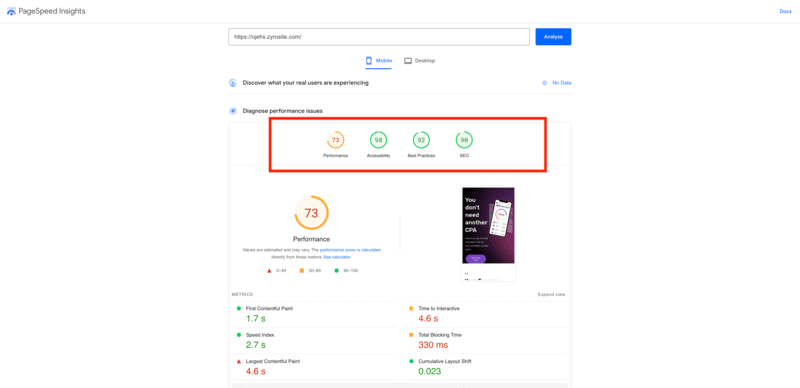
Hostinger -powered websites, in spite of their simplicity, have proven to perform incredibly well. After building my website on Hostinger and testing it for performance, I found out that it outperforms the website of several big brands. Here are what the performance test results look like.
Site and Page Speed
Site and page speeds are important for a good user experience. Slow-loading websites experience awfully high bounce rates. Websites built on Hostinger load fast enough to deliver content to visitors within 1.7 seconds. However, it took a bit longer than necessary (4.6 seconds) for the website to allow users to interact with it. Overall, the speed index of the website (2.7 seconds) falls within acceptable bounds.
Website Accessibility and Uptime
Hostinger promises users a 99.9% website uptime. It is quite an industry-wide standard for website builders and hosting providers to keep customer sites up and accessible almost 100% of the time. However, my test results from the Google-powered PageSpeed Insight show that my Hostinger -powered website has a 98% accessibility score. Although this is below the 99.9% promise, it is a very impressive accessibility score.
SEO
SEO goes beyond good use of keywords. Technical SEO is mainly about the weight of your website’s codes and the ability of search engines to index them. Hostinger websites are super lightweight and scannable. As such it presented a top-tier SEO performance result of 90% during my test. Also, Google awarded the website with a 92% score for building with the best practices. That’s what a website good builder can help you accomplish.
As expected of a mature hosting service, Hostinger has many features to enhance the speed and overall performance of a website. This includes solid-state drive (SSD) storage, unlimited bandwidth, a free domain name, multiple subdomains, and much more.
Regular backups
Whether you’re on the highest plan or the lowest plan, Hostinger offers regular backups for its customers. The lower plans will provide a weekly backup of websites while the Business plan provides daily backups of websites. Both types are indispensable.
1-click installation
There are countless pieces of software that can be used to establish or enhance your online presence. Hostinger has created a custom tool that makes it easy to install over 100 software tools on your website. These solutions include WordPress, Drupal, Joomla, etc.
Free SSL
Security on the web is becoming more and more important. When registering for a Hostinger account, you have the option of using an SSL certificate provided by the company free of charge.
Built-in caching
Caching is a powerful way to improve the performance of a website. It makes it easier to serve static resources to visitors. Instead of using a third-party tool to accomplish this, Hostinger provides it when you register for any shared hosting plan.
Control Panel
Hostinger has built its own control panel from scratch and it’s called hPanel. It focuses on the main features of managing your hosting account such as setting up domains, emails, SSL certificates, servers, billing, etc. The interface makes it a breeze to navigate all of the products and services you’ve purchased. In addition to the standard hPanel, you have the option of using cPanel. This is ideal if you’re familiar with cPanel and don’t want to learn a new interface as soon as you register for the service. With that being said, hPanel is well-designed and makes it much easier to manage your hosting account.
Premium features for secure and optimized hosting.
Integrated email solutions for seamless communication.
Easily manage access and permissions across your site.
Promote your site effectively with integrated tools.
Features
- Website Builder
- Shared Hosting
- Cloud hosting
- Reseller Hosting
- VPS Hosting
- WordPress Hosting
- Linux Servers
- Unlimited Transfers
- Email Access
- Control Panel
Verdict
Hostinger (formerly known as Zyro) is a website builder that allows business owners to build responsive websites in less than 15 minutes. With the intuitive drag-and-drop editor, you can create a well-optimized website that serves your business right. The fantastic perk of Hostinger is the availability of AI tools that have the potential to automate branding and marketing activities.
With a paid version that’s highly affordable as well as a 30-day money-back guarantee, Hostinger presents an excellent opportunity for new businesses to test the waters and go with the solution if it works really well for them.
Hostinger has been around for well over a decade and has amassed over 29 million users in that time. It offers multiple types of hosting services that can benefit everyone from freelancers to large businesses. IT’s shared hosting is specialized to give its users the most bang for their buck. It accomplishes this by focusing on performance, security, and optionality. For example, many of the shared hosting plans have unlimited bandwidth and all of them come with a free SSL certificate. Additionally, it provides regular backups and built-in server-side caching.
Of course, there are things that you should be aware of before signing up for Hostinger. If you’re coming from a hosting management platform like cPanel, you may have difficulty adjusting to the oversimplified control panel from Hostinger. Another thing to note is that while the support reps are knowledgeable, it can take time to get a reply. If neither of these things are deal-breakers then the inexpensive pricing and 99.9% uptime guarantee should keep you happy over the long term.
Hostinger Alternatives

Starting from: $2.99/month
Premium Website Builder
$2.99
seat/month
Pros
- Excellent uptime
- Unlimited storage and bandwidth on all plans
- Sophisticated AI-powered business tools
- Large photo repository
Cons
- Can’t publish a site on free plan
- Limited customization

Starting from: $0/month
Free
$0
seat/month
Pros
- Wix-powered websites are fast
- Has intuitive drag-and-drop design features
- Digital marketing integrations are super easy
- Massive reservoir of support materials
Cons
- One paid plan (except Enterprise) for only one site.
- Wix branding on Free plan
- Cannot use a custom domain on Free plan

Starting from: $0/month
Free
$0
seat/month
Pros
- Has easy drag-and-drop feature for intuitive design experience.
- Offers advanced store features for ecommerce businesses.
- Multiple language options and automatic translation.
- Outstanding 24/7 customer support via live chat and email support.
Cons
- Premium packages only cover for one website. You have to purchase multiple packages if you own more than one website.
- Site123 branded message on the free plan.
- Great for generic websites as customization features are highly limited.
Users Reviews
Write a review
Leave a review, help others get it right the first time.
2 Reviews
Darryl S
Amazing service!
I am hosting my site with Hostinger and I was up and running in less than 30 minutes. The Support Team and Staff are Amazing with almost immediate response to your inquiries and resolutions. I am very happy to have chosen Hostinger as my Hosting provider.
Fallon A
Hostinger is top class
This is the first time I have used Hostinger, and I have hosting accounts with other Hostinger services. Their low-cost hosting packages include all the features you'll need to excel online. Hostinger's customer support is easy to reach.
- Customer service is courteous and knowledgeable