
Last updated: October 2026
Screaming Frog SEO Spider is one of the most powerful website auditing tools available for SEO professionals. It enables users to crawl websites and analyze critical SEO factors, making it an essential tool for digital marketers, web developers, and businesses looking to optimize their online presence. This in-depth review covers everything you need to know, including pricing, features, performance, and its overall value.
Plans & Pricing
Free Version
$0
seat/
year
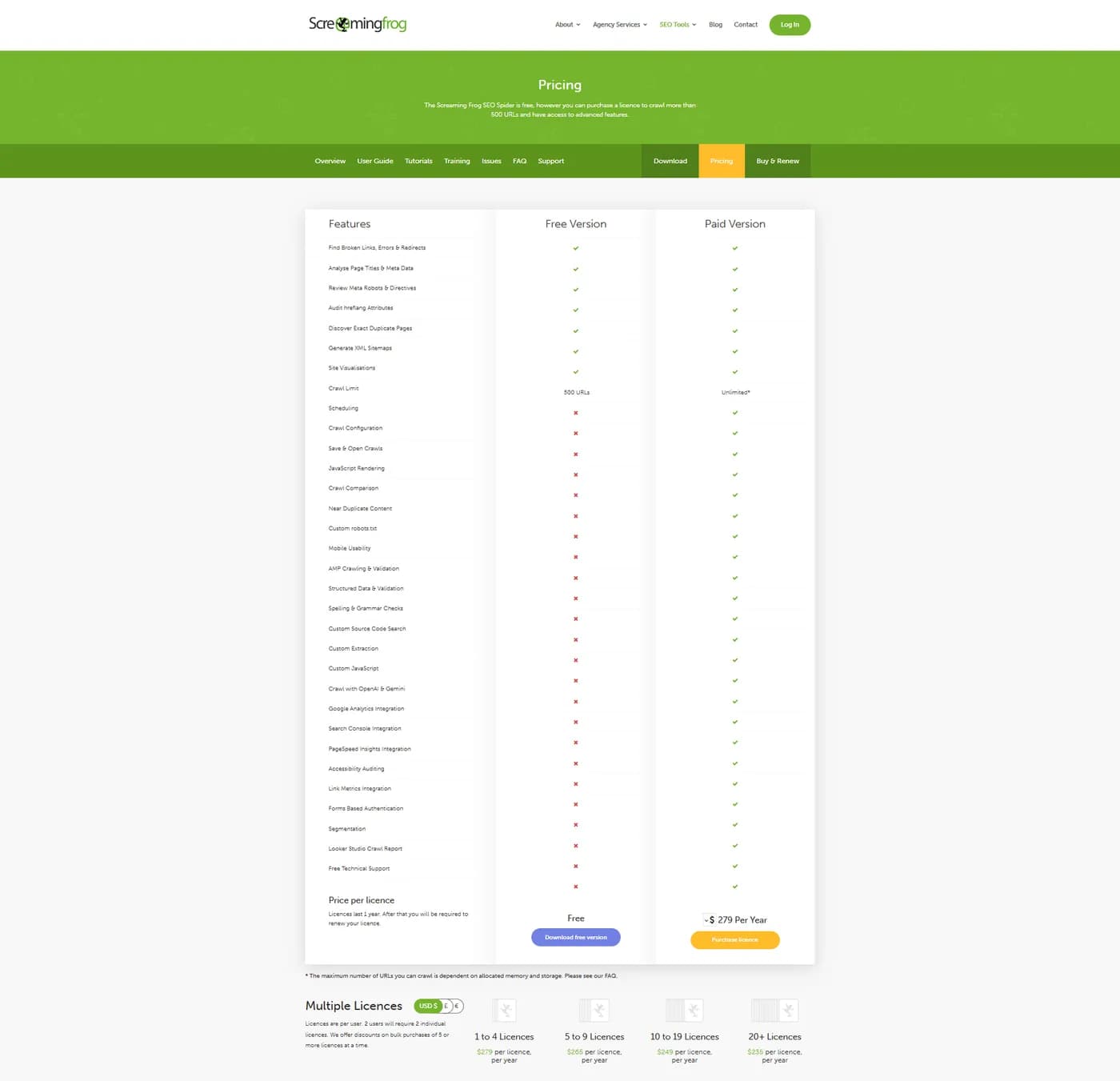
- Crawl Limit: Limited to 500 URLs per crawl.
- Find broken links, errors, and redirects.
- Analyze page titles and meta data.
- Review meta robots and directives.
- Audit hreflang attributes.
- Discover exact duplicate pages.
- Generate XML sitemaps.
- Site visualizations.
Paid Version
$279
seat/
year
- Unlimited Crawl Limit
- Customize crawl settings to suit specific requirements.
- Save crawl data and reopen it for future analysis.
- Integrate with Google Analytics to enrich crawl data with user metrics.
- JavaScript Rendering
- Custom robots.txt
- Free Technical Support
* Featured prices can be updated and free offers may include additional terms.
Do you need Screaming Frog if you are not an SEO?
Yes - if you have a website, you need it. Screaming Frog SEO Spider is the first SEO tool I ever paid for, and after 12+ years in SEO it is still open on my desktop almost every week. It is not only for SEO specialists: any small business owner, marketer, or developer responsible for a website can use it to find what is broken before users (and Google) do.
And for most small business websites, it costs nothing. The free version crawls up to 500 URLs, which is enough for a typical local business site, portfolio, or small online store, with room to spare.
What does Screaming Frog actually do?
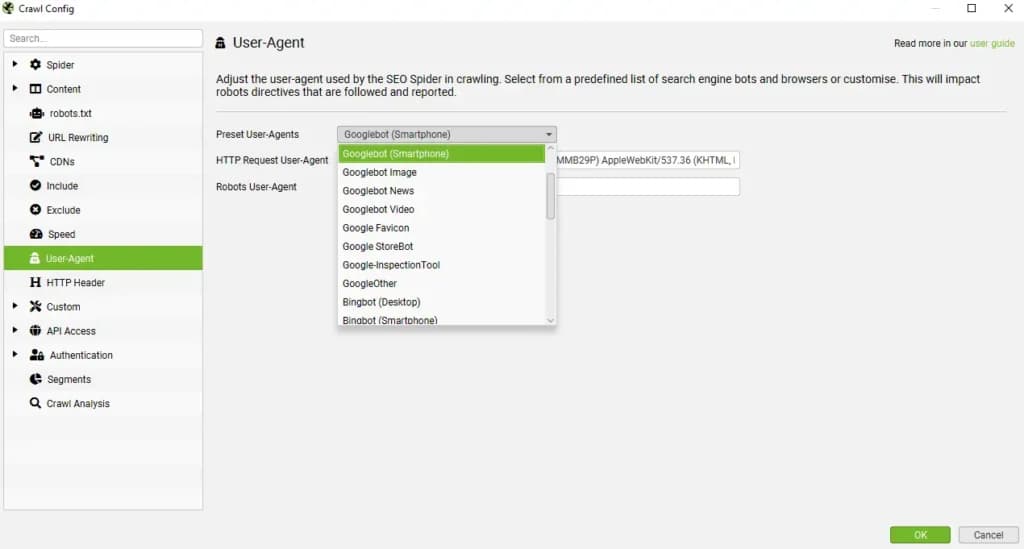
It crawls (scans) your website the way a search engine does, page by page, and reports what it finds on each URL. You can even set it to identify itself as Googlebot Smartphone or Googlebot Desktop, so you see your site the way Google's crawler requests it.
Here is how a crawl works, in plain words:
- You enter your homepage URL and click Start.
- Screaming Frog downloads that page and collects every internal link on it.
- It follows each of those links, collects the links on those pages, and keeps going until it has found every URL it can reach. You can also point it at your XML sitemap, so pages that nothing links to get crawled too.
- For every URL, it records the technical details: status code (200, 301, 404 and so on), title tag, meta description, H1, canonical, indexability, and the JS and CSS files the page loads.
The result is one table with a row per URL, split into tabs (Response Codes, Page Titles, Meta Description, H1, Canonicals, and more), plus filters for the issues inside each tab. That is the boring part of the interface, and also the part that saves you hours.
How much does Screaming Frog cost?
Free up to 500 URLs, then $279 per licence per year - not per month. That is the detail most people miss when they compare it with cloud SEO suites that charge every month. It was the first SEO tool I ever bought, and on value for money it is still hard to beat.
Plan | Price | Crawl limit | What you get |
|---|---|---|---|
Free | $0 | 500 URLs per crawl | Broken links, redirects, status codes, titles and meta descriptions, meta robots, hreflang, exact duplicates, XML sitemap generation, site visualizations |
Paid licence | $279 per user per year (1-4 licences) | Unlimited (depends on your machine) | Everything in Free, plus saved crawls, JavaScript rendering, crawl configuration, custom extraction, GA4, Search Console and PageSpeed Insights integrations, scheduling, crawl comparison, and support |
Expert Score
Pros
- Simple installation and setup
- Fast website crawling with minimal lag
- Data-rich interface for in-depth analysis
Cons
- Steep learning curve for beginners
- No cloud-based option—requires desktop installation
Customer Support
support@screamingfrog.co.uk
24/7 Help & Support
Via email
FAQ
https://www.screamingfrog.co.uk/seo-spider/faq/
Blog
https://www.screamingfrog.co.uk/blog/
Ease of Use
At first glance, the interface may seem overwhelming, especially for beginners. However, after spending some time with it, I found it to be incredibly intuitive. The tab-based structure makes it easy to navigate between issues like redirects, duplicate content, and indexing problems. For advanced users, the ability to customize crawls ensures flexibility and deeper insights.
Performance
The SEO Spider is renowned for its speed and efficiency in crawling websites of varying sizes. It provides real-time data analysis, allowing users to identify and address SEO issues promptly. The tool's performance is particularly notable when handling large-scale sites, offering comprehensive insights without significant delays.
One of the most impressive aspects of Screaming Frog is its blazing-fast crawling speed. I’ve used it on websites with over 100,000 URLs, and it handled the job smoothly without crashing. Unlike cloud-based tools, Screaming Frog runs locally on your machine, ensuring faster data retrieval and immediate analysis.
Why trust a crawler over AI tools and cloud audits?
Because Screaming Frog does not guess - it actually requests every URL and reports what your server sent back. AI tools and many external audit tools work from samples, cached data, or assumptions about your site, and they can confidently report a problem that is not there or miss one that is. When Screaming Frog says a page returns a 404, that is the response your server gave a few seconds ago.
That also makes it the right way to check the other tools. If a cloud audit or an AI assistant flags an issue, a quick crawl in Screaming Frog tells you whether it is real before anyone spends time fixing it.
The trade-off: it only knows what it can crawl. It does not show backlinks, keyword rankings, or traffic on its own - for those you connect Search Console, GA4, or an API from Ahrefs, Moz, or Majestic, or use a separate tool.
Features & Functionality
Screaming Frog SEO Spider is packed with a variety of powerful features designed to help SEO professionals, digital marketers, and webmasters conduct thorough technical SEO audits. Below is a breakdown of its key features, their functionalities, and how they contribute to improving SEO performance.
Comprehensive Website Crawling
- What it Does: Crawls an entire website, following internal and external links to identify SEO issues.
- Why It Matters: Ensures all pages, redirects, and assets (CSS, JS, images, etc.) are accounted for, providing an in-depth structural analysis of a website.
- SEO Benefit: Helps uncover hidden pages, orphan pages (not linked internally), and issues affecting site indexation.
Can Screaming Frog find broken links on my site?
Yes - and more importantly, it tells you which pages those broken links sit on. That second part is what makes it useful. Knowing a 404 exists is half the job - knowing every page that still links to it is what lets you fix it.
Think about it from the user's side. Someone lands on your service page, clicks a link, and hits a 404 page. That is a terrible experience, and it has nothing to do with search engines - it is just a broken promise to a real person. Screaming Frog catches most of these:
- 4XX client errors: pages that do not exist anymore (404) or are blocked (403). These are the ones users actually hit.
- 3XX redirects: internal links that still point to an old URL and bounce through a redirect. Not broken, but every hop slows the page and wastes crawl budget, so update the link to the final URL.
- 5XX server errors: the server failed to answer. If you see these, talk to your developer or host before anything else.
To find them: open the Response Codes tab, pick the Client Error (4xx) filter, select a URL, and open the Inlinks tab at the bottom. That shows every page linking to the broken URL, with the anchor text, so you know exactly what to edit.
What does a real crawl look like?
- Below is a live crawl of sonary.com, stopped at 44% (2,754 of 6,254 URLs found so far), on the Page Titles tab. The right panel already summarizes the title issues across the 778 HTML pages crawled at that point:
- 241 titles are over 60 characters and 228 are over 561 pixels: these are the ones Google is likely to cut off in search results.
- 26 titles are below 30 characters: usually too thin to describe the page.
- 14 titles are identical to the page's H1: not an error, but a missed chance to target a second phrasing.
- 0 missing and 0 duplicate titles: the things you never want to see here are clean.
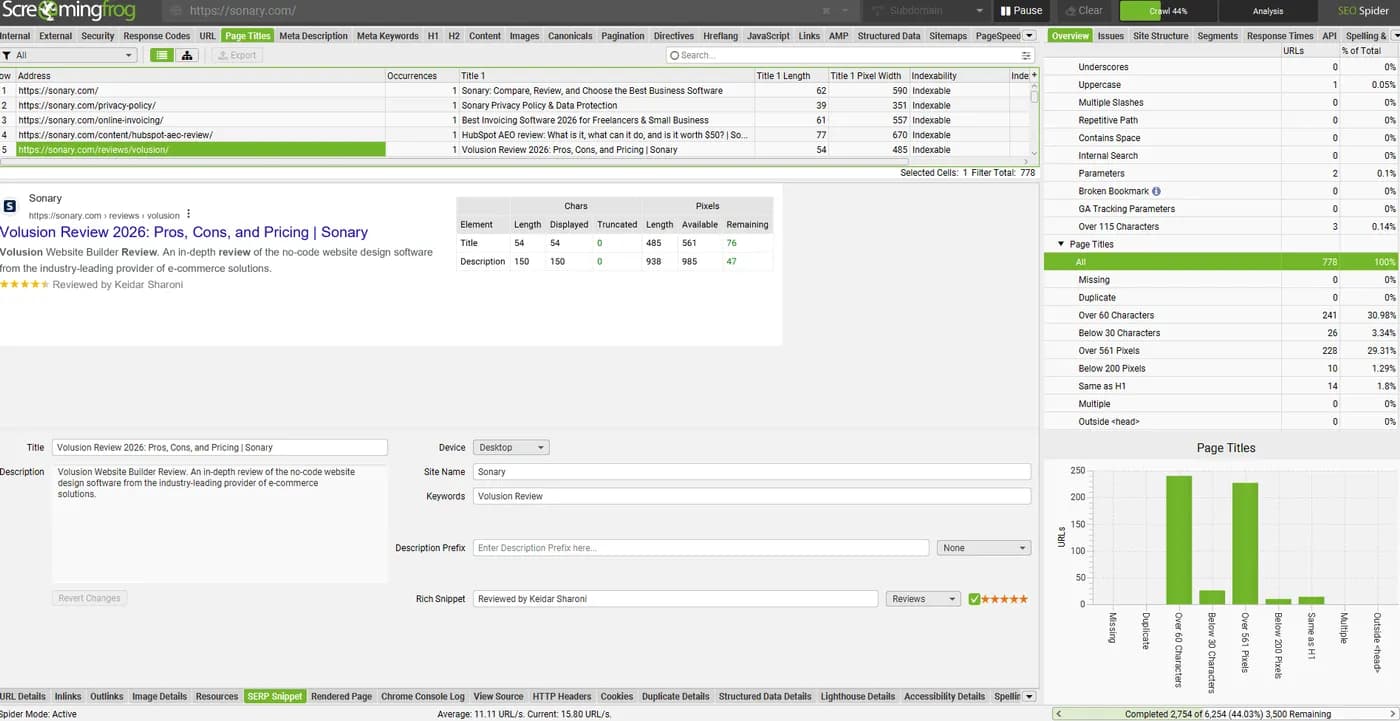
The bottom half is the SERP Snippet tab. Select any URL and you get a preview of how it may look in Google, with the exact character and pixel counts. For our Volusion review, the title is 54 characters (485 of 561 available pixels) and the description is 150 characters, so both fit with nothing truncated. You can also edit the title and description right there and see the preview update before you touch your CMS.Duplicate Content & Canonical Tag Checking
- What it Does: Detects identical or near-duplicate pages and verifies correct implementation of canonical tags.
- Why It Matters: Duplicate content confuses search engines and can result in ranking penalties.
- SEO Benefit: Helps webmasters consolidate duplicate pages using canonical tags or redirects, ensuring proper indexing of the preferred version.
Crawl Tree Graph: the visualization I use the most
Tables are powerful, but for many people they are boring and hard to read. Screaming Frog has a few visualizations that make more sense to them, and the Crawl Tree Graph is the one I personally use a lot. It shows every URL, where it comes from, and the site hierarchy in one simple visual - folder by folder, from the homepage down.
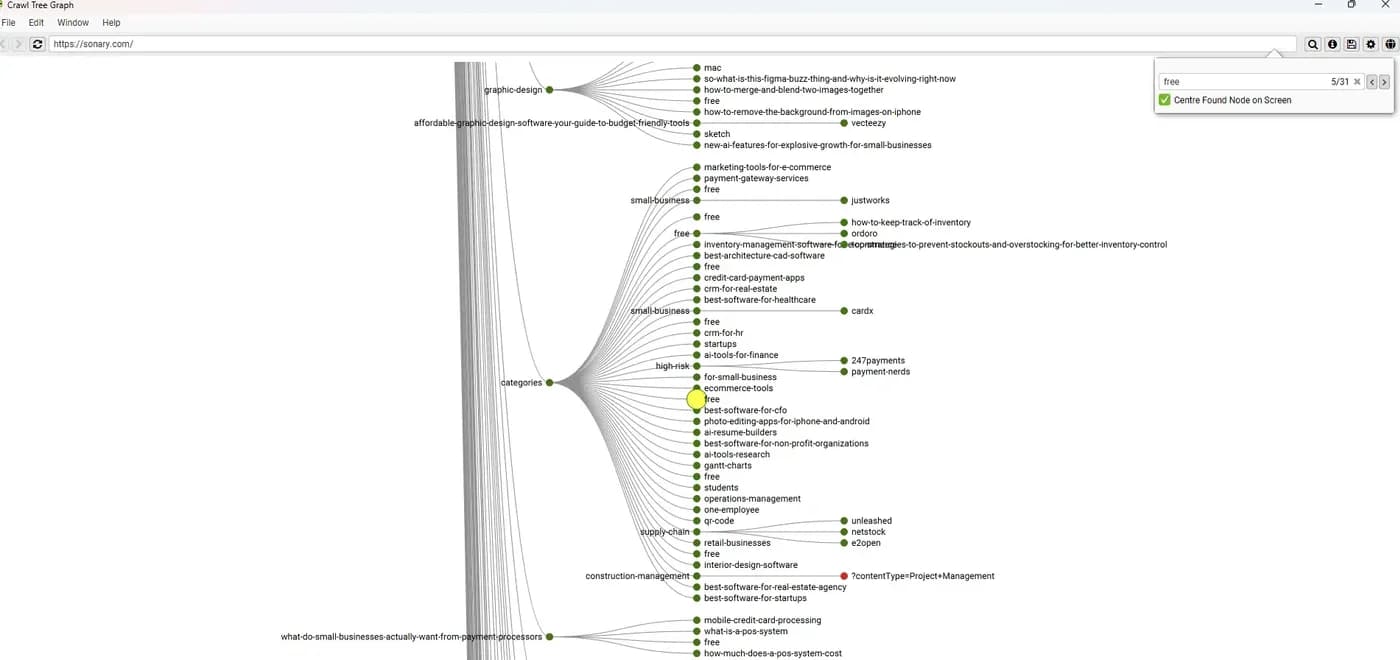
I use it for a quick overview of a specific URL or section. In the screenshot I searched for "free" (31 matches) and the graph centers on each match, so I can see right away which category it sits under and what else lives next to it.
The colors do the reporting for you: green nodes are indexable, red nodes are not (noindex, redirect, error, or canonicalized elsewhere). The red dot here is on a ?contentType=Project+Management URL under construction-management, and that one is on purpose - it carries a noindex tag. That is the point of the view: you spot the red dot in a second, then decide if it is a mistake or a choice.
XML Sitemap Generation
- What it Does: Automatically creates XML sitemaps for search engines.
- Why It Matters: Search engines rely on XML sitemaps to crawl and index pages efficiently.
- SEO Benefit: Helps Google and other search engines find and index new and updated pages faster, improving visibility.
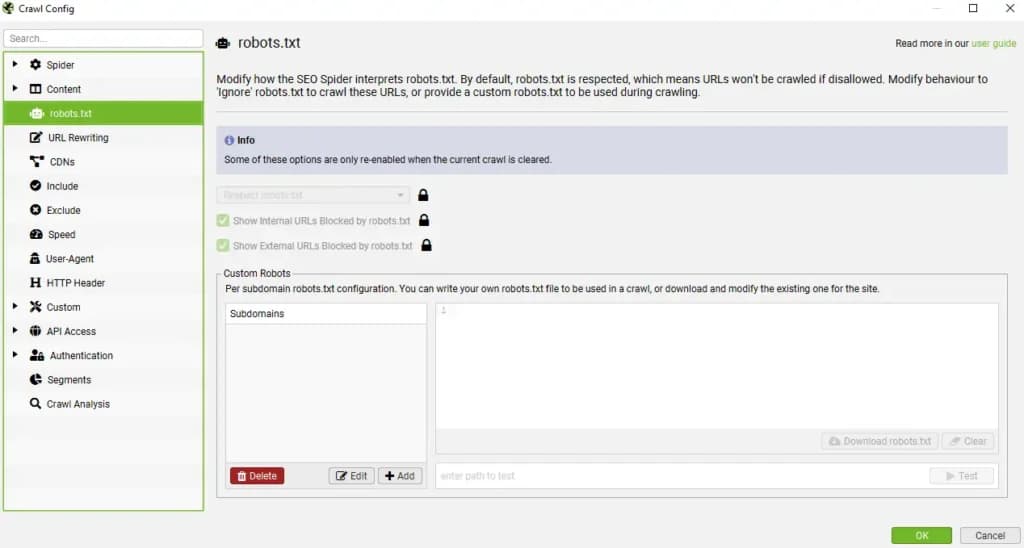
Robots.txt & Noindex Detection
- What it Does: Identifies pages blocked by robots.txt or tagged with “noindex.”
- Why It Matters: Critical pages being mistakenly blocked from indexing can lead to traffic loss.
- SEO Benefit: Ensures the correct pages are accessible to search engines while preventing low-value pages from being indexed.
Redirect & HTTP Status Code Analysis
- What it Does: Checks for temporary (302) and permanent (301) redirects, as well as error pages (4xx, 5xx).
- Why It Matters: Improper redirects can dilute link equity and hurt user experience.
- SEO Benefit: Ensures redirects are implemented correctly to maintain SEO value and prevent broken pathways.
Custom Extraction (XPath, CSS Path, Regex)
- What it Does: Extracts specific on-page elements (e.g., schema markup, Open Graph tags, analytics codes).
- Why It Matters: Enables users to track critical page elements efficiently.
- SEO Benefit: Helps optimize structured data, ensuring better rich snippet eligibility in SERPs.
JavaScript Rendering
- What it Does: Renders JavaScript-heavy websites and extracts SEO data from dynamically loaded content.
- Why It Matters: Some websites (e.g., Single Page Applications) rely on JavaScript to load content, which standard crawlers may not capture.
- SEO Benefit: Ensures that search engines properly crawl and index JavaScript-based pages.
Google Analytics & Search Console Integration
- What it Does: Pulls additional data from Google Analytics and Google Search Console.
- Why It Matters: Combines Screaming Frog’s crawl data with real user interaction data.
- SEO Benefit: Helps pinpoint high-impression but low-click pages, revealing optimization opportunities.
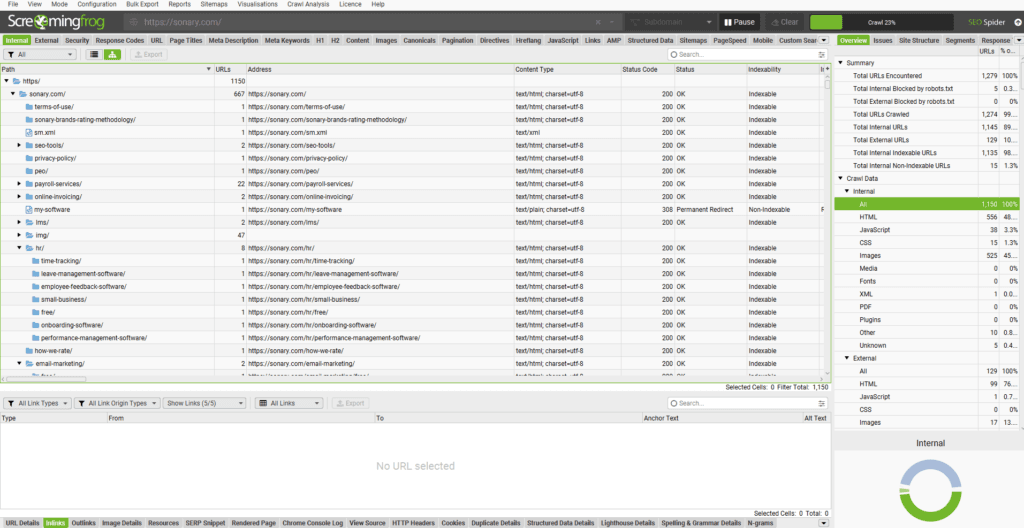
Site Architecture Visualization
- What it Does: Provides visual representations of a site’s internal linking and structure.
- Why It Matters: Poor site structure can lead to inefficient search engine crawling and indexation issues.
- SEO Benefit: Helps optimize internal linking, ensuring that important pages get the necessary link authority.
PageSpeed Insights Integration
- What it Does: Fetches PageSpeed scores and insights directly within Screaming Frog.
- Why It Matters: Site speed is a major ranking factor for Google.
- SEO Benefit: Helps identify slow-loading pages, allowing webmasters to optimize performance for better rankings.
Internal & External Link Analysis
- What it Does: Examines how internal and external links are structured across the site.
- Why It Matters: Poor internal linking can affect crawl efficiency and page authority distribution.
- SEO Benefit: Helps improve link structure, ensuring pages receive adequate internal linking for better SEO performance.
Mobile vs. Desktop Crawling
- What it Does: Allows switching between desktop and mobile user agents for crawling.
- Why It Matters: Google prioritizes mobile-first indexing.
- SEO Benefit: Ensures mobile and desktop versions of a site are optimized correctly for search engines.
Hreflang Tag Validation
- What it Does: Checks for proper implementation of hreflang tags for multilingual and multi-regional sites.
- Why It Matters: Incorrect hreflang tags can cause incorrect language versions to rank in different regions.
- SEO Benefit: Helps optimize international SEO strategies for better rankings in multiple countries.
Structured Data (Schema Markup) Validation
- What it Does: Identifies missing or incorrect schema markup.
- Why It Matters: Structured data enhances rich results in search engines (e.g., star ratings, FAQs, breadcrumbs).
- SEO Benefit: Ensures proper implementation of schema markup, improving CTR and visibility in SERPs.
Why Screaming Frog SEO Spider is a Must-Have for SEO Audits
- Pinpoints Critical SEO Errors: Instantly detects broken links, duplicate content, and other ranking issues.
- Enhances Website Indexation: Ensures search engines can efficiently crawl and index pages.
- Improves Page Optimization: Offers insights to refine meta tags, headings, and structured data.
- Strengthens Internal Linking: Helps optimize site architecture for better user experience and rankings.
- Boosts Technical SEO Insights: Advanced features like log file analysis and JavaScript rendering provide deeper SEO intelligence.
Screaming Frog SEO Spider – Integration Guide
1. Website Platforms & CMS
Screaming Frog is platform-agnostic– it works with any website because it crawls URLs directly, not through platform-specific plugins.
- Supports WordPress, Shopify, Wix, Squarespace, Magento, Drupal, and more.
- You simply enter your website URL, and the tool crawls it like a search engine would.
- For WordPress users, it pairs well with SEO plugins like Yoast or Rank Math for deeper analysis.
2. Analytics & Tracking Tools
Screaming Frog can integrate directly with:
- Google Analytics (GA4)– pull traffic and engagement data into your crawl reports.
- Google Search Console– import impressions, clicks, CTR, and position data alongside crawl insights.
- Helps you connect SEO performance with technical crawl issues.
3. SEO APIs & Data Sources
For advanced users, Screaming Frog can connect to multiple APIs to enhance data:
- PageSpeed Insights API– fetch Core Web Vitals data for every URL.
- Ahrefs, Moz, Majestic– import backlink metrics into your crawl results.
- Link Metrics APIs– see authority scores and link data while reviewing your site structure.
4. Data Export & Reporting
Screaming Frog integrates seamlessly with spreadsheet and BI tools:
- Excel & Google Sheets– export crawl data for filtering, pivot tables, and client reports.
- Data Studio / Looker Studio– connect exported data for dashboard visualization.
- CSV, TSV, XLSX exports for easy sharing and offline analysis.
5. CMS & Development Workflow
While it doesn’t “plug in” directly to CMS editing screens, Screaming Frog fits into development workflows by:
- Exporting broken links, duplicate content, and redirect chains to share with developers.
- Generating XML sitemaps that can be uploaded to your CMS or Search Console.
- Identifying missing meta tags and structured data for content teams to fix in the CMS.
6. Automation & Scheduling
For recurring site checks:
- Command-Line Interface (CLI)allows automated crawls and exports.
- Can be integrated with Jenkins, GitHub Actions, or other automation tools for regular SEO health checks.
- Useful for agencies and in-house teams managing multiple sites.
Features
- Graphs and Widgets
- API Integration
- Schema Controls
- XML Sitemap
- Snippet Preview
- Content Analysis
- Site Audit
Screaming Frog Alternatives

Starting from: $0/year
Free Version
$0
seat/year
Pros
- Simple installation and setup
- Fast website crawling with minimal lag
- Data-rich interface for in-depth analysis
Cons
- Steep learning curve for beginners
- No cloud-based option—requires desktop installation

Starting from: $117.33/month
Pro
$117.33
seat/month
Pros
- Comprehensive Toolset
- Detailed Competitive Analysis
- User-Friendly Interface
- Extensive Database
Cons
- Comparatively Expensive
- Limited Website Crawling
- Additional Add-Ons Cost

Starting from: $52/month
Essential
$52
seat/month
Pros
- Very Easy to Use: We found the learning curve is almost zero. The dashboard is clean and perfect for small business owners.
- Unbeatable value: Costs half of competitors.
- Granular data: Deep, instant keyword drill-downs.
- Real AI tracking: Tracks visibility in AI chatbots.
Cons
- Tab annoyance: Tools constantly open new tabs.
- Slower speed: Processing data takes noticeable time.
- Smaller database: Fewer backlinks found than Ahrefs.
Verdict
Everyone who owns a website should run it at least once - it is free, and it shows you broken pages your users are already hitting. Small business sites under 500 URLs can stay on Free for good. SEOs, agencies, and anyone with a bigger or JavaScript-heavy site should pay the $279 a year without overthinking it. I do not cover every feature here, because you do not need every feature: Response Codes, Page Titles, Inlinks, and the Crawl Tree Graph will solve most of the problems a typical site has.
FAQ
Q: What is Screaming Frog, and what is it actually used for?
A: It's a "site crawler," but think of it as a robot that visits every single page of your website just like the Googlebot does. It's the #1 tool for a technical SEO audit. You use it to find deep technical problems like broken links (404s), redirect chains, duplicate content, and missing meta descriptions all in one place.
Q: Why does Screaming Frog look so complicated? It's just a bunch of tabs.
A: It's definitely overwhelming at first! The key is to not look at everything. It's a professional tool that gives you raw data. Just start with the "Response Codes" tab (to find 404s) and the "Page Titles" and "Meta Description" tabs (to find what's missing or duplicated).
Q: What's the difference between Screaming Frog and a "Site Audit" from Semrush or Ahrefs?
A: Semrush/Ahrefs are cloud-based and give you a pretty "Health Score." They're easier to use but less powerful. Screaming Frog is a program on your computer that gives you way more raw data and is infinitely customizable. Pros use Screaming Frog for deep dives; beginners use cloud tools for a quick check-up.
Q: What's the real limit of the free version of Screaming Frog?
A: The free version is amazing but has one hard limit: it will only crawl up to 500 URLs on a site. This is perfect for small blogs or business sites. If your site has more than 500 pages, blog posts, and images combined, you'll need the paid version to see everything.
Q: How do I find all the broken links on my site?
A: This is what it does best.
- Run a crawl on your site.
- Go to the"Response Codes"tab.
- Use the filter to select"Client Error (4xx)".
- Now, click on any 404 (Not Found) URL in the top window, and then click the"Inlinks"tab at the bottom. This will show you every single page on your site that is pointing to that broken link so you can go fix it.
Q: Screaming Frog crashed, or my computer slowed to a crawl. What's wrong?
A: By default, Screaming Frog runs in "RAM" mode, which uses your computer's active memory. If you're crawling a big site, this will eat up all your memory and crash. The Fix: Go to Configuration > System > Storage and change the mode from "RAM" to"Database". This saves the crawl to your hard drive instead and lets you crawl millions of pages.
Q: How do I crawl a website that uses a lot of JavaScript?
A: This is a key setting. By default, Screaming Frog only reads the basic HTML. To see the site just like a user's browser, you must enable JavaScript rendering. The Fix: Go to Configuration > Spider > Rendering and change the mode from "Text Only" to"JavaScript". Be warned: this will make your crawl much slower, but it's necessary for modern sites.
Q: How do I find all the images on my site that are missing "alt text"?
A: Easy. Run your crawl, then go to the"Images"tab. In the main window, look for the column named "Alt Text." Just click that column header to sort it. All the images with a blank "Alt Text" field will pop right to the top.
Q: What is "List Mode" and when would I ever use it?
A:"Spider Mode" (the default) crawls a whole site by following links."List Mode"is for when you have a specific list of URLs you want to check. You'd use this to upload a list of competitor URLs, check the status of all your backlinks, or audit a list of URLs from an XML sitemap.
Q: How do I find "orphan pages" (pages with no internal links)?
A: This is an advanced but super useful trick.
- Go to Configuration > Spider > Crawl and make sure you are crawling your sitemap.xml.
- Run your crawl.
- Go to the"Crawl Analysis"tab and click "Start."
- Once it's done, look for the"Orphan URLs"filter in the "Overview" pane on the right. This will show you all the pages that were found in your sitemap but had zero internal links pointing to them.
Screaming Frog SEO Spider distinguishes itself with its deep crawling capabilities and advanced features such as JavaScript rendering and custom extraction. Its ability to integrate with multiple analytics platforms and provide detailed, customizable reports makes it a valuable asset for technical SEO audits.
Users Reviews
Be the first to write a review
Share your experience with Screaming Frog SEO Spider and help others choose the right software.