
How to cancel a Canva subscription

To cancel Canva Pro, open Settings from your profile picture, go to Billing, and click Cancel plan next to your subscription. On a paid plan, Canva then offers a pause, lists the Pro features you will lose, and asks why you are leaving. I tested this on a Pro trial on October 20, 2026. Canva showed how much I had used Pro and offered to remind me 7 days before the trial ended. The reason for leaving is required, so you cannot skip that screen.
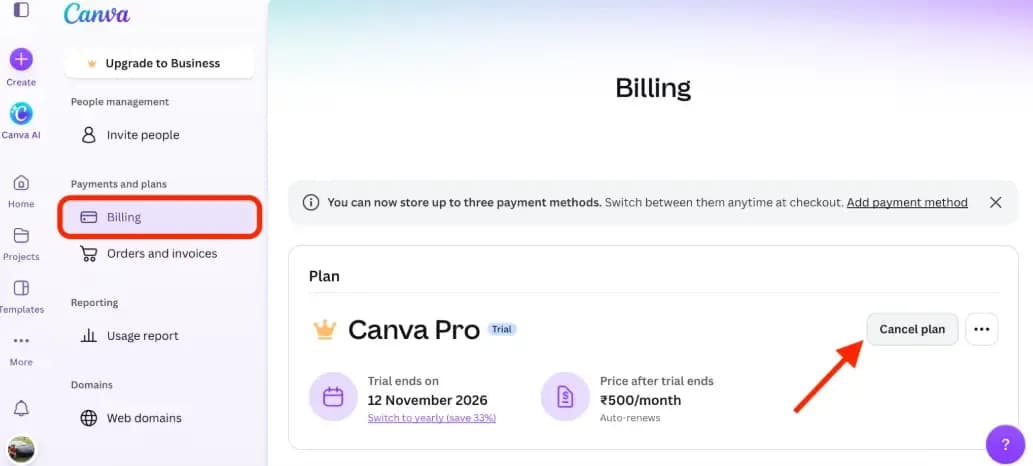
If you subscribed to the Canva app on an iPhone, iPad, or Android phone, you will have to cancel the subscription in the App Store or Google Play instead. Those steps are further down.
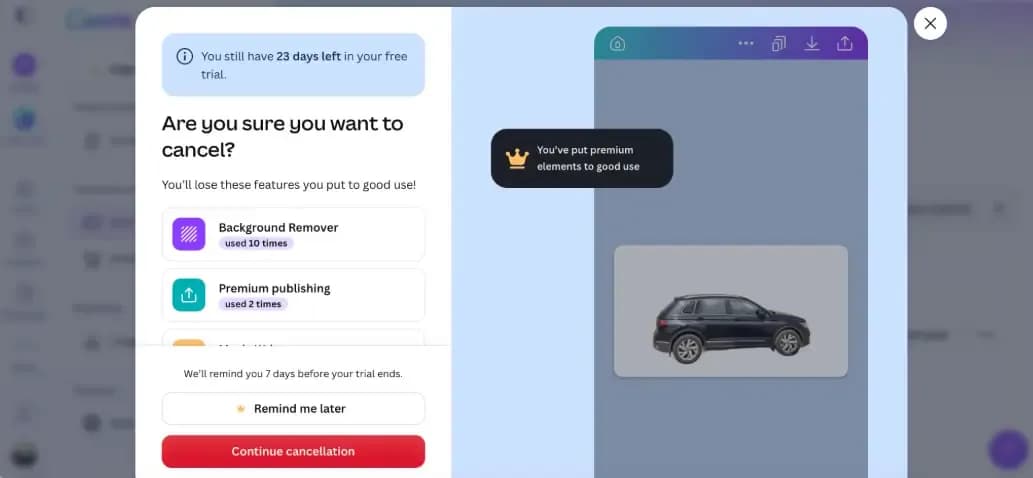
You keep every Pro feature until the end of the billing cycle you have already paid for. After canceling, I still had over 3 weeks left on my Pro trial. Canva Pro costs $18 per month or $144 per year when billed annually (as of October 2026). Canva bills on UTC time, so cancel a few days before your renewal date, not on the day itself.
How do I cancel Canva Pro in a web browser?
You cancel Canva Pro from the Billing page inside your Canva account Settings, and the whole process takes 7 steps in a desktop browser. Expect 3 separate Continue cancellation buttons (2 on a free trial) along the way. Canva uses them to offer a pause, list the features you will lose, and ask why you are leaving. None of them cancels the plan on its own, so keep clicking until you see the final confirmation.
Go to canva.com and sign in to the account that pays for Canva Pro.
- Click your profile picture in the bottom left corner of the screen and select Settings.
- In the sidebar, find Payments and plans and click Billing.
- You will see your current plan listed in the window with a Cancel plan button. Click it to start the cancellation process.
- You will see a pop-up offering to pause your subscription for 3 months instead. To keep going, select Continue cancellation. On my free trial, this pop-up did not appear, and I went straight to the next screen.
- The next screen lists the Pro features you will lose. Click the red Continue cancellation button.
- Pick a reason for leaving, such as "too expensive" or "too many issues". A reason is required. The written feedback is optional. Click Continue cancellation again.
- A pop-up confirms that your Canva Pro plan has been canceled.
Should you pause Canva Pro instead of canceling?
Pause Canva Pro only if you are sure you will need it again within 3 months, because the pause ends on its own and your subscription resumes automatically. Canva shows the exact start date of the pause in a pop-up, and the plan restarts 3 months after that date.
The pause suits a seasonal business, such as a shop that designs heavily before the holidays and barely opens Canva in the quiet months. It is a poor choice if you are switching tools or cutting costs for good. A forgotten pause becomes a renewed subscription, so if you do pause, put the restart date in your calendar the same day.
If you are leaving for good, skip the pause and cancel.
Should you cancel, pause, or downgrade your Canva plan?
Canceling is not always the cheapest option. Pick by your situation:
Your situation | Best option | Why |
Not using it for a few months | Pause | $0 during the 3-month pause (payments and Pro access are placed on hold until it auto-resumes) |
On annual, renewal coming up | Cancel before the renewal date | Canva says most subscriptions are not refundable, so cancel before the renewal charges |
On Business but only you design | Downgrade to Pro | $144/yr (Pro) vs. $250/yr (Business) (checked November 10, 2026). You must remove all team members first, and they lose access to designs made in the team |
Want to keep Pro, avoid a big lump-sum bill | Switch to monthly | Allowed in Settings > Billing. You pay $18 a month instead of $144 up front, but 12 months of monthly billing costs $216. The change starts on your next billing date |
Leaving for good | Cancel | Access continues until the end of your current paid billing period |
What happens after you cancel Canva Pro?
After you cancel Canva Pro, you keep full access to every Pro feature until the end of your current billing cycle, and the Billing page shows the exact date that access ends. Nothing switches off on the day you cancel.
If you change your mind before the end date, go back to Settings > Billing and click Stay on Canva Pro. Canva reinstates the subscription immediately, and you do not need to sign up again.
Once the end date passes, Pro features stop working on your account.
How do you cancel Canva Pro if you subscribed through Apple or Google Play?
If you bought Canva Pro inside the iPhone, iPad, or Android app, you cannot cancel it from Canva's Billing page. Deleting the app does not cancel the plan.
To find out where you subscribed, check the billing email or your card statement. A charge from Apple or Google means you cancel in that store. A charge from Canva means you use the steps above.
Cancel on iPhone or iPad
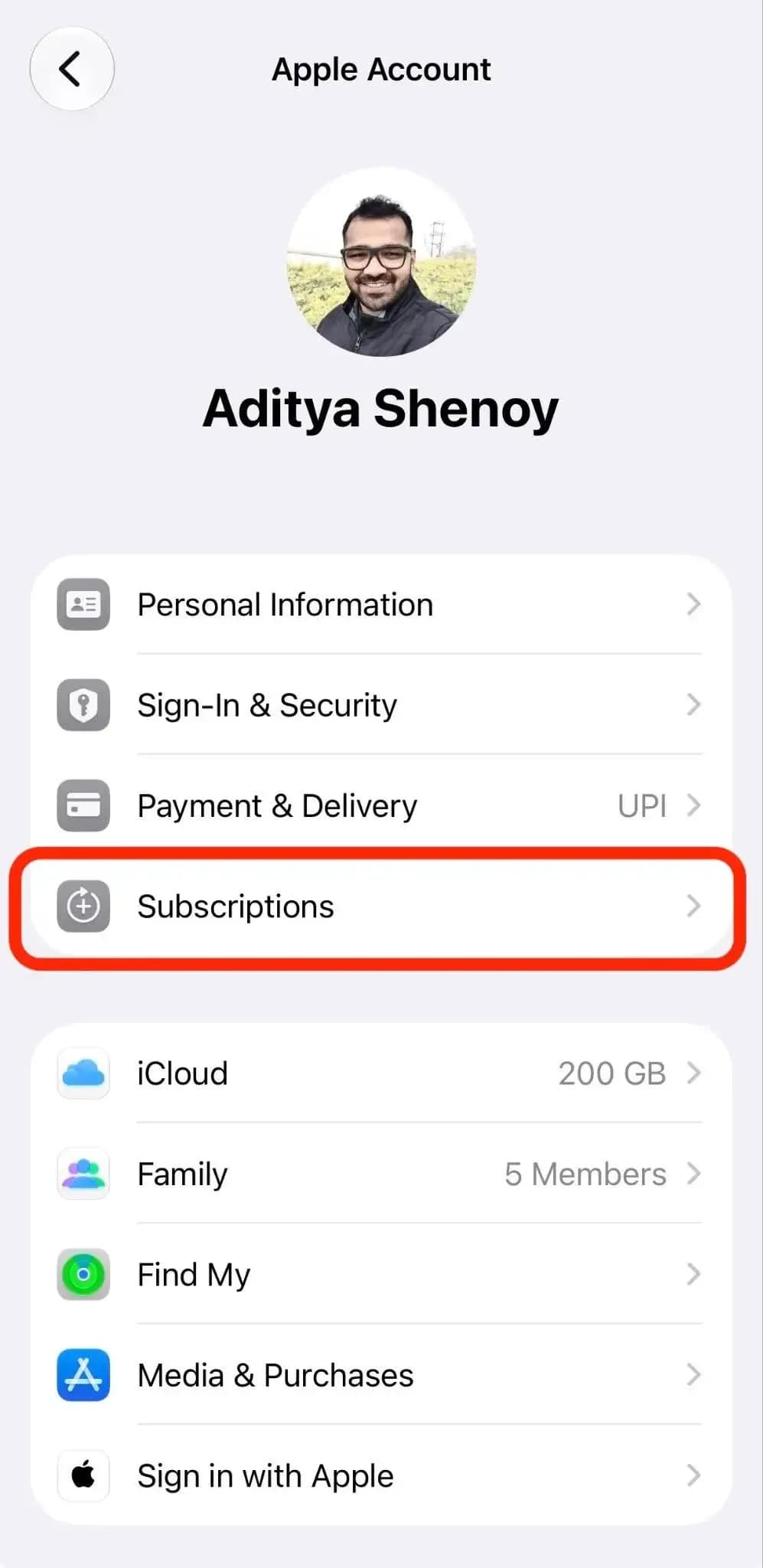
- Open Settings and tap your name.
- Tap Subscriptions.
- Tap Canva.
- Scroll down and tap Cancel Subscription.
Cancel on a Mac
- Open the App Store and click your name at the bottom left corner on the sidebar. Sign in to your Apple Account if asked.
- Click your name again on the page that appears.
- Click Subscriptions.
- Click Canva.
- Click Cancel Subscription.
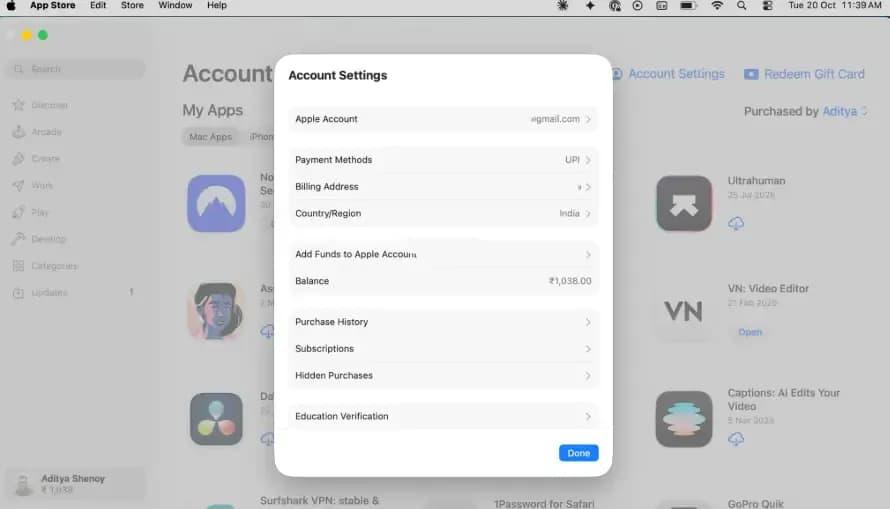
If Canva is not listed, search your email for "receipt from Apple". The receipt shows which Apple Account paid, and if it belongs to a family member, only they can cancel it. If there is no Cancel button and you see an expiration date in red, the plan is already canceled.
Cancel on Android
- Open the Google Play Store app. Tap your profile picture, scroll down and tap Payments and subscriptions.
- Tap Subscriptions.
- Select Canva.
- Tap Cancel subscription.
- Follow the prompts on screen.
If Canva does not appear, you are probably signed in to a different Google Account. Switch accounts in Google Play and check again.
Charged after you canceled Canva Pro? Do this
If Canva charged you after you canceled, check these four things first.
- Check which email the receipt went to: You may have two Canva accounts, such as one through Google sign-in and one through email.
- Check who has charged you. Is it Canva, Apple, or Google? Each one handles its own refunds (App Store charges must be disputed directly through Apple).
- Go to Canva Billing page and look for an end date: If it still shows a renewal date instead of an end date, the cancellation did not go through. Canva also sends a confirmation email when a plan is canceled, so no email means the same thing.
- Request a refund: Contact Canva support with your invoice ID. Canva's refund page gives no time limit, and it reviews each request. If a refund is approved, it takes 3 to 5 business days to PayPal, 5 to 10 to a credit card, and up to 20 for other methods.
What should you check before you cancel Canva Pro?
Before you cancel Canva Pro, check your next renewal date on the Billing page and read the list of features you will lose. That list is the fastest way to see what you will lose, such as Pro templates or brand assets that you use every week.
Also, decide where your design work goes next. If price is the reason you are leaving, compare what a cheaper tool includes before your Pro access ends, not after. You have until the end of the billing cycle to test a replacement while your Canva files still open with Pro features.
See also
FAQs
Where is the cancel button in Canva?
The cancel option sits in Settings, under Payments and plans, then Billing. Click Cancel plan.
Do I lose Canva Pro the moment I cancel?
No. You keep Pro until the end of your current billing cycle, and the Billing page shows the exact end date.
Can I undo a Canva Pro cancellation?
Yes. Go back to Billing and click Stay on Canva Pro before your access ends. The subscription is reinstated immediately.
How long can I pause Canva Pro?
Canva offers a 3-month pause during cancellation. The subscription resumes automatically when the 3 months are up. The pause option is not available for App Store subscriptions or free trials.
Will Canva refund the rest of my billing cycle?
In most cases, Canva subscriptions are not refundable. Canva reviews each refund request on a case-by-case basis.