
How to check if ChatGPT, Perplexity, and Gemini recommend your brand

There are several options to check your AI visibility across ChatGPT, Perplexity, and Gemini. Free native dashboards like Google Search Console and Bing Webmaster Tools provide excellent baseline indicators and impression trends, while dedicated platforms like HubSpot’s AEO tool help track off-site brand mentions. This guide can help solve the hassle of stitching those fragmented reports together, bringing every partial metric into one clear, confident view of your AI share of voice (with the screenshots to prove it!).
Key takeaways
- No tool sees everything. Google Search Console, Bing Webmaster Tools, manual prompting, and the paid platforms each show a different slice of your AI visibility; none shows the full picture.
- Start free. Google Search Console and Bing Webmaster Tools both now report on AI-generated answers, at no extra cost, if you already have these accounts set up.
- Ask the chatbots yourself. Manually querying ChatGPT, Perplexity, and Gemini is free, fast, and still one of the most direct ways to see what's actually being said about you.
- Paid platforms cost real money. Semrush and Ahrefs both offer dedicated AI visibility tracking, but they sit on top of already-expensive subscriptions.
- HubSpot AEO is the value option. It's cheaper than Semrush and Ahrefs combined, and it's strong on competitor insight and content recommendations — though it doesn't reliably show your own brand's results.
Why there's no perfect way to check AI visibility
Unlike traditional SEO and Google rankings, where your position on a search results page is a fixed, checkable fact, AI answers are generated fresh for every prompt. I've asked ChatGPT the same question twice and gotten two different answers, with different brands mentioned each time. That's the core problem every tool on this list is working around: they're all sampling a moving target, not reading a static leaderboard.
With that in mind, here's what's actually available today, starting with what's free.
The free options (three ways to start without spending anything)
There are three ways to check your AI visibility without spending anything: two native dashboards you may already have running, and simply asking the chatbots yourself. None of them show the full picture, but they're the right place to start before you pay for anything.
1. Google Search Console: The new Generative AI performance report
This is what I see when I pull up the new Generative AI performance report in Google Search Console:
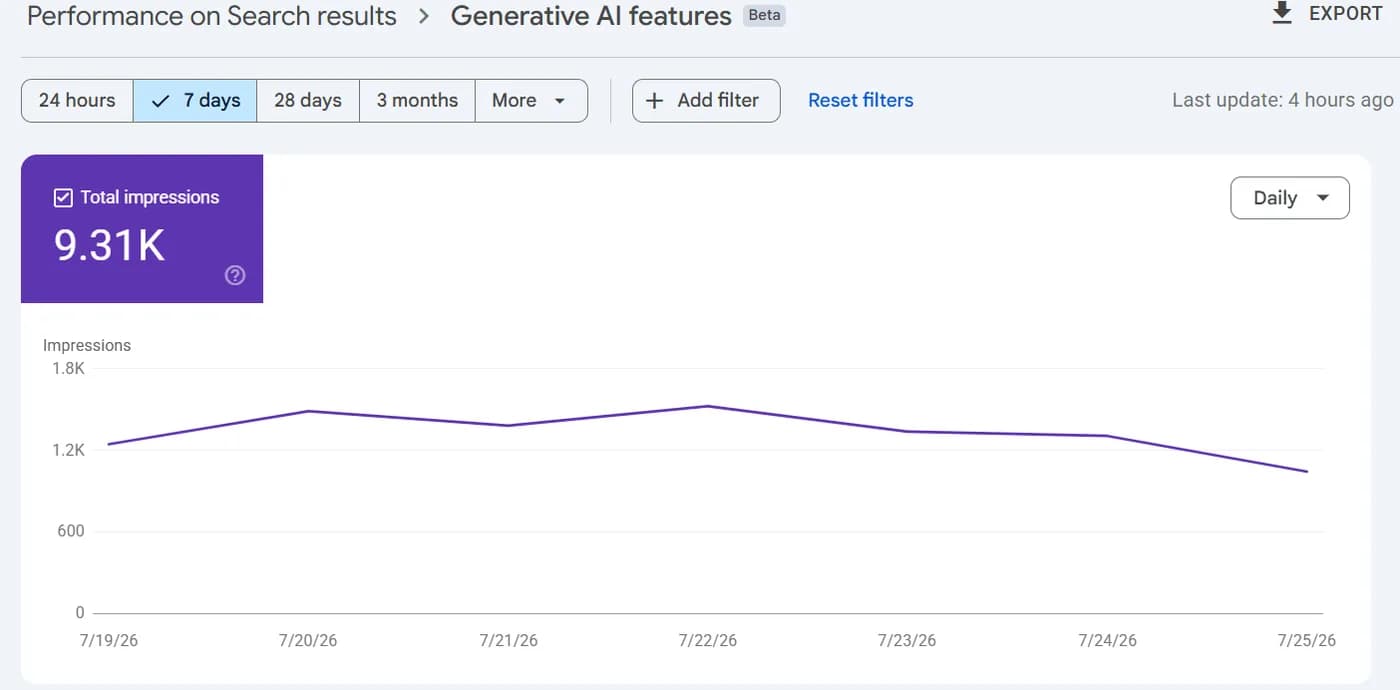
If you're already using Search Console for SEO, this beta report is worth knowing about. It tracks how often URLs from your site showed up inside Google's AI-generated features — specifically AI Overviews and AI Mode in Search and Discover — broken down by impressions, pages, countries, and devices, with hourly, daily, weekly, or monthly views.
A few things to know before you go looking for it:
- It's a staged rollout. Google began rolling this out to a subset of sites, starting in the UK, and has said it's expanding to more countries and more site owners over time, so it may not be visible in your account yet.
- It only shows impressions, not clicks. You can see that your pages appeared in an AI answer, but not whether anyone clicked through to your site.
- It leans on existing data. This report is most useful for pages that already have some search traffic and history in Search Console; brand-new or barely-indexed pages won't have much to show.
2. Bing Webmaster Tools: The AI Performance report
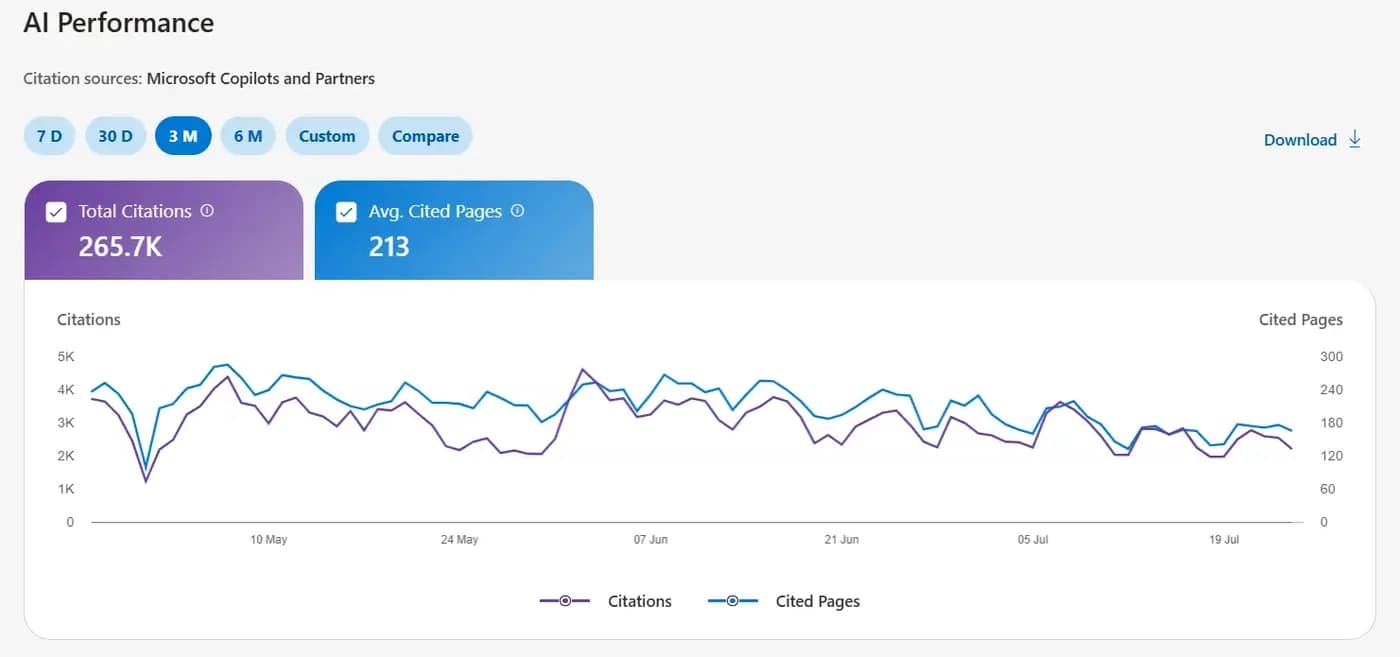
Bing has its own free equivalent: a dedicated AI Performance report inside Bing Webmaster Tools. It tracks how often your content is cited across Microsoft Copilot and Bing's AI-generated summaries, and shows:
- Total citations over a given time period
- The average number of unique pages cited per day
- Sample queries that triggered your content being pulled in
- Citation activity broken down by individual URL
- A trendline of how your citation activity moves over time
Like Google's version, it has a real limitation: it tells you that you were cited, not whether that citation turned into a visit. There's no click or traffic data attached to it.
Here’s what that looks like inside my own Bing Webmaster Tools account:
3. Manual query checking
The simplest method costs nothing but your time: pick a topic that's closely tied to your business, and ask the chatbots directly.
Start with ChatGPT and Perplexity first, because both will actually show you their sources, so you can see exactly which page, if any, they pulled your brand from. Then ask Gemini the same question. Gemini won't give you a source, so you're left reading the answer itself to see if your brand is mentioned.
One thing worth keeping in mind: even brands with some history and basic on-site optimization in place aren't guaranteed to show up. These answers are generated dynamically and can vary from one ask to the next, so a single check, even a clean one, isn't proof of anything either way. Treat it as a spot check, not a verdict.
The top AI monitoring paid platforms (they don't come cheap)
Once you're ready to move past manual spot checks, two familiar SEO names have built out AI visibility tracking of their own. Both are well known for search and off-page optimization, and both now extend that into monitoring how you show up in AI search engines.
1. HubSpot AEO: The best value for competitor and content insight
Between the free options and the SEO-suite price tags sits HubSpot AEO, and it's currently the best value-for-money option if what you're after is competitor analysis and general AI visibility direction. It costs $50/month ($45/month billed annually) and covers tracking across roughly 25 prompts across three AI engines.
Where it earns its price is the recommendations: Hubspot AEO gives you suggested content ideas based on the actual prompts it's tracking, so you're not guessing at what to write next. It also gives you a genuinely useful signal that's easy to overlook: a clear read on who your real competitors are inside AI answers, which is often a different list than the competitors you're used to seeing in regular Google search.
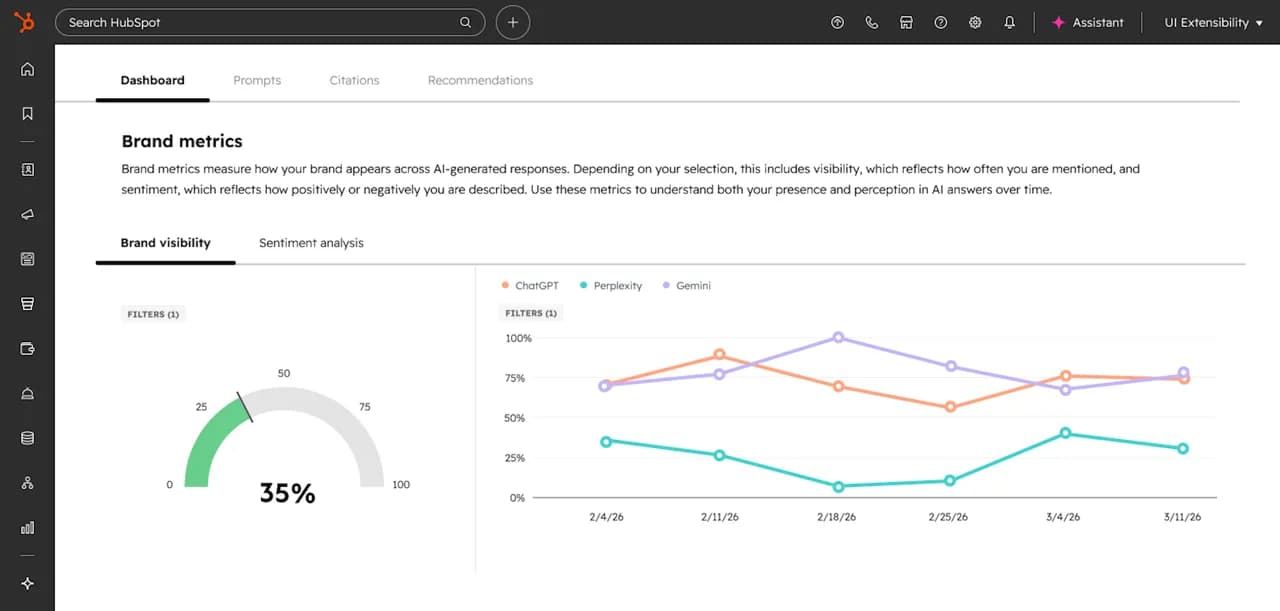
The catch: your own brand doesn't reliably show up in HubSpot AEO's own results. So this product is best used as a competitor and content-strategy tool, not as proof of your own visibility.
Here’s what my own HubSpot AEO dashboard looks like:
2. Semrush: AI Visibility Toolkit
Semrush's AI Visibility toolkit sits on top of its existing platform and starts at $99/month per domain (billed annually) on its base plan. It tracks your brand's mentions across ChatGPT, Google AI, Gemini, and Perplexity, monitors up to 25 custom prompts a day, and includes competitor comparison plus a site audit that scores how ready your domain is for AI-driven discovery.
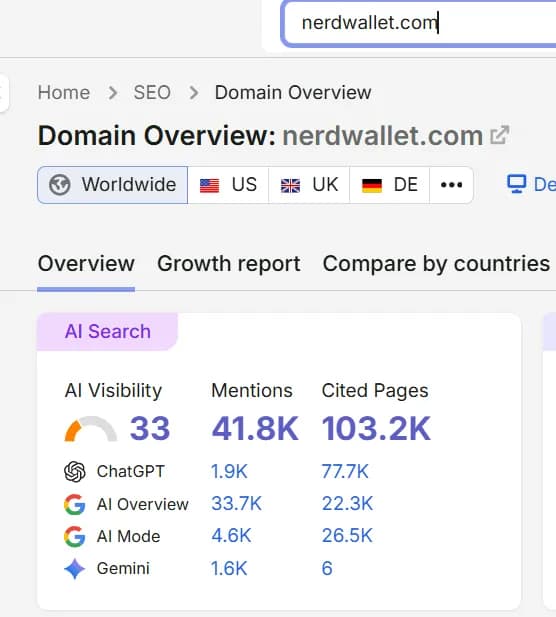
Semrush also breaks that tracking down by engine, showing exactly how mentions and cited pages split across ChatGPT, Google AI Overview, AI Mode, and Gemini:
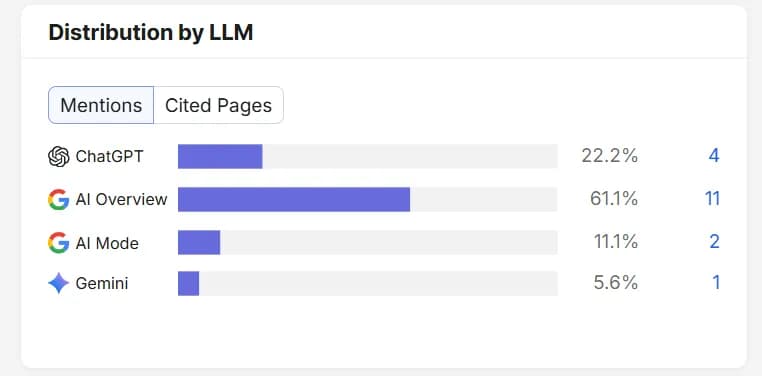
Here's what the fuller AI Search report looks like for a sample domain — nerdwallet.com — inside Semrush's Domain Overview page:
3. Ahrefs: Brand Radar
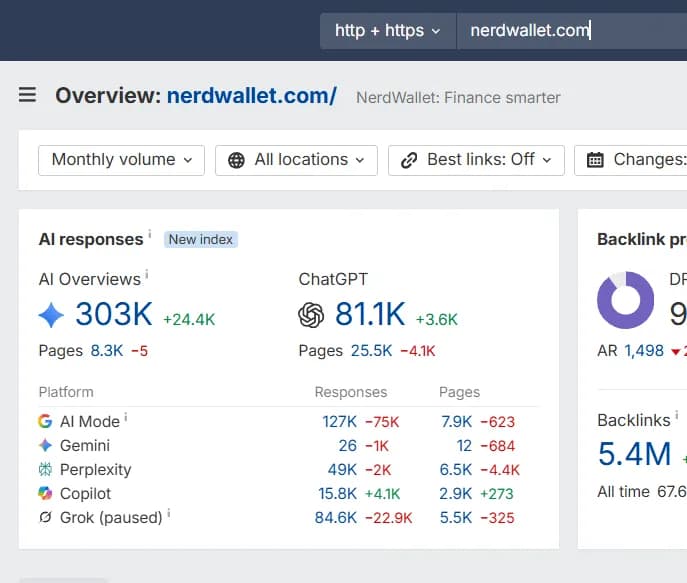
Ahrefs' equivalent is Brand Radar, which tracks brand mentions across six major AI platforms, including ChatGPT, Copilot, Gemini, and Perplexity, pulled from a large pool of monitored prompts. It lets you benchmark your visibility against competitors and surface citations you could turn into more mentions. It's priced in two tiers: a "Select Platforms" plan starting around $398/month, and an "All Platforms" plan around $699/month for full prompt coverage.
Here’s a look at Brand Radar’s dashboard, tracking AI share of voice for a few F1 teams as an example:
Both are genuinely capable tools, but at these prices, they're built for teams that are already deep into SEO and have budget set aside specifically for AI visibility tracking.
Comparing your options at a glance
Tool | Cost | What it's best for |
|---|---|---|
Google Search Console | Free | AI Overview/AI Mode impressions for pages you already rank on |
Bing Webmaster Tools | Free | Citation tracking in Copilot and Bing's AI summaries |
Manual prompting | Free | Quick, direct spot checks, with visible sources on ChatGPT and Perplexity |
HubSpot AEO | $45–50/month | Competitor visibility and content recommendations, at the lowest paid price point — sold standalone, no existing HubSpot account or plan requiredCompetitor visibility and content recommendations, at the lowest paid price point |
Semrush AI Visibility | From $99/month per domain | Ongoing AI mention tracking layered on an existing Semrush subscription |
Ahrefs Brand Radar | $398–699/month | The broadest AI platform coverage, for teams with SEO budget to spare |
Conclusions
There are several options available today to check your AI visibility across ChatGPT, Perplexity, and Gemini, but no single tool gives you 100% of the picture on its own.
- Free Trend Indicators: Google Search Console and Bing Webmaster Tools serve as strong baseline tools, giving you directional impression trends and citation metrics directly from search engines.
- Prompt & Competitor Intelligence: Manual spot checks show you raw source links in real time, while platforms like HubSpot AEO, Semrush, and Ahrefs offer automated tracking and competitive benchmarking.
The Bottom Line: A Unified Solution
While stitching together free search console trends, manual prompts, and third-party dashboards provides a partial workaround, bouncing between platforms remains a major hassle. That is exactly what this page solves. By unifying these fragmented metrics into a single, transparent view, you can finally monitor your AI share of voice with total confidence—backed by real data and proof every step of the way.
Frequently asked questions
FAQs
How do I get my brand in AI results?
How do I get my brand in AI results?
There's no signup or directory — ChatGPT, Perplexity, and Gemini pull from what's already indexed and cited across the web, so getting into AI results comes down to having content that directly answers the questions people ask, plus real citations and mentions elsewhere online that these models can point to. Once that's in place, use Google Search Console, Bing Webmaster Tools, or a direct prompt to check whether it's actually working.
How can I track brand mentions in AI?
How can I track brand mentions in AI?
The two free starting points are Google Search Console's Generative AI performance report and Bing Webmaster Tools' AI Performance report — both show when your pages get pulled into AI-generated answers. For a fuller, always-on view, paid tools like Semrush's AI Visibility Toolkit, Ahrefs' Brand Radar, or HubSpot AEO track mentions across ChatGPT, Gemini, Perplexity, and more automatically.
How do you list a brand on AI?
How do you list a brand on AI?
You don't submit a listing — AI tools like ChatGPT, Perplexity, and Gemini generate answers from what they've already indexed or retrieved from the web, not from a directory you sign up for. The closest thing to "listing" your brand is making sure it's genuinely present and cited in the sources these tools pull from.
How should I do brand tracking?
How should I do brand tracking?
Start with what's free: check Google Search Console and Bing Webmaster Tools for their new AI-answer reports, and ask ChatGPT, Perplexity, and Gemini directly how they describe your brand. If you want ongoing tracking without manual checks, Semrush, Ahrefs, or HubSpot AEO monitor this for you automatically.
How do I get AI to mention my business?
How do I get AI to mention my business?
The same logic as ranking in Google search applies here: AI tools mention businesses that show up clearly and credibly in the content and citations they pull from. Publish content that directly answers the questions your customers are asking, make sure your business is mentioned accurately elsewhere online, then check the results with Search Console, Bing Webmaster Tools, or a direct prompt.
How can I track my brand mentions across AI platforms like ChatGPT and Perplexity?
How can I track my brand mentions across AI platforms like ChatGPT and Perplexity?
The fastest free way is to just ask them — both ChatGPT and Perplexity show their sources, so you can see exactly which page, if any, they pulled your brand from. For ongoing tracking without manually prompting every day, Semrush, Ahrefs, and HubSpot AEO all monitor ChatGPT and Perplexity mentions automatically.
How do I track my company's visibility across AI search platforms?
How do I track my company's visibility across AI search platforms?
Combine a couple of methods, since no single tool covers everything: Google Search Console and Bing Webmaster Tools now report on AI Overviews, AI Mode, and Copilot citations for free, and manually asking ChatGPT, Perplexity, and Gemini fills in the gaps. Paid platforms like Semrush AI Visibility, Ahrefs Brand Radar, and HubSpot AEO add ongoing, automated tracking on top of that.
Is Perplexity an AI aggregator?
Is Perplexity an AI aggregator?
Not exactly — Perplexity is an AI answer engine that searches the live web in response to a prompt and generates an answer with cited sources, rather than aggregating a fixed set of listings the way a traditional aggregator does. That said, it functions a bit like one in practice: it pulls information from multiple sources into a single answer, and it's one of the few AI tools that shows you exactly which pages it drew from.
What are the best tools to track brand visibility in AI answers?
What are the best tools to track brand visibility in AI answers?
For free options, Google Search Console's Generative AI performance report and Bing Webmaster Tools' AI Performance report are the best starting points, along with manually prompting ChatGPT, Perplexity, and Gemini. For paid, ongoing tracking, HubSpot AEO is the best value, while Semrush's AI Visibility Toolkit and Ahrefs' Brand Radar offer the deepest coverage if you have the budget.
What is the best AI visibility checker for my brand?
What is the best AI visibility checker for my brand?
There isn't one that shows everything — every option gives a partial view. If you want free and quick, ask ChatGPT and Perplexity directly; if you want ongoing tracking on a budget, HubSpot AEO is the best value; if you need the broadest coverage and already pay for Semrush or Ahrefs, their AI visibility add-ons are worth it.
What are top 3 AI tools?
What are top 3 AI tools?
For checking your brand's AI visibility, it's ChatGPT, Perplexity, and Gemini — the three platforms every method in this guide is built around. ChatGPT and Perplexity both show their sources, so you can trace exactly where a mention came from; Gemini doesn't, so it's more useful as a second opinion than a first check.
The bottom line
Checking your AI visibility today means accepting that the picture will always be incomplete. Start with what's free: Google Search Console's new AI report, Bing Webmaster Tools' AI Performance report, and a round of manual questions to ChatGPT, Perplexity, and Gemini. If you need deeper, ongoing tracking and have the budget, HubSpot AEO is the most affordable paid step up, while Semrush and Ahrefs go further for teams ready to spend more. None of them will give you the full answer alone, but used together, they'll get you a lot closer.