
Last updated: September 2026
I've had the pleasure of testing HubSpot across its full suite — CRM, email marketing, sales pipelines, scheduling, service ticketing, and website CMS — and it's the most complete free-tier CRM I've reviewed for small to mid-sized businesses. So, is HubSpot worth it? If you need a CRM that grows with your team without a Day 1 credit card, yes — the free plan is genuinely useful, and paid options add automation that rivals enterprise tools. Plans start free; paid tiers from $15/user/mo. If you're running inbound marketing alongside sales, HubSpot is the natural choice.
Plans & Pricing
Free
$0
seat/
month
Up to 2 users
- Free Marketing tools
- Free Sales tools
- Free Service tools
- Free Content tools
- Free Operations tools
Starter
$7
seat/
month
Additional seat $15/mo
- When billed annually
- Everything in Free Plan, plus:
- Simple Automation
- Email and in-app chat support
- Conversation routing
- Different available currencies
- No HubSpot branding
Professional
$90
seat/
month
- Conversation intelligence
- Forecasting
- Sales workspace
- Smart Deal Progression
Enterprise
$150
seat/
month
- AI transcript enrichment
- Deal splits
- Deal journey analytics
- Lead Form Routing
- Pipeline approvals for Deals
* Featured prices can be updated and free offers may include additional terms.
I like that the majority of the features on the Hubspot CRM are available for free. However, the unavailable ones are available on a 14-day trial that still offers you the liberty to get a complete feel of how the platform works and its benefits to your business. Automation features such as creating sales sequences and workflows are some of the features that are available for 14 days. Within 14 days, you can access a fair number of workflow templates and create your dashboard to make your work smoother.
Free Plan:
You can manage your contacts, deals, and leads, as well as track your business conversations, using the Hubspot CRM for free. This tool provides software that covers marketing, sales, and customer service that you can access for free before deciding whether the premium plan is perfect for you, especially since this tool is more expensive than most of its competitors. However, the price is understandable since the premium plan offers multiple-user access.
Starter Plans
Starting at $15 per month per seat, when billed annually. The Starter plans offer additional features such as email automation, meeting scheduling, and more. These plans are suitable for growing businesses seeking more robust tools.
hubspot.com
Professional Plans
Designed for teams requiring advanced capabilities, the Professional plans start at $800 per month(billed annually). They include features like marketing automation, A/B testing, and custom reporting.
Enterprise Plans
For large organizations needing extensive customization and dedicated support, Enterprise plans start at $3,600 per month. They offer advanced features such as predictive lead scoring and custom event triggers.
Depending on your chosen plan, you can always increase the number of team members who can use the tool. However, the price increases automatically. Depending on what suits you best, you can have your fee billed monthly or annually. If you’re convinced about using this tool long-term, you can settle for the annual plan since it will help you save 10%.
Is HubSpot Worth It for Growing Businesses in 2026?
Yes — HubSpot's free CRM is the most generous in its category, and the paid Hubs add meaningful automation and reporting. Here's how each area performs in my testing:
- CRM & Contact Management: Unlimited contacts, deal tracking, activity logging, and pipeline management — all on the free plan. I found the contact timeline and deal board intuitive to set up, with minimal training needed for new reps.
- Email Marketing: Drag-and-drop email builder, list segmentation, A/B testing, and deliverability analytics included in Marketing Hub. The free tier handles basic sends; paid adds automation workflows and smarter segmentation.
- Scheduling (Meetings): Embeddable booking links that sync with Google and Outlook calendars — a standout feature even on the free plan. I tested it for sales outreach and customer onboarding; both worked reliably without extra tools.
- Project Management / Tasks: Task creation, deal-stage automation, and sales sequences are solid for pipeline management, but HubSpot tasks are not a true PM replacement. For complex multi-team projects, I’d recommend pairing with Monday.com or ClickUp.
- VoIP / Calling: Built-in calling with call recording and automatic CRM logging. Available from Starter tier. Useful for SDR teams that want call data tied directly to contact records without a separate dialer.
- Website Builder / CMS Hub: Drag-and-drop pages, landing pages, and forms tied directly to the CRM — stronger than most marketing-site builders because conversion data flows into the same database as your contacts and deals. Best for inbound marketing teams.
- Service Hub / ITSM: Help desk, ticketing, knowledge base, and customer feedback tools. Works best when support and sales teams share the same CRM data as customer history is always visible to both. Not a full ITSM replacement for IT teams.
Expert Score
Pros
- Intuitive design
- Free version available
- Reliable customer support
- Numerous workflow templates
Cons
- Automation is unavailable for free plan
Customer Support
Hubspot ensures customers are never stranded as they offer numerous resources and support options to guide users at every step. This company walks you through leveraging its sales CRM tools with emails, videos, guides, phone calls, and a live chat at your fingertips. When using Hubspot, you can easily access the team members regardless of the peculiarity of your situation.
Phone Support
When I tried HubSpot’s phone support, I was connected with a rep in under five minutes. The process was simple—I filled out a short form with my issue and phone number, and they called me back. The rep was knowledgeable and walked me through my problem efficiently. If you prefer real-time help over waiting on emails, this is a solid option.
Live Chat
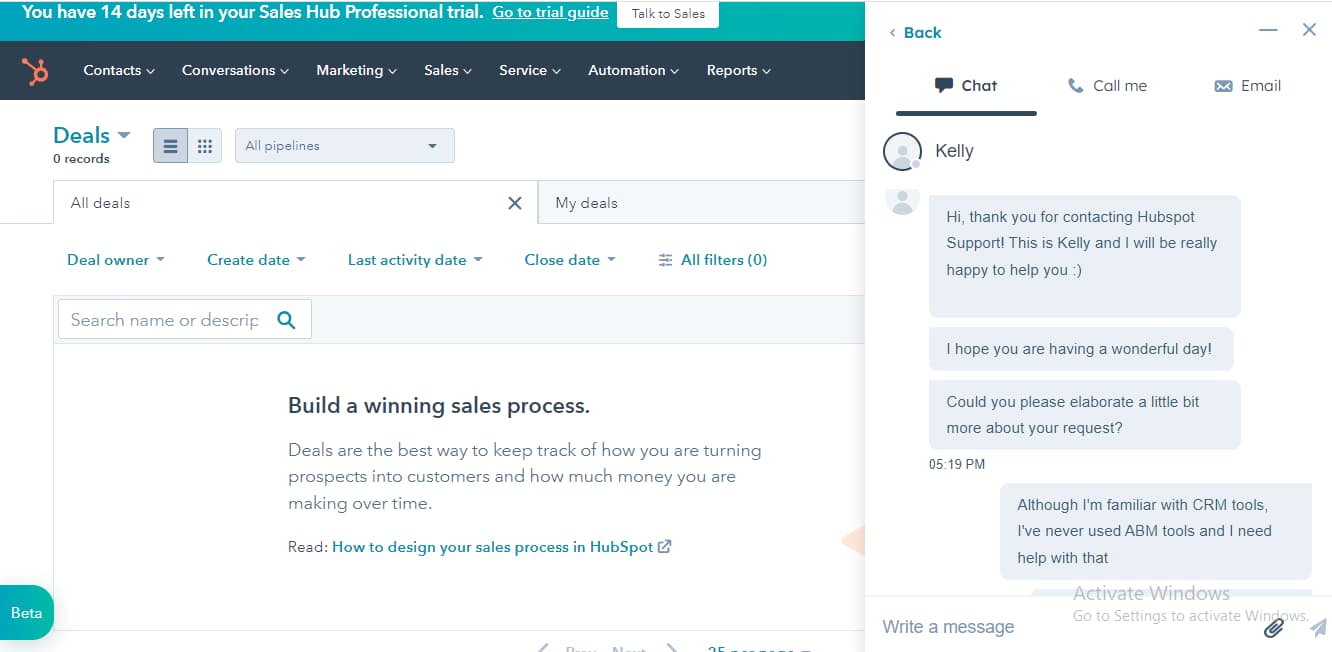
I tested the live chat and was impressed by how fast I got connected. In under a minute, I was chatting with a team member who was friendly and eager to help. The conversation felt natural, not robotic, and they made sure I fully understood the solution before ending the chat. When I lost connection, I received a follow-up email with an option to continue where I left off—nice touch.
Email Support
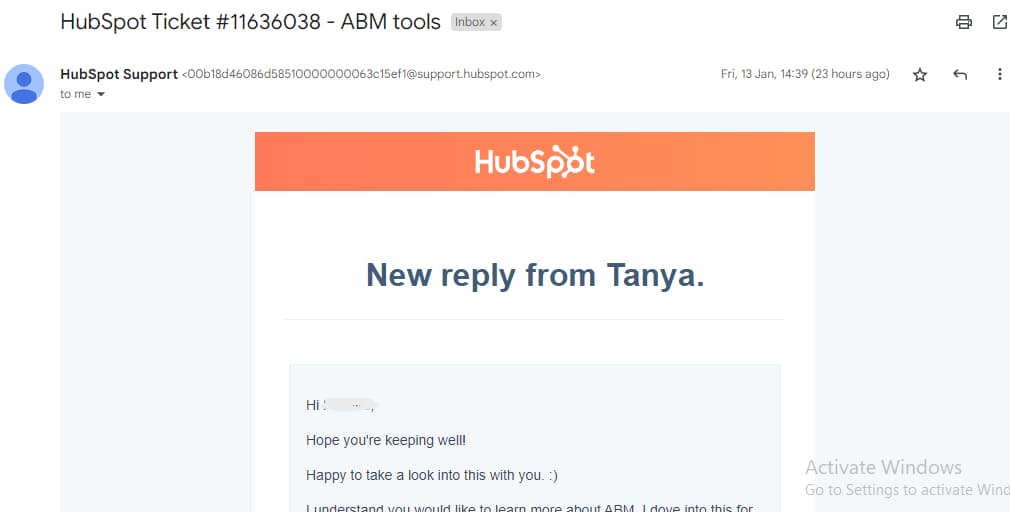
Opening a support ticket was straightforward when I tried it. HubSpot lets you submit requests in six languages and even attach screenshots for clarity. I got a response in under 24 hours, and in the meantime, they directed me to related help articles, which was useful. If your issue isn’t urgent, email support works well, but for faster responses, live chat or phone might be better.
Hubspot Academy
I explored HubSpot Academy and found a ton of valuable content for sales, contact management, and inbound marketing. You can choose courses, lessons, ebooks, or templates based on your learning preference. When I tested it, I liked that courses were available in multiple languages and ranged from quick 30-minute lessons to in-depth multi-hour trainings. No matter your experience level, there’s something useful here.
Blog
HubSpot’s blog is packed with insights on marketing, sales, and business automation. When I browsed through it, I found articles on sales strategies, automation tips, and even building business acumen. If you like staying updated, you can subscribe to their newsletter or check out their ebooks, podcasts, and guides. There’s no shortage of learning material here.
Phone Support
Book a call to receive a response in minutes. +1 877 929 0687
Gain timely responses to email: info@hubspot.com
24/7 Help & Support
Access 24/7 support through live chat, email, and phone.
FAQ
Receive comprehensive answers to all your questions
Live Online Chat
Get connected to a live agent within seconds
Video Tutorials
Tutorials and free online courses are accessible
Ease of Use
Using Hubspot is a seamless process that anyone can crack. This company provides a tour that guides users through using different tools and features to benefit their business. From the onset, Hubspot places support resources at your disposal to ensure you’re not stranded at any point as you navigate the platform.
Setup
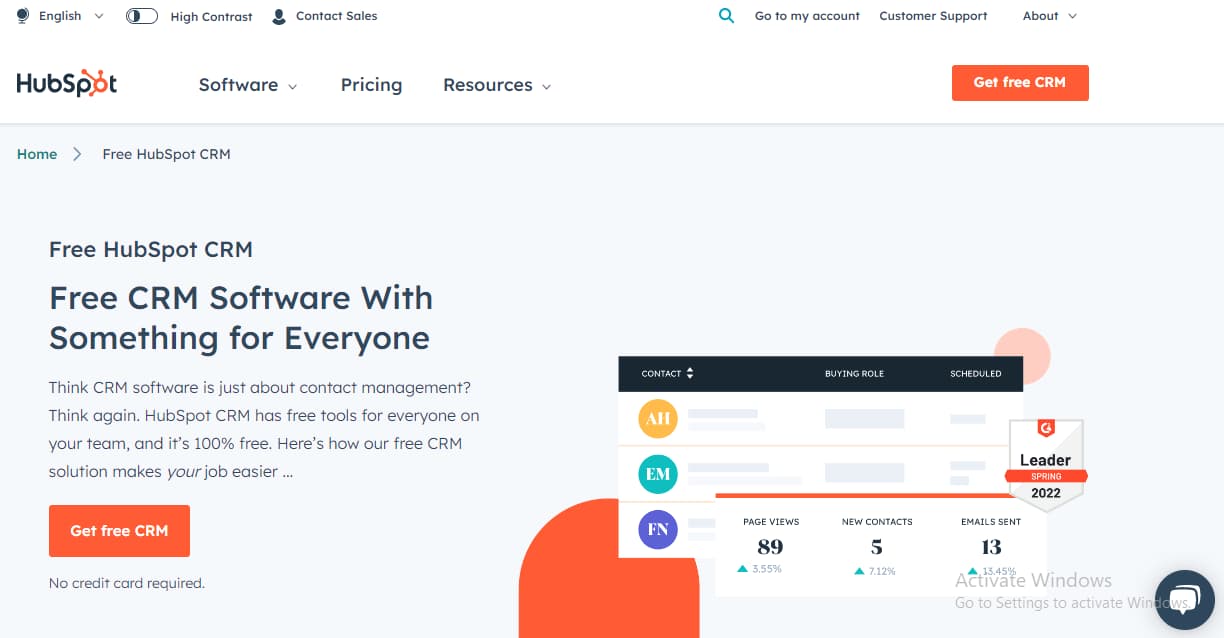
When I tested HubSpot CRM, getting started was quick. Since the CRM is just one part of the platform, I clicked “Get Free CRM” and set up my account in minutes. You can sign up with your email or use Google SSO for an even faster process. Once inside, HubSpot asks for basic business details like job role, company size, and industry. After filling that out, I was ready to dive into the features—no complicated setup or waiting around.
Customizing CRM tools
I played around with HubSpot’s customization options, and there’s a lot of flexibility. You can tweak contact fields, add filters, and adjust tables to match your workflow. The deals page is just as customizable—I could create up to 50 different views and set quick actions to speed up tasks. However, I did notice that while the functionality is solid, there aren’t many built-in tools to enhance the visual layout of the CRM.
Audience building and segmenting
Importing customer data was effortless when I tested HubSpot. You can add details manually, but the real power comes from bulk imports. I uploaded contacts from a CSV file in seconds—HubSpot supports XLS, CSV, and XLSX, making it easy to bring in existing data. Syncing with other tools was just as smooth, letting me pull in customer info without rebuilding my database from scratch.
Automation
When I tried out HubSpot’s automation, I was impressed by how much time it saves. The pre-built workflow templates are great for common tasks, but if you need something more custom, it’s easy to build automations from scratch. I set up workflows for data formatting, task assignments, and email sequences in just a few clicks. Plus, with programmable automation, you can fine-tune processes for more advanced needs. It’s a game-changer for streamlining work.
Performance
Although Hubspot has products across marketing and customer service, it still performs optimally in the sales category. Hubspot makes it easy for you to track customer data without wasting time. Here are some of the parameters I analyzed while using this tool:
Speed
It takes a few minutes for you to set up your Hubspot account. If you’re transferring data and uploading customer data, Hubspot makes it seamless for you. You can successfully import your data to Hubspot within 50 seconds without any glitches.
Once you include the necessary details, Hubspot is quick to provide accurate and explicit reports that cut across different performance metrics that are essential to the success of your business.
https://www.youtube.com/watch?v=uPHAUAf3XoM
Automation
Hubspot also boasts powerful automation features that help you avoid repetitive tasks. Since Hubspot is a digital marketing hub, it allows you to automate marketing tasks, sales pipeline, and emails and even provides updated forecasts generated from the customer data you provide. Also, the process of automating these tasks is smooth and easy for anyone to figure out.
HubSpot is a complete CRM tool suitable for businesses of all types. It includes all the CRM automation features required for the proper function of any business.
Features & Functionality
CRM
Reports
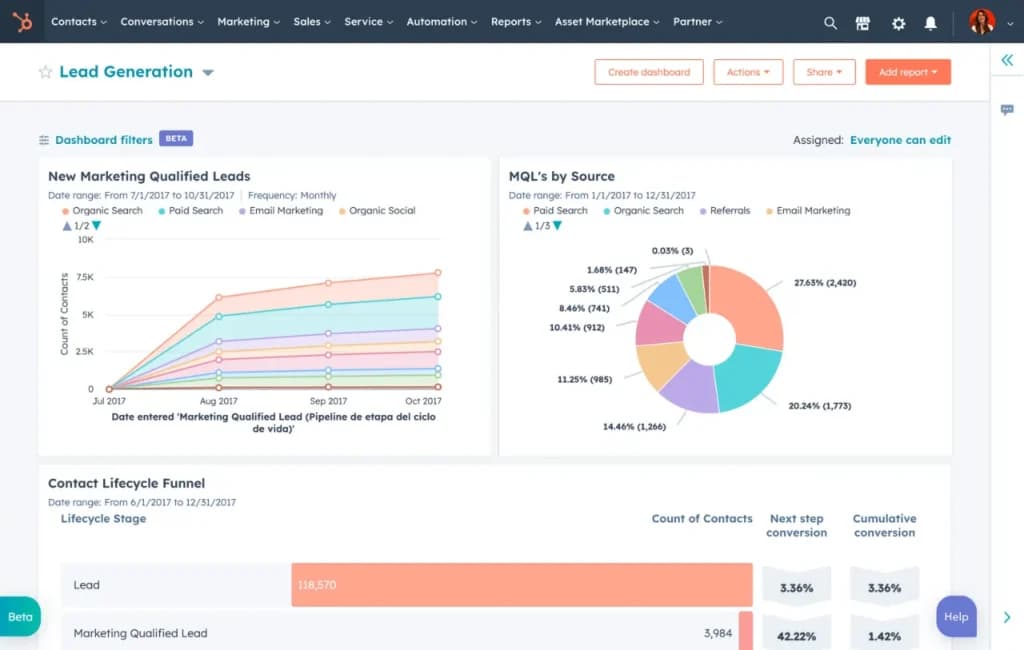
The free CRM package includes reporting features. This allows you to track specific activities like notes, emails, calls, and meetings. You are able to build up to 2 free dashboards with standard reports.
Integrations
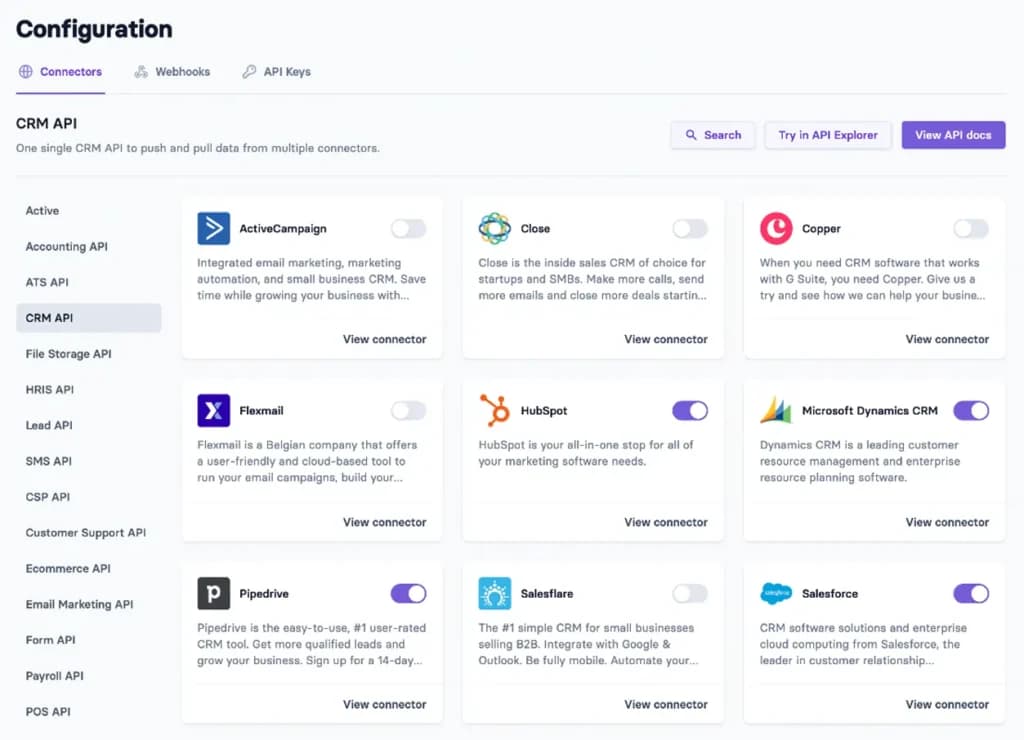
HubSpot offers over 70 integrations to choose from, all built from HubSpot and 3rd-party vendors. Some of the most popular ones are Gmail, Salesforce, HelloSign, Freshbooks, Outlook, Google Calendar, Zapier, and PandaDoc. Some additional ones include MailChimp, GoToWebinar, SurveyMonkey, and many more.
Email Marketing
HubSpot CRM’s email marketing feature allows you to create and send up to 2,000 branded emails per month, or more with advanced plans that remove HubSpot branding. This CRM tool provides a variety of customizable templates and options to design professional, engaging emails that resonate with your audience.
You can also connect and authenticate your email domain for seamless branding, track email performance with analytics, and schedule emails for optimal delivery times. By automating email campaigns and analyzing their effectiveness, you can nurture leads, improve engagement, and drive conversions without the hassle of manual outreach.
Forms
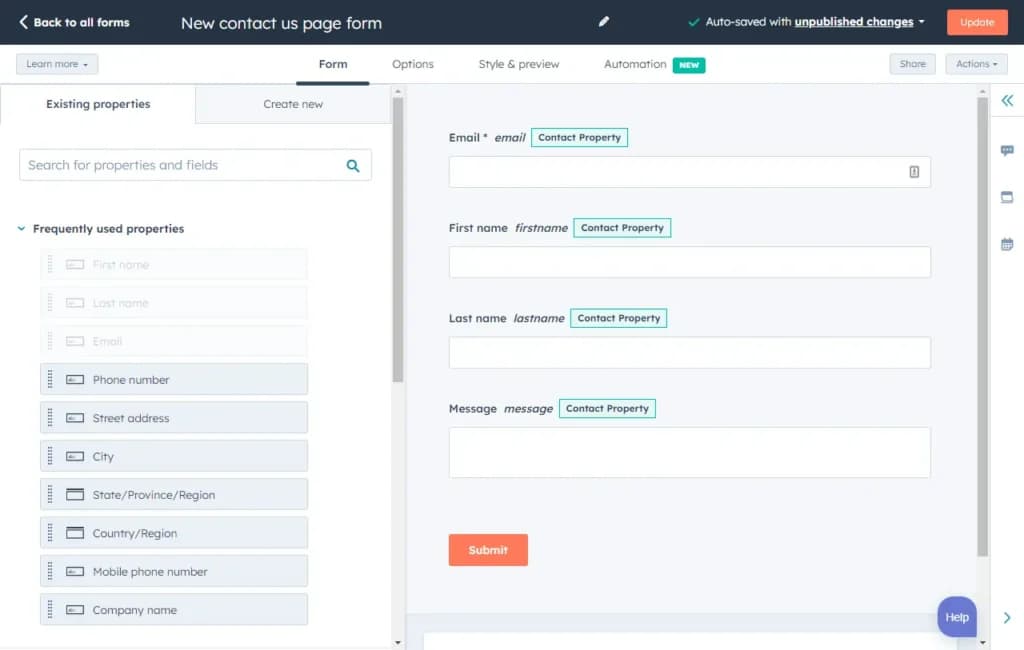
HubSpot CRM includes customizable lead capture forms that allow you to collect valuable data from prospects effortlessly. These forms can be tailored to fit your brand and integrated into your website or landing pages, making it easy to gather contact details, preferences, and other key information. By streamlining data collection, this feature helps you build your contact database, qualify leads, and drive targeted marketing efforts.
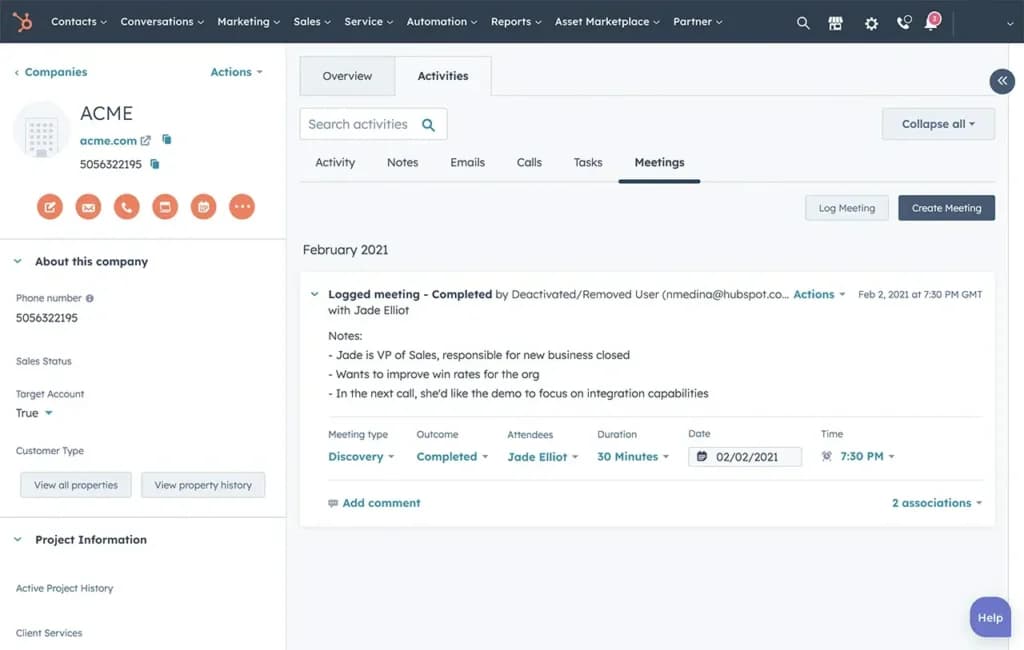
Contact Management
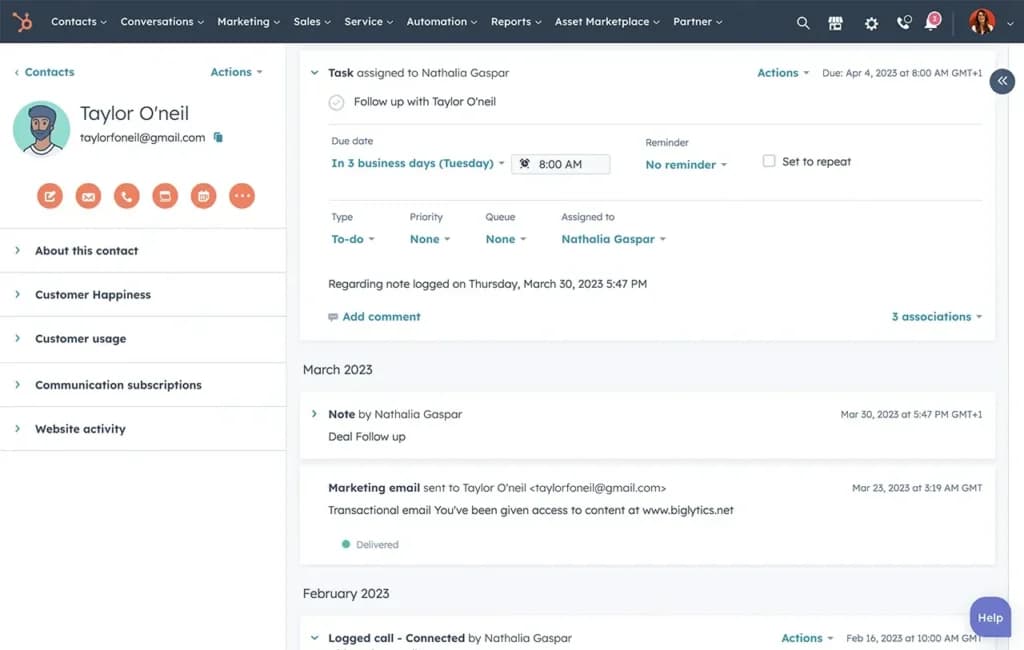
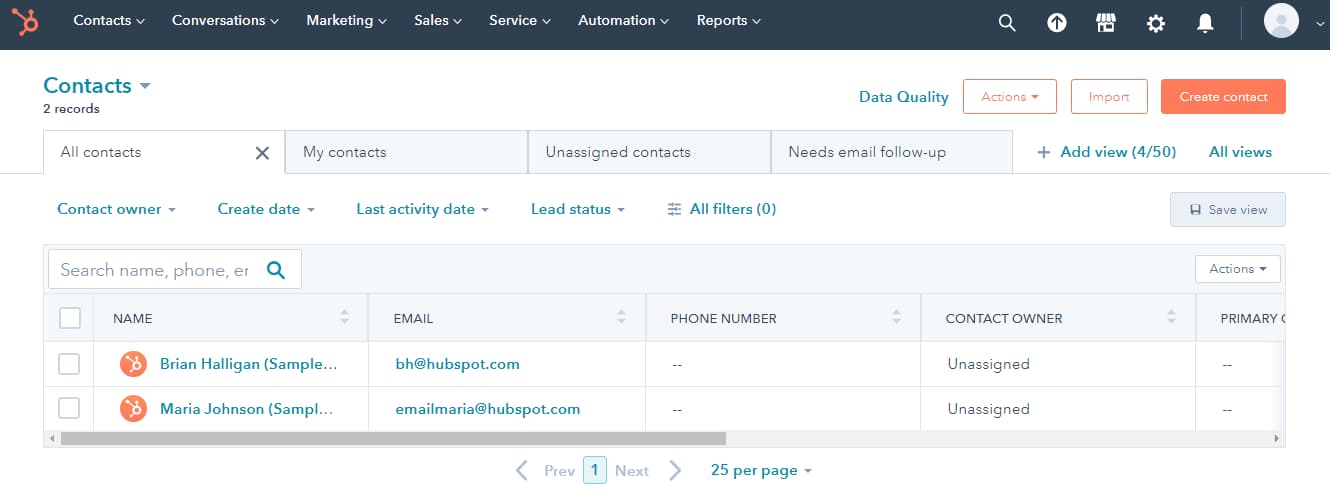
Hubspot has a contact management feature that covers companies, target accounts, and even call activity. This tool allows you to manage contacts, including contact details, and track the various companies you work with. This way, you can easily find the necessary contact information and avoid dealing with multiple spreadsheets simultaneously. With this feature, you can filter the data you need and hide the ones you don’t to make your work more organized.
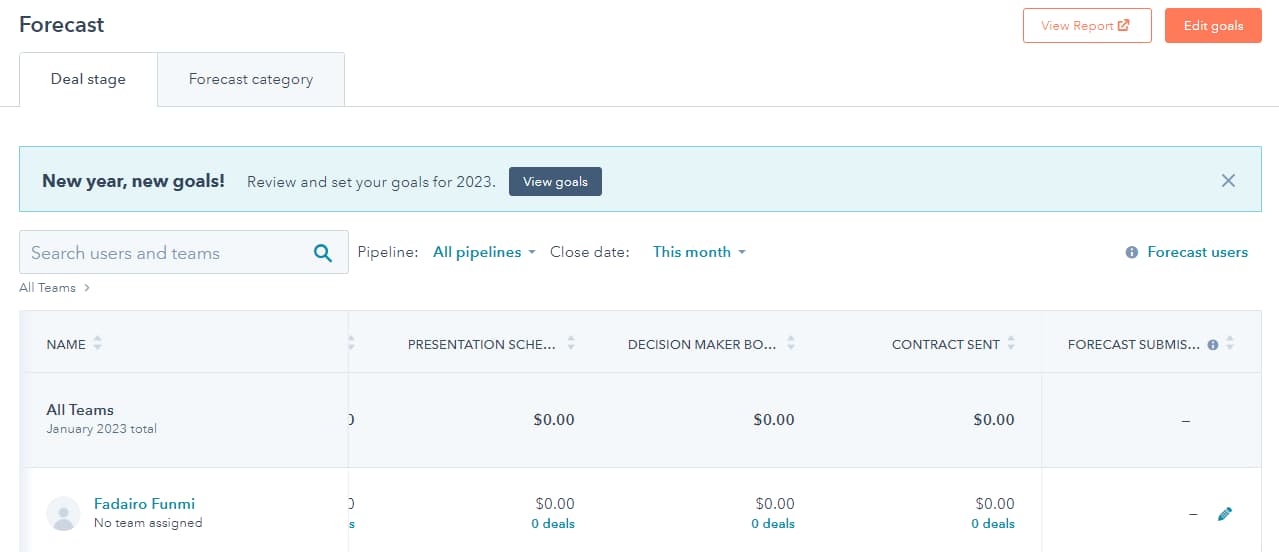
Forecasting
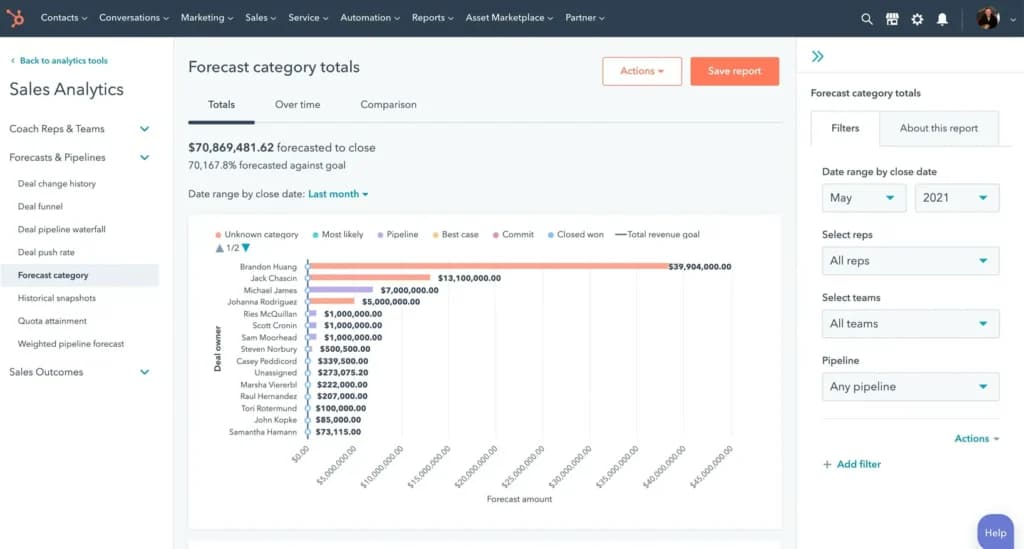
The forecasting tool on Hubspot predicts what your business is likely to sell within a specific timeframe. You can structure it monthly, weekly, quarterly, or annually. Either way, this tool assists you with an in-depth report that shows your team’s progress toward achieving the set goals. This way, you will never lose track of your position in the sales process. First, you need to create a goal, then select the appropriate template for goal setting. Then, you define the goal and complete the process.
Meeting Scheduling
HubSpot’s meeting scheduling feature lets you create and share personal or team meeting links, streamlining appointment booking for clients. With options to customize branding and sync with your calendar, it eliminates back-and-forth scheduling and keeps your meetings organized and professional.
Deal Pipelines
HubSpot’s deal pipelines allow you to manage multiple sales processes by creating separate, customizable pipelines. This feature helps you track deal progress, organize workflows, and gain clear visibility into every stage of your sales journey, ensuring nothing falls through the cracks.
Email Templates
With HubSpot’s email templates, you can save and reuse up to 5,000 personalized emails for efficient outreach. These templates allow you to maintain consistency, save time, and enhance communication with prospects and clients, all while tracking their performance for continuous improvement.
Commerce Hub
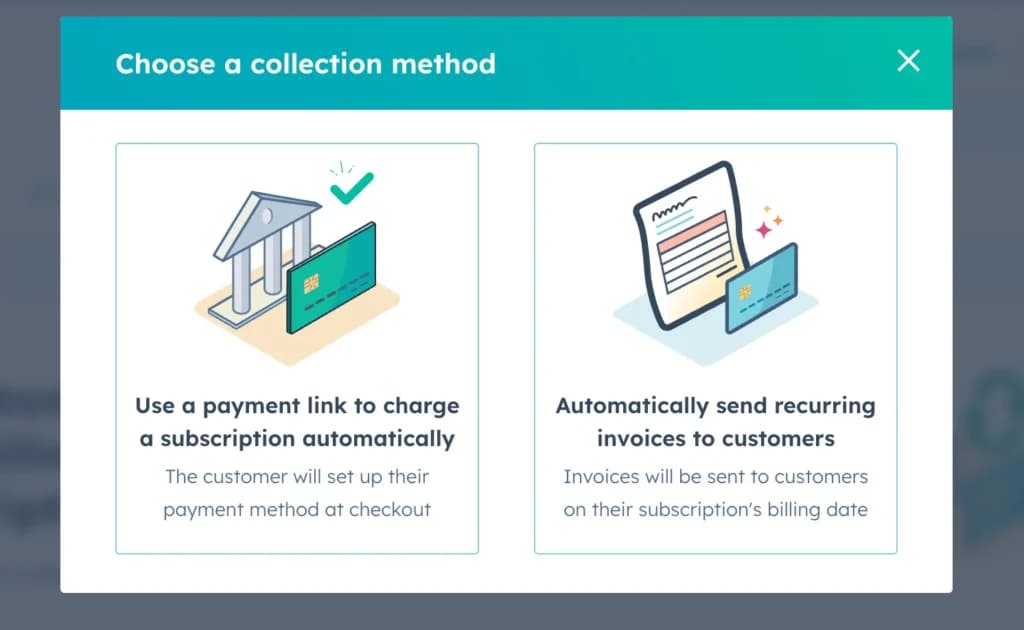
- Invoices: Generate and manage professional invoices directly within HubSpot to streamline your billing process.
- Stripe Payment Processing: Seamlessly integrate with Stripe to enable secure and efficient payment collection.
- E-signature: Facilitate quick approvals with the e-signature feature, allowing clients to digitally sign quotes and contracts.
- HubSpot Payments: For U.S.-based users, HubSpot Payments offers a built-in solution for easy, streamlined payment collection.
Automated Reports
HubSpot CRM's automated reporting feature generates detailed reports on key metrics such as sales performance, lead activity, and marketing effectiveness without manual effort. These reports provide actionable insights in real-time, helping you track progress and make informed decisions quickly and efficiently.
Marketing Automation
HubSpot’s marketing automation tools streamline repetitive tasks such as email campaigns, lead nurturing, and workflow management. With drag-and-drop workflows, you can set triggers and conditions to automate personalized interactions, improving lead engagement and conversion rates.
Sales Pipeline Automation
Sales pipeline automation in HubSpot optimizes the management of deals by automatically advancing them through pipeline stages based on defined triggers or actions. This reduces manual input, keeps pipelines accurate, and ensures your sales process runs smoothly and efficiently.
Sales Forecasting Automation
HubSpot’s sales forecasting automation uses your pipeline data to predict future revenue trends and sales outcomes. With clear forecasts, you can identify potential gaps, allocate resources strategically, and stay on track to meet your sales goals.
Automated Emails
HubSpot’s automated email feature enables you to send personalized, behavior-triggered emails to leads and customers at scale. By automating follow-ups, nurturing campaigns, and transactional emails, you save time while maintaining consistent, meaningful communication.
Email Marketing
I was really impressed by the amount of features that Hubspot offered in the email marketing arena, and how well everything worked. Here are some of the many features:
- Employee and customer feedback surveys
- Image Library
- Drag-and-Drop Editor
- Multiple Users
- Sign-Up Forms
- Google Analytics
- Email Lists
- Segmenting
Employee and Customer Feedback Surveys
HubSpot offers versatile survey tools that, while primarily designed for customer feedback, can be effectively adapted for gathering employee insights. These tools enable organizations to create and distribute various types of surveys, such as Net Promoter Score (NPS), Customer Effort Score (CES), and Customer Satisfaction (CSAT) surveys, which can be repurposed to assess employee engagement and satisfaction.
By utilizing HubSpot's survey features, companies can:
- Collect anonymous feedback to encourage candid responses.
- Analyze responses to identify trends and areas for improvement.
- Integrate feedback data with other HubSpot services for a comprehensive view of organizational health.
This integration facilitates internal communication and ensures consistent engagement with employees.
While HubSpot's survey tools are not exclusively dedicated to employee feedback, their adaptability makes them a valuable resource for organizations aiming to enhance internal processes and foster a culture of continuous improvement.
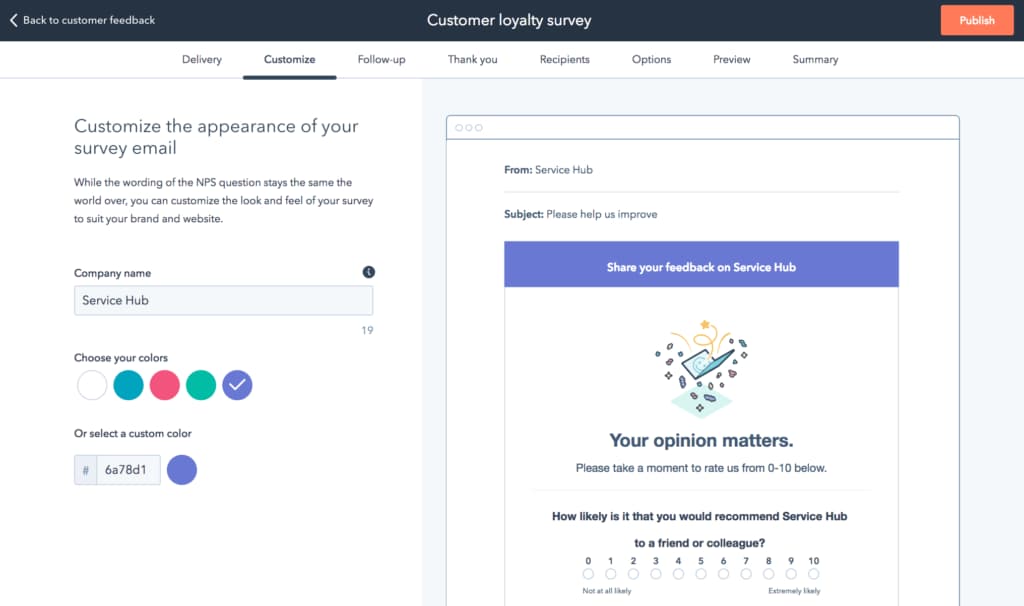
Image Library
HubSpot’s Image Library is an intuitive repository for storing and organizing visuals for email campaigns. As an email marketing tool, it supports seamless integration with templates, ensuring your emails are visually compelling. The ability to organize by campaigns or tags saves time and enhances productivity. This email marketing feature helps businesses maintain consistency in branding, delivering professional, polished marketing content effortlessly.
Drag-and-Drop Editor
HubSpot’s Drag-and-Drop Editor makes designing emails a breeze. During testing, I found its interface highly intuitive, allowing users to build visually stunning campaigns without technical expertise. This email marketing tool supports real-time previews, ensuring designs are responsive across devices. By simplifying the creation process, this email marketing feature empowers businesses to deliver engaging content efficiently, boosting campaign success and engagement rates.
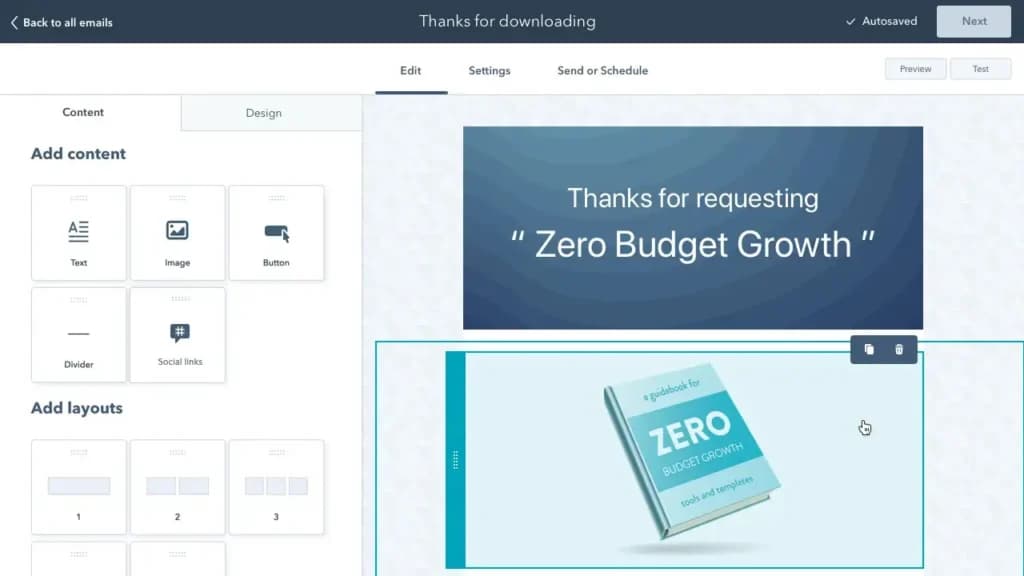
The drag-and-drop editor is well-equipped to help you build an email that really speaks to your audience. You can either build from scratch or customize an existing template. The interface is properly organized, making it easy for you to find anything you might need.
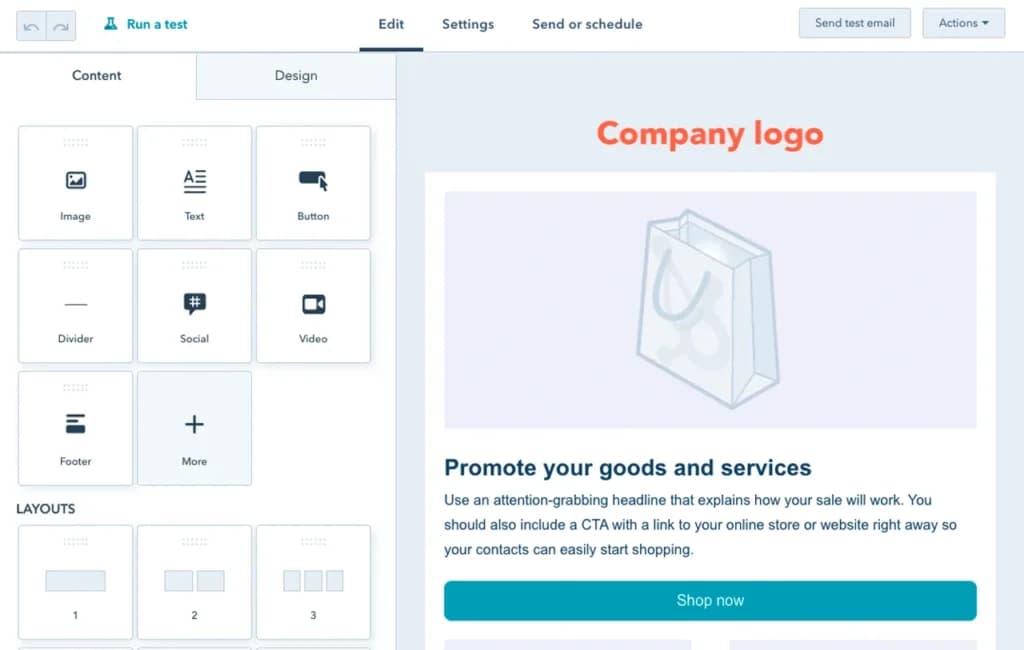
The “Content” section contains widgets that let you add texts, buttons, dividers, layouts, and more to your email. The “Design” section of the editor gives you control over the styles, color, and aesthetic outlook of your email. This is creative freedom at its peak.
Reporting & Analytics
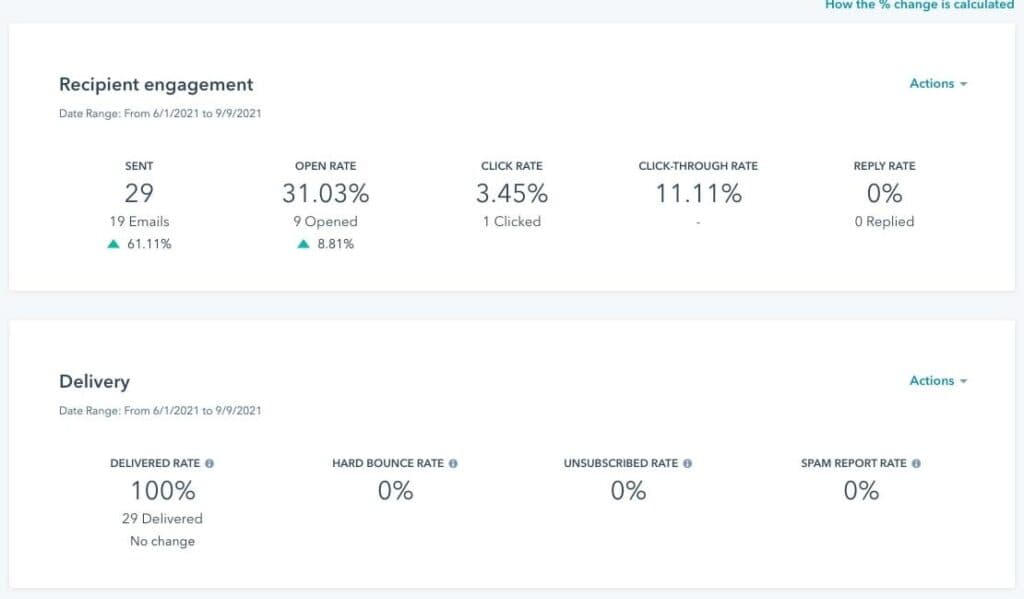
HubSpot lets you measure the performance of your email by tracking important metrics. With the analytics and reporting tools on HubSpot, you can gain real-time insights into how your recipients are interacting with your emails by focusing on metrics like open rates, click-through rates (CTR), bounce, unsubscribes, etc. These can guide how you craft your emails as well as the time and modes of delivery.
Multiple Users
The Multiple Users feature in HubSpot supports collaborative email creation. With role-based permissions, teams can work on campaigns simultaneously while maintaining control over access levels. This email marketing tool fosters teamwork and ensures accountability. Businesses benefit from streamlined workflows and faster campaign execution, making this an essential email marketing feature for teams managing multiple campaigns.
Sign-Up Forms
HubSpot’s Sign-Up Forms simplify lead generation by seamlessly embedding customizable forms into websites and landing pages. As part of its email marketing features, these forms capture visitor information and sync directly with your email lists. Testing revealed that these forms are user-friendly and highly effective for building an audience. Businesses benefit from streamlined lead collection and nurturing, enhancing their overall marketing strategy.
Email Lists
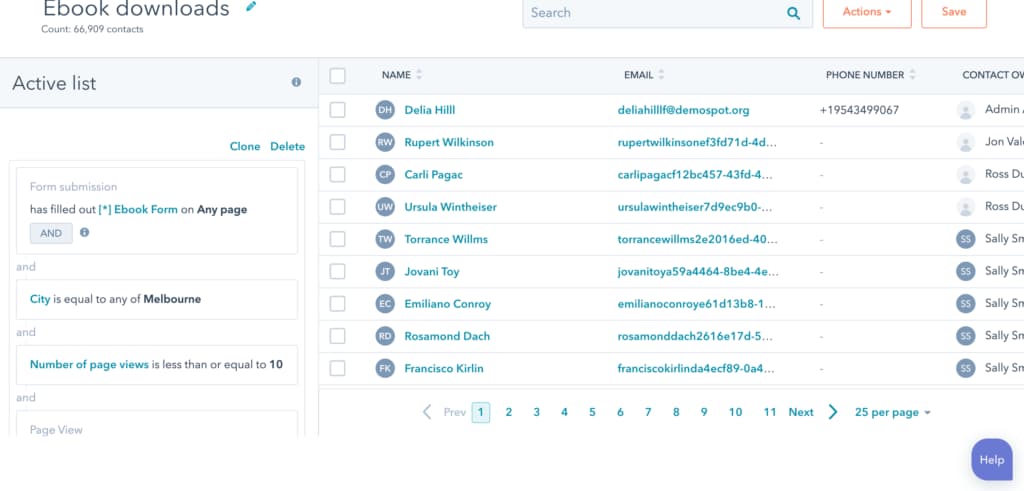
HubSpot’s Email Lists feature allows for easy management of subscribers through dynamic or static lists. I found the automation capabilities particularly useful for updating lists based on user actions. This email marketing tool ensures you’re always targeting the right audience, increasing the relevance of campaigns. Businesses benefit from improved segmentation, leading to higher open rates and engagement.
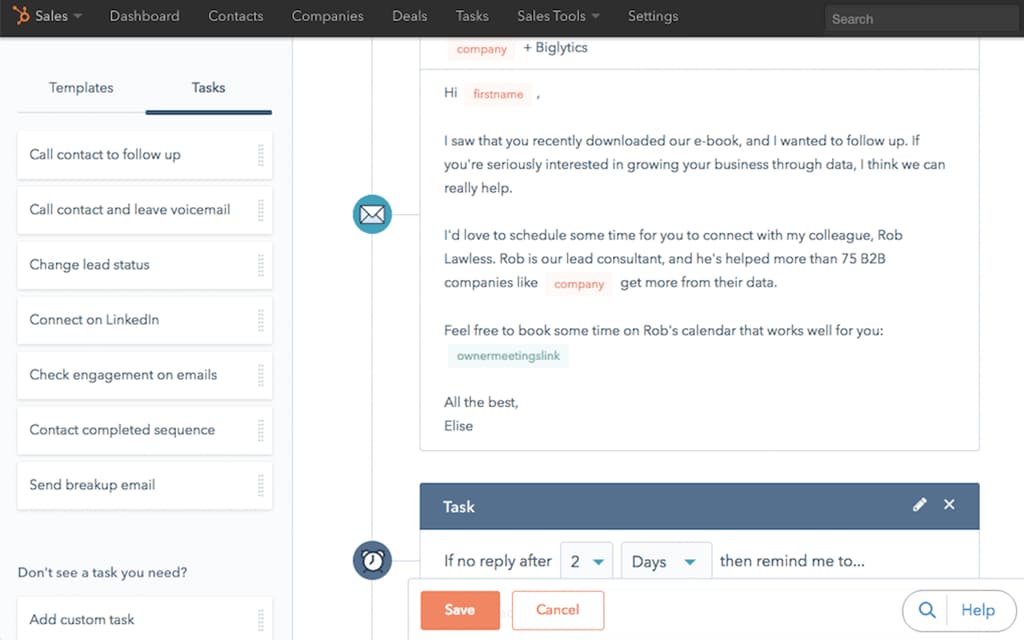
You can also create automated follow up emails:
Segmenting
The Segmenting feature in HubSpot empowers businesses to create highly targeted campaigns by dividing audiences based on demographics, behaviors, or interests. As an email marketing expert, I found this feature critical for delivering personalized content. With advanced filters and automation, businesses can enhance audience engagement and improve conversion rates. This email marketing tool is a game-changer for precision in modern marketing strategies.
Hubspot email marketing enables you to boost engagement with targeted marketing strategies.
- A/B Testing
- Social Media Marketing
- Surveys
- Bounce Management
- Tracking Analytics
- Automated Email Responses
- List Segmentation
A/B Testing
HubSpot’s A/B Testing feature allows businesses to compare variations of email campaigns to determine which performs better. This email marketing tool tests subject lines, designs, or CTAs, providing data-driven insights. I found it invaluable for optimizing email performance. By refining campaigns with this email marketing feature, businesses can improve engagement rates and maximize ROI in their marketing efforts.
Social Media Marketing
HubSpot integrates Social Media Marketing with its email platform, enabling cross-channel campaigns. During testing, I appreciated the seamless connection between email content and social posts. This marketing feature allows businesses to amplify reach, track engagement across platforms, and ensure cohesive messaging. It’s an essential tool for organizations aiming to create unified, multi-channel marketing strategies.
Surveys
HubSpot’s Surveys feature is a powerful tool for gathering feedback and understanding customer needs. Embedded easily into emails, these surveys help improve engagement and refine future campaigns. As an email marketing tool, it provides actionable insights that can enhance overall marketing efforts. Businesses benefit from the ability to align their offerings with customer preferences, boosting loyalty and satisfaction.
Bounce Management
HubSpot’s Bounce Management ensures clean and effective email lists by automatically handling undeliverable emails. This email marketing feature categorizes bounces (soft and hard) and updates the database to prevent delivery issues. I found it crucial for maintaining sender reputation and improving deliverability. Businesses benefit from streamlined email marketing processes and higher engagement rates.
Tracking Analytics
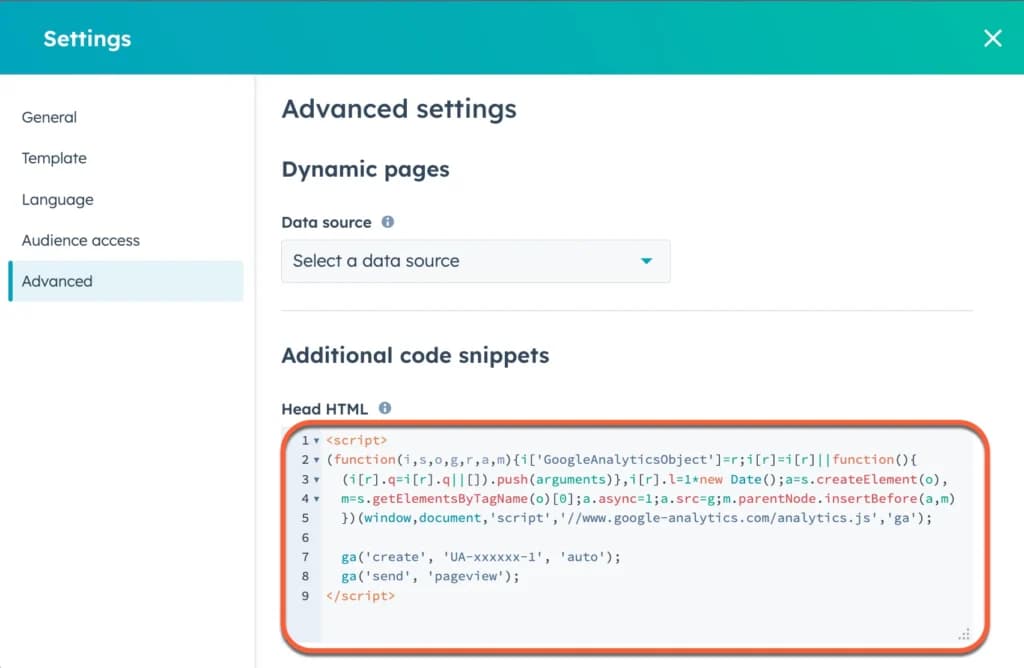
HubSpot’s Tracking Analytics offers detailed insights into email performance, from open rates to click-throughs. As a reviewer, I appreciated the clarity and depth of this email marketing feature. By connecting email data with website traffic via Google Analytics, businesses can measure ROI effectively. This email marketing tool is essential for refining campaigns and aligning them with broader marketing objectives.
Automated Email Responses
HubSpot’s Automated Email Responses save time by instantly replying to customer actions like form submissions or inquiries. During testing, I found the feature highly customizable and efficient. This email marketing tool improves engagement and builds stronger customer relationships. As part of its email marketing features, automation helps businesses maintain consistent communication and improve conversion rates effortlessly.
List Segmentation
HubSpot’s List Segmentation feature enables marketers to divide audiences into targeted groups based on demographics, behaviors, or engagement history. This powerful email marketing tool allows for tailored campaigns, ensuring higher relevance and engagement. By leveraging dynamic lists that update automatically, businesses can enhance personalization, improve open rates, and drive better results from their email marketing efforts.
You can create visually appealing emails with these great design tools:
- Email Templates
- Building Personalized Emails
- Email & Mobile Preview
- Flexible Design
- Storage for Data & Images
- Newsletter Templates
- Languages
- Integrations
Email Templates
HubSpot’s Email Templates feature simplifies campaign creation by offering pre-designed layouts tailored to various goals. I found it easy to customize these templates to match branding and messaging needs. This email marketing tool saves time and ensures consistent, professional designs. Businesses benefit from streamlined campaign production, enhancing their overall marketing efficiency and engagement rates.
Building Personalized Emails
HubSpot’s Building Personalized Emails feature enables marketers to tailor content to individual recipients using data from email lists and CRM. During testing, I appreciated the ease of inserting personalized elements like names, locations, or purchase history. This email marketing tool boosts engagement by creating a deeper connection with the audience, enhancing the effectiveness of email marketing campaigns.
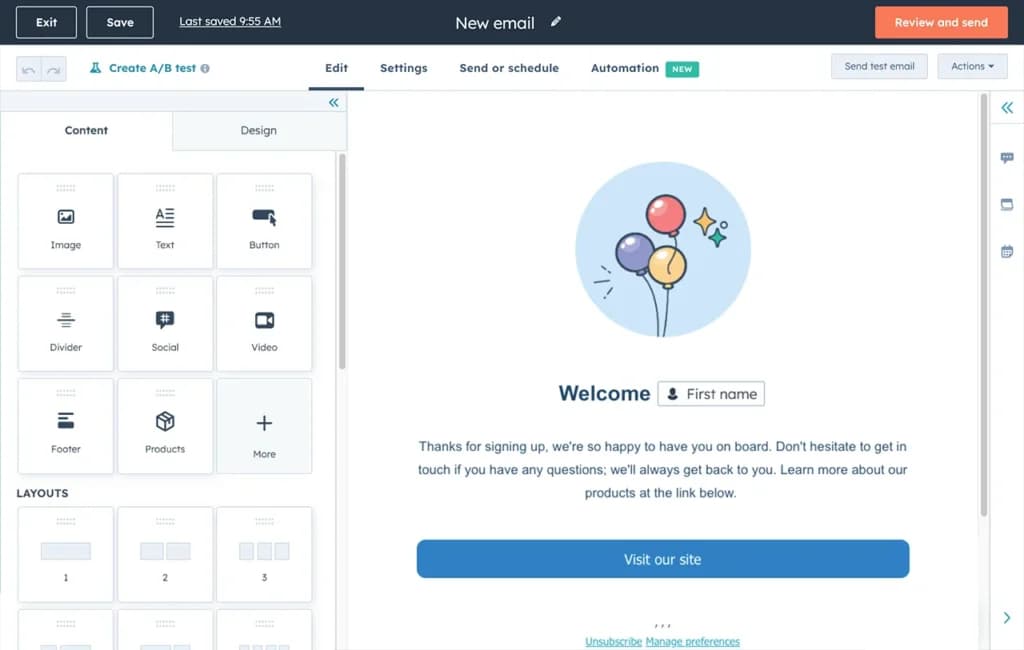
Email & Mobile Preview
The Email & Mobile Preview feature in HubSpot allows users to see how their emails appear on various devices and email clients before sending. As an email marketing expert, I found this tool invaluable for ensuring designs are responsive and error-free. This email marketing feature improves campaign professionalism and ensures a seamless experience for recipients across devices.
Flexible Design
HubSpot’s Flexible Design feature provides freedom to create custom layouts with its drag-and-drop editor and code customization options. This email marketing tool supports advanced branding and creativity, enabling businesses to design unique campaigns. During testing, I appreciated its versatility in catering to both beginners and seasoned marketers. This feature elevates the quality and impact of email campaigns.
Storage for Data & Images
The Storage for Data & Images feature in HubSpot centralizes marketing assets for easy access and management. I found it highly efficient for organizing visuals and campaign materials. This email marketing feature ensures consistency and reduces time spent searching for files. Businesses benefit from a streamlined workflow, enhancing the productivity of their email marketing efforts.
Newsletter Templates
HubSpot’s Newsletter Templates make it simple to create professional and engaging email newsletters. These pre-designed layouts are easy to customize and align with branding. As an email marketing tool, I found them ideal for maintaining consistent communication with subscribers. This feature supports ongoing marketing efforts, keeping audiences informed and engaged with regular updates.
Languages
HubSpot supports multiple Languages, making it a powerful email marketing tool for global businesses. During testing, I found its ability to create and localize campaigns in various languages particularly useful for targeting diverse audiences. This email marketing feature enables businesses to connect with international markets effectively, enhancing the reach and impact of their marketing campaigns.
Integrations
HubSpot’s Integrations feature connects its email marketing tool with other platforms like CRM, social media, and analytics tools. I appreciated the seamless data flow and enhanced functionality during testing. This email marketing feature ensures campaigns align with broader marketing strategies, offering businesses a unified system to manage customer interactions and measure success.
Project Management
HubSpot Projects is a simple project management tool that strips away all of the added features that may not be needed to get the job done. As part of the larger marketing suite, customers get a lot more functionality that’s directly tied to helping them build awareness and grow their brand.
You’re able to set up multiple projects to organize initiatives within your teams, manage team members, create an unlimited number of tasks, and assign those tasks to anyone on the team. You can also create subtasks that are dependent on the main task which makes it easier to organize work.
How to use Hubspot for project management:
- Task creation and assignment
- Project and task-tracking dashboards
- Pre-built project templates
- Customizable workflows
- Integration with HubSpot CRM
- File sharing and centralized document storage
- Time tracking and logging
- Invoicing Integration
- Automation for task updates and reminders
- Reporting and analytics dashboards
- Integration with third-party tools like Slack and Google Workspace
- Cloud-based access with mobile compatibility
- Collaboration features with team chat options
- Notifications and real-time updates
- Detailed user activity tracking
- Cross-team visibility for marketing, sales, and service
- Resource Management
- Advanced Reporting and Analytics
Task Creation and Assignment
When I tested HubSpot's project management software, I found that creating and assigning tasks was effortless. You can set priorities, deadlines, and assign owners to ensure accountability and transparency. This makes it easy for team members to understand their responsibilities, streamlining task delegation and improving productivity. It’s an excellent option for those seeking the best task management software.
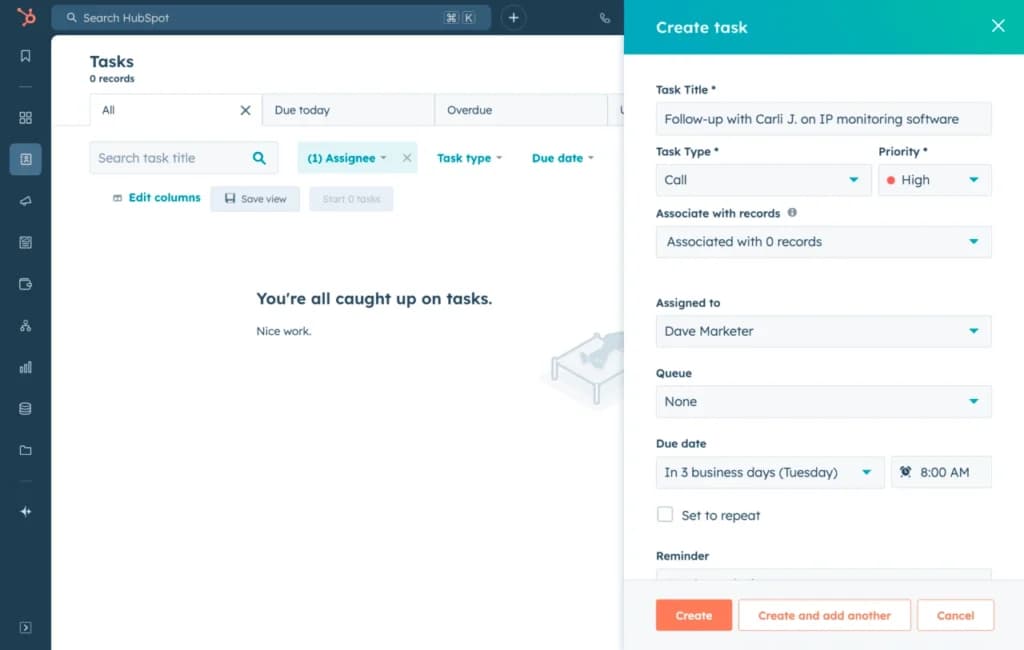
Project and Task Tracking Dashboards
I played with the HubSpot project tracking software and found its dashboards provide real-time visibility into task progress and project milestones. These dashboards help teams spot bottlenecks early and stay on top of deadlines. Businesses value this feature for improving visibility and ensuring timely delivery, making it one of the best project management solutions available.
Pre-Built Project Templates
When I explored HubSpot's project management platform, I found the pre-built templates for recurring workflows like marketing campaigns and sales strategies to be incredibly useful. These templates save setup time and ensure consistency. For businesses, this means getting projects off the ground faster with a structured approach that aligns with best practices.
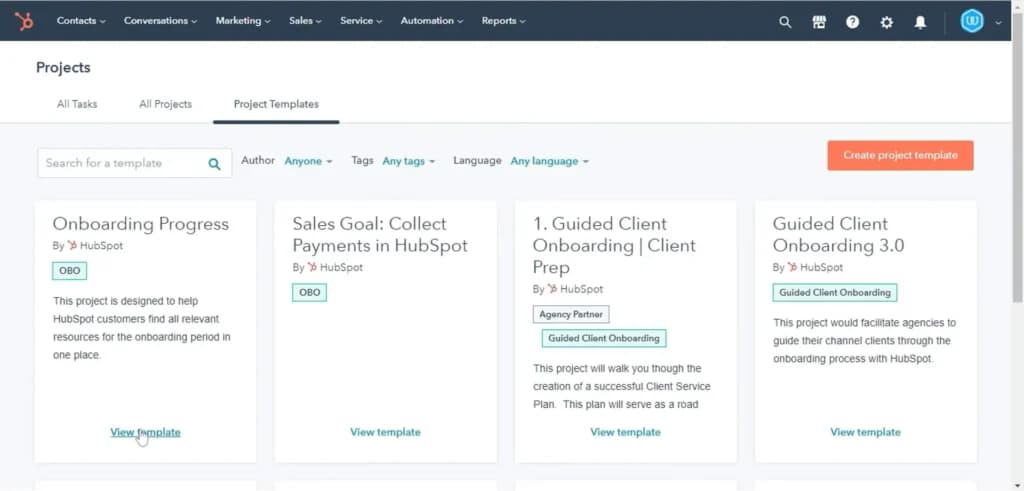
Customizable Workflows
I tried out the HubSpot project management tool and found that customizable workflows are a standout feature. You can tailor task automation and tracking to suit your business needs, which boosts efficiency by automating repetitive tasks. This flexibility makes it one of the top project management tools for adaptive strategies.
Integration with HubSpot CRM
A big highlight when using HubSpot project management software is its seamless integration with HubSpot CRM. This connects project data with customer interactions, giving a unified view of client-related tasks. This is valuable for aligning customer management with project workflows, ultimately enhancing service quality and client relationships.
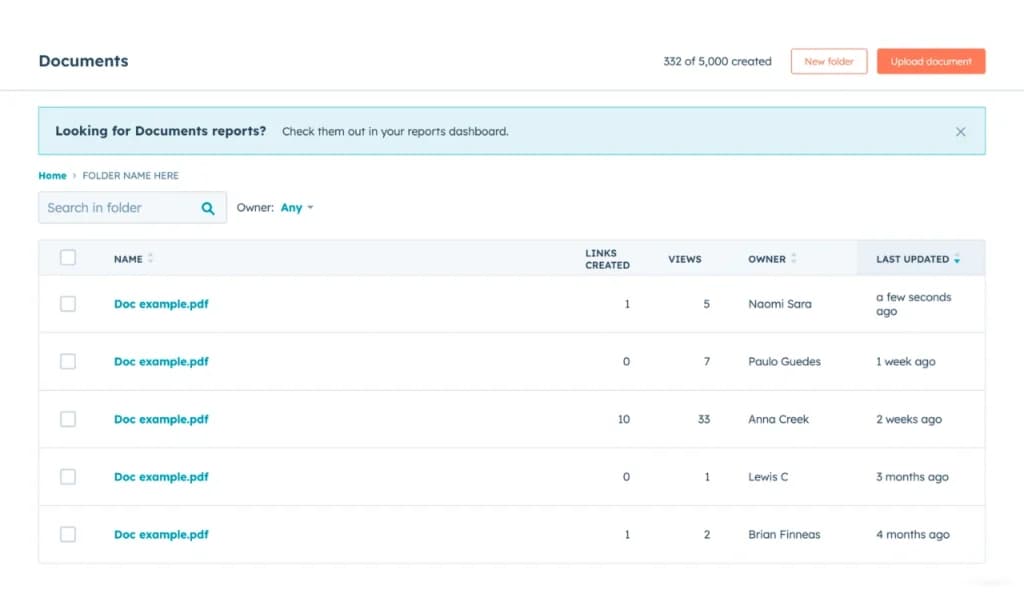
File Sharing and Centralized Document Storage
I found that HubSpot's task management software includes centralized document storage and file-sharing capabilities. Team members can access important files without leaving the platform, which improves collaboration and reduces delays caused by misplaced files—especially beneficial for remote teams.
Time Tracking
While HubSpot's project management software offers robust task management and collaboration features, it lacks built-in time tracking capabilities. This omission means businesses cannot monitor the time spent on tasks directly within the platform, potentially complicating project time management and billing processes. To address this, users may need to integrate third-party time tracking tools, which can add complexity and additional costs.
Invoicing Integration
Another limitation of HubSpot's project management tools is the absence of integrated invoicing features. Without this functionality, businesses must rely on separate invoicing systems, leading to fragmented workflows and increased administrative efforts. Integrating external invoicing applications can bridge this gap but may result in additional expenses and require more complex setup processes.
Reporting and Analytics Dashboards
When I explored HubSpot project management tools, I noticed the robust reporting features that let you analyze team performance, task efficiency, and project outcomes. These insights help businesses refine workflows and make data-driven decisions, ensuring continuous improvement in project management processes.
Cloud-Based Access with Mobile Compatibility
I found that HubSpot project management apps are cloud-based and mobile-compatible, letting teams manage tasks from any location. This is ideal for hybrid and remote teams needing uninterrupted collaboration, making it one of the best project management software for small businesses.
Collaboration Features with Team Chat Options
I used the collaboration features in HubSpot PM software and liked the integrated chat options. Team members can communicate directly within the platform, reducing reliance on external tools and fostering real-time collaboration for faster decision-making.
Detailed User Activity Tracking
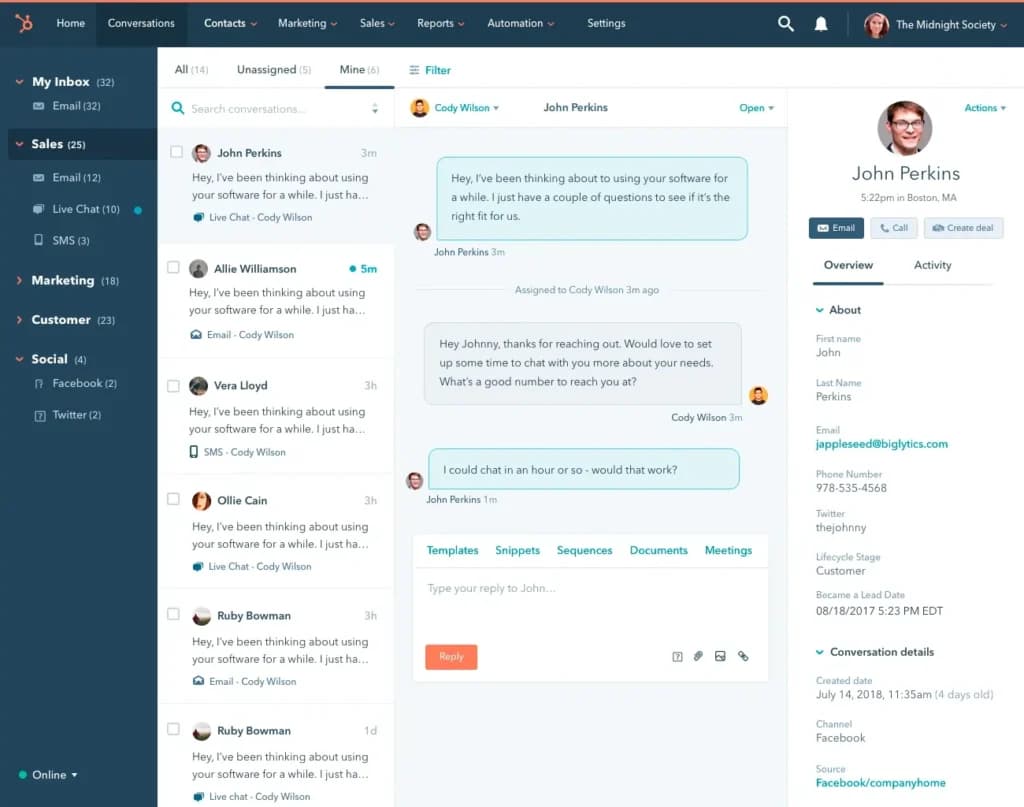
When I tested HubSpot's project management platform, I saw how useful the detailed user activity tracking can be. Managers can monitor task updates, identify bottlenecks, and ensure accountability. This helps optimize resource allocation and maintain project momentum.
Cross-Team Visibility for Marketing, Sales, and Service
One of the standout benefits of HubSpot project management software is the cross-team visibility it offers. It aligns marketing, sales, and service efforts into one cohesive view. This holistic approach enhances business performance and ensures that all departments are working together for client satisfaction.
Additional Features
In addition to core project management features, HubSpot offers access to forms, email marketing, landing pages, and live chat. These additional tools help businesses capture leads, keep them engaged, and deliver targeted messages, making HubSpot one of the best project management solutions for growing businesses.
Resource Management
HubSpot's project management platform does not include comprehensive resource management features. This means businesses cannot effectively allocate and monitor resources such as personnel and equipment within the system. The lack of resource management tools can lead to inefficiencies and challenges in project planning and execution. To mitigate this, companies might need to adopt additional software solutions, which can increase operational costs and complicate system integration.
Customization and Scalability
HubSpot's project management tools offer limited customization options, which may not suffice for businesses with unique project workflows or those experiencing rapid growth. The platform's scalability is also a concern, as it may not efficiently handle the increasing complexity and volume of projects in expanding organizations. This could necessitate transitioning to more robust project management solutions as the business grows, leading to potential disruptions and additional investments.
Third-Party Integrations
While HubSpot supports integrations with various third-party applications, the process can be complex and may require technical expertise. Additionally, relying on multiple external tools can lead to fragmented data and inconsistent user experiences. Ensuring seamless integration and data synchronization across platforms demands careful planning and ongoing maintenance, which can strain resources and impact overall efficiency.
To keep all team members aligned during the project, Hubspot Projects offers the following communication tools:
To boost productivity and ensure the projects are completed on time, you can enjoy these productivity tools:
Advanced Reporting and Analytics
While HubSpot provides basic reporting and analytics, it falls short in offering advanced project reporting features. Businesses seeking in-depth insights into project performance, such as earned value analysis or advanced forecasting, may find the platform's capabilities limited. This limitation could hinder data-driven decision-making and affect project outcomes. To obtain advanced analytics, organizations may need to integrate specialized reporting tools, which can entail additional costs and setup efforts.
Website Builders
The landing page creation tool is essential for creating a well-developed and high-quality page that will help you convert your site’s visitors into customers. You can easily design your page by choosing a template and dragging and dropping photos and text boxes where you want them.
HubSpot offers a detailed, step-by-step process to help you create and edit your page, offering the following functions:
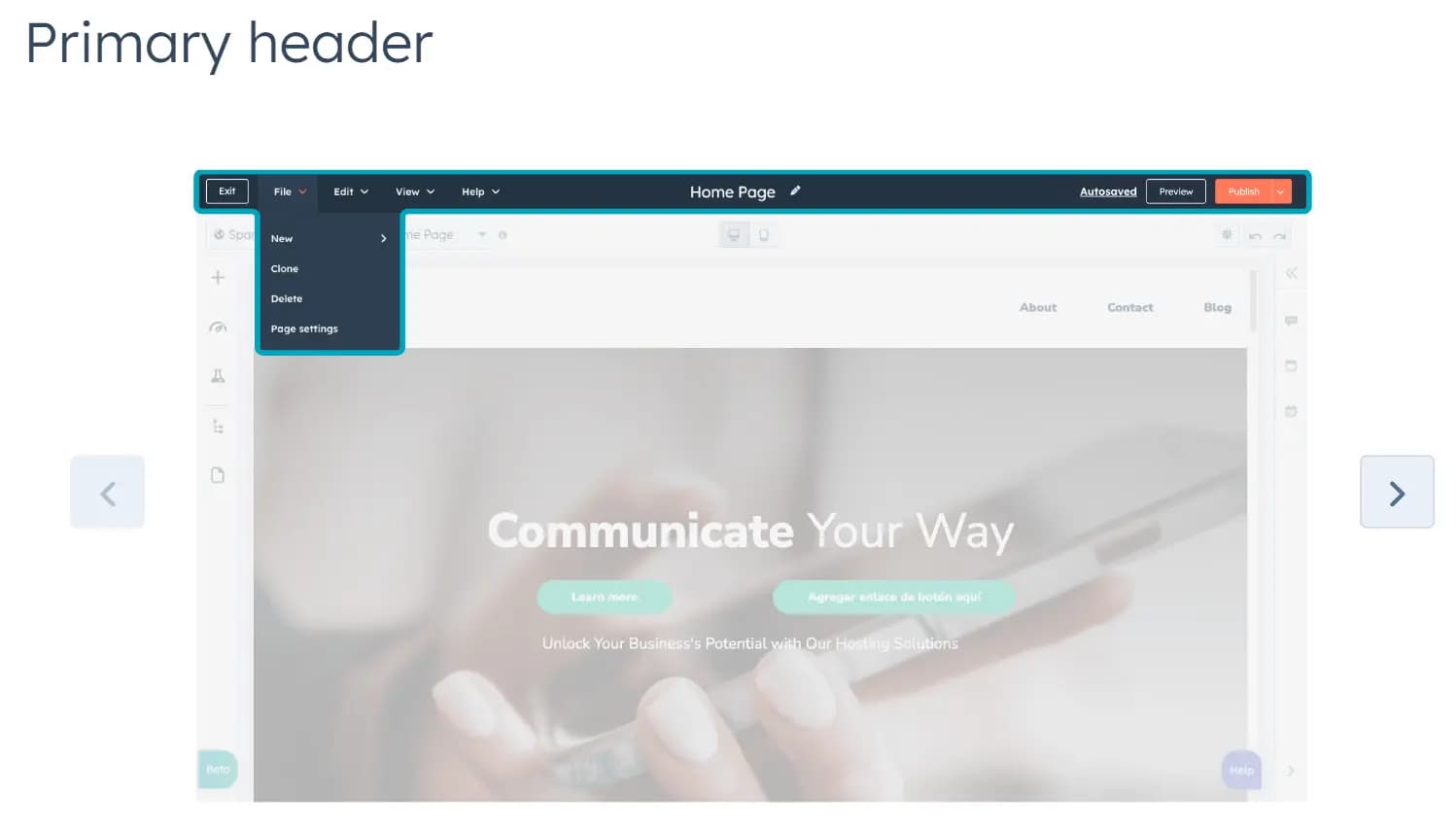
The Primary Header
The main bar at the top of the screen is the header offering the following:
- File: Create a new language variant, access your page settings, create a new page, clone, and delete.
- Edit: Undo, redo, and access the Theme editor.
- View: Access your version history and page details.
- Help: Find quick access to the onboarding tour, the knowledge base, and a place to give feedback.
- A button on the top right lets you publish once your creation is complete.
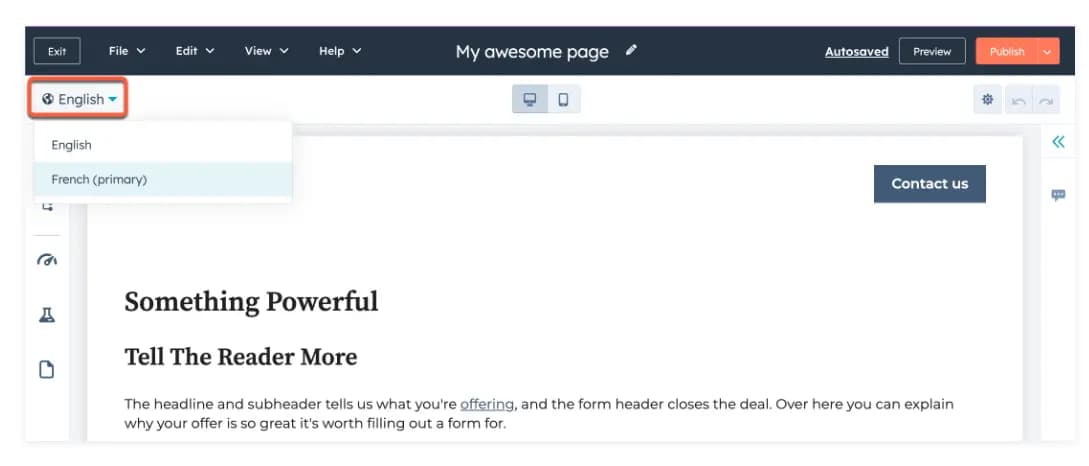
The Secondary Header
It lets you switch between language variations, pages, and screen sizes. The right corner allows you to access settings and undo or redo actions.
The Side Bar
Allows you to add, organize, and enhance the content on your landing page.
- Add: This option allows you to browse and add modules, sections, or layouts to your page. To add, drag and drop the content onto your page.
- Optimize: Provides information and tools to help you boost your search ranking (learn about search ranking through the Academy’s SEO course)
- Test: Allows you to run A/B or adaptive tests
- Page Contents: Breaks down your page contents into an outline
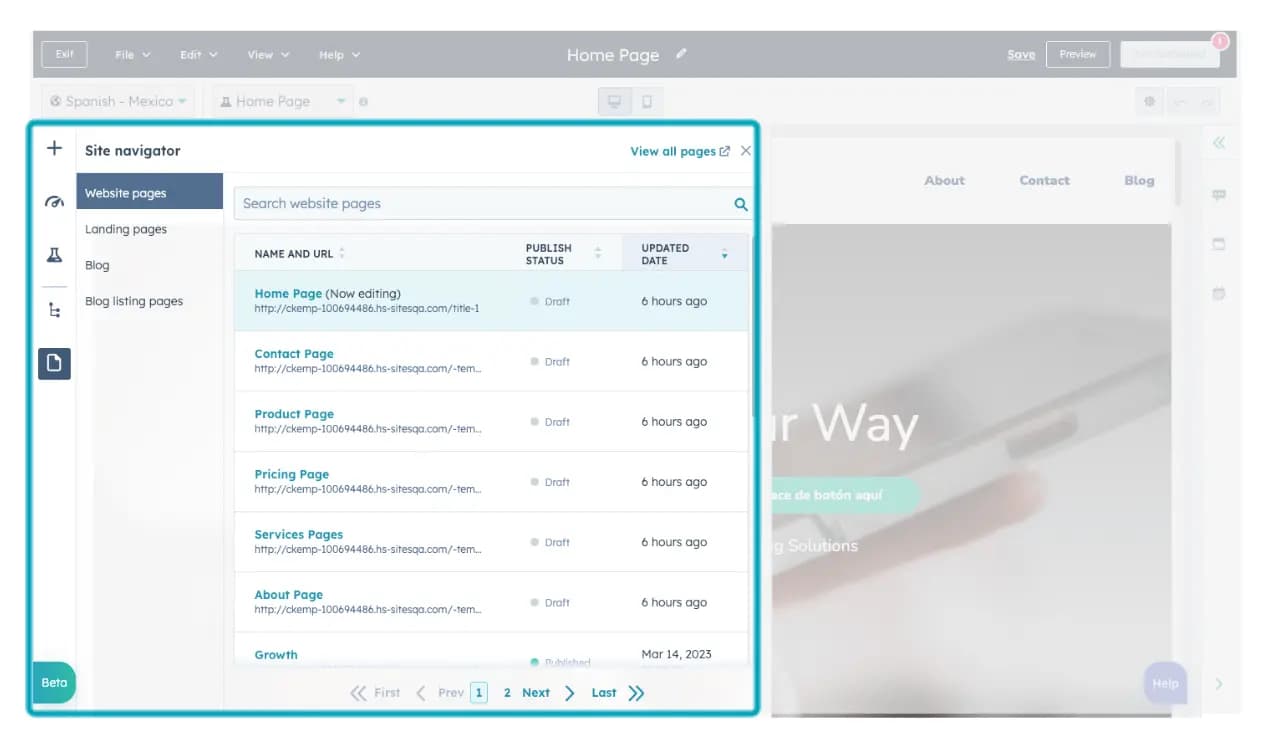
- Site Navigator: Manage and navigate through your pages in your domain.
Mobile Responsiveness
Many of your page visits will be from mobile devices, and HubSpot’s design caters to mobile and desktop browsing.
Custom Domain Linking
HubSpot allows all users a customized domain for free.
Analytics and Reporting
HubSpot allows you to view the traffic to your landing page and offers valuable information like interaction with the page and time spent on the page. The larger subscription packages offer more options for analytics and reporting.
A/B Testing
It allows you to use two content variants and tracks which perform better. This will enable you to create better designs for your landing page.
Enhance visibility with integrated marketing tools.
Reliable hosting solutions to support your site.
Incorporate videos, images, and more for dynamic websites.
Ideal for small businesses, individuals, and enterprises.
ITSM
HubSpot is a feature-rich CRM software that helps companies to attract visitors, convert leads, and close & retain customers, and here are five of the best features of the HubSpot Marketing Hub:
Ad management and tracking
With the same tool you use to create campaigns, you can monitor and prioritize conversations as well as publish to social media. Utilize the power of video to increase the impact of your content. Easily embed files in social media, web pages, and blog posts by hosting and managing them right inside HubSpot.
Landing page
Marketers can create their own templates or use ones that have already been created. For marketers with little to no design or coding experience, the drag and drop editor makes it simple to move modules around and add text or images.
This feature also allows you to create a form and send a follow-up email directly from the landing page. This simplifies the process of creating assets for lead capture while also maximizing time and efficiency for marketers. It also eliminates the need for multiple workflows to create and use a lead generation landing page.
Users can send bulk emails with personalization tokens, calls-to-action, links, and images using HubSpot's email feature. You can also use it to test your emails on various email clients and devices before sending them.
In terms of design, there's a drag-and-drop editor that allows marketers to customize templates according to the type of email they're sending without having to hire a developer. The email feature also includes reporting tools that allow you to examine metrics such as bounce rate, unsubscribes, open rate, and click-through rate over time and by email type.
Dashboards
In each and every marketing team, reporting role is essential, and most marketers must use multiple platforms to report on their entire buying cycle, customers, and marketing interactions. However, if your entire team uses HubSpot, you can do all of your reporting from one place. HubSpot's pre-built reports, custom reports, and attribution reports can all be added to a dashboard for easy review and analysis.
Users can be emailed dashboards, they can be edited for different date selections, or they can be made private to limit access. Dashboards make your customer and prospect data easy to access and refer to above all else. You will become a more informed and well-rounded marketer if you have that information at your fingertips and refer to it frequently.
Social Media Management and Integration
HubSpot integrates with Linkedin, Instagram, and Facebook, allowing users to connect multiple accounts across platforms and plan and schedule posts more easily. Posts can be drafted, edited, and scheduled directly within HubSpot.
It's important to note that the social tools have limitations in terms of analytics, tracking, and in-app functionality, but the fact that you can schedule and post from within HubSpot is a huge plus.
Integrations
Just like other competing CRM software, HubSpot integrates perfectly well with most other third-party apps, giving you the flexibility to get the most out of your HubSpot journey.
Below are a few of HubSpot's integrations: PandaDoc, Salesforce, Facebook Ads, EventBrite.
Efficiently handle and resolve IT incidents.
Identify and solve recurring issues with advanced solutions.
Effectively manage IT infrastructure changes.
Simplify service request processes for IT teams.
Generate detailed reports for insights and decision-making.
Merchant Services
HubSpot's Commerce Hub offers a comprehensive suite of features designed to streamline and enhance the sales and payment processes for businesses:
- Invoices
- Payment Links
- Quotes
- Subscription Management
- Product Library
- Payment Gateway Selection (HubSpot Payments or Stripe)
- QuickBooks Online Integration
- Export Payments and Payouts to CSV
- Automated Workflows
- Revenue Reporting
- Transactions
- Customizable Storefronts
- Advanced Product Catalog Management
- Order Tracking
- Seamless Payment Integration
- Integration with Over 1,400 Tools in HubSpot’s App Marketplace
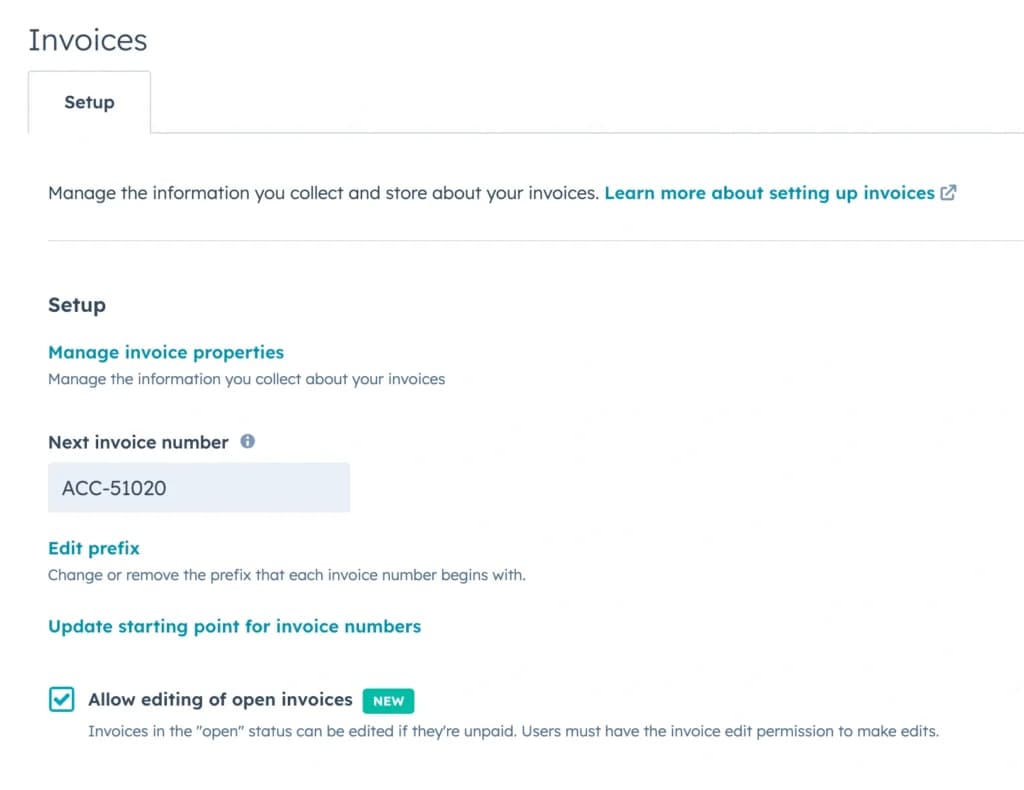
Invoices
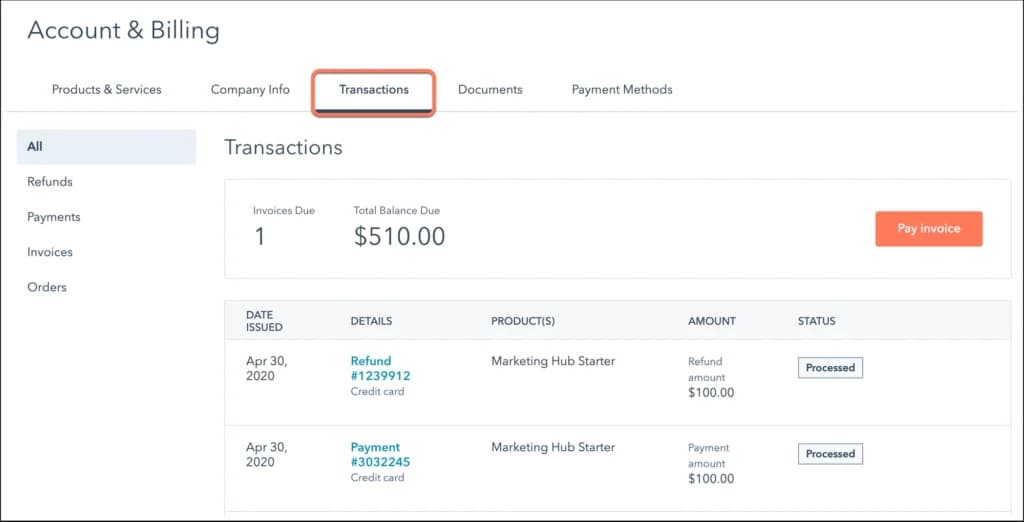
I tried out HubSpot’s merchant services software, and creating invoices was effortless. The system lets businesses generate professional invoices and send them instantly through email. Payments are processed via the online payment platform, allowing customers to pay seamlessly using e-commerce payment methods, including credit cards and electronic check processing.
Payment Links
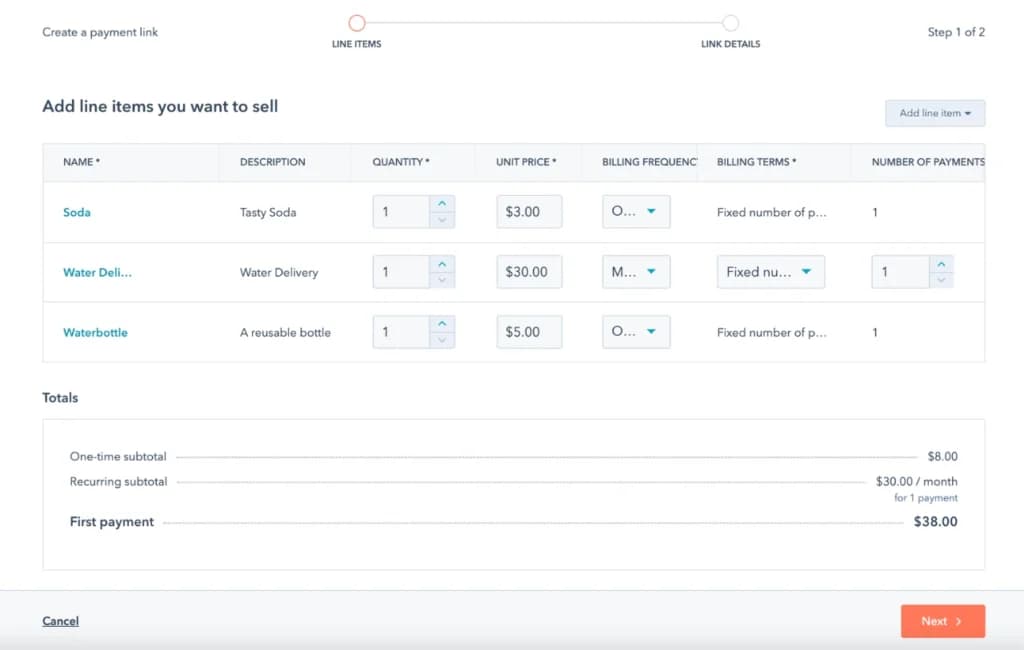
I tried out HubSpot’s online payment solutions, and the payment link feature stood out. It allows businesses to create and share links for quick transactions. Whether selling a product or collecting service fees, customers can complete payments through a secure payment gateway, reducing friction in online merchant services.
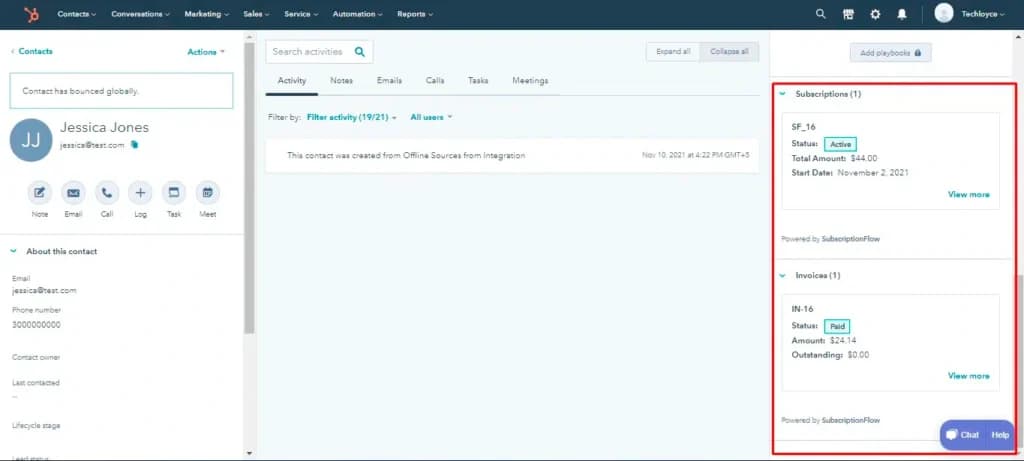
Subscription Management
I played with HubSpot’s subscription management tool and found it ideal for businesses offering recurring billing. The platform automates payments, sends reminders, and provides detailed insights into recurring revenue, making it a powerful merchant services software for subscription-based businesses.
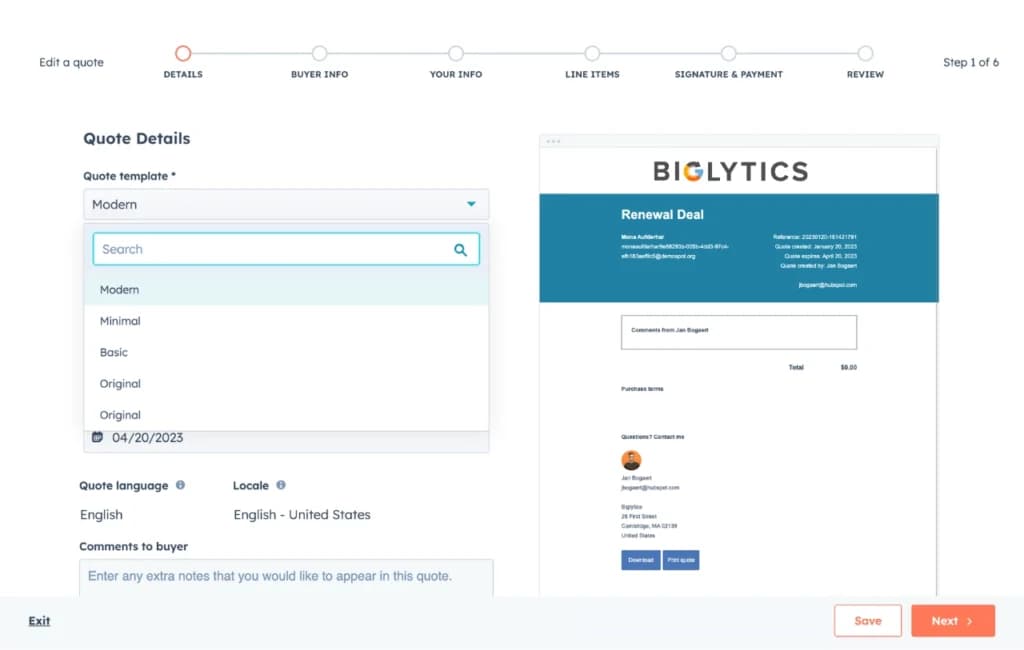
Quotes
HubSpot’s e-commerce payment system makes it easy to generate quotes with built-in approvals and payment options. When I tested it, I could customize pricing, add discounts, and send quotes that customers could accept and pay directly using online payment processing services, improving conversion rates.
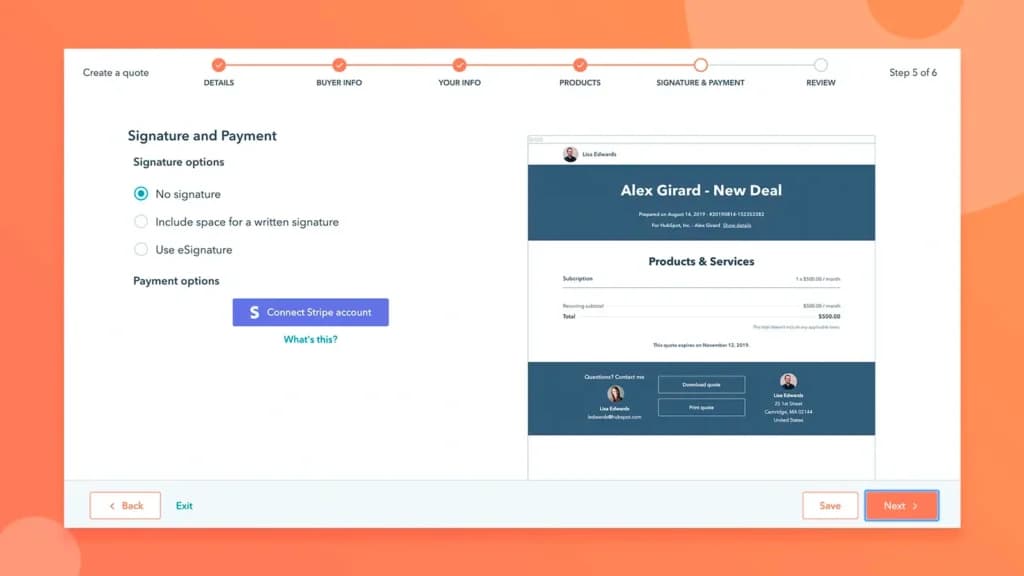
Payment Gateway Selection (HubSpot Payments or Stripe)
When I tested HubSpot’s payment gateway, I liked the flexibility of using HubSpot Payments or integrating Stripe. Transactions were processed securely, and businesses can choose the option that best suits their needs, ensuring a reliable online payment platform for any industry.
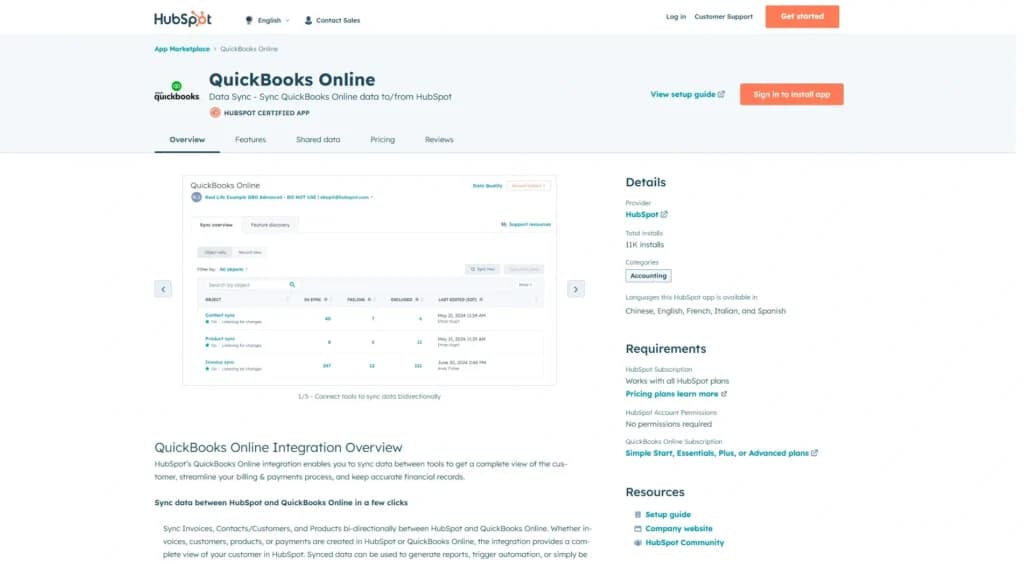
QuickBooks Online Integration
I connected HubSpot Commerce Hub to QuickBooks Online, and it synced transactions effortlessly. This integration simplifies financial management by automatically categorizing payments, making it easier for businesses to track revenue and expenses without manual data entry.
Export Payments and Payouts to CSV
I found the ability to export payments and payouts to CSV incredibly useful for financial reporting. Businesses can quickly generate spreadsheets for analysis, making it easier to manage online payment processing services and reconcile accounts.
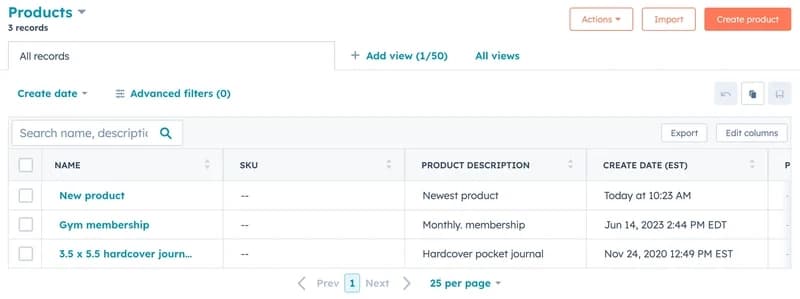
Product Library
HubSpot’s product library organizes pricing, product details, and payment options in one place. I used it to set up product descriptions and pricing models, making checkout smooth through e-commerce payment methods and virtual cards for online payment.
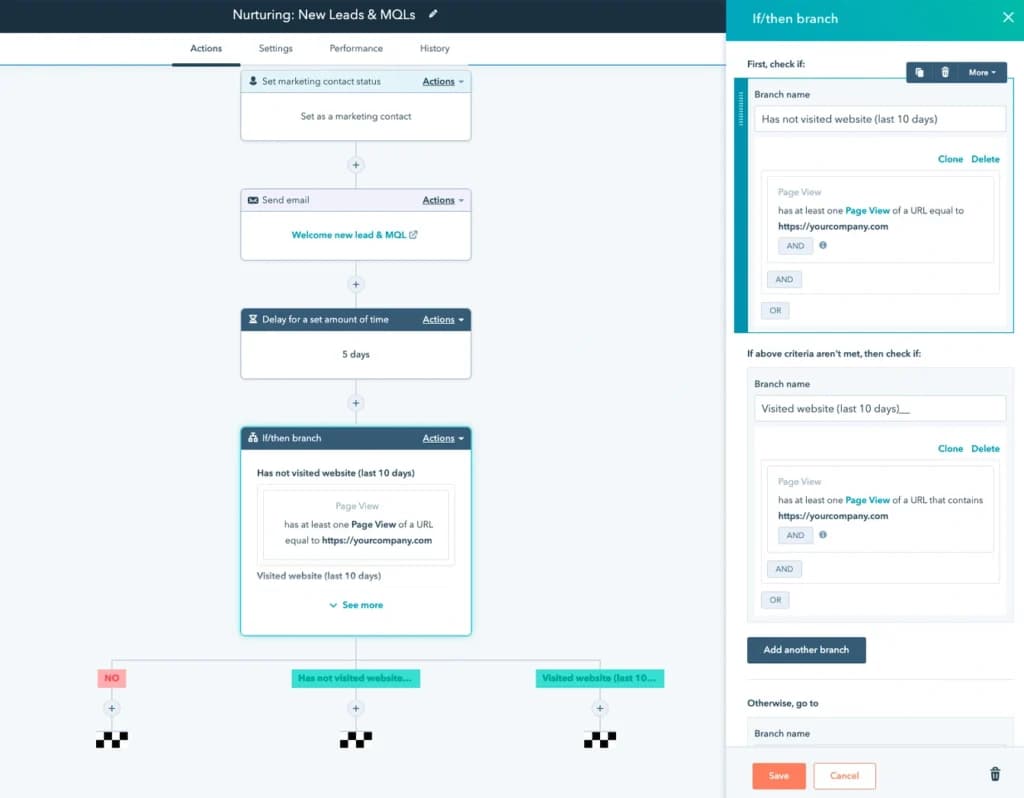
Automated Workflows
I tried out HubSpot’s automated workflows, and it saved me time. The system automatically triggers actions like sending invoices, confirming payments, and updating customer records, streamlining e-commerce payment and customer interactions.
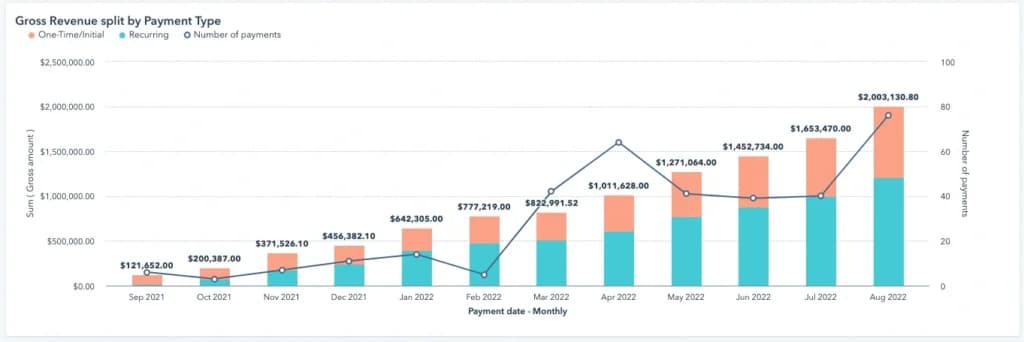
Revenue Reporting
HubSpot’s revenue reporting tools provide deep insights into sales trends and payment performance. I was able to track revenue streams, payment statuses, and online payment platform analytics in real time, making data-driven decisions easier.
Transactions
When I tested HubSpot’s online payment solutions, transactions were smooth and secure. Payments processed through Stripe were instant, while ACH payments took a few days for approval. The payment gateway supports multiple e-commerce payment methods, including electronic check processing and virtual cards for online payment, ensuring flexibility for businesses.
Customizable Storefronts
For businesses selling products online, HubSpot’s customizable storefronts offer an easy way to set up a digital shop. I played with its design options and found it intuitive, integrating smoothly with online merchant services for effortless transactions.
Advanced Product Catalog Management
I tested HubSpot’s product catalog management and found it highly detailed. Businesses can categorize products, manage pricing, and adjust inventory while ensuring smooth online payment processing services for customers.
Order Tracking
With HubSpot’s order tracking, I could monitor purchases, pending payments, and completed transactions in real time. This feature is crucial for businesses that need clear visibility over their e-commerce payment processes.
Seamless Payment Integration
I liked how HubSpot Commerce Hub integrates with other business tools, making online payment solutions smooth. Whether accepting electronic check processing or credit card payments, the system ensures seamless, secure transactions.
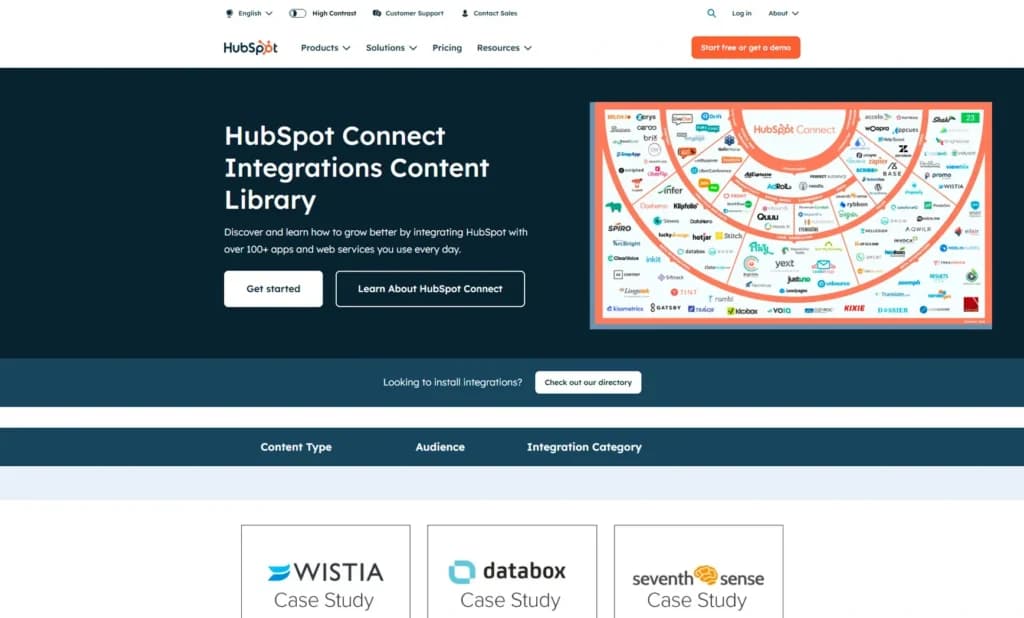
Integration with Over 1,400 Tools in HubSpot’s App Marketplace
I was impressed by the vast selection of over 1,400 integrations. Businesses can seamlessly connect accounting software, CRM platforms, and marketing tools to their merchant services software, streamlining online payment processing services. This flexibility enhances workflow automation, improves customer data management, and simplifies e-commerce payment methods, making transactions smoother and business operations more efficient.
Being that Hubspot is a purely digital system, it doesn’t include any type of hardware.
The Hubspot Commerce Hub is focused on helping US-based commerce businesses automate tasks and collect payments.
Simplify billing with automated pricing features.
Expand business reach with diverse sales channels.
VoIP
HubSpot's VoIP software offers a range of features designed to streamline communication and enhance sales and service processes for businesses of all sizes. Let’s explore the key offerings:
- In-browser calling
- Call routing
- Automatic call logging
- Call monitoring
- Call recording
- Call transcription
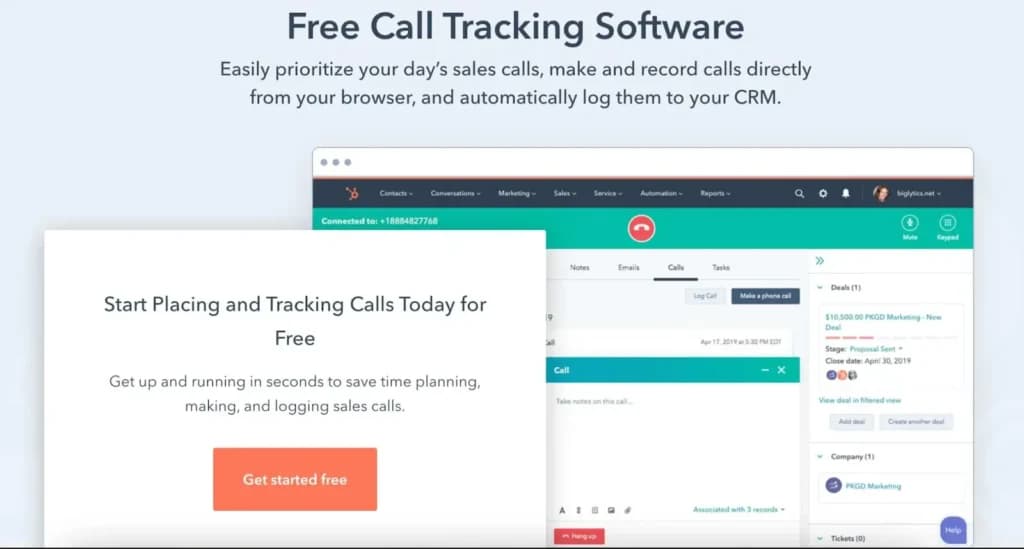
- Call tracking and prioritization
- Custom dashboards and analytics
- Integration
In-Browser Calling
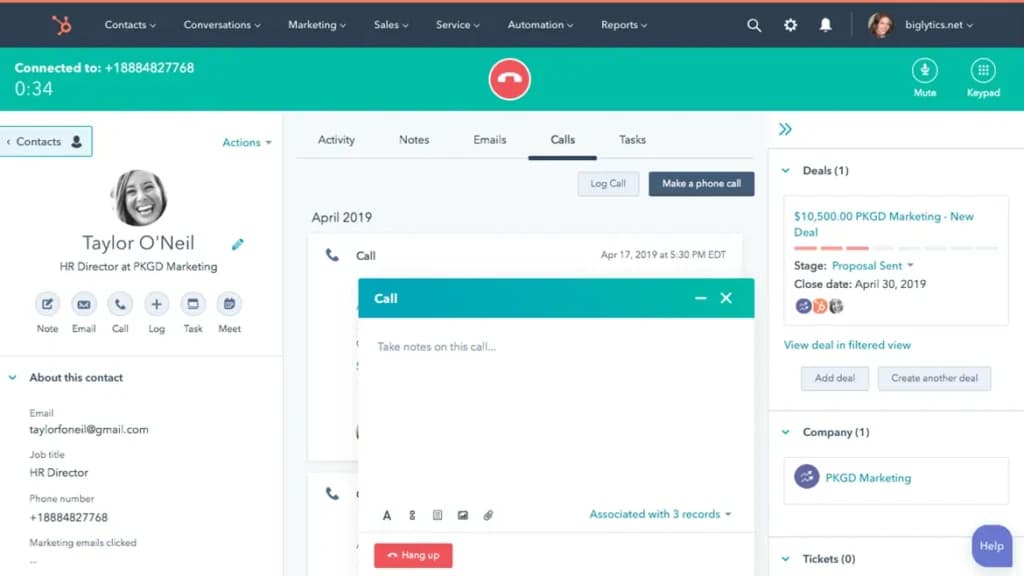
The core feature of HubSpot VoIP is its calling software that allows users to make and receive calls directly through their web browser, eliminating the need for external software or hardware like IP phones. For businesses with remote employees or sales teams, this feature removes technical barriers and allows team members to handle calls anywhere.
You can also handle incoming calls, which are free of charge.
Call Routing
The higher-tiered plans allow you to set up call routing, which automatically routes calls to agents based on availability. Routing can also be prioritized based on the customer’s CRM data, like past interactions or their position in the sales pipeline.
Automatic Call Logging
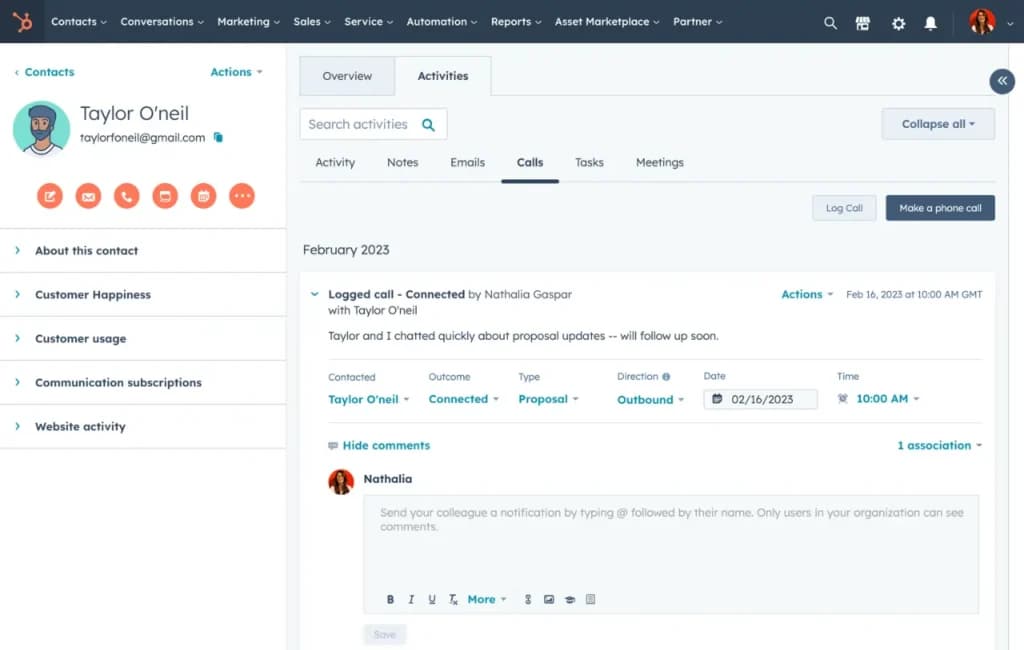
Every inbound and outbound call made through HubSpot VoIP is tracked and automatically logged into the CRM. This includes details such as call duration, time of the call, who made or received it, and notes taken by the callers. The details are automatically linked to the corresponding contact or company record in your HubSpot CRM, providing a complete view of customer interactions.
This promotes accountability and record-keeping. Logs also ensure that nothing slips through the cracks, making it easy for team members to review previous interactions with customers.
Call Monitoring
As the call data is recorded in real-time, HubSpot VoIP software allows managers and team leads to review the calls in real-time. They can view the number of calls made, the number of active calls, and the pending calls for the day. This granular data ensures that team members are providing high-quality customer service or making the required number of calls.
Call Recording
Call recording in HubSpot’s VoIP service allows businesses to record both inbound and outbound calls. Recorded calls are linked to specific contacts or deals in the CRM. This centralizes all communications, making it easier to access call logs alongside emails, chat histories, and other customer interactions.
Call Transcription
Enterprise users also get access to automatic call transcripts. The built-in transcription software converts recorded calls into text, allowing users to quickly review conversations without having to listen to the entire recording. This feature adds another layer of convenience for businesses looking to analyze or archive communications efficiently.
Call Tracking and Prioritization
Not all calls are created equal. Some lead to better deals. And you can find such deals and prioritize them with the HubSpot VoIP tool. HubSpot’s call tracking feature allows businesses to track call metrics, such as call volume, response times, and outcomes, directly within the CRM. You can segment customer data based on factors like engagement or deal status.
You can then create automated workflows to route calls to specific team members or departments based on the caller’s information or the nature of the call.
Custom Dashboards and Analytics
HubSpot's VoIP software allows users to create custom dashboards and generate detailed reports for call analytics, enabling businesses to track call performance, monitor key metrics, and gain insights into communication effectiveness directly within the platform.
Integration
As expected, HubSpot VoIP software seamlessly integrates with the broader HubSpot ecosystem, which includes Sales and Service Hub, which makes it the best VoIP for small businesses looking to incorporate a calling system with their CRMs. With a single setup, you can connect VoIP to the rest of the HubSpot tools you might be using.
The VoIP integration bridges the gap between communication tools and customer data, enabling teams to manage calls, track customer interactions, and automate follow-ups efficiently—all from one unified platform.
With integration, you can also set up automated workflows that trigger based on call data. For example, if a call is missed or a voicemail is left, an automated task can be created for follow-up. Additionally, calls made to high-priority contacts can trigger notifications or set up reminders for future action.
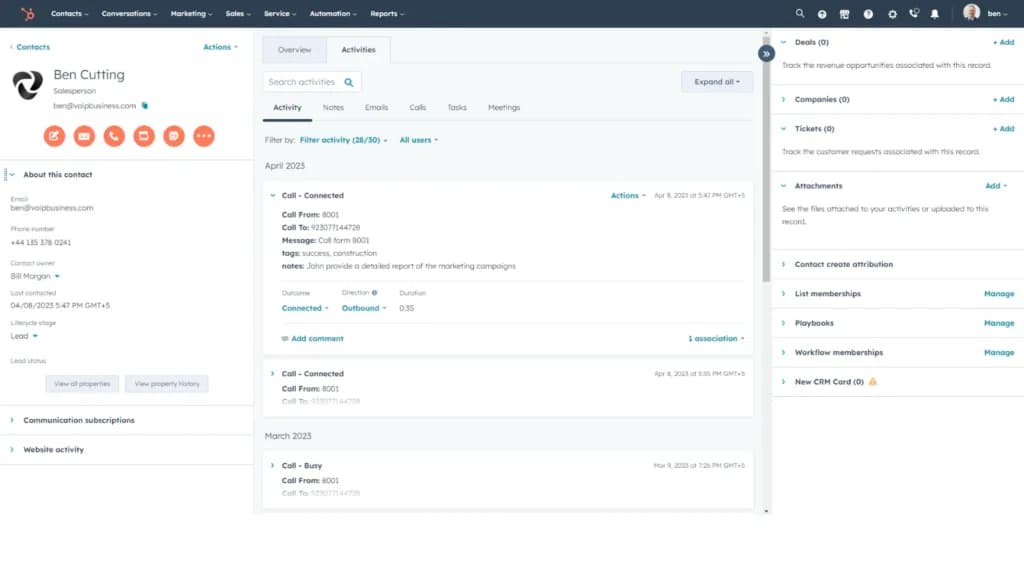
In addition to its native integration with the HubSpot CRM, HubSpot’s VoIP solution also works seamlessly with several third-party tools and services like Google Workspace, Slack, or Outlook to manage communications.
You can use the Hubspot VoIP services on the following devices:
Hubspot VoIp offers the following features to optimize your calling services:
Leverage cutting-edge tools for seamless calling experiences.
scheduling
HubSpot scheduling tool offers a wide range of user-friendly features to meet your business's appointment scheduling and management needs. Here’s a breakdown of some key features and functionalities:
- Online Scheduling Tool
- Calendar Synchronization
- Automated Reminders
- Customization Options
- Multi-platform Access
- Payment Integration
- Client management
- Marketing tools
- Multiple locations
- Resource Management
- Appointment Scheduling Pages
- Analytics and Reporting
- Class management
- Team Collaboration
- Third-party Integration
- Subscriptions
Online Scheduling Tool
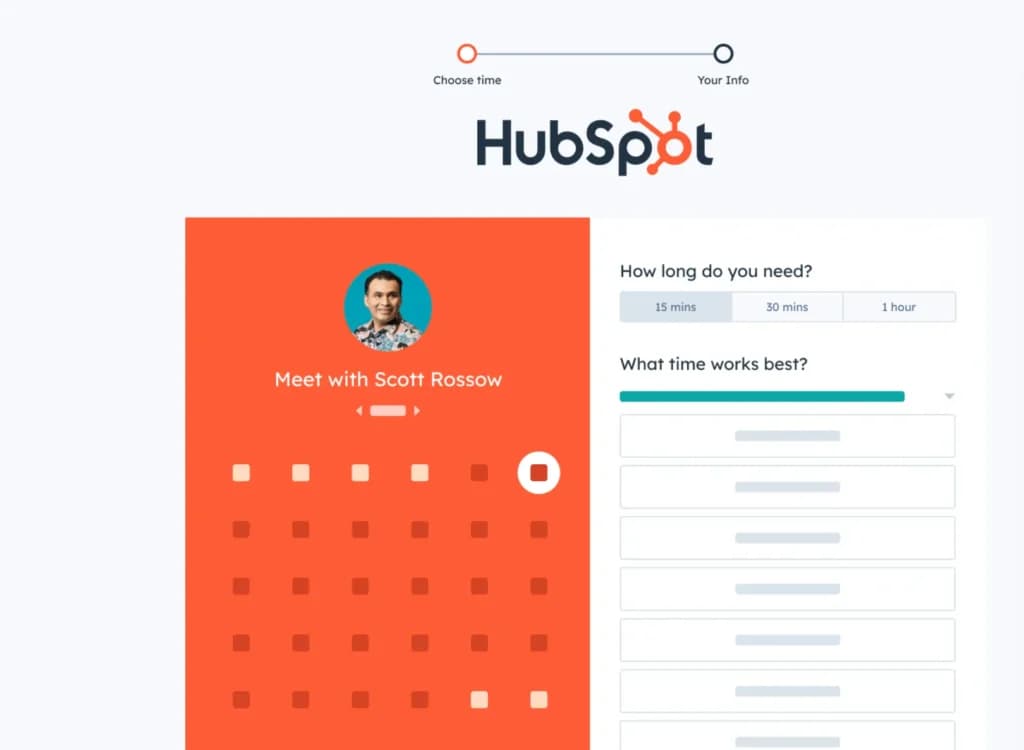
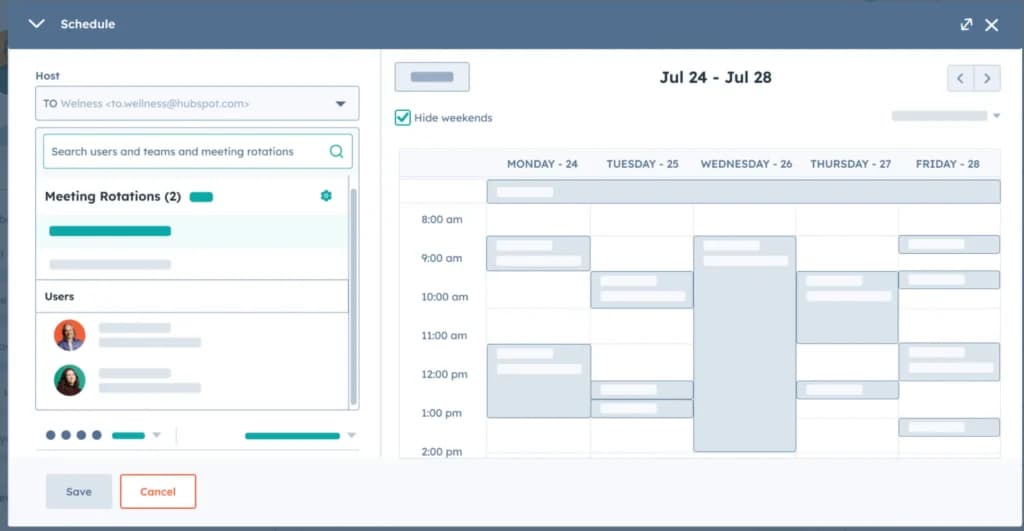
HubSpot scheduling software eliminates the back-and-forth email chains associated with scheduling meetings. You can create custom scheduling pages where prospects and clients can view your availability and book a meeting directly.
Calendar Synchronization
The software seamlessly syncs with your Google Calendar or Office 365 calendar, making sure your availability is always up-to-date. This eliminates double bookings and ensures a smooth scheduling experience.
Automated Reminders
HubSpot can automatically send confirmation and reminder emails to both you and your clients, reducing the risk of missed meetings.
Customization Options
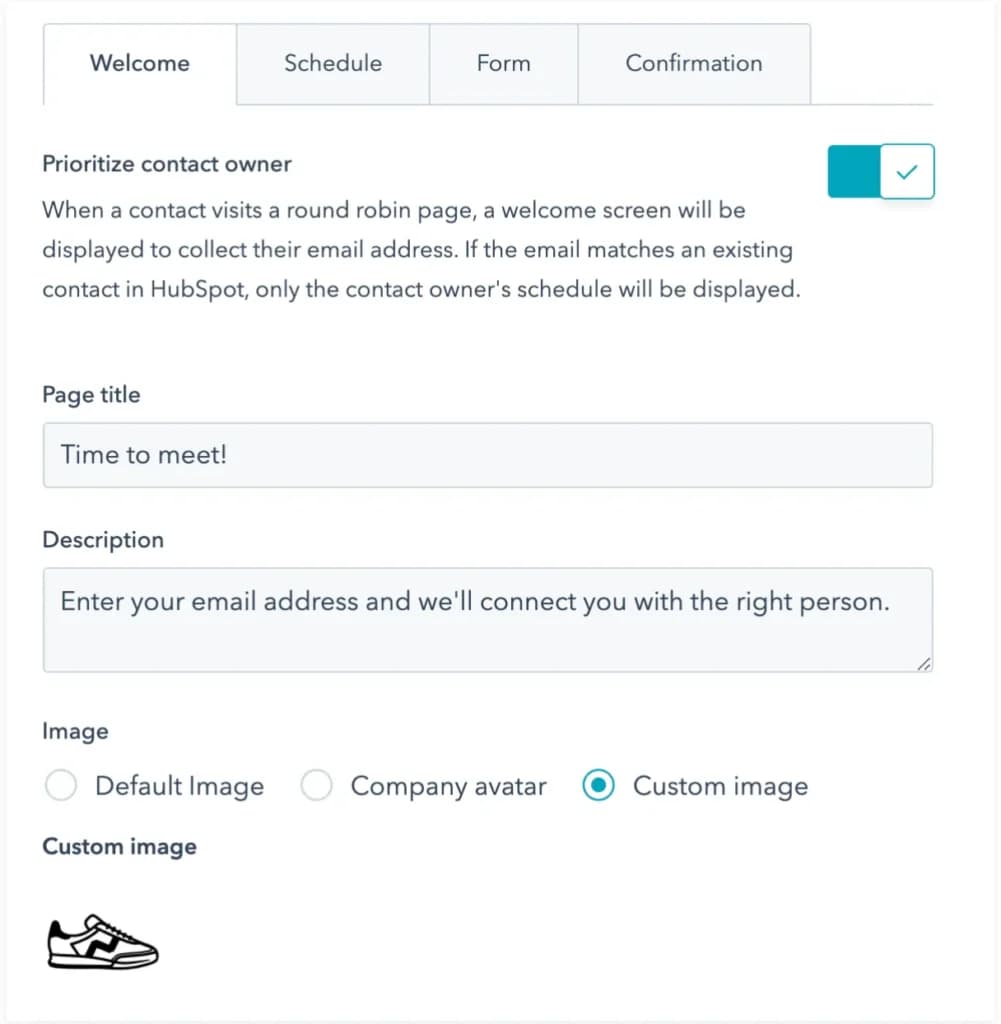
You can customize your calendar scheduler pages to match your brand and include information relevant to your meetings. This includes setting buffer times between meetings, customizing the call to action button, and adding a brief description of the meeting type.
Multi-platform Access
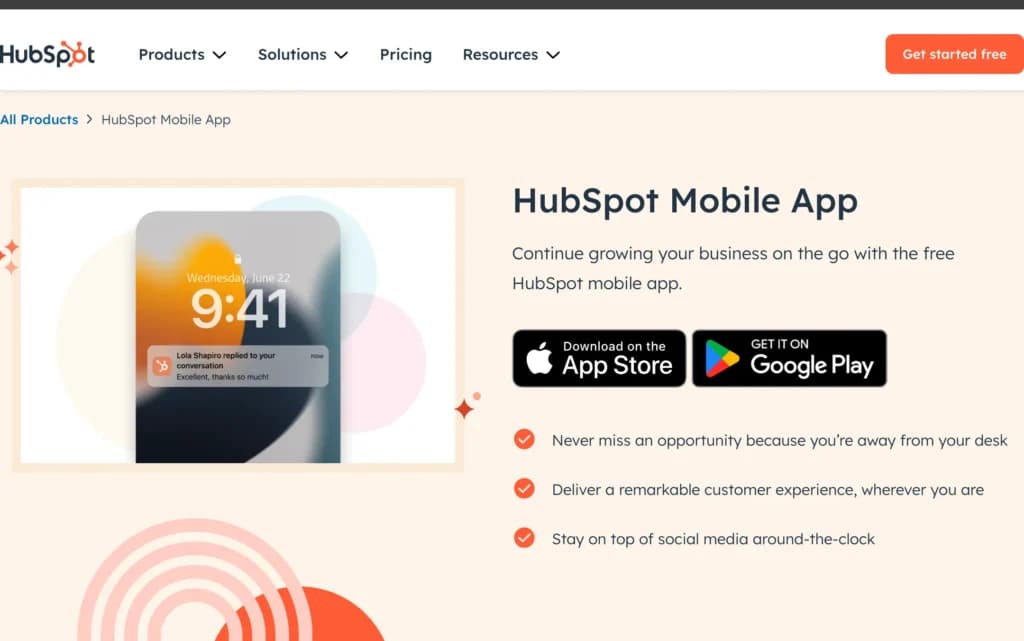
Thanks to the Hubspot app, the software is accessible from any device, allowing you to schedule meetings and manage your calendar on the go, whether you're using a desktop computer, laptop, tablet, or smartphone.
Payment Integration
For businesses offering paid consultations or coaching sessions, HubSpot integrates with popular payment gateways like Stripe and PayPal, allowing you to collect payments directly when booking appointments.
Client Management
HubSpot connects with the HubSpot CRM, providing a centralized location for storing client information and tracking meeting history. This allows you to personalize the scheduling experience and build stronger client relationships.
Marketing Tools
Hubspot can be used in side-by-side with other HubSpot marketing tools. For example, you can create landing pages that include scheduling options, allowing potential customers to book appointments directly from your marketing campaigns.
Multiple Locations
For businesses with multiple locations, you can set up individual scheduling pages for each location, ensuring clients can easily book appointments with the appropriate team member or at the most convenient location.
Resource Management
Hubspot integrates with other HubSpot tools like Projects, allowing you to schedule meetings with team members and assign tasks associated with those meetings, enhancing project management and team collaboration.
Appointment Scheduling Pages
This feature allows you to create different types of scheduling pages for various purposes. These include one-on-one meetings, group meetings (where multiple team members can be involved), and round-robin scheduling (where clients can book with any available team member).
Analytics and Reporting
Provides valuable insights into your scheduling activity. You can track metrics like the number of bookings, booking sources, and cancellation rates. This data can be used to optimize your scheduling process and improve appointment conversion rates.
Class Management
While not specifically designed for scheduling classes, HubSpot can be adapted to manage online or in-person classes. With the ability to create scheduling pages and limit the number of attendees, you can effectively manage class enrollment and availability.
Team Collaboration
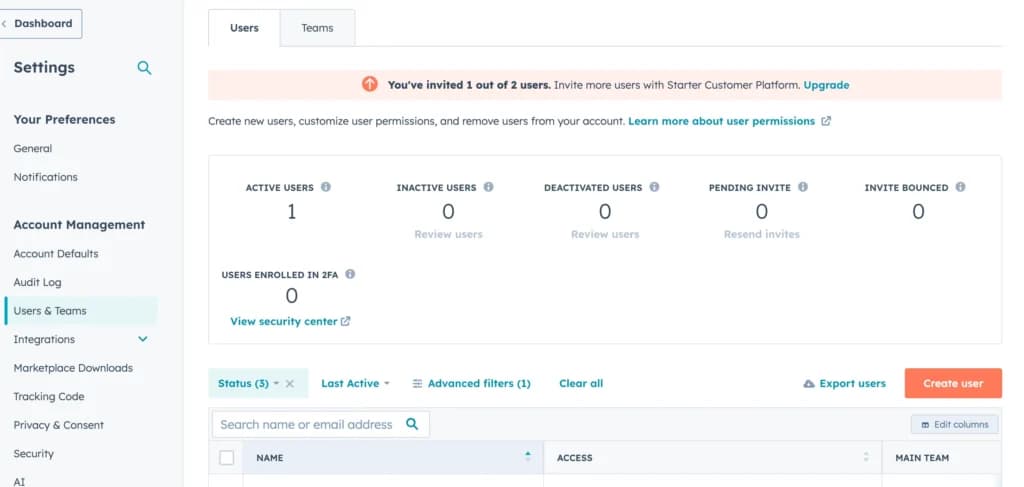
Team members can share scheduling pages, allowing prospects and clients to book appointments with any available team member. This ensures efficient scheduling and reduces the risk of missed opportunities.
Third-party Integration
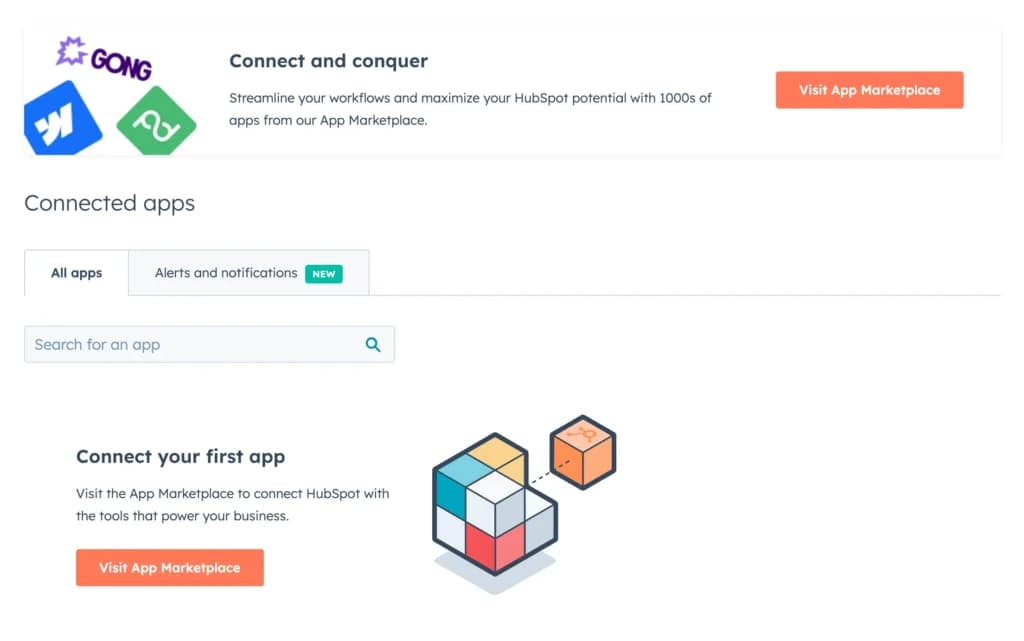
While less extensive than some dedicated scheduling tools, HubSpot software integrates with popular third-party applications like Zoom, GoToMeeting, and Google Meet. This allows you to easily schedule online meetings and manage them within the HubSpot platform.
Subscriptions
HubSpot is available as part of HubSpot's Sales Hub, which offers a range of features for sales teams, including contact management, deal tracking, and email templates. You can also purchase HubSpot Meeting Scheduler as a standalone product.
Enhance scheduling capabilities with additional features.
Accessible across various platforms for versatile use.
Features
- Dashboards
- Reporting
- Marketing Analytics
- Pipeline Management
- Call Management
- Account Management
- Collaborative Data
- Mobile App
- Integrations
- Sales AI
HubSpot is an inbound marketing platform that helps businesses provide customer-centric solutions with an intuitive and user-friendly design that provides adequate support for users. This CRM software uses a simple and customizable structure to help businesses manage customer data effectively and track their progress across the sales pipeline.
HubSpot Alternatives

Starting from: $0/month
Free
$0
seat/month
Pros
- Intuitive design
- Free version available
- Reliable customer support
- Numerous workflow templates
Cons
- Automation is unavailable for free plan

Starting from: $14/month
Lite
$14
seat/month
Pros
- User-friendly design
- Easy setup process
- Friendly customer support
- Efficient management tools
Cons
- No free version

Starting from: $12/seat/month
Basic
$12/seat
seat/month
Pros
- Intuitive design
- Responsive customer service
- Numerous templates
- Cross-team collaboration tools
Cons
- Limited features on free version
Verdict
After testing HubSpot across its full Hub range, it certainly earns its reputation as the go-to CRM for growth-stage companies. The free plan gives you a real working CRM without a credit card — something Salesforce and Zoho can't match. The tradeoff: as you scale and layer Hubs and seats, costs escalate quickly. The platform is most powerful when marketing, sales, and support all live in the same database — which is exactly what HubSpot is built for.
What works well
✓ Free plan includes unlimited contacts, deals, tasks, scheduling, and live chat — no credit card required
✓ Marketing, Sales, and Service Hubs share a single CRM — no data silos across teams
✓ Intuitive UI — faster to set up and onboard than Salesforce or Zoho
✓ Native email marketing, scheduling, and calling with automatic CRM logging
✓ 1,000+ integrations including Salesforce, Shopify, Slack, and Zapier
What to watch out for
✗ Costs scale fast — bundling Marketing + Sales + Service Hubs multiplies quickly per seat
✗ Reporting depth is limited on free and Starter plans; advanced analytics require Pro+
✗ CMS Hub and advanced automation require higher-tier plans that add up quickly
✗ Not a true ITSM or project management platform — dedicated tools perform better
Use HubSpot if you are...
→ A small to mid-sized business needing a CRM with built-in marketing and sales tools
→ Running inbound marketing — content, email, landing pages, and lead capture in one place
→ A team that wants to start free and upgrade features progressively as revenue grows
→ Looking for scheduling, email sequences, and deal tracking without stitching separate tools
Skip HubSpot if you are...
✗ A large enterprise needing deep ERP or IT service management — consider Salesforce or ServiceNow
✗ Price-sensitive at scale — multiple Hubs and seats get expensive fast beyond the free tier
✗ Looking for true project management — HubSpot tasks are not a PM replacement
Bottom line: HubSpot is the best starting point for teams that need a CRM with built-in marketing — the free plan is genuinely useful, and the Hubs grow with you. Just plan your Hub bundling carefully before seat counts and paid tiers compound.


Users Reviews
Write a review
Leave a review, help others get it right the first time.
10 Reviews
Celia B
User-friendly CRM
Hubspot is the first CRM software I've worked with and it is seriously user-friendly. Optimizing and tracking my work has become a breeze
- - templates aren't as customizable as I'd like
James M
Sales Director
HubSpot turned our Sales team around
2 years ago, my sales team were lacking in the right tool for CRM & sales pipeline management. CRM and sales pipeline and thanks to HubSpot our has eased up the process by a long shot! Thanks for providing us with a great solution.
Alina R
Very convenient
HubSpot is famous for its business solutions for a good reason. They offer multiple services, and their CRM is entirely free to use. I manage our client lists and leads through the platform and it's very convenient as all the information lives in one plac
- Widely popular and integrates with everything.
Nicole P
Director
Simplicity at its finest!
My favorite thing about HubSpot is just how simple it is as a CRM tool and the way it has increased our customer management effortlessly
- -User interface is intuitive and easy
Dylan D
Excellent CRM with a few hiccups
We wanted to modernize many aspects of our business and part of that was updating our legacy CRM. We chose HubSpot and have been happy with the results despite the occasional frustrations.
- - The main features are easy to grasp and teach other people
- - It is quite simple to pull prospect information from within the system
- It doesn’t handle companies with various locations well
Prudence B
Access from anywhere
HubSpot is very powerful and allows multiple custom fields (that we tend to use). It's also accessible from any device which allows us to view and log information from anywhere.
- Customizable and available on any device
Kimberly L
The small business CRM
HubSpot is a great entry-level CRM but it does have a few limitations that prevent it from being the cream of the crop.
- - There are many third-party integrations to take advantage of
- - The interface was easy to learn and it’s just a matter of pointing and clicking
- - Strong automation features to free up some of your time
- - There is a limit on the total number of custom fields you can create
- - The logic on the forms is limited
Ralph L
Exceptional All-in-one crm
Hubspot really scales along with you and provides the tools you need as you grow and the personalization experience is really the cherry on top of our successful decision to use HubSpot
- - UI
- - Personalization
- - Feature-rich
- - Lacking a few features that i would love to see added such as tracking of files and clicks on landing pages, other than that amazing platform
Ryan S
I lost big with Hubspot
Many people have had great experiences with HubSpot but I was not one of them. Due to the system, I lost thousands of dollars.
Emily P
Versatile and lightweight
It has made it easier for us to collect data and build out our database in a way that gives us information to make better decisions.
- - Easy to use and onboard team members
- - There are tons of native integrations
- - It is cheaper than the major CRM players