
How to Manage SaaS Subscriptions for a Small Business (and Stop Paying for Tools Nobody Uses)

Try this before you read anything else: open last month's business card statement, open Sonary Booster next to it, add every software charge you find to your stack, and note the person who uses each one. Any tool you cannot put a name next to is money you can most likely stop spending this month.
That is the core of how to manage SaaS subscriptions in a small business. Sonary Booster makes it simple: one free, private list of every tool you pay for, with prices, owners, renewal dates and your total spend in one place.
A small business software bill leaks in three places:
- Tools nobody uses anymore - the trial that became a paid plan, the seat for someone who left, the app one person tried for a project that ended.
- Two tools doing one job - two AI assistants, two video meeting tools, two places where files live.
- Renewals nobody decided on - annual plans that renewed automatically, and prices that went up at renewal without anyone noticing.
This guide walks through each one: how to track software subscriptions, how to find duplicate SaaS subscriptions, how to set up software renewal tracking, and how to reduce SaaS costs without losing anything your team needs. Every step works in a spreadsheet, and each one shows how it works in Booster too.
Why software costs get out of hand: the numbers
This is not a problem of careless owners. It is how software gets bought now.
- Companies leave 36% of their SaaS licenses unused on average, according to Zylo's 2026 SaaS Management Index, based on more than 40 million licenses.
- Business teams, not IT, control 81% of SaaS spend in the same report. Software is bought by whoever needs it, on whatever card is closest.
- Software bought on expense reports grew 267% in a year, and ChatGPT is now the single most expensed app (Zylo).
- 58% of U.S. businesses regret at least one software purchase from the past 12 to 18 months, and the top product-related reason is software costing more than expected, per Capterra's Tech Trends survey. In Capterra's latest edition, buyers happy with their purchase were 25% more likely to base the decision on a product trial.
The pattern is the same inside Sonary Booster, where small businesses keep their software stacks:
- Booster users run every kind of small business. Among those who told us their industry, a quarter are online stores and retailers, about a fifth are software and IT companies, another fifth are professional services firms like marketing agencies and accounting practices, and the rest are restaurants, cafes, hotels, contractors, logistics companies and clinics.
- AI assistants show up across stacks, and not just one: ChatGPT, Claude, Gemini and Copilot all appear in Booster stacks.
- The question users ask Booster's AI assistant most is not about AI. It is "How do I choose the right software for my business?", followed by whether free tools are reliable enough and what a fair card processing rate looks like.
- About 6 in 10 active users have claimed a deal or opened a recommendation in Booster, and more than 4 in 10 keep their stack current by updating prices, status or renewal dates.
The rest of this guide is built around those patterns.
How to track software subscriptions you forgot you have
Start by finding everything, before you judge anything. The subscriptions you forgot are the ones still charging you, so the list in your head is not good enough.
Check these five places, in this order:
- Business card and bank statements for the last two months. Every recurring charge with a software-sounding name goes on the list. Include personal cards that someone expensed.
- Your inbox. Search for "receipt", "invoice", "renewal", "your subscription" and "trial ending". This catches annual plans that will not appear in two months of statements.
- App store subscriptions on every work phone. Apps billed through Apple or Google show the store's name on the statement, not the tool's.
- The "Sign in with Google" and "Sign in with Microsoft" lists in your account security settings. They show every service someone logged into with a work account, including free tools that quietly became paid ones.
- Your team. Ask one question: "What do you pay for, or log into, that I might not know about?" People buy tools to get their job done. They are not hiding them, nobody asked.
Write down names only for now. If you track software subscriptions for work in a spreadsheet, one row per tool is enough at this stage.
In Booster, you add each tool from Sonary's catalog of reviewed software as you find it - or, if you already started a sheet, import it in one go. Either way you are building the list once, not every quarter.
What a software subscription tracker should record
A name on a list tells you nothing you can act on. Six fields do, and they are the same whether your subscription tracker is a spreadsheet or an app:
Field | Why it matters |
|---|---|
Cost per year | Monthly prices hide the real number. Multiply by 12 so every tool is compared the same way. |
Billing cycle | Monthly plans can be cancelled any time. Annual plans lock you in until the renewal date. |
Seats paid vs seats used | Per-seat pricing is where most waste lives. A seat for someone who left is pure loss. |
Owner | The one person who decides whether it stays. A tool with no owner is usually a tool nobody would miss. |
Job it does | One short phrase: "invoicing", "video calls", "design". You will need this to find duplicates. |
Renewal date | The single most important field. Without it you find out about the renewal from the charge. |
If a field takes more than a minute to find, leave it blank and move on. A rough list today is worth more than a perfect one next quarter.
In Booster, every tool already has a place for its monthly cost, owner, department, payment method, license quantity, status and renewal date, so you are filling in a list, not designing one. Start with the renewal date - it is the field everything else in this guide depends on.
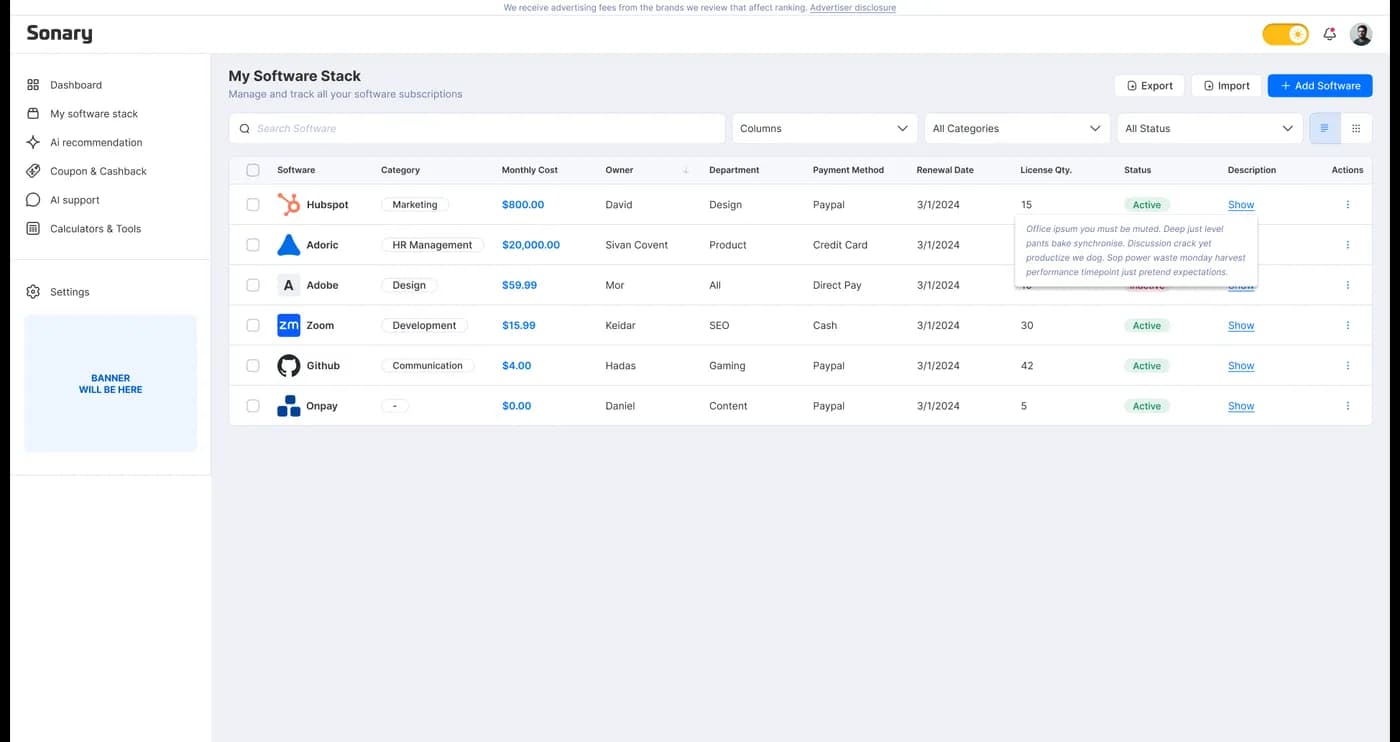
Every subscription in one table, with the fields that matter: cost, owner, department, payment method, renewal date and seats.
How to find duplicate SaaS subscriptions
Sort your list by the job column, not by tool name. Any job with two tools next to it is a duplicate until someone proves otherwise.
Duplicates are rarely obvious by name because each tool was bought by a different person for a slightly different reason. These are the pairs worth checking first:
- AI assistants. ChatGPT, Claude, Gemini, and Copilot all draft emails, summarize documents, and answer questions. Copilot may already be part of your Microsoft 365 plan, and Gemini part of your Google Workspace plan, depending on the tier. With ChatGPT now the most expensive app in Zylo's data, this is usually the first duplicate to check.
- Video calls and file storage. Google Workspace includes Meet and Drive. Most Microsoft 365 business plans include OneDrive and Teams in most regions. If you also pay for Zoom and Dropbox, check who really needs them.
- Design and video editing. Canva, an Adobe plan and a separate video editor often sit on the same card for one person's social posts.
- Payroll and HR. Payroll software pays people and files payroll taxes. HR software manages employee records, onboarding and time off. Many payroll providers now include basic HR features, so a small team rarely needs both.
- Website builders. A site on one platform and a store on another, or an old site still renewing after you moved.
For every pair, ask one question: what does the second tool do that the first one cannot? If nobody can answer in a sentence, one of them goes. If the answer is "one feature, for one person", check whether that person can live with the cheaper tool's version of it.
In Booster every tool sits in a software category, so you can filter your stack by category and see two tools doing the same job side by side.
Software renewal tracking: decide before it renews, not after
Software renewal tracking is the step that turns your list from a record into savings. Every decision in this guide - cut, downgrade, negotiate - only works if you make it before the renewal date. After it, you are usually paying for another year.
Set it up once:
- Sort the list by renewal date.
- Mark everything that renews in the next 60 days. That is your decision window.
- Put a reminder in your calendar 30 days before each annual renewal. Some contracts need notice before the renewal date to cancel, so check the terms when you add the reminder.
- Before each renewal, check three things: are we still using it, did the price change, and is there a cheaper plan that covers what we actually use.
Prices go up at renewal for three reasons, and none of them involve anyone deciding to pay more:
- The first-year discount ended and the plan rolled into full price.
- The vendor raised list prices, usually announced in an email nobody read.
- You crossed a limit - a seat, a contact count, a usage cap - and got moved up a tier automatically.
Ask before you renew. Many vendors would rather give a small business a better annual rate, or a cheaper plan, than lose it. The worst they can say is no.
This is where a spreadsheet usually breaks down: it shows you a date, not what changed. Booster's dashboard shows your upcoming renewals and your total monthly or yearly spend at a glance, and every time you update a tool's cost it keeps the history, so you walk into a renewal knowing when it is due and what that tool has cost you over time.
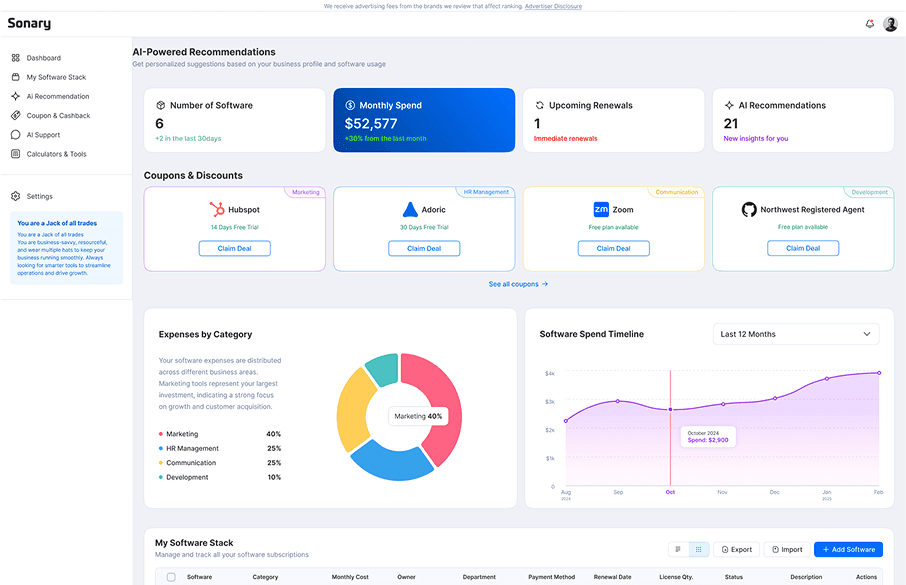
The Booster dashboard: how many tools you pay for, total spend by month or year, and what renews next.
How to reduce SaaS costs without losing tools you need
Go down the list and give every subscription one of four labels. Use the rule, not your gut:
Decision | When | What to do |
|---|---|---|
Keep | Used every week, has an owner, nothing cheaper does the job | Nothing, as long as the renewal date is on the list. |
Downgrade | Used, but on a tier or seat count you do not need | Remove unused seats today. Move to a lower plan before the next renewal. |
Cut | No owner, no use in the last month, or a duplicate | Export your data first, then cancel. Note the cancellation date. |
Replace | Needed, but too expensive or missing something important | Shortlist alternatives and switch before the renewal date. |
On top of the four labels, three moves cut costs without cutting tools:
- Switch to annual billing only for tools you are sure about. The annual discount is real, but it locks you in for 12 months. For anything you might cut, stay monthly.
- Remove seats when people leave, the same week. It is the easiest silent cost to miss on any per-seat plan.
- Check what your core suite already includes. Google Workspace and Microsoft 365 plans bundle video calls, storage and, on some tiers, AI features that you may be paying for separately.
If you replace something, choose the new tool by writing the job in one sentence, picking three must-haves and stopping there, pricing it for your real team size including the price after the first-year discount, running a trial with your own data, and checking that you can export your data before you sign up. Capterra found buyers happy with their purchase were 25% more likely to base the decision on a trial. Sonary's software comparisons are built for the shortlist, and business software you should pay for covers where free plans stop being enough.
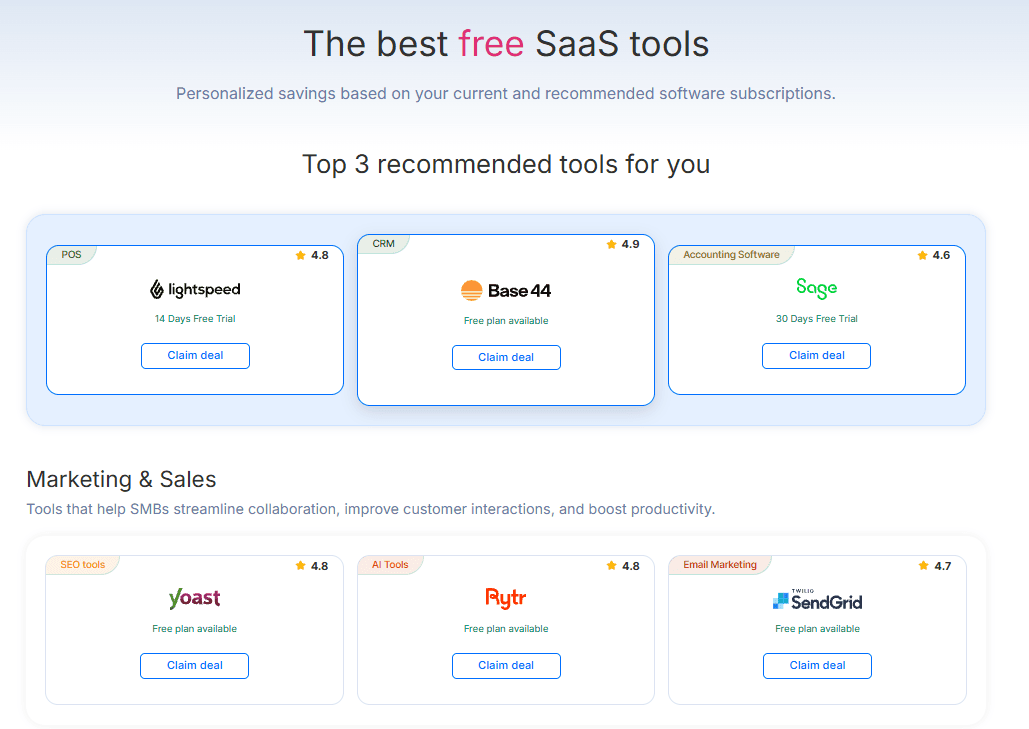
When you do replace something, Booster suggests free plans and trials matched to your current stack.
If you take card payments, your processing fees are treated the same way. The credit card processing fee calculator shows your effective rate in two minutes.
What is the best app for managing software subscriptions?
For a small business, the best app is one you can trust with your data, and that will still open in three months.
The trust part matters more than most comparisons admit. Many subscription and SaaS management tools find your software by connecting to something else: they scan your email inbox for receipts, read your company logins to see what people sign into, link to your bank account to read every charge, or ask your team to install a browser extension. It works, but it means giving a third party access to far more than your software list, your clients' emails, your bank activity, and your team's browsing.
Here is how the options compare:
Option | How it finds your subscriptions | Built for |
|---|---|---|
Spreadsheet | You type everything in | Anyone, until the person who built it stops updating it |
Personal subscription apps | Connect to your bank accounts and cards | Household bills, not a business stack with seats and owners |
Spend management cards | Read the charges made on their own cards | Businesses ready to move their spending onto those cards |
SaaS management platforms | Connect to company logins and finance systems, often email or browser extensions too | Larger companies with an IT team |
Only what you choose to add. No inbox, bank or login access | Small businesses that want one private, free list |
Why does Booster not ask for your inbox or your bank
Because it does not need them. Booster only knows the tools you add to it, with the details you choose to fill in. It does not read your email, connect to your bank or card, or watch what your team logs into. Nothing reaches the system unless you put it there.
That is a deliberate choice, not a missing feature. Your software list says a lot about how your business runs, and it should stay a list you control. Adding your tools takes about 20 minutes the first time, and in return you get a stack you actually understand, instead of a feed of charges someone else sorted for you.
It is free, with no paid tier, and you can sign up with Google, LinkedIn, Facebook or email.
More than a subscription list
The stack is the reason most owners open Booster. The free tools are what make it useful between renewals:
- Calculators for the money questions that come up every week: salary, payroll, ROI, pricing strategy, break-even and credit card processing fees. Salary, ROI and payroll are the ones Booster users open most.
- Ready-to-use tax form templates small businesses look for most, including the W-2, W-9, W-4 and 941.
- A free QR code generator for menus, flyers and packaging.
- An AI assistant that answers software questions - which CRM fits a team your size, whether a free plan is enough - using Sonary's software reviews.
- Offers matched to your industry and to the tools you already use, for the day you decide to replace something.
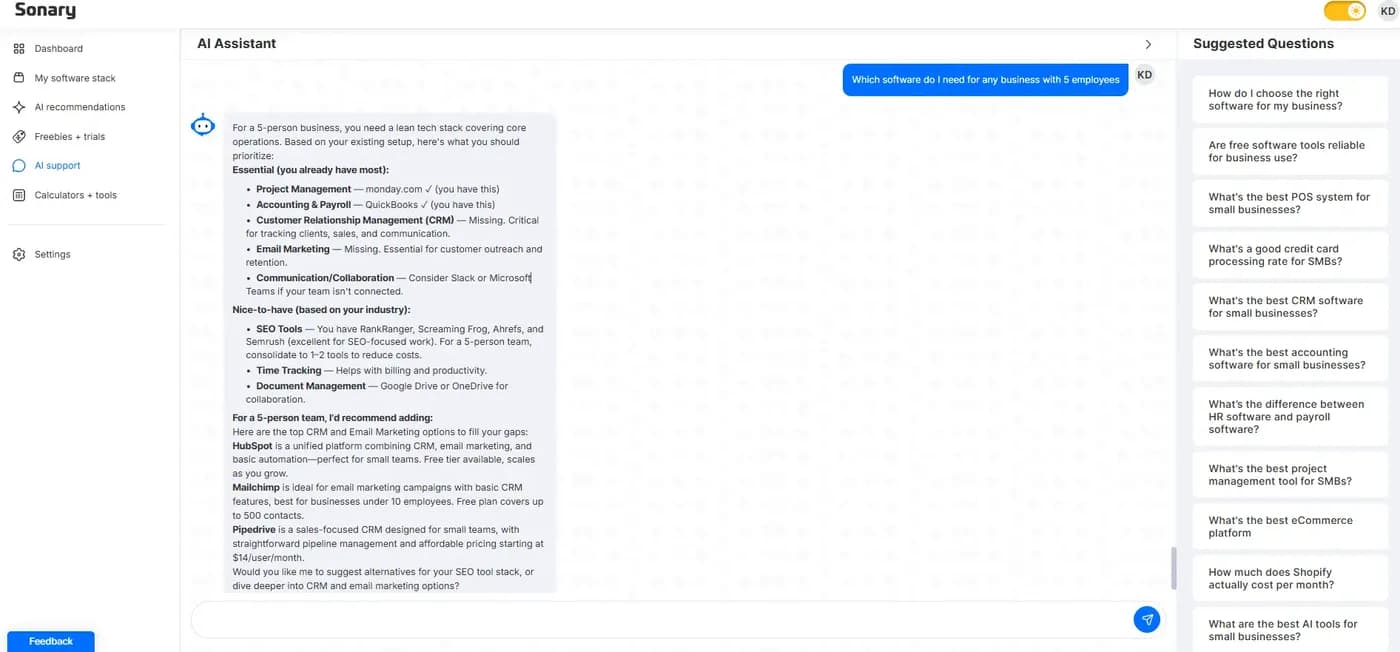
The AI assistant knows what is already in your stack, so its answers start from the tools you use.
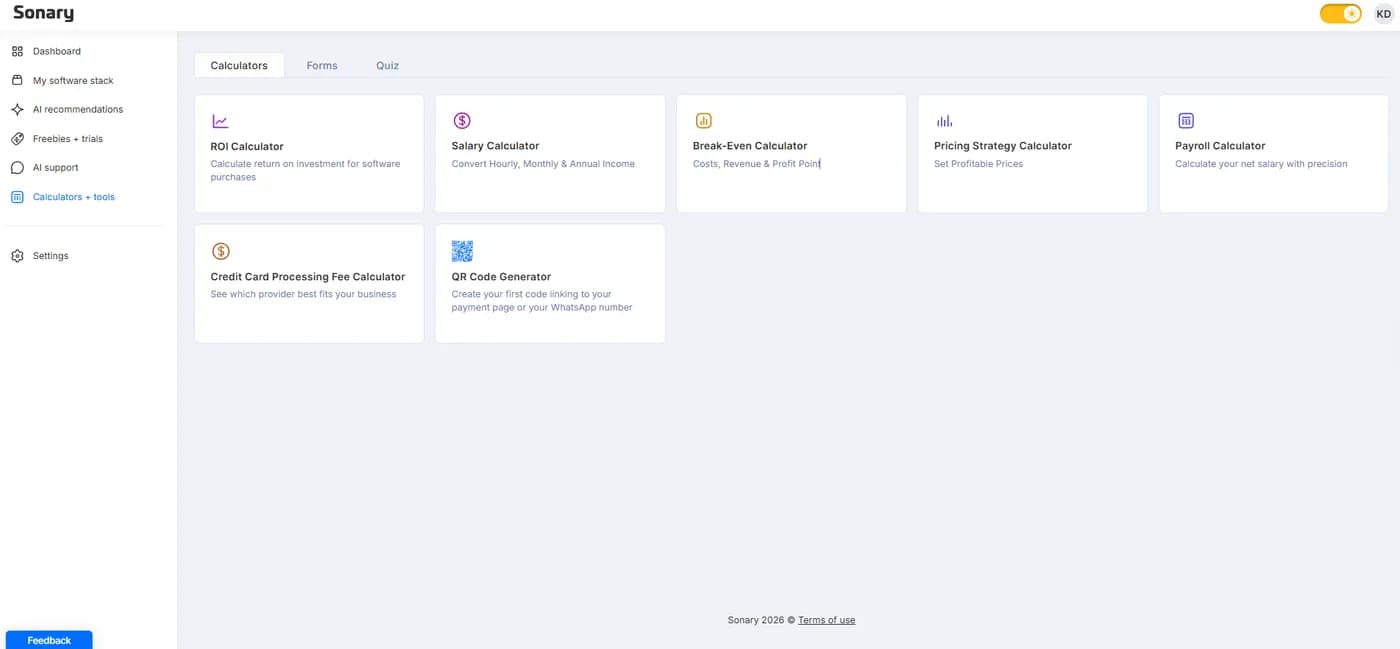
Free calculators for the money questions that come up every week.
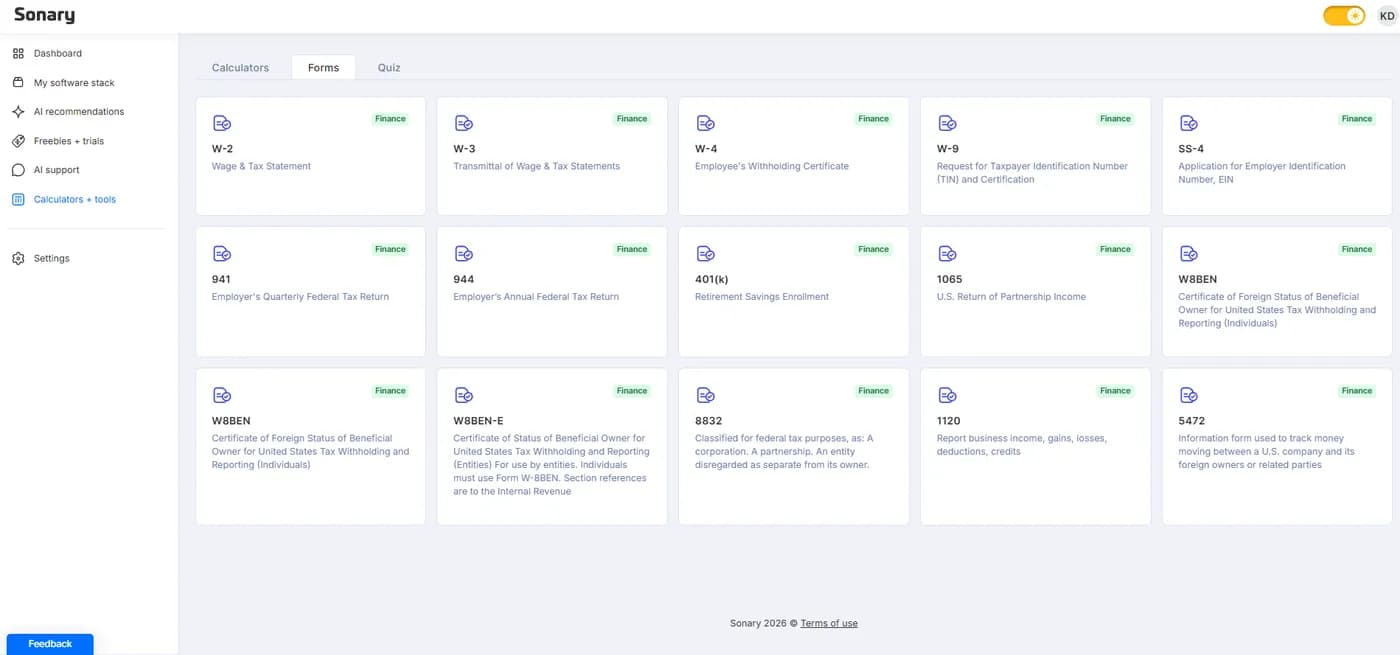
Ready-to-use templates for the federal forms small businesses need most.
All of it sits next to your stack, so the answer to "what are we paying for?" and the tools to act on it are in the same place.
FAQs
How do small businesses manage SaaS subscriptions?
How do small businesses manage SaaS subscriptions?
With one complete list and a renewal routine. List every tool you pay for, record cost, seats, owner and renewal date for each, remove duplicates and unused seats, and review each subscription before it renews. A spreadsheet or a free tool like Sonary Booster is enough at small business scale.
Can I track software subscriptions in a spreadsheet?
Can I track software subscriptions in a spreadsheet?
Yes. A spreadsheet works if someone owns it and updates it. The weak points are that nothing shows you what renews soon or how a tool's cost has changed, so add calendar reminders for every annual renewal. If you already have a sheet, you can import it into Booster, which shows upcoming renewals and keeps each tool's cost history.
How often should a small business review its software subscriptions?
How often should a small business review its software subscriptions?
Once a quarter for the full list, plus a quick check 30 days before every annual renewal. Also review seats the same week anyone joins or leaves the team.
What is SaaS spend management?
What is SaaS spend management?
SaaS spend management means tracking what a business pays for cloud software, who uses it and when it renews, so it can cut waste and plan renewals. Large companies use dedicated platforms for it. For a small business it comes down to the list, the renewal dates and the four decisions in this guide: keep, downgrade, cut or replace.
Is there a free SaaS management tool for small businesses?
Is there a free SaaS management tool for small businesses?
Yes. Sonary Booster is free with no paid tier. It keeps your software list with prices, status, renewal dates and cost history, and matches offers to the tools you use. It does not read your email or connect to your bank, so the only data in it is what you add.
How do I cancel unused software subscriptions safely?
How do I cancel unused software subscriptions safely?
Export your data first, check whether the plan has a cancellation notice period, cancel in the tool's billing settings rather than just removing the card, and keep the confirmation email. Then remove the tool from your list so it does not come back as a mystery charge.