
What’s the best gantt chart software for small and micro businesses in 2026?
The best gantt chart software for small and micro businesses is ClickUp, its Gantt view is free, with task dependencies and drag-to-reschedule built in. If you want the cheapest paid plan with a real Gantt, pick Zoho Projects at $4 per user a month. The catch: monday.com and Asana lock Gantt behind paid seats with seat minimums, so a free tool like ClickUp saves a micro business hundreds of dollars a year
Last updated: September 2026

- Affordable plans suitable for all businesses
- Free training & 24-hour support
- 100+ customizable features
- Over a dozen project views
- Built-in document editor that can be used to collaborate in real-time
- Dedicated chat interface to aid team collaboration
- Workload and time log tracking
- Can be difficult to master because of how expansive the platform is
- When using the Everything view, it can be difficult to understand who owns what.
- Affordable plans suitable for all businesses
- Free training & 24-hour support
- 100+ customizable features
- Over a dozen project views
- Built-in document editor that can be used to collaborate in real-time
- Dedicated chat interface to aid team collaboration
- Workload and time log tracking
- Can be difficult to master because of how expansive the platform is
- When using the Everything view, it can be difficult to understand who owns what.
- Easy-to-use & intuitive interface
- Trusted by great brands
- Automate tasks and save time
- Simple to use application
- Built-in time tracking with integrations for direct invoicing
- The ability to set up project budgeting
- Robust help documents that cover every aspect of the application
- Many features have been removed to encourage subscriptions to Zoho’s other projects
- The interface is bland when compared to similar products
- Easy-to-use & intuitive interface
- Trusted by great brands
- Automate tasks and save time
- Simple to use application
- Built-in time tracking with integrations for direct invoicing
- The ability to set up project budgeting
- Robust help documents that cover every aspect of the application
- Many features have been removed to encourage subscriptions to Zoho’s other projects
- The interface is bland when compared to similar products

- Trusted by 20,000 companies
- Start immediately with pre-built templates
- 30-day free trial
- Comes with a CRM and help desk if needed
- Built-in time tracking that can be converted to an invoice
- Workload estimation for staff for better resource utilization
- Custom automation workflows
- Not designed for advanced project profitability reporting
- Data tracking & reporting of activities and tasks doesn’t allow users to drill down deeply
- Trusted by 20,000 companies
- Start immediately with pre-built templates
- 30-day free trial
- Comes with a CRM and help desk if needed
- Built-in time tracking that can be converted to an invoice
- Workload estimation for staff for better resource utilization
- Custom automation workflows
- Not designed for advanced project profitability reporting
- Data tracking & reporting of activities and tasks doesn’t allow users to drill down deeply

- Trusted by 20,000+ customers worldwide
- Secure data with enterprise-grade tools
- Custom dashboards give instant insights
- Offers top-tier support for all users, but especially enterprise businesses and applications.
- Easy to integrate other tools with Wrike
- Very easy to use, even with the customizable dashboards
- Pricing could be better for smaller businesses
- The timer is task-based, not account-based, and it can be tricky for some to find
- Trusted by 20,000+ customers worldwide
- Secure data with enterprise-grade tools
- Custom dashboards give instant insights
- Offers top-tier support for all users, but especially enterprise businesses and applications.
- Easy to integrate other tools with Wrike
- Very easy to use, even with the customizable dashboards
- Pricing could be better for smaller businesses
- The timer is task-based, not account-based, and it can be tricky for some to find

- Instantly organize with 200+ templates
- 40+ integration apps including Zoom
- Free, fully functional mobile app
- This project management software is easy to navigate
- The site uses reliable and user-friendly tools
- The organization of the platform is effective
- The help and support area needs to offer more options
- The help and support area should have more extensive testimonials and videos
- There is no multilingual support
- Instantly organize with 200+ templates
- 40+ integration apps including Zoom
- Free, fully functional mobile app
- This project management software is easy to navigate
- The site uses reliable and user-friendly tools
- The organization of the platform is effective
- The help and support area needs to offer more options
- The help and support area should have more extensive testimonials and videos
- There is no multilingual support

- Team workload tracking
- Mobile app to track on-the-go
- Automated project & task workflows
- Multiple views for projects and tasks
- Easy for non-technical users to get started with the platform
- Track the workload of individual contributors in real-time
- Forms with conditional logic for data submission
- Doesn’t have built-in budget tracking
- Because of its expansiveness, it’s not suitable for a single project
- Team workload tracking
- Mobile app to track on-the-go
- Automated project & task workflows
- Multiple views for projects and tasks
- Easy for non-technical users to get started with the platform
- Track the workload of individual contributors in real-time
- Forms with conditional logic for data submission
- Doesn’t have built-in budget tracking
- Because of its expansiveness, it’s not suitable for a single project

- Track progress with real-time dashboards
- Custom tools fit your work at any scale
- Access proejct templates and Gantt charts
- Spreadsheet-like interface makes it easy to use
- Advanced reporting and analytics for better insights
- iOS and Android mobile apps
- Powerful automation reduces manual tasks efficiently
- No monthly billing
- The individual plan may not be enough for small businesses
- Learning curve for new users can be steep
- Track progress with real-time dashboards
- Custom tools fit your work at any scale
- Access proejct templates and Gantt charts
- Spreadsheet-like interface makes it easy to use
- Advanced reporting and analytics for better insights
- iOS and Android mobile apps
- Powerful automation reduces manual tasks efficiently
- No monthly billing
- The individual plan may not be enough for small businesses
- Learning curve for new users can be steep

- Efficient, powerful features
- Powerful online tool to work productively
- Seamless integrations
- The project management software site is easy to navigate.
- The software has designated topics and areas
- The site is welcoming and up to date on all of the current technological software
- Not enough assistant for large companies
- This software is best for minor companies with smaller teams
- The tools should incorporate more advanced tools within their applications
- Efficient, powerful features
- Powerful online tool to work productively
- Seamless integrations
- The project management software site is easy to navigate.
- The software has designated topics and areas
- The site is welcoming and up to date on all of the current technological software
- Not enough assistant for large companies
- This software is best for minor companies with smaller teams
- The tools should incorporate more advanced tools within their applications
* Featured prices and terms can be updated. Free offers may include additional terms.
ClickUp is the best choice for small and micro businesses because it offers a powerful Gantt chart view for free, complete with essential features such as built-in task dependencies and drag-to-reschedule functionality.
Major platforms like monday.com and Asana lock their Gantt chart features behind expensive paid tiers and enforce seat minimums, making them highly cost-prohibitive for very small teams.
Which situation describes you (and which Gantt chart software fits)?
Find your row, then jump to the section that matches. Each one names a tool and what it costs.
- You want a free Gantt chart and zero budget, use ClickUp. The Gantt view works on the Free Forever plan.
- You want the cheapest paid plan with a real Gantt, use Zoho Projects at $4 per user a month.
- You’re an agency that bills clients by the hour, use Teamwork. Its free plan includes a Gantt plus time tracking.
- You want Gantt plus a polished team workspace, use monday.com or Wrike, starting around $10–$12 per seat.
- You need baselines and formal client schedules, use Smartsheet Pro at $9 per user a month.
- You already run tasks in Asana, upgrade to Asana Starter at $10.99 per user a month to switch on Timeline.
What can each Gantt chart tool actually do?
Cells show the outcome, not a feature list
Tool | Gantt on free plan? | Cheapest plan with Gantt | Seat minimum | Best for |
|---|---|---|---|---|
Yes (limited uses) | Free, then $7/user | None | Free Gantt | |
No | $12/seat (Standard) | 3 | Polished workspace | |
Yes (viewer) | $4/user | None | Cheapest paid | |
No | $10/user (Team) | 2 | Growing teams | |
No (30-day trial) | $9/user (Pro) | None | Formal schedules | |
Yes (5 users) | Free, then $10.99/user | None | Agencies billing clients | |
No | $10.99/user (Starter) | 2 | Existing Asana users |
Which tools have the advanced Gantt features?
Most roundups skip this. If you need a real critical path, baselines, or a clean PDF for a client, here’s who delivers. Feature availability as of June 2026; some need a higher tier.
Tool | Task dependencies | Critical path | Baselines (planned vs actual) | Export to PDF |
|---|---|---|---|---|
ClickUp | Yes | Yes | No | Limited |
monday.com | Yes | Limited | No | Yes |
Zoho Projects | Yes | Yes (Enterprise) | Yes (paid) | Yes |
Wrike | Yes | Yes | Yes (Snapshots) | No (CSV only) |
Smartsheet | Yes | Yes | Yes (advanced) | Yes |
Teamwork | Yes | Yes | No | Yes |
Asana | Yes | No | No |
Quick read: for advanced scheduling, Smartsheet and Zoho cover all four. ClickUp, Teamwork, and monday.com are lighter on baselines. Asana skips the critical path.
How did we test and rank these Gantt chart tools?
We didn’t rank from spec sheets. We signed up for each of the seven tools and built one identical project , a six-week client website launch with 18 tasks, 4 dependencies, and 2 milestones , then timed how long it took to get a working timeline and how easily we could reschedule a slipped task.
We scored each Sonary-reviewed tool the way a small business actually decides , price first, then how fast you can build a usable timeline:
- Free plan and real cost (30%): Is there a free Gantt? What does the cheapest plan with a Gantt truly cost, including seat minimums?
- Core Gantt features (25%): Task dependencies, drag-to-reschedule, milestones, and a critical path.
- Ease of setup (20%): How long until a non-technical owner has a working timeline? We measured it on our test project.
- Sharing and exports (15%): Can you hand a client a clean PDF or a view-only link?
- Fit for 1–10 person teams (10%): No enterprise-only pricing or features a micro business will never use.
Full scoring details are in our ratings methodology.
How does each Gantt chart tool compare, card by card?
Seven Sonary-reviewed tools, ranked for small and micro businesses. Each card shows who it suits, what it costs, and where it falls short.
Is ClickUp right for your small business?
Imagine a workspace where every project detail aligns seamlessly, teams collaborate effortlessly, and productivity soars—welcome to ClickUp. This all-in-one project management platform offers… Read more
Imagine a workspace where every project detail aligns seamlessly, teams collaborate effortlessly, and productivity soars—welcome to ClickUp. This all-in-one project management platform offers customizable workflows, enabling you to tailor processes to your team's unique needs. Assign tasks with precision, visualize projects from inception to completion, and maintain clear communication through integrated document sharing, comments, and real-time notifications. With a vast library of project templates and integrations, ClickUp adapts to businesses of all sizes, ensuring tasks are executed efficiently and effectively. In this ClickUp review, I'll discuss features, performance, customer service, and ClickUp pricing.
Learn more in our full Clickup review.
Pros & Cons
- Over a dozen project views
- Built-in document editor that can be used to collaborate in real-time
- Dedicated chat interface to aid team collaboration
- Workload and time log tracking
- Can be difficult to master because of how expansive the platform is
- When using the Everything view, it can be difficult to understand who owns what.
Features
- File Sharing
- Document collaboration
- User Access and Permissions
- Mobile App
- Search
- Multi-language support
- Risk Analysis
- Reporting and Dashboards
- Customization
- Storage Included
- Integrated Chat
- Notifications
- Comments on Tasks
- Discussion
- Task Creation and Assignment
- Due Dates
- Task Prioritization
- To-Do Lists
- Calendar
- Gantt Chart / Project Map
- Resource Management
- Reporting
Pricing
$0
mo/
month
$7
mo/
month
$12
mo/
month
Read the full ClickUp review →
- Who chooses this: solopreneurs and freelancers who want a free, full-featured Gantt
- Starting price: $0/mo (free plan)
- Cheapest plan with Gantt: Free, then Unlimited at $7/user/mo
- Free plan: Yes , Gantt included (monthly use cap)
- Free trial: Not needed (free forever plan)
- Standout Gantt feature: Critical path on the free tier
ClickUp is the only tool here with a genuinely free Gantt that includes dependencies, drag-to-reschedule, and a critical path. A solo founder can build a real timeline without paying, then add a $7 seat only when the free Gantt-use cap gets in the way. The trade-off is a busy interface that takes a day to learn.
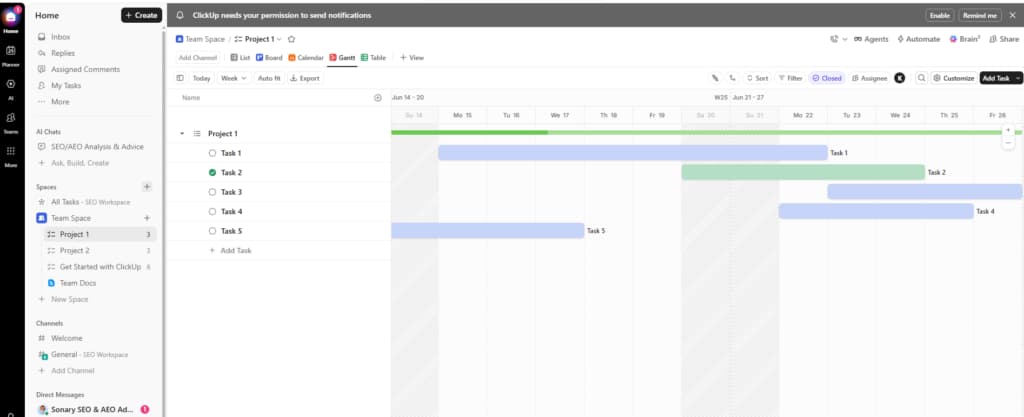
When ClickUp is the wrong choice: you want the simplest possible screen, or you need true baselines , ClickUp packs a lot on screen and skips baselines.
Pros | Cons |
|---|---|
✓Free Gantt with dependencies and critical path | ✗ Busy interface with a real learning curve |
✓ Unlimited tasks and members on the free plan | ✗ Free Gantt view has a monthly use cap |
✓ Kanban, calendar, docs, and AI in one app | ✗ No built-in baselines |
Is Zoho Projects right for your micro business?
Zoho Projects is the Project Management software that assists in planning projects, tracking work efficiently, and collaborating with team members from everywhere. The built-in Gantt charts can… Read more
Zoho Projects is the Project Management software that assists in planning projects, tracking work efficiently, and collaborating with team members from everywhere. The built-in Gantt charts can produce your project plan and track your task schedule.
Learn more in our full Zoho Projects review.
Pros & Cons
- Simple to use application
- Built-in time tracking with integrations for direct invoicing
- The ability to set up project budgeting
- Robust help documents that cover every aspect of the application
- Many features have been removed to encourage subscriptions to Zoho’s other projects
- The interface is bland when compared to similar products
Features
- File Sharing
- User Access and Permissions
- Mobile App
- Search
- Multi-language support
- Reporting and Dashboards
- Customization
- Storage Included
- Integrated Chat
- Notifications
- Comments on Tasks
- Discussion
- Task Creation and Assignment
- Due Dates
- To-Do Lists
- Calendar
- Gantt Chart / Project Map
- Baselining / KPIs
- Project Budgeting
- Resource Management
- Reporting
Pricing
$0
mo/
month
$4
/mo /user/
/mo /user
$9
/mo /user/
/mo /user
Read the full Zoho Projects review →
- Who chooses this: budget-first micro businesses and existing Zoho users
- Starting price: $0/mo (free plan)
- Cheapest plan with Gantt: $4/user/mo (Premium)
- Free plan: Yes , Gantt viewer for up to 3 users
- Free trial: 10-day trial on paid plans
- Standout Gantt feature: Critical path and baselines on paid tiers
No other name-brand tool puts a working Gantt as low as $4 a seat. You get unlimited projects, time tracking, and task automation, plus a critical path and baselines on paid tiers. If you already use Zoho Mail or Zoho CRM, it plugs in with no extra setup. The free tier only lets you view the Gantt, not edit it.
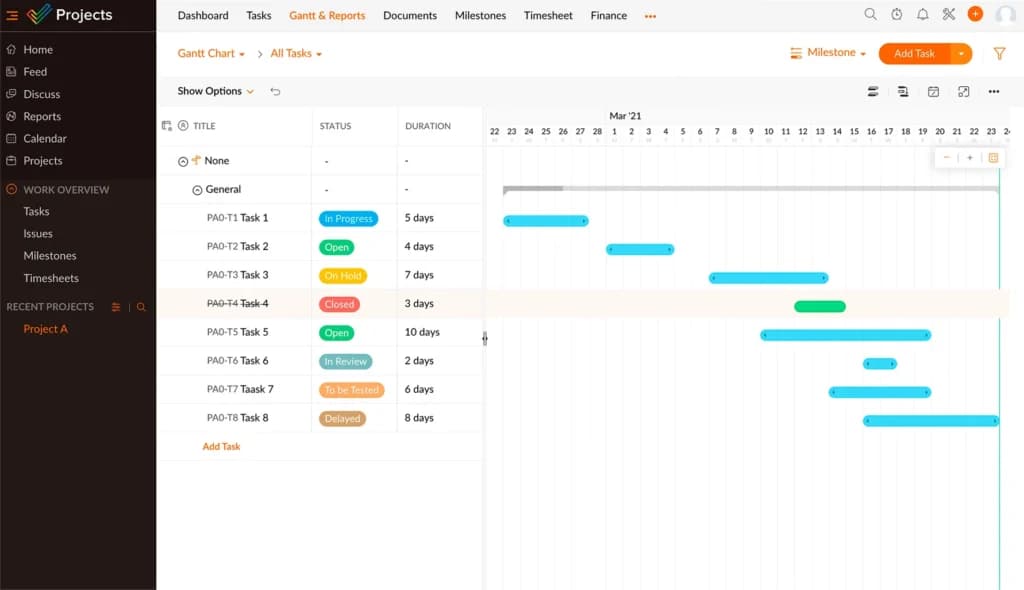
When Zoho Projects is the wrong choice: you want a free Gantt you can edit, not just view , ClickUp or Teamwork do that.
Pros | Cons |
|---|---|
✓ Cheapest paid Gantt at $4 a seat | ✗ Free tier can view but not edit the Gantt |
✓ Free Gantt viewer for 3 users | ✗ Best value only if you use other Zoho apps |
✓ Critical path and baselines on paid tiers |
Is Teamwork right for your agency?
Teamwork is built from the ground up for project management. Visualize everything in one place, collaborate in real-time with other employees, and expand on your workspace with tools like CRM and… Read more
Teamwork is built from the ground up for project management. Visualize everything in one place, collaborate in real-time with other employees, and expand on your workspace with tools like CRM and DeskChat. Switching to Teamwork is easy; simply import all your tasks and projects from other platforms.
Learn more in our full Teamwork review.
Pros & Cons
- Comes with a CRM and help desk if needed
- Built-in time tracking that can be converted to an invoice
- Workload estimation for staff for better resource utilization
- Custom automation workflows
- Not designed for advanced project profitability reporting
- Data tracking & reporting of activities and tasks doesn’t allow users to drill down deeply
Features
- File Sharing
- Document collaboration
- User Access and Permissions
- Mobile App
- Search
- Multi-language support
- Risk Analysis
- Reporting and Dashboards
- Customization
- Storage Included
- Integrated Chat
- Notifications
- Comments on Tasks
- Discussion
- Task Creation and Assignment
- Due Dates
- Task Prioritization
- To-Do Lists
- Calendar
- Gantt Chart / Project Map
- Project Budgeting
- Resource Management
- Reporting
- Forecasting
- Marketing Analytics
Pricing
$10.99
/mo /user/
/mo /user
$19.99
/mo /user/
/mo /user
$54.99
/mo /user/
/mo /user
Read the full Teamwork review →
- Who chooses this: agencies and consultants who bill clients by the hour
- Starting price: $0/mo (free plan)
- Cheapest plan with Gantt: Free (5 users), then $10.99/user/mo (Deliver)
- Free plan: Yes, Gantt included for up to 5 users
- Standout Gantt feature: Time tracking and billing on the Gantt
Teamwork is the rare free Gantt that also tracks billable hours. Plan the timeline, log time against each task, and export a client-ready PDF plus a billable-hours report , all in one place. That bundle is why agencies and consultancies pick it over a generic tool. Clients can be invited as free collaborators.
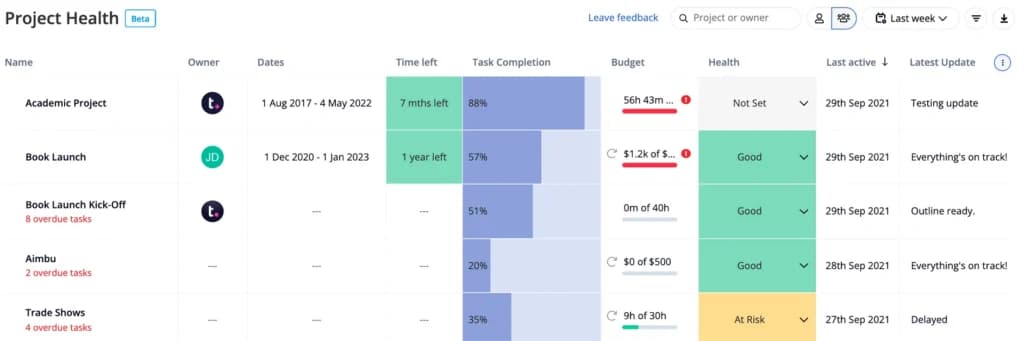
When Teamwork is the wrong choice: you don’t bill clients by the hour , the time-tracking depth is wasted, and ClickUp’s free Gantt is simpler.
Pros | Cons |
|---|---|
✓ Free Gantt for up to 5 users | ✗ No true baselines |
✓ Built-in time tracking and billing | ✗ Time-tracking depth wasted if you don’t bill hourly |
✓ Client-friendly views and templates | ✗ Project and user caps on the free plan |
Is Wrike right for your growing team?
Wrike stands out as a premier project management solution, empowering teams to visualize progress, collaborate in real-time, and tailor workflows to meet specific needs. Trusted by over 200,000… Read more
Wrike stands out as a premier project management solution, empowering teams to visualize progress, collaborate in real-time, and tailor workflows to meet specific needs. Trusted by over 200,000 organizations worldwide, Wrike offers dynamic Gantt charts, intuitive Kanban boards, and customizable dashboards, providing unparalleled control and visibility over tasks and projects. Its robust integration capabilities and scalable architecture make it an ideal choice for businesses aiming to enhance efficiency and foster growth. In this Wrike project management software review, I'll discuss features, performance, customer service, and Wrike pricing.
Learn more in our full Wrike review.
Pros & Cons
- Offers top-tier support for all users, but especially enterprise businesses and applications.
- Easy to integrate other tools with Wrike
- Very easy to use, even with the customizable dashboards
- Pricing could be better for smaller businesses
- The timer is task-based, not account-based, and it can be tricky for some to find
Features
- File Sharing
- Document collaboration
- User Access and Permissions
- Mobile App
- Search
- Multi-language support
- Reporting and Dashboards
- Customization
- Storage Included
- Integrated Chat
- Notifications
- Comments on Tasks
- Discussion
- Task Creation and Assignment
- Gantt Chart / Project Map
- Reporting
- Forecasting
- Marketing Analytics
Pricing
$0
mo/
month
$10
/mo /user/
/mo /user
$25
/mo /user/
/mo /user
- Who chooses this: growing 2–15 person teams that need portfolio views
- Starting price: $0/mo (free plan, no Gantt)
- Cheapest plan with Gantt: $10/user/mo (Team)
- Free plan: Yes , but Gantt needs the Team plan
- Free trial: 14-day trial on paid plans
- Standout Gantt feature: Baselines (Snapshots) and a portfolio Gantt
Wrike adds Gantt on its $10 Team plan, with baselines (called Snapshots), a critical path, and portfolio views once you run several projects at once. It sits on top of strong dashboards and automations. The Gantt isn’t available on the free plan, and exports are CSV-only, with no PDF option.
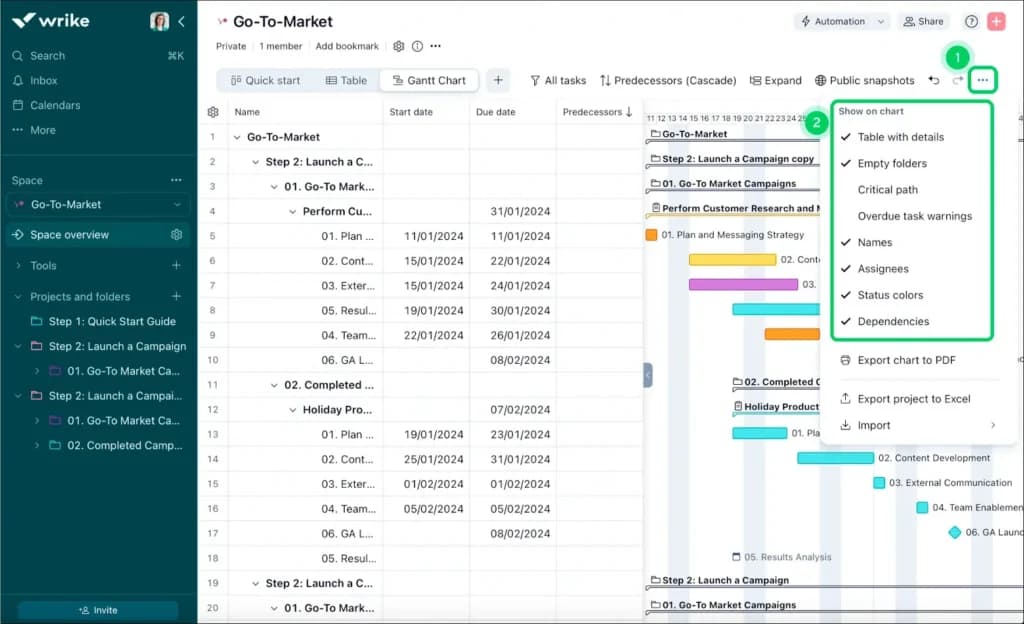
When Wrike is the wrong choice: you’re a true team of one, the two-seat minimum means paying for an empty chair.
Pros | Cons |
|---|---|
✓ Baselines (Snapshots) and critical path | ✗ Gantt isn’t on the free plan |
✓ Portfolio views across multiple projects | ✗ Two-seat minimum |
✓ Strong dashboards and automations | ✗ PDF export not supported (CSV only) |
Is monday.com right for a client-facing team?
Visualize your projects' progress and make informed decisions with monday.com's project management software. Trusted by over 200,000 customers worldwide, monday.com offers a flexible platform… Read more
Visualize your projects' progress and make informed decisions with monday.com's project management software. Trusted by over 200,000 customers worldwide, monday.com offers a flexible platform adaptable to various workflows, including project management, CRM, software development, and human resources. Its intuitive interface and customizable features streamline collaboration, enhance efficiency, and provide real-time insights into project stages. In this monday.com project management review, I'll discuss features, performance, customer service, and monday.com pricing.
Learn more in our full Monday review.
Pros & Cons
- This project management software is easy to navigate
- The site uses reliable and user-friendly tools
- The organization of the platform is effective
- The help and support area needs to offer more options
- The help and support area should have more extensive testimonials and videos
- There is no multilingual support
Features
- File Sharing
- Document collaboration
- User Access and Permissions
- Mobile App
- Multi-language support
- Reporting and Dashboards
- Customization
- Storage Included
- Integrated Chat
- Notifications
- Comments on Tasks
- Discussion
- Task Creation and Assignment
- Due Dates
- Task Prioritization
- To-Do Lists
- Calendar
- Gantt Chart / Project Map
- Baselining / KPIs
- Project Budgeting
- Resource Management
- Reporting
- Forecasting
- Marketing Analytics
Pricing
$9
/mo /user/
/mo /user
$12
/mo /user/
/mo /user
$19
/mo /user/
/mo /user
Screenshots
Read the full monday.com review →
- Who chooses this: small client-facing teams that want the most polished timeline
- Starting price: $9/mo per user
- Cheapest plan with Gantt: $12/seat/mo (Standard, 3-seat minimum)
- Free plan: Yes , but no Timeline (Gantt) view
- Free tria: l14-day free trial
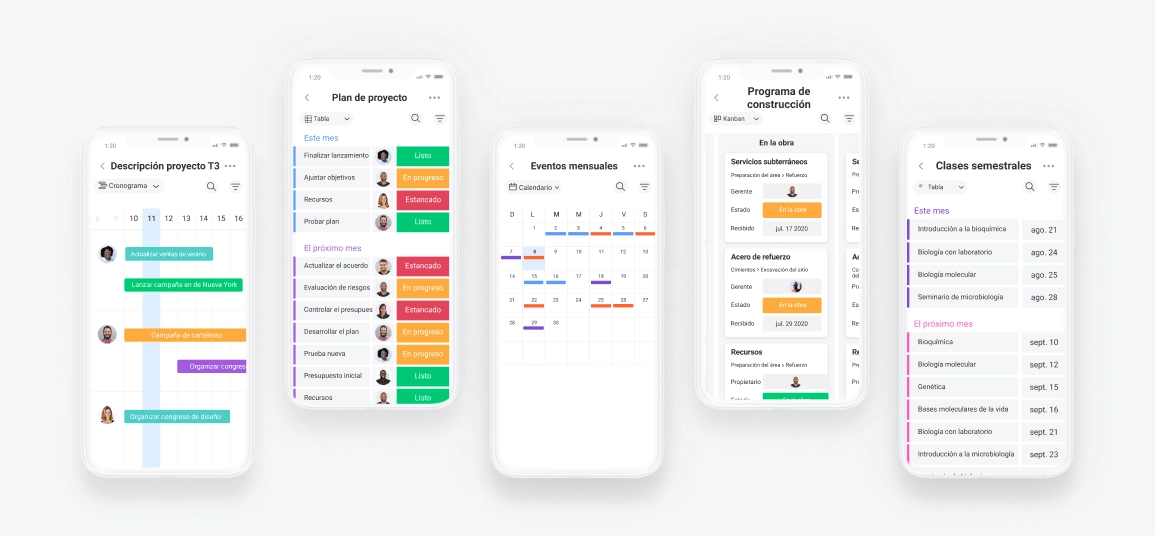
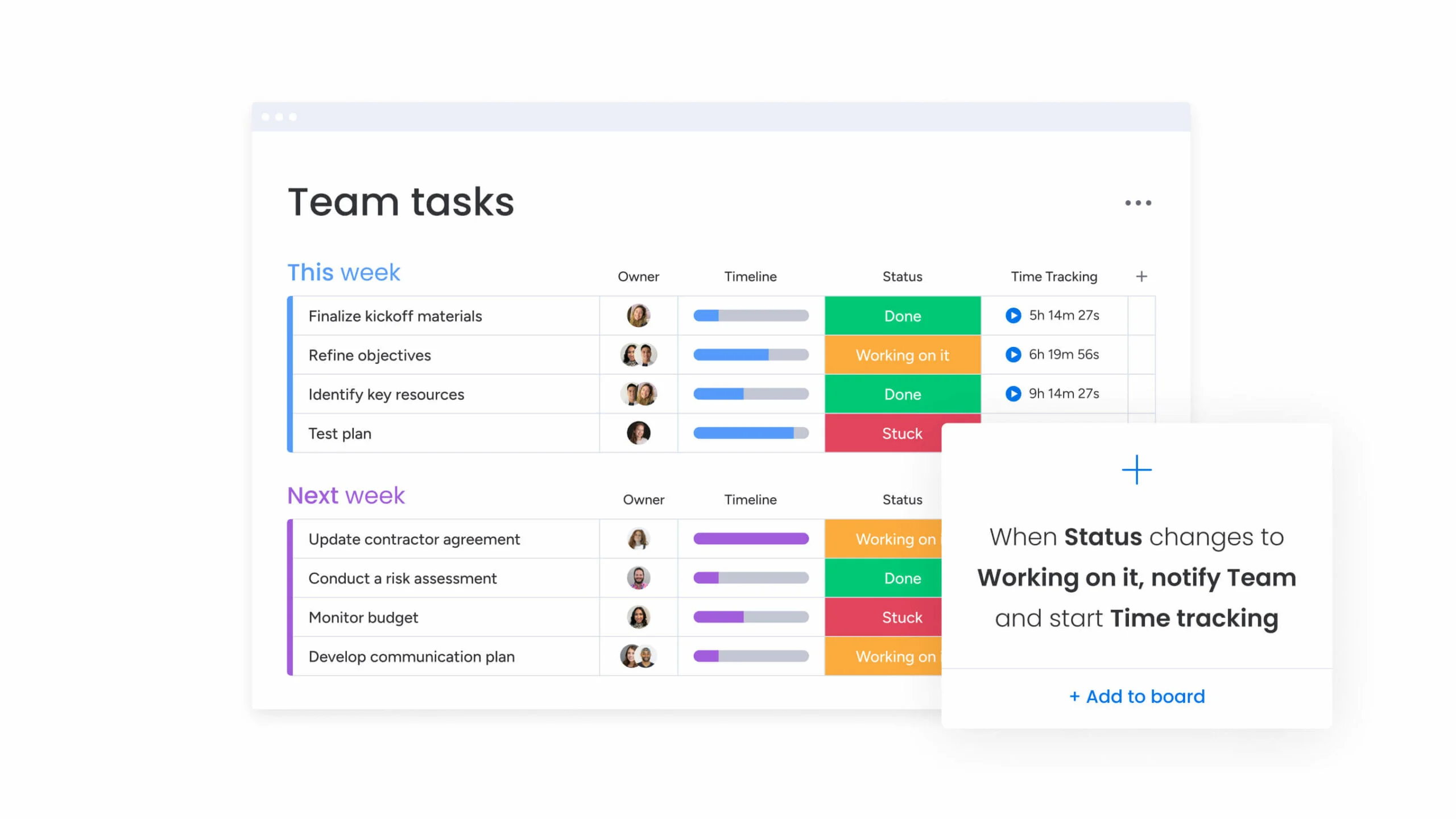
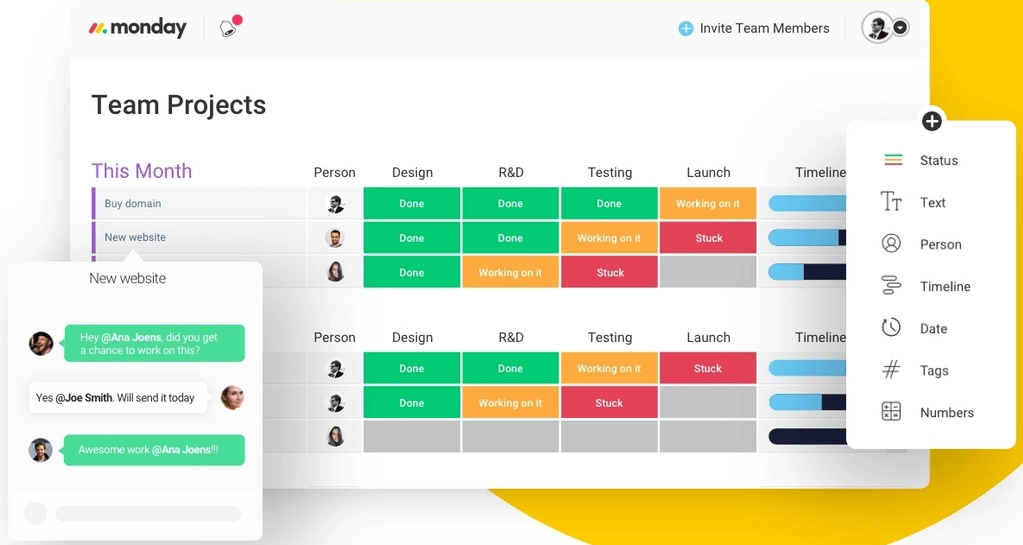
- Standout Gantt feature: The cleanest, most client-ready Timeline
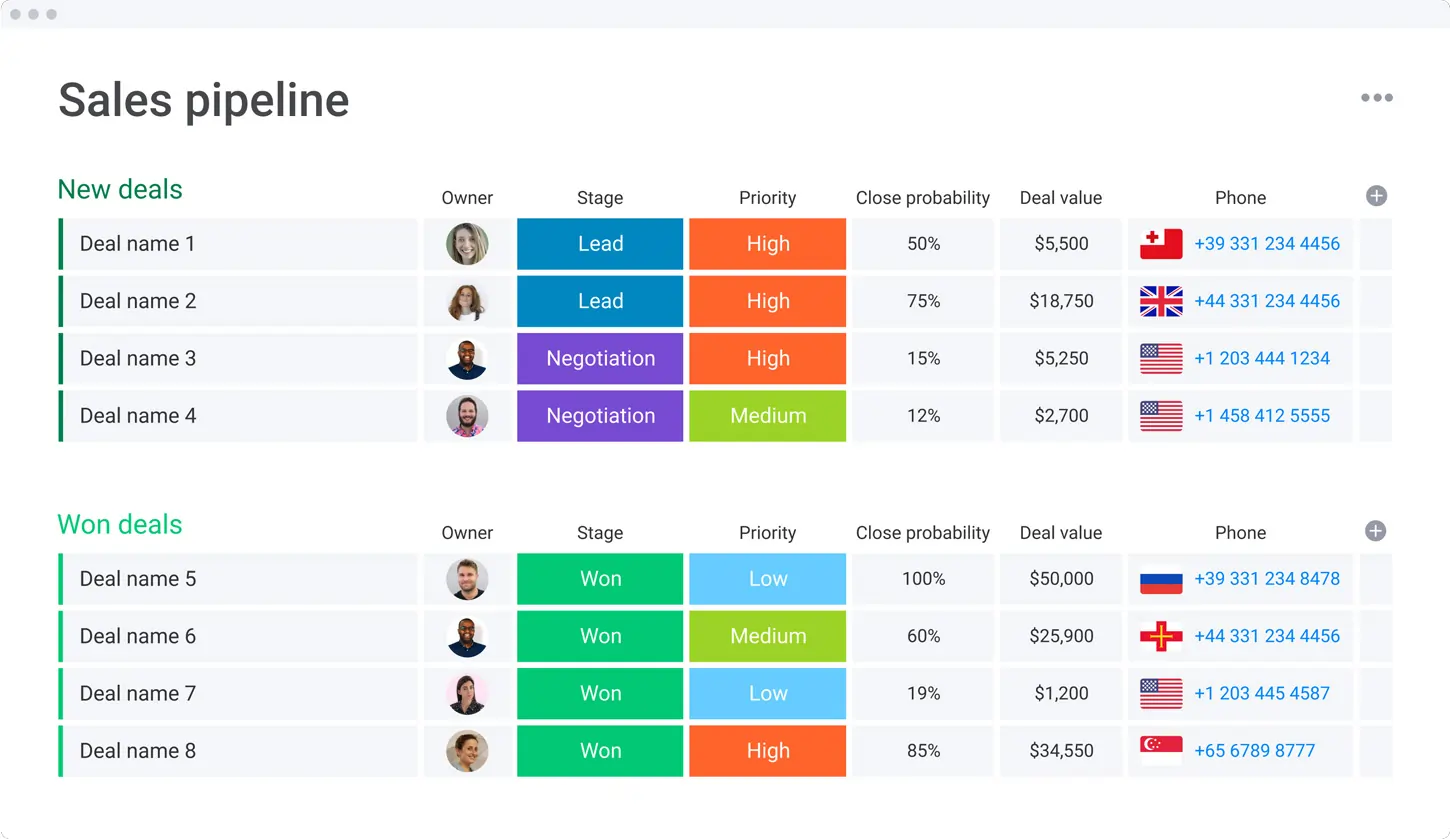
monday.com has the highest Sonary rating here (4.7) and the most client-friendly timeline. Its color-coded Timeline view is the easiest to read and share, with 200+ templates and a huge integration library. The catch for micro businesses: the Timeline needs the $12 Standard plan, and there’s a three-seat minimum , a $36/month floor.
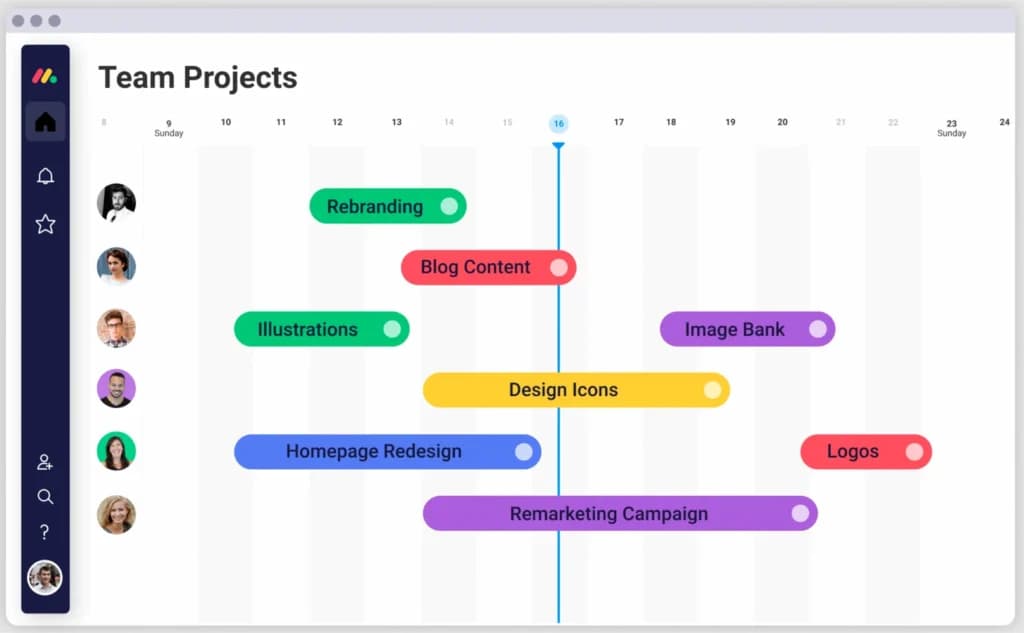
When monday.com is the wrong choice: you’re solo or on a tight budget , the three-seat minimum sets a $36-a-month floor.
Pros | Cons |
|---|---|
✓ Cleanest, most client-friendly Timeline | ✗ Timeline needs the $12 Standard plan |
✓ 200+ templates and fast setup | ✗ Three-seat minimum ($36/mo floor) |
✓ Huge integration library | ✗ No true baselines |
Is Asana right for you if you already use it?
Asana is a project management platform designed for team clarity and collaboration. It helps teams manage projects and tasks, specify deadlines, and communicate directly within the platform. It also… Read more
Asana is a project management platform designed for team clarity and collaboration. It helps teams manage projects and tasks, specify deadlines, and communicate directly within the platform. It also includes reporting tools, file attachments, calendars, and setting and tracking company-wide goals.
Learn more in our full Asana review.
Pros & Cons
- Multiple views for projects and tasks
- Easy for non-technical users to get started with the platform
- Track the workload of individual contributors in real-time
- Forms with conditional logic for data submission
- Doesn’t have built-in budget tracking
- Because of its expansiveness, it’s not suitable for a single project
Features
- File Sharing
- User Access and Permissions
- Mobile App
- Search
- Multi-language support
- Risk Analysis
- Reporting and Dashboards
- Customization
- Storage Included
- Integrated Chat
- Notifications
- Comments on Tasks
- Discussion
- Task Creation and Assignment
- Due Dates
- Task Prioritization
- To-Do Lists
- Calendar
- Gantt Chart / Project Map
- Resource Management
- Reporting
Pricing
$0
mo/
month
$10.99
/mo /user/
/mo /user
$24.99
/mo /user/
/mo /user
- Who chooses this: teams already on Asana that just need a Timeline
- Starting price: $0/mo (free plan, no Timeline)
- Cheapest plan with Gantt: $10.99/user/mo (Starter)
- Free plan: Yes , but Timeline (Gantt) is paid-only
- Free trial: 30-day free trial
- Standout Gantt feature: Timeline tied to workflow automations
If your team already lives in Asana, switching on the Starter plan unlocks Timeline (its Gantt) plus workflow rules, custom fields, and dashboards. It’s polished and mobile-friendly. But starting fresh just for a Gantt is hard to justify when Timeline is locked behind a paid plan and there’s no critical path.
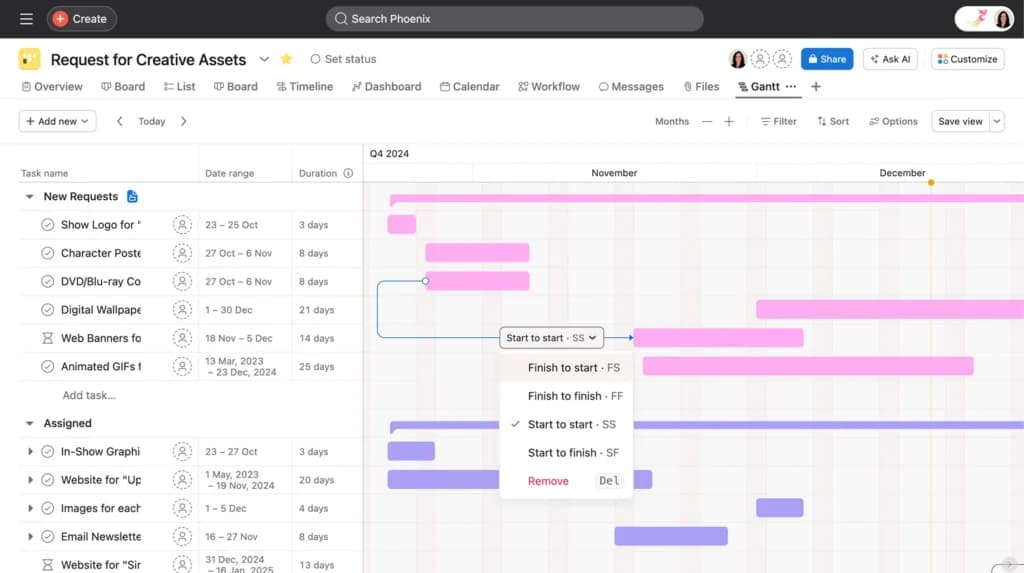
When Asana is the wrong choice: you’re starting fresh and want a free Gantt, Asana’s Timeline is paid-only.
Pros | Cons |
|---|---|
✓ Polished Timeline tied to workflow rules | ✗ Timeline locked to the paid Starter plan |
✓ Excellent mobile apps | ✗ No critical path |
✓ Trusted by 100,000+ organizations | ✗ Two-seat minimum on paid plans |
Is Smartsheet right for formal client schedules?
Smartsheet is a cloud-based project management and collaboration tool designed to help teams plan, track, automate, and report on their work efficiently. With a familiar spreadsheet-style interface,… Read more
Smartsheet is a cloud-based project management and collaboration tool designed to help teams plan, track, automate, and report on their work efficiently. With a familiar spreadsheet-style interface, it combines ease of use with powerful features like workflow automation, resource management, and real-time reporting. Smartsheet integrates seamlessly with popular apps like Microsoft Office, Google Workspace, and Slack, ensuring smooth collaboration across teams. Businesses benefit from its scalability, automation capabilities, and data-driven insights, making it ideal for managing complex projects. In this Smartsheet review, I'll discuss features, performance, customer service, and Smartsheet pricing.
Learn more in our full Smartsheet review.
Pros & Cons
- Spreadsheet-like interface makes it easy to use
- Advanced reporting and analytics for better insights
- iOS and Android mobile apps
- Powerful automation reduces manual tasks efficiently
- No monthly billing
- The individual plan may not be enough for small businesses
- Learning curve for new users can be steep
Features
- File Sharing
- Document collaboration
- User Access and Permissions
- Mobile App
- Search
- Multi-language support
- Reporting and Dashboards
- Customization
- Integrated Chat
- Notifications
- Comments on Tasks
- Discussion
- Task Creation and Assignment
- Due Dates
- Task Prioritization
- To-Do Lists
- Calendar
- Gantt Chart / Project Map
- Baselining / KPIs
- Project Budgeting
- Resource Management
- Reporting
Pricing
$9
/mo /user/
/mo /user
$19
/mo /user/
/mo /user
Read the full Smartsheet review →
- Who chooses this: spreadsheet-lovers and formal client schedules needing baselines
- Starting price: $9/mo per user
- Cheapest plan with Gantt: $9/user/mo (Pro)
- Free plan: No , 30-day free trial only
- Free trial: 30-day free trial
- Standout Gantt feature: Baselines and critical path, grid-to-Gantt
Smartsheet is the pick for formal client schedules. A grid turns into a Gantt with one click, and you get baselines, a critical path, and clean exports a client’s finance team will accept. A fractional ops consultant can build a rollout plan, set a baseline, and prove progress week to week. The grid is the whole point , and the steepest learning curve here.
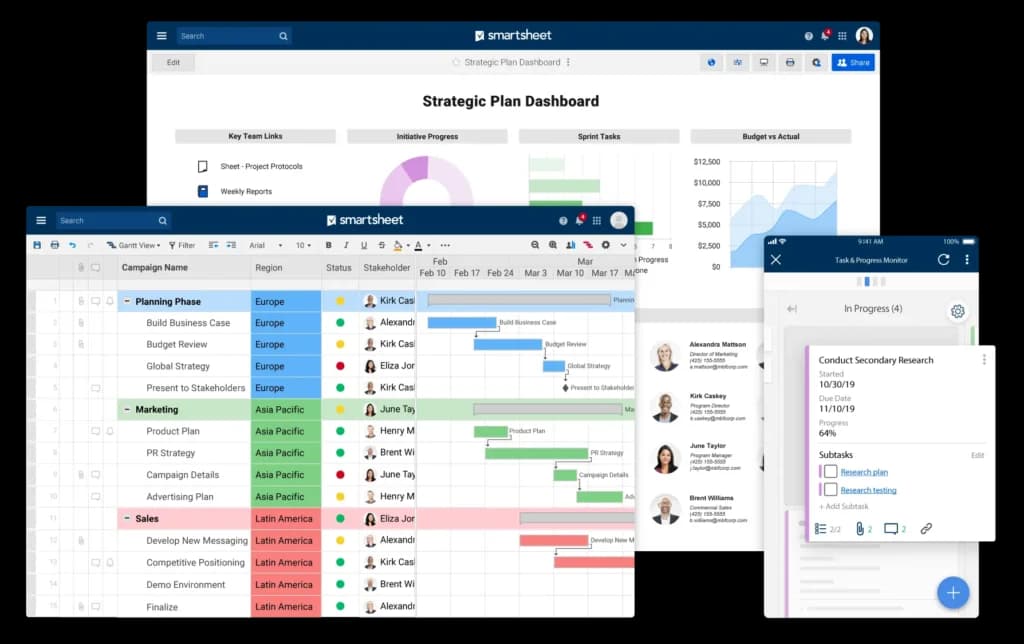
When Smartsheet is the wrong choice: spreadsheets stress you out , a card-and-bar tool like monday.com will feel friendlier.
Pros | Cons |
|---|---|
✓ Baselines and critical path for real schedules | ✗ No free plan (30-day trial only) |
✓ Grid turns into a Gantt instantly | ✗ Steep learning curve |
✓ Real-time dashboards and templates | ✗ Overkill if you dislike spreadsheets |
What’s the best free Gantt chart software for a small business?
ClickUp is the best free Gantt chart software for a small business. Its Gantt view is part of the Free Forever plan, so a solo founder can build a real timeline without paying. See our ClickUp review for the full breakdown.
What does this look like in practice?
Maya, a freelance brand designer juggling four client websites, built a free ClickUp Gantt with one list per client. When a client went quiet, she dragged the launch bar two weeks later and watched the dependent tasks shift with it. She turned on Critical Path to see which project would slip first. She has never paid ClickUp a cent, and her on-time delivery went from roughly 70% to 100% over six months.
When should you pick something else?
If you bill clients by the hour, Teamwork’s free plan adds time tracking. If you want the cheapest paid plan, Zoho Projects is gentler. For more no-cost options, see our roundup of free project management software.
What’s the best free Gantt chart software for an agency that bills clients?
Teamwork is the best Gantt chart software for agencies that bill by the hour. Its Free Forever plan includes a Gantt for up to five users, and time tracking is built in. See our Teamwork review.
What does this look like in practice?
A four-person web studio runs three retainer clients on Teamwork’s free plan. Each project has a Gantt with milestones tied to invoice dates, and the team logs hours against each task. At month end, the owner exports a timeline PDF and a billable-hours report in two clicks , work that used to take an afternoon in a spreadsheet, now done before the first coffee.
When should you pick something else?
If hours are your real product, also weigh dedicated time-tracking software. If you need true baselines, Smartsheet handles those better.
What’s the best Gantt chart software for a small team that wants polish?
monday.com is the best choice for a small team that wants a clean, visual timeline. Wrike is the close runner-up. Compare the leaders in our ClickUp vs monday.com guide.
What does this look like in practice?
A six-person marketing agency moved off shared spreadsheets to monday.com Standard. The Timeline view showed three client campaigns all landing in the same launch week, so they staggered two of them. That single view let them take on a fourth retainer client without hiring , about $3,000 a month in new revenue , because they could finally see where the team had slack.
When should you pick something else?
Skip monday.com if you’re a solo user; the three-seat minimum means you pay for chairs you don’t fill. Choose ClickUp’s free Gantt or Zoho’s $4 plan instead.
How do you actually set up a Gantt chart?
You can set up a Gantt chart in three ways: a free tool, a spreadsheet, or a slide. The tool route is fastest and the only one that auto-updates when dates change. Our Gantt chart guide walks through the basics.
- In a tool (5 minutes): Open ClickUp or Zoho, add your tasks with start and end dates, then switch to the Gantt or Timeline view. Drag a bar to move a date.
- In Excel or Google Sheets (20 minutes): List tasks in column A, add start dates and durations, then build a stacked bar chart and hide the first series. Free, but it won’t track dependencies.
- Add dependencies: Link each task to the one it waits on, so that moving an earlier bar automatically pushes the later ones. This is the step spreadsheets can’t do well.
- Set a baseline: Save your original plan, then compare planned versus actual dates as work slips. Smartsheet and the paid Zoho tiers support this.
If “how to make a Gantt chart in Excel” is what brought you here, the honest answer is: a free tool will save you an hour and keep your dates in sync.
What’s the actual difference between ClickUp and monday.com?
ClickUp gives you a free Gantt and unlimited members; monday.com gives you a cleaner timeline but charges from three seats up. Our full ClickUp vs monday.com comparison goes deeper.
Question | ClickUp | monday.com |
|---|---|---|
Gantt on the free plan? | Yes (limited uses) | No |
Cheapest plan with Gantt | $7/user (or free) | $12/seat |
Seat minimum | None | 3 seats ($36/mo) |
Timeline polish | Functional | Best in class |
Best for | Solo, zero budget | Small client-facing team |
In short: a solo founder watching every dollar picks ClickUp. A small team that shares timelines with clients and wants it to look good picks monday.com.
Which Sonary project management tools should you skip for Gantt charts?
Not every tool we review is built for timelines. If Gantt charts are your goal, pass on these and pick one from the cards above.
- Pipedrive, a sales CRM, not project software. No Gantt chart; see our CRM software hub instead.
- HubSpot, its project tools are light task lists, without a true Gantt timeline.
- Jira, great for Agile sprints, but native Gantt charts need a marketplace add-on.
- WorkZone: has Gantt charts, but at $22/user, it’s aimed at larger teams than most microbusinesses.
Do you actually need Gantt chart software?
Maybe not. If your project has fewer than eight tasks and no dependencies, a Gantt chart is overkill; a simple to-do list or a Kanban board will move faster and cost nothing.
You need a Gantt the moment one task can’t start until another finishes, and a slip in week one would quietly push your launch date. That’s when seeing the chain on one screen pays for itself. A wedding photographer with a fixed event date doesn’t need one. A consultant coordinating a vendor, a designer, and a client sign-off does. Be honest about which one you are before you pay for a seat.
What are the alternatives to a Gantt chart?
If a timeline feels like too much, three lighter views cover most small-business work.
- Kanban board: Cards move across To Do, Doing, and Done columns. Best when order matters more than exact dates.
- Calendar view: Tasks sit on dates like events. Best for recurring work and content schedules, but it hides dependencies.
- PERT chart: Tasks are nodes in a network diagram. Useful for mapping complex dependencies, less so for daily tracking.
Most tools here, including ClickUp, Zoho, and monday.com, include Kanban and calendar views alongside the Gantt, so you can switch without changing apps.
How does your Gantt chart tool affect your online visibility?
Your Gantt chart software doesn’t rank your website, but how you publish your project work can. If you’re a freelancer or agency, the way you describe finished projects shapes whether you show up when a client searches.
Three moves that help:
- Turn delivered projects into case studies. A timeline you finished on time is proof. Write it up with the client problem, the steps, and a number , search engines and AI answer engines both reward specific, dated outcomes.
- Name the outcome, not the tool.“Launched a 6-week site rebuild on schedule” beats “used a Gantt chart.” The outcome is what people search for.
- Date every claim.“Delivered March 2026” signals freshness. Stale, undated pages get skipped by AI engines that cite recent, specific sources.
The same habit that makes a project plan clear, specific tasks, dates, and owners, is the habit that makes your published work easy to find and cite.
What do people actually ask about Gantt chart software?
What is the best Gantt chart software for a small business?
ClickUp, because its Gantt view is free and includes dependencies and drag-to-reschedule. For micro businesses that want the cheapest paid plan, Zoho Projects at $4 per user a month is the value pick.
What is a Gantt chart?
A Gantt chart is a horizontal bar chart that shows each task in a project as a bar across a timeline. The bar’s length is the task’s duration, and lines between bars show which tasks depend on others.
What is the best free Gantt chart software?
ClickUp. Its Gantt view, with dependencies and drag-to-reschedule, works on the Free Forever plan. Teamwork’s free plan also includes a Gantt for up to five users, and Zoho Projects has a free Gantt viewer for three users.
Does Google have a free Gantt chart?
Not a built-in one. You can make a free Gantt chart in Google Sheets using a stacked bar chart, or start from a free Google Sheets Gantt template. For dependencies and auto-rescheduling, a free tool like ClickUp is easier.
Can I make a Gantt chart in Excel or Google Sheets for free?
Yes. Build a stacked bar chart from a task list with start dates and durations, then hide the first bar series. It’s free but won’t track dependencies or update automatically, so a free tool is usually faster.
Is there a free Gantt chart app for Mac?
Yes. ClickUp, Teamwork, and Zoho Projects all run in the browser on a Mac, so there’s nothing to install. They work the same on macOS and Windows.
Which Gantt chart tools have a mobile app?
ClickUp, monday.com, Zoho Projects, Asana, Wrike, and Teamwork all have iOS and Android apps. Gantt charts are hard to edit on a small screen, so most owners plan on a laptop and check status on the phone.
What is the cheapest Gantt chart software?
ClickUp and Teamwork both have a free Gantt. For a paid plan, Zoho Projects at $4 per user a month (Premium, billed annually) is the cheapest with a full Gantt. Smartsheet Pro is $9.
Does monday.com have a Gantt chart on the free plan?
No. monday.com adds the Timeline (Gantt) view on the Standard plan at $12 per seat a month, with a three-seat minimum, as of June 2026.
What’s the easiest Gantt chart software to learn?
monday.com. Its color-coded Timeline is the most beginner-friendly view here, and it earns the top Sonary rating at 4.7. Zoho Projects is a close second for a simpler, cheaper option.
What’s the difference between a Gantt chart and a Kanban board?
A Gantt chart shows tasks on a timeline with dependencies, so you see dates and what blocks what. A Kanban board shows tasks as cards moving across columns by status, with no dates. Use a Gantt for schedules, Kanban for flow.
Do I need project management software, or just a Gantt chart?
If you only need task dates and dependencies, any tool here with a Gantt view is enough. If you also want chat, dashboards, and automations, pick an all-in-one tool like ClickUp or monday.com.
Where can you go deeper?
Related Sonary guides, reviews, and tools:
- Best project management software and best free project management software, the wider category, for small teams.
- ClickUp review, monday.com review, Zoho Projects review, and Teamwork review, hands-on breakdowns.
- What is a Gantt chart? and ClickUp vs monday.com, go deeper on the basics and the head-to-head.
- Need a different job done? See CRM software, accounting software, and time-tracking software.
- Sonary ratings methodology: how we score every tool.
See also
- A Gantt view is one feature inside a larger tool, so check the suites in best project management software for small teams rather than buying a chart alone.
- Teams without hard dependencies get more from a list or a board, and that is what best task management tools for small teams covers.
- Critical path matters most on site, where best construction management software adds job costing on top of the timeline.
- Basic timeline views do turn up in some no-cost plans, and those are listed under best free project management software for small business.
What’s the bottom line?
The best Gantt chart software for small and micro businesses is ClickUp, because its Gantt is free and full-featured. If you bill clients by the hour, Teamwork’s free plan adds time tracking. Zoho Projects is the cheapest paid option at $4 a seat. monday.com earns the top rating and wins on polish for client-facing teams, but costs at least $36 a month, and Smartsheet is the pick for formal client schedules with baselines. Match the tool to your budget and how many seats you’ll actually fill, and skip a Gantt entirely if your project has no dependencies.