
Last updated: September 2026
Mailchimp is an all-in-one marketing platform primarily used for creating, sending, and tracking email campaigns and automated marketing workflows.
Mailchimp stands as a premier cloud-based email marketing software, offering a comprehensive suite of tools tailored for businesses of all sizes. From crafting personalized emails and designing custom forms to generating insightful reports, Mailchimp empowers users to execute effective marketing campaigns. Its AI-driven features assist in content creation, enhancing campaign efficiency. With flexible plans, including a completely free edition, Mailchimp accommodates varying needs based on contact lists and monthly email volumes. Additionally, Mailchimp provides survey tools that can be utilized as an employee feedback tool, facilitating internal assessments and engagement strategies. In this Mailchimp review, I'll dicuss the features, benefits, performance, and the Mailchimp pricing plans.
Plans & Pricing
- Limited to 250 contacts
- Email support for first 30 days
- Limited reporting and analytics
- 500/monthly email sends or 500/day
- 1 user
- Forms & landing pages
- Everything in the Free plan plus:
- 500 contacts
- 24/7 Email and chat support
- Up to 4 automated journey points
- 10x contacts
- 3 users
- 2 role based access
- Everything in the Essentials plan plus:
- Unlimited reporting & analytics
- No additional cost AI add-on features
- 12x monthly email contacts
- 5 users
- Forms & landing pages
- Remove Mailchimp branding
- A/B Testing
- Dynamic Content
- Advanced Segmentation
- Everything in the Standard plan plus:
- Phone & Priority support
- 15x monthly email sends
- Unlimited users
- Unlimited audiences
* Featured prices can be updated and free offers may include additional terms.
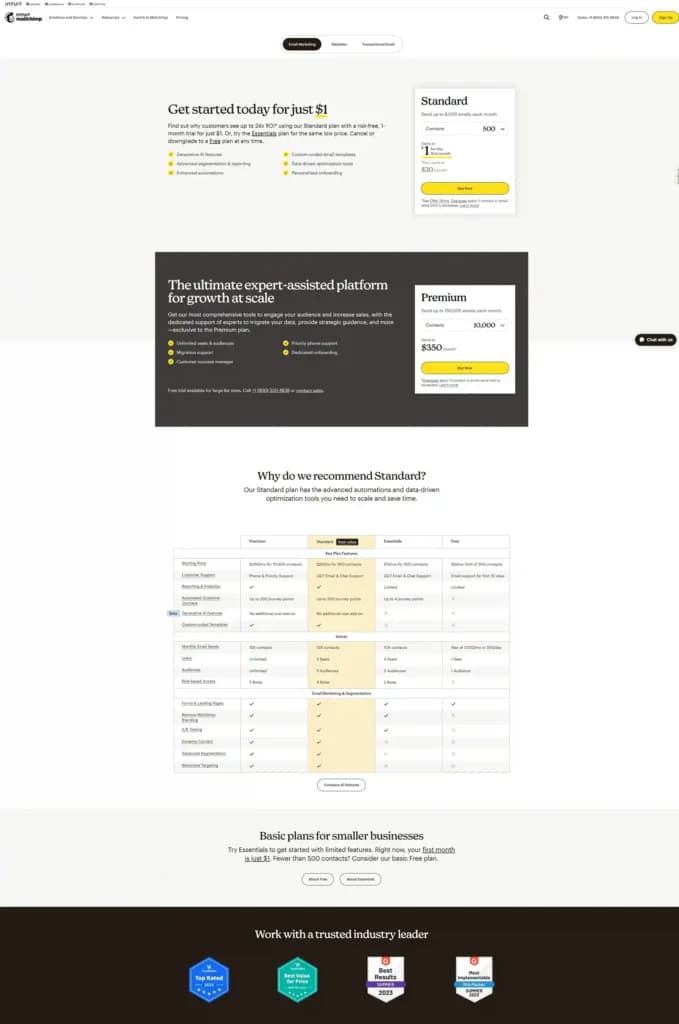
I checked out the Mailchimp pricing plans and found them to be reasonable.
The Free plan includes up to 500 contacts, email support for the first 30 days, limited reporting and analytics, 1000 monthly email sends or 500 per day, and support for one user, all at no cost. It offers a free trial but no money-back guarantee.
The Essentials plan, at $13/month, includes everything in the Free plan plus 24/7 email and chat support, up to four automated journey points, 10x contacts, support for three users, and two role-based accesses. No free trial or money-back guarantee is available.
The Standard plan, at $20/month, adds unlimited reporting and analytics, AI features, 12x monthly email contacts, support for five users, removal of Mailchimp branding, A/B testing, dynamic content, advanced segmentation, and behavioral targeting to the Essentials plan. It does not include a free trial or money-back guarantee.
The Premium plan, priced at $350/month, includes everything in the Standard plan plus phone and priority support, 15x monthly email sends, unlimited users, and unlimited audiences. This plan does not offer a free trial or money-back guarantee.
Expert Score
Pros
- Free version of the software is available
- Full Marketing hub
- Convenient email templates and helpful reports
- Thorough Reporting
Cons
- Lower pricing tiers offer fewer features
- No email scheduling on free plan
- High-cost subscription plans
Customer Support
Phone Support
Mailchimp’s phone support number is 800-315-5569. The sales representative was fast to get on the line with me. He was able to answer some of my questions and then transferred me to a specialist to answer my more technical questions about the Mailchimp tool, marketing strategy, email automation tools, email campaign management, and other email marketing tools Mailchimp offers. I was not on hold for more than two or three minutes when I was transferred to the specialist. Overall, Mailchimp has an exceptional phone support team.
Chatbot
Mailchimp has an automated chatbot on the homepage of their website. It mainly consists of automated messages with reply options to choose from. If your questions were not answered during this process the chatbot will suggest getting you connected with a Mailchimp sales representative to assist you further. You can give them a call, email, or live chat with the representative.
Email Support
Users can fill out a quick information form in order to submit a request for a sales team member to send you an email for assistance. They respond in a timely manner via email. However the phone support is a faster option to get a live representative that will answer questions and/or help assist users in software operations.
Community
There is a Blog on the website for Mailchimp users as well as a “question and answer” section for users to seek help with operating the Mailchimp email marketing software and the Mailchimp email marketing tools. These sections can be found through the Mailchimp software’s website under the help center tab found in the upper right hand corner.
Ease of Use
Clean Interface and User-Friendly Tools
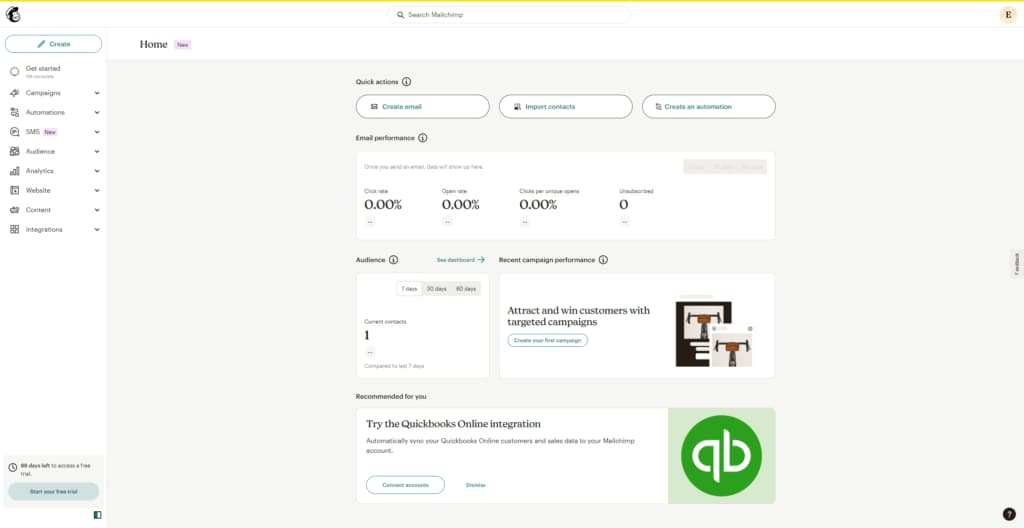
I found Mailchimp’s interface to be clean and easy to use, which made exploring its features enjoyable. The platform caters to both beginners and experienced marketers, offering tools that are straightforward to operate.
Navigation Challenges
However, while testing the platform, I noticed that some tools were slightly hidden, making navigation a bit confusing at times. A clearer layout would make accessing specific features more intuitive and save time.
Simple Opt-In Setup
Setting up the initial opt-in process was a breeze. Mailchimp guided me through creating forms and managing subscriber lists, making it simple to get started. The process felt seamless and beginner-friendly.
Reliable Features and Performance
Most of Mailchimp’s features worked impressively well during my testing. From email creation to audience management, the platform delivered reliable performance. Despite minor navigation issues, I’d rank Mailchimp as one of the easiest email marketing tools to use.
Performance
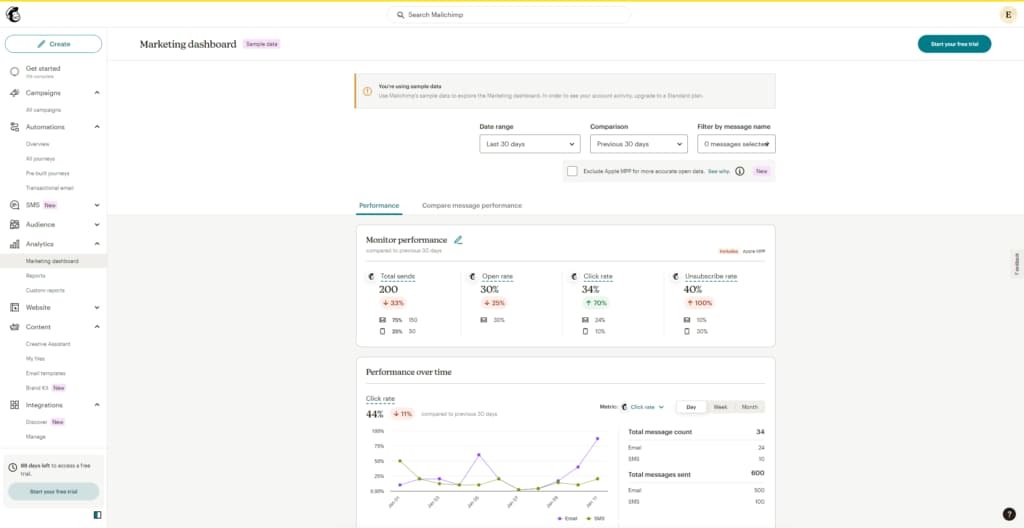
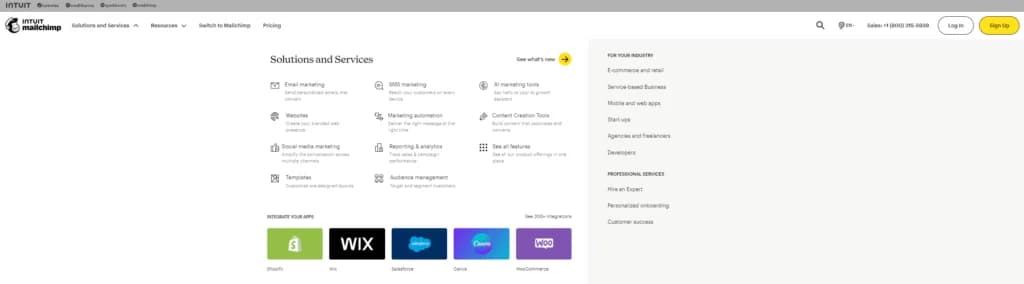
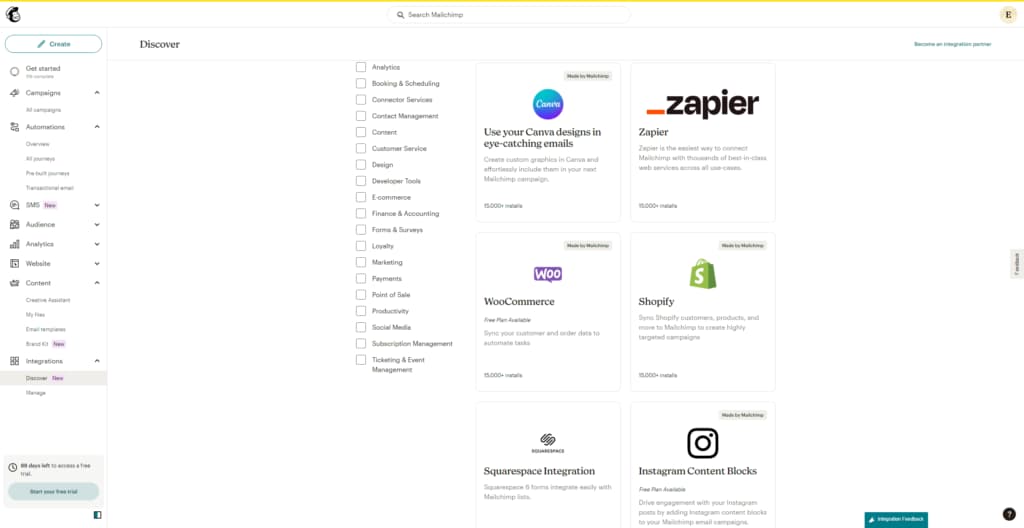
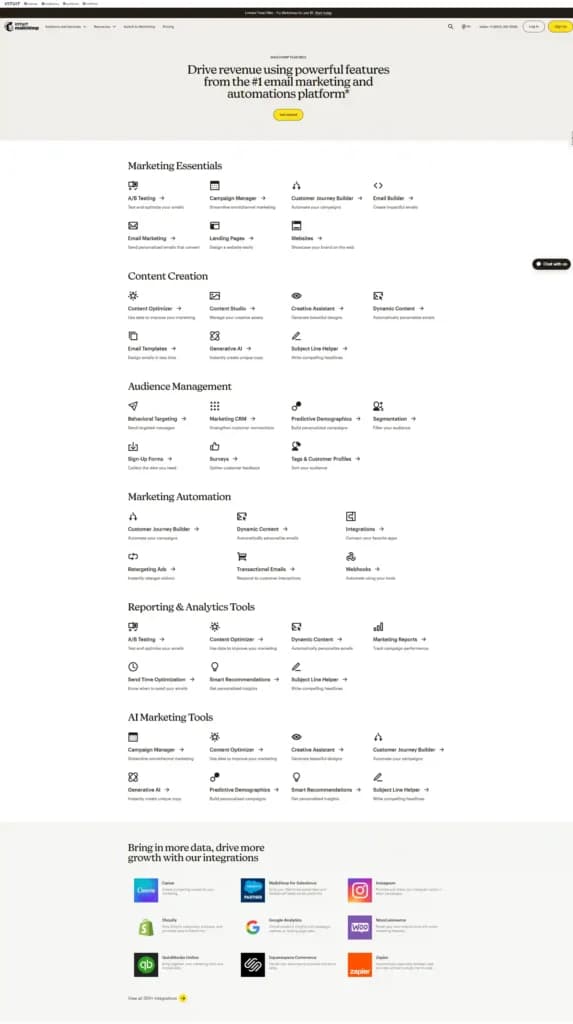
Mailchimp is a powerful email marketing tool that ensures high inbox delivery rates by adhering to email regulations and reducing spam risks. I tested its integration capabilities and found it seamlessly connects with popular apps like Salesforce, Shopify, Canva, Wix, and WooCommerce, streamlining workflows across platforms. Its analytics feature impressed me, offering actionable insights based on campaign performance and audience behavior. These suggestions helped refine my future campaigns effectively.
Mailchimp’s user-friendly interface makes it accessible even for beginners. During my testing, generating detailed campaign reports, including click-through and open rates, was effortless. These reports provided valuable metrics to measure campaign success and identify areas for improvement. Combined with its automation features and intuitive dashboard, Mailchimp simplifies email marketing while maximizing results, making it a reliable choice for businesses of all sizes.
Features & Functionality
Mailchimp offers a comprehensive set of features for email marketing, making it a popular choice for businesses of all sizes. Here are some of the key features:
- Employee and customer feedback
- Email campaign management
- Personalization
- Automation workflows
- Contact list management
- Content Generation
- Landing page builder
- CRM integration
- Social media integration
- Lead generation
- Subscriber Segmentation
- Email templates
- A/B testing
- Drag-and-drop editor
- Mobile optimization
- Predictive Analytics
- Marketing automation
- Drip campaigns
- SMS marketing
- Dynamic Content
- Web tracking
- Surveys and forms
- Multi-channel marketing
Employee and Customer Feedback
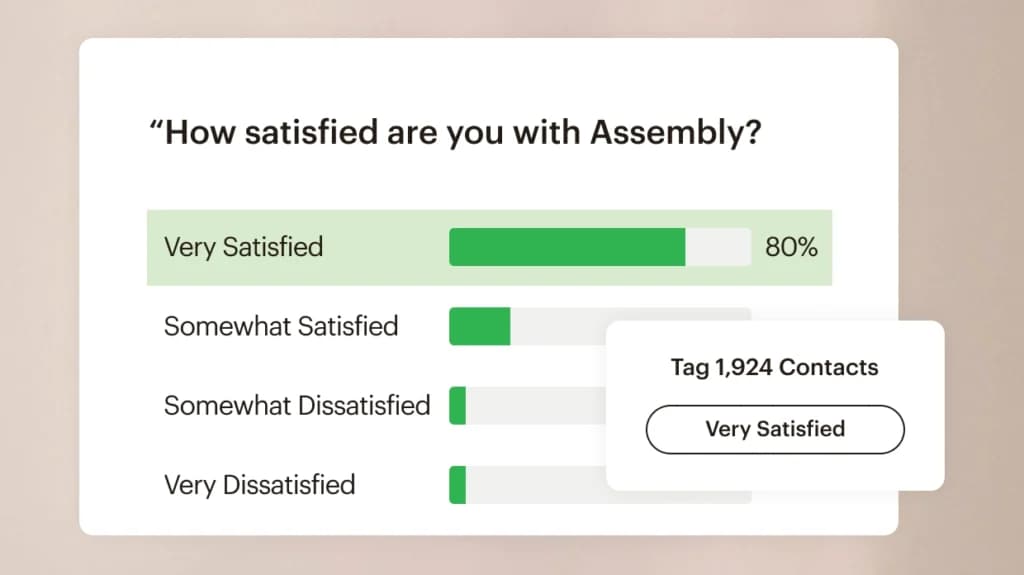
Mailchimp offers comprehensive customer and employee feedback functions through its customizable survey tools.
I played around with this feature and found it easy to design and distribute surveys to assess employee engagement, gather insights, and identify areas for improvement. These surveys can be shared via email or embedded on internal platforms, facilitating seamless feedback collection.
By leveraging Mailchimp's analytics, you can analyze responses to inform decision-making and enhance workplace culture. This integration streamlines the feedback process, promoting a more responsive and engaged organizational environment.
Automation Workflows
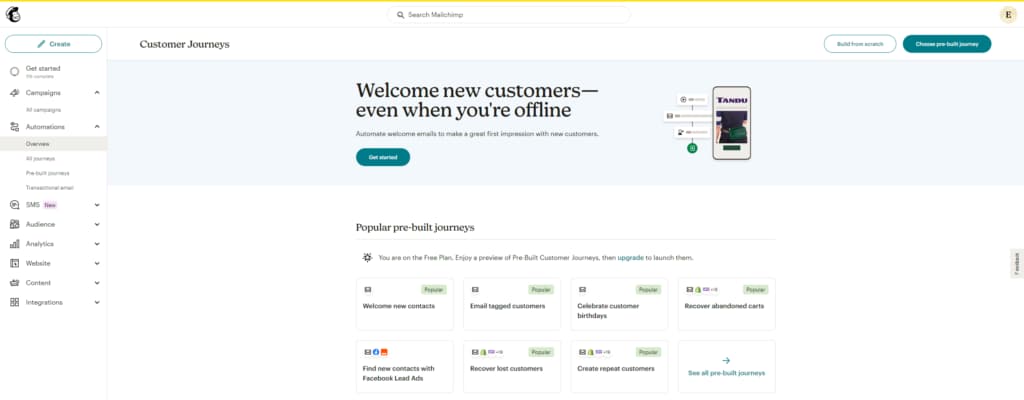
Workflow automation is a straightforward way to streamline essential processes and minimize delays so things get done faster. Workflow automation does not reduce or eliminate the human element, just the opposite. It puts people at the center by automating recurring functions so that teams can do more planning, strategizing, and thinking.
Landing Page Builder
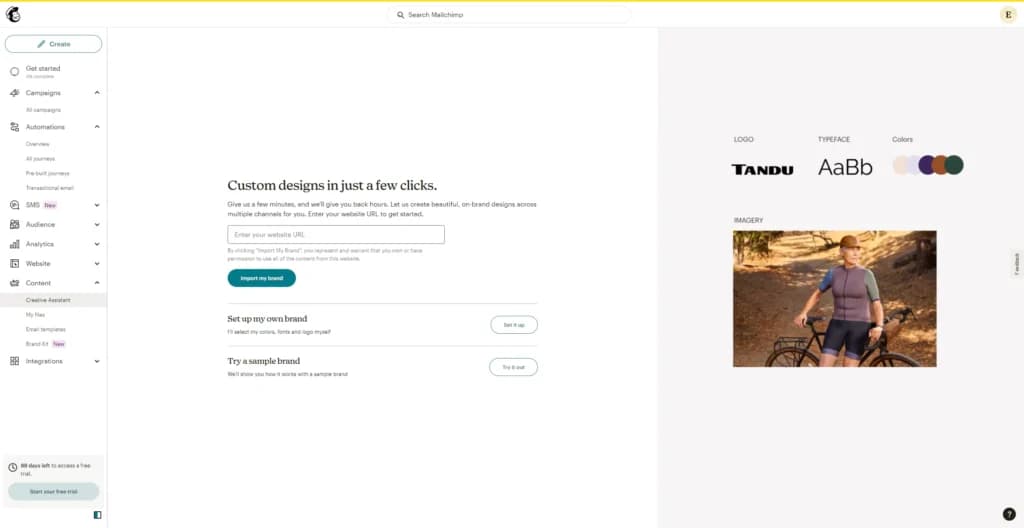
Mailchimp's landing page builder has many page templates that work hard for you. You can test out your products, messaging, and ideas before you launch, so you can find your future customers, optimize your conversion rates, and get people excited about your brand. Mailchimp makes it easy to create and launch your landing page.
Content Generation
Reach audiences who are ready to buy with more personalized content. Content optimizer benchmarks your email content against millions of top-performing campaigns in your industry and offers data-driven suggestions to improve your results.
Lead Generation
Generating leads for your business is critical to success. Lead generation encompasses strategic activities to identify and cultivate potential customers who exhibit genuine interest in your company's products or services. As you strive to expand your reach and capture market share, using lead generation strategically becomes even more important because it enables you to establish meaningful connections with your target audience and drive revenue.
Personalization
Anticipate which customers to target. Mailchimp will create segments for users based on expected conversion rates and potential revenue. Mailchimp will generate campaigns that fit your brand and are ready for your review.
Subscriber Segmentation
Your audience contains a lot of information about your contacts, like when they were added, where they live, and how they interact with your marketing. Intuit Mailchimp uses this information to filter contacts into segments, and then target them with emails, text messages, or ads.
Dynamic Content
Use dynamic content to send a single email that shows unique, personalized content based on the customer segments you’ve created in your audience. Turn on dynamic content for a content block, and Mailchimp will show or hide your content based on the conditions you choose. Mailchimp allows users to send content that matters the most and drive more engagement and results, create just one email and dynamically personalize it for multiple contacts, and easily drag and drop content blocks to personalize messages (no coding needed).
Mailchimp can help you boost engagement with targeted marketing strategies:
A/B Testing
Learn more about your people by sending tests to certain audience segments. Try out different subject lines, images, and layouts, and send times to see what's working best. Determining success for your campaign, whether it's clicks, opens, or revenue, Mailchimp email marketing helps you see which email is the clear winner. With the Mailchimp A/B testing feature, you can test up to 3 variations for your campaign and build a strategy that works for you.
Predictive Analytics
Intuit Assist works across Intuit platforms, including Mailchimp, to help users tackle the manual parts of marketing, from turning data into actionable insights to producing personalized content at scale. Mailchimps advanced automated multichannel tools help users drive personalized marketing messages that scale alongside your business.
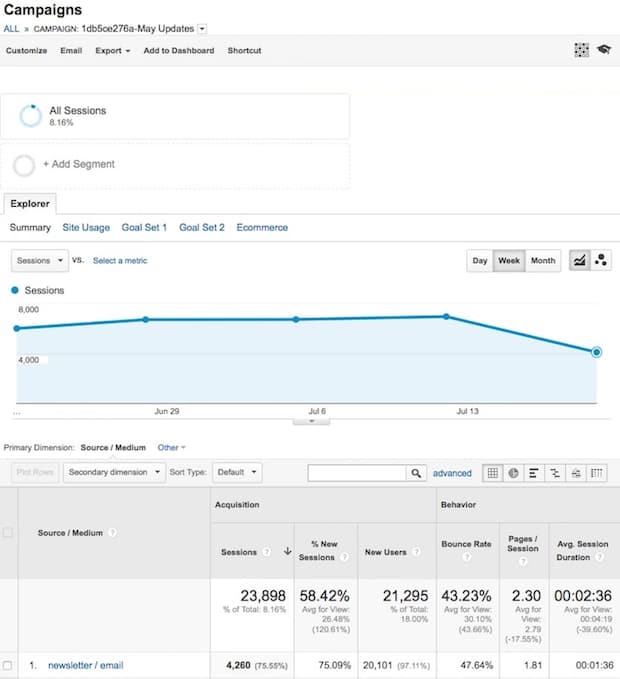
Mailchimp’s Analytics provides detailed insights into email campaign performance, helping you refine their marketing strategies. Key metrics like open rates, click-through rates, and conversion data are presented in dashboards which I found to be very intuitive and easy to understand. The platform’s AI-powered recommendations further enhance decision-making.
I found its integration with e-commerce and social platforms particularly valuable for tracking ROI across channels. This robust email marketing feature allows businesses to measure success, identify trends, and optimize future campaigns, ensuring consistent engagement and improved outcomes.
Mailchimp’s Design tools make it simple to create visually appealing emails. With drag-and-drop functionality and an intuitive interface, users can craft professional, engaging campaigns. The tools offer customization for layouts, fonts, and colors, ensuring emails align with brand aesthetics. These features enhance audience engagement and elevate overall email campaign effectiveness.
Email Templates
Mailchimp’s Email Templates provide pre-designed layouts for different business needs, from promotions to newsletters. These templates are customizable, saving time while ensuring a professional look. With options tailored to industries, users can quickly craft campaigns that align with their brand. This feature boosts efficiency and simplifies email creation for businesses.
Building Personalized Emails
Mailchimp’s Building Personalized Emails feature allows marketers to customize emails with recipient-specific details like names, preferences, or purchase history. This level of personalization fosters deeper connections with audiences. Leveraging dynamic content, businesses can enhance engagement, improve conversion rates, and create meaningful customer relationships with minimal effort.
Email & Mobile Preview
The Email & Mobile Preview feature ensures campaigns look flawless across devices. Before sending, users can test how their emails appear on desktops and mobile devices. This feature prevents formatting errors and enhances user experience. It’s an essential tool for maintaining a polished, professional image in email marketing.
Flexible Design
Mailchimp’s Flexible Design tools enable users to customize emails with drag-and-drop elements, coding options, or template adjustments. This flexibility caters to both beginners and advanced users, ensuring design meets branding needs. These tools allow businesses to create unique, visually engaging campaigns that stand out in crowded inboxes.
Storage for Data & Images
Mailchimp’s Storage for Data & Images provides a centralized library for organizing marketing assets. Users can easily upload, store, and retrieve images or content for campaigns. This feature streamlines workflow, ensuring consistency and reducing time spent searching for materials, ultimately enhancing productivity and campaign quality.
Newsletter Templates
Mailchimp’s Newsletter Templates offer ready-made designs for regular updates. They are customizable, allowing businesses to share company news, promotions, or industry insights effectively. These templates simplify the process of creating professional newsletters that engage audiences, driving consistent communication and strengthening customer relationships.
Languages
Mailchimp’s support for multiple Languages allows businesses to create localized campaigns for global audiences. Users can translate email content to connect with diverse markets effectively. This feature ensures inclusivity, expands reach, and enhances engagement with multilingual subscribers, making it a vital tool for international email marketing.
Integrations
Mailchimp’s Integrations connect the platform with other tools like CRMs, analytics, and e-commerce platforms. This feature facilitates seamless data sharing, enabling businesses to synchronize customer information, measure campaign performance, and optimize marketing strategies. These integrations ensure a cohesive, efficient marketing ecosystem for better results.
Features
- Image Library
- Multiple Users
- Gmail Import
- Sign-Up Forms
- Google Analytics
- Email Lists
- Segmenting
- A/B Testing
- Social Media Marketing
- Surveys
Verdict
Mailchimp is an excellent email marketing tool for any company that’s looking to increase their email marketing ROI with exceptional analytics and reporting, A/B testing, integration capabilities, and email personalization all in an easy to use business software. Mailchimp’s user interface (UI) is simple and easy to operate. MailChimp offers a free version of the email marketing software as well as multiple paid subscriptions that allow for scalability.
Mailchimp alternatives

Starting from: $0/month
Free
$0
seat/month
Pros
- Free version of the software is available
- Full Marketing hub
- Convenient email templates and helpful reports
- Thorough Reporting
Cons
- Lower pricing tiers offer fewer features
- No email scheduling on free plan
- High-cost subscription plans

Starting from: $0/month
Free
$0
seat/month
Pros
- Intuitive user interface
- Simple drag-and-drop editor
- Easy integrations
- Wealth of resource materials
Cons
- Brevo branding on free plan
- Limited tools on free plan

Starting from: $0/month
Free
$0
seat/month
Pros
- Creates AI-powered smart content
- Simple drag-and-drop editor
- Affordable pricing
- Numerous support channels
Cons
- Low deliverability
Users Reviews
Be the first to write a review
Share your experience with Mailchimp and help others choose the right software.
Related Articles


How to Use Canva AI in 2026


