

CRM tools for startups

If you’re looking for a CRM that you’ll actually want to use, you’re in the right place. monday CRM is a no-code, fully customizable CRM that empowers business owners, sales teams, and RevOps to… Read more
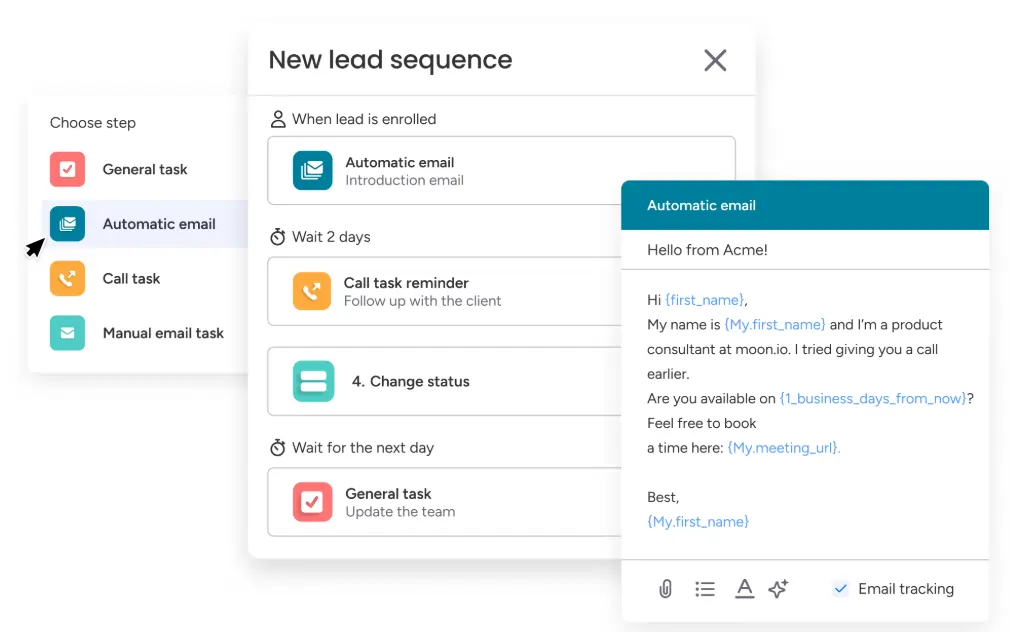
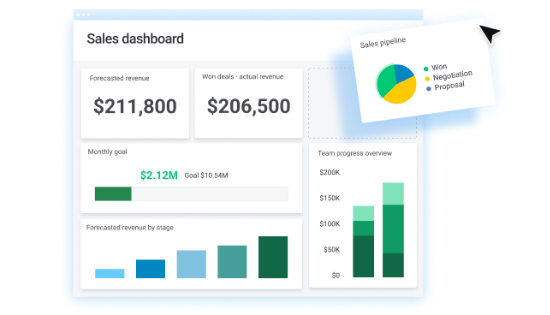
If you’re looking for a CRM that you’ll actually want to use, you’re in the right place. monday CRM is a no-code, fully customizable CRM that empowers business owners, sales teams, and RevOps to automate and manage the entire sales cycle from pre- to post-sales. From capturing leads to managing your deals pipeline to gathering and analyzing real-time data, seamlessly connect all of the pieces so you can spend more time on the most important work – selling. In this monday CRM review, I'll delve into pricing, features, performance and more, of this CRM software.
Learn more in our full Monday review.
Pros & Cons
- Intuitive design
- Responsive customer service
- Numerous templates
- Cross-team collaboration tools
- Limited features on free version
Features
- Dashboards
- Reporting
- Marketing Analytics
- Pipeline Management
- Account Management
- Collaborative Data
- Mobile App
- Integrations
- Sales AI
- Customer Contact Management
- Sales Opportunity
- Quote Management
- Lead Scoring
- Email Sync
- Email Templates
- Automated Reports
- Sales Pipeline Automation
- Sales Forecasting Automation
Pricing
$12
mo/
month
$17
mo/
month
$28
mo/
month
Screenshots
Pipedrive CRM is worth $14/user/month for sales teams of 5 to 25 reps that need pipeline visibility without the complexity of HubSpot Pro or Salesforce. If you have fewer than 5 reps, HubSpot Free… Read more
Pipedrive CRM is worth $14/user/month for sales teams of 5 to 25 reps that need pipeline visibility without the complexity of HubSpot Pro or Salesforce. If you have fewer than 5 reps, HubSpot Free covers you; if you have more than 25, you outgrow Pipedrive's reporting and need HubSpot Professional or Salesforce. The catch: Pipedrive has no free tier and the 14-day trial is the only way to test it, so plan an evaluation week and import a real subset of your data before committing to annual billing
Learn more in our full Pipedrive review.
Pros & Cons
- User-friendly design
- Easy setup process
- Friendly customer support
- Efficient management tools
- No free version
Features
- Dashboards
- Reporting
- Marketing Analytics
- Pipeline Management
- Call Management
- Account Management
- Collaborative Data
- Mobile App
- Integrations
- Sales AI
- Customer Contact Management
- Sales Opportunity
- Quote Management
- Lead Chatbot
- Lead Scoring
- Email Sync
- Email Tracking
- Email Templates
- Schedule Emails
- Automated Reports
- Marketing Automation
- Sales Pipeline Automation
- Sales Forecasting Automation
- Automated Emails
Pricing
$14
mo/
month
$39
mo/
month
$59
mo/
month
$79
mo/
month

Salesforce CRM is the world’s #1 customer relationship management tool, empowering businesses to track every customer interaction with precision and ease. Packed with cutting-edge features,… Read more
Salesforce CRM is the world’s #1 customer relationship management tool, empowering businesses to track every customer interaction with precision and ease. Packed with cutting-edge features, Salesforce enhances sales, optimizes marketing strategies, and delivers seamless customer service—all from a single platform. With thousands of apps available to supercharge these processes, Salesforce is the ultimate solution for businesses looking to grow smarter and faster while maintaining exceptional customer experiences. In this Salesforce CRM review, I'll discuss the oricing, features, performance, and business value of this CRM software.
Learn more in our full Salesforce review.
Pros & Cons
- One-stop solution for sales, marketing, and customer service
- Very flexible and highly customizable CRM system
- Offers multiple support channels
- Scalable pricing model
- Deployment can be difficult and time-consuming
- Not a very user-friendly interface
Features
- Dashboards
- Reporting
- Marketing Analytics
- Pipeline Management
- Call Management
- Account Management
- Collaborative Data
- Mobile App
- Integrations
- Sales AI
- Customer Contact Management
- Sales Opportunity
- Quote Management
- Lead Chatbot
- Lead Scoring
- Email Sync
- Email Tracking
- Email Templates
- Schedule Emails
- Automated Reports
- Marketing Automation
- Sales Pipeline Automation
- Sales Forecasting Automation
- Automated Emails
Pricing
$25
/mo /user/
/mo /user
$100
/mo /user/
/mo /user
$0
/mo/ user/
/mo/ user

ClickUp CRM software helps you build customer relationships using data visualization, tracking, and communication tools to improve efficiency. It helps you save time by eliminating silos and… Read more
ClickUp CRM software helps you build customer relationships using data visualization, tracking, and communication tools to improve efficiency. It helps you save time by eliminating silos and automating your pipeline to onboard customers faster. ClickUp helps you build the ideal customer database.
Learn more in our full Clickup review.
Pros & Cons
- Impressive interface
- Free version and trial
- Customizable features
- Prebuilt templates
- Billed per user
- Slow loading speed
Features
- Dashboards
- Reporting
- Marketing Analytics
- Pipeline Management
- Account Management
- Collaborative Data
- Mobile App
- Integrations
- Sales AI
- Email Sync
- Customer Contact Management
- Sales Opportunity
- Automated Reports
- Sales Pipeline Automation
- Sales Forecasting Automation
Pricing
$0
mo/
month
$7
/mo/user/
/mo/user
$12
/mo/user/
/mo/user
AI coding tools for a startup business

Claude AI, built by Anthropic, is a safety-first AI assistant for writing, coding, research, data analysis, and agentic tasks. You can use Claude on the web, desktop (Windows/macOS), and mobile (iOS… Read more
Claude AI, built by Anthropic, is a safety-first AI assistant for writing, coding, research, data analysis, and agentic tasks. You can use Claude on the web, desktop (Windows/macOS), and mobile (iOS and Android), through the API, or inside tools via connectors. Claude reads and reasons over long documents and images, searches the web for current information with cited sources, and runs multi-step work through Claude Code and connectors (remote MCP). In 2026 the lineup runs on Anthropic's newest models — Opus 4.8, Sonnet 5, and Haiku 4.5 — with plans for individuals, teams, and enterprises.
Learn more in our full Claude Ai review.
Pros & Cons
- Runs on Anthropic's newest models (Opus 4.8, Sonnet 5, Haiku 4.5) with very large context windows
- Genuinely useful free plan; Pro is competitively priced at $20/mo (less billed annually)
- Strong at coding and agentic work via Claude Code and MCP connectors
- Web search with cited sources, vision, and extended reasoning built in
- Heaviest usage requires the Max plan (from $100/mo)
- Team plan requires a minimum of 5 seats
- Usage is capped by rolling session limits rather than a fixed message count, which can interrupt heavy sessions
Features
- Grammar and Style Checks
- Collaboration Features
- Content Personalization
- Multilingual Support
- API Access
- Compliance and Security Measures
- Web
- Windows
- macOS
- iOS
Pricing
$0
mo/
month
$20
mo/
month
$25
/mo or per user/
/mo or per user

Google Gemini is Google's flagship multimodal AI assistant — it reasons and generates across text, images, video, audio, code and PDFs in one app. As of 2026 the consumer lineup runs on the Gemini… Read more
Google Gemini is Google's flagship multimodal AI assistant — it reasons and generates across text, images, video, audio, code and PDFs in one app. As of 2026 the consumer lineup runs on the Gemini 3.5 generation, framed by Google as "frontier intelligence with action": Gemini 3.5 Flash is Google's strongest agentic and coding model yet — leading coding and agentic benchmarks, with output roughly 4× faster than other frontier models and computer use built in, so you can build custom agents that see, reason and act across desktop, mobile and browser. Gemini 3.5 Pro is rolling out for the most advanced reasoning and long-context work (up to a 1M-token context window), with a Deep Think mode on the top tier. Image generation is handled by the Nano Banana 2 family (with Nano Banana 2 Lite as the fastest, most cost-efficient option) and video by Gemini Omni — a model that creates high-quality video from any input (image, audio, video, text), grounded in real-world knowledge and physics; the first model is Gemini Omni Flash. Gemini is free to start, with paid Google AI plans (Plus, Pro, Ultra) unlocking higher limits, Gemini Omni video, Deep Research and deep Google Workspace integration.
Learn more in our full Gemini AI review.
Pros & Cons
- Many features available in the free plan, strong value at $0
- Deepest integration with Google Workspace
- Capable of writing in multiple languages for global reach
- Clear, laddered pricing from $4.99 → $99.99
- Occasionally misinterprets the context or the nuances of the task
- Top features can be region-limited and roll out unevenly
- Data-privacy considerations when feeding sensitive business content into a consumer AI
Features
- Grammar and Style Checks
- SEO Optimization
- Plagiarism Check
- Collaboration Features
- Content Personalization
- Multilingual Support
- API Access
- Text Editing and Formatting
- Compliance and Security Measures
- Background Noise Reduction
- Green Screen
- Text-to-Video
- Object Tracking
- Pre-Built Templates
- Object Removal
- AI Filters and Effects
- Background Replacement
- Layer Support
- Text-to-Image Generation
- Face and Body Pose Synthesis
- Scene Composition
- Style Emulation
- Batch Generation
- Interactive Editing
- Web
- Android
- iOS
Pricing
$0
mo/
month
$4.99
mo/
month

ChatGPT, developed by OpenAI, is one of the most sophisticated AI-powered conversational models available today. Designed as a versatile AI assistant, ChatGPT excels in a range of applications, from… Read more
ChatGPT, developed by OpenAI, is one of the most sophisticated AI-powered conversational models available today. Designed as a versatile AI assistant, ChatGPT excels in a range of applications, from casual conversations to professional writing, content creation, coding, and beyond. It is built on the GPT-4 architecture (for the premium version) and combines natural language understanding with generative capabilities, making it a robust tool for individuals, businesses, and developers.
Learn more in our full Chatgpt review.
Pros & Cons
- Extensive free service
- High reading grade
- Provides accurate grammar and syntax corrections.
- Easy to navigate and use.
- Text generation can have factual inaccuracies
- Slower than some alternatives
- Limited image generation capacity
Features
- Grammar and Style Checks
- SEO Optimization
- Plagiarism Check
- Collaboration Features
- Content Personalization
- Multilingual Support
- API Access
- Text Editing and Formatting
- Compliance and Security Measures
- Web
- Windows
- macOS
- Android
- iOS
Pricing
$0
mo/
month
$20
mo/
month
$200
mo/
month
$25
/mo or per user/
/mo or per user

Microsoft Copilot is an advanced AI tool that enables individuals and organizations to optimize their workflows, thereby accomplishing more tasks efficiently in less time. Copilot AI's chatbot… Read more
Microsoft Copilot is an advanced AI tool that enables individuals and organizations to optimize their workflows, thereby accomplishing more tasks efficiently in less time. Copilot AI's chatbot functionality is deeply integrated into its system, capable of generating content and providing conversational interactions based on natural language processing. This AI tool supports authors by offering features like conversational search, summarization, and creative content generation, making it an effective assistant for a wide range of writing tasks.
Learn more in our full Copilot review.
Pros & Cons
- Enhances teamwork by streamlining communication Integration with other Microsoft Apps
- Enterprise-grade security against threats and breaches
- Consistent updates
- The depth of data analysis needed for Copilot to function optimally raises privacy issues
- Dependency on Microsoft 365 subscription for business users
Pricing
$0
mo/
month
$20
mo/
month
$30
mo/
month
Graphic design software

In the realm of design, Adobe Photoshop remains an essential tool for professionals, blending traditional design functionalities with cutting-edge AI enhancements. The introduction of AI-driven tools… Read more
In the realm of design, Adobe Photoshop remains an essential tool for professionals, blending traditional design functionalities with cutting-edge AI enhancements. The introduction of AI-driven tools like the improved Font browser helps designers manage and explore over 25,000 Adobe fonts with ease, enriching the creative process and ensuring a seamless workflow across devices and platforms. Adobe Photoshop, a leader in digital editing for over 30 years, offers powerful tools to support creatives across industries in produce detailed and complex designs effortlessly.
Learn more in our full Adobe Photoshop review.
Pros & Cons
- Can deeply customize almost every aspect of the design process
- Supports multiple file formats — essential for cross-platform design work.
- Tools for mobile and web design
- Adobe Suite integration for easy workflow
- Requires a powerful computer as it runs many processes
- Steep learning curve due to many features
- No option for a perpetual license
Features
- API
- Templates
- Image Database
- Collaboration Tools
- Content Import/Export
- Edits Vector & Raster Graphics
- Touch Interface Support
- Pro-Level Typography
- Print Management
- Publishing / Sharing
- Multi-Language
- Multiple Format Support
- Animation
- Document Storage
- Search/Filter
- Photo Editing
- Video Editing
- Offline Editing
- Drag & Drop
Pricing
$14.98
mo/
month
$22.99
mo/
month
$37.99
mo/
month
$59.99
mo/
month

Canva is a user-friendly graphic design platform that empowers individuals to create a wide array of visual content, including graphics, presentations, headers, documents, invitations, posters, and… Read more
Canva is a user-friendly graphic design platform that empowers individuals to create a wide array of visual content, including graphics, presentations, headers, documents, invitations, posters, and resumes. This all-in-one graphic design tool features a video and graphic maker, photo editor, and logo creator, making it accessible for both beginners and professionals. With its intuitive interface and extensive template library, Canva simplifies the design process, enabling users to produce stunning visuals with ease. In this Canva review, I'll discuss, graphic design features, performance, Canva pricing, and more.
Learn more in our full Canva review.
Pros & Cons
- AI tools for creating and editing designs
- 1M+ free templates
- Easy to share option
- Automatic save
- Best features aren't available for free
- No phone, live chat, email or community support
- Its online version has more templates and design elements
Features
- API
- Templates
- Image Database
- Collaboration Tools
- Content Import/Export
- Content Management
- Edits Vector & Raster Graphics
- Pro-Level Typography
- Print Management
- Publishing / Sharing
- Multi-Channel Marketing
- Multi-Language
- Multiple Format Support
- Social Promotion
- Animation
- Document Storage
- Access Controls/Permissions
- Search/Filter
- Photo Editing
- Video Editing
- Rich Text Editor
- WYSIWYG Editor
- Drag & Drop
Pricing
$0
mo/
month
$15
mo/
month
$21
mo/
month
Figma is a browser-based design platform built for collaboration. It combines vector design, prototyping, feedback, and developer handoff into one shared workspace. Instead of juggling multiple… Read more
Figma is a browser-based design platform built for collaboration. It combines vector design, prototyping, feedback, and developer handoff into one shared workspace. Instead of juggling multiple tools, small businesses can design websites, mobile apps, and marketing visuals in one place. With flexible pricing and smart seat types, Figma gives SMBs the same professional design power that large teams enjoy.
Learn more in our full Figma review.
Pros & Cons
- Real-time co-editing improves teamwork and eliminates file chaos.
- Smart layout and prototyping tools reduce repetitive work.
- Flexible pricing suits both small teams and larger organizations.
- No native CMYK support, which limits print design workflows.
- Lacks advanced photo editing capabilities.
- Requires careful seat management to avoid paying for unused licenses.
Features
- API
- Image Database
- Collaboration Tools
- Content Import/Export
- Content Management
- Edits Vector & Raster Graphics
- Touch Interface Support
- Pro-Level Typography
- Print Management
- Publishing / Sharing
- Multi-Channel Marketing
- Multi-Language
- Multiple Format Support
- Engagement Analytics
- Animation
- Document Storage
- Access Controls/Permissions
- Freelancer Screening & Profiles
- Search/Filter
- Photo Editing
- Offline Editing
- Rich Text Editor
- WYSIWYG Editor
- Drag & Drop
Pricing
$0
mo/
month
$16
mo/
month

Pixlr is a versatile online AI-powered photo editing suite. Photo Editor is its primary tool and offers a wide array of features for both beginners and experienced users. It provides capabilities… Read more
Pixlr is a versatile online AI-powered photo editing suite. Photo Editor is its primary tool and offers a wide array of features for both beginners and experienced users. It provides capabilities for image generation, background and object removal, collage creation, and more. Users can customize images with various editing tools such as cropping, adjusting hues, and applying filters. You can also try Express, Batch Editor, Remove BG, and Designer. For those looking to animate their designs, Pixlr includes animation presets and a timeline editor. The tool is free, but premium subscriptions unlock advanced features, unlimited use, and ad removal. The AI-powered photo editing tool streamlines content creation, enhancing your business’s marketing and design efforts without requiring extensive graphic design skills or resources.
Learn more in our full Pixlr review.
Pros & Cons
- Intuitive interface and a minimal learning curve
- Powerful and fast AI functions
- Multiple tools to maximize value for money
- Cross-platform support for editing on the go
- AI image generation instructions need to be precise
- You only get limited credits for free
- No live chat support
Features
- Text-to-Video
- Object Tracking
- Pre-Built Templates
Pricing
$1.49
mo/
month
$6.49
mo/
month
$11.99
mo/
month
AI marketing tools for startups

Canva AI is transforming the way people approach design by harnessing the power of artificial intelligence to make the creative process faster, easier, and more accessible than ever before. With a… Read more
Canva AI is transforming the way people approach design by harnessing the power of artificial intelligence to make the creative process faster, easier, and more accessible than ever before. With a suite of ai powered tools, Canva AI enables users to generate images, edit photos, and create eye-catching visual content for everything from social media posts to business presentations—all from a simple prompt. Whether you’re a seasoned designer or just starting out, Canva’s Magic Studio and Dream Lab act as your creative partner, helping you brainstorm, design, and polish your projects in just a few clicks. By integrating artificial intelligence into every step of the design process, Canva AI empowers users to bring their ideas to life with minimal effort, streamlining workflows and saving valuable time.
Learn more in our full Canva review.
Pros & Cons
- User-friendly interface and AI-powered assistance
- Seamlessly integrates with Canva’s design tools
- Over a dozen different useful AI tools
- Offers many templates for different writing purposes
- May require a subscription to access all its features
- AI-generated content might not always be perfectly accurate
Features
- Grammar and Style Checks
- Multilingual Support
- Text Editing and Formatting
- Object Removal
- AI Filters and Effects
- Background Replacement
- Pre-Built Templates
- Layer Support
- Text-to-Image Generation
- Style Emulation
- Batch Generation
- Interactive Editing
- Web
- Windows
- macOS
- Android
- iOS
Pricing
$0
mo/
month
$15
mo/
month
$21
mo/
month
For over three decades, Adobe Photoshop has set the benchmark in digital creativity, offering robust tools for designers and artists. With its latest AI capabilities, Photoshop simplifies complex… Read more
For over three decades, Adobe Photoshop has set the benchmark in digital creativity, offering robust tools for designers and artists. With its latest AI capabilities, Photoshop simplifies complex processes like image generation and content addition through features like Generative Fill and Generative Expand. These tools use the Adobe Firefly engine to enhance creative freedom and efficiency, allowing users to add or alter content with simple text prompts or to expand images seamlessly. Adobe Photoshop is known for its comprehensive toolset that caters to professionals at all levels, leveraging advancements in AI that have further solidified its role in enhancing creative workflows.
Learn more in our full Adobe Photoshop review.
Pros & Cons
- Enhance productivity and creativity, automating complex processes
- Produce high-quality results that blend with the original images
- Tools for mobile and web design
- Adobe Suite integration for easy workflow
- It may be too complex for basic editors
- No option for a perpetual license
Features
- Grammar and Style Checks
- SEO Optimization
- Plagiarism Check
- Collaboration Features
- Multilingual Support
- API Access
- Text Editing and Formatting
- Compliance and Security Measures
- Background Noise Reduction
- Green Screen
- Text-to-Video
- Object Tracking
- Pre-Built Templates
- Object Removal
- AI Filters and Effects
- Layer Support
- Text-to-Image Generation
- Scene Composition
- Style Emulation
- Interactive Editing
- Web
- Windows
- macOS
- Android
- iOS
Pricing
$14.98
mo/
month
$22.99
mo/
month
$37.99
mo/
month
$59.99
mo/
month

Firefly is a new online AI tool designed by the software giant Adobe. It is a part of the Adobe Creative Cloud suite and leverages artificial intelligence in its Firefly Image 3 Model. The… Read more
Firefly is a new online AI tool designed by the software giant Adobe. It is a part of the Adobe Creative Cloud suite and leverages artificial intelligence in its Firefly Image 3 Model. The web-based app can generate images from scratch based on text directions. Thanks to the generative fill feature, you can modify your images by switching, adding, and removing elements via text prompts. Adobe Firefly is a simple and powerful tool suitable for individual and commercial use!
Learn more in our full Adobe Firefly AI Image Generator review.
Pros & Cons
- Multiple variations of generated images on one prompt entered.
- Many effects and adjustments to choose from the camera angle to color variations.
- Can access the web-based app with portable and desktop devices. E
- dit your own images by removing, adding, or replacing certain areas.
- It takes a bit of patience to receive the result when generating images.
- Limited photo editing features, better for generating
- Live agent support isn’t easy to reach
Features
- Text-to-Image Generation
- Style Emulation
- Interactive Editing
- Web
- Windows
- macOS
- Android
- iOS
Pricing
$0
mo/
month
$4.99
mo/
month
Screenshots



Figma is a powerful web design software that allows you to create and collaborate on designs for websites, mobile apps, and other digital products. With Figma, you can easily create wireframes,… Read more
Figma is a powerful web design software that allows you to create and collaborate on designs for websites, mobile apps, and other digital products. With Figma, you can easily create wireframes, prototypes, and high-fidelity designs using a range of intuitive tools and features.
Learn more in our full Figma review.
Pros & Cons
- Ultimate collaboration tool
- Powerful AI prototyping tools
- Wide range of design elements & templates
- Integrates with other platforms
- Limited offline functionality
- Does not support all file types
- No ability to edit code
Features
- Collaboration Features
- API Access
- Text Editing and Formatting
- Compliance and Security Measures
- Pre-Built Templates
- Layer Support
- Interactive Editing
- Web
- Windows
- macOS
- Android
- iOS
Pricing
$0
mo/
month
$15
mo/
month
$45
mo/
month
$75
mo/
month
Project management software for startups
Imagine a workspace where every project detail aligns seamlessly, teams collaborate effortlessly, and productivity soars—welcome to ClickUp. This all-in-one project management platform offers… Read more
Imagine a workspace where every project detail aligns seamlessly, teams collaborate effortlessly, and productivity soars—welcome to ClickUp. This all-in-one project management platform offers customizable workflows, enabling you to tailor processes to your team's unique needs. Assign tasks with precision, visualize projects from inception to completion, and maintain clear communication through integrated document sharing, comments, and real-time notifications. With a vast library of project templates and integrations, ClickUp adapts to businesses of all sizes, ensuring tasks are executed efficiently and effectively. In this ClickUp review, I'll discuss features, performance, customer service, and ClickUp pricing.
Learn more in our full Clickup review.
Pros & Cons
- Over a dozen project views
- Built-in document editor that can be used to collaborate in real-time
- Dedicated chat interface to aid team collaboration
- Workload and time log tracking
- Can be difficult to master because of how expansive the platform is
- When using the Everything view, it can be difficult to understand who owns what.
Features
- File Sharing
- Document collaboration
- User Access and Permissions
- Mobile App
- Search
- Multi-language support
- Risk Analysis
- Reporting and Dashboards
- Customization
- Storage Included
- Integrated Chat
- Notifications
- Comments on Tasks
- Discussion
- Task Creation and Assignment
- Due Dates
- Task Prioritization
- To-Do Lists
- Calendar
- Gantt Chart / Project Map
- Resource Management
- Reporting
Pricing
$0
mo/
month
$7
mo/
month
$12
mo/
month

Visualize your projects' progress and make informed decisions with monday.com's project management software. Trusted by over 200,000 customers worldwide, monday.com offers a flexible platform… Read more
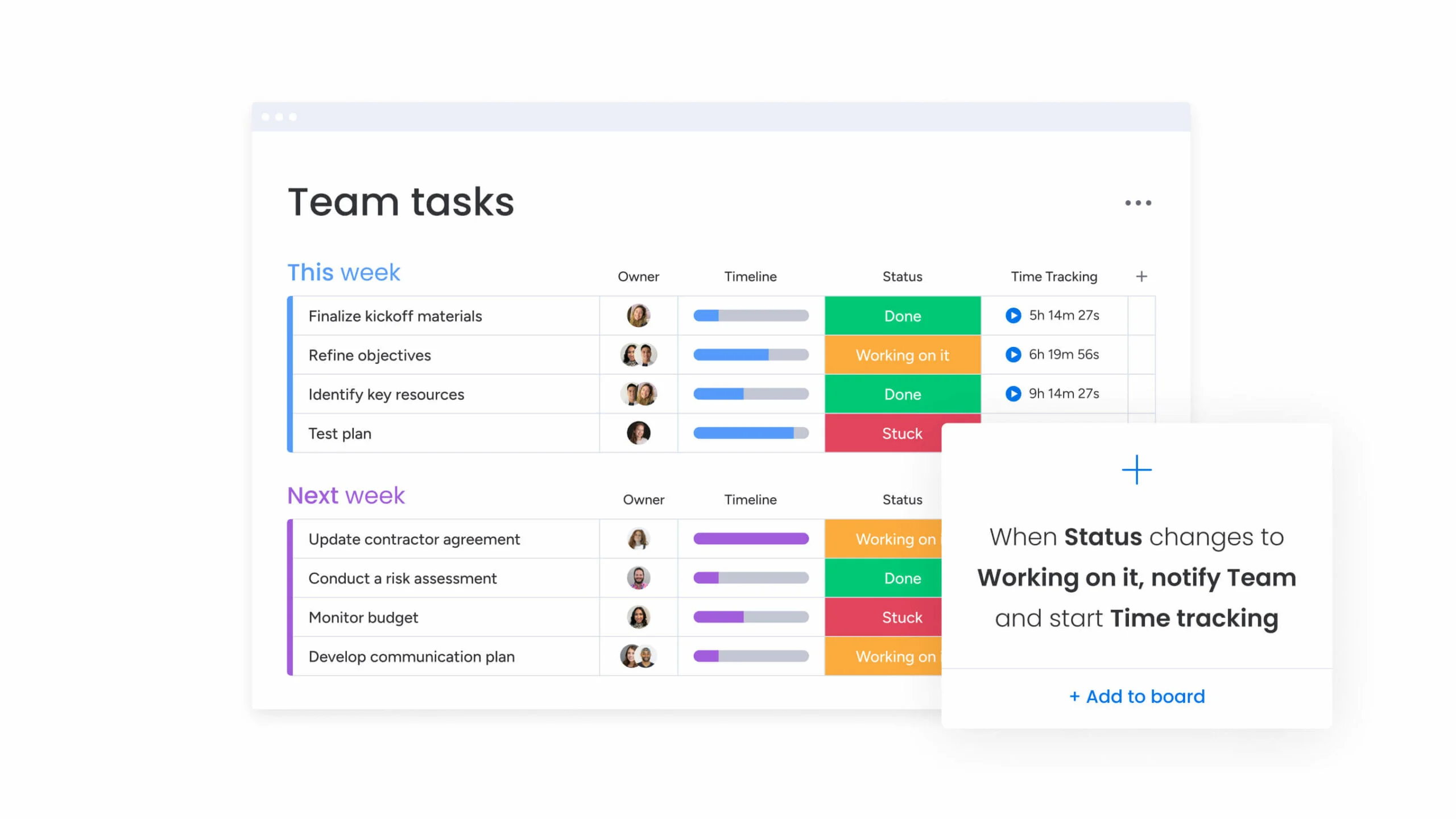
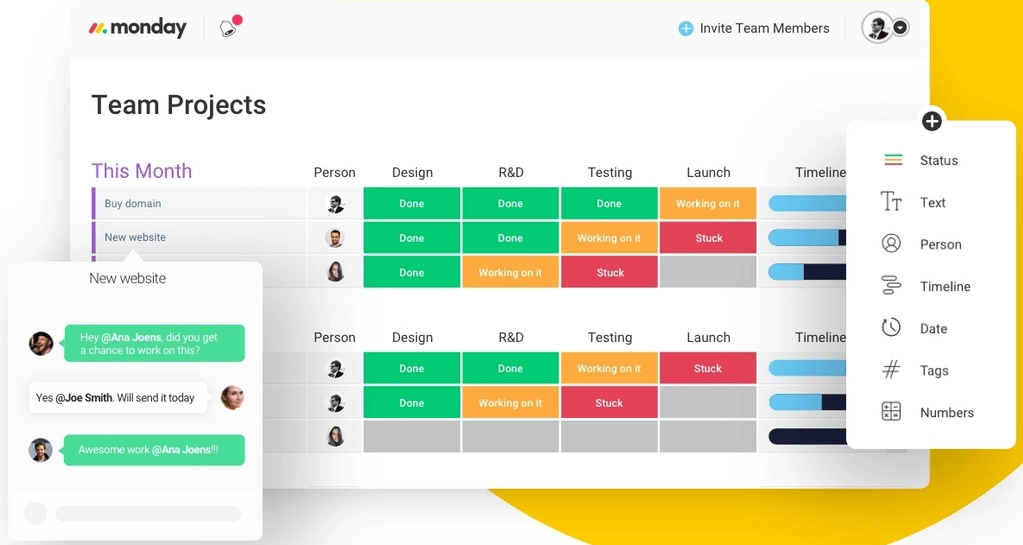
Visualize your projects' progress and make informed decisions with monday.com's project management software. Trusted by over 200,000 customers worldwide, monday.com offers a flexible platform adaptable to various workflows, including project management, CRM, software development, and human resources. Its intuitive interface and customizable features streamline collaboration, enhance efficiency, and provide real-time insights into project stages. In this monday.com project management review, I'll discuss features, performance, customer service, and monday.com pricing.
Learn more in our full Monday review.
Pros & Cons
- This project management software is easy to navigate
- The site uses reliable and user-friendly tools
- The organization of the platform is effective
- The help and support area needs to offer more options
- The help and support area should have more extensive testimonials and videos
- There is no multilingual support
Features
- File Sharing
- Document collaboration
- User Access and Permissions
- Mobile App
- Multi-language support
- Reporting and Dashboards
- Customization
- Storage Included
- Integrated Chat
- Notifications
- Comments on Tasks
- Discussion
- Task Creation and Assignment
- Due Dates
- Task Prioritization
- To-Do Lists
- Calendar
- Gantt Chart / Project Map
- Baselining / KPIs
- Project Budgeting
- Resource Management
- Reporting
- Forecasting
- Marketing Analytics
Pricing
$9
/mo /user/
/mo /user
$12
/mo /user/
/mo /user
$19
/mo /user/
/mo /user
Screenshots

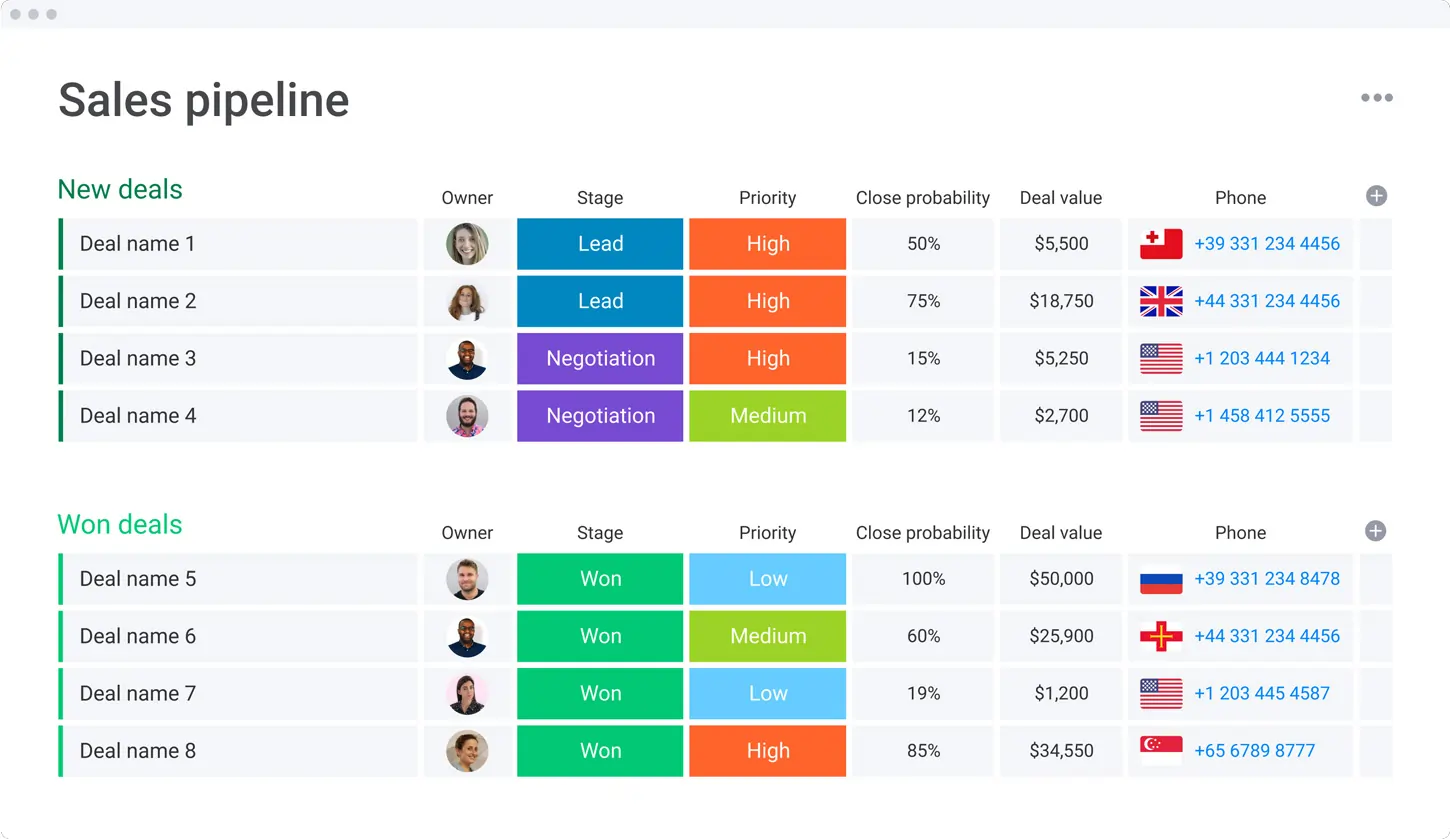

Smartsheet is a cloud-based project management and collaboration tool designed to help teams plan, track, automate, and report on their work efficiently. With a familiar spreadsheet-style interface,… Read more
Smartsheet is a cloud-based project management and collaboration tool designed to help teams plan, track, automate, and report on their work efficiently. With a familiar spreadsheet-style interface, it combines ease of use with powerful features like workflow automation, resource management, and real-time reporting. Smartsheet integrates seamlessly with popular apps like Microsoft Office, Google Workspace, and Slack, ensuring smooth collaboration across teams. Businesses benefit from its scalability, automation capabilities, and data-driven insights, making it ideal for managing complex projects. In this Smartsheet review, I'll discuss features, performance, customer service, and Smartsheet pricing.
Learn more in our full Smartsheet review.
Pros & Cons
- Spreadsheet-like interface makes it easy to use
- Advanced reporting and analytics for better insights
- iOS and Android mobile apps
- Powerful automation reduces manual tasks efficiently
- No monthly billing
- The individual plan may not be enough for small businesses
- Learning curve for new users can be steep
Features
- File Sharing
- Document collaboration
- User Access and Permissions
- Mobile App
- Search
- Multi-language support
- Reporting and Dashboards
- Customization
- Integrated Chat
- Notifications
- Comments on Tasks
- Discussion
- Task Creation and Assignment
- Due Dates
- Task Prioritization
- To-Do Lists
- Calendar
- Gantt Chart / Project Map
- Baselining / KPIs
- Project Budgeting
- Resource Management
- Reporting
Pricing
$9
/mo /user/
/mo /user
$19
/mo /user/
/mo /user
Zoho Projects is the Project Management software that assists in planning projects, tracking work efficiently, and collaborating with team members from everywhere. The built-in Gantt charts can… Read more
Zoho Projects is the Project Management software that assists in planning projects, tracking work efficiently, and collaborating with team members from everywhere. The built-in Gantt charts can produce your project plan and track your task schedule.
Learn more in our full Zoho Projects review.
Pros & Cons
- Simple to use application
- Built-in time tracking with integrations for direct invoicing
- The ability to set up project budgeting
- Robust help documents that cover every aspect of the application
- Many features have been removed to encourage subscriptions to Zoho’s other projects
- The interface is bland when compared to similar products
Features
- File Sharing
- User Access and Permissions
- Mobile App
- Search
- Multi-language support
- Reporting and Dashboards
- Customization
- Storage Included
- Integrated Chat
- Notifications
- Comments on Tasks
- Discussion
- Task Creation and Assignment
- Due Dates
- To-Do Lists
- Calendar
- Gantt Chart / Project Map
- Baselining / KPIs
- Project Budgeting
- Resource Management
- Reporting
Pricing
$0
mo/
month
$4
/mo /user/
/mo /user
$9
/mo /user/
/mo /user
How Do Startup Tools Help Businesses?
Startup tools drive efficiency, reduce costs, and increase productivity. Every minute and dollar counts for startups, which is why the right software can make a significant difference. Here’s how startup tools can help:
- Streamline Operations: Tools such as project management software and CRMs enable startups to automate workflows and manage tasks efficiently. This reduces the time spent on manual tasks and improves overall operational efficiency.
- Improve Collaboration: With more startups operating in remote or hybrid environments, tools like remote desktop software and cloud-based collaboration platforms allow teams to work together seamlessly from anywhere. These tools make it easy to share documents, track progress, and communicate in real-time.
- Enhance Customer Relations: CRM software helps startups build stronger customer relationships by managing contacts, tracking customer interactions, and personalizing follow-ups. This leads to better customer retention and higher sales.
- Automate Marketing and Sales Efforts: AI marketing tools and influencer platforms allow startups to run smarter marketing campaigns by analyzing customer data, optimizing ads, and finding relevant influencers to boost brand exposure.
- Boost Productivity: Time-saving tools like AI coding software and automation platforms allow startups to accelerate product development, reduce errors, and improve the overall speed of work.
- Ensure Financial Health: Accounting software helps startups manage finances more effectively by automating tasks like invoicing, payroll, and expense tracking, ensuring financial transparency and compliance with regulatory requirements.
Productivity Essentials for a Work-from-Anywhere World
As the business world becomes more decentralized, productivity tools that support remote work are becoming essential. Here's why these tools are crucial in a work-from-anywhere setup:
- Flexibility: Remote desktop tools and cloud-based software enable employees to access data and applications from any location, ensuring that work doesn’t stop regardless of where the team is.
- Collaboration: Tools like cloud storage and project management software facilitate real-time collaboration, document sharing, and communication, ensuring teams stay aligned and projects remain on track.
- Accountability: Time-tracking software and productivity tools allow managers to monitor task completion and productivity, ensuring that remote teams remain accountable and focused on business objectives.
- Security: Remote access tools come with built-in security features like encryption, helping startups ensure that sensitive business data remains secure even in distributed work environments.
Best Software for Startups
CRM Tools
Benefits:
CRM tools provide startups with the ability to track customer interactions, manage sales pipelines, and optimize communication. Startups can automate tasks like follow-up emails, manage contact information, and generate reports to understand customer behavior and sales performance. As businesses grow, CRM platforms can also scale and provide more complex tools, such as AI-driven insights.
Range of Costs:
Pricing generally starts from $12 per user per month for basic plans and can go upwards of $100 per user per month for premium plans with advanced automation and analytics features.
Why Startups Need It:
Startups need to nurture customer relationships from day one. A CRM ensures you don’t lose leads and helps you streamline sales processes, improve conversion rates, and foster customer loyalty, all of which are crucial for long-term success.
AI Coding Tools
Benefits:
AI coding tools help developers create, test, and deploy code faster. These tools can generate code snippets, detect bugs in real-time, and offer suggestions for code improvements. Many AI tools also integrate with popular code repositories and collaboration platforms, streamlining team-based development.
Range of Costs:
Free plans with basic features are common, while advanced AI coding tools range from $20 to $200+ per month, depending on features such as real-time collaboration, debugging, and machine learning-driven code generation.
Why Startups Need It:
With limited resources, startups can’t afford long development cycles or error-prone code. AI coding tools can significantly speed up the software development process and improve the quality of the product, allowing startups to launch quicker and scale more effectively.
Graphic Design Tools
Benefits:
Graphic design tools allow startups to produce high-quality visuals for marketing, branding, and communication. These platforms offer customizable templates for various assets like social media posts, presentations, and website graphics. They also facilitate collaboration between team members, enabling quick feedback and revisions.
Range of Costs:
Basic design tools are available for free, with paid plans starting at $10 per month. High-end tools with extensive features and collaboration functionalities can go up to $50 per month or more.
Why Startups Need It:
Visual branding is key to capturing attention in a crowded market. Startups need to produce professional-quality designs to convey their message, attract customers, and stand out. Having access to intuitive design software saves time and costs by allowing teams to manage design needs in-house.
Remote Desktop Tools
Benefits:
Remote desktop tools allow team members to securely access their work computers from anywhere. These tools offer robust security features like encryption and multi-factor authentication, ensuring that sensitive data remains safe. They also support real-time collaboration, which is essential for remote or hybrid work environments.
Range of Costs:
Basic plans typically start at $10 per user per month, while advanced remote desktop tools with multi-user and enterprise-level security can cost over $100 per month, depending on features.
Why Startups Need It:
With remote work becoming more prevalent, startups need flexible tools to keep teams connected and productive. Remote desktop tools enable employees to collaborate and access important resources regardless of their physical location, fostering seamless operations in a distributed workforce.
AI Marketing Tools
Benefits:
AI marketing tools provide insights into customer behavior, automate marketing tasks, and optimize campaigns for better ROI. These tools can predict trends, personalize customer experiences, and improve ad targeting. Some platforms even offer AI-generated content, helping startups create engaging material without needing a large marketing team.
Range of Costs:
Entry-level AI marketing tools start at around $15 per month, while more sophisticated platforms with deep data analytics and advanced automation features can cost upwards of $100 per month.
Why Startups Need It:
In a competitive market, data-driven marketing is essential for attracting and retaining customers. AI marketing tools give startups the edge by automating tasks, improving targeting, and offering insights that help refine strategies for maximum impact.
Influencer Tools
Benefits:
Influencer tools help startups find and manage collaborations with influencers in their niche. These platforms track campaign performance, engagement metrics, and ROI, allowing startups to optimize their influencer marketing efforts. Some tools even offer analytics to help identify the most relevant influencers based on audience, engagement rate, and location.
Range of Costs:
Free versions often come with limited functionality, while premium tools start at $50 per month and can go up to $500+ depending on the level of analytics, campaign management, and the number of influencers tracked.
Why Startups Need It:
Building brand credibility and gaining exposure are critical for startups. Influencer tools help startups leverage the power of social media personalities to promote their brands authentically and effectively, reaching target audiences quickly and efficiently.
Project Management Software
Benefits:
Project management tools help startups plan, execute, and monitor projects in real-time. They come equipped with features such as task management, team collaboration, Gantt charts, and performance tracking. These platforms also integrate with tools like Slack or Google Workspace, providing a centralized location for all project-related activities.
Range of Costs:
While many project management tools offer free versions for small teams, paid plans start at $10 per user per month and can reach $100+ per user per month for enterprise-level functionalities like advanced reporting and integrations.
Why Startups Need It:
Efficient project management is key to meeting deadlines, staying organized, and ensuring team collaboration. Project management tools provide startups with the framework to manage multiple projects, track progress, and ensure resources are allocated effectively, making sure that nothing falls through the cracks.
Additional Sections:
Integration and Automation Tools
Benefits:
Integration tools allow startups to connect various software platforms, ensuring smooth workflows between different tools like CRM, email marketing, project management, and accounting software. Automation tools, on the other hand, help startups automate repetitive tasks, such as sending invoices, updating CRM records, or launching marketing campaigns, saving time and reducing human error.
Range of Costs:
These tools often start with free tiers for basic integration, with premium plans starting at $20 per month and scaling based on the number of apps and workflows automated.
Why Startups Need It:
As startups grow, manual processes become inefficient and error-prone. Automation and integration tools streamline operations, allowing businesses to scale more efficiently by reducing the time spent on routine tasks and improving data flow across systems.
Accounting and Financial Management Tools
Benefits:
These tools simplify financial tracking, invoicing, payroll, and tax management. They offer features such as real-time expense tracking, automated billing, financial reporting, and even tax preparation, helping startups maintain financial health and comply with regulatory requirements.
Range of Costs:
Accounting tools generally start from $10 per month for basic features, with more advanced platforms costing upwards of $50 to $200 per month depending on the number of users and integrations.
Why Startups Need It:
Accurate financial management is critical for any startup. These tools provide transparency into cash flow, help manage expenses, and ensure compliance with tax regulations, making it easier to focus on growth and strategic planning.
List of 25 Best Startup Tools Based on Sonary.com Website
Here’s a curated list of the 25 best startup tools to help startups thrive:
- CRM Tools
- Efficient customer management and sales tracking.
- AI Coding Tools
- Automates code writing and debugging for faster development.
- Graphic Design Tools
- Enables non-designers to create professional-quality visuals.
- Remote Desktop Software
- Access your work computer from anywhere with secure connections.
- AI Marketing Tools
- Automates and optimizes digital marketing campaigns.
- Influencer Tools
- Helps identify and manage influencer partnerships to grow brand awareness.
- Project Management Software
- Keeps teams organized and projects on schedule.
- Accounting Software
- Simplifies financial management, invoicing, and payroll.
- Collaboration Tools
- Facilitates real-time document sharing and communication.
- Automation Tools
- Automates repetitive tasks, saving time and improving efficiency.
- File Sharing and Storage Tools
- Securely stores and shares important business documents.
- Customer Support Tools
- Manage customer service inquiries efficiently across multiple channels.
- Social Media Management Tools
- Automates social media posting and analytics.
- Email Marketing Software
- Personalizes and automates email marketing campaigns.
- Team Communication Tools
- Ensures smooth and effective communication between remote teams.
- Analytics and Reporting Tools
- Provides insights into customer behavior, sales, and marketing performance.
- Task Management Tools
- Helps manage and prioritize day-to-day tasks.
- E-commerce Platforms
- Builds and manages online stores with ease.
- Security and Backup Tools
- Protects sensitive business data and ensures business continuity.
- Website Building Tools
- Easily create and maintain professional websites.
- Time-Tracking Software
- Tracks employee productivity and project hours.
- Presentation Tools
- Designs engaging presentations for pitches and internal meetings.
- Survey Tools
- Gathers feedback from customers and employees to make data-driven decisions.
- Content Creation Tools
- Assists in creating compelling blogs, articles, and social media content.
Conclusion
The right software solutions can empower startups to work smarter, not harder. Whether it's optimizing customer relationships, improving collaboration among remote teams, or boosting marketing effectiveness, investing in the right tools early on can save time, reduce costs, and drive growth. By evaluating your needs and choosing the right software, startups can gain a competitive edge in today’s fast-paced business environment.