
Best POS for gyms & fitness studios in 2026
For owners of gyms, boutique fitness studios, yoga and pilates studios, CrossFit boxes, and solo personal trainers
Last updated: September 2026

- Free setup & no hidden fees
- Create customer profiles in seconds
- Simple to use inventory management
- No monthly payment
- Next-business-day transfers
- Inexpensive long-term option
- Comprehensive inventory management
- Not great for all industries
- Some performance issues
- Free setup & no hidden fees
- Create customer profiles in seconds
- Simple to use inventory management
- No monthly payment
- Next-business-day transfers
- Inexpensive long-term option
- Comprehensive inventory management
- Not great for all industries
- Some performance issues

- No contracts. No monthly fees. No hidden charges.
- Top-rated customer service
- Lowest interchange rate for each transaction
- Clear pricing structure
- Tiered discount rates
- Built-in inventory system
- Challenging to forecast earnings
- Lacks online support support
- Extensive list of prohibited businesses
- No contracts. No monthly fees. No hidden charges.
- Top-rated customer service
- Lowest interchange rate for each transaction
- Clear pricing structure
- Tiered discount rates
- Built-in inventory system
- Challenging to forecast earnings
- Lacks online support support
- Extensive list of prohibited businesses

- Process digital wallets & popular payments
- Personalize marketing to boost loyalty
- Sync online & in-store sales effortlessly
- Seamlessly integrate your online and in-person store. Keep inventory, payments, and customers in sync.
- Rich customer profiles & integrated loyalty programs
- Very cost-effective service fee
- Integrated payments: Accept payments in store with low rates, quick payouts, and fully integrated Shopify hardware.
- Shopify plan (for ecommerce) is required for POS i.e. not suited for retail only merchants
- POS Lite is included with Shopify plan but additional upgrade to POS Pro plan is required for more advanced features
- Not suitable for certain industries such as restaurants or grocery stores/supermarkets
- Process digital wallets & popular payments
- Personalize marketing to boost loyalty
- Sync online & in-store sales effortlessly
- Seamlessly integrate your online and in-person store. Keep inventory, payments, and customers in sync.
- Rich customer profiles & integrated loyalty programs
- Very cost-effective service fee
- Integrated payments: Accept payments in store with low rates, quick payouts, and fully integrated Shopify hardware.
- Shopify plan (for ecommerce) is required for POS i.e. not suited for retail only merchants
- POS Lite is included with Shopify plan but additional upgrade to POS Pro plan is required for more advanced features
- Not suitable for certain industries such as restaurants or grocery stores/supermarkets

- Cloud-hosted & accessible from anywhere
- Accept payments & track inventory
- Offer gift cards to boost customer retention
- Attractive pricing 30-day trial at no cost
- Affordable hardware beginning at $49
- Feature-packed Ideal for businesses with an online presence
- Round-the-clock phone and email assistance.
- You can't apply for the POS online; it requires interaction with a sales representative
- Pricing information isn't clear-cut
- No complimentary plan available
- Cloud-hosted & accessible from anywhere
- Accept payments & track inventory
- Offer gift cards to boost customer retention
- Attractive pricing 30-day trial at no cost
- Affordable hardware beginning at $49
- Feature-packed Ideal for businesses with an online presence
- Round-the-clock phone and email assistance.
- You can't apply for the POS online; it requires interaction with a sales representative
- Pricing information isn't clear-cut
- No complimentary plan available

- Scalability for selling online & in-person
- Easy setup and 24/7 support
- Real-time inventory & fast payouts
- Accept payments from anywhere with instant syncing
- End-to-end encryption and stellar PCI compliance
- Track offline and online sales through the same dashboard
- GoDaddy devices connect with all existing hardware
- No free trials
- Scalability for selling online & in-person
- Easy setup and 24/7 support
- Real-time inventory & fast payouts
- Accept payments from anywhere with instant syncing
- End-to-end encryption and stellar PCI compliance
- Track offline and online sales through the same dashboard
- GoDaddy devices connect with all existing hardware
- No free trials
* Featured prices and terms can be updated. Free offers may include additional terms.
The best gym POS system for most studios in is Square2026; it books sessions with Square Appointments, bills recurring memberships, and runs front-desk retail on one free account. For the lowest membership billing fees, use Helcim; for heavy retail or merch, use Shopify. The honest catch: none of these replace dedicated gym software like Mindbody or Glofox for deep class scheduling, waitlists, and a member app, if that’s your core, pair one or switch.
Which gym POS system is best for your studio?
Each line is the real question a studio owner in that spot is asking. Jump to the section that sounds like your business.
- You’re a solo trainer or a new boutique studio→ Square, free, books sessions, bills memberships, runs retail on day one.
- Membership dues are your main revenue, and fees hurt→ Helcim, recurring billing with the lowest realistic per-charge rate.
- You sell a lot of retail, apparel, or supplements→ Shopify, one inventory across your front desk and online store.
- You want a polished front-desk terminal and check-in→ Clover, premium hardware, and recurring-plan apps at the desk.
- You’re on a tight budget and want it simple→ GoDaddy, a genuinely free plan and a low flat rate.
- Class scheduling, waitlists, and a member app are your core→ A dedicated gym platform (Mindbody, Glofox, PushPress) , see the honest section below.
Best gym POS systems by situation: at a glance
A fitness POS system is not one-size-fits-all. Find the row that matches how your studio runs, then read that section below for the why and the cost.
If this is your studio | Best POS | Why this one |
|---|---|---|
Solo trainer or new boutique studio | Square | Free, booking + memberships + retail on one account |
Membership dues are the business; fees hurt | Helcim | Recurring billing at the lowest realistic per-charge fee |
Retail, apparel, or supplements are big | Shopify | One inventory across the front desk and online store |
You want premium front-desk hardware | Clover | Polished terminal, recurring-plan apps, check-in |
Tight budget, keep it simple | GoDaddy | Genuinely free plan, low flat 2.5% rate |
Class scheduling + member app is the core | Dedicated gym software | Mindbody / Glofox / PushPress do this; a POS does not |
What capabilities does a gym or fitness studio actually need (and why)?
A fitness business runs on recurring revenue and repeat visits, not one-off checkouts, so the capabilities that matter differ from those of a shop or a restaurant. These are the ones that decide whether a gym POS system truly fits, and why each earns its place. The table right after shows which of the five systems delivers each.
- Recurring membership billing (cards on file). Dues are your predictable monthly revenue, so the system must automatically charge a stored card each cycle instead of chasing manual invoices.
- Failed-payment recovery (dunning + card updater). A few percent of cards are declined or expire every month; automatic retries and card updates recover dues you would otherwise silently lose.
- Session and class booking. Members reserve spots and one-on-ones; booking tied to payment cuts no-shows and ends front-desk phone tag.
- Member check-in and profiles. Fast check-in with a visible membership status stops unpaid or expired members from slipping through the door.
- Front-desk retail. Water, protein bars, and branded merch are easy margin; you want to ring them on the same account as dues.
- Online / merch store. Selling apparel and supplements online extends revenue beyond the four walls and keeps a shared inventory.
- Low recurring processing fees. Dues bill at the higher card-not-present rate, so a lower recurring rate compounds into real money as your member count grows.
- Membership admin, freezes, proration, no-show fees. Real studios pause memberships, take mid-month joins, and charge late-cancel fees; the tool should handle this without manual math.
- Class scheduling and a member app. Multi-instructor studios need waitlists, instructor calendars, and a branded booking app; the one area where dedicated gym software beats every POS here.
Which gym POS system has each capability?
Read across the row for the capability you need. Each cell shows how the system delivers it, based on our hands-on testing and the vendors’ current feature sets.
Capability the studio needs | |||||
|---|---|---|---|---|---|
Recurring membership billing (card on file) | Yes | Best | Yes | Yes | OK |
Failed-payment recovery (dunning + updater) | OK | Best | OK | OK | Limited |
Session and class booking | Best | No | OK | Limited | No |
Member check-in and profiles | Yes | Limited | Yes | OK | Limited |
Front-desk retail | Best | OK | Yes | Best | Yes |
Online / merch store | Yes | OK | OK | Best | Yes |
Low recurring processing fees | No | Best | OK | OK | Yes |
Freezes, proration, no-show fees | OK | OK | OK | Limited | Limited |
Class scheduling + member app | Limited | No | Limited | No | No |
Best = purpose-built and proven in our testing. Yes = does it well. OK = works, but it's not its strength. Limited/No = weak or unavailable.
The takeaway: Square covers the widest set for an all-in-one studio; Helcim wins on billing and fees; Shopify on retail; and no POS here fully covers class scheduling and a member app, which is dedicated gym software’s job.
How much does a gym POS system cost?
The cost of a gym POS system runs from $0/month to about $130/month in software, plus card fees on every membership charge and sale. The detail most guides miss: recurring membership dues billed to a card on file are charged at the higher card-on-file rate, not the cheaper in-person tap rate, so the recurring fee is what really moves your margin.
POS | Monthly software | In-person / recurring rate | Watch out for |
|---|---|---|---|
Square | $0 Free (Appointments free plan) | 2.6% + 15¢ tap / 3.5% + 15¢ card-on-file | Recurring bills at the higher card-on-file rate; deeper booking needs paid add-ons |
Helcim | $0/mo | ~1.93% + 8¢ tap / ~2.5% keyed | No native class scheduling; best used as the billing engine |
Clover | $14.95 payments / ~$50–$130 plans | From 2.3% + 10¢ | Recurring needs App Market apps that add monthly cost; 36-mo contracts |
Shopify | $39/mo Basic | 2.6% + 10¢ in-person | Memberships need a subscription app; scheduling is not native |
GoDaddy | $0 Free / $28.99 Plus | 2.5% Free / 2.3% Plus | Recurring via invoices/pay links; lighter membership tooling |
Do the recurring math, not the sticker math. A studio billing $20,000/month in dues on cards on file pays roughly $720 a month at Square’s card-on-file rate versus about $500 on Helcim’s keyed rate, a $200-plus/month gap that compounds as you grow. That single rate line matters more than the monthly software fee.
Sources: vendor pricing pages and pricing reviews for Square, Helcim, Clover, Shopify, and GoDaddy.2026
How did we test these gym POS systems?
The Sonary team has tested more than 12 POS systems hands-on. For this guide, we set up each of the five below in demo and trial accounts using demo studio profiles, then judged them against the jobs a fitness business does every week.
- Set up recurring billing with a card on file, a monthly dues date, and a test charge, the core of any gym billing system.
- Checked failed-payment handling for auto-retry (dunning) and card-updater support, since expired cards are where studios quietly lose revenue.
- Ran the front-desk flow booking or checking in a member, then ringing a smoothie or a retail item on the same account.
- Compared the real rate in-person tap versus card-not-present, because dues on the file bill are at the higher online rate.
- Noted the scheduling ceiling where a POS stops, and dedicated gym software (class waitlists, member apps) has to take over.
One honest limit: our testing was in demo environments with demo studios, not running a live class schedule for a month. We can speak to setup, billing, and retail with confidence; how a system holds up across hundreds of members and instructors depends on your volume. Where a system’s live behavior is well documented, we say so.
See Sonary’s full rating methodology for how scores are assigned.
What’s the best gym POS system for a solo trainer or boutique studio?
Square is the best gym POS system for a solo trainer or new boutique studio.
Square is one of the most complete free business platforms for small businesses, covering POS, merchant services, accounting, online invoicing, payroll, bookkeeping, and ecommerce from a single… Read more
Square is one of the most complete free business platforms for small businesses, covering POS, merchant services, accounting, online invoicing, payroll, bookkeeping, and ecommerce from a single dashboard. It works especially well for micro businesses and SMBs that want to replace multiple subscriptions with one connected system — where sales, finances, inventory, and payroll all update automatically in the same place. For most small businesses, Square is worth it.
Learn more in our full Square review.
Pros & Cons
- No monthly payment
- Next-business-day transfers
- Inexpensive long-term option
- Comprehensive inventory management
- Not great for all industries
- Some performance issues
Features
- Inventory Management
- Loyalty Program
- Mobile Compatibility
- Online Ordering
- Reporting
- Split Checks
- Manage Tips
- Staff Scheduling
- Offline Payments
- Customer Profiles
- Multidevice Payments
- Gift Card Support
- Accounting Integration
- Tableside Ordering
- Floor Plan Management
- Customer-Facing Display
- Self-Service Kiosk
- Retail Store
- Coffee Shop
- Nightclub
- Quick Service
- Bars
- Restaurants
- Food Truck
- iOS
- Android
- Cloud-Based
- Free Trial
- Freemium
- Monthly subscription
- One-Time License
Pricing
$0
mo/
month
$49
mo/
month
$149
mo/
month
Screenshots
Why it fits
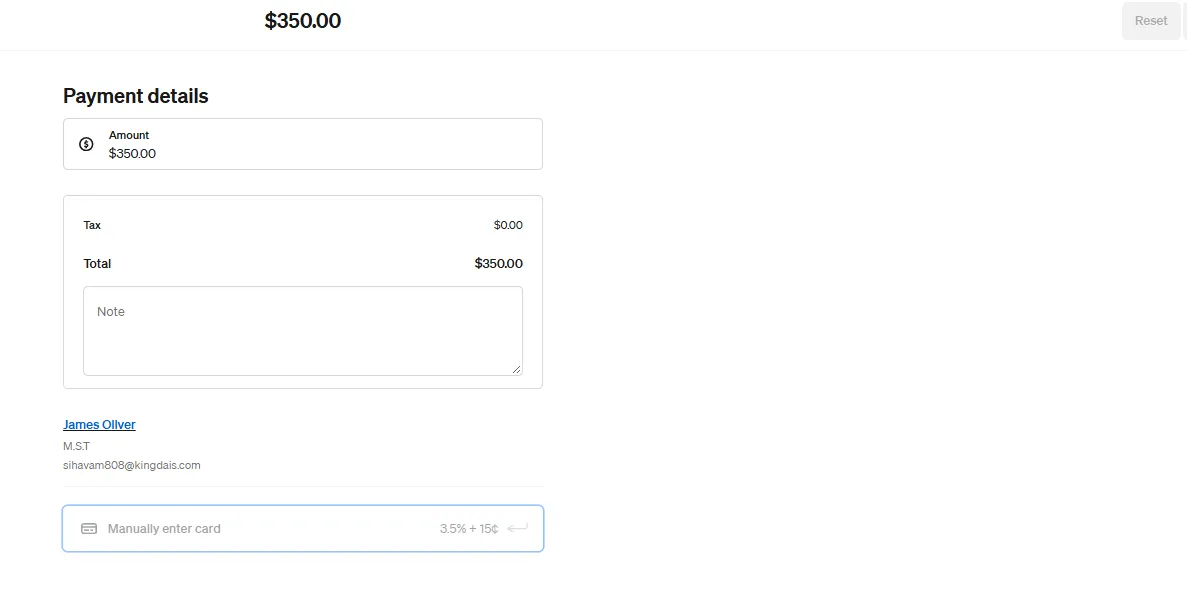
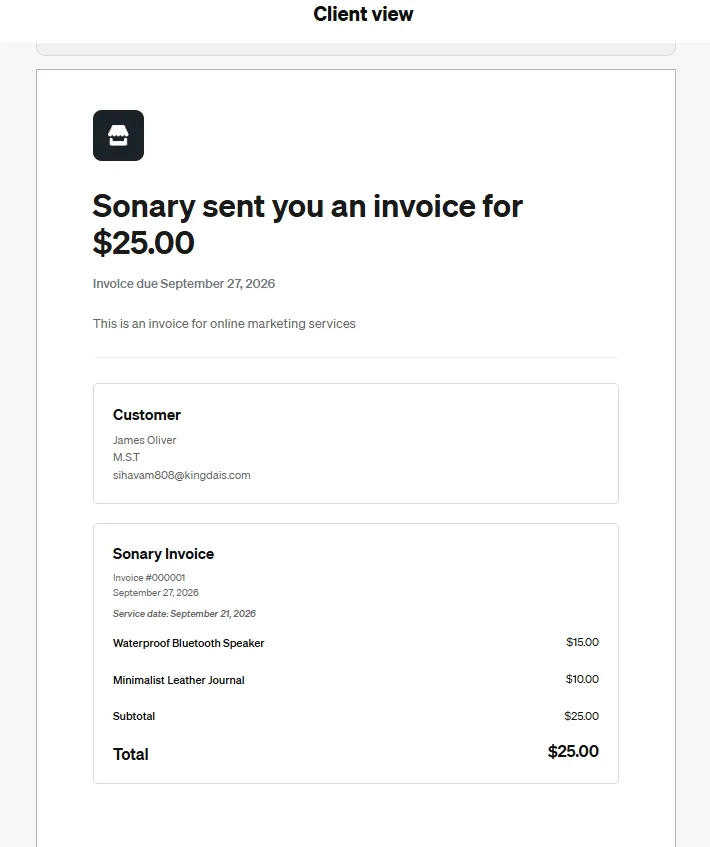
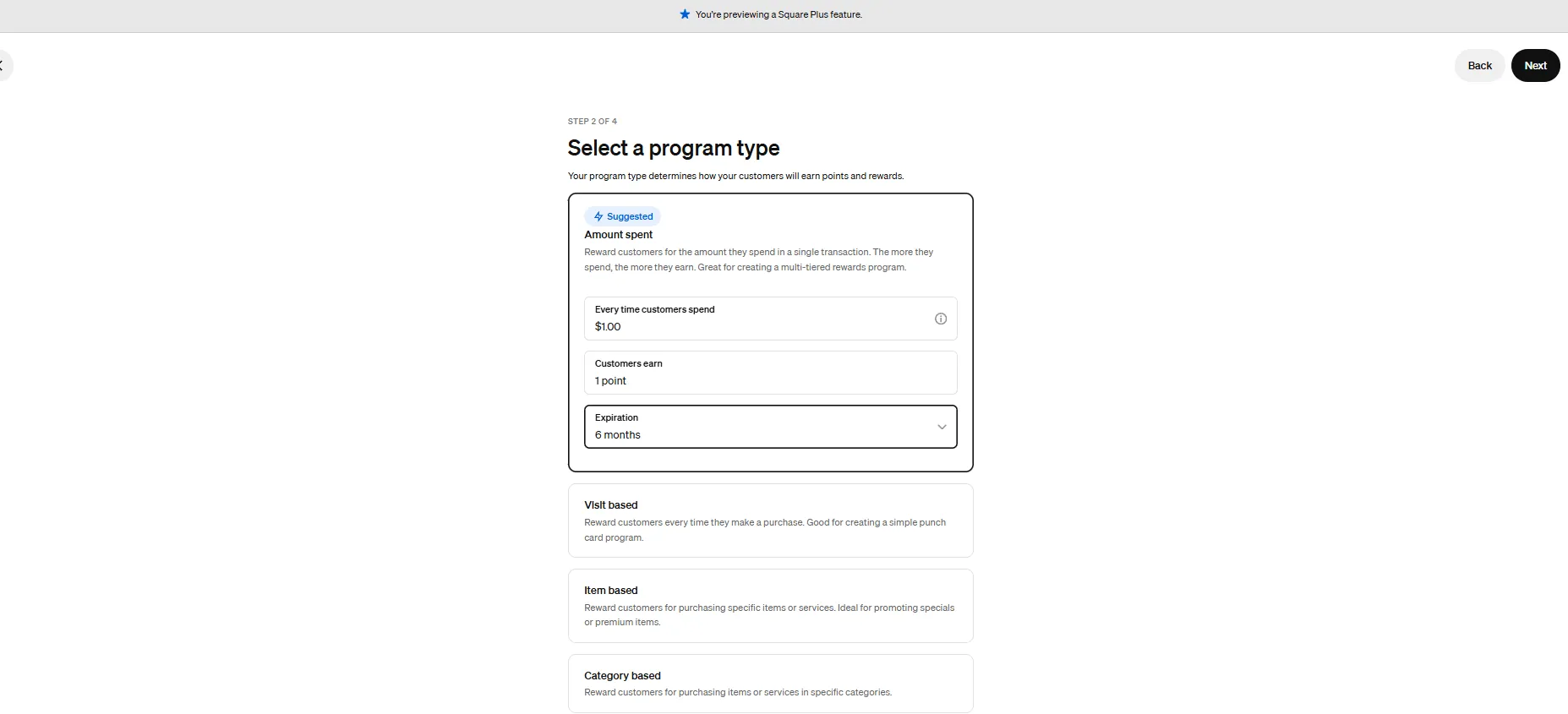
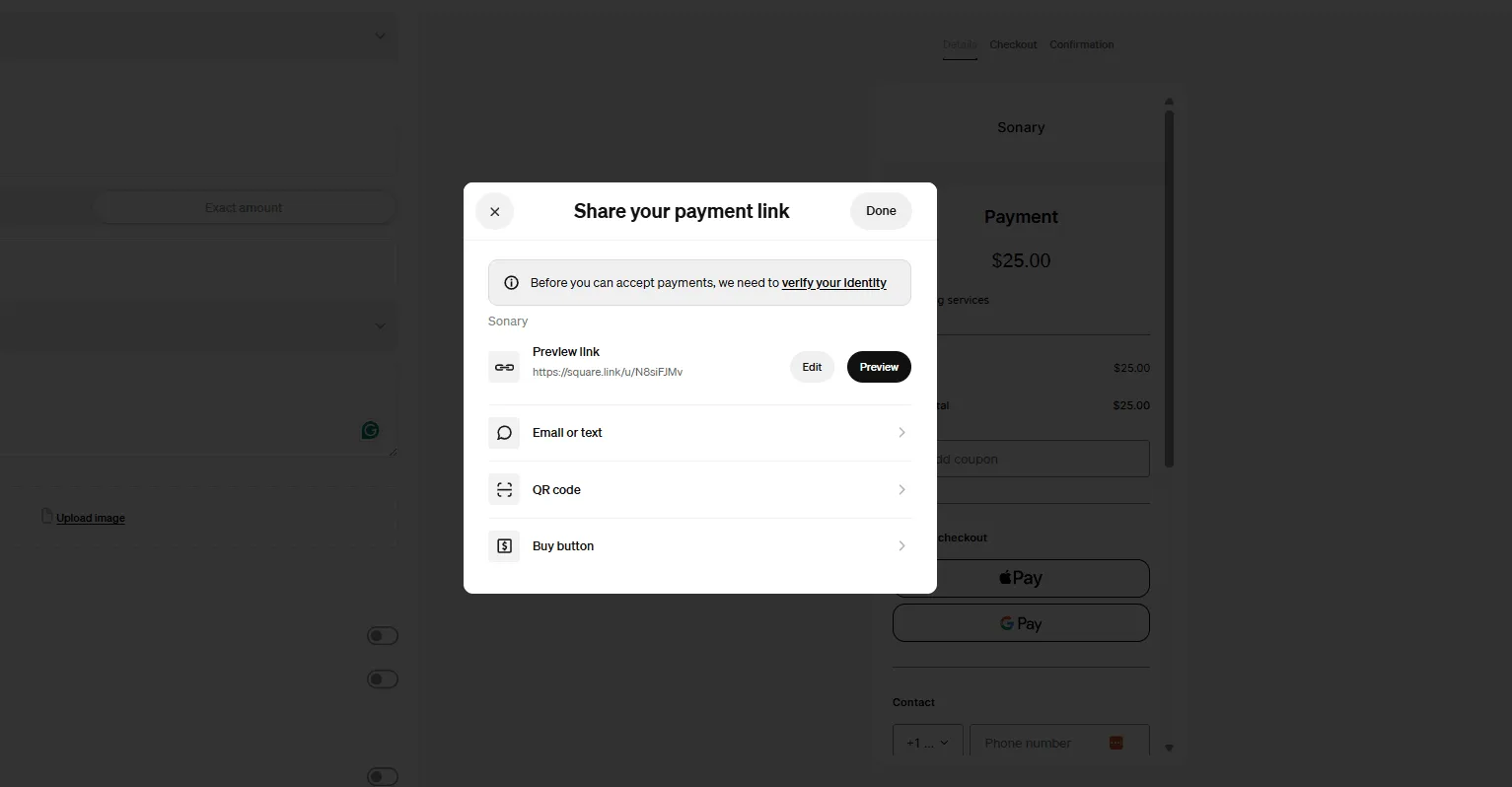
Square does three studio jobs on one free account: Square Appointments books one-on-ones and small classes, Square’s recurring invoices and subscriptions bill monthly dues to a card on file, and the POS rings retail , water, protein bars, and branded tees at the desk. Tap to Pay, and a $59 reader keeps hardware near zero. For a studio under a few hundred members, that’s usually all you need.
What we found testing it
In our testing: Square was the simplest to set up, a few minutes on a phone, and it was booking and charging. The catch a studio owner needs to know up front: dues billed to a card on file run at Square’s card-on-file rate (3.5% + 15¢), not the 2.6% + 15¢ tap rate you see quoted. On real dues volume, that gap is the number to watch.
What does it cost?
- Software:$0/month; Square Appointments has a free tier, with paid plans for more staff calendars.
- Rates: 2.6% + 15¢ in person; 3.5% + 15¢ for cards on file / recurring dues.
- Hardware:$0 Tap to Pay on iPhone; $59 reader; Square Stand from $149.
When to pick something else
Once dues are your main revenue, Helcim’s lower recurring rate saves real money. And once you need class waitlists, an instructor schedule, and a branded member app, Square’s booking is too light; that’s dedicated gym software territory.
What’s the best system for gym membership billing at the lowest fees?
Helcim is the best gym billing engine when recurring dues are the heart of the business.

Helcim Merchant Software provides retail and e-commerce businesses with a reliable payment processing solution that simplifies transactions. It offers credit card processing, invoicing, a… Read more
Helcim Merchant Software provides retail and e-commerce businesses with a reliable payment processing solution that simplifies transactions. It offers credit card processing, invoicing, a Point-of-Sale (POS) system, e-commerce tools, and customer management features. With no monthly fees and an interchange-plus pricing model, businesses benefit from cost savings and automatic volume discounts. Helcim’s all-in-one platform supports online and in-person payments, making it ideal for growing businesses. Its user-friendly interface, security features, and integrated reporting help streamline operations. In this Helcim Merchant Software review, I'll discuss features, performance, customer service, and Helcim pricing.
Learn more in our full Helcim review.
Pros & Cons
- No minimum processing requirement
- Easily navigate surcharging, convenience fees, and service charge with one tool
- No monthly fees
- Excellent customer service
- Exclusive to low-risk industries
Features
- ACH Payment Processing
- Billing & Invoicing
- Data Security
- Debit/Credit Card Processing
- In-Person Payments
- Mobile Payments
- Multiple Payment Gateways
- Online payment processing
- PCI Compliance
- POS Integration
- Payment Fraud Prevention
- Payment Processing Services Integration
- Recurring Billing
- Cash Transactions
- Contactless NFC
- Electronic Receipts
- Mobile Card Reader
- iOS
- Android
- Cloud-Based
- Windows
- Mac
- Instore Sales
- Online Sales
- Mobile Sales
Pricing
1.83%
+ 8¢/
+ 8¢
2.27%
+ 25¢/
+ 25¢
Why it fits
Helcim is built around recurring billing and subscription management with a customer vault for cards on file, and it runs on interchange-plus pricing with no monthly fee and no contract. For a studio charging hundreds of members every month, the per-charge rate is the whole game, and Helcim’s is the lowest of this group. It also handles the unglamorous parts well: retrying declined cards and updating expired ones so dues don’t silently fail.
The fee math
Why it matters: Cards on file bill at the higher card-on-file rate. Helcim’s keyed rate lands near or below ~2.5% versus Square’s 3.5% + 15¢. On $20,000/month of dues that’s roughly $500 versus ~$720 , a $200-plus monthly saving that grows with your member count, with no software fee attached.
What does it cost?
- Software:$0/month, no contract; interchange-plus pricing (~1.93% + 8¢ in person, ~2.5% keyed/recurring).
- Tools: recurring billing, subscription plans, customer vault, and invoicing built in.
When to pick something else
Helcim has no native class scheduling or member app, so it’s best used as the billing engine behind a booking tool, or paired with dedicated gym software. If you want booking and dues in one box for a small studio, Square is simpler.
What’s the best fitness POS for a studio that sells a lot of retail?
Shopify POS is the best fitness POS system for a studio with real retail or merch.

Shopify stands as a leading e-commerce platform, empowering over 1.75 million merchants across 175 countries to sell online seamlessly. Its user-friendly interface, customizable templates, and… Read more
Shopify stands as a leading e-commerce platform, empowering over 1.75 million merchants across 175 countries to sell online seamlessly. Its user-friendly interface, customizable templates, and comprehensive app ecosystem enable businesses to create and manage online stores with ease. Features like integrated inventory management, secure payment gateways, and mobile-responsive design ensure a smooth shopping experience for customers. Trusted by brands like Netflix and Mattel, Shopify offers scalable solutions suitable for businesses of all sizes. In this Shopify e-commerce review, I'll discuss features, performance, customer service, and Shopify pricing.
Learn more in our full Shopify review.
Pros & Cons
- Large suite of marketing tools to grow your website
- You’re able to sell online, offline, and through multiple marketplaces
- It has a built-in payment processor
- Supports unlimited products on every plan
- It charges you for third party payment processors
- The basic plan doesn’t have access to pro reports
Features
- Number of templates
- Drag & Drop Editor
- Free Stock Photos
- SEO Tools
- Social Media Integration
- Visitor statistics
- Third-party apps
- Data Security
- Multi-lingual website
- Inventory Management
- Payment options
- Returns & Refunds
- Shipping Management
- Mobile - friendly
- Mobile compatible templates
- Add HTML code
- Portfolio
- Design flexibility
- Fully customized
- Video Plug-Ins
- Audio Plug-Ins
- Widgets + Apps
- Abandoned cart tools
- Newsletter tool
- Monetization
- Product reviews
- Promotions & Discounts
- Advertising credits
- Free custom domain
- Space
- Bandwith
Pricing
$29
mo/
month
$79
mo/
month
$299
mo/
month
Why it fits
If apparel, supplements, and branded merch are a real revenue line, in-studio and online, Shopify keeps one inventory and one customer file across both. A hoodie sold at the front desk decrements the online store instantly, and a website order adjusts studio stock. Memberships run through a subscription app rather than natively, so Shopify is the pick when product sales, not class booking, are the second engine of the business.
What we found testing it
In our testing: The unified inventory is the standout, one catalog across the desk and the website, with no manual re-counting. Memberships aren’t native, though; you add them through a subscription app, which is fine, but is one more moving part (and monthly cost) to manage.
What does it cost?
- Software:$39/month Basic; POS Pro add-on at +$89/month per location for advanced retail tools.
- Rate & hardware: 2.6% + 10¢ in person; $49 card reader; subscriptions via a third-party app.
When to pick something else
If you don’t sell much retail, $39/month for an e-commerce platform is overkill; Square’s free plan does memberships and light retail for nothing. And Shopify does not do class scheduling.
What’s the best gym POS with premium front-desk hardware?
Clover is the best gym point-of-sale system for a studio that wants a polished front-desk terminal.
Clover is a user-friendly point-of-sale (POS) system designed for small to medium businesses, offering a range of software and hardware tailored to different industries, from retail to restaurants.… Read more
Clover is a user-friendly point-of-sale (POS) system designed for small to medium businesses, offering a range of software and hardware tailored to different industries, from retail to restaurants. While not the most affordable, its diverse payment partners make it a reliable choice. Clover is owned by Fiserv (which acquired First Data in 2019), Clover POS delivers a comprehensive solution for payment processing, inventory management, and sales tracking.
Learn more in our full Clover review.
Pros & Cons
- Attractive pricing 30-day trial at no cost
- Affordable hardware beginning at $49
- Feature-packed Ideal for businesses with an online presence
- Round-the-clock phone and email assistance.
- You can't apply for the POS online; it requires interaction with a sales representative
- Pricing information isn't clear-cut
- No complimentary plan available
Features
- Inventory Management
- Loyalty Program
- Mobile Compatibility
- Online Ordering
- Reporting
- Split Checks
- Manage Tips
- Staff Scheduling
- Offline Payments
- Customer Profiles
- Multidevice Payments
- Gift Card Support
- Accounting Integration
- Tableside Ordering
- Floor Plan Management
- Customer-Facing Display
- Self-Service Kiosk
- Retail Store
- Coffee Shop
- Nightclub
- Quick Service
- Bars
- Restaurants
- Food Truck
- Android
- Cloud-Based
- Free Trial
- Monthly subscription
Pricing
$16
mo/
month
$59.95
mo/
month
$170
mo/
month
$145
mo/
month
$230
mo/
month
$205
mo/
month
Why it fits
Clover’s Station and Mini hardware look the part at a staffed reception desk, and its App Market adds recurring-membership and check-in apps on top of the core POS. You also get processor flexibility, useful for negotiating a better recurring rate as dues volume grows. It’s the easiest of the reporting-heavy systems to run day-to-day.
What we found testing it
In our testing: Clover was one of the strongest all-around systems, with polished hardware and real-time retail inventory. The gym-specific caveat: recurring memberships and check-in usually come from App Market apps, and those monthly app fees stack up, pricing the full stack, not just the base plan.
What does it cost?
- Software:$14.95/month payments-only; roughly $50–$130/month with the plans and apps a studio needs.
- Rate & hardware: from 2.3% + 10¢, negotiable; Clover Mini ~$849, Station Duo ~$1,899; buying direct usually means a 36-month contract.
When to pick something else
For a solo trainer or budget studio, Clover’s hardware and app costs are hard to justify; Square is free. For the lowest recurring rate, Helcim wins.
What’s the best free gym POS for a tight budget?
GoDaddy is a solid free gym POS for a small studio watching every dollar.
GoDaddy provides a wide range of internet services including hosting. With industry-leading load times, guaranteed 99.9% uptime and expert, 24/7 support, your site couldn’t ask for more.
Learn more in our full Godaddy review.
Pros & Cons
- Free SSL certificate when purchasing a hosting plan
- Free domain is also included with hosting plans
- Unlimited storage and unmetered bandwidth on most plans
- 1-click installation for 100+ applications
- More expensive than comparable web hosting services
- Many instances of the hosting service being slow
Features
- Website Builder
- Shared Hosting
- Reseller Hosting
- Dedicated Hosting
- VPS Hosting
- WordPress Hosting
- Linux Servers
- Windows servers
- Unmetered SSD storage
- Unlimited Transfers
- Email Access
- Control Panel
- Free SSL Certificate
- 1-Click App Installs
- Free Domain Registration
- PCI Compliance
- GIT
- SSH Access
- Site Statistics
- Log Files
- File Manager
- Custom Cron Jobs
- Raw Access Logs
- Script Library
- Customizable Error Pages
- Autoresponder
- Cron Jobs
- Spam Filters
- Hypertext Access
- Unlimited FTP Accounts
- Anonymous FTP
- Mailing lists
Pricing
$6.99
mo/
month
$9.99
mo/
month
$14.99
mo/
month
$21.99
mo/
month
Why it fits
GoDaddy’s POS has no monthly subscription on its standard plan; you pay a flat 2.5% with no per-transaction cents fee, which is friendly for small front-desk sales. It handles catalog, invoicing, pay links, and multichannel selling, so a small studio can bill dues via recurring invoices and sell a bit of retail without a monthly bill.
Worth knowing
Good to know: GoDaddy’s membership tooling is lighter than Square’s; recurring dues are processed via invoices and pay links rather than a true subscription engine; and there’s no built-in class booking. It’s best for a simple studio that mostly needs clean, cheap payments.
What does it cost?
- Software:$0/month Free (2.5% + $0 in person); $28.99/month Plus (2.3%).
- Hardware:$79 card reader; Smart Terminal from $275.
When to pick something else
If memberships are complex or you want booking in the same tool, Square is the better free option. If the dues volume is high, Helcim’s recurring rate saves more than GoDaddy’s flat 2.5%.
How do you set up membership billing that doesn’t bleed failed payments?
Failed and expired cards are the quiet leak in every gym billing system; a few percent of dues are lost every month. Here’s the setup that plugs it, on Square, Helcim, or Clover.
- Store the card on file in a vault. Capture the member’s card at signup so dues are charged automatically, not by manual invoice.
- Set one clear billing date and cycle. Bill everyone on the 1st (or their join date), so declines are easy to spot and chase in one batch.
- Turn on auto-retry (dunning). Have the system re-attempt a declined card over a few days before you ever touch it.
- Enable the card updater. Automatic updates for expired or reissued cards recover dues you’d otherwise lose silently.
- Write a freeze and proration policy. Decide how holds, mid-month joins, and cancellations prorate, then set it so staff isn’t doing math by hand.
- Plan for chargebacks. Keep signed membership terms on file; a clear cancellation policy is your best defense against disputes.
What’s the actual difference between Square and Helcim for gym billing?
Square gives you booking, memberships, and retail in one free box; Helcim gives you the cheapest recurring billing but no scheduling. The deciding question: is dues volume big enough that the per-charge rate beats the convenience of one tool?
What matters | Square | Helcim |
|---|---|---|
Monthly fee | $0 Free | $0 |
Recurring / card-on-file rate | 3.5% + 15¢ | ~2.5% keyed (interchange-plus) |
In-person rate | 2.6% + 15¢ | ~1.93% + 8¢ |
Booking/appointments | Built in | None |
Failed-payment retries + card updater | Basic | Strong |
Front-desk retail | Strong | OK |
Best for | All-in-one small studio | High dues volume, lowest fees |
Run your own numbers before you choose: Sonary’s credit card processing fee calculator shows what Square versus Helcim would actually cost on your monthly dues volume. And if you want to weigh other low-fee processors, see Helcim alternatives.
Which gym POS system is right for you?
Square
- Free setup & no hidden fees
- Create customer profiles in seconds
In testing: the simplest to set up and the only one here that books sessions, bills dues, and rings retail on one free account.
Skip it if dues are your main revenue (the card-on-file rate adds up) or you need class waitlists and a member app.
Choose it if you’re a solo trainer or small studio that wants booking, memberships, and retail in one free tool from day one.
Helcim
- No contracts. No monthly fees.
- Comprehensive customer management system
Worth knowing: recurring billing with a card vault, auto-retry, and card updater, at the lowest realistic per-charge rate, no contract.
Skip it if you need class scheduling or a member app in the same tool. Helcim is a billing engine, not a booking platform.
Choose it if membership dues are the heart of the business and you want the cheapest, most reliable recurring billing.
Shopify POS
- Trusted by millions of businesses globally
- Drag-and-drop store creator
In testing: one inventory across the front desk and online store, the cleanest retail engine of the group.
Skip it if retail is small or you need native memberships/booking; both are add-ons or absent here.
Choose it if apparel, supplements, and merch are a real revenue line in the studio and online.
Read the full Shopify POS review →
Clover
- Cloud-hosted & accessible from anywhere
- Accept payments & track inventory
In testing: one of the strongest all-around systems with polished front-desk hardware and real-time retail inventory.
Skip it if you’re a budget or solo operation; hardware plus recurring App Market apps stack up fast.
Choose it if you want a premium reception-desk terminal and are willing to build memberships from App Market apps.
GoDaddy
- Winners of the "Exceptional Customer Service" Stevie® Award
- Superior performance & load times
Worth knowing: a genuinely free plan at a flat 2.5% with no cents fee , friendly on small front-desk sales.
Skip it if memberships are complex or you want booking built in; the tooling is lighter than Square’s.
Choose it if you run a simple studio that mostly needs clean, cheap payments and basic recurring invoices.
Read the full GoDaddy review →
Do you need a POS or dedicated gym-management software?
This is the real fork for a fitness business, and most POS roundups skip it. Be honest about which one you are.
If your studio lives on class scheduling, waitlists, instructor calendars, a branded booking app, and automated dunning across hundreds of members, a POS is the wrong core tool. Dedicated gym-management platforms like Mindbody, Glofox, PushPress, and Zen Planner are built for exactly that, and no general POS matches them on scheduling depth. But that software is pricier and heavier than a solo trainer or a small retail-forward studio needs. If your reality is simple memberships, one-on-one or small-group booking, and front-desk retail, a POS like Square (or Helcim as the billing engine) does the job for far less. And plenty of studios run both: gym software for booking and member management, a POS or Helcim for retail, and the lowest-cost payments. Pick by where your complexity actually is: scheduling, payments, or retail.
Dedicated gym & fitness POS, built just for your world
Any of the platforms above could be a great fit and cover everything you need. But if you're really only after a POS built specifically for a gym or studio, one that already understands memberships, class packs, check-ins, and door access without the extra breadth, one of these fitness-native options might be the simpler choice.
Boutique studios & mid-size gyms
Glofox is an all-in-one for boutique studios and chains, with strong branded apps. Vagaro, the cheapest entry (~$30/mo), doubles as booking/marketing. WellnessLiving, the "good enough" Mindbody alternative with marketing built in. Zen Planner, dependable workhorse (dated UI, basic retail POS). PushPress, a CrossFit favorite with a free tier (check the fees). Wellyx, broad suite across memberships, scheduling, and CRM.
Small gyms & niche facilities
GymDesk is affordable, easy, and good for new gyms. WodGuru is lightweight and low-cost for small gyms and boxes. Kicksite, martial-arts-native with belt/rank tracking. GymMaster, best-in-class 24/7 door access for unmanned facilities.
How does your gym POS choice affect your online visibility?
Your booking and payment tools quietly decide how easily new members find and sign up with you , and most owners never connect the two.
Square and dedicated gym platforms publish a bookable class or appointment page tied to your schedule. Google indexes those pages, so real class names, times, and prices help you show up for “yoga class near me” or “personal trainer downtown.” Keep your studio name, address, and hours identical across your booking page, your Google Business Profile, and aggregators like ClassPass, because AI answer engines like ChatGPT Search and Perplexity cite sources that agree with each other. Reviews matter more here than in most categories; a steady flow of Google reviews from members is the single strongest local-search signal a studio has. The studio whose schedule, profile, and reviews all line up is the one that wins the free “near me” traffic.
What do studio owners actually ask before picking a POS?
What’s the best gym POS system in ?2026
For most studios, Square, it books sessions, bills recurring memberships, and runs front-desk retail on one free account. Use Helcim for the lowest membership-billing fees, Shopify for heavy retail, Clover for premium front-desk hardware, and GoDaddy on a tight budget. If deep class scheduling is your core, use dedicated gym software instead.
Can Square run a gym or fitness studio?
Yes, for a solo trainer or small studio. Square Appointments handles bookings, recurring invoices, subscriptions, bill memberships, and POS for retail, all free. It’s not a full class-scheduling platform, so a busy multi-instructor studio may outgrow it.
What’s the best system for gym membership billing?
Helcim, when dues are the heart of the business. It offers recurring billing, a card vault, auto-retry for declines, and a card updater, at the lowest realistic per-charge rate with no monthly fee. Square is the simpler all-in-one alternative for small studios.
Why do recurring membership charges cost more than in-person sales?
Because a card on file is a card-not-present transaction, which the networks price higher than an in-person tap. On Square, that’s 3.5% + 15¢ for a stored card versus 2.6% + 15¢ in person , so on real dues volume, the recurring rate is what matters most.
Do I need dedicated gym software like Mindbody, or will a POS do?
If class scheduling, waitlists, and a member app are your core, use dedicated gym software; a POS can’t match it. If you mainly need simple memberships, light booking, and retail, a POS like Square is cheaper and simpler. Many studios run both.
How do I stop losing revenue to failed membership payments?
Store cards in a vault, bill on a set date, and turn on auto-retry (dunning) plus a card updater for expired cards. Helcim handles this well natively; on Square and Clover, confirm retry settings or add an app.
What’s the cheapest POS for a small fitness studio?
Square’s free plan or GoDaddy’s free plan. Square adds booking and subscription tools; GoDaddy is a flat 2.5% with no cents fee, good on small sales. Both cost $0/month in software.
Can I sell retail and supplements through my gym POS?
Yes. Square, Clover, Shopify, and GoDaddy all handle front-desk retail; Shopify is strongest if you also sell merch online from one shared inventory.
Where can you go deeper?
- Best POS Systems for Small Business (hub), the full situation-by-situation POS guide.
- POS for Beauty Salons & Spas, the closest sister guide, is built around appointments and deposits.
- Mobile POS Systems, for trainers who take payment on the road or between sessions.
- Best Retail POS Systems for studios with a serious apparel or supplement shop.
- Full Square review, Helcim review, and Clover review, hands-on scores, and pricing.
- How We Rate, Sonary’s testing and scoring methodology.
What’s the bottom line on the best gym POS system?
There’s no single winner among gym POS systems; there’s the one that fits how your studio makes money. For most solo trainers and small studios, Square is the best gym POS system: booking, memberships, and retail on one free account. When dues are the whole business and fees matter, Helcim bills them the cheapest. Retail-heavy? Shopify. Premium front desk? Clover. Tight budget? GoDaddy. And if class scheduling and a member app are your core, pair or switch to dedicated gym software like Mindbody or Glofox. Match the tool to your complexity, payments and retail, or scheduling, then set it up this week.
Who wrote and reviewed this article?
Written by Daniel Zvi
Daniel Zvi writes about POS and small-business software at Sonary, where he has hands-on tested more than 12 point-of-sale systems. He’s the author of Sonary’s POS comparison library, including Shopify POS vs Square, Lightspeed vs Clover, and “What Is a POS System?” His focus is on giving non-technical operators the practical details they need to choose the right tools.
Daniel’s author page · LinkedIn
Disclosure: Sonary tests products hands-on in demo environments and may earn advertising fees from brands it reviews, which can affect placement but not our assessments. Featured prices and terms can change. Free offers may include additional terms.
See also
- Memberships change what a till has to do, and best POS systems by business type sets out which categories can bill on a schedule.
- Class timetables, waitlists and instructor rosters sit outside the till, which is the job of the tools in best scheduling software.
- Studios selling packages by appointment rather than by class have more in common with the best POS for salons shortlist.
- Shelves of supplements and drinks need counts at the front desk, and that is what best POS for stock control ranks on.