
Last updated: October 2026
Honeybook is the ultimate CRM solution for entrepreneurs, freelancers, and independent business owners looking to streamline their operations. Designed to provide a seamless and professional experience, Honeybook simplifies customer relationship management by handling client interactions, payments, and follow-ups in one intuitive platform. By automating repetitive tasks and organizing your workflows, Honeybook lets you focus on growing your business while delivering exceptional service to your clients. In this review I'll discuss Honeybook CRM pricing, performance, customer service, and features.
Plans & Pricing
- Unlimited clients and projects
- Invoices and payments
- Proposals and contracts
- All professional templates
- Client Portal
- Basic reports
- Scheduler
- QuickBooks Online integration
- Workflow and email automation
- Up to 2 team members
- Expense management
- Profit and loss
- Standard reports
- Unlimited team members
- Priority support
- Multiple companies
- Onboarding specialist
- Advanced reports
* Featured prices can be updated and free offers may include additional terms.
HoneyBook uses three tiers billed annually (monthly billing costs more):
Starter at $29/month covers unlimited clients/projects, invoicing and payments, proposals and contracts, a client portal, basic reporting, and up to 2 lead forms.
Essentials at $49/month (their "most popular" tier) adds scheduling, automations, QuickBooks Online sync, up to 2 team members, SMS reminders, and removal of the "Powered by HoneyBook" branding.
Premium at $109/month adds unlimited team members, priority support, multi-company management, and advanced reporting. All tiers include HoneyBook AI features and a 60-day money-back guarantee. Payment processing runs 2.9%+25¢ for cards and 1.5% for ACH transfers on top of the subscription.
contracts and e-signatures, invoicing/payments, and client communication into a single The strongest value argument is consolidation: HoneyBook bundles CRM, scheduling, contracts/e-signatures, invoicing/payments, and client communication into one subscription. HoneyBook's own marketing claims this replaces 5+ separate tools (Typeform, Calendly, DocuSign, QuickBooks, Trello/Asana, payment processors) that could otherwise cost over $2,000/year combined. For a solo freelancer or very small team that would otherwise be stitching together multiple point solutions, that consolidation is a legitimate time-saver and cost-saver.
The honest takeaway is that value for money is tier-and stage-dependent. For solo freelancers or brand-new businesses on a shoestring budget, the $29 entry price (and the $49 jump for automations/scheduling, which many consider essential) can feel steep compared to point-solution alternatives, especially before revenue ramps up. For established small businesses or small teams that would otherwise pay for multiple separate subscriptions, the consolidation, professional client-facing experience, and support quality tend to justify the cost, which is reflected in the generally strong 4.5–4.7 star ratings despite price being the most common complaint. I'd frame it in your review as strong value for growing SMBs with active client volume, less compelling for very early-stage or ultra-budget-conscious solopreneurs.
Expert Score
Pros
- Comprehensive client management
- Easy-to-use, intuitive interface and layout
- Custom automation for workflows and tasks
- Excellent customer support and onboarding assistance
Cons
- Limited scalability for very large enterprises
- Fewer integrations compared to larger CRMs
- Advanced CRM features are absent
Customer Support
The Honeybook CRM tool offers several support options to help users get the most out of the platform. There are a lot of self-guided resources for general information about the CRM software, and the support team is easy to reach for direct interaction if you run into a problem.
Live Chat:
At the lower right corner of the platform’s homepage, Honeybook provides live chat support, where users can connect with a representative for real-time assistance. This is operated by an AI chatbot trained on Honeybook data, but I was able to reach a human representative after one minute of asking.
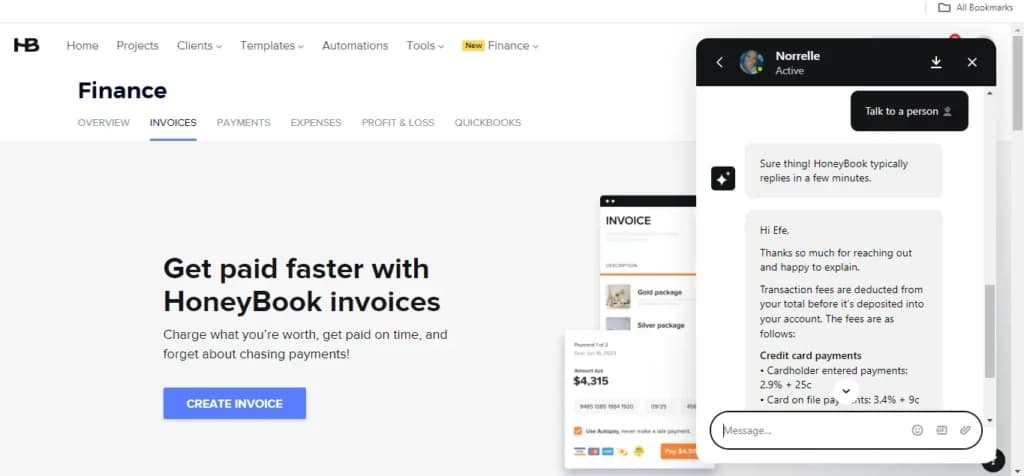
Phone support:
Honeybook has a phone support option that is accessible to every customer. They can be reached at 1-415-591-7768. I had to go through the pre-programmed automated response first, but I was in touch with a representative after 10-15 minutes (within work hours)
Email Support:
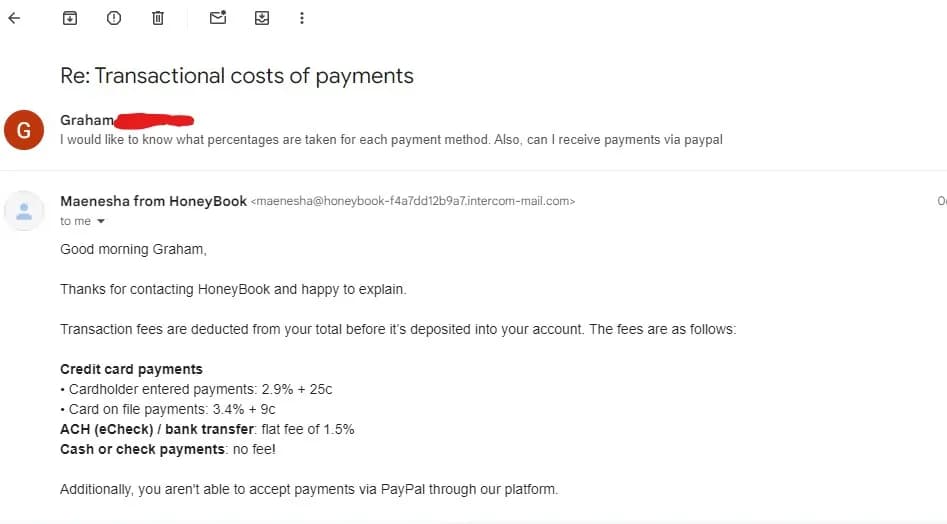
Users can reach out to Honeybook’s support team via email for more detailed inquiries. The email address is concierge@honeybook.com. I sent an email inquiry and got a response in 12 hours, as well as a follow-up mail to confirm clarity.
Help Center:
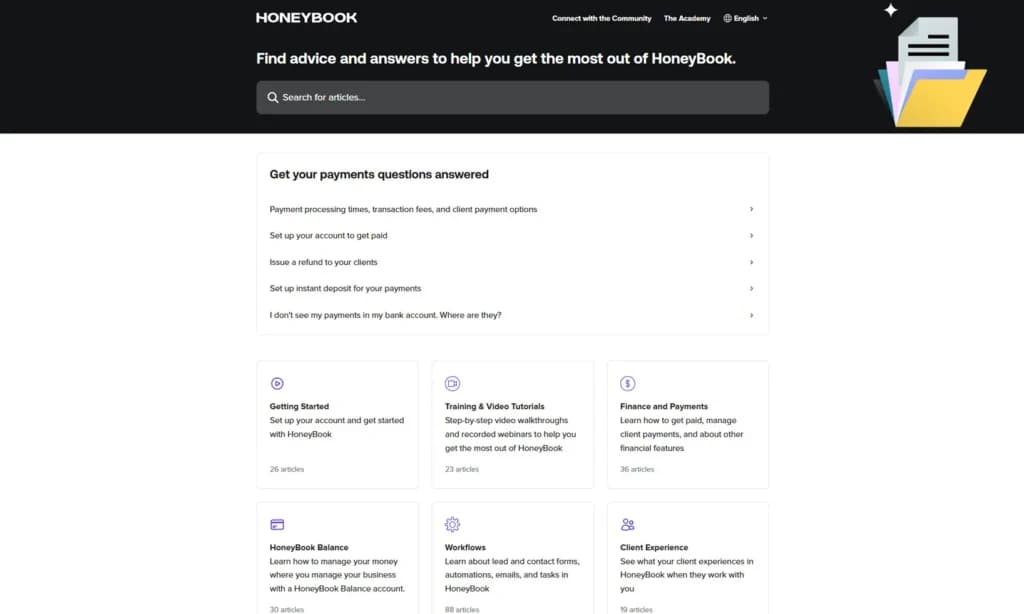
Honeybook’s Help Center is quite broad, with a wide range of articles, tutorials, and FAQs for instant use. It’s a self-service resource where users can find answers to common questions and step-by-step guides on using the platform’s features.
Academy & Video Tutorials:
I was able to find step-by-step video walkthroughs and recorded webinars to help me get the most out of the CRM software. The Business Academy is a good source of information for wider business growth, with live classes on industry trends, best practices, and tips for modern success.
Priority Support (for Unlimited Plan users):
Customers on the Unlimited plan get priority access to support, with faster response times and more immediate help when needed. Unlimited users also get a complimentary onboarding session with a specialist to help set up their accounts, customize workflows, and learn key features.
Phone Support
1-415-591-7768
concierge@honeybook.com
24/7 Help & Support
Via live chat & email
FAQ
Via Help Center
Blog
honeybook.com/blog
Live Online Chat
On-page chatbox
Ease of Use
For independent business owners, ease of use ranks highly for any software, and Honeybook delivers here. Its design makes it accessible for professionals with little or no technical experience.
User Interface:
The clean and simple UI immediately stood out for me. I was able to find everything I wanted with a few clicks, from projects to invoices to client messages. Setting up my account was a breeze. I was able to get my free trial with a single click – no cards or agreements. Moving between tasks felt natural. I never felt lost navigating the system.
It doesn’t give free rein of customization like an open-source CRM would, but you can alter some of the design features to your taste.
Automation:
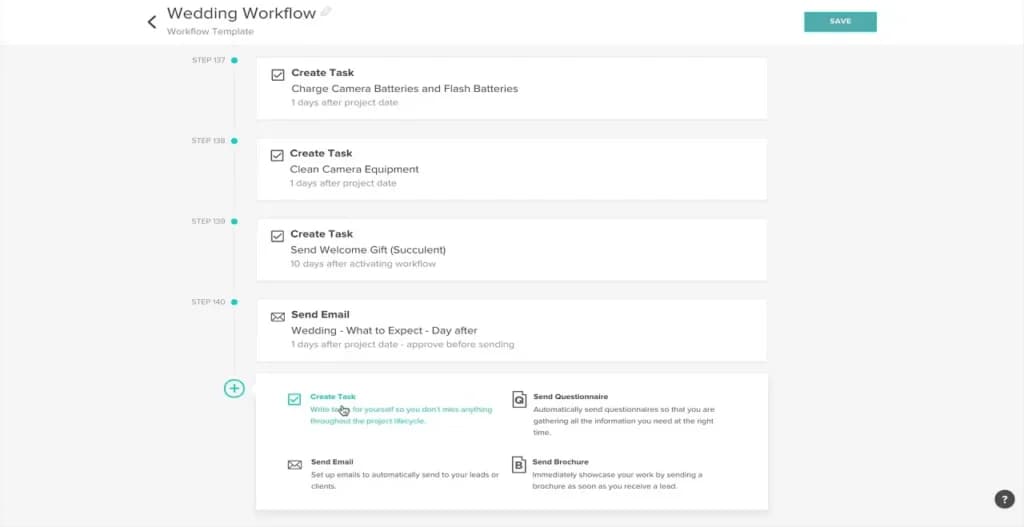
Setting up automated workflows was very straightforward. Honeybook provides templates for things like follow-up emails and reminders, so you never have to start from scratch. Here, the software uses AI to intuit possible services and automate them. You can stay on top of tasks without any of the automation expertise usually needed for customer relationship management software.
Performance
Honeybook is a highly effective CRM software for small and growing businesses, performing strongly with automation and finance management. It’s particularly useful for creative entrepreneurs but scales well for larger enterprises.
Speed:
All tabs load quickly, and tasks are handled with no visible lag. Navigating through customer profiles, managing projects, or handling invoices is smooth, including with data-heavy processes. Setting up my profile was quick, and I could skip steps I considered unnecessary.
Scalability:
Honeybook might be the best CRM for small businesses, but it is also well-equipped to handle growth. With an unlimited subscription, you can handle multiple businesses with different projects and multiple users. While it scales decently, I can see that larger enterprises with more advanced data and feature demands might find it somewhat limited compared to more robust CRM systems.
Integration:
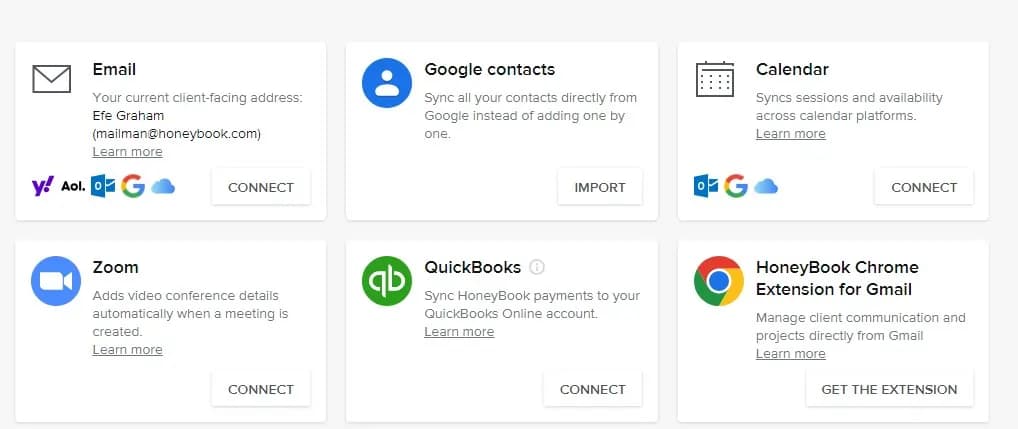
Honeybook integrates well with tools like Gmail, QuickBooks, and Calendar. I was able to sync my calendar in a few clicks. It also integrates with tools like Monday, Zapier, and Asana. There are also CRM integrations with marketing tools like Meta Leads. Some of these may require workarounds, but the core integrations work fine.
Automation and Workflow Efficiency:
The CRM automation tools are easy to use and manage. I found setting up workflows easier than with free CRM tools. Automating client onboarding, follow-up emails, and reminders was straightforward and intuitive enough for a non-technical user like me.
Features & Functionality
HoneyBook CRM offers a range of features and functionality designed to help freelancers and small businesses manage clients and payments and efficiently streamline their day-to-day operations. This includes features for:
- Pipeline management
- Reports
- Workflow tools
- Third-party integrations
- Contact management
- Email synchronization and templates
- Payments and expenses
- Workflow automation
- Automated emails
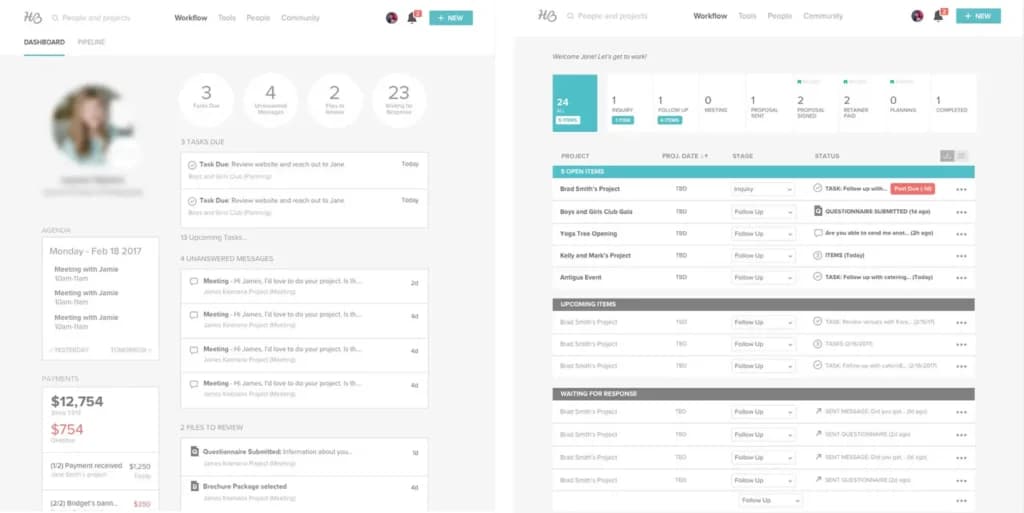
Dashboard
Pipeline Management:
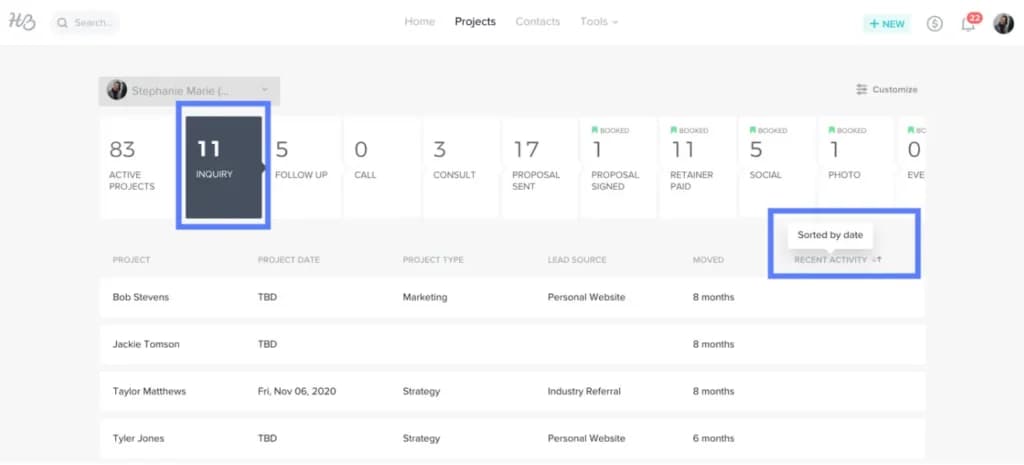
Honeybook CRM’s pipeline breaks up your projects into digestible steps, letting you track the progress of deals from lead generation to project completion. It’s great for coordinating businesses of any kind, providing a visual layout of project milestones and client interactions.
Reports:
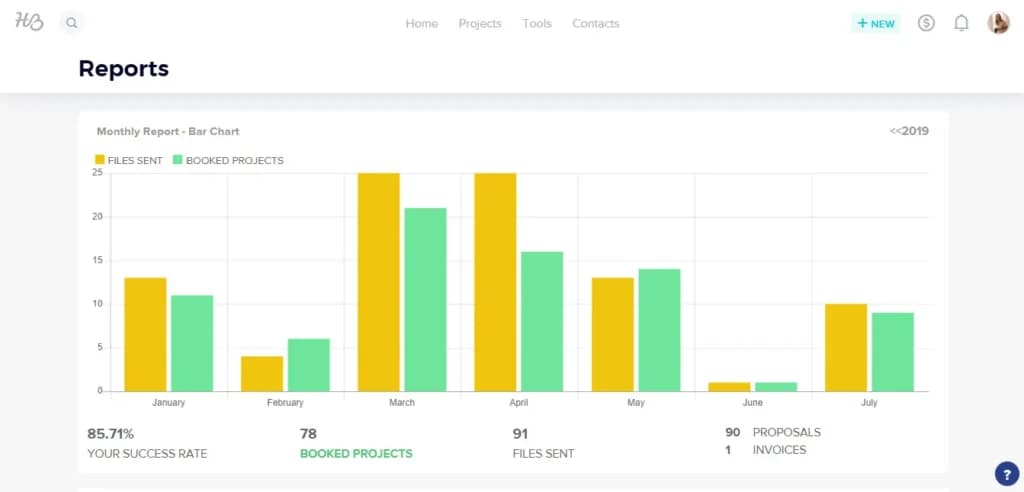
Like all top CRM platforms, Honeybook offers powerful reporting tools for goal tracking and financial analytics to identify trends or improve decision-making. It doesn’t have the advanced reporting tools (e.g., for marketing or sales) that other CRMs might offer, but you can identify your productive leads and track progress and earnings just fine.
Workflow tools:
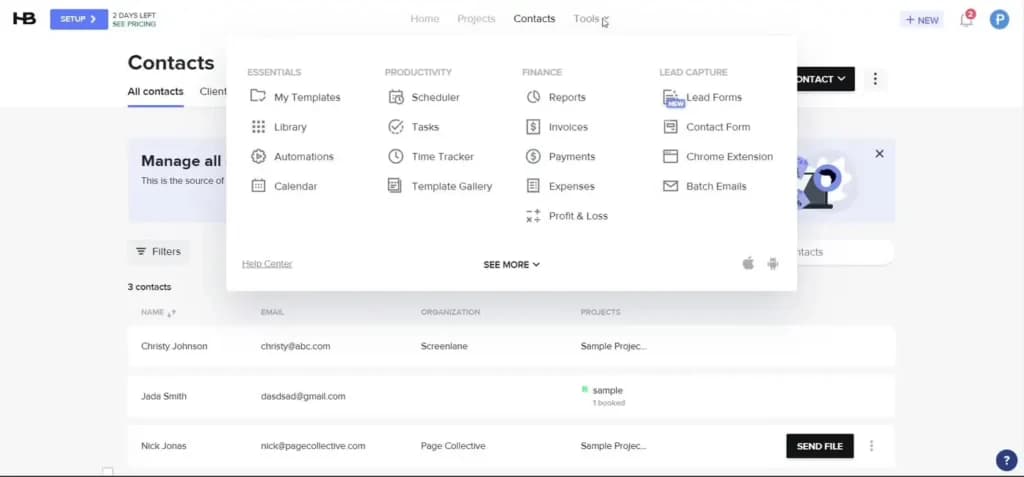
CRM software provides two-way productivity tools, such as a calendar and scheduler, so you can visualize all business-related meetings and directly share availability with clients. There’s also a handy time tracker to ensure you can invoice all billable hours and a library where you can upload brand graphics for quick reuse.
Integrations:
Honeybook CRM integrates seamlessly with essential tools like QuickBooks for accounting, Gmail for communication, and tools for e-signing documents. There are also workflow and marketing integrations like Asana and Meta leads.
Contact Management:
Honeybook efficiently stores and organizes client details like names, emails, phone numbers, and project-specific information, making it easy to manage client relationships. I could easily import my contact list via a .csv file or Google Contacts. You also get a customizable form builder for contacts and leads. This allows you to transfer first-party data directly from consumers to your CRM tool through these interactive forms.
Email Management:
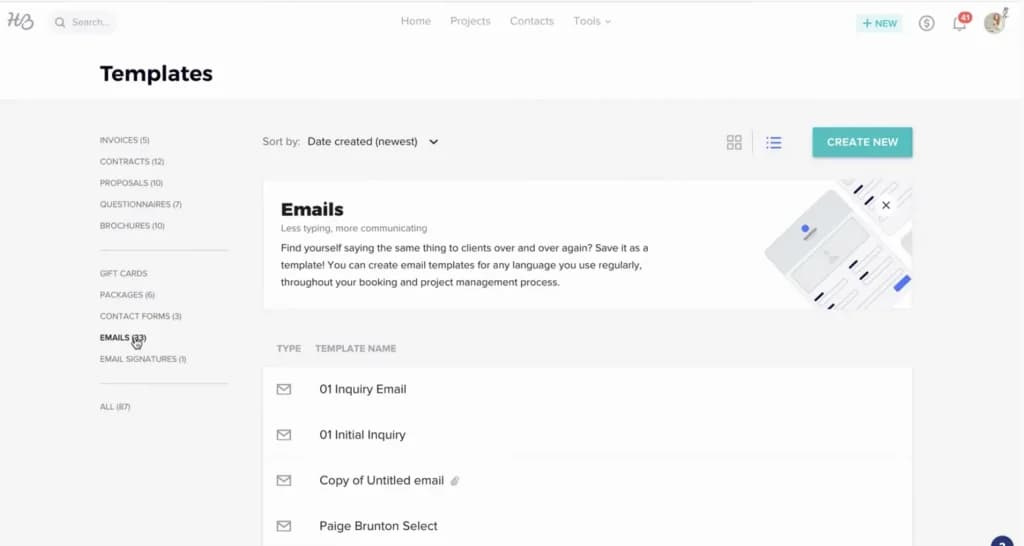
Honeybook CRM synchronizes with Gmail, consolidating client communications within the platform.
There, you’ll find customizable email templates for brand aesthetics and consistency. Users can schedule emails (Individually or in batches) to send at optimal times, a helpful feature for managing client communications and follow-ups in advance. In addition, there’s a Chrome Extension with which you can manage client communication and projects directly from Gmail.
Payments and expenses
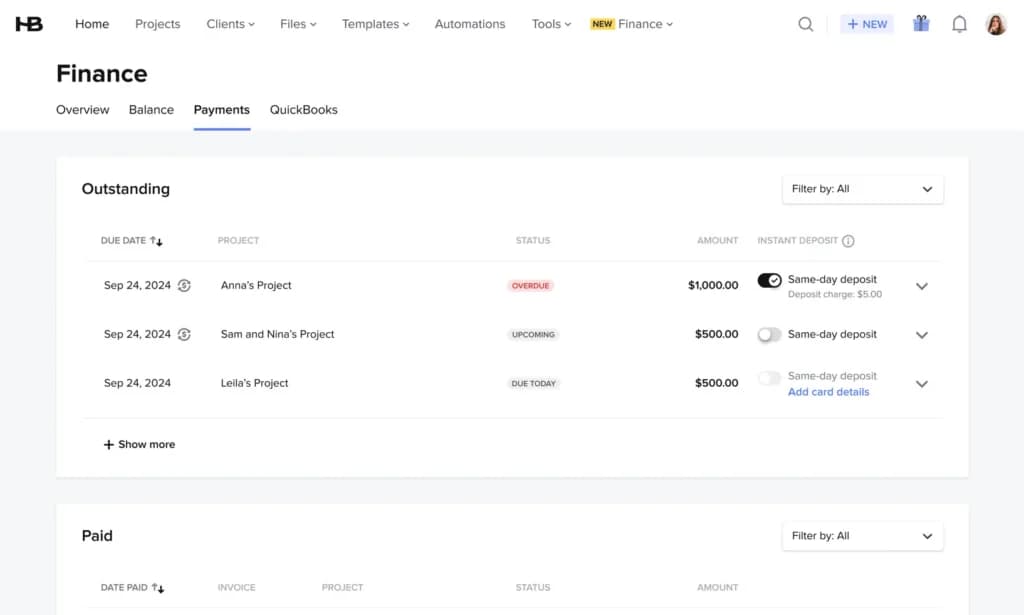
Track all payments, whether upcoming, due, overdue, or paid. You can set auto-reminders to avoid the awkwardness of payment-is-due conversations, and you can get notifications and keep track of current
and upcoming payments. Multiple payment systems are now allowed, including Apple and Google Pay.
You can create customizable drag-and-drop invoices and share them via email or link. You can also track your expenses and connect external accounts to get a full financial view of your business. Honeybook is a cloud-based CRM with servers hosted in a secure private cloud so that you can be assured of the safety of your financial data. The QuickBooks integration allows you to automatically sync invoices, payments, tips, discounts, refunds, taxes, and fees for up-to-date financials.
Workflow automation
Honeybook CRM excels in automating client-facing tasks. Users can set up workflows that automatically send emails, request payments, or send project updates, helping save time on repetitive tasks. Sen
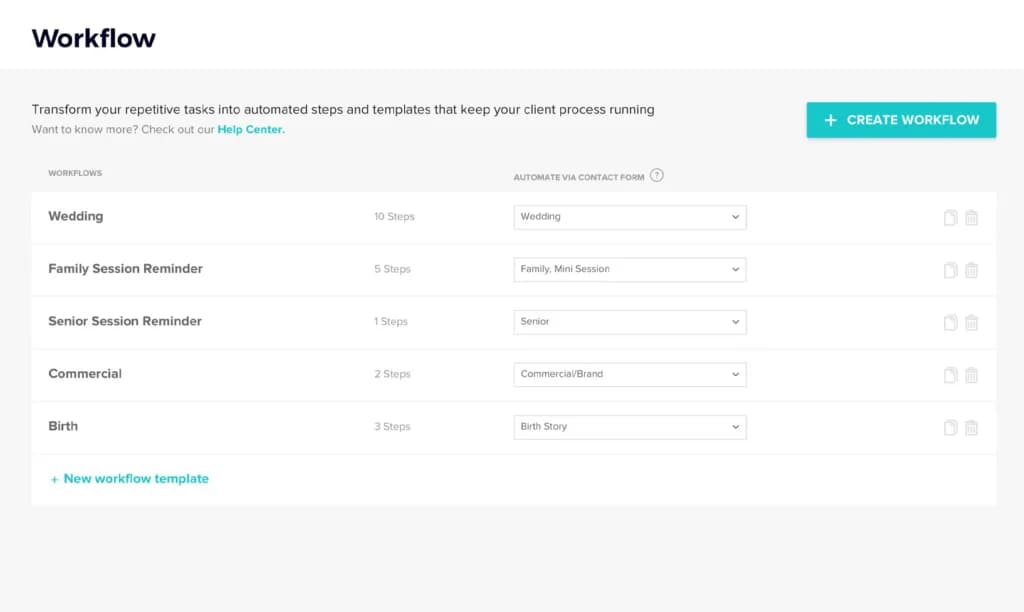
ding reminders or moving clients through various stages of a project.
Features
- Dashboards
- Reporting
- Pipeline Management
- Account Management
- Collaborative Data
- Mobile App
- Integrations
- Email Sync
- Email Templates
- Schedule Emails
Verdict
Simplicity and functionality are the story of this Honeybook review. It is the best CRM software for creative professionals, offering strong project management, email communication, and automation features.
Honeybook CRM is best suited for freelancers and small businesses who need simple sales CRM software to manage clients and finances. Its intuitive interface and automation features make it an excellent choice for service-based industries like photography, event planning, and design, where client interaction and project tracking are important.
The Honeybook CRM pricing is within market rates, with options starting at $19/month. These plans provide good value for users seeking an all-in-one platform to manage their business operations.
However, for larger businesses or enterprises, some might find its features somewhat limited compared to more comprehensive CRMs. However, as far as customer relationship management is concerned, Honeybook covers the essentials well.
Honeybook CRM Alternatives

Starting from: $29/month
Starter
$29
seat/month
Pros
- Comprehensive client management
- Easy-to-use, intuitive interface and layout
- Custom automation for workflows and tasks
- Excellent customer support and onboarding assistance
Cons
- Limited scalability for very large enterprises
- Fewer integrations compared to larger CRMs
- Advanced CRM features are absent

Starting from: $12/seat/month
Basic
$12/seat
seat/month
Pros
- Intuitive design
- Responsive customer service
- Numerous templates
- Cross-team collaboration tools
Cons
- Limited features on free version

Starting from: $23//mo/user
Basic
$23
seat//mo/user
Pros
- Google chrome extension
- User-friendly interface
- Diverse support options
- Explicit product tours
Cons
- Inflexible tool
- Confusing email tracking
Users Reviews
Be the first to write a review
Share your experience with HoneyBook CRM and help others choose the right software.
Related Articles


How to Use Canva AI in 2026


