
Best AI Tools for Small Businesses
Artificial intelligence (AI) is transforming the way businesses operate. For small businesses, the best AI tools can make a significant difference by streamlining operations, improving customer experiences, and driving growth. We explore the best AI tools for business, particularly focusing on how AI for small business can provide valuable advantages. Whether you're just starting out or looking to scale, these insights will guide you through the benefits and potential of AI technology.
Last updated: September 2026

Free plan available
- Custom templates: Blogs, articles & social
- Plagiarism Checker: Protect your reputation
- Real-time teamwork to edit & refine copy
- User-friendly interface and AI-powered assistance
- Seamlessly integrates with Canva’s design tools
- Over a dozen different useful AI tools
- Offers many templates for different writing purposes
- May require a subscription to access all its features
- AI-generated content might not always be perfectly accurate
Free plan available
- Custom templates: Blogs, articles & social
- Plagiarism Checker: Protect your reputation
- Real-time teamwork to edit & refine copy
- User-friendly interface and AI-powered assistance
- Seamlessly integrates with Canva’s design tools
- Over a dozen different useful AI tools
- Offers many templates for different writing purposes
- May require a subscription to access all its features
- AI-generated content might not always be perfectly accurate

7-Days Free Trial
- Mash up multiple landscapes & swap skies
- Change your age, expression, or pose
- Facial recognition for quality alterations
- Enhance productivity and creativity, automating complex processes
- Produce high-quality results that blend with the original images
- Tools for mobile and web design
- Adobe Suite integration for easy workflow
- It may be too complex for basic editors
- No option for a perpetual license
7-Days Free Trial
- Mash up multiple landscapes & swap skies
- Change your age, expression, or pose
- Facial recognition for quality alterations
- Enhance productivity and creativity, automating complex processes
- Produce high-quality results that blend with the original images
- Tools for mobile and web design
- Adobe Suite integration for easy workflow
- It may be too complex for basic editors
- No option for a perpetual license

Free plan available
- Web-based and user-friendly AI tool
- Broad settings to tailor generated images
- Generative AI fill and expand tools
- Multiple variations of generated images on one prompt entered.
- Many effects and adjustments to choose from the camera angle to color variations.
- Can access the web-based app with portable and desktop devices. E
- dit your own images by removing, adding, or replacing certain areas.
- It takes a bit of patience to receive the result when generating images.
- Limited photo editing features, better for generating
- Live agent support isn’t easy to reach
Free plan available
- Web-based and user-friendly AI tool
- Broad settings to tailor generated images
- Generative AI fill and expand tools
- Multiple variations of generated images on one prompt entered.
- Many effects and adjustments to choose from the camera angle to color variations.
- Can access the web-based app with portable and desktop devices. E
- dit your own images by removing, adding, or replacing certain areas.
- It takes a bit of patience to receive the result when generating images.
- Limited photo editing features, better for generating
- Live agent support isn’t easy to reach
- Make prototype with AI
- Automate your work with Plugins & Widgets
- AI Image Generator
- Ultimate collaboration tool
- Powerful AI prototyping tools
- Wide range of design elements & templates
- Integrates with other platforms
- Limited offline functionality
- Does not support all file types
- No ability to edit code
- Make prototype with AI
- Automate your work with Plugins & Widgets
- AI Image Generator
- Ultimate collaboration tool
- Powerful AI prototyping tools
- Wide range of design elements & templates
- Integrates with other platforms
- Limited offline functionality
- Does not support all file types
- No ability to edit code

Free plan available
- Readability score for intended audience
- Plagiarism checker against 1B+ web pages
- Context-aware content corrections
- Intuitive user interface with easy navigation.
- High-quality, contextually relevant content generation.
- Extensive customization options for tailored content.
- Fast and efficient performance with minimal delays.
- Phone support is not available.
- Some advanced features may have a learning curve for beginners.
Free plan available
- Readability score for intended audience
- Plagiarism checker against 1B+ web pages
- Context-aware content corrections
- Intuitive user interface with easy navigation.
- High-quality, contextually relevant content generation.
- Extensive customization options for tailored content.
- Fast and efficient performance with minimal delays.
- Phone support is not available.
- Some advanced features may have a learning curve for beginners.

- Easily integrate apps into custom chatbots
- Use AI-powered 24/7 customer support
- Generate leads with automation
- Seamlessly integrates with over 6,000 apps
- Automates repetitive and time-consuming tasks
- Deep customization and control over automation processes
- Scalability as your business evolves
- A very limited free plan
- Requires time to learn and develop
- Easily integrate apps into custom chatbots
- Use AI-powered 24/7 customer support
- Generate leads with automation
- Seamlessly integrates with over 6,000 apps
- Automates repetitive and time-consuming tasks
- Deep customization and control over automation processes
- Scalability as your business evolves
- A very limited free plan
- Requires time to learn and develop

- Apply data & analytics to your content
- Robust security to protect sensitive data
- Performance prediction & copy intelligence
- Intuitive user interface with easy navigation.
- High-quality, contextually relevant content generation.
- Extensive customization options for tailored content.
- Fast and efficient performance with minimal delays.
- Phone support is available only for Enterprise plan users.
- Some advanced features may have a learning curve for beginners.
- Apply data & analytics to your content
- Robust security to protect sensitive data
- Performance prediction & copy intelligence
- Intuitive user interface with easy navigation.
- High-quality, contextually relevant content generation.
- Extensive customization options for tailored content.
- Fast and efficient performance with minimal delays.
- Phone support is available only for Enterprise plan users.
- Some advanced features may have a learning curve for beginners.
- Built-in collaboration tools for teams
- SEO capabilities for search engines
- Real-time suggestions & style adjustments
- Scalability from solo team to large enterprise
- Comprehensive marketing collaboration features for large teams
- Extensive prompt engineering educational materials
- Many helpful templates to get you started
- Not the cheapest option for marketing AI applications
- Requires existing content inputs for optimal results
- Some key features not included in plans (cost extra)
- Built-in collaboration tools for teams
- SEO capabilities for search engines
- Real-time suggestions & style adjustments
- Scalability from solo team to large enterprise
- Comprehensive marketing collaboration features for large teams
- Extensive prompt engineering educational materials
- Many helpful templates to get you started
- Not the cheapest option for marketing AI applications
- Requires existing content inputs for optimal results
- Some key features not included in plans (cost extra)

Free plan available
- Elevate SEO with keyword integration
- Translate & localize for global audiences
- Extensive features & mobile friendly
- Extensive free service
- High reading grade
- Provides accurate grammar and syntax corrections.
- Easy to navigate and use.
- Text generation can have factual inaccuracies
- Slower than some alternatives
- Limited image generation capacity
Free plan available
- Elevate SEO with keyword integration
- Translate & localize for global audiences
- Extensive features & mobile friendly
- Extensive free service
- High reading grade
- Provides accurate grammar and syntax corrections.
- Easy to navigate and use.
- Text generation can have factual inaccuracies
- Slower than some alternatives
- Limited image generation capacity

Free plan available
- Built-in fact-checking and citation tools
- Boost your writing skills & efficiency
- Formal, casual, humorous, or informative
- Many features available in the free plan, strong value at $0
- Deepest integration with Google Workspace
- Capable of writing in multiple languages for global reach
- Clear, laddered pricing from $4.99 → $99.99
- Occasionally misinterprets the context or the nuances of the task
- Top features can be region-limited and roll out unevenly
- Data-privacy considerations when feeding sensitive business content into a consumer AI
Free plan available
- Built-in fact-checking and citation tools
- Boost your writing skills & efficiency
- Formal, casual, humorous, or informative
- Many features available in the free plan, strong value at $0
- Deepest integration with Google Workspace
- Capable of writing in multiple languages for global reach
- Clear, laddered pricing from $4.99 → $99.99
- Occasionally misinterprets the context or the nuances of the task
- Top features can be region-limited and roll out unevenly
- Data-privacy considerations when feeding sensitive business content into a consumer AI

Free plan available
- Thousands of interactions simultaneously
- Adapts responses to each user's preference
- Detailed analytics into customer behavior
- Enhances teamwork by streamlining communication Integration with other Microsoft Apps
- Enterprise-grade security against threats and breaches
- Consistent updates
- The depth of data analysis needed for Copilot to function optimally raises privacy issues
- Dependency on Microsoft 365 subscription for business users
Free plan available
- Thousands of interactions simultaneously
- Adapts responses to each user's preference
- Detailed analytics into customer behavior
- Enhances teamwork by streamlining communication Integration with other Microsoft Apps
- Enterprise-grade security against threats and breaches
- Consistent updates
- The depth of data analysis needed for Copilot to function optimally raises privacy issues
- Dependency on Microsoft 365 subscription for business users
* Featured prices and terms can be updated. Free offers may include additional terms.
What Is AI and Why Does It Matter for Small Businesses?
Artificial intelligence is a branch of computer science that enables machines to perform tasks that usually require human intelligence. These tasks include problem-solving, learning, and understanding natural language. AI can automate repetitive tasks, predict outcomes based on data, and offer personalized customer service. This has made AI an essential component of small business AI strategies.
For small businesses, AI tools are no longer reserved for big corporations with massive budgets. There are AI tools for small business that are affordable, efficient, and tailored to meet the needs of smaller enterprises. Understanding how AI can help small businesses is the first step in unlocking its potential to improve productivity, reduce costs, and drive innovation.
1. AI for Small Business: Streamlining Operations
One of the primary benefits of AI tools for business development is their ability to automate day-to-day operations. Whether it's managing customer inquiries, scheduling tasks, or processing transactions, AI can handle these tasks without human intervention, freeing up valuable time for small business owners.
ChatGPT
ChatGPT, developed by OpenAI, is one of the most sophisticated AI-powered conversational models available today. Designed as a versatile AI assistant, ChatGPT excels in a range of applications, from… Read more
ChatGPT, developed by OpenAI, is one of the most sophisticated AI-powered conversational models available today. Designed as a versatile AI assistant, ChatGPT excels in a range of applications, from casual conversations to professional writing, content creation, coding, and beyond. It is built on the GPT-4 architecture (for the premium version) and combines natural language understanding with generative capabilities, making it a robust tool for individuals, businesses, and developers.
Learn more in our full Chatgpt review.
Pros & Cons
- Extensive free service
- High reading grade
- Provides accurate grammar and syntax corrections.
- Easy to navigate and use.
- Text generation can have factual inaccuracies
- Slower than some alternatives
- Limited image generation capacity
Features
- Grammar and Style Checks
- SEO Optimization
- Plagiarism Check
- Collaboration Features
- Content Personalization
- Multilingual Support
- API Access
- Text Editing and Formatting
- Compliance and Security Measures
- Web
- Windows
- macOS
- Android
- iOS
Pricing
$0
mo/
month
$20
mo/
month
$200
mo/
month
$25
/mo or per user/
/mo or per user
Best for: Automating content creation and communication.
Description: ChatGPT is a powerful AI writing tool that helps businesses automate content creation, from blog posts to customer support replies. Its ability to handle large amounts of content generation helps small businesses save time and streamline their communication processes.
Why it fits: Small businesses benefit from ChatGPT’s ability to create engaging content quickly, without needing a full content team. It's also ideal for automating repetitive communication tasks.
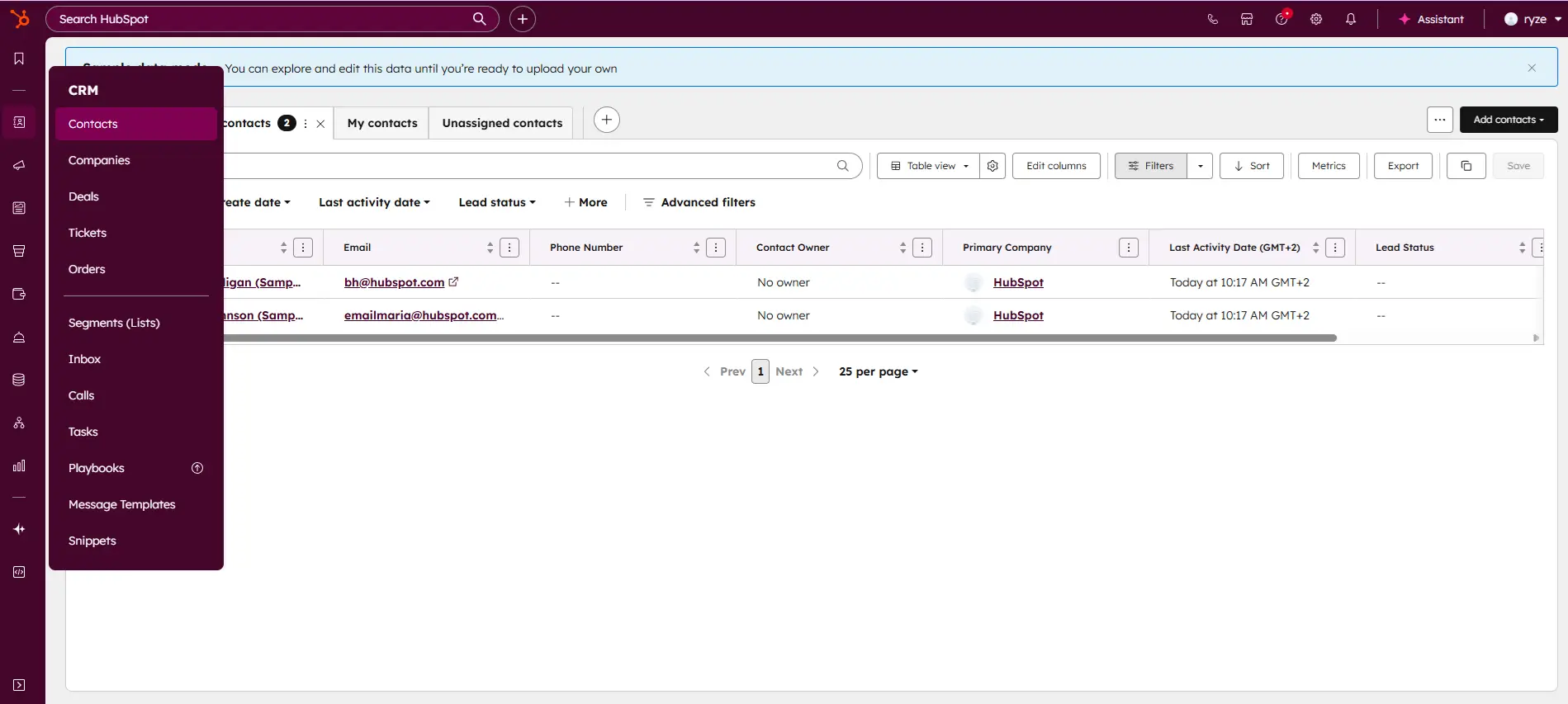
HubSpot

HubSpot CRM is your go-to solution for managing sales and customer relationships with precision and ease. Offering a real-time view of your sales activity, HubSpot provides explicit, actionable… Read more
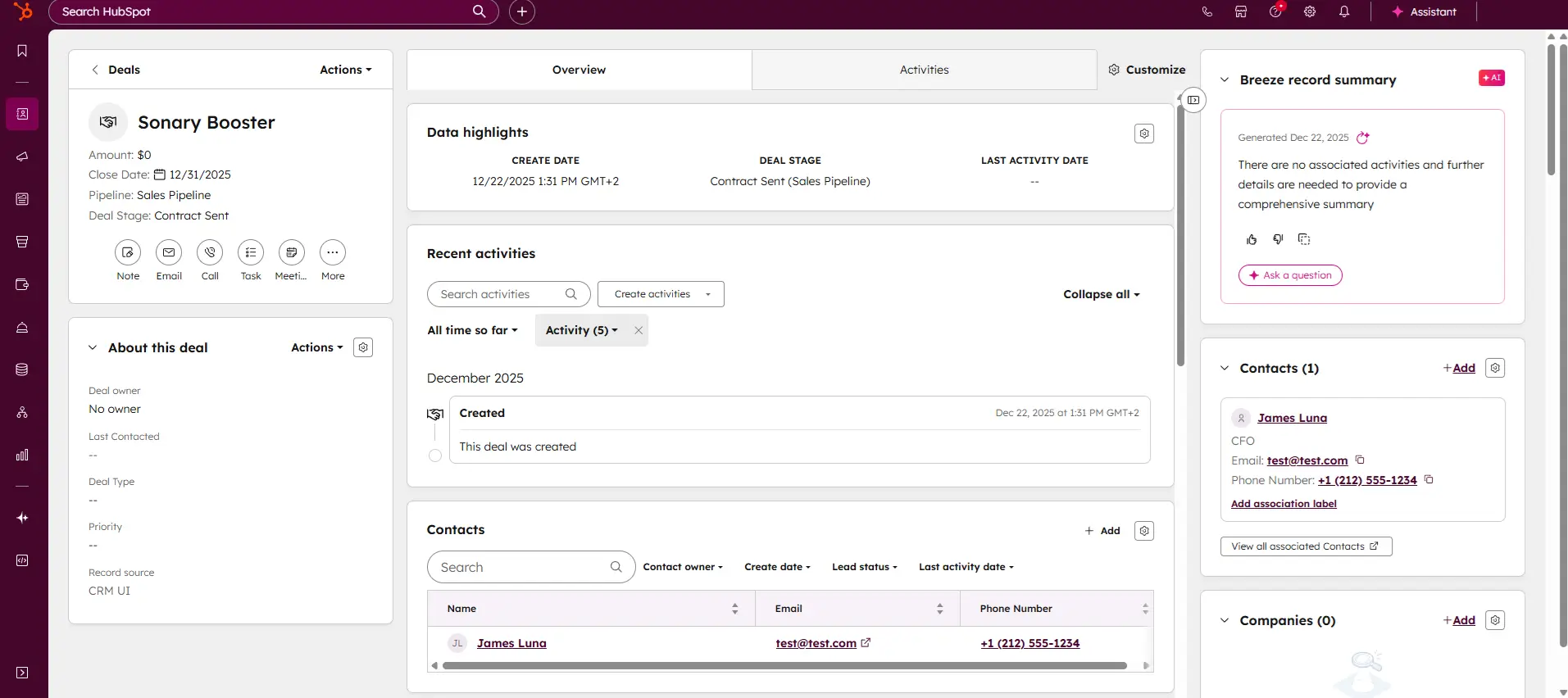
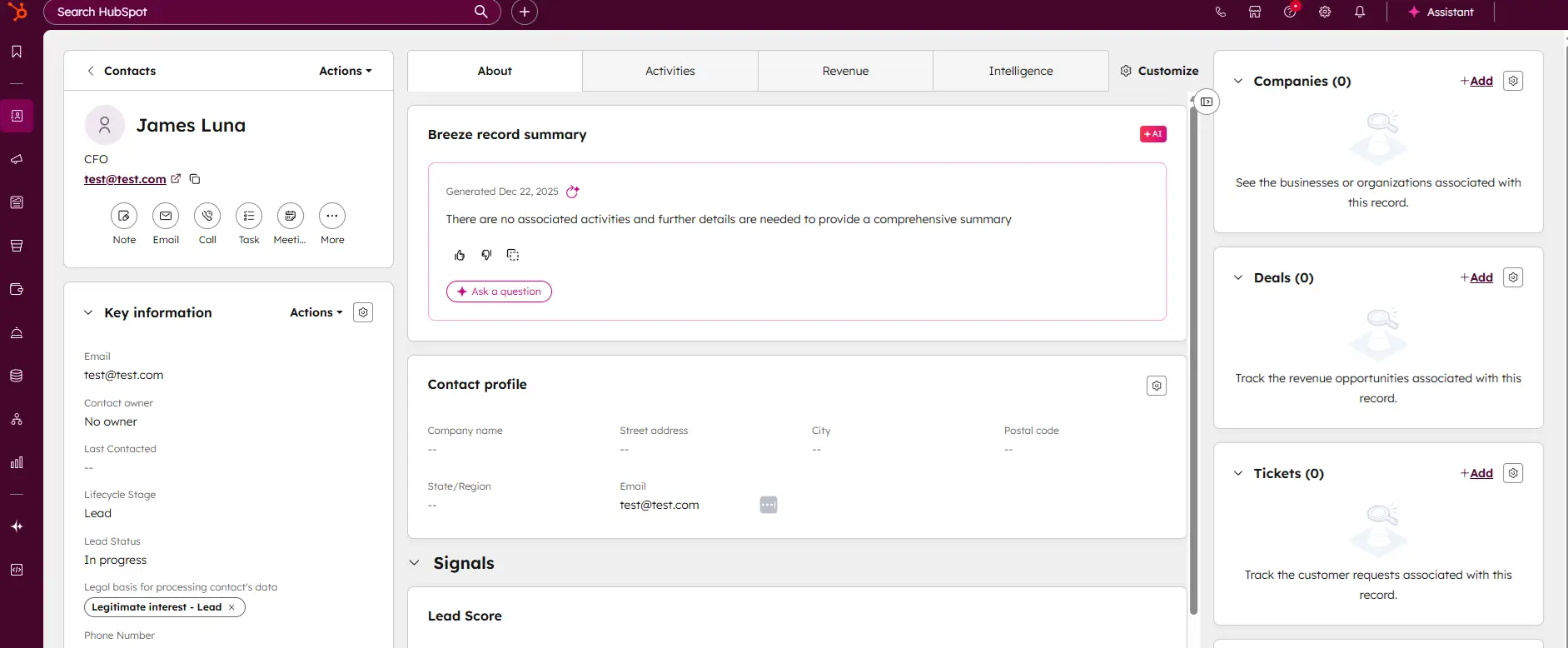
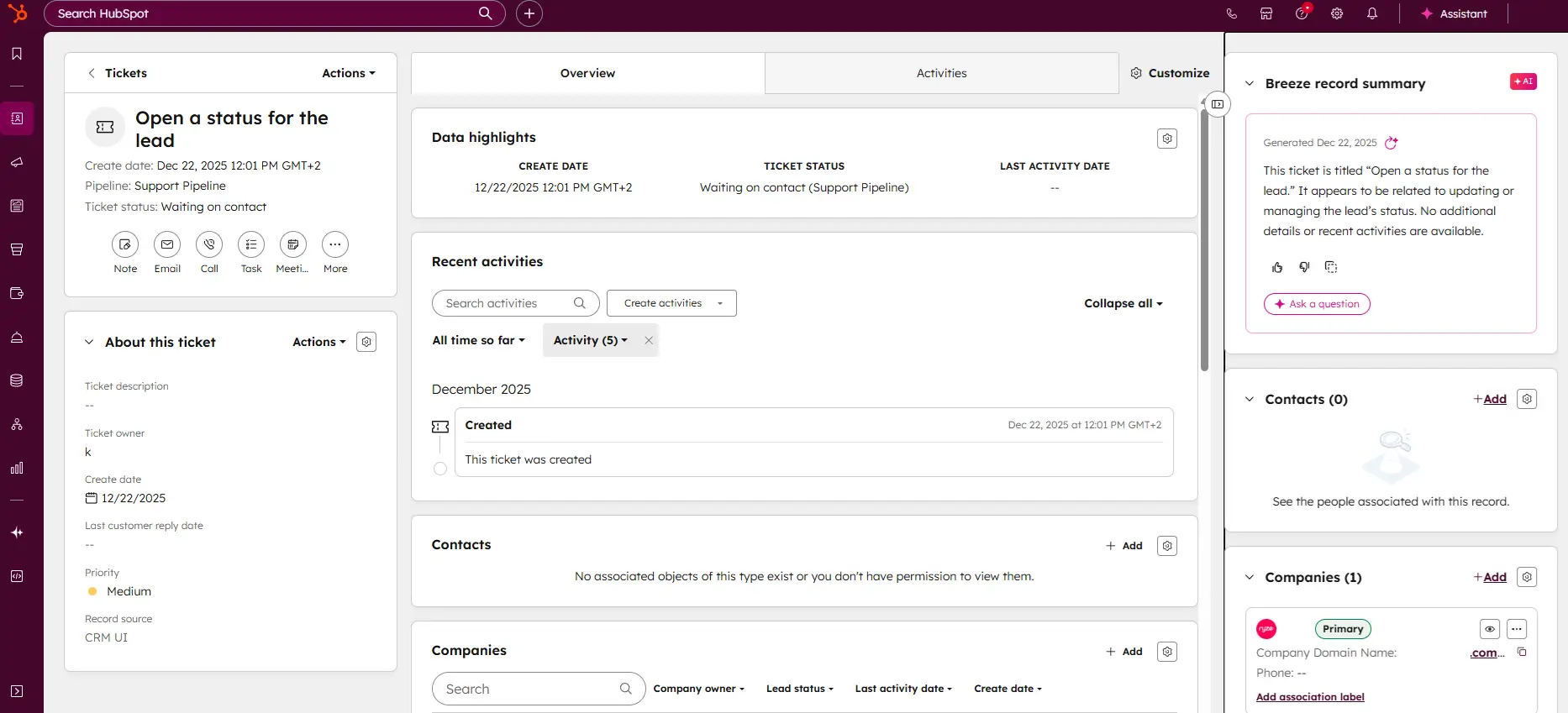
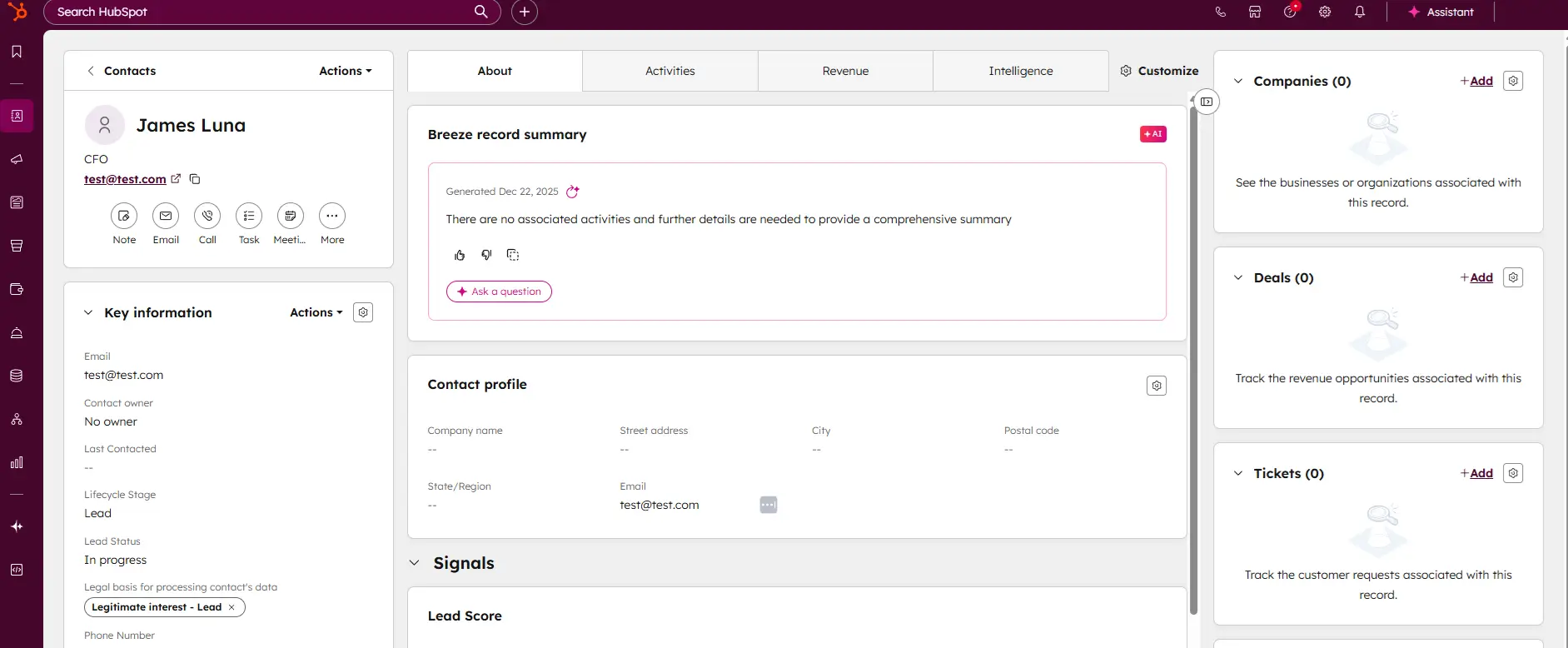
HubSpot CRM is your go-to solution for managing sales and customer relationships with precision and ease. Offering a real-time view of your sales activity, HubSpot provides explicit, actionable reports that give you deep insights into your team's performance. Track deal progress, monitor leads, and pinpoint areas for growth, all within an intuitive platform. With HubSpot CRM, you gain the tools to optimize your sales strategy, enhance collaboration, and drive business success like never before. This Hubspot CRM review will look at pricing, features, and performance of the CRM tool.
Learn more in our full Hubspot review.
Pros & Cons
- Intuitive design
- Free version available
- Reliable customer support
- Numerous workflow templates
- Automation is unavailable for free plan
Features
- Dashboards
- Reporting
- Marketing Analytics
- Pipeline Management
- Call Management
- Account Management
- Collaborative Data
- Mobile App
- Integrations
- Sales AI
- Sales Opportunity
- Quote Management
- Lead Chatbot
- Email Sync
- Email Tracking
- Email Templates
- Schedule Emails
- Customer Contact Management
- Lead Scoring
- Automated Reports
- Marketing Automation
- Sales Pipeline Automation
- Sales Forecasting Automation
- Automated Emails
Pricing
$0
mo/
month
$7
mo/
month
$90
mo/
month
$150
mo/
month
Screenshots

Best for: CRM and operations management.
Description: HubSpot offers a comprehensive CRM platform that automates and organizes business operations like customer relationship management, marketing, and sales.
Why it fits: HubSpot helps small businesses streamline operations by integrating their sales, marketing, and customer service tools into one platform, making it easier to track progress and manage customer relationships.
AI tools can help businesses reduce errors, improve efficiency, and operate more smoothly. Tasks such as inventory management, financial reporting, and even marketing campaigns can be automated with the right AI software. This allows small businesses to focus on growth and customer relationships rather than getting bogged down by operational details.
2. Improving Customer Engagement with AI
Customer service is crucial for any business, and AI tools are now at the forefront of customer engagement strategies. AI-powered chatbots, for example, can provide immediate, 24/7 customer support. This is a game-changer for small businesses that may not have the resources for full-time customer service teams.
Grammarly

Grammarly is an AI-powered tool that helps users compose bold, clear, and mistake-free writing. It also offers a plagiarism checker that searches billions of web pages and documents to find matching… Read more
Grammarly is an AI-powered tool that helps users compose bold, clear, and mistake-free writing. It also offers a plagiarism checker that searches billions of web pages and documents to find matching text.
Learn more in our full Grammarly review.
Pros & Cons
- Offers rewriting suggestions that can help decrease plagiarism percentage
- Mostly accurate in finding plagiarized sources
- Catches even common phrases
- Plagiarism checker is not available in the free plan
- Plagiarized sources do not match in some cases
- Not reliable for edited or paraphrased texts
Features
- Plagiarism Check
- Style Editor
- Citation Finder
- Content Scan
- Text Similarity Detection
- Reporting/Analytics
- Multiple File Format Support
- Spell Checker
- Grammar Check
- Tone Check
- Sentence Formatting
- Vocabulary Recommendations
- Sentence Rephrasing
- Dictionary
- Standalone Application
- Plugin
- Browser Application
- Desktop Application
- Internet Content
- Academic Databases
Pricing
$0
mo/
month
Best for: Enhancing customer communication.
Description: Grammarly ensures all written communications are professional, clear, and grammatically correct. This includes emails, social media interactions, and customer service responses.
Why it fits: Grammarly is essential for small businesses to maintain professionalism in customer engagement and improve the quality of communication across all platforms.
ChatGPT
ChatGPT, developed by OpenAI, is one of the most sophisticated AI-powered conversational models available today. Designed as a versatile AI assistant, ChatGPT excels in a range of applications, from… Read more
ChatGPT, developed by OpenAI, is one of the most sophisticated AI-powered conversational models available today. Designed as a versatile AI assistant, ChatGPT excels in a range of applications, from casual conversations to professional writing, content creation, coding, and beyond. It is built on the GPT-4 architecture (for the premium version) and combines natural language understanding with generative capabilities, making it a robust tool for individuals, businesses, and developers.
Learn more in our full Chatgpt review.
Pros & Cons
- Extensive free service
- High reading grade
- Provides accurate grammar and syntax corrections.
- Easy to navigate and use.
- Text generation can have factual inaccuracies
- Slower than some alternatives
- Limited image generation capacity
Features
- Grammar and Style Checks
- SEO Optimization
- Plagiarism Check
- Collaboration Features
- Content Personalization
- Multilingual Support
- API Access
- Text Editing and Formatting
- Compliance and Security Measures
- Web
- Windows
- macOS
- Android
- iOS
Pricing
$0
mo/
month
$20
mo/
month
$200
mo/
month
$25
/mo or per user/
/mo or per user
Best for: Chatbot and customer support automation.
Description: ChatGPT can act as a customer support tool, automating responses and providing customer service 24/7 through AI-driven chatbots.
Why it fits: Small businesses can use ChatGPT to handle customer inquiries and provide immediate responses, improving customer satisfaction and engagement without needing a dedicated support team.
Synthesia

Synthesia is an AI video creation platform that lets you generate professional-looking videos with AI avatars in minutes. It offers features like text-to-speech, script assistant, and customizable… Read more
Synthesia is an AI video creation platform that lets you generate professional-looking videos with AI avatars in minutes. It offers features like text-to-speech, script assistant, and customizable avatars to streamline video creation without needing actors, studios, or cameras.
Learn more in our full Synthesia review.
Pros & Cons
- Easy to use, no editing skills needed
- Large amount of AI features
- Saves time and money
- Makes videos in 130+ languages
- Creative limitations compared to human videos
- Can get expensive for high-volume video creation
- AI voices and avatars aren’t perfect
Features
- Grammar and Style Checks
- Content Personalization
- Background Noise Reduction
- Green Screen
- Text-to-Video
- Object Tracking
- Pre-Built Templates
- Web
- Windows
- macOS
Pricing
$0
mo/
month
$18
mo/
month
$64
mo/
month
Best for: Personalized customer communication through video.
Description: Synthesia allows businesses to create AI-generated video content with personalized messaging, perfect for customer onboarding, training, or product demos.
Why it fits: Small businesses can use Synthesia to engage customers with personalized, professional-looking videos, enhancing customer communication and interaction.
Through machine learning and natural language processing, AI chatbots can understand customer inquiries, answer questions, and even upsell products or services based on customer preferences. This kind of personalization leads to a better customer experience and, ultimately, increased customer loyalty.
Through machine learning and natural language processing, AI chatbots can understand customer inquiries, answer questions, and even upsell products or services based on customer preferences. This kind of personalization leads to a better customer experience and, ultimately, increased customer loyalty.
3. AI Tools to Start a Business: Enhancing Marketing and Sales
Marketing is one of the most crucial areas where AI can make a difference for small businesses. AI-driven tools help businesses analyze customer data to create targeted marketing campaigns. By understanding consumer behavior, preferences, and buying patterns, small businesses can tailor their messaging to reach the right audience at the right time.
Copy.ai

Copy.ai is an AI writing tool designed to generate high-quality content for millions of users. This state-of-the-art artificial intelligence software provides content across various niches to… Read more
Copy.ai is an AI writing tool designed to generate high-quality content for millions of users. This state-of-the-art artificial intelligence software provides content across various niches to simplify the content creation process. The AI tool includes features like automated content generation, multilingual support, SEO optimization, plagiarism checks, and tailored templates for emails, social media, and e-commerce, all designed to enhance user productivity and creativity. With its advanced technology, users can now generate creative, relevant, and engaging content.
Learn more in our full Copy Ai review.
Pros & Cons
- Both AI writing tool and ChatBot provide high-quality content generation
- AI writing tool provides customization options
- Provides a wide range of templates for various content need
- Some advanced features require learning and practicing for new users
- Slow and glitchy UI and unresponsive at times
Features
- Grammar and Style Checks
- SEO Optimization
- Collaboration Features
- Content Personalization
- API Access
- Text Editing and Formatting
- Compliance and Security Measures
- Web
Pricing
$0
mo/
month
$49
mo/
month
$249
mo/
month
Best for: Creating marketing content and social media posts.
Description: Copy.ai automates the creation of marketing copy, social media posts, and product descriptions, helping businesses craft messages that resonate with their audience.
Why it fits: Small businesses benefit from Copy.ai’s quick and easy content generation for social media and marketing efforts, allowing them to stay competitive without hiring a marketing team.
Jasper AI
Jasper's AI Writing Tool is designed specifically for marketing teams & SEOs. It revolutionizes content creation by leveraging advanced AI to swiftly produce high-quality, engaging content. It offers… Read more
Jasper's AI Writing Tool is designed specifically for marketing teams & SEOs. It revolutionizes content creation by leveraging advanced AI to swiftly produce high-quality, engaging content. It offers extensive language support and integrates seamlessly with numerous platforms for easy publishing. The platform’s main features are designed to scale content production and maintain a brand voice, featuring real-time grammar, style, and plagiarism checks. Ideal for marketers, bloggers, and businesses looking to scale their content efforts efficiently, Jasper's writing tool ensures consistency and quality in all communications, promoting better engagement and SEO performance.
Learn more in our full Jasper review.
Pros & Cons
- Scalability from solo team to large enterprise
- Comprehensive marketing collaboration features for large teams
- Extensive prompt engineering educational materials
- Many helpful templates to get you started
- Not the cheapest option for marketing AI applications
- Requires existing content inputs for optimal results
- Some key features not included in plans (cost extra)
Features
- Grammar and Style Checks
- SEO Optimization
- Plagiarism Check
- Collaboration Features
- Content Personalization
- Multilingual Support
- API Access
- Text Editing and Formatting
- Compliance and Security Measures
- Web
- Windows
- macOS
Pricing
$59
mo/
month
Best for: Scaling content for marketing and SEO.
Description: Jasper AI is built for businesses to scale content creation efforts, especially for marketing and SEO purposes. It helps generate blog posts, email campaigns, and more.
Why it fits: Jasper AI helps small businesses grow their digital presence by providing high-quality, SEO-friendly content to reach a broader audience.
Anyword
Anyword is a powerful AI writing tool designed to optimize content creation for businesses and marketers. It leverages advanced natural language processing to generate high-quality, engaging copy for… Read more
Anyword is a powerful AI writing tool designed to optimize content creation for businesses and marketers. It leverages advanced natural language processing to generate high-quality, engaging copy for ads, blogs, social media, and more. With Anyword, users can streamline their writing process, enhance creativity, and improve the performance of their marketing campaigns.
Learn more in our full Anyword review.
Pros & Cons
- Intuitive user interface with easy navigation.
- High-quality, contextually relevant content generation.
- Extensive customization options for tailored content.
- Fast and efficient performance with minimal delays.
- Phone support is available only for Enterprise plan users.
- Some advanced features may have a learning curve for beginners.
Features
- Grammar and Style Checks
- SEO Optimization
- Plagiarism Check
- Collaboration Features
- Content Personalization
- Multilingual Support
- API Access
- Text Editing and Formatting
- Compliance and Security Measures
- Background Noise Reduction
- Text-to-Video
- Pre-Built Templates
Pricing
$49
mo/
month
$99
mo/
month
$499
mo/
month
Best for: Optimizing content for better conversions.
Description: Anyword helps businesses optimize their marketing content by using AI to predict which phrases or headlines will convert best, generating persuasive content for ads and landing pages.
Why it fits: Small businesses looking to improve conversion rates benefit from Anyword’s AI insights, ensuring their marketing messages are optimized for success.
AI-powered analytics can predict which marketing strategies are most likely to succeed, ensuring that small business owners get the most out of their marketing budget. From social media management to email marketing automation, AI tools are critical for small business AI in sales and marketing.
4. Best AI Tools for Business Development
When it comes to AI tools for business development, small businesses have a wide range of options. AI can help entrepreneurs find new business opportunities by analyzing market trends, customer needs, and competitor strategies. Whether you're launching a new product or looking to expand into new markets, AI can provide data-driven insights that help you make informed decisions.
HubSpot
HubSpot CRM is your go-to solution for managing sales and customer relationships with precision and ease. Offering a real-time view of your sales activity, HubSpot provides explicit, actionable… Read more
HubSpot CRM is your go-to solution for managing sales and customer relationships with precision and ease. Offering a real-time view of your sales activity, HubSpot provides explicit, actionable reports that give you deep insights into your team's performance. Track deal progress, monitor leads, and pinpoint areas for growth, all within an intuitive platform. With HubSpot CRM, you gain the tools to optimize your sales strategy, enhance collaboration, and drive business success like never before. This Hubspot CRM review will look at pricing, features, and performance of the CRM tool.
Learn more in our full Hubspot review.
Pros & Cons
- Intuitive design
- Free version available
- Reliable customer support
- Numerous workflow templates
- Automation is unavailable for free plan
Features
- Dashboards
- Reporting
- Marketing Analytics
- Pipeline Management
- Call Management
- Account Management
- Collaborative Data
- Mobile App
- Integrations
- Sales AI
- Sales Opportunity
- Quote Management
- Lead Chatbot
- Email Sync
- Email Tracking
- Email Templates
- Schedule Emails
- Customer Contact Management
- Lead Scoring
- Automated Reports
- Marketing Automation
- Sales Pipeline Automation
- Sales Forecasting Automation
- Automated Emails
Pricing
$0
mo/
month
$7
mo/
month
$90
mo/
month
$150
mo/
month
Screenshots
Best for: Managing customer relationships and automating marketing.
Description: HubSpot integrates marketing, sales, and service tools, automating key processes in customer relationship management and business growth strategies.
Why it fits: Small businesses benefit from HubSpot’s all-in-one platform, enabling them to grow their customer base and improve customer engagement through streamlined processes.
Claude AI

Claude AI, built by Anthropic, is a safety-first AI assistant for writing, coding, research, data analysis, and agentic tasks. You can use Claude on the web, desktop (Windows/macOS), and mobile (iOS… Read more
Claude AI, built by Anthropic, is a safety-first AI assistant for writing, coding, research, data analysis, and agentic tasks. You can use Claude on the web, desktop (Windows/macOS), and mobile (iOS and Android), through the API, or inside tools via connectors. Claude reads and reasons over long documents and images, searches the web for current information with cited sources, and runs multi-step work through Claude Code and connectors (remote MCP). In 2026 the lineup runs on Anthropic's newest models — Opus 4.8, Sonnet 5, and Haiku 4.5 — with plans for individuals, teams, and enterprises.
Learn more in our full Claude Ai review.
Pros & Cons
- Runs on Anthropic's newest models (Opus 4.8, Sonnet 5, Haiku 4.5) with very large context windows
- Genuinely useful free plan; Pro is competitively priced at $20/mo (less billed annually)
- Strong at coding and agentic work via Claude Code and MCP connectors
- Web search with cited sources, vision, and extended reasoning built in
- Heaviest usage requires the Max plan (from $100/mo)
- Team plan requires a minimum of 5 seats
- Usage is capped by rolling session limits rather than a fixed message count, which can interrupt heavy sessions
Features
- Grammar and Style Checks
- Collaboration Features
- Content Personalization
- Multilingual Support
- API Access
- Compliance and Security Measures
- Web
- Windows
- macOS
- iOS
Pricing
$0
mo/
month
$20
mo/
month
$25
/mo or per user/
/mo or per user
Best for: Complex problem solving and business strategy.
Description: Claude AI excels in reasoning, helping businesses analyze data, plan strategies, and solve complex problems. It can also assist with content creation and automation.
Why it fits: For small businesses looking to develop and refine their business strategies, Claude AI offers advanced reasoning and analysis capabilities that improve decision-making and planning.
By utilizing AI for research, small businesses can identify gaps in the market, understand customer pain points, and even predict future trends. This allows business owners to stay ahead of the competition and develop products and services that are in high demand.
5. AI for Financial Management and Forecasting
Financial management is a crucial aspect of running a small business, and AI tools can assist with budgeting, forecasting, and even risk management. By analyzing historical data, AI can predict future trends in revenue and expenses, helping businesses make informed decisions about growth and investment.
Jasper AI
Jasper's AI Writing Tool is designed specifically for marketing teams & SEOs. It revolutionizes content creation by leveraging advanced AI to swiftly produce high-quality, engaging content. It offers… Read more
Jasper's AI Writing Tool is designed specifically for marketing teams & SEOs. It revolutionizes content creation by leveraging advanced AI to swiftly produce high-quality, engaging content. It offers extensive language support and integrates seamlessly with numerous platforms for easy publishing. The platform’s main features are designed to scale content production and maintain a brand voice, featuring real-time grammar, style, and plagiarism checks. Ideal for marketers, bloggers, and businesses looking to scale their content efforts efficiently, Jasper's writing tool ensures consistency and quality in all communications, promoting better engagement and SEO performance.
Learn more in our full Jasper review.
Pros & Cons
- Scalability from solo team to large enterprise
- Comprehensive marketing collaboration features for large teams
- Extensive prompt engineering educational materials
- Many helpful templates to get you started
- Not the cheapest option for marketing AI applications
- Requires existing content inputs for optimal results
- Some key features not included in plans (cost extra)
Features
- Grammar and Style Checks
- SEO Optimization
- Plagiarism Check
- Collaboration Features
- Content Personalization
- Multilingual Support
- API Access
- Text Editing and Formatting
- Compliance and Security Measures
- Web
- Windows
- macOS
Pricing
$59
mo/
month
Best for: Budget forecasting and planning.
Description: While primarily a content tool, Jasper AI can assist with financial forecasting and budgeting by generating reports and analyzing trends based on historical data.
Why it fits: Small businesses can use Jasper AI to analyze financial trends and forecast budgets, helping them make informed decisions for long-term business sustainability.
Claude AI
Claude AI, built by Anthropic, is a safety-first AI assistant for writing, coding, research, data analysis, and agentic tasks. You can use Claude on the web, desktop (Windows/macOS), and mobile (iOS… Read more
Claude AI, built by Anthropic, is a safety-first AI assistant for writing, coding, research, data analysis, and agentic tasks. You can use Claude on the web, desktop (Windows/macOS), and mobile (iOS and Android), through the API, or inside tools via connectors. Claude reads and reasons over long documents and images, searches the web for current information with cited sources, and runs multi-step work through Claude Code and connectors (remote MCP). In 2026 the lineup runs on Anthropic's newest models — Opus 4.8, Sonnet 5, and Haiku 4.5 — with plans for individuals, teams, and enterprises.
Learn more in our full Claude Ai review.
Pros & Cons
- Runs on Anthropic's newest models (Opus 4.8, Sonnet 5, Haiku 4.5) with very large context windows
- Genuinely useful free plan; Pro is competitively priced at $20/mo (less billed annually)
- Strong at coding and agentic work via Claude Code and MCP connectors
- Web search with cited sources, vision, and extended reasoning built in
- Heaviest usage requires the Max plan (from $100/mo)
- Team plan requires a minimum of 5 seats
- Usage is capped by rolling session limits rather than a fixed message count, which can interrupt heavy sessions
Features
- Grammar and Style Checks
- Collaboration Features
- Content Personalization
- Multilingual Support
- API Access
- Compliance and Security Measures
- Web
- Windows
- macOS
- iOS
Pricing
$0
mo/
month
$20
mo/
month
$25
/mo or per user/
/mo or per user
Best for: Financial planning and data analysis.
Description: Claude AI can assist businesses by analyzing financial data and creating forecasts, helping owners make smarter financial decisions based on data-driven insights.
Why it fits: Small businesses can streamline their financial planning by using Claude AI to understand financial patterns and predict future trends, reducing the risk of financial mismanagement.
For small business owners who may not have extensive financial expertise, AI software can provide intuitive financial reports, making it easier to track cash flow, identify profitable ventures, and avoid potential financial pitfalls.
6. AI Tools for Small Business Growth and Scalability
As your small business grows, the need for efficient tools becomes more critical. AI can scale with your business, providing solutions that grow alongside your company. Whether you're managing a few clients or hundreds, AI tools can handle large volumes of data without compromising on accuracy or efficiency.
Figma
Figma is a browser-based design platform built for collaboration. It combines vector design, prototyping, feedback, and developer handoff into one shared workspace. Instead of juggling multiple… Read more
Figma is a browser-based design platform built for collaboration. It combines vector design, prototyping, feedback, and developer handoff into one shared workspace. Instead of juggling multiple tools, small businesses can design websites, mobile apps, and marketing visuals in one place. With flexible pricing and smart seat types, Figma gives SMBs the same professional design power that large teams enjoy.
Learn more in our full Figma review.
Pros & Cons
- Real-time co-editing improves teamwork and eliminates file chaos.
- Smart layout and prototyping tools reduce repetitive work.
- Flexible pricing suits both small teams and larger organizations.
- No native CMYK support, which limits print design workflows.
- Lacks advanced photo editing capabilities.
- Requires careful seat management to avoid paying for unused licenses.
Features
- API
- Image Database
- Collaboration Tools
- Content Import/Export
- Content Management
- Edits Vector & Raster Graphics
- Touch Interface Support
- Pro-Level Typography
- Print Management
- Publishing / Sharing
- Multi-Channel Marketing
- Multi-Language
- Multiple Format Support
- Engagement Analytics
- Animation
- Document Storage
- Access Controls/Permissions
- Freelancer Screening & Profiles
- Search/Filter
- Photo Editing
- Offline Editing
- Rich Text Editor
- WYSIWYG Editor
- Drag & Drop
Pricing
$0
mo/
month
$16
mo/
month
Best for: Collaborative design for scaling products.
Description: Figma allows businesses to collaborate on design projects, helping to create web designs, product prototypes, and marketing materials.
Why it fits: Small businesses scaling up their digital presence can benefit from Figma’s collaboration features, ensuring efficient and professional design work.
DALL · E
ChatGPT, developed by OpenAI, is one of the most sophisticated AI-powered conversational models available today. Designed as a versatile AI assistant, ChatGPT excels in a range of applications, from… Read more
ChatGPT, developed by OpenAI, is one of the most sophisticated AI-powered conversational models available today. Designed as a versatile AI assistant, ChatGPT excels in a range of applications, from casual conversations to professional writing, content creation, coding, and beyond. It is built on the GPT-4 architecture (for the premium version) and combines natural language understanding with generative capabilities, making it a robust tool for individuals, businesses, and developers.
Learn more in our full Chatgpt review.
Pros & Cons
- Extensive free service
- High reading grade
- Provides accurate grammar and syntax corrections.
- Easy to navigate and use.
- Text generation can have factual inaccuracies
- Slower than some alternatives
- Limited image generation capacity
Features
- Grammar and Style Checks
- SEO Optimization
- Plagiarism Check
- Collaboration Features
- Content Personalization
- Multilingual Support
- API Access
- Text Editing and Formatting
- Compliance and Security Measures
- Web
- Windows
- macOS
- Android
- iOS
Pricing
$0
mo/
month
$20
mo/
month
$200
mo/
month
$25
/mo or per user/
/mo or per user
Best for: Creating visuals for marketing campaigns.
Description: DALL · E is an AI image generator that creates realistic visuals based on text descriptions, helping businesses generate marketing materials quickly.
Why it fits: Small businesses growing their brand can use DALL · E to produce custom visuals, saving money on graphic design while creating eye-catching marketing materials.
Pixlr

Pixlr is a versatile online AI-powered photo editing suite. Photo Editor is its primary tool and offers a wide array of features for both beginners and experienced users. It provides capabilities… Read more
Pixlr is a versatile online AI-powered photo editing suite. Photo Editor is its primary tool and offers a wide array of features for both beginners and experienced users. It provides capabilities for image generation, background and object removal, collage creation, and more. Users can customize images with various editing tools such as cropping, adjusting hues, and applying filters. You can also try Express, Batch Editor, Remove BG, and Designer. For those looking to animate their designs, Pixlr includes animation presets and a timeline editor. The tool is free, but premium subscriptions unlock advanced features, unlimited use, and ad removal. The AI-powered photo editing tool streamlines content creation, enhancing your business’s marketing and design efforts without requiring extensive graphic design skills or resources.
Learn more in our full Pixlr review.
Pros & Cons
- Intuitive interface and a minimal learning curve
- Powerful and fast AI functions
- Multiple tools to maximize value for money
- Cross-platform support for editing on the go
- AI image generation instructions need to be precise
- You only get limited credits for free
- No live chat support
Features
- Text-to-Video
- Object Tracking
- Pre-Built Templates
Pricing
$1.49
mo/
month
$6.49
mo/
month
$11.99
mo/
month
Best for: Quick and affordable image editing.
Description: Pixlr offers a simple, user-friendly interface for editing photos and creating designs, ideal for small businesses that need polished visuals quickly.
Why it fits: Small businesses looking to scale their online presence can use Pixlr to create professional-looking visuals without needing a large design budget.
AI's ability to analyze data and optimize processes ensures that as your business expands, you're prepared to handle increased demand, enhance customer service, and continue growing without missing opportunities. Best AI software for business makes scalability achievable even for the smallest enterprises.
7. Free Artificial Intelligence Apps for Small Business
The great news for small businesses is that many AI tools are available at little to no cost. These free artificial intelligence apps can provide essential functions such as basic customer support, marketing automation, and data analysis. By using these free tools, small businesses can dip their toes into the world of AI without committing to a significant investment.
Grammarly (Free Version)
Grammarly is an AI-powered tool that helps users compose bold, clear, and mistake-free writing. It also offers a plagiarism checker that searches billions of web pages and documents to find matching… Read more
Grammarly is an AI-powered tool that helps users compose bold, clear, and mistake-free writing. It also offers a plagiarism checker that searches billions of web pages and documents to find matching text.
Learn more in our full Grammarly review.
Pros & Cons
- Offers rewriting suggestions that can help decrease plagiarism percentage
- Mostly accurate in finding plagiarized sources
- Catches even common phrases
- Plagiarism checker is not available in the free plan
- Plagiarized sources do not match in some cases
- Not reliable for edited or paraphrased texts
Features
- Plagiarism Check
- Style Editor
- Citation Finder
- Content Scan
- Text Similarity Detection
- Reporting/Analytics
- Multiple File Format Support
- Spell Checker
- Grammar Check
- Tone Check
- Sentence Formatting
- Vocabulary Recommendations
- Sentence Rephrasing
- Dictionary
- Standalone Application
- Plugin
- Browser Application
- Desktop Application
- Internet Content
- Academic Databases
Pricing
$0
mo/
month
Best for: Improving writing quality.
Description: Grammarly’s free version offers essential grammar and spelling checks, making it a great tool for small businesses to enhance the quality of their communication.
Why it fits: Small businesses with limited budgets can benefit from the free version of Grammarly to ensure all customer communications and content are error-free.
ChatGPT (Free Version)
ChatGPT, developed by OpenAI, is one of the most sophisticated AI-powered conversational models available today. Designed as a versatile AI assistant, ChatGPT excels in a range of applications, from… Read more
ChatGPT, developed by OpenAI, is one of the most sophisticated AI-powered conversational models available today. Designed as a versatile AI assistant, ChatGPT excels in a range of applications, from casual conversations to professional writing, content creation, coding, and beyond. It is built on the GPT-4 architecture (for the premium version) and combines natural language understanding with generative capabilities, making it a robust tool for individuals, businesses, and developers.
Learn more in our full Chatgpt review.
Pros & Cons
- Extensive free service
- High reading grade
- Provides accurate grammar and syntax corrections.
- Easy to navigate and use.
- Text generation can have factual inaccuracies
- Slower than some alternatives
- Limited image generation capacity
Features
- Grammar and Style Checks
- SEO Optimization
- Plagiarism Check
- Collaboration Features
- Content Personalization
- Multilingual Support
- API Access
- Text Editing and Formatting
- Compliance and Security Measures
- Web
- Windows
- macOS
- Android
- iOS
Pricing
$0
mo/
month
$20
mo/
month
$200
mo/
month
$25
/mo or per user/
/mo or per user
Best for: Free content creation and idea generation.
Description: The free version of ChatGPT allows businesses to generate content, ideas, and even automate customer responses without needing to pay for premium tools.
Why it fits: Small businesses with limited budgets can use the free version of ChatGPT to automate content creation and customer support.
However, as your business grows, you may want to explore premium AI solutions that offer more advanced features and greater customization. The best approach is to start with free or low-cost AI tools and upgrade as your needs evolve.
How AI Can Help Small Businesses Compete with Larger Companies
One of the most significant advantages of AI is that it levels the playing field between small and large businesses. With the right AI tools to start a business, even small companies can compete on a global scale. AI enables small businesses to operate more efficiently, reach a wider audience, and make smarter, data-driven decisions.
By using AI for everything from customer service to marketing, small businesses can offer the same level of service and engagement as their larger competitors. With AI handling the heavy lifting, small business owners can focus on building relationships with customers and growing their brand.
See also
- Category by category breakdowns live on the best AI software for small business hub if you would rather compare inside one job at a time.
- Owners whose real bottleneck is the inbox and the calendar should jump straight to best AI productivity tools.
- Customer questions arriving after closing time are a staffing gap, and best AI chatbot for customer questions covers the tools that answer the repeat ones.
- Marketing is usually where the first visible return shows up, so scan best AI tools for marketing next.
Conclusion:
As we’ve explored, AI tools for small business are essential for companies looking to stay competitive in today's market. The ability to automate tasks, personalize customer experiences, and make informed decisions based on data makes AI a valuable asset for any business, regardless of size.
Whether you're just getting started or looking to grow your existing business, adopting the best AI tools for business can help you achieve your goals. By incorporating AI tools for business development and operational efficiency, small businesses can unlock new opportunities and navigate the challenges of growth more effectively.
With so many affordable and even free artificial intelligence app options available, there's never been a better time to start leveraging AI to transform your business.