
How to Build a Business Website with AI: Our 30-Minute Test

You can build a real business website with AI, without code, a developer or a designer.
The process is simple: describe your business, tell the AI which pages and features you need, let it generate the website, test the important functions, and publish it. We followed those five steps using Base44, then checked what actually worked and what still needed fixing.
In November 2026 we built a six-page plumber website on Base44's free plan in about 30 minutes, from one detailed prompt and five rounds of fixes, using 4.7 of the 25 monthly free credits. The click-to-call number worked, the quote form delivered leads to email almost instantly, and the AI generated the initial website copy and generated every image.
The catch is not technical: the result is only as good as your description of the business. For a simple business or brochure website, an AI website builder can be one of the fastest ways to get online, especially if you already know which pages and features your business needs. For an online store or a site that lives on organic search, established builders like Shopify, Wix, WordPress, Hostinger, Site123 or Bluehost are still the safer choice.
There is a lot of hype around building websites with AI right now, and most of it skips the part business owners actually care about: does the site work when a real customer taps the phone number? So instead of describing the tools, we built a site and tested it.
Everything below comes from that build, done by our SEO lead on a fictional New York City plumbing company we called P-NYC.
The same process works on Lovable, Bolt AI, and Webflow. You do not need to know how to code on any of them.
Can AI Really Build a Working Business Website? What Happened When We Tried
Yes - Base44 turned one detailed prompt into a working six-page plumber website in about 10 minutes, and testing and fixing it took the rest of a 30-minute session. The whole build used 4.7 of the free plan's 25 monthly credits, inside its daily limit of 6.
Here is where the 30 minutes went:
- About 5 minutes thinking and writing the first prompt.
- About 10 minutes of the AI building the site, with no input from us.
- About 15 minutes testing every button and form, and fixing what was off, across five rounds of edits.
And here is what the AI produced on its own:
- Six pages: Home, Services, Gallery, About, Blog and Contact.
- All of the copy, including three blog articles, plus six generated images for the hero and gallery.
- A custom droplet logo in the green, blue and white palette we asked for.
- A click-to-call phone number in the header and hero, and a service-area section for New York City plus a 20-mile radius.
- A quote form that saves every request to the site's dashboard and emails it out.
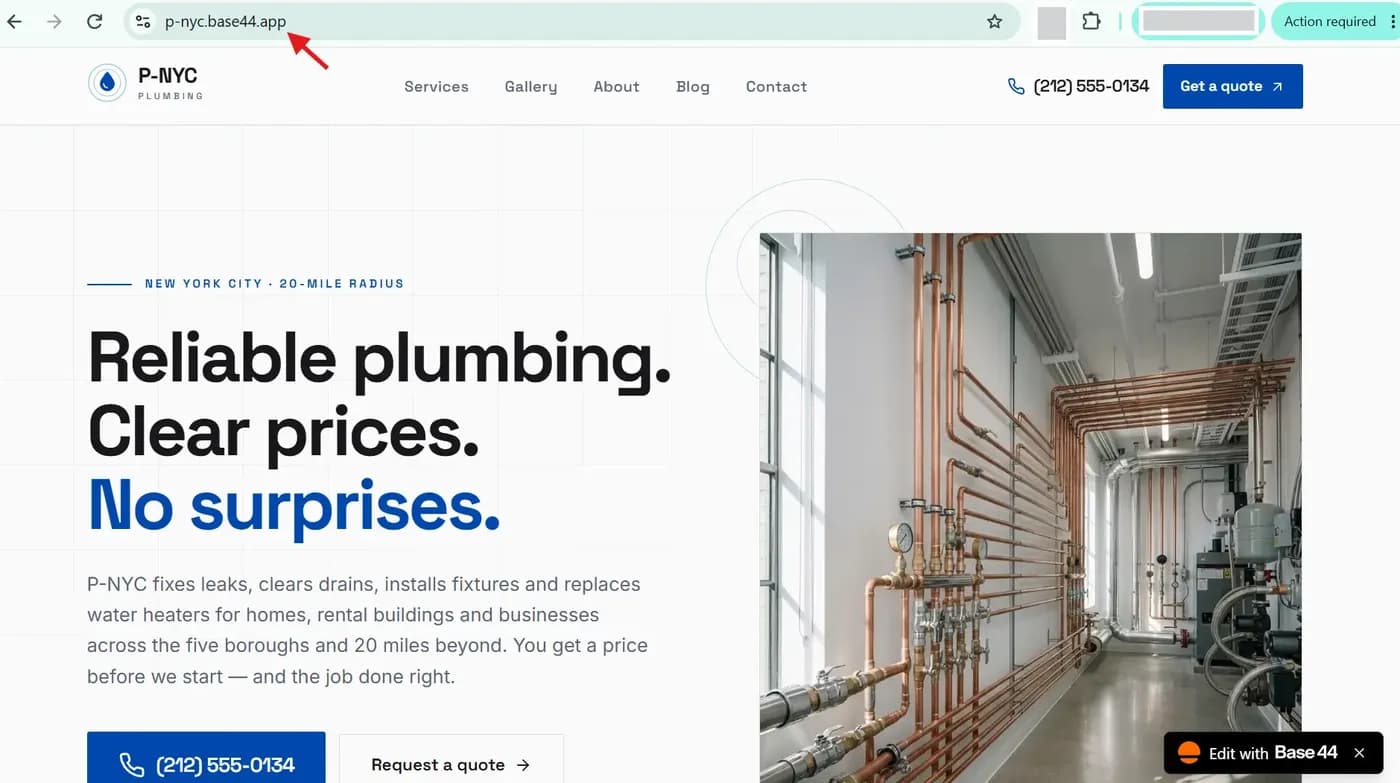
Want to see the result? Explore the P-NYC test website and check the design, navigation, and service pages yourself. This is a demonstration website for a fictional plumbing business, not a real company accepting customer bookings.
Almost everything we asked for in the first prompt was there on the first try. The fixes were mostly design: some elements came out too big or too small, and the layout was slightly different from what we pictured. Nothing needed code.
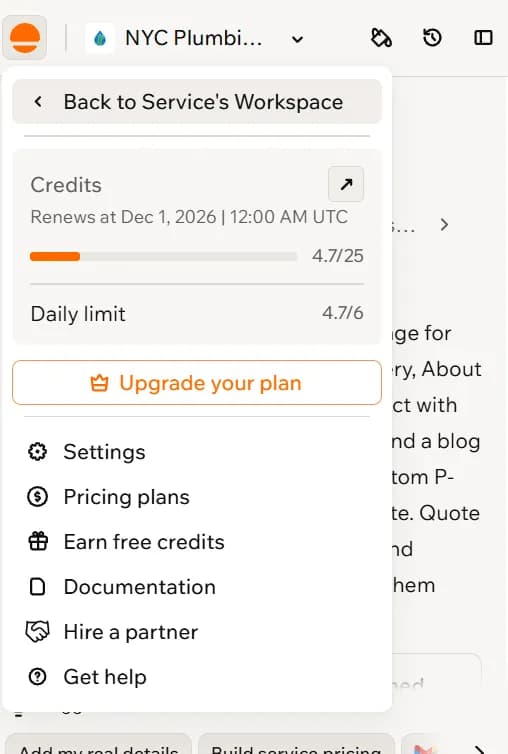
Credit usage after the full build and five rounds of edits: 4.7 of 25 monthly credits on Base44's free plan.
What Prompt Should You Use to Build a Business Website with AI?
Our plumber site was built from a three-line prompt that covered the business, its pages, its must-have features, its service area and its colors. Here it is exactly as we typed it, so you can copy it and swap in your own details:
I want to build a website for my plumbing company with our services, a gallery of finished projects, a blog, and a quote form that sends each lead to my email; include a clickable phone number; and create a logo for this website i offer services in NYC and the surrounding area within a 20-mile radius (add a map image of it in the About Us
website should include: home page service pages about us contact us (phone + form) Blog
Color palette: Green, blue, white
Notice what it does not include: no code, no layout instructions, no font names. It is a list of business requirements, the same brief you would hand a web agency. That is why it works.
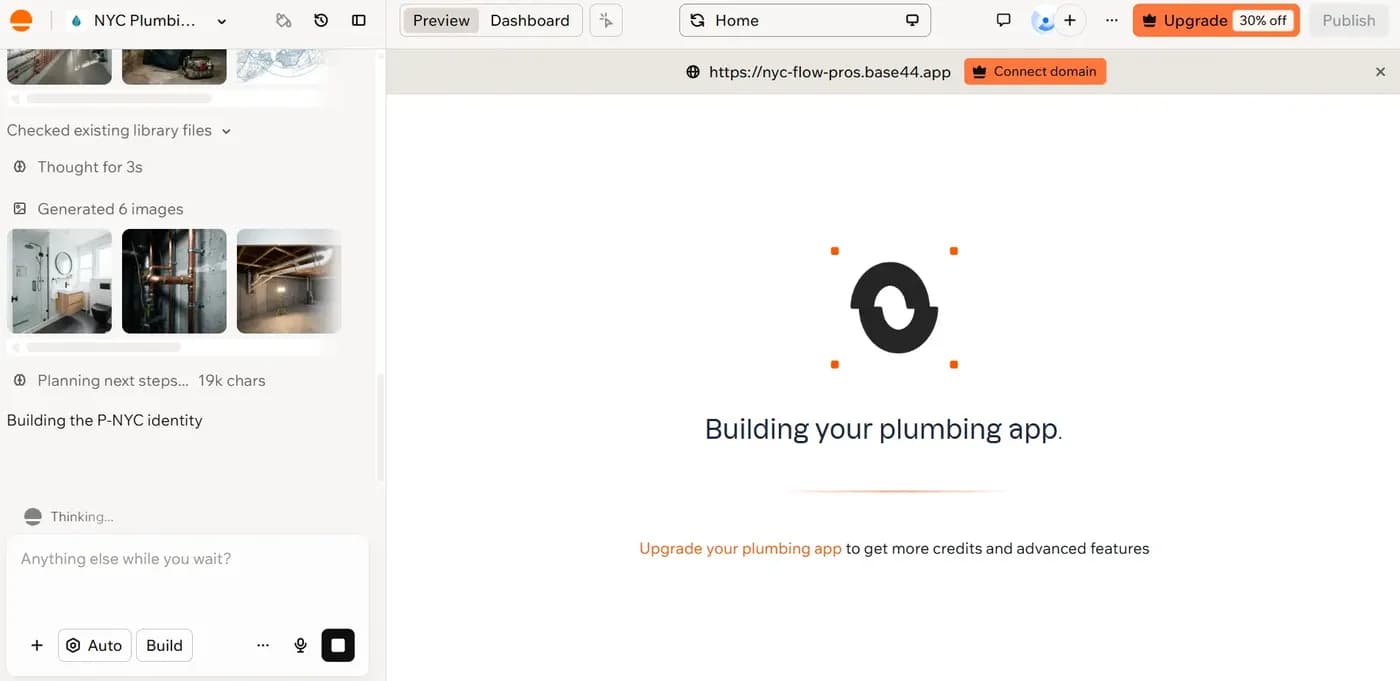
Base44 planning and building the site from the prompt above.
How Do You Build a Business Website with AI, Step by Step?
Building a business website with AI takes five steps: write a detailed prompt, let the AI build, test everything a customer would touch, fix in batches, and publish. On our test site, testing and fixing took longer than the build itself.
Step 1: Write One Prompt That Describes the Whole Business
Your first prompt does most of the work. Avoid two common mistakes: dozens of tiny prompts ("change the blue," "make the logo bigger") that move the site forward one detail at a time, or one giant prompt that crams in design, backend logic and a store and comes back full of bugs. Use the structure of our prompt above and cover:
- What you do: your exact services, such as emergency drain unclogging, pipe and gutter cleaning, and general repairs.
- Pages: list them by name. If you do not, you will likely get fewer pages than you need.
- What the site must do: click-to-call, a quote form that sends leads to your email, a blog.
- Where you work: your city and service radius, so the AI can build a service-area section.
- Look and feel: a color palette and a logo request if you do not have one. Add a tone of voice if you have a preference, such as down-to-earth and honest.
Step 2: Let the AI Build, and Do Not Interrupt It
Hit enter and wait. Our site took about 10 minutes to build, during which the AI planned the design, wrote the copy, generated the images and set up the backend for the quote form. Sending new instructions mid-build only splits its attention.
Step 3: Test Everything a Customer Would Touch
This is the step most guides skip, and on our build it took the most time. A site that looks finished is not the same as a site that works. Check each of these on a real phone:
- Click-to-call: tap the number and make sure it dials. On our site it worked from the start, because the AI used a standard tel: link.
- The quote form: submit a test request and check your inbox. Ours delivered almost instantly, but only after we connected our own email inbox to it.
- Every page and button: click through the whole menu, including the blog and gallery.
- Mobile layout: open the website on a real phone and check that the text is readable, buttons are easy to tap, and nothing extends beyond the screen.
- Business information: verify the phone number, email address, service area, opening hours, and any claims the AI generated. Do not publish invented reviews, certifications, or project photos as if they were real.
- Basic SEO: check that every important page has a descriptive title, a clear main heading, and a URL that makes sense. Make sure search engines are not blocked from indexing the published website.
Step 4: Fix in Batches (And Use Click-to-Edit)
Do not fix things one by one. Walk through the whole site, write a numbered list of the changes you want, and send them together in one prompt. A batched request keeps the AI looking at the whole site instead of fixing one thing and breaking another. We needed five rounds of edits in total.
For visual tweaks, Base44, Lovable, Bolt AI and Webflow let you click directly on part of the page. In Base44 you switch on the element selector, click a section, and type the change into a box that opens on top of it.
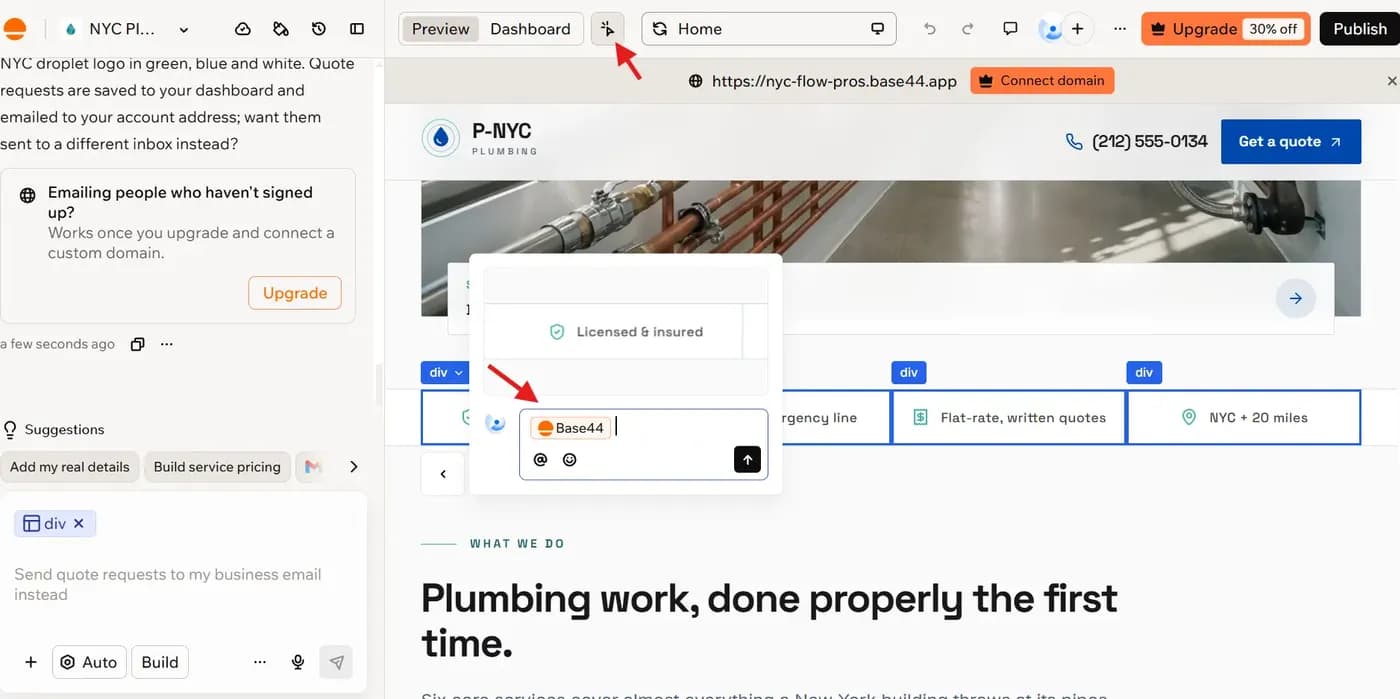
Editing one specific section in Base44: select the element, then describe the change.
Step 5: Publish and Connect Your Domain
Base44 and Lovable host the site for you, so there is no server to set up. On Base44's free plan, your site goes live on a base44.app address the moment you publish. To use your own domain, such as nycplumber.com, you need a paid plan: Starter and up on Base44, which includes a free domain for the first year, and Pro on Lovable. If you build with Claude or Claude Code instead, you buy a domain from a registrar like GoDaddy or Domain.com and hosting separately, and Claude walks you through connecting them.
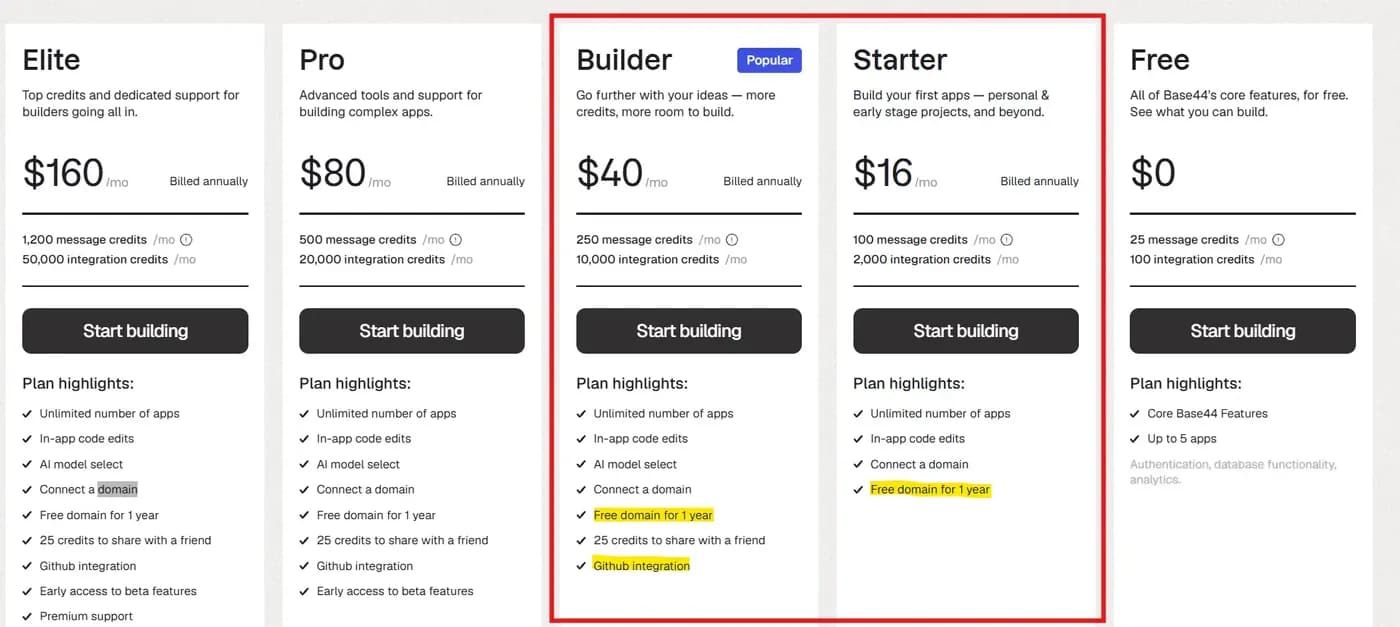
Base44 plans, verified on Base44's pricing page on 23 November 2026: connecting a domain starts at Starter, GitHub integration starts at Builder.
What Does an AI Business Website Cost After Launch?
Our test used 4.7 free credits, but that is not the same as the long-term cost of running a business website. Once you publish, you may need to pay for a custom domain, a hosting or platform subscription, additional AI usage, and third-party services.
Before committing to a platform, check what happens when you exceed the free plan's limits, whether you can export your website, and what you would pay to keep it running for a full year. A free prototype can be a useful starting point, but a business website needs a sustainable setup.
What Is the Hardest Part of Building a Website with AI?
The hardest part of an AI website build is knowing what to ask for - the AI builds what you describe, so a vague description gets a thin site. Our test prompt worked because it was written by someone who knows what a service business website needs: a quote form, a service area, a gallery for proof, a blog for search traffic.
If we had typed "I want a website for a plumber," we would expect something very different: probably two pages at most, minimal color, and none of the lead-capture features. That is the real skill shift. You no longer need to know how to build a website, but you still need to know what yours is for. Before you write your prompt, answer three questions: what do customers need to see before they call you, what do you want them to do on the site, and what do they ask you most often?
Do You Need a Developer or Designer to Build a Website with AI?
No - on our test, the AI handled every job a developer and a designer would normally do, from the quote form backend to the logo and images. Base44 also gave us a ready dashboard for the site's data, users, analytics and domains without any setup. What it cannot replace is your knowledge of the business, which is why the prompt matters so much.
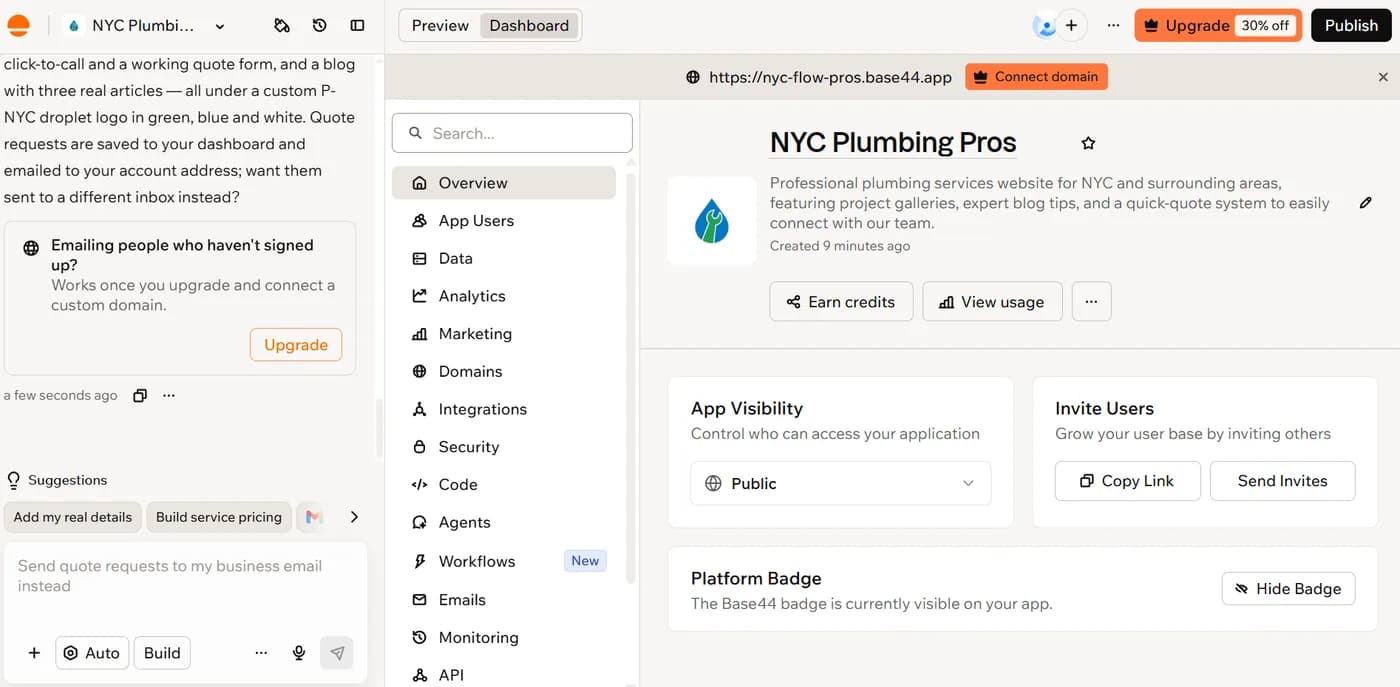
The Base44 dashboard for our test site, with no setup.
Can Google and AI Search Read a Website Built with AI?
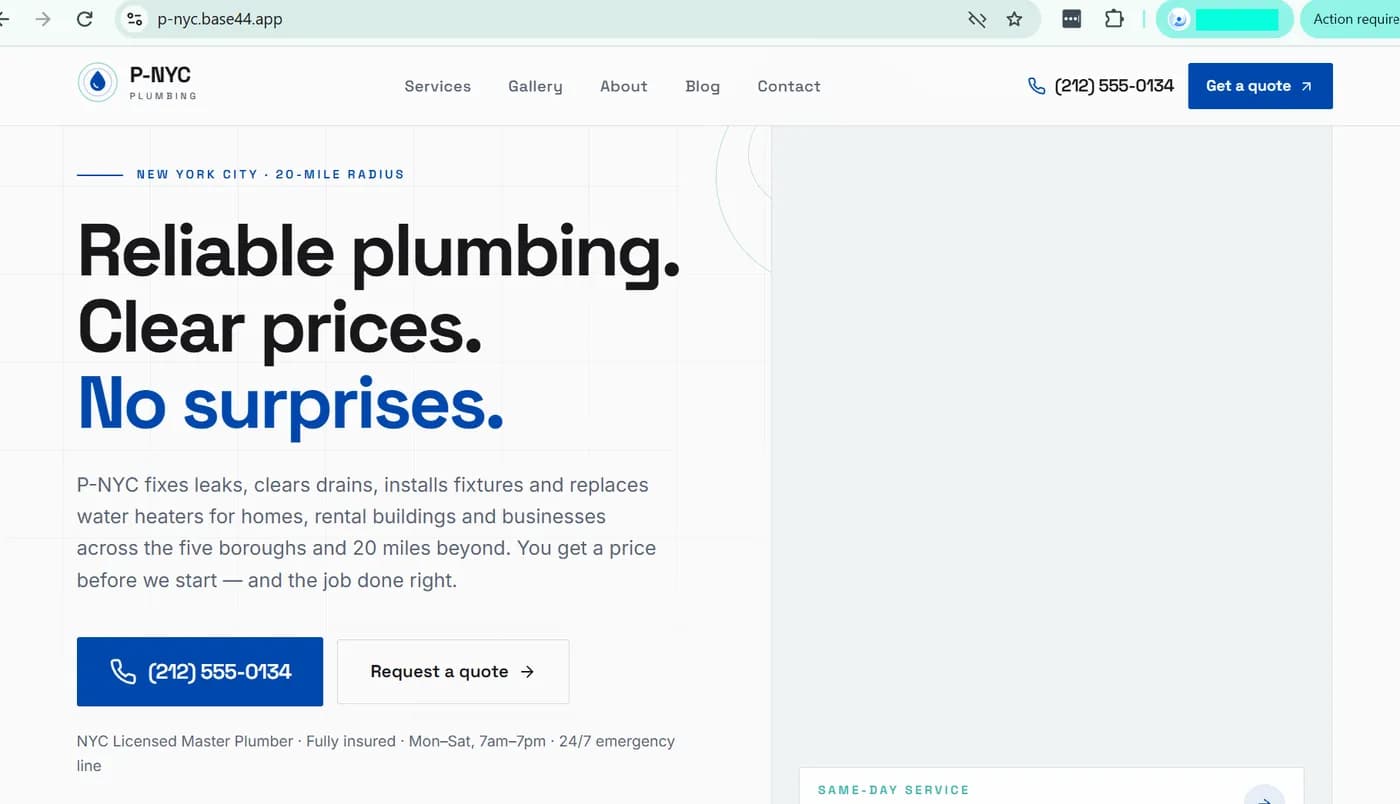
Our Base44 site could - with JavaScript turned off in the browser, the P-NYC homepage still showed its headline, service description, phone number and full navigation. This is a useful technical check because many AI crawlers primarily rely on the HTML they receive rather than rendering a page as a full browser would.
Google can render JavaScript, but content that is available in the initial HTML is generally easier for different crawlers to access.
Our test confirmed that the homepage's main text and navigation were available without JavaScript, although it does not prove that every page will be indexed or appear in AI search results. The only thing missing without JavaScript was the hero image.
The P-NYC homepage with JavaScript disabled: the text is still there, only the image is gone.
Readable is not the same as optimized, though. An AI-built website can rank on Google, but its SEO performance depends on the platform and how the site is built. Before choosing a builder, check whether you can edit title tags and meta descriptions, control URLs, add structured data, manage redirects, and create an XML sitemap. Also check whether important content is available to search crawlers. Established platforms such as WordPress, Wix, and Shopify offer mature SEO tools, but that does not automatically make every site built on them better optimized.
When Should You Not Build Your Website with AI?
Skip the AI builder when your site is more than a business presence: an online store, a site that depends on organic search, or one you update every week. For a simple business or brochure site, building with AI is easy and fast. Beyond that, a regular platform is the better tool.
1. You Are Building an Online Store
If you are building an online store, Shopify or Wix eCommerce may be a better starting point than a general-purpose AI app builder. Selling products involves more than designing pages: you need reliable checkout, inventory management, shipping settings, taxes, payment integrations, and order tracking. AI builders can create custom shopping experiences, but you should verify that these essential features work reliably before using one for a live store.
E-commerce needs reliable, native integrations with social channels, Amazon, payment gateways and other aggregators, and forcing an AI builder to handle them gets messy very quickly.
2. Search Traffic Is Your Main Channel
An AI-built site can rank, and ours was readable without JavaScript. But deep SEO work - technical fixes, structured content at scale, plugins and integrations - is still easier on WordPress, Wix or Shopify.
3. You Update the Site Every Week
On an AI builder, every change is a prompt. That is great for building, but for constant updates like new posts or seasonal offers, a drag-and-drop editor is often faster. Wix and Hostinger now also generate a first draft from a prompt and then let you edit the traditional way, so for a standard service site that route can be just as easy.
Should You Use an AI Builder or a Traditional Website Builder?
Both AI builders and traditional builders let you launch without code, so the real difference is what each one handles best once your site is live. Read the table row by row: each row is one decision factor, and the column that matches your business wins it.
Feature | AI Builders (Lovable, Base44, Bolt AI, Claude) | Traditional Builders (Wix, Shopify, Hostinger, Site123, WordPress) |
Best For | Simple business and brochure sites, custom features, fast prototypes | E-commerce stores, SEO-driven businesses, sites you update every week |
Skills Needed | None - you describe what you want in plain language | None - you pick a template and edit it with drag-and-drop |
Speed to Launch | Very fast (our test site took about 30 minutes) | Moderate (a few hours to a few days) |
Content and Images | Written and generated by the AI | Template placeholders you replace yourself |
Custom Features | Easy - describe a quote calculator or booking logic and the AI builds it | Limited to templates and app marketplace add-ons |
SEO & AI Search | Varies by platform, harder to optimize deeply | Strong, with cleaner codebases and built-in SEO tools |
Integrations | Limited, and gets messy quickly | Native integrations (social media, Amazon, payments, apps) |
How Can a Small Business Get Search Traffic to an AI-Built Site?
A small business can attract organic search traffic by creating useful service pages, location-specific content where relevant, and articles that answer real customer questions. A blog can support that strategy, but it should not replace clear pages describing what the business offers, who it serves, and where it operates.
Ask the AI to include a simple blog section in your first prompt. Ours came with three articles already written, so the setup is the easy part - the work is publishing posts that answer real questions.
Think about what homeowners ask a plumber standing in their kitchen: typical prices, or simple troubleshooting like, "I have a small sink clog, will a plunger fix it?" Write short, honest posts answering those exact questions. Many business owners worry that free tips will cost them a job. The opposite happens: real advice builds trust, and when that homeowner runs into a complicated problem, you are the first person they call.
Common Questions About Building a Business Website with AI
1. Can I build a business website with AI for free?
Yes, but not on your own domain. Our full test build used 4.7 of the 25 monthly credits on Base44's free plan and went live on a free base44.app address. Connecting your own domain requires a paid plan on both Base44 (Starter and up) and Lovable (Pro).
2. Do I need to know how to code?
No. We built the whole site from plain-language prompts and never opened a code file. Even the click-to-call button, which is a small piece of code, was written by the AI on its own.
3. How long does it take to build a website with AI?
Our test site took about 30 minutes: 5 minutes writing the prompt, 10 minutes of building, and 15 minutes of testing and fixes. Plan for testing to take longer than the build itself.
4. Can AI make a professional-looking website?
Yes. Our test site came with a custom logo, a consistent color palette and generated images from the first prompt, and the fixes we made were about sizing, not quality. The design was slightly different from what we pictured, which is easy to adjust with click-to-edit.
5. Do I own the website and code?
It depends on the platform. Lovable and Claude let you export your code to GitHub, and Base44 offers GitHub integration from its Builder plan up. If you are choosing between the first two, our Base44 vs. Lovable comparison goes deeper.
6. How much does it cost to build a website with AI?
It depends on the plan you stay on and whether you buy your domain separately. Our guide to how much a website costs breaks down the full picture.
7. Can ChatGPT build a website?
ChatGPT can write the code, but it does not host or publish the site for you the way Base44 or Lovable do. Our guide to building a website with ChatGPT covers that route.
Summary: Should You Build Your Business Website with AI?
For a simple business site, building with AI is easy and fast, and you do not need code, a developer or a designer. It works as long as you know what your site needs to do. For anything more complex, use a regular platform.
- Go with an AI builder (like Base44, Lovable, Bolt AI or Claude) if you need a business or brochure site that explains your services, shows your service area, and lets customers call you or request a quote. See our picks for the best AI website builders for small business.
- Go with a traditional website builder (like Shopify, Wix, Hostinger, Site123, Bluehost or WordPress) if you run an online store, depend heavily on organic Google and AI search traffic, or update your site every week.