
Best Social Media Graphic Design Tools
In the fast-paced world of digital marketing, creating eye-catching social media graphics has become an essential skill. Whether you're crafting Instagram posts, TikTok videos, or Facebook stories, the right graphic design app can make all the difference in your social media strategy. Digital marketing and social media specialists understand how powerful visual content can transform engagement rates and brand perception. Let's explore and compare the top social media graphic design tools.
Last updated: September 2026
Social media activity is not a "side project", it is the engine that drives new customers, increases branding, and keeps your current users up-to-date with your brand's evolution. To thrive, you must embrace a vibrant, active presence that keeps your users up-to-date and consistently invites new customers into your journey. The best social media graphic design strategy balances high-end customization with the speed required for daily distribution. At Sonary, we test these tools hands-on daily to ensure they don't just "look good" but actually move the needle on your sales numbers.
What is the best app for social media graphic design?
The absolute best social media graphic design tool for high-volume SMBs is Canva due to its unmatched "Magic Studio" AI speed. However, for businesses requiring 100% unique brand identities, Figma and Photoshop are the superior choices for deep customization, while CapCut is mandatory for anyone serious about short-form video distribution.
- Built for easy team collaboration
- Internal content scheduler and publisher
In 2026, the "best" app is the one that minimizes your "Cost of Retrieval." You don't have hours to spend on a single "social media graphics" asset. You need "easy graphic design" that leverages generative AI to handle the heavy lifting. While many seek a "free design app," the real value lies in the premium capabilities that allow for bulk content creation and instant cross-platform distribution.
This guide breaks down exactly where to put your efforts to maximize engagement and distribution.
Key Takeaways
- Canva is best for speed; its "Magic Switch" can resize one post for 10 platforms instantly.
- CapCut is the #1 tool for video distribution, featuring 99% accurate AI captions essential for "silent" scrollers.
- Figma is the ultimate choice for teams needing a collaborative "Design System" to maintain visual consistency at scale.
- Retention Advantage: A 5% boost in customer retention via social engagement can increase profits by up to 95%.
Hands-on expert review of top tools
Canva
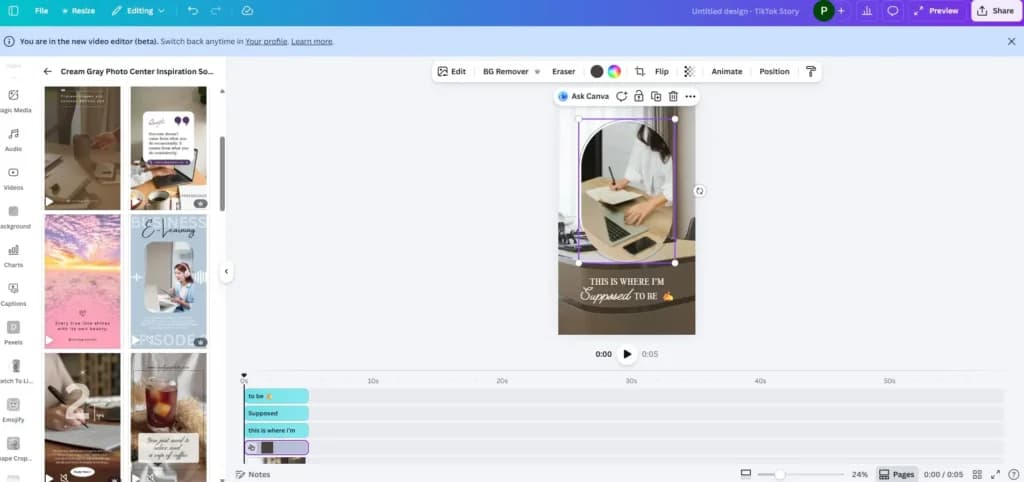
Canva’s unique value is its Magic Studio. It isn't just a "social media post creator"—it's an AI-powered production house.
Canva is a powerful, inspiring, and incredibly simple-to-use free design app. It empowers every single person in your organization to produce professional social media assets that look like they were made by a high-end agency.
Canva is the undisputed king of accessibility. Its philosophy is to "empower the world to design," and for SMBs, this means you can create professional-grade Instagram posts, Facebook headers, or TikTok stories without ever touching a "blank canvas".

Canva is a user-friendly graphic design platform that empowers individuals to create a wide array of visual content, including graphics, presentations, headers, documents, invitations, posters, and… Read more
Canva is a user-friendly graphic design platform that empowers individuals to create a wide array of visual content, including graphics, presentations, headers, documents, invitations, posters, and resumes. This all-in-one graphic design tool features a video and graphic maker, photo editor, and logo creator, making it accessible for both beginners and professionals. With its intuitive interface and extensive template library, Canva simplifies the design process, enabling users to produce stunning visuals with ease. In this Canva review, I'll discuss, graphic design features, performance, Canva pricing, and more.
Learn more in our full Canva review.
Pros & Cons
- AI tools for creating and editing designs
- 1M+ free templates
- Easy to share option
- Automatic save
- Best features aren't available for free
- No phone, live chat, email or community support
- Its online version has more templates and design elements
Features
- API
- Templates
- Image Database
- Collaboration Tools
- Content Import/Export
- Content Management
- Edits Vector & Raster Graphics
- Pro-Level Typography
- Print Management
- Publishing / Sharing
- Multi-Channel Marketing
- Multi-Language
- Multiple Format Support
- Social Promotion
- Animation
- Document Storage
- Access Controls/Permissions
- Search/Filter
- Photo Editing
- Video Editing
- Rich Text Editor
- WYSIWYG Editor
- Drag & Drop
Pricing
$0
mo/
month
$15
mo/
month
$21
mo/
month
- Our Experience: It takes us less than 10 minutes to create a single post. We select an out-of-the-box template and customize it to our brand language instantly.
- Capabilities: It is a pure drag-and-drop platform. With over 10,000 built-in templates, you can edit every layer—from text and images to geometric shapes and graphic elements.
- Unique Value: Canva includes built-in AI for text generation and image creation even in the free plan. As seen in our workspace (Image 4), the "Social Media" dashboard allows for rapid navigation between Instagram, TikTok, and LinkedIn formats.
- Best For: High-volume daily content and micro-businesses.
Figma
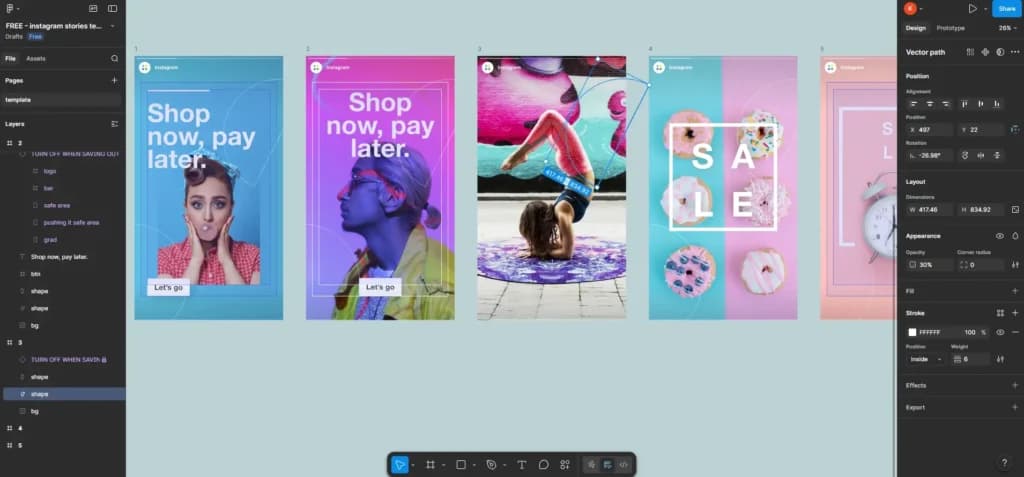
Figma is a vector-based powerhouse. Its unique value is its collaborative Design Systems and high-fidelity output.
This is a wonderful, vector-based tool that brings professional-grade precision to your fingertips. It is built for businesses that want a deeply customized and scalable visual identity.
While Canva is about assets, Figma is about systems. It is a vector-based platform designed for real-time collaboration. If you have a team of three or more people who need to review, comment, and iterate on designs simultaneously, Figma is your best move.
Figma is a browser-based design platform built for collaboration. It combines vector design, prototyping, feedback, and developer handoff into one shared workspace. Instead of juggling multiple… Read more
Figma is a browser-based design platform built for collaboration. It combines vector design, prototyping, feedback, and developer handoff into one shared workspace. Instead of juggling multiple tools, small businesses can design websites, mobile apps, and marketing visuals in one place. With flexible pricing and smart seat types, Figma gives SMBs the same professional design power that large teams enjoy.
Learn more in our full Figma review.
Pros & Cons
- Real-time co-editing improves teamwork and eliminates file chaos.
- Smart layout and prototyping tools reduce repetitive work.
- Flexible pricing suits both small teams and larger organizations.
- No native CMYK support, which limits print design workflows.
- Lacks advanced photo editing capabilities.
- Requires careful seat management to avoid paying for unused licenses.
Features
- API
- Image Database
- Collaboration Tools
- Content Import/Export
- Content Management
- Edits Vector & Raster Graphics
- Touch Interface Support
- Pro-Level Typography
- Print Management
- Publishing / Sharing
- Multi-Channel Marketing
- Multi-Language
- Multiple Format Support
- Engagement Analytics
- Animation
- Document Storage
- Access Controls/Permissions
- Freelancer Screening & Profiles
- Search/Filter
- Photo Editing
- Offline Editing
- Rich Text Editor
- WYSIWYG Editor
- Drag & Drop
Pricing
$0
mo/
month
$16
mo/
month
- Our Experience: Using specialized plugins (as shown in Image 2), we can finalize high-quality, professional layouts in around 10 minutes.
- Capabilities: The customization options are massive. It allows for high-resolution image creation that is a game-changer for brand distribution. By combining it with cloud collaboration, teams can iterate on a "visual identity" in real-time.
- Unique Value: The ability to build custom components ensures that your creative social media post design remains 100% unique.
- Best For: Tech startups and SaaS brands needing a professional, scalable design system.
CapCut
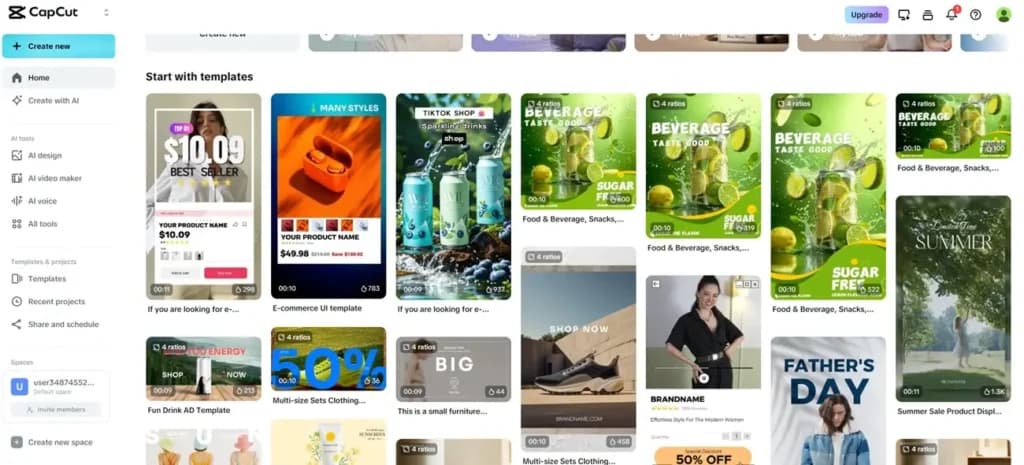
Video is the #1 driver of distribution in 2026. CapCut’s unique value is its Short-Form Viral Integration.
Short-form video is the most powerful way to tell your story in 2026. CapCut is the number 1 tool for turning raw clips into captivating experiences that keep your audience inspired.
Owned by ByteDance (the parent company of TikTok), CapCut is built specifically for "trend-driven" content. If your social strategy relies on Reels, Shorts, or TikTok, CapCut is mandatory.

CapCut has earned a reputation as the leading AI video editor on the market. With a wide range of functions, a simple user interface, and affordable pricing, it’s no wonder millions of users choose… Read more
CapCut has earned a reputation as the leading AI video editor on the market. With a wide range of functions, a simple user interface, and affordable pricing, it’s no wonder millions of users choose this video editor for their content creation needs. Learning all the tricks and features might take some time, not because they’re complicated to use but because there are so many things you can do with the CapCut tool. This CapCut video editor review will include everything there is to know including CapCut pricing, its features, customer support, and much more.
Learn more in our full CapCut review.
Pros & Cons
- Powerful free plan
- Affordable Pro plan
- Very easy to use
- Integrated music library
- Lack of customer support
- Limited frame rate
Features
- Image Editing Capabilities
- Video Editing Capabilities
- JPG
- MP4
- PNG
- Free Trial
- Monthly subscription
- Annual subscription
- iOS
- Android
- Windows
- macOS
- Web
- Filters and Effects
- Layer Support
- Color Correction
- Audio Editing Tools
- Direct Social Media Sharing
- Cloud Storage Integration
Pricing
$0
mo/
month
$19.99
mo/
month
$25.99
mo/
month
- Our Experience: It takes us less than 30 minutes to create a professional short video with subtitles for Instagram or TikTok.
- Capabilities: As seen in our dashboard (Image 3), the "Create with AI" feature and pre-designed templates for "E-commerce" or "Marketing" simplify the process. It handles everything from auto-captions to complex transitions.
- Unique Value: You can create high-resolution short videos (up to 10 minutes) that are optimized for viral algorithms.
- Best For: E-commerce and lifestyle brands targeting TikTok/Reels audiences.
Adobe Photoshop
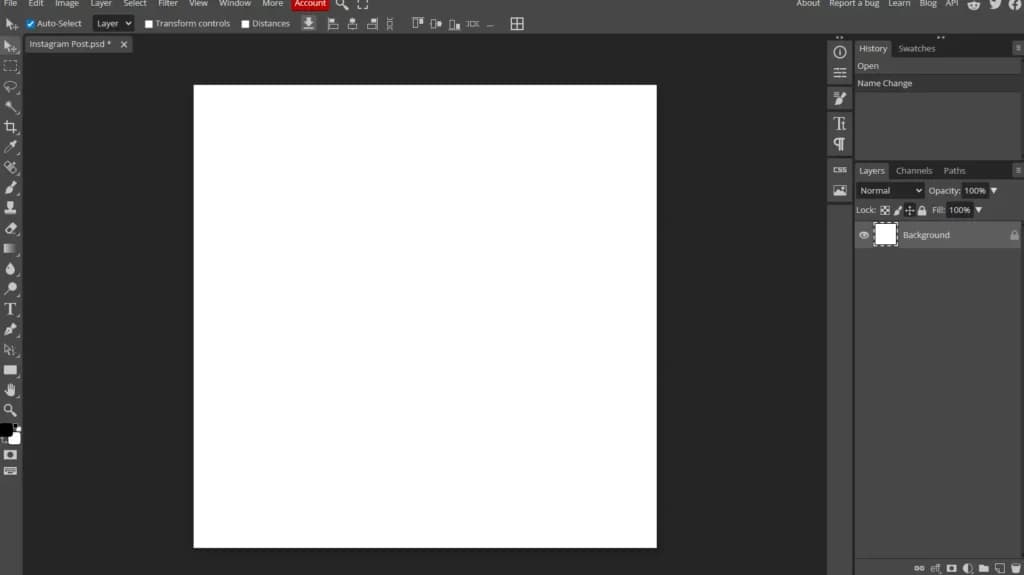
Adobe Photoshop is for the "famous" unique look. Its unique value is Generative Fill.
This is the world-famous standard for unique, high-end visual art. It is the right choice for businesses that want to craft a purely original brand universe.
Photoshop is the "famous" tool that offers total creative freedom. Unlike template-based apps, you start with a blank page. While it has a steep learning curve, its new "Generative Fill" AI (powered by Adobe Firefly) allows you to add or remove objects using simple text prompts.

In the realm of design, Adobe Photoshop remains an essential tool for professionals, blending traditional design functionalities with cutting-edge AI enhancements. The introduction of AI-driven tools… Read more
In the realm of design, Adobe Photoshop remains an essential tool for professionals, blending traditional design functionalities with cutting-edge AI enhancements. The introduction of AI-driven tools like the improved Font browser helps designers manage and explore over 25,000 Adobe fonts with ease, enriching the creative process and ensuring a seamless workflow across devices and platforms. Adobe Photoshop, a leader in digital editing for over 30 years, offers powerful tools to support creatives across industries in produce detailed and complex designs effortlessly.
Learn more in our full Adobe Photoshop review.
Pros & Cons
- Can deeply customize almost every aspect of the design process
- Supports multiple file formats — essential for cross-platform design work.
- Tools for mobile and web design
- Adobe Suite integration for easy workflow
- Requires a powerful computer as it runs many processes
- Steep learning curve due to many features
- No option for a perpetual license
Features
- API
- Templates
- Image Database
- Collaboration Tools
- Content Import/Export
- Edits Vector & Raster Graphics
- Touch Interface Support
- Pro-Level Typography
- Print Management
- Publishing / Sharing
- Multi-Language
- Multiple Format Support
- Animation
- Document Storage
- Search/Filter
- Photo Editing
- Video Editing
- Offline Editing
- Drag & Drop
Pricing
$14.98
mo/
month
$22.99
mo/
month
$37.99
mo/
month
$59.99
mo/
month
- Our Experience: When our graphic designer uses it, it takes about 10 minutes based on our references. However, when I tried it myself, it took more than 40 minutes to achieve the same result.
- Capabilities: You start with a blank template page of the correct size for each platform. It offers total creative control and AI-powered "Generative Fill" to expand or change images.
- Unique Value: Perfect for businesses that refuse to look like a template and want to be 100% unique in their market.
- Best For: Brands with dedicated design resources or high-end studios.
Facetune
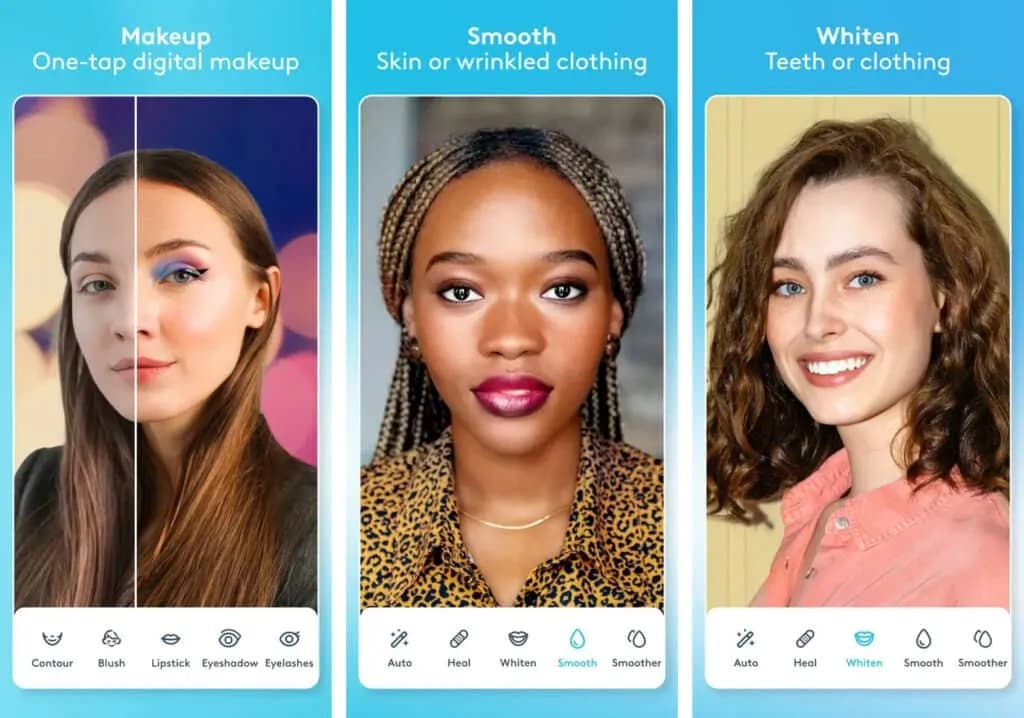
Facetune is a specialized tool for mobile-first visual polishing.
Facetune is a specialized mobile gem, perfect for businesses in fashion, jewelry, and lifestyle that rely on the beauty of human-centric marketing.
Facetune is often overlooked in "business" lists, but for high-end retail, jewelry, or fashion businesses using models, it is essential. It allows you to sharpen images, adjust lighting on faces, and make user-generated content (UGC) look like it was shot in a studio.

Facetune is one of the most advanced AI-driven photo editing apps on the market; it’s an easy-to-use app that allows you to do everything - from removing blemishes to adding makeup, hair, and blemish… Read more
Facetune is one of the most advanced AI-driven photo editing apps on the market; it’s an easy-to-use app that allows you to do everything - from removing blemishes to adding makeup, hair, and blemish filters - in a matter of seconds!
Learn more in our full Facetune review.
Pros & Cons
- Extremely easy to use
- Amazing filters and effects
- Intelligent AI editing options
- AI-powered styling and makeup
- Has limited support options
- No customization options for the app
Features
- Image Editing Capabilities
- JPG
- Free Trial
- Monthly subscription
- Annual subscription
- iOS
- Android
- Offline Capabilities
- Filters and Effects
- Layer Support
- Color Correction
- Audio Editing Tools
- Direct Social Media Sharing
- Cloud Storage Integration
- MP4
- PNG
- TIF
Pricing
$25
mo/
month
$40
mo/
month
$77.99
yr/
year
- Our Experience: It takes us around 15 minutes to transform a raw image into a professional, polished asset.
- Capabilities: It helps make any image sharper and allows for subtle "face" and skin editing, which is critical for jewelry and luxury brands.
- Unique Value: It makes user-generated content (UGC) look like it was shot in a professional studio.
- Best For: Fashion, jewelry, and influencer-led marketing
Related Articles


Comparison: Efficiency vs. Customization
Tool | Efficiency (Expert) | Customization | Best Business Type |
|---|---|---|---|
Canva | < 10 Minutes | Medium | Retail / Local SMB |
Figma | ~ 10 Minutes | High | SaaS / Tech Startups |
CapCut | < 30 Minutes | High (Video) | E-commerce / Lifestyle |
Photoshop | 10 Min (Pro) | Unlimited | High-End Creative Agencies |
Facetune | ~ 15 Minutes | High (Mobile) | Luxury / Fashion |
See also
- Feed graphics are the narrow case, and the best graphic design software hub covers the print, logo and document work you will eventually need.
- Template tools often cost nothing until you want brand kits or background removal, and those limits are compared in best free graphic design tools.
- Working entirely inside macOS narrows the field, and the options that behave well there sit under best Mac design software.
- Making the graphic is half the job, since queueing it across accounts and tracking replies needs best social media marketing tools.
- For a background or illustration you do not own the rights to, the best AI image generators roundup fills the gap before you add text.
Conclusion: Stop Designing, Start Dominating
In 2026, your design isn't just a post; it's an invitation. The best social media graphic design is the one that radiates clarity, heart, and professional confidence. You must move past the stress of creation and step into the joy of distribution.
To maximize your brand's reach with complete ease, embrace Canva for your daily visuals and CapCut for your storytelling videos. These tools are designed to work for you, letting you focus on what you do best, connecting with your community. If you want to build a legacy brand with a signature look, dedicate the time to master Figma.
Every visual you publish is a building block for your customer experience. Choose the tools that empower you, and start flooding the feed with a message only you can deliver. Your audience is waiting—give them something beautiful to remember.
FAQ
Q: Which software is best for creating social media content easily?
A: For most small businesses, Canva is the ultimate choice. It is designed specifically to minimize the "cost of retrieval," allowing anyone to use out-of-the-box templates and a drag-and-drop interface to launch professional posts in under 10 minutes.
Q: Which platform has the most templates for social posts?
A: Canva is the undisputed heavyweight champion in terms of volume. As of 2026, Canva offers over 4.5 million templates (with over 1.6 million available on the free plan). In comparison, Adobe Express offers approximately 350,000 premium templates.
Q: Can I use Figma for social media design?
A: Absolutely! Figma is a brilliant choice if you want to move beyond templates and create a truly unique visual identity. It is a vector-based tool that ensures high-resolution output and allows your team to collaborate on "creative social media post design" in real-time.
Q: Why don't some graphic designers use Canva?
A: Many professionals actually embrace Canva for its speed! However, some prefer Photoshop or Figma when they need deep, pixel-level customization or complex vector illustrations that aren't possible with a template-first approach.
Q: What are the "Big 4" of social media design tools?
A: The essential toolkit for a thriving brand in 2026 consists of Canva(for rapid static posts), CapCut(for viral video distribution), Figma(for collaborative brand systems), and Photoshop(for high-end, unique image manipulation).
Q: Is it better to edit in CapCut or directly in Instagram?
A: CapCut is the superior partner for storytelling. It offers much more robust creative control, including advanced AI auto-captions, cinematic transitions, and better export quality, which helps your videos stand out once uploaded to Instagram.
Q: Can I sell graphics I've made on Canva?
A: Yes! You can absolutely sell your original designs created in Canva. Just ensure you are following their licensing terms regarding the use of specific stock media and elements to keep your business fully protected.
Q: Is CapCut or Canva better for my business?
A: They are both stars in different roles! Use Canva to sparkle in your static social media graphics and carousels, and use CapCut as your vibrant heart for all video-first content like TikToks and Reels.
Q: What are the downsides of Canva?
A: While it is incredibly empowering, Canva is template-focused. If your goal is to create a 100% original vector logo or a complex digital painting from scratch, you might find the creative freedom of Figma or Photoshop more rewarding.
Q: "I have a great brand but my posts look just like everyone else's. How do I stand out?"
A: This is a common hurdle! To move past "template fatigue," use Figma to build a custom set of brand components that are unmistakably yours. Even 10 minutes of customization can transform a generic look into a professional, recognizable identity.
Q: "I want to do video, but I'm not a professional editor and I'm short on time. What should I do?"
A: Embrace the power of CapCut. You can create a captivating video with subtitles in less than 30 minutes by using their inspiring, built-in templates. It’s designed to make you look like a pro without the steep learning curve.
Q: "How do I make sure my social media design actually brings in new customers?"
A: Focus on high-engagement visuals that speak to your audience's needs. Pairing your beautiful designs with a strong CRM strategy ensures that the attention you grab today turns into a loyal customer relationship tomorrow.