
Best AI Tools for Graphic Design in 2026
Artificial Intelligence (AI) tools for graphic design are transforming the creative landscape, enabling designers to automate routine tasks, generate innovative visuals, and refine aesthetic decisions with unprecedented precision. These tools leverage AI algorithms to facilitate logo creation, layout design, and visual enhancements, streamlining the design process and enhancing productivity. AI graphic design tools offer significant cost savings and scalability for your business, allowing even non-designers to produce professional-grade graphics with ease. Let’s explore and compare the top AI tools for designers.
Last updated: September 2026

- Web-based and user-friendly AI tool
- Broad settings to tailor generated images
- Generative AI fill and expand tools
- Multiple variations of generated images on one prompt entered.
- Many effects and adjustments to choose from the camera angle to color variations.
- Can access the web-based app with portable and desktop devices. E
- dit your own images by removing, adding, or replacing certain areas.
- It takes a bit of patience to receive the result when generating images.
- Limited photo editing features, better for generating
- Live agent support isn’t easy to reach
- Web-based and user-friendly AI tool
- Broad settings to tailor generated images
- Generative AI fill and expand tools
- Multiple variations of generated images on one prompt entered.
- Many effects and adjustments to choose from the camera angle to color variations.
- Can access the web-based app with portable and desktop devices. E
- dit your own images by removing, adding, or replacing certain areas.
- It takes a bit of patience to receive the result when generating images.
- Limited photo editing features, better for generating
- Live agent support isn’t easy to reach

- Mash up multiple landscapes & swap skies
- Change your age, expression, or pose
- Facial recognition for quality alterations
- Enhance productivity and creativity, automating complex processes
- Produce high-quality results that blend with the original images
- Tools for mobile and web design
- Adobe Suite integration for easy workflow
- It may be too complex for basic editors
- No option for a perpetual license
- Mash up multiple landscapes & swap skies
- Change your age, expression, or pose
- Facial recognition for quality alterations
- Enhance productivity and creativity, automating complex processes
- Produce high-quality results that blend with the original images
- Tools for mobile and web design
- Adobe Suite integration for easy workflow
- It may be too complex for basic editors
- No option for a perpetual license
- Make prototype with AI
- Automate your work with Plugins & Widgets
- AI Image Generator
- Ultimate collaboration tool
- Powerful AI prototyping tools
- Wide range of design elements & templates
- Integrates with other platforms
- Limited offline functionality
- Does not support all file types
- No ability to edit code
- Make prototype with AI
- Automate your work with Plugins & Widgets
- AI Image Generator
- Ultimate collaboration tool
- Powerful AI prototyping tools
- Wide range of design elements & templates
- Integrates with other platforms
- Limited offline functionality
- Does not support all file types
- No ability to edit code

- Type in a topic for AI-made presentation
- AI-powered voiceovers & voice cloning
- Real-time team collaborate on full decks
- Comprehensive AI: Designs and improves slides.
- Customizable, diverse, professional templates.
- Quick processing, responsive interface.
- Integrates and formats various media.
- AI text needs refinement.
- Limited advanced animation features.
- Potential AI dependency risk.
- Type in a topic for AI-made presentation
- AI-powered voiceovers & voice cloning
- Real-time team collaborate on full decks
- Comprehensive AI: Designs and improves slides.
- Customizable, diverse, professional templates.
- Quick processing, responsive interface.
- Integrates and formats various media.
- AI text needs refinement.
- Limited advanced animation features.
- Potential AI dependency risk.

- Transform text into detailed visuals
- High-resolution outputs for all needs
- Customizable video generation options
- High-quality video generation
- Intuitive and user-friendly interface
- Extensive customization options
- Fast processing speeds
- Limited phone support
- Higher cost for premium features
- Transform text into detailed visuals
- High-resolution outputs for all needs
- Customizable video generation options
- High-quality video generation
- Intuitive and user-friendly interface
- Extensive customization options
- Fast processing speeds
- Limited phone support
- Higher cost for premium features

- Videos with subtitles, voiceover & music
- Serving 25M customers & 190 countries
- Change edits with simple text commands
- Variety of AI features
- Amazing customer support
- Export quality
- Very easy to use
- InVideo watermark in the free plan
- Credits don’t roll over if left unused
- Videos with subtitles, voiceover & music
- Serving 25M customers & 190 countries
- Change edits with simple text commands
- Variety of AI features
- Amazing customer support
- Export quality
- Very easy to use
- InVideo watermark in the free plan
- Credits don’t roll over if left unused

- Custom templates: Blogs, articles & social
- Plagiarism Checker: Protect your reputation
- Real-time teamwork to edit & refine copy
- User-friendly interface and AI-powered assistance
- Seamlessly integrates with Canva’s design tools
- Over a dozen different useful AI tools
- Offers many templates for different writing purposes
- May require a subscription to access all its features
- AI-generated content might not always be perfectly accurate
- Custom templates: Blogs, articles & social
- Plagiarism Checker: Protect your reputation
- Real-time teamwork to edit & refine copy
- User-friendly interface and AI-powered assistance
- Seamlessly integrates with Canva’s design tools
- Over a dozen different useful AI tools
- Offers many templates for different writing purposes
- May require a subscription to access all its features
- AI-generated content might not always be perfectly accurate

- Tons of features and customization tools
- 4 high-quality images with each prompt
- Image rights for private or commercial use
- Images are usable for commercial purposes
- Accurate image generation
- Numerous image customization tools
- Very simple to use
- Lacks customer support options
- No free trial
- Tons of features and customization tools
- 4 high-quality images with each prompt
- Image rights for private or commercial use
- Images are usable for commercial purposes
- Accurate image generation
- Numerous image customization tools
- Very simple to use
- Lacks customer support options
- No free trial

- Elevate SEO with keyword integration
- Translate & localize for global audiences
- Extensive features & mobile friendly
- Extensive free service
- High reading grade
- Provides accurate grammar and syntax corrections.
- Easy to navigate and use.
- Text generation can have factual inaccuracies
- Slower than some alternatives
- Limited image generation capacity
- Elevate SEO with keyword integration
- Translate & localize for global audiences
- Extensive features & mobile friendly
- Extensive free service
- High reading grade
- Provides accurate grammar and syntax corrections.
- Easy to navigate and use.
- Text generation can have factual inaccuracies
- Slower than some alternatives
- Limited image generation capacity
- Built-in collaboration tools for teams
- SEO capabilities for search engines
- Real-time suggestions & style adjustments
- Scalability from solo team to large enterprise
- Comprehensive marketing collaboration features for large teams
- Extensive prompt engineering educational materials
- Many helpful templates to get you started
- Not the cheapest option for marketing AI applications
- Requires existing content inputs for optimal results
- Some key features not included in plans (cost extra)
- Built-in collaboration tools for teams
- SEO capabilities for search engines
- Real-time suggestions & style adjustments
- Scalability from solo team to large enterprise
- Comprehensive marketing collaboration features for large teams
- Extensive prompt engineering educational materials
- Many helpful templates to get you started
- Not the cheapest option for marketing AI applications
- Requires existing content inputs for optimal results
- Some key features not included in plans (cost extra)

- Thousands of interactions simultaneously
- Adapts responses to each user's preference
- Detailed analytics into customer behavior
- Enhances teamwork by streamlining communication Integration with other Microsoft Apps
- Enterprise-grade security against threats and breaches
- Consistent updates
- The depth of data analysis needed for Copilot to function optimally raises privacy issues
- Dependency on Microsoft 365 subscription for business users
- Thousands of interactions simultaneously
- Adapts responses to each user's preference
- Detailed analytics into customer behavior
- Enhances teamwork by streamlining communication Integration with other Microsoft Apps
- Enterprise-grade security against threats and breaches
- Consistent updates
- The depth of data analysis needed for Copilot to function optimally raises privacy issues
- Dependency on Microsoft 365 subscription for business users

- Limitless AI-generated backgrounds
- Cloud storage & collaboration features
- Access a vast library of filters & effects
- Organized interface
- Thousands of pre-made templates
- Free plan
- Powerful AI features including AI image generation and enhancement
- Free plan is limited
- Lack of advanced editing features
- Some advanced AI features require a paid subscription
- Limitless AI-generated backgrounds
- Cloud storage & collaboration features
- Access a vast library of filters & effects
- Organized interface
- Thousands of pre-made templates
- Free plan
- Powerful AI features including AI image generation and enhancement
- Free plan is limited
- Lack of advanced editing features
- Some advanced AI features require a paid subscription
* Featured prices and terms can be updated. Free offers may include additional terms.
AI graphic design tools are innovative platforms that are game-changers for graphic designers and businesses alike. They make it easier than ever to craft stunning visuals with just a few clicks.
Whether you're looking to create a logo, revamp your branding, or simply speed up your design process, the best AI for graphic design offers a plethora of options.
These AI tools save time and reduce costs, as well as empower businesses to scale their creative capabilities and keep up with market trends, ensuring continuous growth and a competitive edge in the market.
Dive into the realm of visual AI tools and discover how the best AI design apps are reshaping the future of graphic design.
What Is AI for Graphic Design and What Does it Do?
AI for graphic design refers to the application of artificial intelligence technologies to assist in the creation, editing, and management of visual content.
These tools use advanced algorithms to analyze and learn from existing design elements, enabling them to offer quick suggestions and generate new design ideas.
From small tasks like color correction to complex ones like layout adjustments and typography, today’s AI for graphic designers can efficiently handle a variety of design and creative needs.
AI design tools streamline the creative process by automating tasks that traditionally require extensive manual effort and expertise. For instance, using AI to create a logo can be as simple as inputting brand preferences and letting the AI generate multiple options tailored to those specifics.
They’ll also enhance your creativity by suggesting design improvements and alternatives that might not be immediately obvious to human designers.
Furthermore, AI design tools are increasingly capable of integrating seamlessly with other digital tools, providing a comprehensive suite for designers that supports everything from initial concept to final output, thereby enhancing productivity and expanding creative possibilities.
7 of the Best AI Tools for Graphic Design
Leveraging the best visual AI tools for your business will help you enhance efficiency, creativity, and scalability by automating complex processes and providing innovative solutions.
Here’s a look at the top brands:
In the realm of design, Adobe Photoshop remains an essential tool for professionals, blending traditional design functionalities with cutting-edge AI enhancements. The introduction of AI-driven tools… Read more
In the realm of design, Adobe Photoshop remains an essential tool for professionals, blending traditional design functionalities with cutting-edge AI enhancements. The introduction of AI-driven tools like the improved Font browser helps designers manage and explore over 25,000 Adobe fonts with ease, enriching the creative process and ensuring a seamless workflow across devices and platforms. Adobe Photoshop, a leader in digital editing for over 30 years, offers powerful tools to support creatives across industries in produce detailed and complex designs effortlessly.
Learn more in our full Adobe Photoshop review.
Pros & Cons
- Can deeply customize almost every aspect of the design process
- Supports multiple file formats — essential for cross-platform design work.
- Tools for mobile and web design
- Adobe Suite integration for easy workflow
- Requires a powerful computer as it runs many processes
- Steep learning curve due to many features
- No option for a perpetual license
Features
- API
- Templates
- Image Database
- Collaboration Tools
- Content Import/Export
- Edits Vector & Raster Graphics
- Touch Interface Support
- Pro-Level Typography
- Print Management
- Publishing / Sharing
- Multi-Language
- Multiple Format Support
- Animation
- Document Storage
- Search/Filter
- Photo Editing
- Video Editing
- Offline Editing
- Drag & Drop
Pricing
$14.98
mo/
month
$22.99
mo/
month
$37.99
mo/
month
$59.99
mo/
month

Canva is a user-friendly graphic design platform that empowers individuals to create a wide array of visual content, including graphics, presentations, headers, documents, invitations, posters, and… Read more
Canva is a user-friendly graphic design platform that empowers individuals to create a wide array of visual content, including graphics, presentations, headers, documents, invitations, posters, and resumes. This all-in-one graphic design tool features a video and graphic maker, photo editor, and logo creator, making it accessible for both beginners and professionals. With its intuitive interface and extensive template library, Canva simplifies the design process, enabling users to produce stunning visuals with ease. In this Canva review, I'll discuss, graphic design features, performance, Canva pricing, and more.
Learn more in our full Canva review.
Pros & Cons
- AI tools for creating and editing designs
- 1M+ free templates
- Easy to share option
- Automatic save
- Best features aren't available for free
- No phone, live chat, email or community support
- Its online version has more templates and design elements
Features
- API
- Templates
- Image Database
- Collaboration Tools
- Content Import/Export
- Content Management
- Edits Vector & Raster Graphics
- Pro-Level Typography
- Print Management
- Publishing / Sharing
- Multi-Channel Marketing
- Multi-Language
- Multiple Format Support
- Social Promotion
- Animation
- Document Storage
- Access Controls/Permissions
- Search/Filter
- Photo Editing
- Video Editing
- Rich Text Editor
- WYSIWYG Editor
- Drag & Drop
Pricing
$0
mo/
month
$15
mo/
month
$21
mo/
month
Figma is a browser-based design platform built for collaboration. It combines vector design, prototyping, feedback, and developer handoff into one shared workspace. Instead of juggling multiple… Read more
Figma is a browser-based design platform built for collaboration. It combines vector design, prototyping, feedback, and developer handoff into one shared workspace. Instead of juggling multiple tools, small businesses can design websites, mobile apps, and marketing visuals in one place. With flexible pricing and smart seat types, Figma gives SMBs the same professional design power that large teams enjoy.
Learn more in our full Figma review.
Pros & Cons
- Real-time co-editing improves teamwork and eliminates file chaos.
- Smart layout and prototyping tools reduce repetitive work.
- Flexible pricing suits both small teams and larger organizations.
- No native CMYK support, which limits print design workflows.
- Lacks advanced photo editing capabilities.
- Requires careful seat management to avoid paying for unused licenses.
Features
- API
- Image Database
- Collaboration Tools
- Content Import/Export
- Content Management
- Edits Vector & Raster Graphics
- Touch Interface Support
- Pro-Level Typography
- Print Management
- Publishing / Sharing
- Multi-Channel Marketing
- Multi-Language
- Multiple Format Support
- Engagement Analytics
- Animation
- Document Storage
- Access Controls/Permissions
- Freelancer Screening & Profiles
- Search/Filter
- Photo Editing
- Offline Editing
- Rich Text Editor
- WYSIWYG Editor
- Drag & Drop
Pricing
$0
mo/
month
$16
mo/
month
Firefly is a new online AI tool designed by the software giant Adobe. It is a part of the Adobe Creative Cloud suite and leverages artificial intelligence in its Firefly Image 3 Model. The… Read more
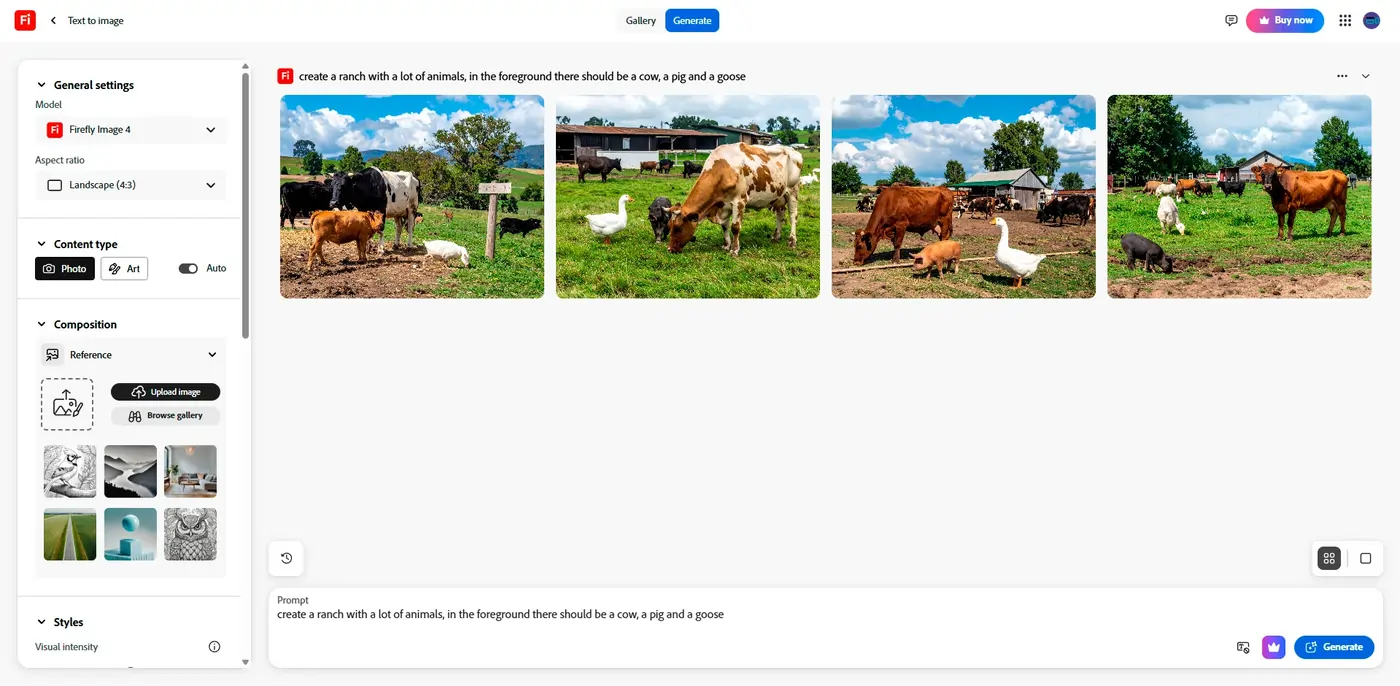
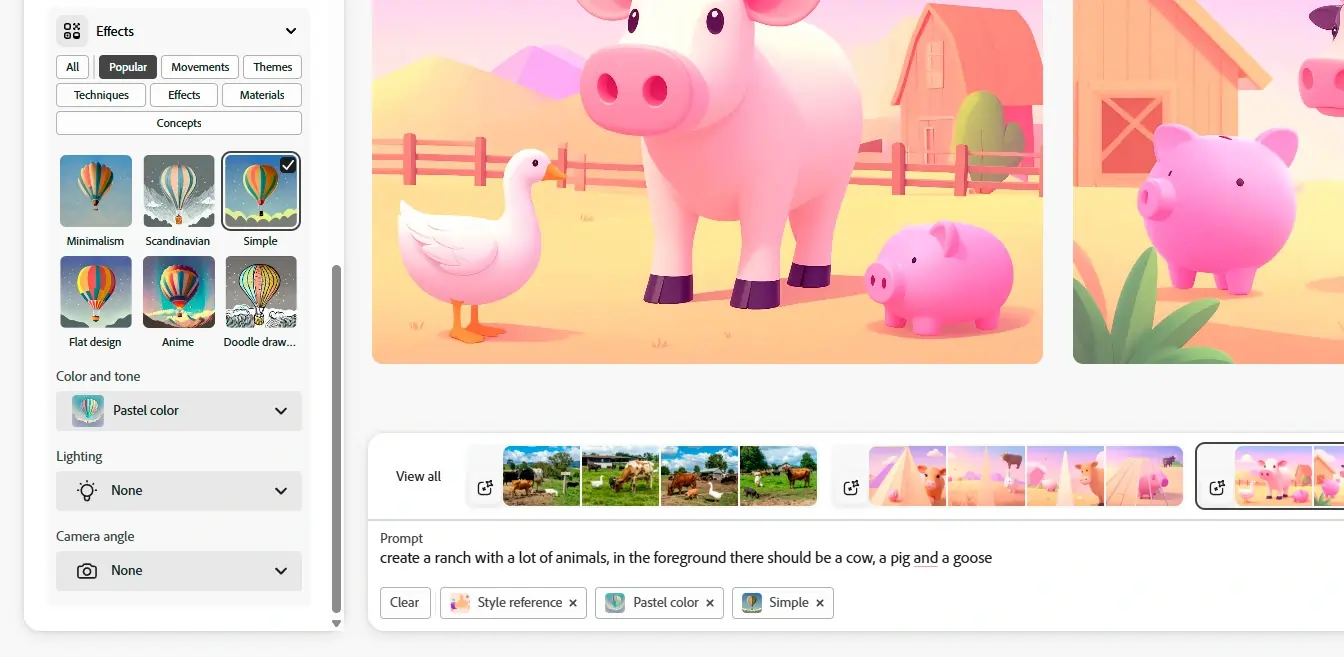
Firefly is a new online AI tool designed by the software giant Adobe. It is a part of the Adobe Creative Cloud suite and leverages artificial intelligence in its Firefly Image 3 Model. The web-based app can generate images from scratch based on text directions. Thanks to the generative fill feature, you can modify your images by switching, adding, and removing elements via text prompts. Adobe Firefly is a simple and powerful tool suitable for individual and commercial use!
Learn more in our full Adobe Firefly AI Image Generator review.
Pros & Cons
- Multiple variations of generated images on one prompt entered.
- Many effects and adjustments to choose from the camera angle to color variations.
- Can access the web-based app with portable and desktop devices. E
- dit your own images by removing, adding, or replacing certain areas.
- It takes a bit of patience to receive the result when generating images.
- Limited photo editing features, better for generating
- Live agent support isn’t easy to reach
Features
- Text-to-Image Generation
- Style Emulation
- Interactive Editing
- Web
- Windows
- macOS
- Android
- iOS
Pricing
$0
mo/
month
$4.99
mo/
month
Screenshots

Midjourney's AI image generator is a remarkable fusion of art and AI technology, pushing the boundaries of digital creativity. Using advanced deep learning models, Midjourney offers text-to-image… Read more
Midjourney's AI image generator is a remarkable fusion of art and AI technology, pushing the boundaries of digital creativity. Using advanced deep learning models, Midjourney offers text-to-image conversion to generate high-resolution images ranging from hyper-realistic to abstract, catering to diverse artistic and business needs. You can create hyper-realistic images, logo designs, adjust aspect ratios, mimic artistic style and more, with multilingual support and at scale. Its intuitive interface integrates with Discord, making it accessible and fostering a community-driven environment where artists and designers can collaborate and refine their creative visions. With each update, Midjourney AI art offers even richer textures, better comprehension of complex prompts, and innovative tools like 3D rendering, setting new standards in the realm of generative AI art and design.
Learn more in our full Midjourney review.
Pros & Cons
- Images are usable for commercial purposes
- Accurate image generation
- Numerous image customization tools
- Very simple to use
- Lacks customer support options
- No free trial
Features
- Text-to-Image Generation
- Face and Body Pose Synthesis
- Scene Composition
- Style Emulation
- Batch Generation
- Interactive Editing
Pricing
$10
mo/
month
$30
mo/
month
$60
mo/
month
$120
mo/
month
ChatGPT, developed by OpenAI, is one of the most sophisticated AI-powered conversational models available today. Designed as a versatile AI assistant, ChatGPT excels in a range of applications, from… Read more
ChatGPT, developed by OpenAI, is one of the most sophisticated AI-powered conversational models available today. Designed as a versatile AI assistant, ChatGPT excels in a range of applications, from casual conversations to professional writing, content creation, coding, and beyond. It is built on the GPT-4 architecture (for the premium version) and combines natural language understanding with generative capabilities, making it a robust tool for individuals, businesses, and developers.
Learn more in our full Chatgpt review.
Pros & Cons
- Extensive free service
- High reading grade
- Provides accurate grammar and syntax corrections.
- Easy to navigate and use.
- Text generation can have factual inaccuracies
- Slower than some alternatives
- Limited image generation capacity
Features
- Grammar and Style Checks
- SEO Optimization
- Plagiarism Check
- Collaboration Features
- Content Personalization
- Multilingual Support
- API Access
- Text Editing and Formatting
- Compliance and Security Measures
- Web
- Windows
- macOS
- Android
- iOS
Pricing
$0
mo/
month
$20
mo/
month
$200
mo/
month
$25
/mo or per user/
/mo or per user
Types of AI Graphic Design Tools Available
AI graphic design tools are diverse, each tailored to specific aspects of the design process. Understanding the subcategories available can help designers and businesses select the most suitable tools for their needs. Here are some of the primary types:
AI Logo Generators
Many businesses use AI to create unique and highly customized logos. These AI tools specialize in creating meaningful logos based on user-defined parameters. They are ideal for startups and businesses looking to establish a brand identity quickly without extensive design resources.AI Layout Designers
These systems automate the arrangement of elements within a design, optimizing space and alignment for aesthetic appeal and practical functionality. They are especially useful in the media, publishing, and advertising industries.AI Color Palette Generators
These tools help designers choose harmonious color schemes based on AI algorithms that understand color theory and current trends. They are invaluable for ensuring brand consistency across various media.AI Typography Tools
These applications assist in selecting and generating typographic elements that complement the overall design. They can suggest font pairings, adjust kerning, and create custom fonts tailored to a brand’s identity.AI Image Editors
Advanced AI image editors can enhance photos automatically, apply complex effects, and even create high-resolution images from low-quality sources. They are essential for photographers, marketers, and content creators who need to process images quickly and effectively.AI Content Planners
These tools integrate design with content strategy, using AI to suggest layouts based on the text content and intended message. They are particularly useful for social media posts, advertisements, and web design, where content and visual appeal must work hand in hand.Visual AI Tools for Prototyping
AI-driven prototyping tools allow designers to quickly generate and iterate on visual concepts for apps and websites. These tools can simulate user interactions, helping designers make informed decisions about usability and aesthetics before finalizing the design.
Do I Really Need AI for Graphic Design?
Implementing AI in graphic design is becoming a necessity for professionals looking to stay competitive and efficient. Here are some benefits of integrating AI tools into your design workflow:
- Efficiency and speed: AI tools can drastically reduce the time spent on repetitive tasks like resizing images or tweaking layouts, allowing designers to focus on more creative aspects of their projects.
- Enhanced creativity: AI can suggest design elements and modifications that might not occur to a human designer, pushing the boundaries of creativity and innovation.
- Cost-effective: By automating routine design tasks, businesses can save on labor costs and allocate resources more effectively towards strategic initiatives.
- Scalability: AI tools can handle large volumes of design work with consistent quality, making it easier for businesses to scale operations without compromising on the quality of their creative outputs.
- Accessibility: Even those with minimal design experience can create professional-quality graphics, making design more accessible to non-designers and helping small businesses and startups establish strong visual brands.
- Data-driven decisions: Many incorporate data analyses to optimize designs based on user engagement and preferences, ensuring that the final products are not only aesthetically pleasing but also effectively tailored to target audiences.
- Consistency: AI helps maintain brand consistency across various platforms and media types by standardizing colors, fonts, and other design elements, which is crucial for brand recognition and trust.
Each of these benefits contributes to a more dynamic, cost-effective, and high-quality design process, highlighting why AI tools for graphic design are an essential asset for modern designers and businesses.
Average Price of Graphic Design AI Tools
The pricing of AI graphic design tools can range significantly based on their functionality and target users:
- Free versions: Commonly available for basic features, which are great for casual users or those just starting out. Some platforms offer these free AI graphic design tools with limited functionalities or with watermarks on the output.
- Low-tier paid subscriptions: Typically cost around $9 to $20 per month and provide access to additional features like higher resolution outputs or more design assets.
- Mid-range plans: Can cost between $40 and $65 per month and are often tailored for professional designers who need more robust tools and resources.
- High-end subscriptions: Or one-time purchase prices can exceed $100, especially for software that offers extensive customization options and advanced design capabilities.
Overall, the cost will depend on your business’s specific needs, with many platforms offering a range of plans to cater to different levels of expertise and requirements.
Important AI Graphic Design Tool Features
AI graphic design tools offer a variety of features that can significantly enhance designers' efficiency and creativity.
By understanding and effectively using these features, designers can not only speed up their workflow but also achieve higher-quality outputs that are closely aligned with the latest design trends and user expectations.
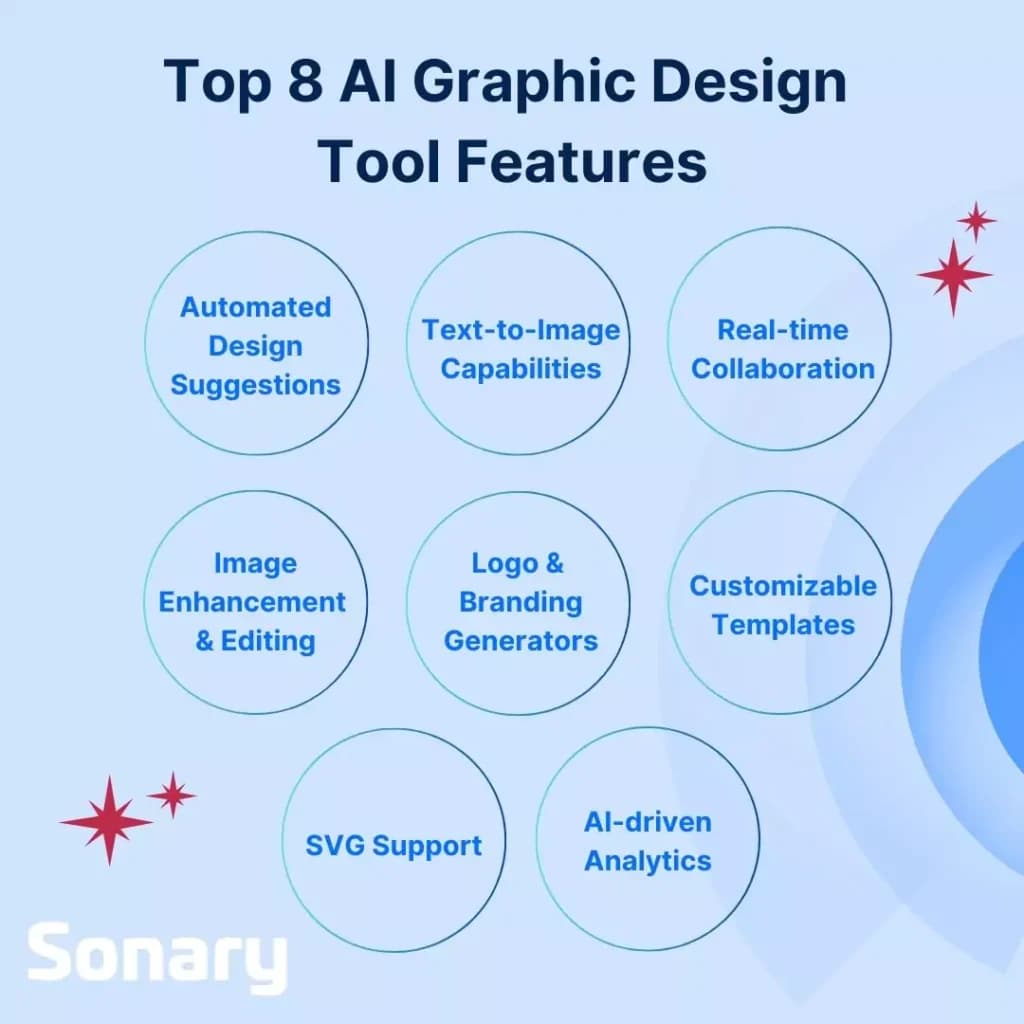
Here’s a breakdown of the key features commonly found across most brands, along with tips on how to leverage them:
Automated Design Suggestions
Many AI tools provide design suggestions based on the current design trends and user preferences. These can include layout adjustments, color schemes, and typography recommendations. To leverage this feature, provide clear input about your design goals and preferences to get the most relevant suggestions.Text-to-Image Capabilities
This feature allows users to describe a scene or object in text, and the AI generates a corresponding image. It's particularly useful for conceptualizing and visualizing ideas quickly. Use this feature to experiment with different concepts before deciding on a final design.Real-time Collaboration
Several AI design tools support real-time collaboration, allowing multiple users to work on a project simultaneously from different locations. This can be leveraged for team projects or when working with clients, ensuring that feedback and changes are integrated seamlessly.Image Enhancement and Editing
AI-powered image editors can automatically enhance photos by adjusting lighting, saturation, and other elements. They can also remove backgrounds or unwanted objects. Utilize these tools to polish images for use in your designs without needing extensive photo editing skills.Logo and Branding Generators
AI tools for creating logos and branding materials can save time by generating multiple options based on a few initial inputs. Leverage these by entering detailed company or brand information to ensure that the generated logos align closely with your brand identity.Customizable Templates
Many tools come with a library of customizable templates for everything from social media posts to full web layouts. These templates are designed to be visually appealing and are optimized for user engagement. Customize templates to maintain brand consistency across all your digital assets.Scalable Vector Graphics (SVG) Support
For designs that need to be scalable without losing quality, such as logos or icons, SVG support is crucial. Use SVG-compatible tools to create designs that can be resized for various applications without degradation.AI-driven Analytics
Some advanced tools offer analytics to measure how designs perform in terms of user engagement or conversions. Use these insights to tweak your designs based on what works best with your target audience.
How to Choose the Right AI Graphic Design Tool for You
When choosing the right AI graphic design tool, designers need to consider specific features that align with their professional needs and enhance their creative processes. Here are some factors to consider:
Resolution and Export Quality
Check the output resolution options the tool offers, especially if you work with print or require high-resolution graphics for digital media. Tools vary in their ability to export crisp, clear images suitable for various end uses.Font Libraries and Typography Tools
Consider whether the tool includes access to extensive font libraries and typography design tools. This is crucial for designers who need to create brand-specific or unique textual content within their designs.Color Palette Generation and Management
Evaluate the tool's capabilities in generating and managing color palettes. Some AI tools offer advanced features that can suggest color schemes based on trends or even the emotions you wish to convey.Template Variety and Customization
Look for tools that provide a wide range of templates and the ability to customize them extensively. This feature can greatly speed up the design process while allowing for creativity.Integration with Other Software
Ensure the tool integrates well with other software you routinely use, such as Adobe Creative Cloud products or web development tools, to maintain a seamless workflow.Collaboration Features
If teamwork is a regular part of your projects, choose a tool that supports collaboration features like shared projects, feedback tools, and real-time editing.AI-driven Features
Evaluate the AI-specific features such as automated design suggestions, AI-driven analytics for design performance, and features like automatic background removal or image enhancement.Pricing and Subscription Model
Determine your budget and assess the tool's subscription models. Some tools offer a free version with basic features, while more comprehensive features might require a monthly or annual subscription.Trial and Demos
Take advantage of trials or demos to test the tool before committing. This can help you gauge the interface's ease of use and whether the tool meets your specific design needs.
Tips for Successful AI Tool Implementation Into Your Workflow
Integrating AI tools into your graphic design workflow can significantly enhance efficiency and creativity. However, it's essential to approach this integration thoughtfully to maximize benefits without compromising the quality of your designs.
Here are some tips to ensure successful implementation:
Use AI as an Enhancement, Not a Replacement
AI tools should be used to augment your skills and not as a complete replacement for your creative process. They are excellent for handling mundane tasks like resizing images, generating basic layouts, or suggesting color palettes. Still, the final creative decisions should always be guided by a designer’s expertise and judgment.Leverage AI for Preliminary Concepts
AI can serve as a fantastic starting point for projects. Use AI to quickly generate ideas and concepts, which can then be refined and personalized. This approach can save time and provide a broad range of options that you might not have considered initially.Maintain a Balanced Workflow
While AI can accelerate certain aspects of design, it’s crucial to maintain a balance where human oversight governs the creative outputs. Ensure that AI-generated designs align with the project's goals and maintain the brand’s essence, tweaking AI suggestions as needed.Regularly Update and Train Your AI Tools
AI tools learn from the data they are fed. Regularly update your AI systems with new information and designs to keep them current with the latest trends and your evolving style. Additionally, take the time to train AI tools to understand your specific preferences and needs better.Use AI for Iterative Testing
AI tools can rapidly prototype different versions of a design, allowing you to test multiple variations quickly and efficiently. This capability can be used to experiment with different aesthetics and functionalities, especially in user interface design.Educate Your Team on AI Capabilities
Ensure that everyone involved in the design process understands what AI can and cannot do. Training sessions or workshops can help your team learn how to best utilize AI tools in their daily tasks.Evaluate AI Contributions Critically
Always critically evaluate the outputs from AI tools. Check for nuances that the AI might have missed, such as cultural subtleties or brand alignment. While AI can generate attractive designs, it may not always understand context or emotional nuances.
Related Products That Integrate With AI Graphic Design Tools
Integrating AI graphic design tools with other software types can significantly enhance functionality and streamline workflows. These software integrations maximize the efficiency of the design process and enhance the overall creativity and relevance of the outputs, providing comprehensive solutions that extend beyond simple design tasks.
Here are some common types of software that integrate well with AI graphic design tools:
Content Management Systems (CMS)
Integrating AI design tools with CMS platforms can automate aspects of web design and content layout, making it easier to maintain brand consistency across digital properties. This is especially useful for designers who regularly update web content.Customer Relationship Management (CRM) Software
CRM software integration allows designers to utilize customer data to create personalized marketing materials. AI tools can generate designs based on customer preferences, behavior patterns, and engagement history, enhancing the effectiveness of marketing campaigns.Project Management Tools
Linking AI graphic design tools with project management software helps teams keep track of design tasks, collaborate more effectively, and ensure projects stay on schedule. This is particularly beneficial in agency settings or in-house design teams handling multiple projects simultaneously.Social Media Management Platforms
Integrating AI graphic design tools with social media management platforms enables the quick creation and adjustment of images and layouts directly tailored to various social media specifications. This helps maintain an active and visually appealing social media presence with minimal effort.Digital Asset Management (DAM) Systems
DAM systems integrated with AI design tools streamline the organization, storage, and retrieval of digital assets. This allows for efficient reuse of designs and ensures that all team members have access to the latest assets.Marketing Automation Platforms
By integrating with marketing automation platforms, AI graphic design tools can help automate the creation of customized marketing collateral based on segmented customer data, campaign results, and engagement metrics.
See also
- Design is one job among many, so use the AI tools for small business hub when you are deciding where the budget goes first.
- Generating the raw visual is step one, and the best AI image generators give you source art that these design tools then arrange.
- Brand kits, layout and print ready export need a proper editor, which is what best free graphic design software is built around.
- Resizing one asset for feed posts, stories and banners at once is the specific strength of best social media graphic design tools.
Final Thoughts
Embracing AI tools in graphic design isn't just about efficiency — it's about opening doors to new creative possibilities. Your imagination is no longer the limit.
By incorporating AI into your workflow, you can streamline mundane tasks like creating initial layouts or generating color palettes, allowing more time for innovation and design refinement. These visual AI tools transform initial ideas into polished outputs quickly, aligning closely with business objectives.
AI is designed to complement — not replace — human creativity. It serves as a powerful starting point and enhancer that, when used effectively, can push the boundaries of traditional design and help your business stay ahead in a competitive landscape.
Let’s continue to explore and innovate, ensuring AI empowers our creative potential to its fullest.
FAQs
Q: What are AI graphic design tools?
A: AI graphic design tools are software that uses artificial intelligence to help automate and enhance various aspects of the design process, from creating layouts to refining visual elements.
Q: How can AI tools enhance my graphic design workflow?
A: AI tools can automate repetitive tasks, suggest design improvements, and expedite the creative process, allowing designers to focus more on the creative aspects of their projects.
Q: Can AI graphic design tools replace human designers?
A: No, AI tools are meant to complement human creativity, not replace it. They serve as assistants to enhance productivity and creativity but still require human oversight for strategic and nuanced decisions.
Q: What should I consider when choosing an AI graphic design tool?
A: Consider factors like the specific features you need, the tool's compatibility with other software, ease of use, and your budget. Also, think about whether the tool supports collaboration if you work in a team.