
Best Free AI Tools for 2026
free AI tools can greatly benefit businesses of all sizes. These tools help improve efficiency, boost productivity, and foster innovation without needing a big budget. Common features include automating data analysis, enhancing customer service, and personalizing marketing efforts. Using AI tools can lead to better decision-making, lower costs, and a stronger competitive edge. Whether it's for marketing, customer support, or managing data, AI tools offer valuable solutions for everyone in the company, making them essential in today's business environment.
Last updated: September 2026

7-Days Free Trial
- Beautify your selfies with AI technology
- Enhance, brighten & retouch in seconds
- Over 200 million downloads
- AI-powered styling and makeup
- Intelligent AI editing options
- Amazing filters and effects
- Extremely easy to use
- Has limited support options
- No customization options for the app
7-Days Free Trial
- Beautify your selfies with AI technology
- Enhance, brighten & retouch in seconds
- Over 200 million downloads
- AI-powered styling and makeup
- Intelligent AI editing options
- Amazing filters and effects
- Extremely easy to use
- Has limited support options
- No customization options for the app

7-Days Free Trial
- Combine two photos into a single image
- Beautifying tools to enhance your selfies
- Create stickers from photos or drawings
- A wide variety of AI tools
- Thousands of premium design templates
- Free trial across all paid plans
- Simple user interface
- Limited free plan
- Works only online
- Limited cloud storage in the free and plus plan
7-Days Free Trial
- Combine two photos into a single image
- Beautifying tools to enhance your selfies
- Create stickers from photos or drawings
- A wide variety of AI tools
- Thousands of premium design templates
- Free trial across all paid plans
- Simple user interface
- Limited free plan
- Works only online
- Limited cloud storage in the free and plus plan

Free plan available
- Auto-complete fills in text as you type
- Plagiarism checker ensures originality
- 40+ pre-set use cases & AI chat prompt
- An intuitive and user-friendly text editor
- Fast and accurate content generator
- Pick between tones of voice and creativity level
- Capable of providing top-quality content for different purposes
- No mobile app yet to use on the go
- The free version has limited content generation.
- It could have more collaborative features for teams
Free plan available
- Auto-complete fills in text as you type
- Plagiarism checker ensures originality
- 40+ pre-set use cases & AI chat prompt
- An intuitive and user-friendly text editor
- Fast and accurate content generator
- Pick between tones of voice and creativity level
- Capable of providing top-quality content for different purposes
- No mobile app yet to use on the go
- The free version has limited content generation.
- It could have more collaborative features for teams

7-Days Free Trial
- Mash up multiple landscapes & swap skies
- Change your age, expression, or pose
- Facial recognition for quality alterations
- Enhance productivity and creativity, automating complex processes
- Produce high-quality results that blend with the original images
- Tools for mobile and web design
- Adobe Suite integration for easy workflow
- It may be too complex for basic editors
- No option for a perpetual license
7-Days Free Trial
- Mash up multiple landscapes & swap skies
- Change your age, expression, or pose
- Facial recognition for quality alterations
- Enhance productivity and creativity, automating complex processes
- Produce high-quality results that blend with the original images
- Tools for mobile and web design
- Adobe Suite integration for easy workflow
- It may be too complex for basic editors
- No option for a perpetual license

7-Days Free Trial
- Stock footage, sounds & fonts library
- Edit, personalize, and share in 1 app
- 90M+ downloads across platforms
- Projects are immediately stored, even while editing
- Ability to see and use other creator's templates
- Uses the latest AI tools in the industry
- User-friendly timeline
- Not supported on Windows or Mac
- Prices are on the high-end
- Watermark on the final outcome of the free version
7-Days Free Trial
- Stock footage, sounds & fonts library
- Edit, personalize, and share in 1 app
- 90M+ downloads across platforms
- Projects are immediately stored, even while editing
- Ability to see and use other creator's templates
- Uses the latest AI tools in the industry
- User-friendly timeline
- Not supported on Windows or Mac
- Prices are on the high-end
- Watermark on the final outcome of the free version

Free plan available
- Web-based and user-friendly AI tool
- Broad settings to tailor generated images
- Generative AI fill and expand tools
- Multiple variations of generated images on one prompt entered.
- Many effects and adjustments to choose from the camera angle to color variations.
- Can access the web-based app with portable and desktop devices. E
- dit your own images by removing, adding, or replacing certain areas.
- It takes a bit of patience to receive the result when generating images.
- Limited photo editing features, better for generating
- Live agent support isn’t easy to reach
Free plan available
- Web-based and user-friendly AI tool
- Broad settings to tailor generated images
- Generative AI fill and expand tools
- Multiple variations of generated images on one prompt entered.
- Many effects and adjustments to choose from the camera angle to color variations.
- Can access the web-based app with portable and desktop devices. E
- dit your own images by removing, adding, or replacing certain areas.
- It takes a bit of patience to receive the result when generating images.
- Limited photo editing features, better for generating
- Live agent support isn’t easy to reach

14-Days Free Trial
- Transform text into detailed visuals
- High-resolution outputs for all needs
- Customizable video generation options
- High-quality video generation
- Intuitive and user-friendly interface
- Extensive customization options
- Fast processing speeds
- Limited phone support
- Higher cost for premium features
14-Days Free Trial
- Transform text into detailed visuals
- High-resolution outputs for all needs
- Customizable video generation options
- High-quality video generation
- Intuitive and user-friendly interface
- Extensive customization options
- Fast processing speeds
- Limited phone support
- Higher cost for premium features

Free plan available
- For teams who create videos at scale
- Generates your script from a link or doc
- 130+ languages, 160+ diverse avatars
- Easy to use, no editing skills needed
- Large amount of AI features
- Saves time and money
- Makes videos in 130+ languages
- Creative limitations compared to human videos
- Can get expensive for high-volume video creation
- AI voices and avatars aren’t perfect
Free plan available
- For teams who create videos at scale
- Generates your script from a link or doc
- 130+ languages, 160+ diverse avatars
- Easy to use, no editing skills needed
- Large amount of AI features
- Saves time and money
- Makes videos in 130+ languages
- Creative limitations compared to human videos
- Can get expensive for high-volume video creation
- AI voices and avatars aren’t perfect

Free plan available
- Create, collaborate & share videos quickly
- Stunning videos with quality AI Avatars
- Host videos with an embeddable player
- Useful AI features
- Ease of use
- Cloud-based workspace
- Brand kit available
- Limited free plan
- Lack of customer support options
Free plan available
- Create, collaborate & share videos quickly
- Stunning videos with quality AI Avatars
- Host videos with an embeddable player
- Useful AI features
- Ease of use
- Cloud-based workspace
- Brand kit available
- Limited free plan
- Lack of customer support options

Free plan available
- Videos with subtitles, voiceover & music
- Serving 25M customers & 190 countries
- Change edits with simple text commands
- Variety of AI features
- Amazing customer support
- Export quality
- Very easy to use
- InVideo watermark in the free plan
- Credits don’t roll over if left unused
Free plan available
- Videos with subtitles, voiceover & music
- Serving 25M customers & 190 countries
- Change edits with simple text commands
- Variety of AI features
- Amazing customer support
- Export quality
- Very easy to use
- InVideo watermark in the free plan
- Credits don’t roll over if left unused

Free plan available
- Social media posting and scheduling
- Choose generated clip parameters with AI
- Add AI captions to videos easily
- AI-Copilot customizes clips by length, keywords, and other parameters.
- Generate multiple viral shorts from one video, potentially 10+ clips.
- Perfect for content creators: virality scores and auto-scheduling.
- Edit clips with the OpusClip editor for layout, pauses, and captions.
- Free version limitations: watermarked clips and no auto-posting.
- Not ideal for non-talking videos, results may be subpar.
- Some actions, like generating B-roll, may take a few minutes.
Free plan available
- Social media posting and scheduling
- Choose generated clip parameters with AI
- Add AI captions to videos easily
- AI-Copilot customizes clips by length, keywords, and other parameters.
- Generate multiple viral shorts from one video, potentially 10+ clips.
- Perfect for content creators: virality scores and auto-scheduling.
- Edit clips with the OpusClip editor for layout, pauses, and captions.
- Free version limitations: watermarked clips and no auto-posting.
- Not ideal for non-talking videos, results may be subpar.
- Some actions, like generating B-roll, may take a few minutes.

Free plan available
- Custom templates: Blogs, articles & social
- Plagiarism Checker: Protect your reputation
- Real-time teamwork to edit & refine copy
- User-friendly interface and AI-powered assistance
- Seamlessly integrates with Canva’s design tools
- Over a dozen different useful AI tools
- Offers many templates for different writing purposes
- May require a subscription to access all its features
- AI-generated content might not always be perfectly accurate
Free plan available
- Custom templates: Blogs, articles & social
- Plagiarism Checker: Protect your reputation
- Real-time teamwork to edit & refine copy
- User-friendly interface and AI-powered assistance
- Seamlessly integrates with Canva’s design tools
- Over a dozen different useful AI tools
- Offers many templates for different writing purposes
- May require a subscription to access all its features
- AI-generated content might not always be perfectly accurate

Free plan available
- Limitless AI-generated backgrounds
- Cloud storage & collaboration features
- Access a vast library of filters & effects
- Organized interface
- Thousands of pre-made templates
- Free plan
- Powerful AI features including AI image generation and enhancement
- Free plan is limited
- Lack of advanced editing features
- Some advanced AI features require a paid subscription
Free plan available
- Limitless AI-generated backgrounds
- Cloud storage & collaboration features
- Access a vast library of filters & effects
- Organized interface
- Thousands of pre-made templates
- Free plan
- Powerful AI features including AI image generation and enhancement
- Free plan is limited
- Lack of advanced editing features
- Some advanced AI features require a paid subscription

Free plan available
- Elevate SEO with keyword integration
- Translate & localize for global audiences
- Extensive features & mobile friendly
- Extensive free service
- High reading grade
- Provides accurate grammar and syntax corrections.
- Easy to navigate and use.
- Text generation can have factual inaccuracies
- Slower than some alternatives
- Limited image generation capacity
Free plan available
- Elevate SEO with keyword integration
- Translate & localize for global audiences
- Extensive features & mobile friendly
- Extensive free service
- High reading grade
- Provides accurate grammar and syntax corrections.
- Easy to navigate and use.
- Text generation can have factual inaccuracies
- Slower than some alternatives
- Limited image generation capacity

Free plan available
- Built-in fact-checking and citation tools
- Boost your writing skills & efficiency
- Formal, casual, humorous, or informative
- Many features available in the free plan, strong value at $0
- Deepest integration with Google Workspace
- Capable of writing in multiple languages for global reach
- Clear, laddered pricing from $4.99 → $99.99
- Occasionally misinterprets the context or the nuances of the task
- Top features can be region-limited and roll out unevenly
- Data-privacy considerations when feeding sensitive business content into a consumer AI
Free plan available
- Built-in fact-checking and citation tools
- Boost your writing skills & efficiency
- Formal, casual, humorous, or informative
- Many features available in the free plan, strong value at $0
- Deepest integration with Google Workspace
- Capable of writing in multiple languages for global reach
- Clear, laddered pricing from $4.99 → $99.99
- Occasionally misinterprets the context or the nuances of the task
- Top features can be region-limited and roll out unevenly
- Data-privacy considerations when feeding sensitive business content into a consumer AI

Free plan available
- Free apps for Slack and iOS are available
- Multi-language support for global users
- Anything from emails to detailed reports
- Runs on Anthropic's newest models (Opus 4.8, Sonnet 5, Haiku 4.5) with very large context windows
- Genuinely useful free plan; Pro is competitively priced at $20/mo (less billed annually)
- Strong at coding and agentic work via Claude Code and MCP connectors
- Web search with cited sources, vision, and extended reasoning built in
- Heaviest usage requires the Max plan (from $100/mo)
- Team plan requires a minimum of 5 seats
- Usage is capped by rolling session limits rather than a fixed message count, which can interrupt heavy sessions
Free plan available
- Free apps for Slack and iOS are available
- Multi-language support for global users
- Anything from emails to detailed reports
- Runs on Anthropic's newest models (Opus 4.8, Sonnet 5, Haiku 4.5) with very large context windows
- Genuinely useful free plan; Pro is competitively priced at $20/mo (less billed annually)
- Strong at coding and agentic work via Claude Code and MCP connectors
- Web search with cited sources, vision, and extended reasoning built in
- Heaviest usage requires the Max plan (from $100/mo)
- Team plan requires a minimum of 5 seats
- Usage is capped by rolling session limits rather than a fixed message count, which can interrupt heavy sessions

Free plan available
- Built-in analytics to measure performance
- Tailor brand voice with style adjustments
- Multilingual capabilities for global reach
- Both AI writing tool and ChatBot provide high-quality content generation
- AI writing tool provides customization options
- Provides a wide range of templates for various content need
- Some advanced features require learning and practicing for new users
- Slow and glitchy UI and unresponsive at times
Free plan available
- Built-in analytics to measure performance
- Tailor brand voice with style adjustments
- Multilingual capabilities for global reach
- Both AI writing tool and ChatBot provide high-quality content generation
- AI writing tool provides customization options
- Provides a wide range of templates for various content need
- Some advanced features require learning and practicing for new users
- Slow and glitchy UI and unresponsive at times

Free plan available
- Thousands of interactions simultaneously
- Adapts responses to each user's preference
- Detailed analytics into customer behavior
- Enhances teamwork by streamlining communication Integration with other Microsoft Apps
- Enterprise-grade security against threats and breaches
- Consistent updates
- The depth of data analysis needed for Copilot to function optimally raises privacy issues
- Dependency on Microsoft 365 subscription for business users
Free plan available
- Thousands of interactions simultaneously
- Adapts responses to each user's preference
- Detailed analytics into customer behavior
- Enhances teamwork by streamlining communication Integration with other Microsoft Apps
- Enterprise-grade security against threats and breaches
- Consistent updates
- The depth of data analysis needed for Copilot to function optimally raises privacy issues
- Dependency on Microsoft 365 subscription for business users

Free plan available
- Readability score for intended audience
- Plagiarism checker against 1B+ web pages
- Context-aware content corrections
- Intuitive user interface with easy navigation.
- High-quality, contextually relevant content generation.
- Extensive customization options for tailored content.
- Fast and efficient performance with minimal delays.
- Phone support is not available.
- Some advanced features may have a learning curve for beginners.
Free plan available
- Readability score for intended audience
- Plagiarism checker against 1B+ web pages
- Context-aware content corrections
- Intuitive user interface with easy navigation.
- High-quality, contextually relevant content generation.
- Extensive customization options for tailored content.
- Fast and efficient performance with minimal delays.
- Phone support is not available.
- Some advanced features may have a learning curve for beginners.

Free plan available
- High-quality AI-powered image creation Available through live chat and email
- Transform text into stunning visuals
- Customize and fine-tune your images
- Intuitive user interface with easy navigation.
- High-quality, detailed image generation.
- Extensive customization options for tailored visuals.
- Fast and efficient performance with minimal delays.
- Phone support is available only for Enterprise plan users.
- Some advanced features may have a learning curve for beginners.
Free plan available
- High-quality AI-powered image creation Available through live chat and email
- Transform text into stunning visuals
- Customize and fine-tune your images
- Intuitive user interface with easy navigation.
- High-quality, detailed image generation.
- Extensive customization options for tailored visuals.
- Fast and efficient performance with minimal delays.
- Phone support is available only for Enterprise plan users.
- Some advanced features may have a learning curve for beginners.
* Featured prices and terms can be updated. Free offers may include additional terms.
Free AI tools for business offer functionalities that were once only accessible to large corporations with substantial budgets. Leveraging machine learning, natural language processing, and other AI methodologies, these tools automate and optimize tasks that typically demand significant time and labor. From data analysis and customer service to marketing and creative projects, the best free AI tools for business democratize advanced technology, empowering companies of all sizes to stay competitive.
Top Free AI Tools
Below are some popular free AI tools. Each offers unique features ranging from automation to advanced analytics:

Runway AI is a cloud-based generative-AI content creation platform designed for video editors, content creators, marketers and creative teams. It enables tasks such as text-to-video generation,… Read more
Runway AI is a cloud-based generative-AI content creation platform designed for video editors, content creators, marketers and creative teams. It enables tasks such as text-to-video generation, image-to-video conversion, advanced video editing with AI, and collaborative workflows.
Learn more in our full Runway review.
Pros & Cons
- Powerful Video Generation: Create lifelike videos from text or images.
- Robust Editing Tools: Advanced suite for video and image editing.
- Customizability: Train custom models and generate personalized outputs.
- Rich Media Integration: Combines live action with AI-generated elements.
- Cluttered Interface: Inconsistent layouts can be confusing.
- High Cost for Advanced Plans: Expensive for small-scale creators.
- Variable Image Results: Quality can be inconsistent for some prompts.
- No Offline Access: Requires an internet connection for use.
Features
- Background Noise Reduction
- Green Screen
- Text-to-Video
- Object Tracking
- Pre-Built Templates
Pricing
$0
mo/
month
$12
mo/
month
$28
mo/
month
$76
mo/
month
Synthesia is an AI video creation platform that lets you generate professional-looking videos with AI avatars in minutes. It offers features like text-to-speech, script assistant, and customizable… Read more
Synthesia is an AI video creation platform that lets you generate professional-looking videos with AI avatars in minutes. It offers features like text-to-speech, script assistant, and customizable avatars to streamline video creation without needing actors, studios, or cameras.
Learn more in our full Synthesia review.
Pros & Cons
- Easy to use, no editing skills needed
- Large amount of AI features
- Saves time and money
- Makes videos in 130+ languages
- Creative limitations compared to human videos
- Can get expensive for high-volume video creation
- AI voices and avatars aren’t perfect
Features
- Grammar and Style Checks
- Content Personalization
- Background Noise Reduction
- Green Screen
- Text-to-Video
- Object Tracking
- Pre-Built Templates
- Web
- Windows
- macOS
Pricing
$0
mo/
month
$18
mo/
month
$64
mo/
month
InVideo is an incredibly powerful AI tool that can be used in personal and business applications. It's an online platform that allows even inexperienced individuals to create professional-looking… Read more
InVideo is an incredibly powerful AI tool that can be used in personal and business applications. It's an online platform that allows even inexperienced individuals to create professional-looking videos using prompts. Although it might take some time getting used to, it's one of the tools every marketer should have at their disposal. It's one of the tools that can help social media growth quickly!
Learn more in our full Invideo review.
Pros & Cons
- Variety of AI features
- Amazing customer support
- Export quality
- Very easy to use
- InVideo watermark in the free plan
- Credits don’t roll over if left unused
Features
- Background Noise Reduction
- Text-to-Video
- Pre-Built Templates
- Web
- Windows
- macOS
Pricing
$0
mo/
month
$28
mo/
month
$48
mo/
month
$96
mo/
month
Canva AI is transforming the way people approach design by harnessing the power of artificial intelligence to make the creative process faster, easier, and more accessible than ever before. With a… Read more
Canva AI is transforming the way people approach design by harnessing the power of artificial intelligence to make the creative process faster, easier, and more accessible than ever before. With a suite of ai powered tools, Canva AI enables users to generate images, edit photos, and create eye-catching visual content for everything from social media posts to business presentations—all from a simple prompt. Whether you’re a seasoned designer or just starting out, Canva’s Magic Studio and Dream Lab act as your creative partner, helping you brainstorm, design, and polish your projects in just a few clicks. By integrating artificial intelligence into every step of the design process, Canva AI empowers users to bring their ideas to life with minimal effort, streamlining workflows and saving valuable time.
Learn more in our full Canva review.
Pros & Cons
- User-friendly interface and AI-powered assistance
- Seamlessly integrates with Canva’s design tools
- Over a dozen different useful AI tools
- Offers many templates for different writing purposes
- May require a subscription to access all its features
- AI-generated content might not always be perfectly accurate
Features
- Grammar and Style Checks
- Multilingual Support
- Text Editing and Formatting
- Object Removal
- AI Filters and Effects
- Background Replacement
- Pre-Built Templates
- Layer Support
- Text-to-Image Generation
- Style Emulation
- Batch Generation
- Interactive Editing
- Web
- Windows
- macOS
- Android
- iOS
Pricing
$0
mo/
month
$15
mo/
month
$21
mo/
month
Facetune is one of the most advanced AI-driven photo editing apps on the market; it’s an easy-to-use app that allows you to do everything - from removing blemishes to adding makeup, hair, and blemish… Read more
Facetune is one of the most advanced AI-driven photo editing apps on the market; it’s an easy-to-use app that allows you to do everything - from removing blemishes to adding makeup, hair, and blemish filters - in a matter of seconds!
Learn more in our full Facetune review.
Pros & Cons
- AI-powered styling and makeup
- Intelligent AI editing options
- Amazing filters and effects
- Extremely easy to use
- Has limited support options
- No customization options for the app
Features
- Object Removal
- AI Filters and Effects
- Background Replacement
- Pre-Built Templates
- Layer Support
- Android
- iOS
Pricing
$0
mo/
month
$19.99
mo/
month

Wordtune is an AI-powered writing assistant that can write, rewrite, summarize, simplify, or enhance text with just a few clicks. The Wordtune tool is highly effective in various writing tasks,… Read more
Wordtune is an AI-powered writing assistant that can write, rewrite, summarize, simplify, or enhance text with just a few clicks. The Wordtune tool is highly effective in various writing tasks, including proofreading and analyzing text for clarity and impact. The Wordtune website offers an online editor with functionalities such as basic spelling and grammar corrections, and a free version of the AI tool, enhancing the user experience directly in the browser. As a versatile productivity tool, it caters to students, writers, marketers, executives, and anyone who needs to improve their writing. Wordtune also integrates seamlessly with various platforms such as Google Docs, Gmail, and Microsoft Word, allowing users to streamline their workflow across different tools. Additionally, it supports multiple languages and provides enterprise-level security to ensure data protection, making it a valuable tool for professionals and students alike.
Learn more in our full Wordtune review.
Pros & Cons
- Free Version Available: Wordtune offers a limited free version, allowing users to test its features before committing to a paid plan.
- Effective for Writer’s Block: The tool is particularly useful for overcoming writer’s block, providing suggestions to help users get started or refine their writing.
- Helpful for Grammar and Spelling: The tool automatically corrects sentences and suggests better word choices, making it a valuable resource for users who may struggle with grammar or spelling.
- Chrome extension to extend functionality
- Limited Free Plan: The free version allows only 10 rewrites per day, which may feel restrictive, and the premium plan can be considered expensive for its scope.
- AI summary from PDF isn't up to par
- Over-reliance: Some users may rely too heavily on Wordtune, using it as a crutch instead of improving their own writing skills.
- No Premium Free Trial: Wordtune does not offer a free trial of its premium features, limiting users’ ability to fully evaluate the tool before purchase.
Features
- Grammar and Style Checks
- Content Personalization
- API Access
- Text Editing and Formatting
Pricing
$0
mo/
month
$6.99
mo/
month
$9.99
mo/
month
$7.99
mo/
month
Veed.io is an online video editing platform that allows beginners and experienced users to create professional videos using simple editing tools combined with incredible AI features. Veed.io… Read more
Veed.io is an online video editing platform that allows beginners and experienced users to create professional videos using simple editing tools combined with incredible AI features. Veed.io offers a free plan by default. However, it’s only for trial purposes and is very limited in terms of features and video export length. Paid plans, on the other hand, offer a very wide variety of tools, features, and export options. The Veed.io platform is an ideal solution for content creators, first of all, because it’s very simple to use, and secondly, because of the incredible AI features it includes.
Learn more in our full Veed review.
Pros & Cons
- Useful AI features
- Ease of use
- Cloud-based workspace
- Brand kit available
- Limited free plan
- Lack of customer support options
Features
- Multilingual Support
- Text Editing and Formatting
- Background Noise Reduction
- Green Screen
- Text-to-Video
- Pre-Built Templates
- Web
- Windows
- macOS
- iOS
Picsart is one of the most comprehensive online video editing apps. Aside from must-have photo editing features, Picsart offers a variety of powerful AI tools that enable users to create visually… Read more
Picsart is one of the most comprehensive online video editing apps. Aside from must-have photo editing features, Picsart offers a variety of powerful AI tools that enable users to create visually appealing content without much hassle. Unlike many other online photo editing apps, Picsart also includes mobile apps for both Android and iPhone users, which is extremely beneficial, especially for users who are frequently on the go. The Picsart platform is an amazing addition to any marketer, no matter whether it’s an individual or an entire team. With more than 150 million users creating amazing content with Picsart, it’s clear that this platform offers features and functionalities that will raise the users’ content game to a higher level.
Learn more in our full Picsart review.
Pros & Cons
- A wide variety of AI tools
- Thousands of premium design templates
- Free trial across all paid plans
- Simple user interface
- Limited free plan
- Works only online
- Limited cloud storage in the free and plus plan
Features
- Grammar and Style Checks
- Text Editing and Formatting
- Object Tracking
- Pre-Built Templates
- Object Removal
- AI Filters and Effects
- Background Replacement
- Layer Support
Pricing
$0
mo/
month
$5
/mo, paid yearly/
/mo, paid yearly
$7
/mo, paid yearly/
/mo, paid yearly
Pictory AI pricing plans start with the Basic tier, priced at $20 per month, which includes text-to-video generation capabilities. This plan offers a 7-day free trial and comes with a 30-day… Read more
Pictory AI pricing plans start with the Basic tier, priced at $20 per month, which includes text-to-video generation capabilities. This plan offers a 7-day free trial and comes with a 30-day money-back guarantee for added security. The Standard plan builds on the Basic features and is available for $40 per month. Like the Basic plan, it also includes a 7-day free trial and a 30-day money-back guarantee. The Premium plan, at $60 per month, includes all features found in the Standard plan. It continues to offer the same trial and guarantee terms, ensuring that all users can test the services confidently. For large-scale needs, the Enterprise plan includes all the Premium features but requires a custom quote. This plan is tailored to the specific needs of larger businesses and does not have a set price or user trial. Each plan is designed to scale with your needs, ensuring you have the right tools and support as your requirements grow.
Learn more in our full Pictory review.
Pros & Cons
- High-quality video generation
- Intuitive and user-friendly interface
- Extensive customization options
- Fast processing speeds
- Limited phone support
- Higher cost for premium features
Features
- Background Noise Reduction
- Text-to-Video
- Object Tracking
- Pre-Built Templates
Pricing
$19
mo/
month
$39
mo/
month
$99
mo/
month
$975
mo/
month
Rytr is a Free AI Writer that offers users the ability to generate engaging content across 40+ use cases. It is an AI writing tool designed to enhance productivity with multilingual support, SEO… Read more
Rytr is a Free AI Writer that offers users the ability to generate engaging content across 40+ use cases. It is an AI writing tool designed to enhance productivity with multilingual support, SEO optimization features, and a rich-text editor. With an easy-to-use Chrome extension and a robust text editor, it stands out as a reliable writing assistant for businesses and individuals alike.
Learn more in our full Rytr review.
Pros & Cons
- An intuitive and user-friendly text editor
- Fast and accurate content generator
- Pick between tones of voice and creativity level
- Capable of providing top-quality content for different purposes
- No mobile app yet to use on the go
- The free version has limited content generation.
- It could have more collaborative features for teams
Features
- SEO Optimization
- Plagiarism Check
- Content Personalization
- Multilingual Support
- API Access
- Text Editing and Formatting
- Compliance and Security Measures
Pricing
$7.5
mo/
month
$24.16
mo/
month
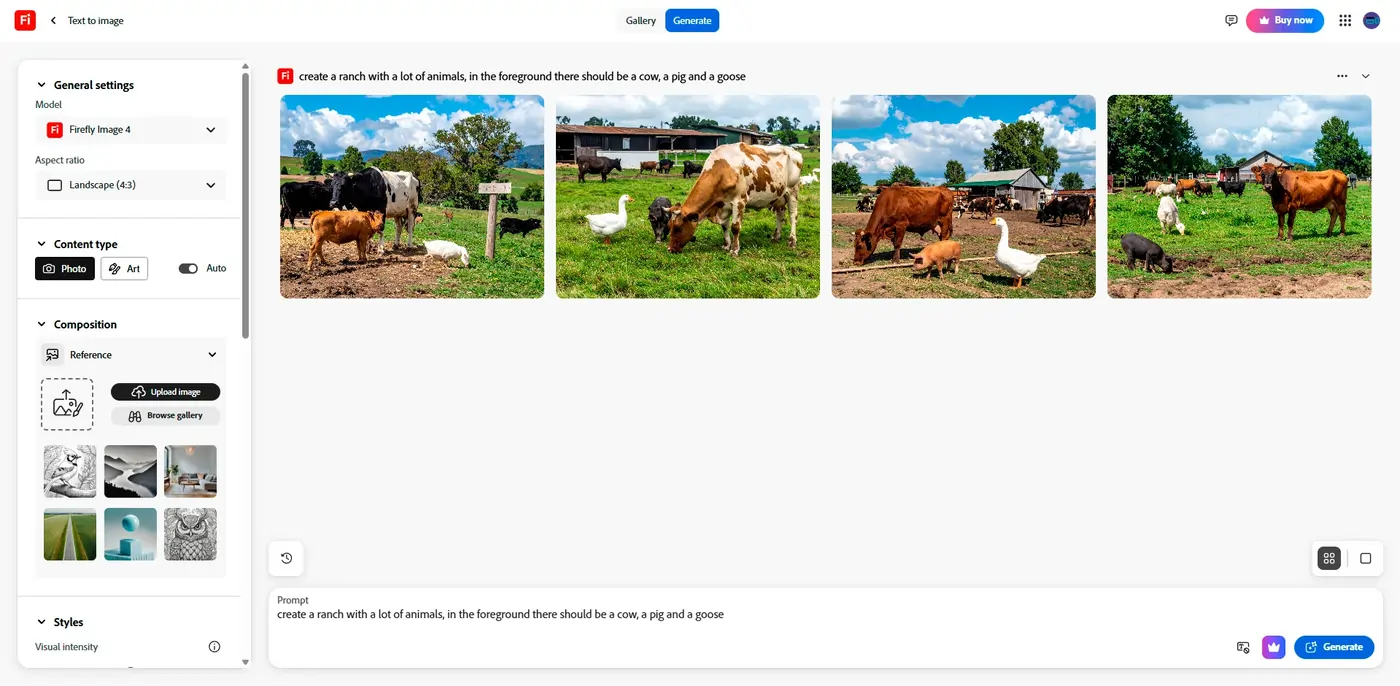
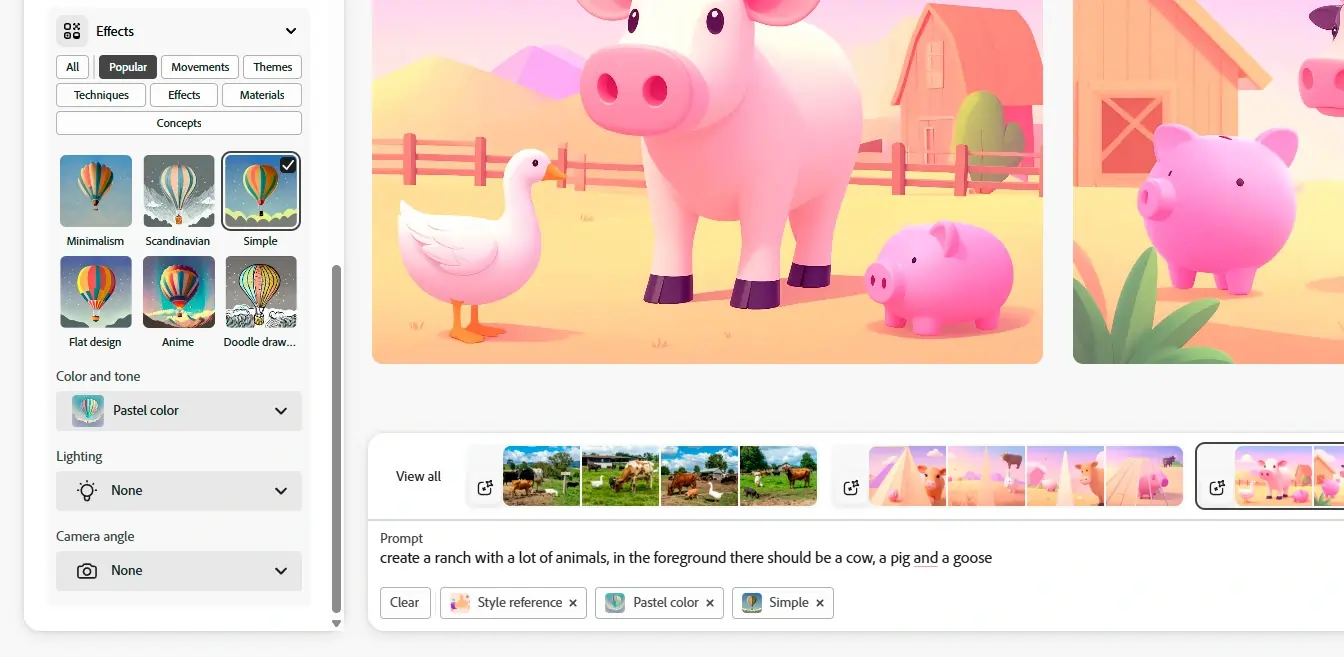
Firefly is a new online AI tool designed by the software giant Adobe. It is a part of the Adobe Creative Cloud suite and leverages artificial intelligence in its Firefly Image 3 Model. The… Read more
Firefly is a new online AI tool designed by the software giant Adobe. It is a part of the Adobe Creative Cloud suite and leverages artificial intelligence in its Firefly Image 3 Model. The web-based app can generate images from scratch based on text directions. Thanks to the generative fill feature, you can modify your images by switching, adding, and removing elements via text prompts. Adobe Firefly is a simple and powerful tool suitable for individual and commercial use!
Learn more in our full Adobe Firefly AI Image Generator review.
Pros & Cons
- Multiple variations of generated images on one prompt entered.
- Many effects and adjustments to choose from the camera angle to color variations.
- Can access the web-based app with portable and desktop devices. E
- dit your own images by removing, adding, or replacing certain areas.
- It takes a bit of patience to receive the result when generating images.
- Limited photo editing features, better for generating
- Live agent support isn’t easy to reach
Features
- Text-to-Image Generation
- Style Emulation
- Interactive Editing
- Web
- Windows
- macOS
- Android
- iOS
Pricing
$0
mo/
month
$4.99
mo/
month
Screenshots

Copy.ai is an AI writing tool designed to generate high-quality content for millions of users. This state-of-the-art artificial intelligence software provides content across various niches to… Read more
Copy.ai is an AI writing tool designed to generate high-quality content for millions of users. This state-of-the-art artificial intelligence software provides content across various niches to simplify the content creation process. The AI tool includes features like automated content generation, multilingual support, SEO optimization, plagiarism checks, and tailored templates for emails, social media, and e-commerce, all designed to enhance user productivity and creativity. With its advanced technology, users can now generate creative, relevant, and engaging content.
Learn more in our full Copy Ai review.
Pros & Cons
- Both AI writing tool and ChatBot provide high-quality content generation
- AI writing tool provides customization options
- Provides a wide range of templates for various content need
- Some advanced features require learning and practicing for new users
- Slow and glitchy UI and unresponsive at times
Features
- Grammar and Style Checks
- SEO Optimization
- Collaboration Features
- Content Personalization
- API Access
- Text Editing and Formatting
- Compliance and Security Measures
- Web
Pricing
$0
mo/
month
$49
mo/
month
$249
mo/
month
Grammarly is an AI-powered writing assistant designed to help users enhance their writing quality. It offers advanced grammar and style checks, plagiarism detection, and context-specific suggestions.… Read more
Grammarly is an AI-powered writing assistant designed to help users enhance their writing quality. It offers advanced grammar and style checks, plagiarism detection, and context-specific suggestions. Ideal for professionals, students, and writers who want to optimize their content writing. Grammarly improves clarity, engagement, and correctness in various types of writing.
Learn more in our full Grammarly review.
Pros & Cons
- Intuitive user interface with easy navigation.
- High-quality, contextually relevant content generation.
- Extensive customization options for tailored content.
- Fast and efficient performance with minimal delays.
- Phone support is not available.
- Some advanced features may have a learning curve for beginners.
Features
- Grammar and Style Checks
- SEO Optimization
- Plagiarism Check
- Collaboration Features
- Content Personalization
- Multilingual Support
- API Access
- Web
- Windows
- macOS
- Android
- iOS
Pricing
$12
mo/
month
Figma is a powerful web design software that allows you to create and collaborate on designs for websites, mobile apps, and other digital products. With Figma, you can easily create wireframes,… Read more
Figma is a powerful web design software that allows you to create and collaborate on designs for websites, mobile apps, and other digital products. With Figma, you can easily create wireframes, prototypes, and high-fidelity designs using a range of intuitive tools and features.
Learn more in our full Figma review.
Pros & Cons
- Ultimate collaboration tool
- Powerful AI prototyping tools
- Wide range of design elements & templates
- Integrates with other platforms
- Limited offline functionality
- Does not support all file types
- No ability to edit code
Features
- Collaboration Features
- API Access
- Text Editing and Formatting
- Compliance and Security Measures
- Pre-Built Templates
- Layer Support
- Interactive Editing
- Web
- Windows
- macOS
- Android
- iOS
Pricing
$0
mo/
month
$15
mo/
month
$45
mo/
month
$75
mo/
month
ChatGPT, developed by OpenAI, is one of the most sophisticated AI-powered conversational models available today. Designed as a versatile AI assistant, ChatGPT excels in a range of applications, from… Read more
ChatGPT, developed by OpenAI, is one of the most sophisticated AI-powered conversational models available today. Designed as a versatile AI assistant, ChatGPT excels in a range of applications, from casual conversations to professional writing, content creation, coding, and beyond. It is built on the GPT-4 architecture (for the premium version) and combines natural language understanding with generative capabilities, making it a robust tool for individuals, businesses, and developers.
Learn more in our full Chatgpt review.
Pros & Cons
- Extensive free service
- High reading grade
- Provides accurate grammar and syntax corrections.
- Easy to navigate and use.
- Text generation can have factual inaccuracies
- Slower than some alternatives
- Limited image generation capacity
Features
- Grammar and Style Checks
- SEO Optimization
- Plagiarism Check
- Collaboration Features
- Content Personalization
- Multilingual Support
- API Access
- Text Editing and Formatting
- Compliance and Security Measures
- Web
- Windows
- macOS
- Android
- iOS
Pricing
$0
mo/
month
$20
mo/
month
$200
mo/
month
$25
/mo or per user/
/mo or per user
Google Gemini is Google's flagship multimodal AI assistant — it reasons and generates across text, images, video, audio, code and PDFs in one app. As of 2026 the consumer lineup runs on the Gemini… Read more
Google Gemini is Google's flagship multimodal AI assistant — it reasons and generates across text, images, video, audio, code and PDFs in one app. As of 2026 the consumer lineup runs on the Gemini 3.5 generation, framed by Google as "frontier intelligence with action": Gemini 3.5 Flash is Google's strongest agentic and coding model yet — leading coding and agentic benchmarks, with output roughly 4× faster than other frontier models and computer use built in, so you can build custom agents that see, reason and act across desktop, mobile and browser. Gemini 3.5 Pro is rolling out for the most advanced reasoning and long-context work (up to a 1M-token context window), with a Deep Think mode on the top tier. Image generation is handled by the Nano Banana 2 family (with Nano Banana 2 Lite as the fastest, most cost-efficient option) and video by Gemini Omni — a model that creates high-quality video from any input (image, audio, video, text), grounded in real-world knowledge and physics; the first model is Gemini Omni Flash. Gemini is free to start, with paid Google AI plans (Plus, Pro, Ultra) unlocking higher limits, Gemini Omni video, Deep Research and deep Google Workspace integration.
Learn more in our full Gemini AI review.
Pros & Cons
- Many features available in the free plan, strong value at $0
- Deepest integration with Google Workspace
- Capable of writing in multiple languages for global reach
- Clear, laddered pricing from $4.99 → $99.99
- Occasionally misinterprets the context or the nuances of the task
- Top features can be region-limited and roll out unevenly
- Data-privacy considerations when feeding sensitive business content into a consumer AI
Features
- Grammar and Style Checks
- SEO Optimization
- Plagiarism Check
- Collaboration Features
- Content Personalization
- Multilingual Support
- API Access
- Text Editing and Formatting
- Compliance and Security Measures
- Background Noise Reduction
- Green Screen
- Text-to-Video
- Object Tracking
- Pre-Built Templates
- Object Removal
- AI Filters and Effects
- Background Replacement
- Layer Support
- Text-to-Image Generation
- Face and Body Pose Synthesis
- Scene Composition
- Style Emulation
- Batch Generation
- Interactive Editing
- Web
- Android
- iOS
Pricing
$0
mo/
month
$4.99
mo/
month
Claude AI, built by Anthropic, is a safety-first AI assistant for writing, coding, research, data analysis, and agentic tasks. You can use Claude on the web, desktop (Windows/macOS), and mobile (iOS… Read more
Claude AI, built by Anthropic, is a safety-first AI assistant for writing, coding, research, data analysis, and agentic tasks. You can use Claude on the web, desktop (Windows/macOS), and mobile (iOS and Android), through the API, or inside tools via connectors. Claude reads and reasons over long documents and images, searches the web for current information with cited sources, and runs multi-step work through Claude Code and connectors (remote MCP). In 2026 the lineup runs on Anthropic's newest models — Opus 4.8, Sonnet 5, and Haiku 4.5 — with plans for individuals, teams, and enterprises.
Learn more in our full Claude Ai review.
Pros & Cons
- Runs on Anthropic's newest models (Opus 4.8, Sonnet 5, Haiku 4.5) with very large context windows
- Genuinely useful free plan; Pro is competitively priced at $20/mo (less billed annually)
- Strong at coding and agentic work via Claude Code and MCP connectors
- Web search with cited sources, vision, and extended reasoning built in
- Heaviest usage requires the Max plan (from $100/mo)
- Team plan requires a minimum of 5 seats
- Usage is capped by rolling session limits rather than a fixed message count, which can interrupt heavy sessions
Features
- Grammar and Style Checks
- Collaboration Features
- Content Personalization
- Multilingual Support
- API Access
- Compliance and Security Measures
- Web
- Windows
- macOS
- iOS
Pricing
$0
mo/
month
$20
mo/
month
$25
/mo or per user/
/mo or per user
Microsoft Copilot is an advanced AI tool that enables individuals and organizations to optimize their workflows, thereby accomplishing more tasks efficiently in less time. Copilot AI's chatbot… Read more
Microsoft Copilot is an advanced AI tool that enables individuals and organizations to optimize their workflows, thereby accomplishing more tasks efficiently in less time. Copilot AI's chatbot functionality is deeply integrated into its system, capable of generating content and providing conversational interactions based on natural language processing. This AI tool supports authors by offering features like conversational search, summarization, and creative content generation, making it an effective assistant for a wide range of writing tasks.
Learn more in our full Copilot review.
Pros & Cons
- Enhances teamwork by streamlining communication Integration with other Microsoft Apps
- Enterprise-grade security against threats and breaches
- Consistent updates
- The depth of data analysis needed for Copilot to function optimally raises privacy issues
- Dependency on Microsoft 365 subscription for business users
Pricing
$0
mo/
month
$20
mo/
month
$30
mo/
month
Many of these solutions come with a free trial period for AI tools, allowing businesses to test capabilities before committing. You can even find an AI app for business free trial specifically tailored for your industry to see which platform suits you best.
The Impact of Free AI Tools on Daily Business Operations
AI tools are revolutionizing the way businesses handle day-to-day tasks across various departments:
- Automated Customer Communications
AI-driven chatbots and virtual assistants can handle a myriad of customer interactions—from answering FAQs to scheduling appointments. This automation increases efficiency and allows staff to focus on more complex customer needs. - Streamlined Administrative Tasks
AI tools simplify administrative duties such as data entry, scheduling, and resource management. For instance, AI-driven scheduling tools can optimize resource allocation, reducing waste and improving productivity. - Enhanced Data Management
AI applications in data management can automatically sort, analyze, and report data. This capability is crucial for making informed business decisions quickly, providing a substantial edge in fast-paced market conditions.
How Free AI Tools Impact Daily Business Operations
Automated Customer Communications
- Chatbots & Virtual Assistants: Answer FAQs, book appointments, and provide basic support.
- Benefit: Staff can focus on more complex interactions, improving the quality of human-led customer service.
Streamlined Administrative Tasks
- Data Entry & Scheduling: AI tools handle routine data entry, schedule meetings, and allocate resources.
- Benefit: Reduced manual work translates to fewer errors and more efficient operations.
Enhanced Data Management
- Real-Time Analytics: Automatically sort and analyze data to surface actionable insights.
- Benefit: Faster decision-making in a competitive, fast-paced market.
Transforming Marketing with Free AI Tools
Marketing is another area where free AI tools for business can significantly impact operations:
- Content Creation
AI-powered content creation tools can generate draft articles, social media posts, and marketing copy, easing the creative burden on marketing teams. These tools leverage natural language processing to produce compelling content that engages audiences. - Customer Insights and Personalization
Free AI tools analyze customer data and behavior to provide insights that drive personalized marketing strategies. This tailored approach enhances customer engagement and boosts conversion rates by delivering more relevant content and recommendations. - Campaign Optimization
AI tools automate the testing and optimization of different marketing campaigns. They can analyze the performance of various approaches in real-time and adjust strategies to maximize effectiveness and ROI. - Social Media Management
AI-driven tools help manage social media profiles, from scheduling posts to analyzing engagement data. Businesses can maintain an active and effective online presence with minimal effort.
Benefits of Integrating Free AI Tools into Business Practices
Integrating the best free AI tools for business into daily operations offers several advantages:
- Cost Efficiency
These tools reduce the need for large teams to manage data, content creation, and customer interactions, significantly cutting costs. - Scalability
AI tools can easily scale with your business, managing increased workloads as your company grows without the need for additional human resources. - Improved Accuracy
AI reduces human error in tasks like data analysis and content generation, ensuring more accurate outputs. - Increased Productivity
Automating routine tasks frees up employees to focus on strategic and creative tasks, boosting overall productivity.
Choosing the Right Free AI Tools
To select the most effective AI tools for your business, consider the following:
To select the most effective AI solutions for your business:
- Identify Specific Needs
Pinpoint the tasks that consume the most time or resources, then explore AI tools free trial options specializing in those areas. - Check Ease of Integration
Choose tools that integrate seamlessly with your existing systems to avoid operational disruptions. - Verify Security Features
Opt for AI tools that provide strong data security measures to protect sensitive business information.
Free vs. Paid AI Tools
Use this overview to weigh the trade-offs between free and paid AI solutions. If your business has straightforward or smaller-scale needs, free AI tools may suffice. However, if you require advanced capabilities, higher throughput, or dedicated support, paid AI tools could be the more cost-effective long-term investment.
Criteria | Free AI Tools | Paid AI Tools |
|---|---|---|
Feature Scope | Typically includes basic functionalities with limited capacity. Some advanced features may be locked or require an upgrade. | Offers comprehensive features, advanced analytics, and expanded usage, including premium add-ons. |
Scalability | May encounter usage caps or restrictions as your needs grow, often requiring you to combine multiple free solutions or upgrade. | Designed to grow with your business, offering flexible plans and robust capabilities that accommodate larger workloads and user bases. |
Ongoing Support | Generally relies on community forums or limited customer service. Response times vary and support may be less comprehensive. | Provides priority or dedicated support, often backed by service-level agreements (SLAs). Response times are typically faster, and troubleshooting is more thorough. |
Security & Compliance | Basic security features are common, but not all tools carry certifications (e.g., GDPR, HIPAA). Thorough due diligence is advised. | Typically includes advanced security measures and compliance certifications (GDPR, HIPAA, etc.), plus stronger data protection protocols. |
Potential Costs | No direct financial investment, but may incur hidden costs due to manual workarounds or lacking functionality. | Involves subscription or license fees but can yield higher ROI if advanced features, automation, and premium support significantly boost business efficiency. |
Best Practices
Data Security
- Confirm encryption standards and legal compliance.
- Pitfall: Overlooking privacy regulations can lead to fines.
Employee Training
- Offer how-to guides and training sessions for a smooth transition.
- Pitfall: Inadequate onboarding can lower adoption rates.
Integration Planning
- Map out which departments and workflows will use the tool.
- Pitfall: Silos form when tools are adopted without cross-team alignment.
Over-Reliance on AI
- Balance AI automation with human oversight for tasks requiring creativity or empathy.
- Pitfall: Missing the human touch may alienate customers or reduce innovation.
See also
- Free is a filter rather than a category, so use the best AI software for small business hub to pick the job first and the price second.
- Video is where free tiers differ most, and the watermark and export limits are laid out in best free AI video generators.
- Word caps on free writing assistants bite quickly once you draft daily, which is why the paid picks in best AI writing tools matter.
- Image tools hand out credits rather than unlimited output, and best AI image generator for commercial use covers which ones allow it.
Conclusion
Free AI tools for business are reshaping how companies operate by automating routine tasks, enhancing marketing efforts, and simplifying complex processes. Especially for small to mid-sized businesses, these resources provide advanced capabilities without the hefty price tag typically associated with high-end AI technology. By carefully selecting and integrating the best free AI tools for business, organizations can improve efficiency, reduce costs, and maintain a competitive edge. Embracing these AI solutions—often available with an AI tools free trial or an AI app for a business free trial—is not just about keeping up with technology trends. It’s about making strategic moves that position your business for success in an ever-evolving marketplace.
FAQ
Which industries benefit most from free AI tools?
All sectors—from retail and healthcare to finance—can leverage AI, especially for customer service, marketing, and data analytics.
What level of technical expertise is required?
Many free AI tools for business are user-friendly. However, more complex features may need some tech-savvy or training to implement effectively.
Are free AI tools secure enough for sensitive data?
Many are, but always check compliance standards (GDPR, HIPAA) and ask about data encryption before deployment.
How long are ai tools free trial periods typically?
Trial lengths vary. Some tools offer 7 to 14 days, while others may extend up to 30 days or more.
When should I consider upgrading to a paid plan?
If your usage exceeds free-tier limits or you require advanced features and dedicated support, exploring a paid plan is recommended.