
Best Construction Scheduling Software for 2026
Last updated: September 2026

- Instantly organize with 200+ templates
- 40+ integration apps including Zoom
- Free, fully functional mobile app
- This project management software is easy to navigate
- The site uses reliable and user-friendly tools
- The organization of the platform is effective
- The help and support area needs to offer more options
- The help and support area should have more extensive testimonials and videos
- There is no multilingual support
- Instantly organize with 200+ templates
- 40+ integration apps including Zoom
- Free, fully functional mobile app
- This project management software is easy to navigate
- The site uses reliable and user-friendly tools
- The organization of the platform is effective
- The help and support area needs to offer more options
- The help and support area should have more extensive testimonials and videos
- There is no multilingual support

- Track progress with real-time dashboards
- Custom tools fit your work at any scale
- Access proejct templates and Gantt charts
- Spreadsheet-like interface makes it easy to use
- Advanced reporting and analytics for better insights
- iOS and Android mobile apps
- Powerful automation reduces manual tasks efficiently
- No monthly billing
- The individual plan may not be enough for small businesses
- Learning curve for new users can be steep
- Track progress with real-time dashboards
- Custom tools fit your work at any scale
- Access proejct templates and Gantt charts
- Spreadsheet-like interface makes it easy to use
- Advanced reporting and analytics for better insights
- iOS and Android mobile apps
- Powerful automation reduces manual tasks efficiently
- No monthly billing
- The individual plan may not be enough for small businesses
- Learning curve for new users can be steep

- Trusted by 20,000+ customers worldwide
- Secure data with enterprise-grade tools
- Custom dashboards give instant insights
- Offers top-tier support for all users, but especially enterprise businesses and applications.
- Easy to integrate other tools with Wrike
- Very easy to use, even with the customizable dashboards
- Pricing could be better for smaller businesses
- The timer is task-based, not account-based, and it can be tricky for some to find
- Trusted by 20,000+ customers worldwide
- Secure data with enterprise-grade tools
- Custom dashboards give instant insights
- Offers top-tier support for all users, but especially enterprise businesses and applications.
- Easy to integrate other tools with Wrike
- Very easy to use, even with the customizable dashboards
- Pricing could be better for smaller businesses
- The timer is task-based, not account-based, and it can be tricky for some to find
- Easy-to-use & intuitive interface
- Trusted by great brands
- Automate tasks and save time
- Simple to use application
- Built-in time tracking with integrations for direct invoicing
- The ability to set up project budgeting
- Robust help documents that cover every aspect of the application
- Many features have been removed to encourage subscriptions to Zoho’s other projects
- The interface is bland when compared to similar products
- Easy-to-use & intuitive interface
- Trusted by great brands
- Automate tasks and save time
- Simple to use application
- Built-in time tracking with integrations for direct invoicing
- The ability to set up project budgeting
- Robust help documents that cover every aspect of the application
- Many features have been removed to encourage subscriptions to Zoho’s other projects
- The interface is bland when compared to similar products

- Integrated communication tracking tools
- Forecast revenue with powerful insights
- Automate workflows to save time
- A quick and easy to use software that is easily explainable to anyone
- Improves the functionality of your sales specialty
- Reasonable prices with effective features
- Expand names on emails. The maximum limits your ability to target specific customers
- A more slick design with adding additional fields for contacts
- Add a LinkedIn integration for optimal potential customer reach
- Integrated communication tracking tools
- Forecast revenue with powerful insights
- Automate workflows to save time
- A quick and easy to use software that is easily explainable to anyone
- Improves the functionality of your sales specialty
- Reasonable prices with effective features
- Expand names on emails. The maximum limits your ability to target specific customers
- A more slick design with adding additional fields for contacts
- Add a LinkedIn integration for optimal potential customer reach
* Featured prices and terms can be updated. Free offers may include additional terms.
Why you can trust this guide: Sonary has independently reviewed 15+ project management and scheduling platforms. For this guide, we set up a real construction-style schedule on each platform — sequencing tasks, assigning crews and subcontractors, and testing the mobile app the way a foreman would on-site — weighing Gantt and timeline tools, crew scheduling, mobile field access, budget visibility, and setup time. See how we rate and our rating methodology.
The best construction scheduling software for most small and mid-sized contractors is monday.com, for its flexible Gantt boards, crew scheduling, and strong mobile app. Smartsheet wins for spreadsheet-style teams; Acumatica is the best construction-specific option (it pairs scheduling with job-cost accounting and field service); Wrike suits document-heavy, multi-department jobs; and Zoho Projects is the best value for Gantt scheduling. Full comparison, pricing, and best use case for each below.
Construction scheduling software at a glance
Tool | Best for | Free plan | Free trial | Starting price |
|---|---|---|---|---|
monday.com | Flexible Gantt + crew scheduling | ❌ | ✅ 14-day | from $9/seat/mo |
Smartsheet | Spreadsheet-style scheduling | ❌ | ✅ 30-day | from $9/seat/mo |
Acumatica | Construction-specific (scheduling + job costing) | ❌ | ✅ demo | custom quote |
Wrike | Cross-team, document-heavy jobs | ✅ | ✅ | from $10/seat/mo |
ClickUp | All-in-one Gantt scheduling on a budget | ✅ | ✅ | from $7/seat/mo |
Zoho Projects | Best value for Gantt + dependencies | ✅ | ✅ | from $5/seat/mo |
Celoxis | Advanced Gantt & resource scheduling | ❌ | ✅ | from $7/seat/mo |
Pipedrive | Pre-construction & bid pipeline | ❌ | ✅ 14-day | from $14/seat/mo |
QuickBooks | Job costing alongside the schedule | ❌ | ✅ | from ~$35/mo |
Prices are starting tiers and billed per the vendor's terms; verify current pricing on each vendor site before publishing.
What is construction scheduling?
Construction scheduling is the process of planning and sequencing every task in a build so the right crews, materials, and equipment are in the right place at the right time. A construction schedule maps out each activity — from site prep and foundations to framing, inspections, and handover — sets how long each takes, and defines which tasks depend on others. Done well, it tells you the project's start and finish dates, who's responsible for what, and where the schedule is most at risk of slipping.
Most construction projects are scheduled using the critical path method (CPM): you identify the longest chain of dependent tasks (the "critical path") that determines the overall completion date, then protect and monitor that chain closely. CPM is almost always visualized as a Gantt chart, which is why Gantt scheduling is the core feature to look for in any tool below.
What is construction scheduling software?
Construction scheduling software is a tool that lets contractors plan, sequence, and track every task in a build — from permits and site prep to inspections and handover — on a shared timeline. It replaces whiteboards, spreadsheets, and group texts with a single Gantt chart or calendar where you assign crews, set task dependencies, track progress against deadlines, and see the impact of a delay before it cascades through the job. It sits alongside your broader project management and scheduling software stack.
Good construction scheduling tools combine four things: a visual timeline(Gantt or calendar), crew and subcontractor assignment, mobile access so field teams can update status on site, and budget or job-cost visibility so schedule slips don't quietly blow the budget.
How we tested these tools
We built the same sample project in each platform — a small multi-phase remodel — and evaluated it against the criteria that matter on an active job site:
- Scheduling tools— Gantt charts, calendars, milestones, and task dependencies
- Crew & subcontractor scheduling— assigning people to tasks and spotting overbooked crews
- Mobile & field usability— can a foreman update the schedule from a phone?
- Budget & job-cost visibility— tracking labor and materials against the plan
- Document handling— plans, permits, and specs attached to the right tasks
- Ease of setup— how fast a non-technical contractor gets a live schedule
Most contractors comparing tools on Sonary are small to mid-sized businesses with fewer than 20 employees, so we weighted ease of use and value alongside raw capability.
The best construction scheduling software in2026
1. monday.com— best for flexible Gantt scheduling and crew assignment
- Instantly organize with 200+ templates
- 40+ integration apps including Zoom
When I set up a multi-phase remodel in monday.com, the Gantt board was the fastest way to get from a blank slate to a sequenced schedule: I could drag task bars, link dependencies, and assign each crew and subcontractor in a few minutes. The mobile app held up well for the kind of quick status updates a foreman makes on site, and automations handled the repetitive nudges ("notify the PM when framing is done"). It's the most flexible all-rounder for contractors who want a schedule that doubles as a project hub.
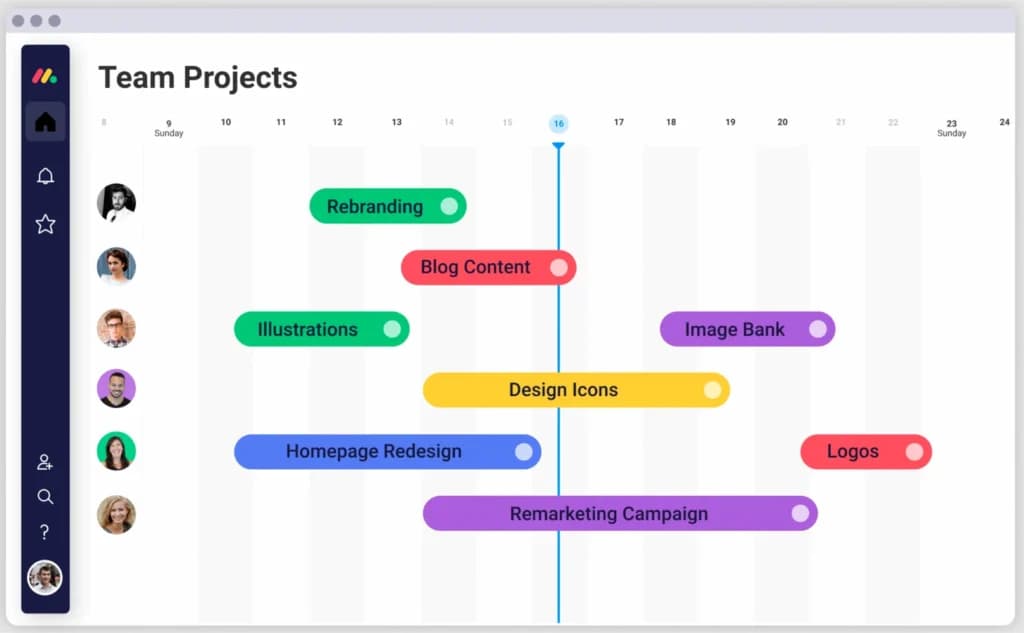
Why choose monday.com? It balances real scheduling power (Gantt, timelines, dependencies, automations) with a visual, low-learning-curve interface and a genuinely usable mobile app — the combination most small contractors need.
Best for: Contractors who want one flexible tool for scheduling, crew assignment, and job tracking.
Pros | Cons |
|---|---|
Visual Gantt and timeline views with dependencies | No construction-specific templates out of the box |
Crew/subcontractor assignment and workload views | Gantt is on higher-tier plans |
Strong mobile app for field updates | Requires some initial setup |
200+ templates and automations |
- Scheduling features: Gantt, timeline, calendar, dependencies, automations, workload view
- What's new in :2026Expanded AI assistance for auto-scheduling and summarizing project status updates.
- Starting price: from $9/seat/mo (Gantt on higher tiers) · Free trial: 14 days
- Read our full monday.com scheduling review
2. Smartsheet— best for spreadsheet-style scheduling
- Track progress with real-time dashboards
- Custom tools fit your work at any scale
If your team already plans jobs in Excel, Smartsheet felt the most familiar in testing: a grid that turns into a Gantt chart, with real-time collaboration, automation, and dashboards layered on top. It's strong for tracking budgets, timelines, inspections, and subcontractor milestones in one sheet, and it scaled cleanly when I added a second job.
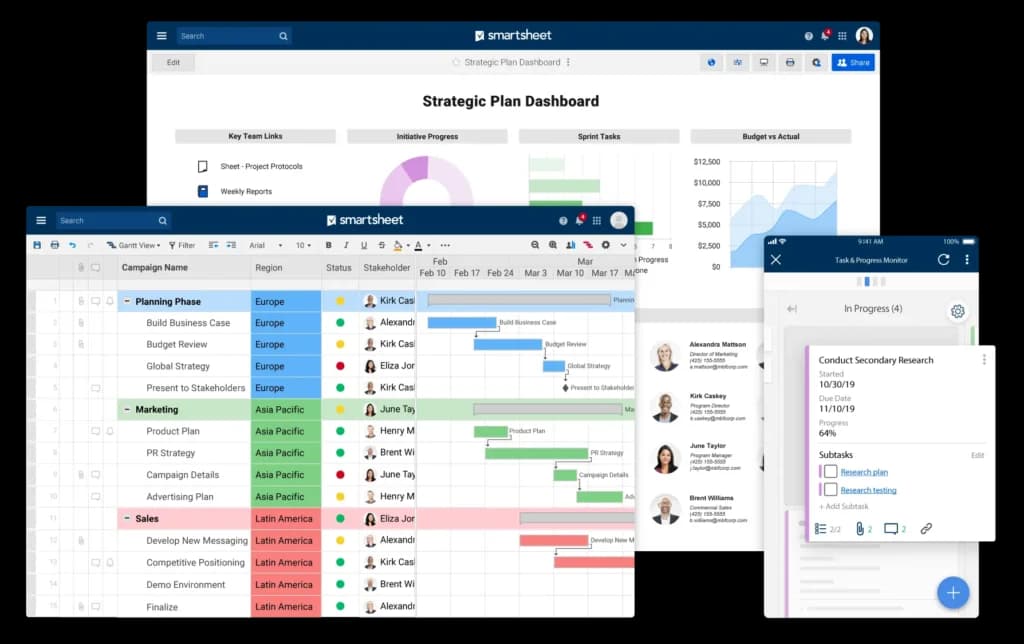
Why choose Smartsheet? It gives spreadsheet-comfortable teams real scheduling power — Gantt, dependencies, critical-path-style planning — without learning a brand-new interface.
Best for: Teams currently scheduling in spreadsheets who want collaboration and automation.
Pros | Cons |
|---|---|
Excel-like interface with real Gantt charts | Steeper learning curve for advanced features |
Forms, dashboards, and automation | Less field-friendly than mobile-first tools |
Good for budgets and milestone tracking |
- Scheduling features: Gantt charts, dependencies, dashboards, forms, automation
- What's new in :2026Deeper AI-assisted formulas and improved portfolio-level dashboards.
- Starting price: from $9/seat/mo · Free trial: 30 days
3. Acumatica— best construction-specific option

- Trusted by 8000+ Customers
- Quality traceability with lot and serial control
Acumatica is the closest thing on this list to true construction software: it's an ERP with a construction edition that ties project scheduling to job-cost accounting, change orders, and mobile field service. In practice that means the schedule isn't a standalone chart — it's connected to budgets, labor, and billing, so a delay shows up as a cost impact immediately. It's heavier than a pure scheduler and is quote-based, so it fits growing firms that have outgrown a spreadsheet-plus-QuickBooks setup.
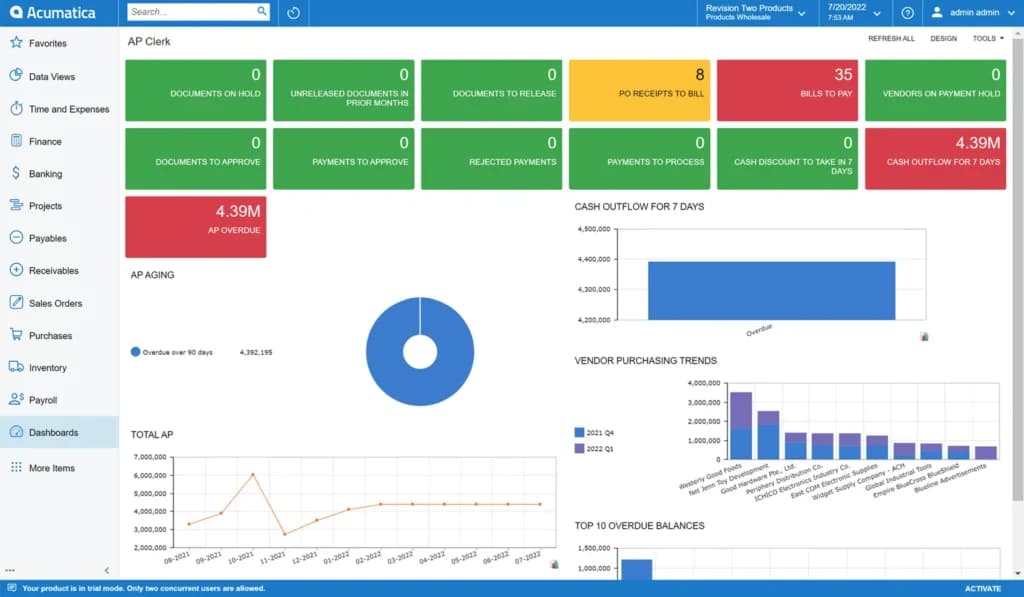
Why choose Acumatica? It's purpose-built for the construction industry, combining scheduling with job costing, project accounting, and field service in one system.
Best for: Growing contractors who want construction-specific scheduling tied to financials.
Pros | Cons |
|---|---|
Built for construction (job costing, change orders, field service) | Custom-quote pricing, higher cost |
Schedule connected to budgets and billing | Heavier setup than a simple scheduler |
Strong mobile field service module | Overkill for very small crews |
- Scheduling features: Project scheduling, job costing, resource and field-service management, mobile access
- Starting price: custom quote · Free demo: available
- Read our full Acumatica ERP review
4. Wrike— best for document-heavy, multi-department jobs
- Trusted by 20,000+ customers worldwide
- Secure data with enterprise-grade tools
Wrike earned its place for firms that coordinate design, permitting, and fieldwork across several departments. It pairs scheduling (Gantt, dependencies, due dates) with strong document sharing and time tracking, so document-heavy jobs stay organized and on schedule. In testing, attaching specs and permits directly to scheduled tasks was the standout.
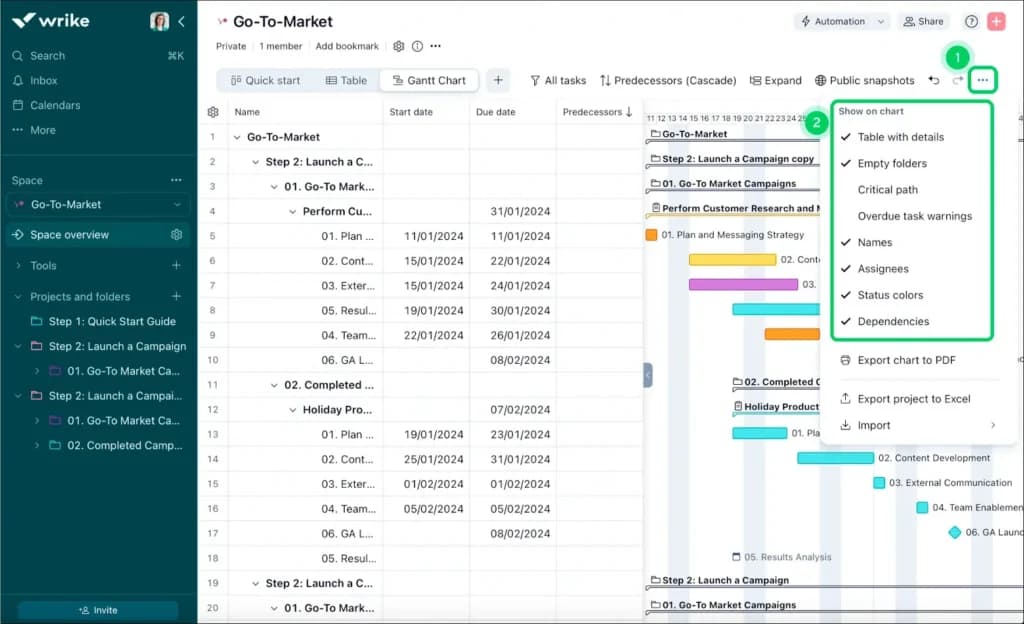
Why choose Wrike? Its task dependencies, file management, and time logging make it ideal when the schedule has to stay in sync with a lot of paperwork and hand-offs.
Best for: Design-build and multi-department firms with document-heavy workflows.
Pros | Cons |
|---|---|
Gantt charts with task dependencies | No native estimating or budgeting |
Strong document sharing and time tracking | Can be more than small crews need |
Free plan available |
- Scheduling features: Gantt, dependencies, time tracking, multiple views (Grid, Gantt, Calendar, Board)
- What's new in :2026Expanded AI work-intelligence for risk and deadline prediction.
- Starting price: free plan; paid from $10/seat/mo · Free trial / free plan:✅
5. ClickUp— best all-in-one Gantt scheduling on a budget

- Affordable plans suitable for all businesses
- Free training & 24-hour support
ClickUp packs a lot into a low price: Gantt charts, dependencies, calendars, custom fields, and dashboards. For a small contractor who wants one tool for scheduling, tasks, and docs without paying premium prices, it was the most feature-dense option I tested. The trade-off is that all those features mean more configuration up front.
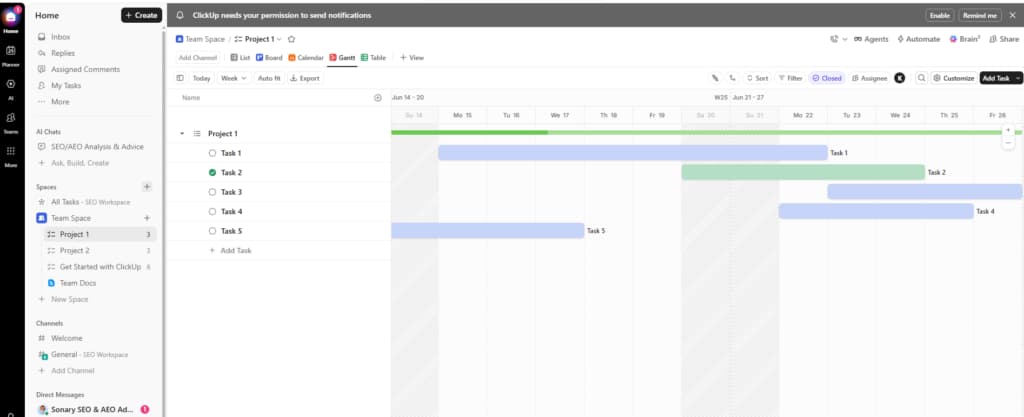
Why choose ClickUp? It delivers Gantt scheduling, dependencies, and dashboards at one of the lowest entry prices, with a generous free plan.
Best for: Small contractors wanting maximum scheduling features per dollar.
Pros | Cons |
|---|---|
Gantt, dependencies, and dashboards on cheap tiers | Feature density means a learning curve |
Generous free plan | Can feel busy for simple jobs |
Highly customizable |
- Scheduling features: Gantt charts, dependencies, calendar, custom statuses, workload view
- Starting price: free plan; paid from $7/seat/mo · Free trial / free plan:✅
- Read our full ClickUp review(confirm project-management slug)
6. Zoho Projects— best value for Gantt scheduling
- Easy-to-use & intuitive interface
- Trusted by great brands
Zoho Projects is the most affordable way to get genuine scheduling features — Gantt charts, task dependencies, and time logging — at a price that works for startups and small crews. It's a big upgrade from spreadsheets for teams just getting organized, and it plugs into the wider Zoho ecosystem if you already use it.
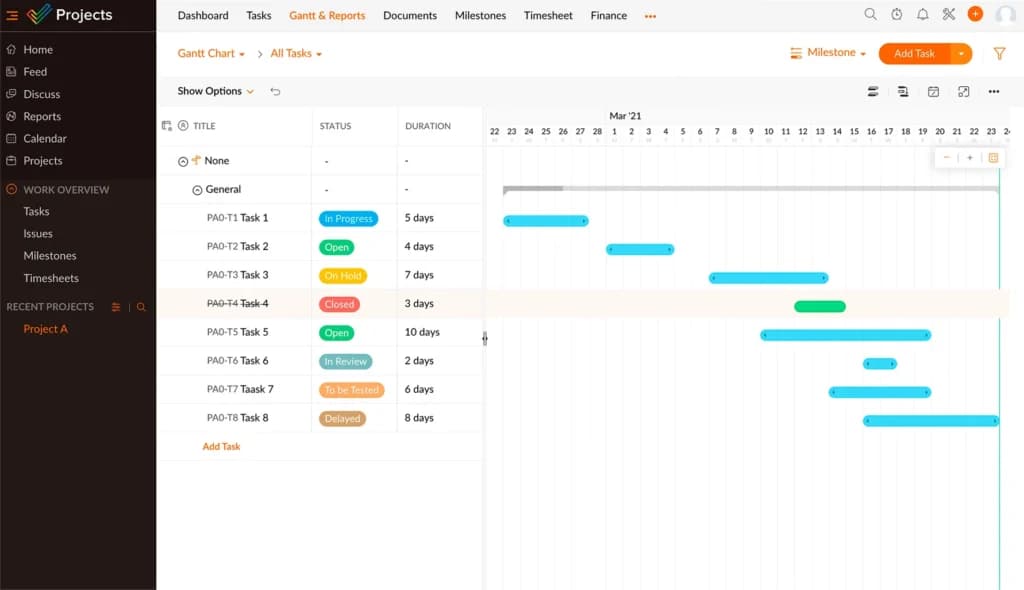
Why choose Zoho Projects? Real Gantt charts and dependencies at one of the lowest price points on the market.
Best for: Budget-conscious contractors who still want a real Gantt-based schedule.
Pros | Cons |
|---|---|
Low price, free plan available | Less powerful mobile experience |
Gantt charts and task dependencies | Not construction-specific |
Integrates with Zoho ecosystem |
- Scheduling features: Gantt charts, dependencies, milestones, time logging
- Starting price: free plan; paid from $5/seat/mo · Free trial / free plan:✅
7. Celoxis— best for advanced Gantt and resource scheduling
- Enterprise-class features
- Powerful reporting & dashboards
Celoxis is the pick when scheduling gets complex — multiple jobs, shared crews, and tight resource constraints. Its Gantt and resource-management tools are more advanced than most general PM apps, with what-if scheduling and portfolio views. It's best for a contractor or PM who's juggling several active jobs and needs to balance crews across all of them.
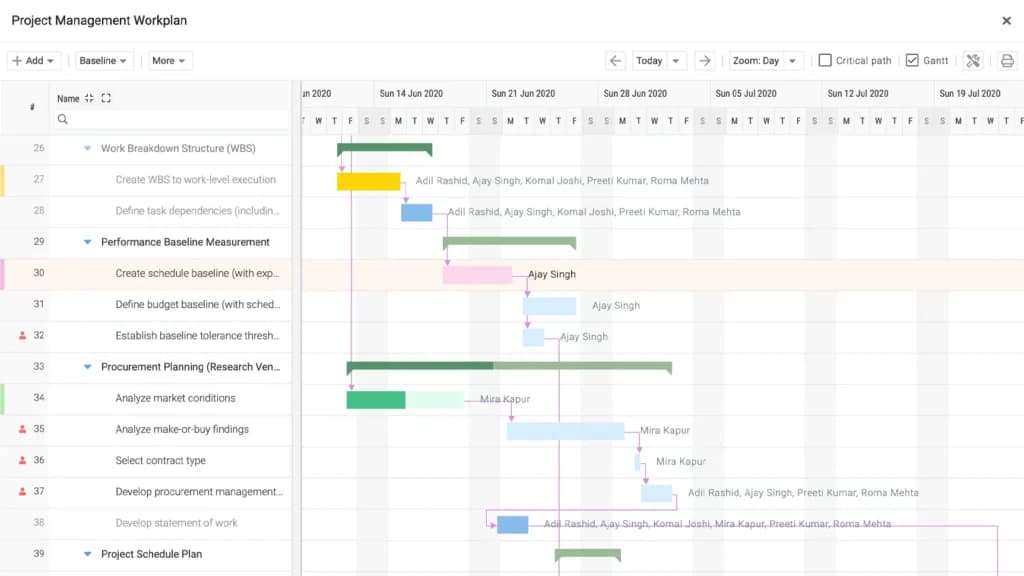
Why choose Celoxis? Advanced, dynamic Gantt charts and genuine resource-allocation tools for managing many jobs at once.
Best for: Firms running multiple concurrent jobs that share crews and equipment.
Pros | Cons |
|---|---|
Advanced Gantt and resource management | Less beginner-friendly |
Portfolio and what-if scheduling | No free plan |
Strong reporting |
- Scheduling features: Dynamic Gantt, resource allocation, portfolio scheduling, what-if planning
- Starting price: from $7/seat/mo · Free trial:✅
- Read our full Celoxis review
8. Pipedrive— best for scheduling the pre-construction pipeline
- Mobile app means you never miss a sale
- 300+ integrations enhance functionality
Before a job is scheduled, it's a lead. Pipedrive is a CRM that helps design-build firms and remodelers schedule and track bids, quotes, and client follow-ups so nothing slips before the job starts. It's not a job-site scheduler, but it keeps your pre-construction timeline organized and hands won jobs off cleanly to monday.com or Acumatica.
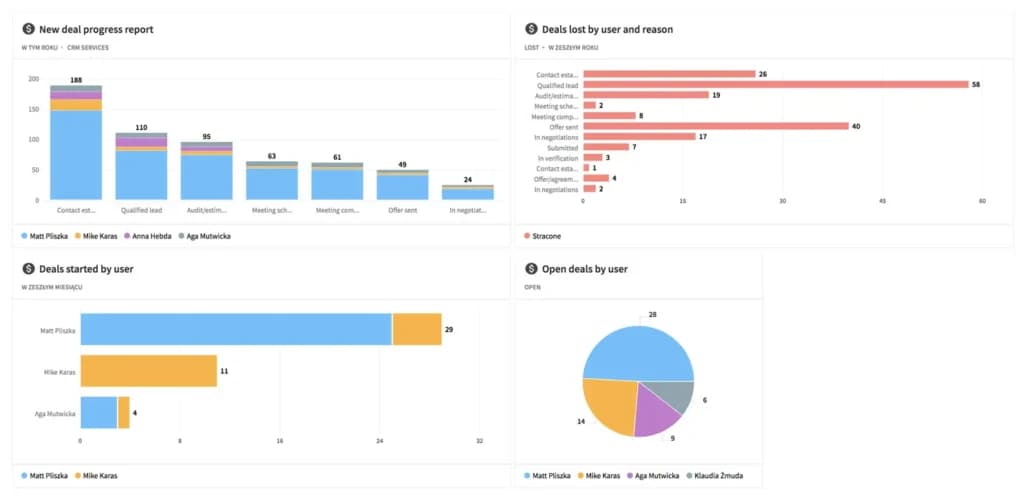
Why choose Pipedrive? It puts structure around the pre-construction pipeline — follow-ups, quotes, and client comms.
Best for: Tracking leads, bids, and client follow-ups before the build begins.
Pros | Cons |
|---|---|
Visual sales pipeline and reminders | Not a job-site scheduling tool |
Email integration and custom pipelines | No task dependencies or Gantt |
Easy to start |
- Scheduling-adjacent features: Activity scheduling, follow-up reminders, pipeline stages
- Starting price: from $14/seat/mo · Free trial: 14 days
9. QuickBooks— best for keeping the schedule tied to job costs

- Unlimited custom invoices and quotes
- Cleaner books from day one
QuickBooks isn't a scheduler, but it's the financial backbone many contractors run alongside one. It handles job costing, invoicing, and payroll, so as your schedule progresses you can see labor and material costs against each job. Most firms pair QuickBooks with monday.com or Smartsheet — scheduling in one, finances in the other (or step up to Acumatica to combine both).

Why choose QuickBooks? It gives the schedule a financial dimension: track costs by project and catch overruns a schedule alone won't show.
Best for: Job costing and financial management alongside your scheduling tool.
Pros | Cons |
|---|---|
Robust job costing and payroll | No project or task scheduling |
Tracks expenses by project | Needs a separate scheduling tool |
Widely used and integrated |
- Scheduling-adjacent features: Job costing, project profitability, payroll, invoicing
- Starting price: from ~$35/mo · Free trial:✅
- Read our full QuickBooks review, and see payroll services for paying your crew.
Other construction scheduling tools to know
If you need deep, construction-native features (blueprint markup, RFIs, submittals, daily logs), it's worth also looking at purpose-built platforms like Procore, Buildertrend, Fieldwire, Buildxact, and Jobber, or Houzz Pro for design-build and remodeling firms that want scheduling, estimates, and client management in one place. Specifically for blueprint markup, you'll pair your scheduler with architecture and CAD software. And if you're curious about where the category is heading, AI-driven schedulers like ALICE Technologies now automatically generate and optimize construction schedules. Many small contractors, however, run their entire schedule on a flexible general tool like monday.com or Smartsheet — especially when paired with QuickBooks for finances.
Key scheduling features to compare
When evaluating construction scheduling software, focus on these capabilities:
- Gantt charts and project planning— sequence tasks and set dependencies so the schedule reorders itself when one task slips. This is the backbone of construction project planning.
- Construction crew and employee scheduling— assign people, trades, and shifts; see who's overbooked; and avoid double-booking a crew across job sites. Strong crew and employee scheduling is what separates a real construction scheduling tool from a basic task manager.
- Subcontractor scheduling and dispatch— schedule and dispatch subcontractors to the right site on the right day, with their tasks and updates in one place.
- Mobile field access— let foremen and subs view and update the schedule from a phone, ideally offline.
- Milestones and deadlines— track inspections, permit dates, and client-facing milestones.
- Budget and job costing— tie labor and material costs to scheduled tasks so delays surface as cost risk.
- Reporting and dashboards— at-a-glance status of every active job.
Construction scheduling best practices
A schedule is only as good as how it's built and maintained. A few principles that consistently separate schedules that hold from schedules that slip:
- Schedule around measurable quantities, not vague durations — "install 40 windows" beats "windows week."
- Protect crew allocation— the fastest way to blow a timeline is double-booking the same crew across two jobs.
- Keep the schedule live— a board nobody updates is worse than no board, because people trust it and get burned.
- Choose visual clarity— if your foreman can't read the schedule on a phone in 10 seconds, it won't get used.
Sonary's take: Across the platforms we tested, the biggest difference-maker isn't the feature list — it's whether the schedule stays current. A Gantt chart built once and never touched is worse than no schedule, because the whole team trusts it and plans around stale dates. The tools that win on real job sites are the ones a foreman will actually update from a phone between tasks.
What we look for when testing: We weight field usability heavily. A scheduling tool can have every advanced dependency and resource feature, but if the mobile view is cluttered or slow, crews stop updating it and the schedule drifts from reality within a week. Clarity and speed on mobile consistently beat raw feature depth for small and mid-sized contractors. —The Sonary software research team
How much does construction scheduling software cost?
Tier | Monthly cost | Suitable for |
|---|---|---|
Entry-level | $5–$50/user | Solo contractors and startups (Zoho Projects, ClickUp, entry monday/Smartsheet seats) |
Mid-tier | $9–$25/user | Small teams on monday.com, Smartsheet, Wrike, or Celoxis with Gantt |
Construction ERP | custom quote | Growing firms want scheduling + job costing in one (Acumatica) |
Add-ons | varies | Job costing (QuickBooks), CRM (Pipedrive), extra integrations |
Hidden costs to watch for: onboarding and training, charges for Gantt or higher-tier features, mobile/offline add-ons, and annual vs. monthly price differences.
How to choose construction scheduling software: buyer checklist
- Can my field crew view and update the schedule from a phone on site?
- Does it offer Gantt charts and task dependencies, not just a to-do list?
- Can I assign and track crews and subcontractors without double-booking?
- Does it integrate with QuickBooks or my payroll software (or handle costing itself)?
- How does pricing scale as I add users or jobs?
- Is there offline access for sites with poor connectivity?
- Can clients see milestones or progress?
- How steep is the learning curve for non-technical field staff?
- Are training and support included or billed separately?
- Is there a free trial or free plan to test it on a real job first?
FAQ: construction scheduling software
What is the best construction scheduling software?
For most small and mid-sized contractors, monday.com is the best all-around choice for its flexible Gantt scheduling, crew assignment, and mobile app. Smartsheet is best for spreadsheet-based teams, Acumatica is the best construction-specific option, and Zoho Projects offers the best value on Gantt scheduling.
What is construction scheduling software used for?
It's used to plan and sequence every task in a build on a shared timeline — assigning crews and subcontractors, setting dependencies, tracking progress against deadlines, and seeing how a delay in one task affects the rest of the job.
Is there free construction scheduling software?
Yes. Wrike, ClickUp, and Zoho Projects all offer free plans with basic scheduling, and most paid tools (monday.com, Smartsheet) offer free trials so you can test them on a live job before paying.
Can I schedule subcontractors and crews with it?
Yes. Tools like monday.com, Smartsheet, Wrike, and Celoxis let you assign tasks to specific people or trades, view workloads to avoid double-booking, and let subs update their status from the field.
What's the best construction crew scheduling software?
For construction crew and employee scheduling, monday.com and Smartsheet lead the list — both let you assign crews to tasks, see workloads across multiple job sites, and avoid double-booking the same crew. For pure shift-based employee scheduling, a dedicated scheduling app may be a better fit, while monday.com or Acumatica handles crew scheduling tied to the overall project timeline.
What's the most common way to schedule a construction project?
Most teams use a Gantt chart built around the critical path — sequencing tasks, setting dependencies, and identifying the chain of tasks that drives the overall deadline. Every Gantt-based tool above supports this.
How long does it take to set up?
Tools like Zoho Projects and Pipedrive can run in a few hours. monday.com, Smartsheet, and ClickUp take longer if you want custom boards and automations dialed in; Acumatica is an ERP implementation measured in weeks.
Do I need construction-specific software like Procore or Buildertrend?
If you need blueprint markup, RFIs, submittals, or compliance features, a dedicated construction platform helps. But many small contractors run their schedule on flexible general tools like monday.com or Smartsheet — and Acumatica covers the construction-specific financial side if you want one connected system.
Building your construction software stack
Scheduling is one piece of the puzzle. Most contractors run a small stack of connected tools, and the right combination depends on where your business loses the most time and money:
- Plan and schedule the work with a project management or scheduling tool like monday.com or Smartsheet — start with free project management software if you're testing the waters.
- Track day-to-day tasks with dedicated task management software when the to-do list outgrows the schedule.
- Win the work with a CRM to manage leads, bids, and client follow-ups before a job starts.
- Design and mark up plans with architecture and CAD software.
- Handle the money with QuickBooks for job costing and a payroll service to pay crews and subcontractors on time.
The goal isn't to buy everything at once — it's to start with your scheduling tool, then add the adjacent pieces as your jobs and team grow.
See also
- Job costing and submittals are the specialist part, the scheduling engine is not, so review general best project management software options first.
- Sequencing trades and holding a critical path is Gantt work, and best gantt chart software covers lighter tools that still manage dependencies.
- Punch lists and daily crew assignments are task work rather than programme work, which best task management software handles.
- One site with a small crew may not justify paying yet, so look at best free project management software first.
- Crew hours on site need clock-in that survives a wage audit, and that is what best clock-in software for hourly staff is built for.
Final thoughts
The right construction scheduling software keeps your crews, subcontractors, and clients working from the same up-to-date timeline — so delays surface early and jobs finish on schedule. Start by solving your most urgent problem: if it's coordinating tasks and crews, lead with monday.com or Smartsheet; if you want scheduling tied to job costs in one system, look at Acumatica; if it's winning more work, layer in Pipedrive for the pre-construction pipeline.
Need help comparing? Use Sonary to explore reviews, feature breakdowns, and side-by-side comparisons tailored to your team size and trade.