

Top Lightspeed Alternatives & Competitors in 2026
The best Lightspeed POS alternatives are CAKE POS, POS Nation, and Lavu, each offering inventory management, with pricing from free.
The best Lightspeed POS alternatives are CAKE POS, POS Nation, and Lavu, each offering inventory… Show more
The best Lightspeed POS alternatives are CAKE POS, POS Nation, and Lavu, each offering inventory management, with pricing from free.
find the best alternatives to Lightspeed POS
Starting from: $69/month
Starter
- Payments, POS and e-commerce all in one place
- Wide hardware compatibility makes customization easy
- Interface is intuitive and simple to use
- Lots of support options and helpful tutorials
- Some desirable features only included in the top tier plans
- Add-ons can ramp up the cost
- You are tied in to an annual contract

Starting from: $0/month
Free
+ processing fees
- No monthly payment
- Next-business-day transfers
- Inexpensive long-term option
- Comprehensive inventory management
- Not great for all industries
- Some performance issues

Starting from: $0/month
Starter Kit
Starting at $0/month
- Streamlined back office operations
- Excellent integration between kitchen and service staff
- Multi-location menu management
- Fairly priced
- Only available on Android
- 2–3-year processing agreement on most plans
- Early termination fee
The best Lightspeed POS alternative is Square for Retail if you want no contract and a $0 software plan, Shopify POS if you sell online and in-store, and Clover if you want to buy through your bank. Most retailers look for alternatives to Lightspeed POS because it charges a monthly fee if you use a processor other than Lightspeed Payments. Our Lightspeed review covers the full product.

Square is one of the most complete free business platforms for small businesses, covering POS, merchant services, accounting, online invoicing, payroll, bookkeeping, and ecommerce from a single… Read more
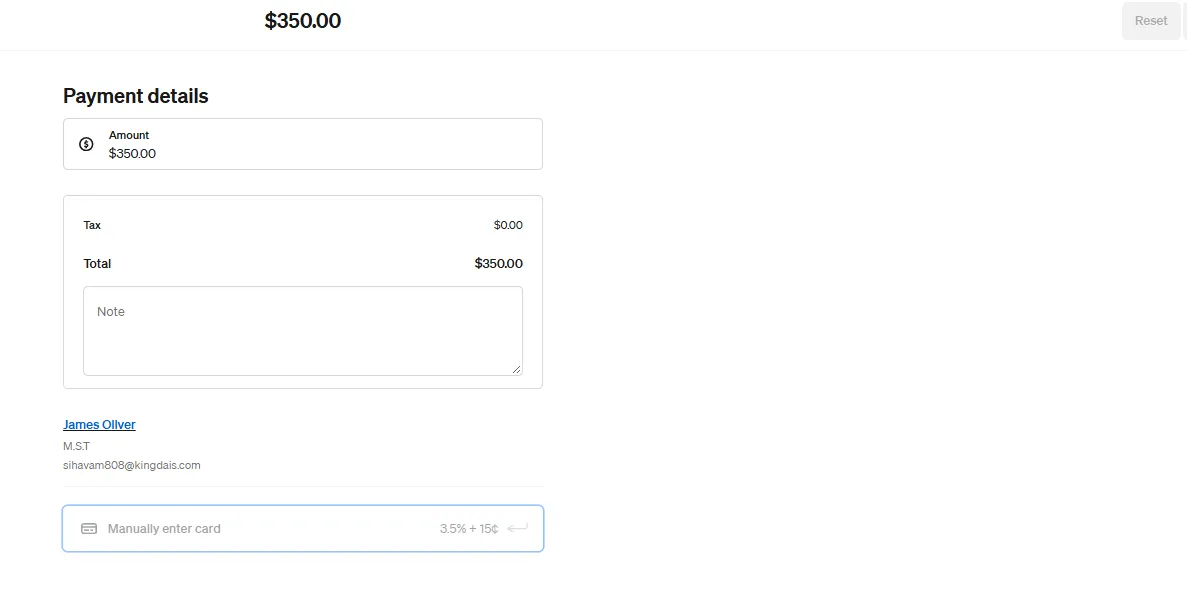
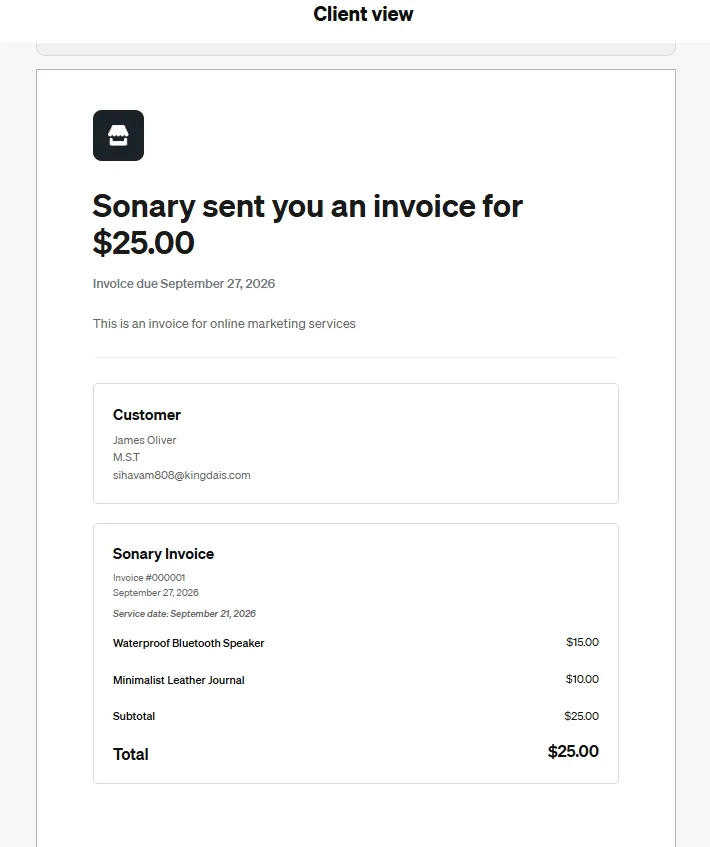
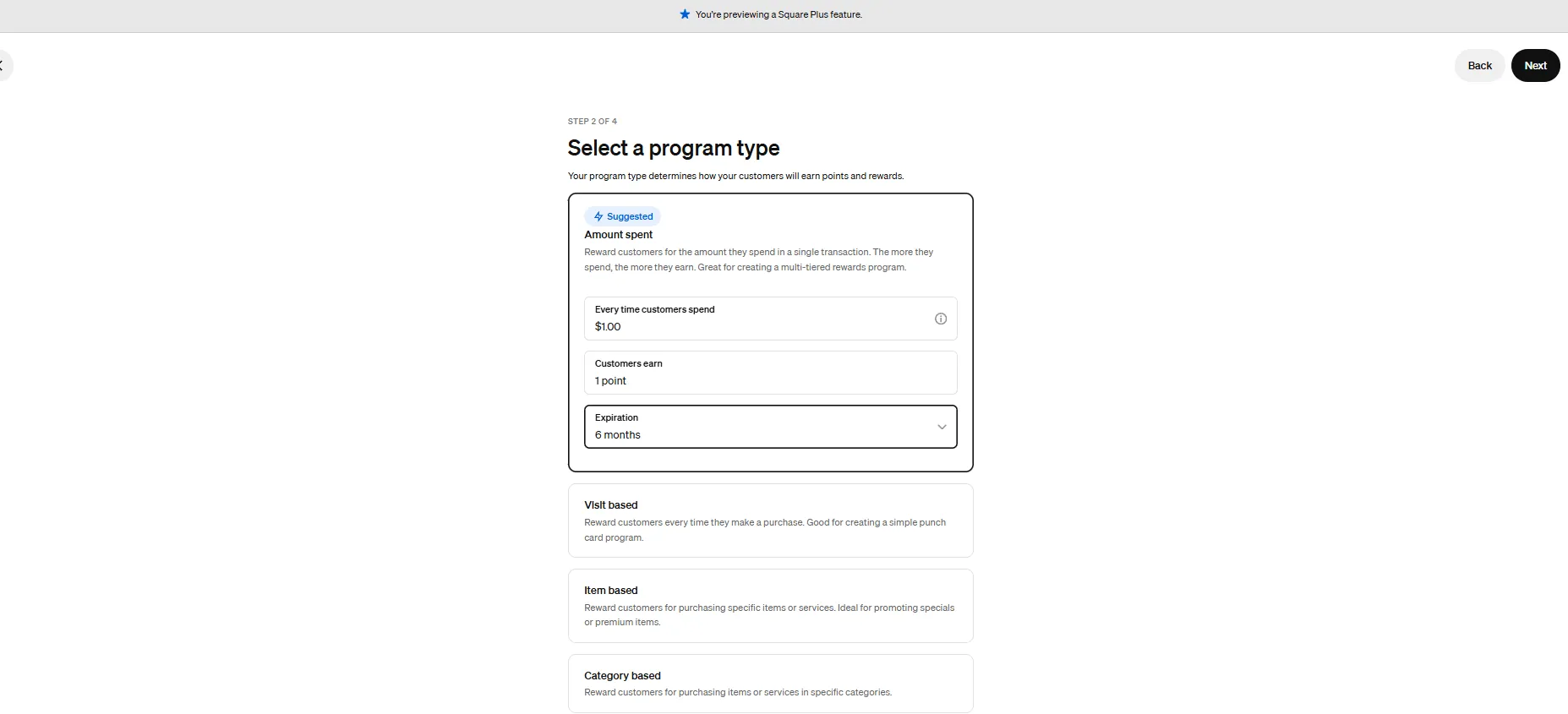
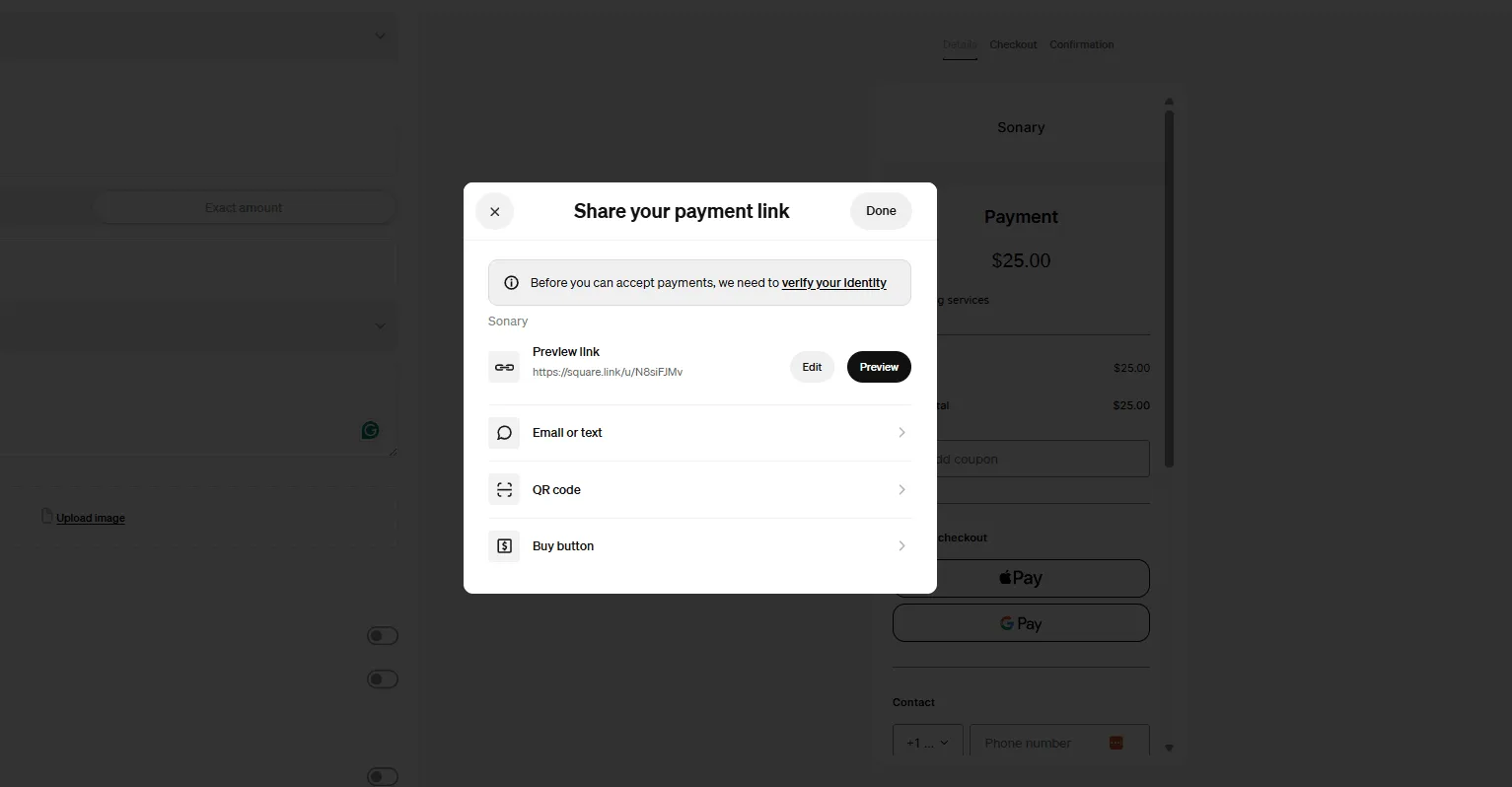
Square is one of the most complete free business platforms for small businesses, covering POS, merchant services, accounting, online invoicing, payroll, bookkeeping, and ecommerce from a single dashboard. It works especially well for micro businesses and SMBs that want to replace multiple subscriptions with one connected system — where sales, finances, inventory, and payroll all update automatically in the same place. For most small businesses, Square is worth it.
Learn more in our full Square review.
Pros & Cons
- No monthly payment
- Next-business-day transfers
- Inexpensive long-term option
- Comprehensive inventory management
- Not great for all industries
- Some performance issues
Features
- Inventory Management
- Loyalty Program
- Mobile Compatibility
- Online Ordering
- Reporting
- Split Checks
- Manage Tips
- Staff Scheduling
- Offline Payments
- Customer Profiles
- Multidevice Payments
- Gift Card Support
- Accounting Integration
- Tableside Ordering
- Floor Plan Management
- Customer-Facing Display
- Self-Service Kiosk
- Retail Store
- Coffee Shop
- Nightclub
- Quick Service
- Bars
- Restaurants
- Food Truck
- iOS
- Android
- Cloud-Based
- Free Trial
- Freemium
- Monthly subscription
- One-Time License
Pricing
$0
mo/
month
$49
mo/
month
$149
mo/
month
Screenshots

Shopify Inc., a Canadian multinational e-commerce company, delivers a powerful Point of Sale system with best-in-class POS software. Shopify POS combines marketing, inventory tracking, integrated… Read more
Shopify Inc., a Canadian multinational e-commerce company, delivers a powerful Point of Sale system with best-in-class POS software. Shopify POS combines marketing, inventory tracking, integrated payment solutions, and deep e-commerce integration, offering a unified platform for selling online and in-store. Its cloud-based POS systems cater to businesses of all sizes, from startups to enterprises with millions in annual revenue. With tools for retail management, sales analytics, and multi-location management, Shopify POS empowers businesses to streamline operations and improve customer engagement. Whether you’re just starting or scaling globally, the Shopify POS tool adapts seamlessly to your needs. In this Shopify POS review, I'll explore the features, performance, Shopify POS pricing, and more.
Learn more in our full Shopify review.
Pros & Cons
- Seamlessly integrate your online and in-person store. Keep inventory, payments, and customers in sync.
- Rich customer profiles & integrated loyalty programs
- Very cost-effective service fee
- Integrated payments: Accept payments in store with low rates, quick payouts, and fully integrated Shopify hardware.
- Shopify plan (for ecommerce) is required for POS i.e. not suited for retail only merchants
- POS Lite is included with Shopify plan but additional upgrade to POS Pro plan is required for more advanced features
- Not suitable for certain industries such as restaurants or grocery stores/supermarkets
Features
- Retail Store
- Inventory Management
- Loyalty Program
- Mobile Compatibility
- Online Ordering
- Reporting
- Split Checks
- Offline Payments
- Customer Profiles
- Multidevice Payments
- Gift Card Support
- Accounting Integration
- Tableside Ordering
- Customer-Facing Display
- Self-Service Kiosk
- iOS
- Android
- Cloud-Based
- Free Trial
- Monthly subscription
- Annual subscription
Pricing
$39
mo/
month
$105
mo/
month
$399
mo/
month
$2300
mo/
month

Clover is a user-friendly point-of-sale (POS) system designed for small to medium businesses, offering a range of software and hardware tailored to different industries, from retail to restaurants.… Read more
Clover is a user-friendly point-of-sale (POS) system designed for small to medium businesses, offering a range of software and hardware tailored to different industries, from retail to restaurants. While not the most affordable, its diverse payment partners make it a reliable choice. Clover is owned by Fiserv (which acquired First Data in 2019), Clover POS delivers a comprehensive solution for payment processing, inventory management, and sales tracking.
Learn more in our full Clover review.
Pros & Cons
- Attractive pricing 30-day trial at no cost
- Affordable hardware beginning at $49
- Feature-packed Ideal for businesses with an online presence
- Round-the-clock phone and email assistance.
- You can't apply for the POS online; it requires interaction with a sales representative
- Pricing information isn't clear-cut
- No complimentary plan available
Features
- Inventory Management
- Loyalty Program
- Mobile Compatibility
- Online Ordering
- Reporting
- Split Checks
- Manage Tips
- Staff Scheduling
- Offline Payments
- Customer Profiles
- Multidevice Payments
- Gift Card Support
- Accounting Integration
- Tableside Ordering
- Floor Plan Management
- Customer-Facing Display
- Self-Service Kiosk
- Retail Store
- Coffee Shop
- Nightclub
- Quick Service
- Bars
- Restaurants
- Food Truck
- Android
- Cloud-Based
- Free Trial
- Monthly subscription
Pricing
$16
mo/
month
$59.95
mo/
month
$170
mo/
month
$145
mo/
month
$230
mo/
month
$205
mo/
month

Heartland Retail offers a cloud-based POS and retail management solution for growing businesses. It includes CRM and inventory management and can link up to a range of third-party hardware and… Read more
Heartland Retail offers a cloud-based POS and retail management solution for growing businesses. It includes CRM and inventory management and can link up to a range of third-party hardware and software.
Learn more in our full Heartland Retail review.
Pros & Cons
- Goes beyond basic POS and into full retail management
- Plenty of flexibility for different payment partners
- A market-leading selection of integrations
- Great at handling multiple branches and suppliers
- Not really suitable for smaller retail businesses
- Limited support options at some pricing levels
- Above average costs
Features
- Inventory Management
- Mobile Compatibility
- Reporting
- Customer Profiles
- Multidevice Payments
- Gift Card Support
- Accounting Integration
- Customer-Facing Display
- Retail Store
- iOS
- Cloud-Based
- Windows
- Mac
- Free Trial
- Monthly subscription
- Annual subscription
Pricing
$89
mo/
month
2.6% + 10¢
mo/
month

TouchBistro POS is a restaurant-focused point-of-sale and management system built for full-service, quick-service, bars, food trucks and cafés. It runs on iPads (primarily) and offers robust… Read more
TouchBistro POS is a restaurant-focused point-of-sale and management system built for full-service, quick-service, bars, food trucks and cafés. It runs on iPads (primarily) and offers robust front-of-house and back-of-house tools (tableside ordering, floor-plan management, menu management, kitchen display etc) tailored for hospitality.
Learn more in our full TouchBistro review.
Pros & Cons
- Intuitive system build specifically for restaurants
- Easily manage online ordering and table reservations
- 24/7 support available
- A wide choice of add-ons
- Some additional features cost extra
- Only supports iPads
- Pricing for multiple users could be more transparent
Features
- Inventory Management
- Loyalty Program
- Mobile Compatibility
- Online Ordering
- Reporting
- Split Checks
- Manage Tips
- Staff Scheduling
- Offline Payments
- Customer Profiles
- Multidevice Payments
- Gift Card Support
- Accounting Integration
- Tableside Ordering
- Floor Plan Management
- Customer-Facing Display
- Coffee Shop
- Nightclub
- Quick Service
- Bars
- Restaurants
- Food Truck
- iOS
- Cloud-Based
- On-place Installation
- Mac
- Monthly subscription
- Annual subscription
Pricing
$69
mo/
month

SpotOn is an all-in-one point-of-sale and business management platform built primarily for restaurants and small retailers, combining POS hardware, integrated payment processing, online ordering,… Read more
SpotOn is an all-in-one point-of-sale and business management platform built primarily for restaurants and small retailers, combining POS hardware, integrated payment processing, online ordering, reservations, loyalty marketing, and reporting in a single system. Pricing is quote-based starting around $0 software + 2.6%+10¢ per card transaction for restaurants, with hardware bundles from roughly $700. The catch: SpotOn is best for full-service and quick-service restaurants under 20 locations; multi-state retail and enterprise hospitality groups usually outgrow it within a year and move to Toast or Square for Restaurants.
Learn more in our full SpotOn review.
Pros & Cons
- 24/7 customer support
- Restaurant-focused platform
- Low commission rates
- No annual contract
- Add-on costs
- No free trial or money-back guarantee
- Must use SpotOn hardware only
Features
- Retail Store
- Coffee Shop
- Quick Service
- Bars
- Restaurants
- Inventory Management
- Loyalty Program
- Mobile Compatibility
- Online Ordering
- Reporting
- Split Checks
- Manage Tips
- Staff Scheduling
- Offline Payments
- Customer Profiles
- Multidevice Payments
- Gift Card Support
- Accounting Integration
- Tableside Ordering
- Floor Plan Management
- Customer-Facing Display
- Self-Service Kiosk
- iOS
- Android
- Cloud-Based
- On-place Installation
- Monthly subscription
Pricing
$0
mo/
month
$99
mo/
month
$135
mo/
month
$25
//
/
$90
//
/

Toast POS is a cloud-based POS system tailored to restaurants. It offers special features for restaurant management and a diverse array of features for restaurant management and revenue maximization.
Learn more in our full Toast review.
Pros & Cons
- Streamlined back office operations
- Excellent integration between kitchen and service staff
- Multi-location menu management
- Fairly priced
- Only available on Android
- 2–3-year processing agreement on most plans
- Early termination fee
Features
- Inventory Management
- Loyalty Program
- Mobile Compatibility
- Online Ordering
- Reporting
- Split Checks
- Manage Tips
- Staff Scheduling
- Offline Payments
- Customer Profiles
- Multidevice Payments
- Gift Card Support
- Accounting Integration
- Tableside Ordering
- Floor Plan Management
- Customer-Facing Display
- Self-Service Kiosk
- Coffee Shop
- Quick Service
- Bars
- Restaurants
- Food Truck
- iOS
- Android
- Cloud-Based
- On-place Installation
- Windows
- Mac
- Free Trial
- Monthly subscription
- Annual subscription
- One-Time License
Pricing
$0
mo/
month
$69
mo/
month
$69
mo/
month
What changed at Lightspeed?
- March 27, 2023: POS and payments became one bundle. New North American customers buy Lightspeed POS with Lightspeed Payments.
- June 1, 2023: existing customers had to switch or pay. Merchants who keep another processor pay an extra $400 a month at lower volume, or up to 0.58% of monthly volume. See Lightspeed's Payments switch page.
- February 26, 2026: the Service Agreement was updated. Restaurant customers on a third-party gateway pay $99 a month. Annual customers get the fee at renewal. Plans renew automatically with 90 days' notice to cancel. See the Lightspeed Service Agreement.
Lightspeed Payments charges 2.6% + 10¢ in person and 2.6% + 30¢ keyed. Plans and add-ons are in our Lightspeed pricing breakdown.
Why do retailers look for Lightspeed competitors?
- The processor penalty. If you have a better rate from your bank or ISO, Lightspeed will let you keep it, charging $400 a month or up to 0.58% of volume. "I was told this was a fee for not using Lightspeed's credit card processing" - co-owner of an 11- 50-person retailer, September 2025.
- Hardware lock-in. Lightspeed Payments terminals are only available from Lightspeed, and existing terminals can't be reused. I am given one option of an outdated credit card machine - retail owner, October 2025.
- Long terms and an exit fee. Plans renew for the full term at then-current prices. Leaving early incurs the remaining fees, and no prorated refunds are available.
- Per-register costs. Retail starts at $89, Core is $149 and Plus $289 a month, with extra registers and locations as add-ons.
- Support gaps. their customer support was virtually nonexistent most of the time" - hospitality owner-operator, July 2025. See our support score.
Stay on Lightspeed if
- You already use Lightspeed Payments and pay 2.6% + 10¢ or less. Switching POS saves little on rates (see the math below).
- You're a multi-location or wholesale-linked retailer using NuORDER, purchase order sync or supplier catalogs.
- You're mid-contract. The exit fee equals the rest of the term, so time the move for renewal.
Signs you've outgrown Lightspeed
- You want your own processor and pay the $400 a month or up-to-0.58% fee. At $100,000 a month, that's up to $580.
- You run Lightspeed Restaurant on another gateway and pay $99 a month for it.
- You need several registers per location and add-ons push you from $89 toward $149 or $289.
- You want month-to-month terms. Lightspeed renews for the full term with 90 days' notice.
Best Lightspeed Retail alternatives by situation
The main Lightspeed retail competitors differ on contracts and processing more than on features.
Your situation | Switch to | Deciding fact |
|---|---|---|
Small store, wants no contract | Square for Retail | $0 plan, cancel anytime |
Sells online and in-store | Shopify POS | One catalog, same 10¢ fixed fee as Lightspeed |
Has a bank or ISO relationship | Clover | Sold through many banks and ISOs |
Several stores, heavy inventory | Heartland Retail | Multi-store inventory focus |
Low-ticket items (coffee, snacks) | Shopify POS | 10¢ fixed fee beats Square's 15¢ |
Restaurant, wants processor choice | TouchBistro | Works with a range of processors |
Square for Retail: best Lightspeed alternative with no contract
Square for Retail is $0, $49 or $149 a month per location, with in-person rates of 2.6%, 2.5% or 2.4% + 15¢. No term contract. Compare both in Lightspeed vs Square POS.
- Where it beats Lightspeed: $0 software against $89. Month-to-month. Plus adds purchase orders, vendors and cost of goods for $49. 30-day trial on Plus and Premium.
- Where it falls short: Square processing only, so it's a closed ecosystem too. Its 15¢ fixed fee is above Lightspeed's 10¢, which hurts low-ticket stores. Our review flags account holds as a con.
- Skip it if: you need your own processor.
- Moving from Lightspeed: export your items to CSV and use Square's item library import.
Shopify POS: best for selling online and in-store
Shopify Basic is $39 a month, Grow $105 and Advanced $399, with POS Pro at $89 per location billed yearly. In-person rates start at 2.6% + 10¢.
- Where it beats Lightspeed: one catalog and inventory across web and store. Same 10¢ fixed fee. An outside processor can be recorded as a custom payment type.
- Where it falls short: POS Pro is billed yearly. Shopify charges a 2% to 0.6% fee on online orders through third-party providers.
- Skip it if: you don't sell online.
- Moving from Lightspeed: CSV product and customer import. More in our Shopify alternatives guide.
Clover: best if you buy through your bank
Clover pricing depends on who sells it. Banks and ISOs bundle the hardware with their own processing. Compare both in Lightspeed vs Clover.
- Where it beats Lightspeed: the processor relationship is negotiable. A wide range of Clover-built hardware.
- Where it falls short: many offers tie you to a 3-year processing agreement. Our review notes early-termination terms aren't always clear.
- Skip it if: you're leaving Lightspeed to escape a long contract.
Heartland Retail: best for multi-store inventory
Heartland Retail lists $89 per station, built for retailers that manage stock across stores.
- Where it beats Lightspeed: multi-store inventory focus. Our review says it can work with other processors.
- Where it falls short: our review rates the cost above average and less suited to single small stores.
- Skip it if: you run one small shop.
Best Lightspeed Restaurant alternatives
Restaurant owners face the same $99 gateway fee. Lightspeed restaurant alternatives split by how much payment freedom they give. More in our restaurant POS guide.
TouchBistro: best restaurant alternative for processor choice
TouchBistro POS starts at $69 a month, with the Essentials bundle from $119, plus hardware and processing. Its FAQ says it works with a wide range of payment processors.
- Skip it if: you don't run on iPads.
SpotOn: best restaurant alternative for month-to-month
SpotOn Essentials is $55 per station, month-to-month, at 2.45% + 15¢. The $0 All-In plan costs 2.79% + 20¢ on a 2-year minimum.
- Skip it if: you need your own hardware. SpotOn uses its own.
Toast: best for restaurant-only operators (same lock-in)
Toast offers a $0 Starter plan with pay-as-you-go processing. It's built for restaurants, but Toast Payments is effectively required, and our review notes 2-3-year contracts. Compare in Toast vs Lightspeed.
- Skip it if the payment choice is why you're leaving.
Square for Restaurants uses the same plans and rates as Square for Retail and requires no contract. See Square vs Toast.
Lightspeed POS competitors compared
Alternative | Best for | Not for | What fixes the Lightspeed pain | Watch out for | Contract |
|---|---|---|---|---|---|
Small stores | Own-processor deals | No contract, $0 plan | 15¢ fixed fee, account holds | Cancel anytime | |
Omnichannel | Store-only shops | One catalog, 10¢ fee | POS Pro billed yearly | Monthly plans, POS Pro yearly | |
Bank or ISO buyers | Contract-averse | Negotiable processor | 3-year agreements | Varies by seller | |
Multi-store | Single small store | Inventory depth | Above-average cost | Ask | |
iPad restaurants | Retail | Processor choice | Hardware and bundle costs | Ask | |
Restaurants | Retail | Month-to-month Essentials | SpotOn hardware only | Month-to-month or 2-year | |
Restaurant-only | Payment freedom | Restaurant depth | Toast Payments required | Multi-year |
What would you pay? Processing plus software
A retail store, in-person cards only, monthly.
$40,000 card volume, 1,000 sales ($40 average)
Option | Math | Total |
|---|---|---|
Lightspeed Basic + Lightspeed Payments | $89 + 2.6% ($1,040) + 1,000 x 10¢ ($100) | $1,229 |
Lightspeed Basic + your own processor | $89 + $400 fee + your processor's cost | $489 + processing |
$0 + $1,040 + 1,000 x 15¢ ($150) | $1,190 | |
Square for Retail Plus | $49 + 2.5% ($1,000) + $150 | $1,199 |
$39 + $89 + $1,040 + $100 | $1,268 |
$100,000 card volume, 2,500 sales
Option | Math | Total |
|---|---|---|
Lightspeed Basic + Lightspeed Payments | $89 + $2,600 + $250 | $2,939 |
Square for Retail Plus | $49 + $2,500 + $375 | $2,924 |
Shopify Grow + POS Pro | $105 + $89 + $2,500 + $250 | $2,944 |
Lightspeed with your own processor | Fee of up to 0.58% | Up to $580 extra |
The honest takeaway: on rates, these options sit within a few dollars of each other. The money is in the third-party fee, extra registers and the exit fee. Switch for freedom and fit, not for a lower rate.
How do you leave Lightspeed without losing your data?
- Find your renewal date. Non-renewal notice is due 90 days before the term ends (30 days if you have no Order Form).
- Price an early exit. It covers the remaining recurring fees, and there are no prorated refunds.
- Export products, customers, sales, register closures, and tax reports. Ask support for gift card and store credit reports.
- Do it before you cancel. Lightspeed permanently deletes account data after cancellation, per its cancellation help article.
- Cancel third-party apps billed through Lightspeed, or they will keep billing.
- Settle any Lightspeed Capital balance.
- Plan new card terminals. Lightspeed Payments terminals don't work with other processors.
Questions to ask before you sign
- Is your processing mandatory, and what's the fee if I use my own processor?
- What's the term, does it auto-renew, and how many days' notice do I need?
- What's the early termination fee, and is hardware rented, leased, or owned?
- What does each extra register or location cost per month?
- Is the advertised price for annual billing only?
- Can you import my Lightspeed product, customer, and gift card files?
- How much notice do you give before changing fees?
How we chose these alternatives
Every POS here has a full Sonary review. We checked each vendor's pricing, contract and payments pages, and put retail options first because most people searching for Lightspeed alternatives run stores. We left out systems that recreate the same payment lock-in without saying so. Sonary may earn a commission from some providers. That never decides who appears or in what order.
FAQ
What are the best Lightspeed POS alternatives?
For retail: Square for Retail (no contract), Shopify POS (online plus in-store) and Clover (through your bank). For restaurants: TouchBistro (processor choice), SpotOn (month-to-month) and Toast (restaurant depth, but similar lock-in).
What is the best alternative to Lightspeed POS for a small store?
Square for Retail. Its free plan has no software fee or contract, and Plus adds purchase orders and vendors for $49 a month.
Why is Lightspeed so expensive?
Per-register plans from $89 a month, add-ons for extra registers and locations, and a monthly fee if you process cards anywhere else. See our Lightspeed pricing.
How much does Lightspeed POS cost?
Lightspeed Retail plans are $89, $149 and $289 a month with one register, and Restaurant plans are $69, $189 and $399. Lightspeed Payments adds 2.6% + 10¢ per in-person sale.
Can I use my own payment processor with Lightspeed?
Yes, but you pay the Lightspeed third party processing fee: $400 a month for lower-volume merchants, up to 0.58% of volume for larger ones, and $99 a month on Restaurant. Annual customers get it at renewal.
What are Lightspeed Payments fees?
2.6% + 10¢ for tapped, dipped or swiped cards, 2.6% + 30¢ for keyed cards and $15 per chargeback.
Is Lightspeed POS good for retail?
Yes for multi-location retailers that use its supplier and wholesale tools and accept Lightspeed Payments. Smaller stores often pay more than they need. Read the Lightspeed verdict.
Lightspeed vs Shopify: which is better?
Shopify if you sell online too, since one catalog runs both channels at the same 10¢ fixed fee. Lightspeed vs Shopify POS for a store-only shop is closer, and Lightspeed's inventory tools are deeper.
Lightspeed vs Square: which is cheaper?
On rates they're close. Square wins on the $0 plan and no contract. Lightspeed wins on the 10¢ fixed fee for low-ticket sales. See Lightspeed vs Square POS.
Lightspeed vs. Clover: which gives more payment freedom?
Clover, because banks and ISOs sell it with their own processing. Watch for 3-year agreements. See Lightspeed vs Clover.
Lightspeed vs Toast for restaurants?
Toast is restaurant-only and deep, but it also requires its own payments. Lightspeed vs. TouchBistro is the better match if you want processor choice.
Is there a Lightspeed early termination fee?
Yes. Leaving early costs the remaining recurring fees for the term, plus unpaid one-time fees and any discount clawback.
Does Lightspeed auto-renew?
Yes, for the same term length at then-current prices, unless you give notice 90 days before the term ends.
What happens to my data when I leave Lightspeed?
It's permanently deleted after cancellation. Export products, customers, and sales first.
See also